Table of Contents
School Website Development Guide for Pakistan: Essential Requirements
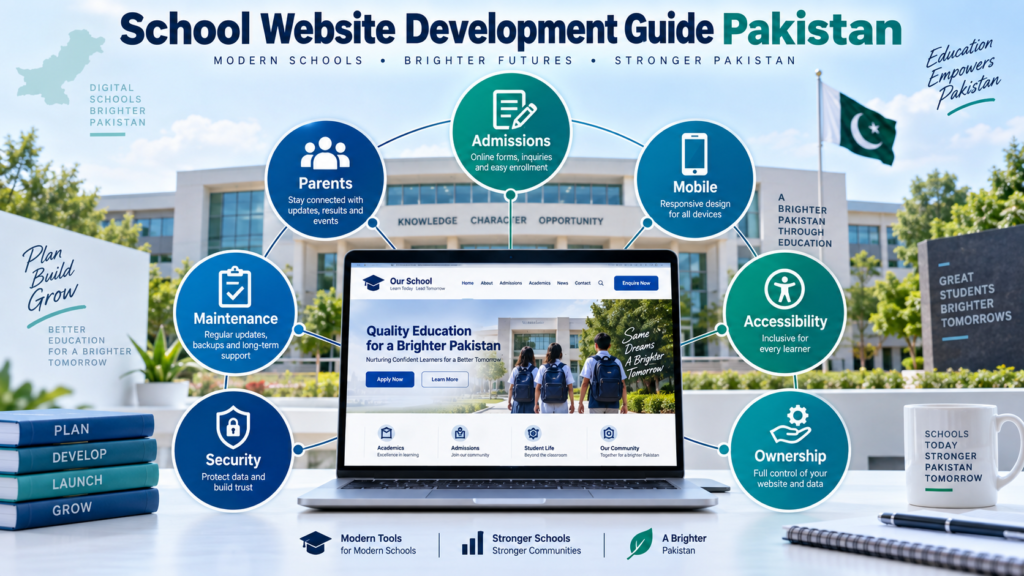
A school website in Pakistan should be planned around admissions, parent communication, mobile usability, accessibility, digital ownership, security and ongoing maintenance. Before development begins, schools should clearly define their required pages, important features, content responsibilities, and long-term website management process.
For prospective parents, existing families, students, teachers, and school administrators, it can become the institution’s central public source for admissions information, academic details, official announcements, important documents, and verified contact information.
This school website development guide for Pakistan explains how an educational institution can plan a useful, manageable, and trustworthy website before development begins.
It is intended for private schools, public-sector schools, Montessori institutions, academies, school networks, and other educational organizations that need to understand their website requirements before choosing a platform, theme, or developer.
The focus of this guide is planning rather than purchasing website-development services.
A useful school website should answer practical questions quickly:
Can a prospective parent understand how admissions work?
Can an existing parent locate an official notice?
Can students find appropriate public resources?
Can visitors verify the institution’s address and contact information?
Can authorized school staff update important information?
Does the institution know who controls its domain and hosting?
Does the site work properly on mobile devices?
Can important website information remain accurate after the original developer is no longer involved?
These questions are more important than visual effects.
A successful school website is not simply a design project. It is an information, communication, and governance system that must remain useful after launch.
Quick Answer: What Should a School Website Include?
A school website should normally include a clear home page, information about the institution, admissions guidance, academic information, official contact details, campus location, news or notices, important documents, and a simple method for visitors to make an enquiry.
Depending on the institution, it may also include faculty or leadership profiles, academic calendars, downloadable forms, event information, vacancies, branch information, student resources, parent resources, and an online admissions enquiry form.
The correct structure depends on the school.
A small local primary school does not necessarily need the same functionality as a multi-campus institution.
The objective should therefore be to identify what parents, students, and staff genuinely need before choosing website technology.
What Is a School Website?
A school website is an institution’s official public-facing digital platform.
It represents the school online and provides information that visitors should be able to verify without depending completely on social media, messaging applications, or telephone calls.
A simple school website may primarily provide public information.
A more developed website may support enquiries, admissions guidance, calendars, notices, downloads and integrations with other approved systems.
However, a school website should not automatically be confused with a school management system.
A public website primarily communicates with visitors.
A school management platform may handle private administrative functions such as student records, attendance, fees, results, or authenticated parent and staff communication.
These systems can be integrated where appropriate, but they solve different problems.
Understanding this distinction can prevent schools from purchasing unnecessary software when their real requirement is a properly structured public website.
Who Should Use This School Website Planning Guide?
This guide is particularly useful for institutions that are preparing a new school website, replacing an outdated website, changing developers, reorganizing admissions information, or trying to improve communication with parents.
It can also help school administrators prepare a requirements document before requesting development quotations.
The better the institution understands its own needs, the easier it becomes to evaluate technical proposals.
Why a Proper School Website Matters in Pakistan
Schools frequently communicate through several channels.
These may include physical notices, phone calls, WhatsApp, Facebook pages, printed prospectuses, and direct visits to the campus.
Each channel can serve a purpose.
However, they do not replace a controlled official website.
A social media post can quickly disappear beneath newer content.
A WhatsApp conversation is useful for direct communication but is not an organized public information library.
Printed material can become outdated.
Repeated telephone enquiries also consume administrative time.
A school website provides a permanent location where public information can be organized and updated.
For example, instead of answering the same questions about admissions repeatedly, the school can publish a clear admissions journey explaining important stages and official contact channels.
Instead of distributing the same public document individually, an appropriate download section can make it easier to access.
Instead of forcing parents to search old social media posts for a notice, the institution can maintain a structured notices area.
The value of a school website, therefore, comes from reducing information friction.
The Marjan School Website Planning Framework
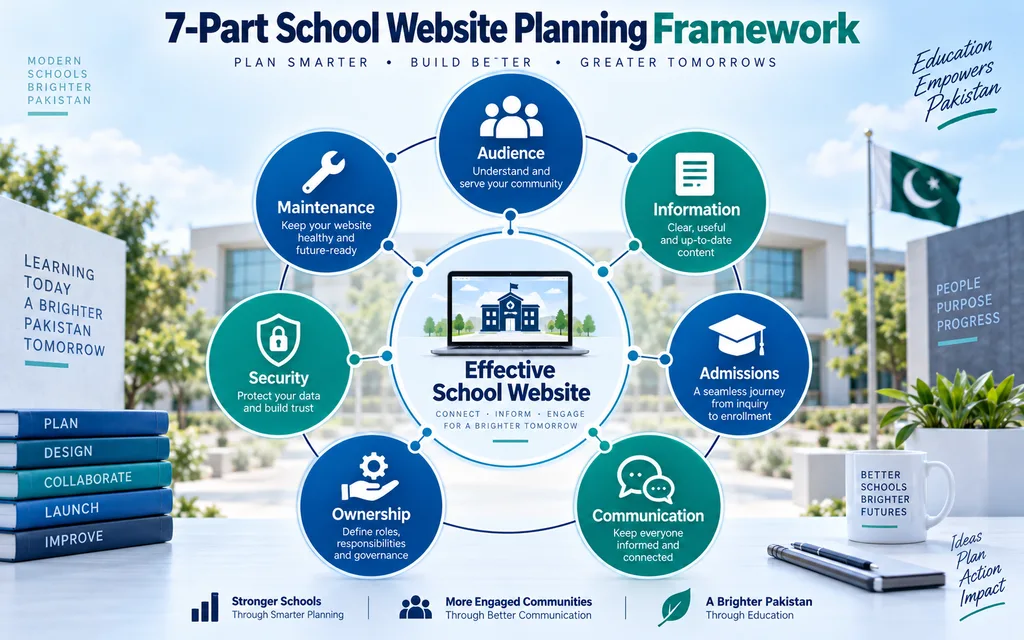
For this guide, school website planning is organized into seven connected areas:
Audience, Information, Admissions, Communication, Ownership, Security, and Maintenance.
This framework is an original organizational model designed to make website requirements easier for school administrators to evaluate.
It is not an educational, cybersecurity, or accessibility certification.
1. Audience
Start by identifying the people who actually need the website.
Typical audiences may include:
Prospective parents.
Current parents.
Students.
Teachers.
Administrative staff.
Job applicants.
Former students.
Members of the local community.
Different audiences have different needs.
A prospective parent may want admissions information.
An existing parent may need a school calendar or notice.
A student may need an approved resource.
A job applicant may be looking for vacancies.
Do not treat every visitor as the same user.
2. Information
Identify what information should be available publicly.
Then decide who is responsible for maintaining it.
This distinction matters because an impressive website with incorrect information can be less useful than a simple website with accurate information.
Admission dates can change.
Contact information can change.
Staff can change.
Policies can change.
The institution should therefore assign content responsibility rather than assuming the developer will know when something becomes outdated.
3. Admissions
Admissions are often one of the most important journeys on a school website.
A parent should be able to understand the process in a logical sequence.
The page should answer the important questions before presenting a form or telephone number.
4. Communication
Determine which information belongs on the public website.
Official public notices, calendars, and announcements may be suitable.
Private student information normally requires an appropriately controlled system instead.
Separating public and private communication reduces unnecessary complexity.
5. Ownership
The school should know who controls its important digital assets.
This includes the domain, hosting, administrator accounts, business email,l and other critical systems.
External developers can legitimately manage these assets, but institutional ownership and recovery should remain clear.
6. Security
Security planning should be considered before launch.
Important accounts require protection.
Website software requires maintenance.
Recoverable backups should exist.
Administrative privileges should be controlled.
Security is discussed briefly later in this guide, while detailed security guidance should remain within a dedicated website-security resource.
7. Maintenance
Someone must remain responsible for the website after launch.
Maintenance includes both technical work and information accuracy.
Without ownership of these responsibilities, websites gradually become outdated.
School Website Requirements in Pakistan
There is no single website specification suitable for every school in Pakistan.
Requirements vary according to the institution’s size, education level, branches, admissions process, and communication needs.
However, several principles apply broadly.
The institution should be clearly identified.
Its official name should be easy to find.
Location and contact information should be accurate.
Where a school operates more than one campus, individual branch details should be unambiguous.
Important information should be accessible on mobile devices.
Menus should use understandable terminology.
Text should remain readable.
Forms should collect only information genuinely required for their stated purpose.
The institution should also decide who is responsible for changing time-sensitive content.
This last requirement is frequently underestimated.
A website is not complete merely because development has ended.
What Pages Should a School Website Have?
There is no ideal number of school website pages.
The right number depends on the amount of useful information that the institution needs to publish.
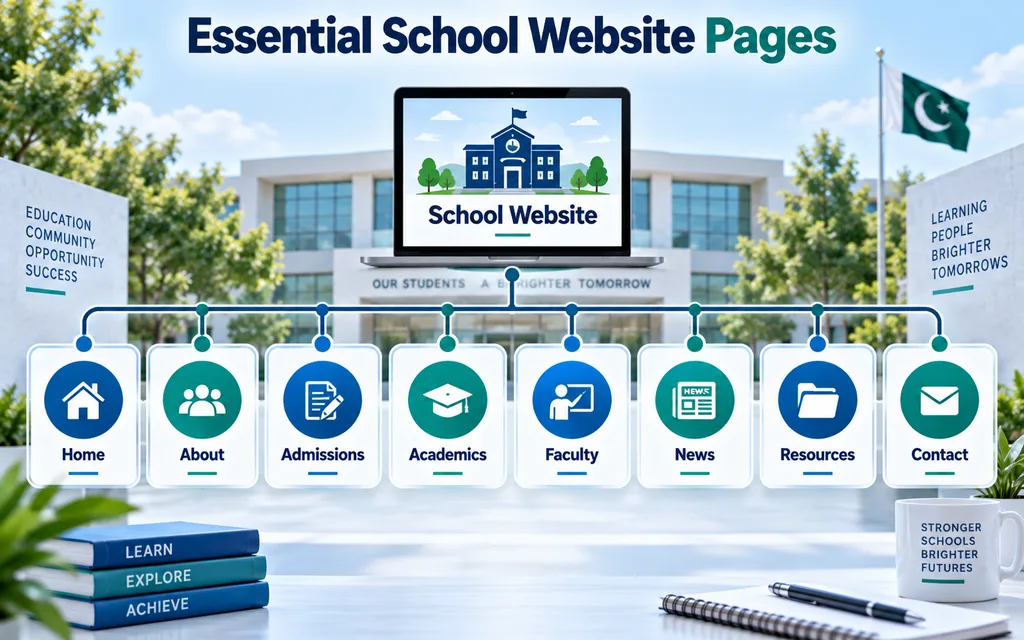
A practical school website architecture may include:
- Home.
- About.
- Admissions.
- Academics.
- Leadership or Faculty.
- News and Notices.
- Events or Calendar.
- Resources or Downloads.
- Contact.
- Policies, where appropriate.
- Additional sections should be created only when the school has meaningful information to support them.
Home Page
The home page should establish identity quickly.
A visitor should understand which institution they are viewing, where it is located,d and what type of education it provides.
The home page can also highlight admissions, important notices, academics, and primary contact routes.
It should not attempt to reproduce every page on the website.
Its primary purpose is orientation.
About the School
The About section can explain the institution’s history, educational approach, leadership, and relevant background.
Factual information is generally more useful than unsupported promotional language.
Statements such as “best school” or “number one institution” should not substitute for useful detail.
Admissions
Admissions normally deserves its own structured section.
Parents should not have to reconstruct the admission process from unrelated pages and old announcements.
Academics
This area can explain classes, academic levels, curriculum, departments, examination systems, or programs where relevant.
Do not create empty academic pages solely to increase the number of indexed URLs.
Leadership, Faculty, or Staff
Schools may choose to publish appropriate leadership or staff profiles.
The amount of information published should reflect institutional policy and privacy considerations.
News and Notices
A dedicated section allows public announcements to remain easier to find than social-media-only communication.
Every notice should contain appropriate context and dates.
Expired information should be reviewed instead of accumulating indefinitely.
Contact and Location
A visitor should be able to identify the school’s official contact details easily.
Include appropriate address, telephone or contact method, and other essential public information.
Schools operating multiple campuses should clearly identify each campus.
Essential School Website Features
The most valuable school website features solve specific problems.
Features should therefore begin with a user need.
If parents cannot understand admissions, improve the admissions journey.
If public forms are frequently requested by telephone, an organized download area may help.
If announcements are difficult to locate, a structured news and notices system may help.
If the institution serves audiences who require more than one language, selected multilingual information may be appropriate.
Features should not be added simply because another school has them.
A successful feature should either improve access to information, simplify a legitimate task, or reduce avoidable administrative friction.
What Should a School Admissions Page Include?
A useful school admissions page should explain the process before asking a parent to submit information.
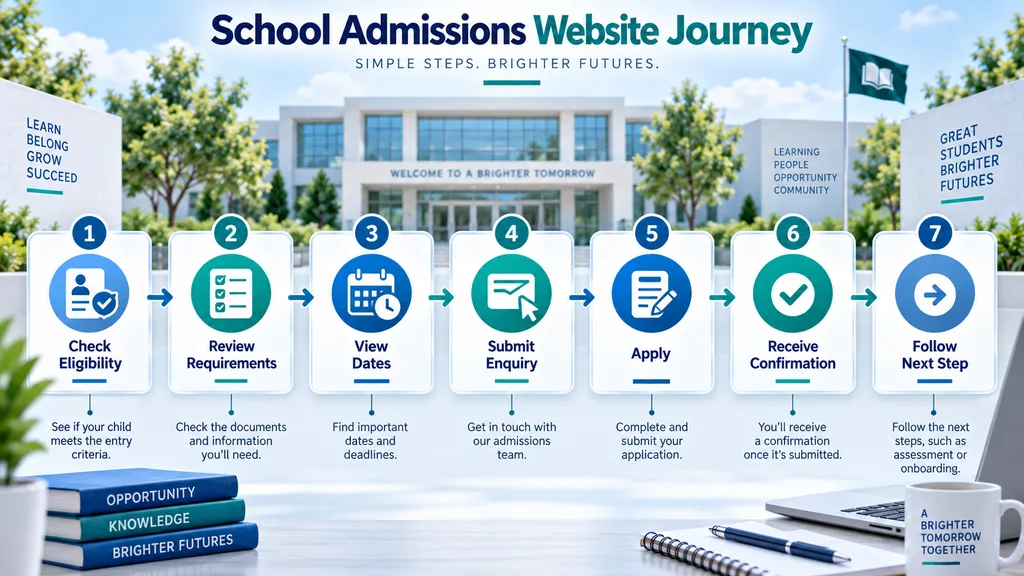
Depending on the institution, this may include:
- Available education levels.
- Relevant admission period.
- General eligibility information.
- Required documentation.
- Application or enquiry procedure.
- Important dates.
- Official contact channel.
- What happens after an enquiry?
- If an online enquiry form is available, the school should also decide who receives submissions and who is responsible for responding.
- The form is only the visible part of the process.
- The administrative workflow behind it matters just as much.
Online Admissions Enquiries
- An online admissions form can reduce friction when there is a clear follow-up process.
- However, the school should distinguish between an initial enquiry and a complete application.
- An initial enquiry may require only limited contact and education-level information.
- A formal application may require more data.
- Collecting unnecessary information at the first stage creates additional data-management responsibility.
- Every requested field should therefore have a genuine purpose.
School Website Features for Parents
Parents are often one of the most important audiences.
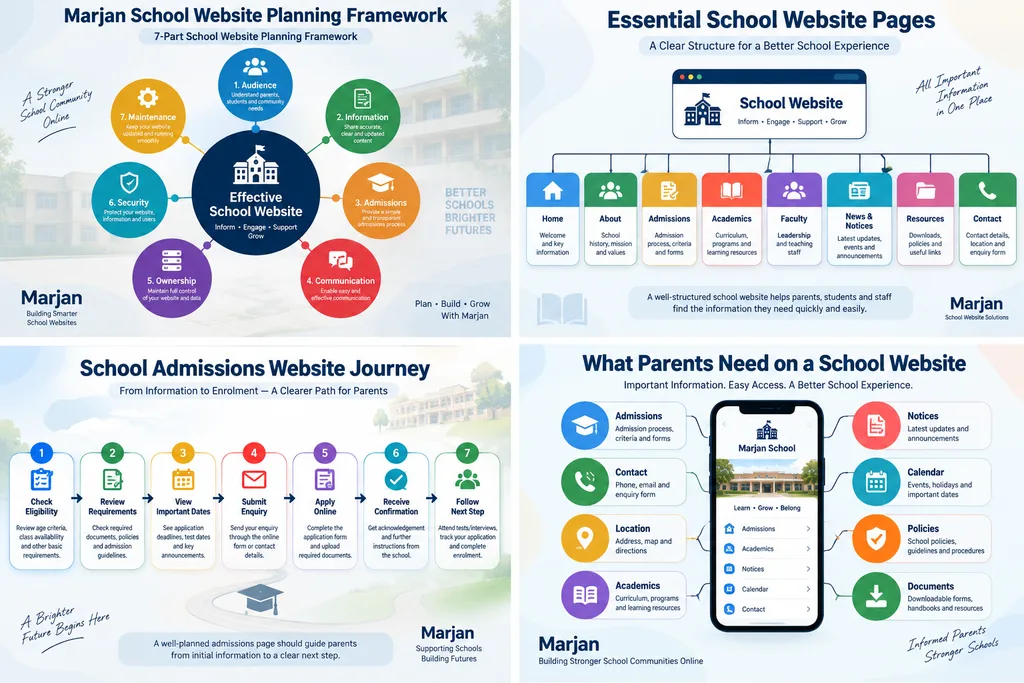
For them, useful information can include:
- Admissions.
- School location.
- Official contact information.
- Academic structure.
- School calendar.
- Important public notices.
- Policies.
- Required documents.
- Public events.
- Appropriate fee or payment guidance where the school chooses to publish it.
- Parent-focused design should prioritize clarity.
- Important information should not be hidden behind creative menu labels or excessive visual effects.
- A menu labelled Admissions is usually clearer than a vague label such as Discover Your Journey.
School Website Structure and Navigation
Website structure should reflect how people look for information.
A school may internally have several administrative departments, but parents should not need to understand that internal hierarchy to locate basic information.
Navigation should therefore be based on visitor tasks.
Important content should be reachable predictably.
Related pages should also link to each other naturally.
For example, the Admissions page can link to contact information and relevant documents.
An Academics page can link to appropriate programs.
The objective is a coherent information architecture rather than isolated pages.
For broader planning principles, see the Website Planning Checklist:
That broader guide should own generic website-planning queries, while this article remains focused specifically on schools.
Mobile Responsive School Website Design
A responsive school website should function correctly across different screen sizes.
Mobile usability is especially important because many parents and students may access links through phones, messaging applications, or mobile search.
Test the actual content rather than only the template.
Verify whether:
Navigation works.
Forms remain usable.
Contact buttons function.
Tables remain readable.
Documents can be located easily.
Text does not become unnecessarily small.
Images do not make pages excessively heavy.
A responsive theme is only a starting point.
Real mobile usability must be tested after real content has been inserted.
School Website Accessibility
Accessibility should be considered during planning, design, content production, and development.
The Web Content Accessibility Guidelines published by W3C provide an internationally recognized framework for accessible web content.
Practical areas can include:
Readable text.
Sufficient contrast.
Logical headings.
Keyboard usability.
Meaningful alternative text for relevant images.
Understandable forms.
Accessible multimedia.
Clear link labels.
Accessibility should not be treated as a cosmetic toolbar added after development.
The structure of the website itself matters.
Documents require attention too.
A readable web page can still create an accessibility barrier if it links to an inaccessible scanned document.
Official reference:
Urdu and English School Website Content
Whether a Pakistani school requires Urdu, English, or both depends on its audience.
Multilingual capability should solve an actual communication need.
Schools do not necessarily need to translate every page.
Important admissions guidance, parent instructions, notices, or frequently requested information may be stronger candidates.
Where multiple languages are maintained, content governance becomes important.
If the English page is updated but the Urdu version remains outdated, the website can provide conflicting information.
Both versions need clear ownership.
School Domain, Hosting and Account Ownership
Digital ownership is one of the most important parts of school website planning.
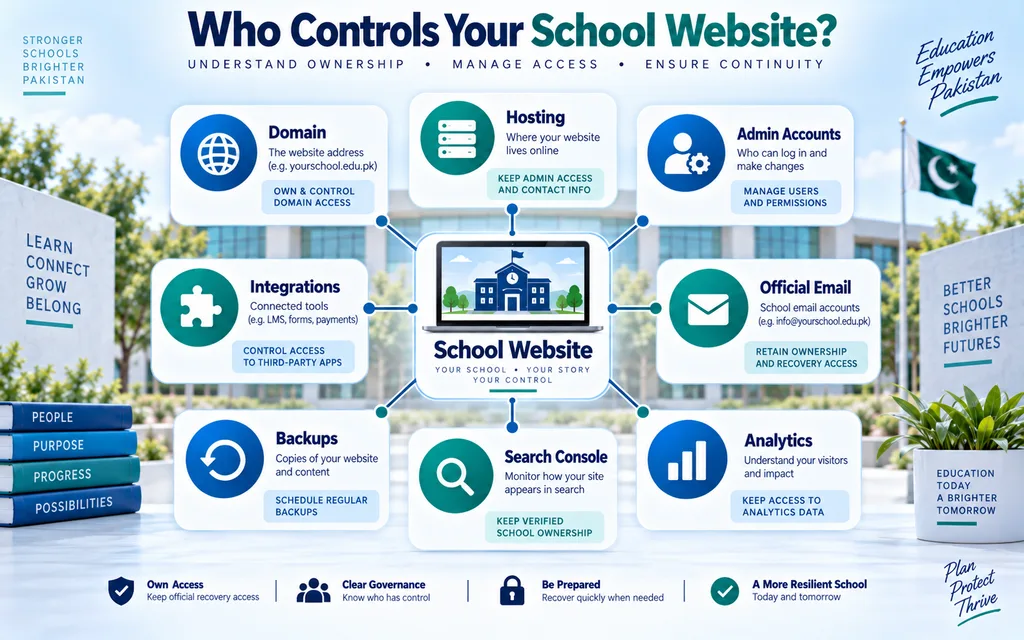
The institution should know who controls:
The domain registrar.
Hosting.
Website administrator accounts.
Official email used for recovery.
Analytics where applicable.
Search Console, where applicable.
Backups.
Other important integrations.
An outside developer may manage these systems legitimately.
The problem arises when the institution has no record of what exists or no recovery path when a relationship changes.
A school website should remain an institutional asset.
School Website Security
School websites require appropriate security controls based on what they do and what information they handle.
At a basic level, institutions should maintain current software, protect important accounts, limit administrator access, use HTTPS, maintain recoverable backups,s and remove obsolete access.
A site that handles user accounts or application information may require additional controls.
This article should not reproduce an entire security guide because that would create unnecessary topical overlap.
For detailed guidance on authentication, backups, monitoring, website ownership, IP, and incident recovery, see:
Website Security Guide 2026
School Website Performance
A school website should remain practical on ordinary connections and mobile devices.
Performance problems frequently come from unnecessary page weight and excessive functionality.
Large event photographs can become particularly heavy if uploaded directly from cameras or phones without optimization.
Use sensible image dimensions.
Compress images appropriately.
Avoid unnecessary scripts and animations.
Remove functionality that serves no meaningful visitor need.
Performance should be evaluated after real content is added.
Testing only an empty template does not represent the finished website.
SEO for a School Website
Search optimization should help people locate genuine school information.
It should not turn every keyword variation into a separate page.
Important pages should have descriptive titles and headings.
The institution’s identity and location should be clear where relevant.
Content should answer real questions.
Internal links should connect related information naturally.
Images should be optimized and described appropriately.
Important pages should be crawlable and indexable where they are intended for public search.
A school should avoid building pages such as:
“best school website”
“Best school website Pakistan”
“professional school website”
“school website development”
as near-duplicates merely to capture wording variations.
Each indexable page should serve a genuine purpose.
Content Governance for School Websites
Content governance determines who can publish, update, and remove information.
This is particularly important for schools because dates, staff information, admissions information,n and notices can change regularly.
Assign responsibilities.
For example:
Admissions content may belong to the admissions office.
Academic information may require approval from academic administration.
News may be managed by an authorized communications role.
Technical settings should remain restricted to appropriate users.
Not everyone who edits text needs full administrator privileges.
Clear roles improve accountability.
Maintaining an Accurate School Website
A school website needs ongoing attention after launch.
Routine work may include checking important pages, updating dates, reviewing notices, confirming contact details, testing forms and applying approved technical updates.
This section intentionally remains concise because general website-maintenance guidance belongs in a separate resource.
For detailed maintenance planning, see:
Website Maintenance Guide
The school-specific principle is simple:
Someone inside or formally responsible for the institution must know which information needs regular review.
Budget and Cost Planning
A school should define requirements before comparing development quotations.
A simple public information website and a custom school platform are fundamentally different projects.
Budget can be influenced by:
Design complexity.
Number of unique templates.
Content requirements.
Multilingual functionality.
Forms.
Integrations.
Custom development.
Hosting.
Ongoing maintenance.
Accessibility requirements.
Security requirements.
Instead of trying to make this page rank as another website-pricing guide, detailed pricing analysis should remain on the site’s dedicated pricing resource:
Website Development Cost in Pakistan
For a school project, use that broader pricing framework after defining the school-specific requirements in this guide.
Common School Website Planning Mistakes
Starting With a Theme Instead of Requirements
A visual template cannot determine what information the school needs.
Plan content and user journeys first.
Building Too Many Features
More functionality means more maintenance.
Only build features with a defined purpose.
Publishing Outdated Admissions Information
Time-sensitive information must have an owner.
Hiding Basic Contact Information
Parents should not have to search deeply for the school’s official location or contact method.
Ignoring Mobile Users
A visually impressive desktop website may still be difficult to use on a phone.
Depending Completely on One Developer Account
The institution should understand domain, hosting, and administrator ownership.
Creating Empty Sections
An empty news page or an incomplete faculty section can weaken user confidence.
Mixing Private and Public Information
Not everything managed by a school belongs on a public website.
Ignoring Maintenance Planning
The website needs ownership after launch.
Creating SEO Pages Without Genuine Purpose
Do not publish dozens of near-duplicate school-development pages merely to target variations of the same phrase.
School Website Requirements Checklist
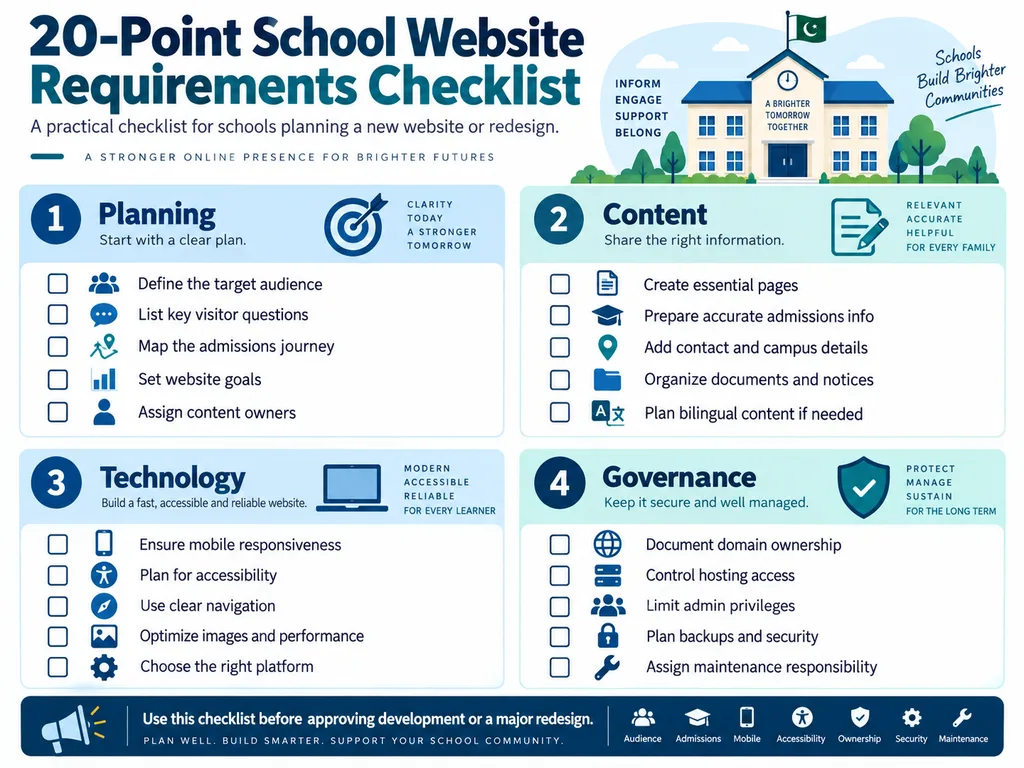
Before approving development or a major redesign, confirm:
- The website’s primary audiences are identified.
- Important visitor questions are documented.
- The required public information is known.
- Each important content area has an owner.
- Admissions have a clear information journey.
- Contact and campus details are accurate.
- Mobile usability will be tested with real content.
- Accessibility has been considered.
- Public forms collect only necessary information.
- Domain ownership is documented.
- Hosting ownership and recovery are understood.
- Administrator privileges are controlled.
- Basic website security is planned.
- Recoverable backups are included in operations.
- Important documents are organized logically.
- Multilingual content has an update process where used.
- News and expired notices have a review policy.
- Internal navigation uses clear labels.
- Ongoing maintenance responsibility is assigned.
- Post-launch review is planned.
This checklist is intentionally school-specific.
For a broader business website planning checklist, use the dedicated Website Planning Checklist rather than repeating generic website-project advice here.
The Marjan 20-Point School Website Readiness Self-Audit
The Marjan 20-Point School Website Readiness Self-Audit is an original planning tool for this guide.
It is not a technical, security, accessibility, or educational certification.
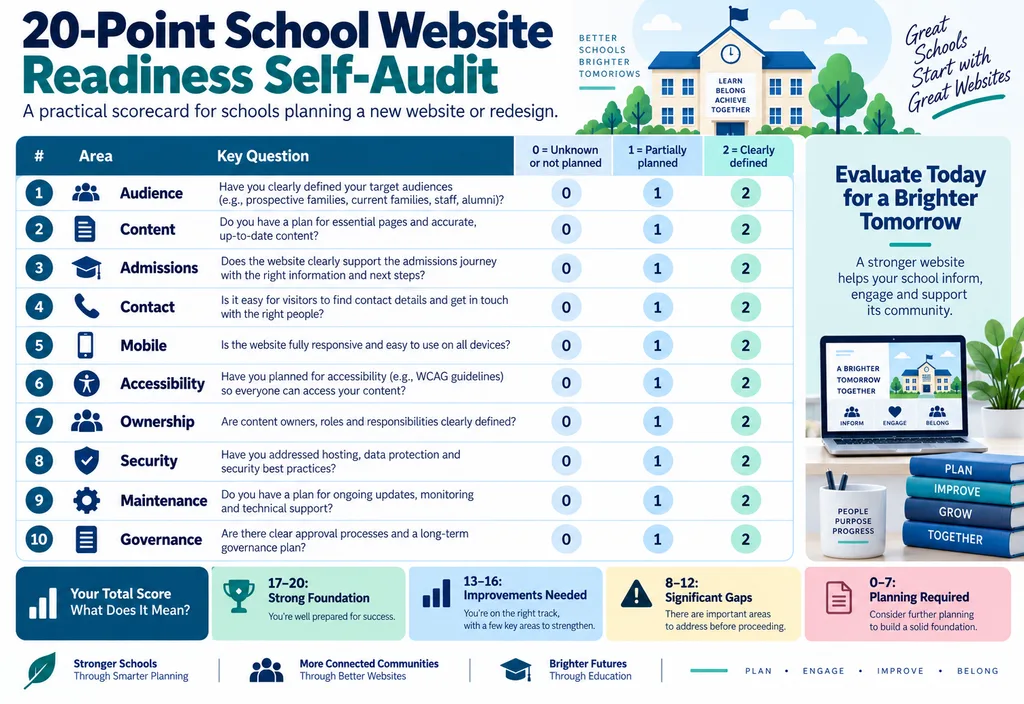
Review ten categories:
Audience clarity.
Content readiness.
Admissions process.
Contact accuracy.
Mobile planning.
Accessibility planning.
Digital ownership.
Security planning.
Maintenance responsibility.
Update governance.
Score each category:
0 points: Unknown or not planned.
1 point: Partially planned, or responsibility is unclear.
2 points: Clearly defined and assigned.
The maximum score is 20.
Score Interpretation
17 to 20: Strong planning foundation.
13 to 16: Reasonable foundation with several gaps.
8 to 12: Important planning areas need clarification.
0 to 7: Requirements should be documented before major development begins.
This score measures planning readiness only.
A high score does not prove that the website will be technically secure, accessible,e or successful.
How Do You Plan a School Website?
Start with audiences and information rather than design.
Identify who will use the website.
Document what those users need.
Determine which information should be public.
Map that information into a simple architecture.
Define responsibilities for updating it.
Then choose the technology and visual system required to support those needs.
This sequence reduces unnecessary development and makes proposals easier to evaluate.
What Are the Most Important Features of a School Website?
The most important features are the ones that make useful information easier to find or legitimate tasks easier to complete.
For many schools, these may include admissions guidance, mobile-friendly navigation, contact information, academic information, notices, and enquiry functionality.
Other institutions may require multilingual content, downloads, multiple campuses, or integrations.
There is no universal feature list suitable for every school.
What Information Should a School Publish Online?
Publish information that has a clear public purpose.
Examples may include admissions information, official contact details, academics, approved announcements, calendars, public policies, and appropriate resources.
Schools should avoid publishing personal or sensitive information simply because the website technically allows it.
Does a School Website Need WordPress?
No.
WordPress is one possible content management system.
Other content-management platforms, education platforms, and custom solutions can also be suitable.
The correct decision depends on requirements, available support, maintenance, security, and functionality.
Define the problem first.
Choose the platform second.
Who Should Own a School’s Domain and Hosting?
The institution should retain clear ownership or authorized recovery access to critical digital assets.
A developer can manage the systems, but the school should know which accounts exist and who is authorized to recover them.
How Should a School Maintain Its Website?
Assign responsibility for both content and technology.
Admissions information should have an owner.
Notices should have an owner.
Technical updates should be managed by an appropriate person or provider.
Administrator accounts should be reviewed.
Important functionality should be tested after changes.
How Much Should a School Budget for a Website?
The correct budget depends on the defined scope.
A small public information website, a bilingual institutional site, and a custom student platform should not be priced as equivalent projects.
Define requirements first, then compare quotations against the same scope.
Use the site’s dedicated Website Development Cost in Pakistan guide for detailed pricing factors instead of duplicating that topic here.
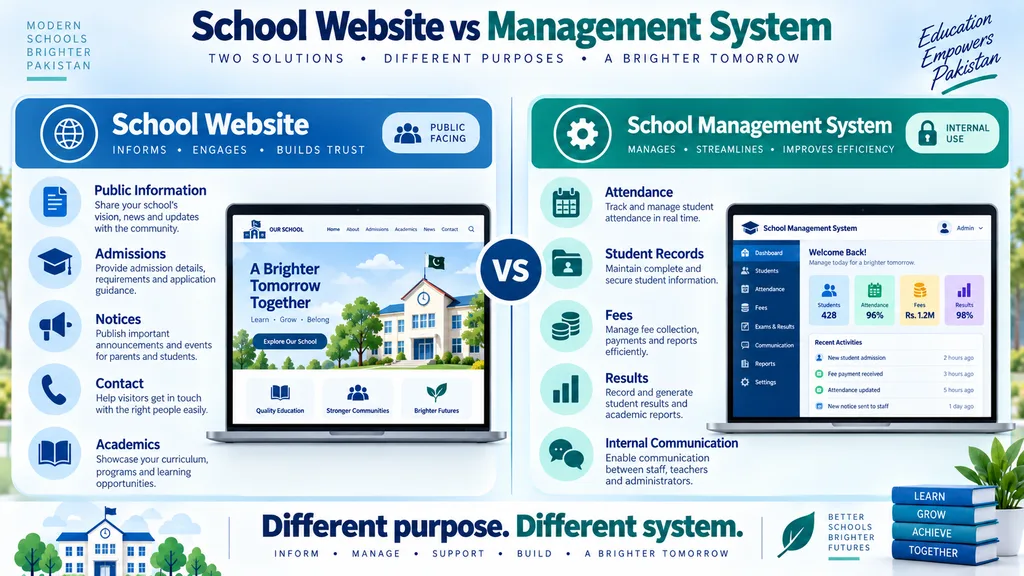
School Website vs School Management System
A school website mainly serves public information and communication needs.
A school management system usually handles authenticated or internal administrative processes.
A school may require one, the other, or both.
Do not purchase a large management system merely because the public website needs improvement.
Likewise, do not expect a basic public website to replace systems needed for complex internal administration.
Final School Website Planning Checklist
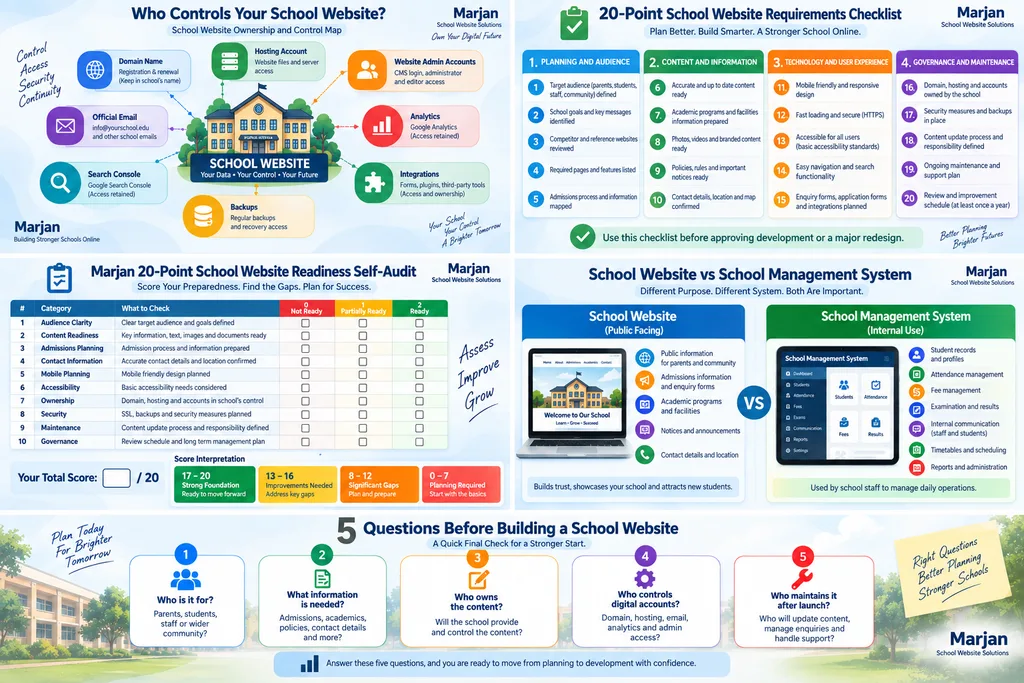
Before development begins, the institution should be able to answer five fundamental questions:
Who is the website for?
What information do those people need?
Who owns and maintains that information?
Who controls the website’s critical digital accounts?
What process keeps the website useful after launch?
If those answers are clear, design and development decisions become much easier.
Conclusion
School website development in Pakistan should begin as an information and operational planning exercise rather than a template-selection exercise.
A useful school website needs clear audiences, structured admissions information, understandable navigation, reliable contact details, strong digital ownership and an ongoing maintenance process.
It should also work effectively on mobile devices and take accessibility, security, and performance seriously.
The Marjan School Website Planning Framework organizes these requirements around:
Audience.
Information.
Admissions.
Communication.
Ownership.
Security.
Maintenance.
The Marjan 20-Point School Website Readiness Self-Audit provides a second practical tool for identifying gaps before development begins.
These original frameworks are intended to help school administrators organize decisions.
They do not replace specialist technical, security, or accessibility assessments where one is required.
The most sustainable school website is not necessarily the website with the largest number of features.
It is the one that helps parents, students, and staff find reliable information while remaining manageable for the institution over time.
Editorial Methodology
This guide is structured around school-specific website planning, information architecture, admissions communication, content governance, mobile usability, accessibility, ownership, and maintenance.
Generic website-development pricing, general website planning, full website security guidance, and commercial website-development services have intentionally been kept on their dedicated Marjan Web Studio pages to prevent unnecessary search-intent overlap.
The Marjan School Website Planning Framework and Marjan 20-Point School Website Readiness Self-Audit are original organizational tools created for this guide.
They are not certifications or guarantees.
Search recommendations should be evaluated against current Google Search documentation.
Accessibility implementation should be reviewed against current W3C guidance.
Technical security requirements should be reviewed according to the website’s actual technology, data, hosting, and integrations.
Authoritative Resources
W3C Web Content Accessibility Guidelines
Google Search Central
Related Marjan Website Guides
Website Planning Checklist
https://marjanservices.tech/website-planning-checklist/
Website Development Cost in Pakistan
https://marjanservices.tech/website-development-cost-in-pakistan/
Website Security Guide
https://marjanservices.tech/professional-website-security/
Website Maintenance Guide
https://marjanservices.tech/website-maintenance-guide/
Technical SEO Guide 2026
https://marjanservices.tech/technical-seo-guide-2026/
Need Website Development After Planning?
If your institution has completed its requirements planning and now needs technical implementation, review Marjan Web Studio’s main website development service:
This guide is intentionally educational. Commercial packages, quotations, and general website-development service information remain on the dedicated service and pricing pages.
Related Website Guides
- Website Planning Checklist
- Website Development Cost in Pakistan
- Website Maintenance Guide
- Technical SEO Guide 2026
- Professional Website Development Services
- Website Security Guide
- Website Launch Checklist
- Website Features Checklist
- SSL Certificate Guide
- Google Search Console Guide
1 Comment