Table of Contents
Author: Syed Abdul Quddus
Website: Marjan Web Studio
Last Updated: September 10, 2026
Fact-Checking Note: Product capabilities and Google guidance were checked against official documentation available on the date above. Prices, policies, and platform features can change and should be verified before purchase or implementation.
Editorial Disclosure: This is an educational guide. Examples are illustrative unless explicitly identified as measured results. No ranking, revenue, cost-saving, or AI visibility outcome is guaranteed.
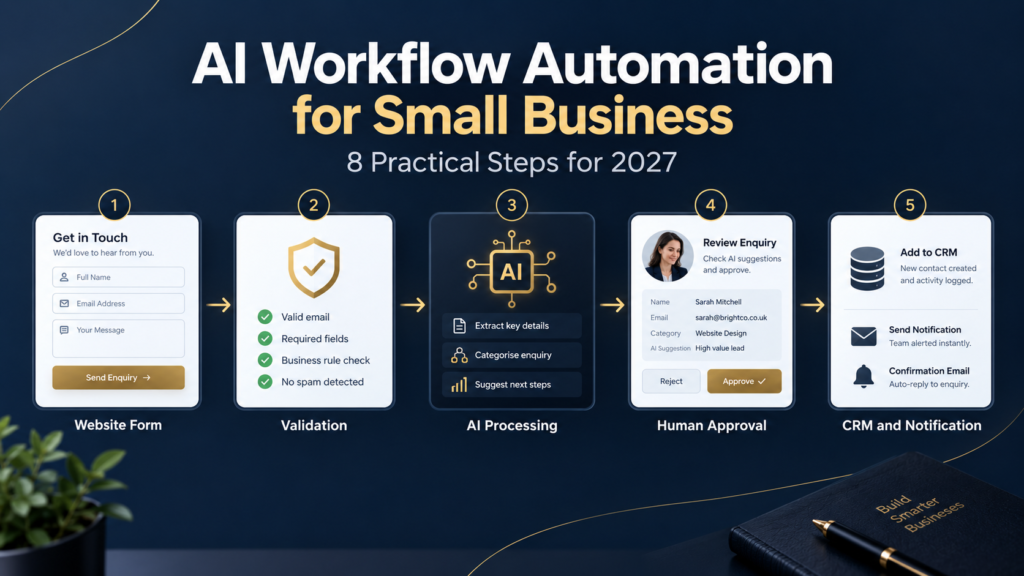
AI workflow automation for small business means combining reliable workflow rules with carefully controlled artificial intelligence to complete repetitive business tasks, move information between tools, and involve a person when judgment is required.
A useful system does not put an entire company on autopilot. It removes predictable administrative work while keeping business owners in control of customer relationships, money, permissions, and exceptions.
For a small business, the best first automation is usually not a futuristic autonomous agent. It is a narrow, frequent, and stable process, such as capturing a website enquiry, checking required fields, creating a CRM record, assigning the lead, and notifying the right person.
AI should be added only where language understanding, classification, extraction, or summarization makes the workflow measurably better.
This guide explains how AI workflow automation works, what a small business should automate first, which decisions need human approval, how to evaluate an automation platform, how to estimate cost and return, and how to prevent failures that generic automation advice often ignores.
Quick Answer
AI workflow automation for small business uses connected software, business rules, and selected AI capabilities to complete repetitive tasks with less manual work.
A safe workflow starts with a defined trigger, validates the information, performs approved actions, and transfers uncertain or sensitive decisions to a person.
Common uses include website lead routing, appointment reminders, customer enquiry classification, ecommerce order alerts, document processing and internal notifications.
What Is AI Workflow Automation?
Traditional workflow automation follows defined rules. When a specific event occurs, the system performs predetermined actions.
For example, when a visitor submits a website contact form, the workflow may create a CRM record and alert a salesperson.
Zapier’s official workflow documentation describes this basic structure as a trigger followed by one or more actions.
AI workflow automation adds an artificial intelligence model to one or more carefully selected steps.
The model might:
- Summarize a customer enquiry.
- Identify the requested service.
- Extract structured details from an unstructured message.
- Categorize a support request.
- Draft a response for human approval.
- Identify whether information appears incomplete.
The surrounding workflow still controls:
- When the AI model runs.
- What information does it receive?
- Which output format is acceptable?
- What actions it is allowed to recommend?
- What happens when the result is uncertain?
- When the process must be transferred to a human.
This distinction matters because a language model is probabilistic. It can misunderstand ambiguous input or produce an inaccurate response.
A deterministic rule such as “reject the record when the email field is empty” is more reliable than asking AI whether an email address exists.
Good automation architecture uses normal logic for predictable decisions and reserves AI for tasks where language or pattern interpretation adds genuine value.
Workflow Automation, AI Automation, and AI Agents
| Approach | How it works | Best use | Main limitation |
|---|---|---|---|
| Rule-based workflow | Executes predefined conditions and actions | Stable and repetitive processes | Struggles with ambiguous, unstructured information |
| AI-assisted workflow | Adds AI to selected steps inside a controlled process | Classification, extraction, summarization, and drafting | Needs validation, monitoring, and human escalation |
| AI agent | Interprets a goal and chooses actions or tools with greater autonomy | Complex tasks where steps cannot be fully predetermined | Higher uncertainty, security exposure, and supervision requirements |
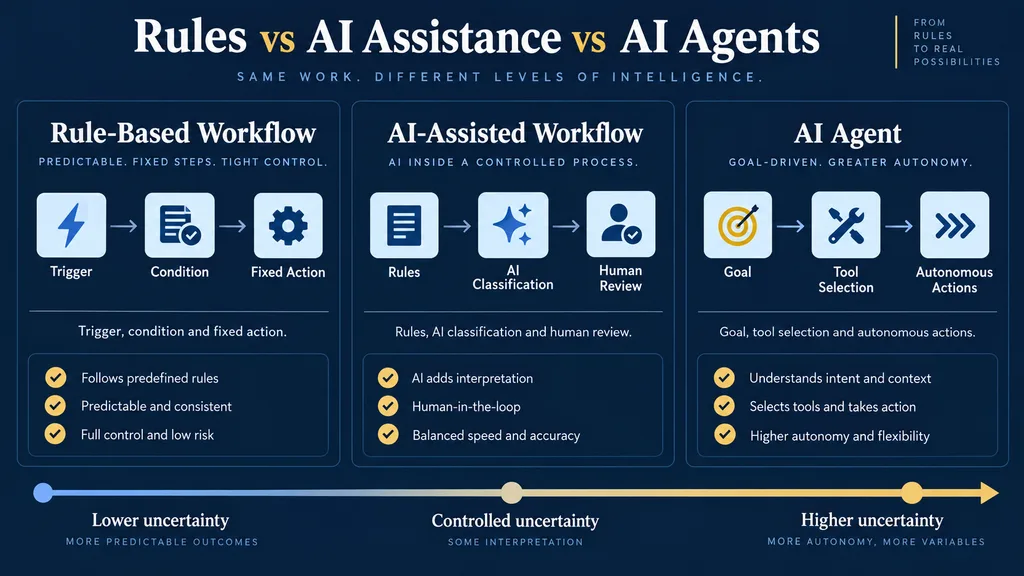
Small businesses should normally begin with rule-based or AI-assisted workflows.
Greater autonomy is not automatically greater value. If a five-step workflow solves the problem safely, adding an AI agent may increase costs and failure risks without improving the result.
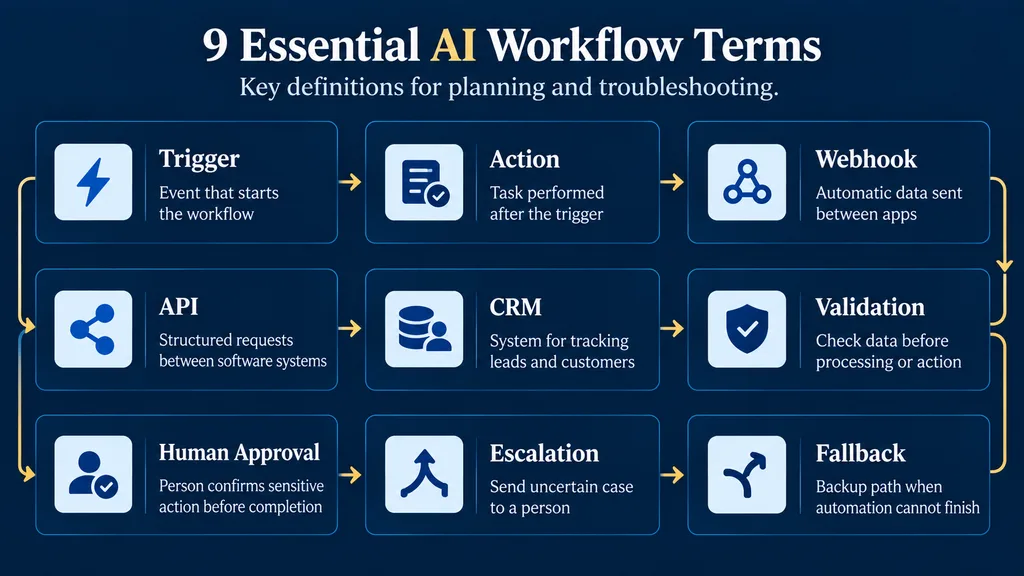
Important AI Workflow Terms
Trigger: The event that starts a workflow, such as a form submission, new order, or scheduled time.
Action: A task completed after the trigger, such as creating a customer record or sending an internal notification.
Webhook: A method used by one application to send information to another application when an event occurs.
API: A structured method that allows different software systems to exchange information or request approved actions.
CRM: A customer relationship management system used to organize leads, customers, and follow-up activity.
Human Approval: A control that prevents a sensitive action from being completed until an authorized person reviews and approves it.
Fallback: A defined alternative path used when a workflow cannot complete its intended action safely.
Validation: The process of checking whether incoming or generated information meets the required rules and format.
Escalation: The transfer of an uncertain, sensitive, or failed case to a responsible person.
Why AI Workflow Automation Matters to Small Businesses
AI workflow automation matters because it can reduce repetitive handling, improve response consistency, and create measurable records without removing human responsibility for sensitive decisions.
Small-business teams frequently perform the same administrative actions across disconnected systems.
A website enquiry is copied into a spreadsheet. The customer receives a manual acknowledgement. Someone decides which employee should respond. A reminder is created later if it is remembered.
None of these tasks is individually difficult, but together they consume attention and create avoidable delays.
Illustrative Small-Business Scenario
Consider a small website-development agency receiving enquiries through its contact form and WhatsApp.
The owner manually copies each request into a spreadsheet, identifies the required service, and sends a confirmation. During busy periods, some enquiries may remain unanswered or lack enough information for a useful response.
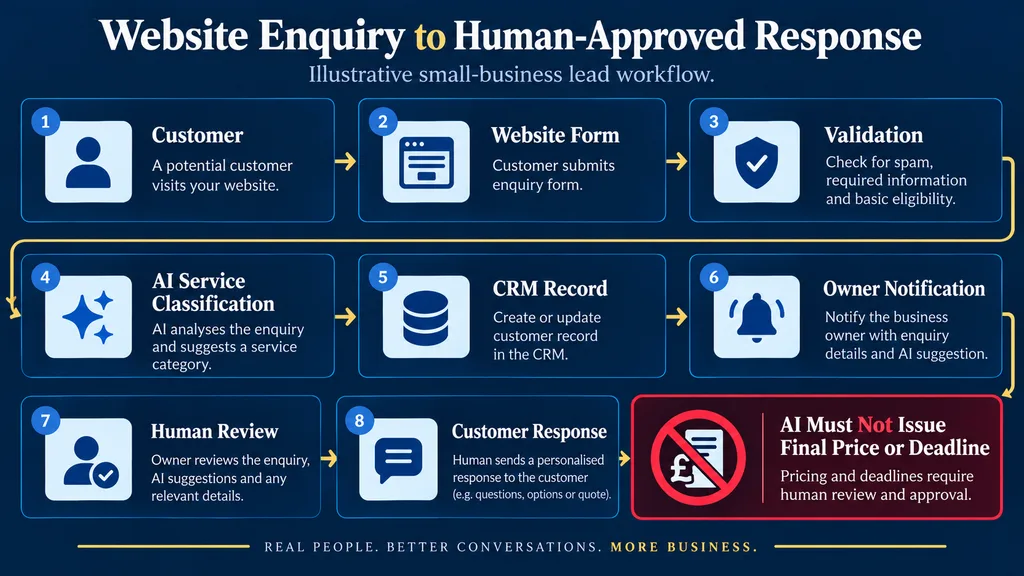
A controlled workflow can:
- Validate the submitted form.
- Preserve the original customer message.
- Create a lead record.
- Classify the requested service.
- Assign a responsible person.
- Notify the business owner.
- Create a follow-up deadline.
- Store failed submissions for recovery.
The system should not automatically issue a final quotation or delivery promise. Pricing, project scope, and deadlines should remain subject to human review.
This is an illustrative workflow design, not a claimed client result.
Automation can acknowledge receipt, standardize lead information, assign an owner, schedule follow-up, and record the result.
This reduces forgotten handoffs and gives the business owner a clearer view of where enquiries are delayed or lost.
As enquiry volume grows, the system can protect human time for judgment, negotiation and customer relationships without pretending that a bot is a person or allowing it to make unauthorized promises.
What Should a Small Business Automate First?
A small business should automate a frequent, stable, low-risk, and measurable process before attempting complex or autonomous AI operations.
Do not select an automation tool first. Select a business process first.
The strongest starting process is:
- Frequent.
- Repetitive.
- Stable.
- Easy to verify.
- Low risk.
- Measurable.
- Inexpensive to reverse.
- Supported by consistent input information.
Score every potential workflow from one to five against the following criteria.
| Criterion | A high score means | Why it matters |
|---|---|---|
| Frequency | The task occurs repeatedly | More repetitions create more potential value |
| Manual time | Each occurrence consumes meaningful time | Establishes a measurable baseline |
| Process stability | Staff normally follow the same steps | Stable rules are easier to automate safely |
| Input quality | Required data is available and consistent | Poor inputs create unreliable outputs |
| Output verifiability | A person or rule can confirm correctness | Makes testing and monitoring possible |
| Low exception rate | Unusual cases are limited and recognizable | Reduces hidden manual work |
| Reversibility | Incorrect actions can be corrected | Limits damage during early testing |
| Data safety | The workflow can operate with limited permissions | Reduces privacy and security risks |
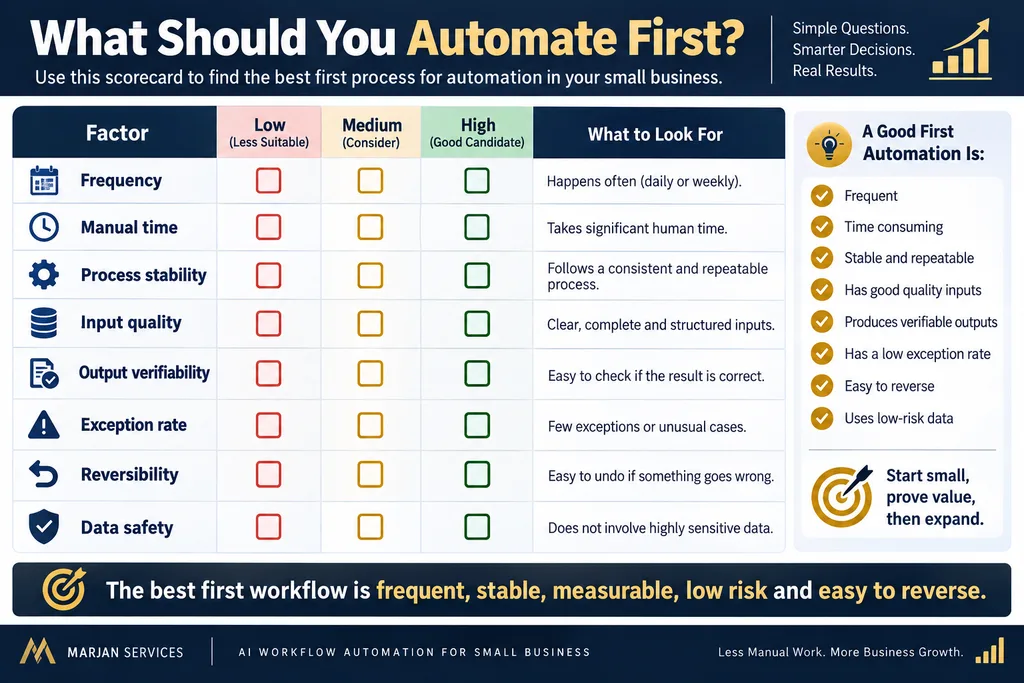
A website lead workflow often scores well.
An autonomous system approving refunds, rejecting job applicants, providing medical decisions, or moving money generally does not.
Four Questions Before Building Anything
- What exact event starts the process?
- What must be true before an action is allowed?
- Which decision requires a person?
- How will the business detect and recover from failure?
If these questions cannot be answered, the process is not ready for automation.
Businesses that are still defining their website, audience, required information, and conversion path should complete a website planning process before connecting multiple automation tools.
The Marjan SAFE Workflow Framework
The Marjan SAFE Workflow Framework is an editorial decision model for keeping small-business automation narrow, testable, and accountable.
It is not a claim that a workflow has been technically validated until the business completes its own implementation and testing.
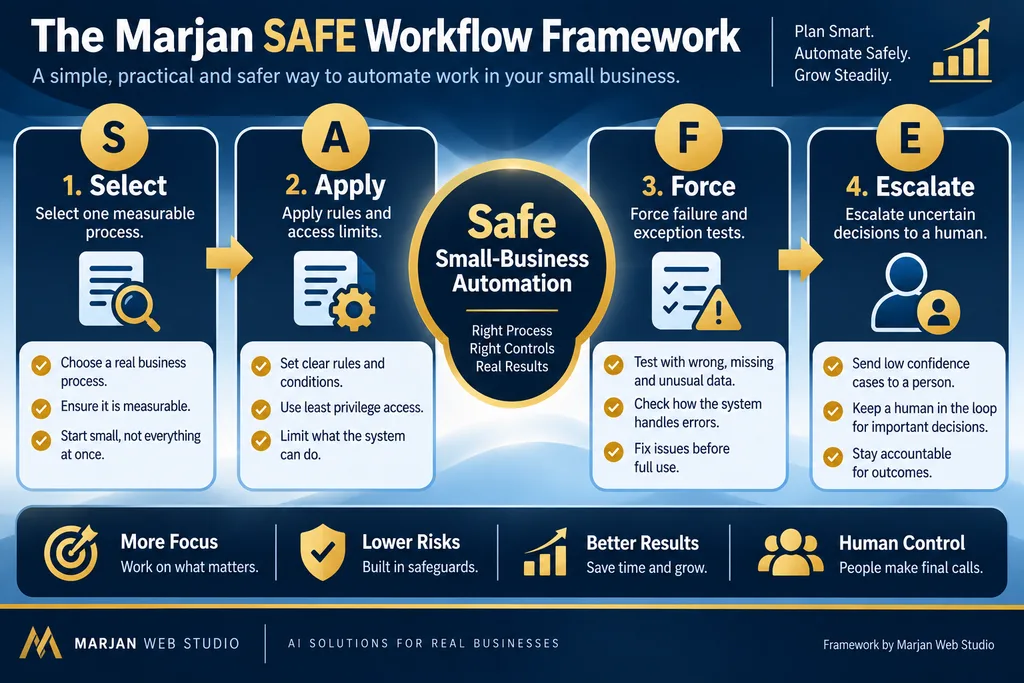
S. Select One Measurable Process
Choose one frequent and clearly defined process.
Record the current handling time, error pattern, and responsible person before changing it.
A. Apply Rules and Access Limits
Use deterministic rules for predictable decisions.
Give every integration the minimum information and permissions required for its task.
F. Force Failure and Exception Tests
Test missing fields, duplicate events, invalid AI output, timeouts, expired credentials, and unavailable services.
A successful demonstration is not enough.
E. Escalate Uncertain Decisions to a Human
Send low-confidence, sensitive, or irreversible decisions to an authorized person.
Record who receives the case and how quickly it should be reviewed.
This framework gives business owners a repeatable question for every proposed automation:
Is the process selected, access limited, failure tested and uncertainty escalated?
Marjan SAFE Framework Example
| SAFE stage | Website lead workflow example |
|---|---|
| Select | Automate contact-form lead recording and assignment |
| Apply | Validate required fields and restrict CRM permissions |
| Force | Test duplicates, missing fields, timeouts, and invalid AI output |
| Escalate | Send uncertain classifications and pricing requests to the owner |
Practical AI Workflow Automation Examples for Small Businesses
The following examples are design patterns, not claimed client results.
Each example should be adapted according to the business, selected platform, data requirements, customer expectations, and applicable privacy rules.
1. Website Enquiry to CRM
Trigger: A visitor submits a website form.
Rules: Validate consent and required fields, normalize the phone number, and check for duplicates.
AI Step: Classify the enquiry according to the requested service and summarize the free-text message.
Actions: Create or update the CRM contact, assign an owner, and send an internal alert.
Human Step: Review the request and send a suitable response.
Failure Path: Store the original submission in a recovery queue and alert an administrator when the CRM or AI service is unavailable.
This pattern fits Marjan’s existing website-development services and analytics and conversion-tracking focus because the workflow begins on a business website and produces measurable lead-handling information.
2. WhatsApp Lead Qualification
A website visitor can choose to continue through WhatsApp after providing appropriate consent.
A structured message can collect:
- Required service.
- Existing website URL.
- Business type.
- Budget range.
- Expected deadline.
- Preferred contact time.
AI may summarize an open-ended request, but business rules should control qualification and routing.
A human should approve:
- Quotations.
- Delivery promises.
- Project deadlines.
- Refund decisions.
- Unusual customer responses.
WhatsApp automation must respect the selected provider’s API requirements, template rules and user consent.
A simple click-to-chat button is not the same as an automated WhatsApp Business Platform workflow.
3. Customer Support Triage
A controlled customer-support workflow can categorize incoming questions, retrieve approved support information, and route sensitive or low-confidence cases to a human.
The system should answer only from authorized sources and clearly identify when a person will take over.
Complaints, refunds, safety issues, account-access problems, and unusual customer requests require explicit escalation rules.
The workflow should preserve the original message so a human can review the complete context.
4. Ecommerce Order Exception Alerts
Instead of automating every order process immediately, a business can begin with exceptions.
The workflow can notify staff when:
- Payment remains pending.
- A delivery address is incomplete.
- Stock information conflicts.
- An order appears duplicated.
- A high-value order needs approval.
- An order has not progressed within the expected time.
AI may summarize the issue, while the ecommerce or inventory system remains the authoritative source of order information.
Businesses using WooCommerce or Shopify should connect automation only after their product, payment, and order architecture is stable.
Review the Ecommerce Website Development Services page when the online store itself requires technical restructuring.
A Reliable Small-Business Workflow Architecture
A production workflow needs more than a trigger and one successful action.
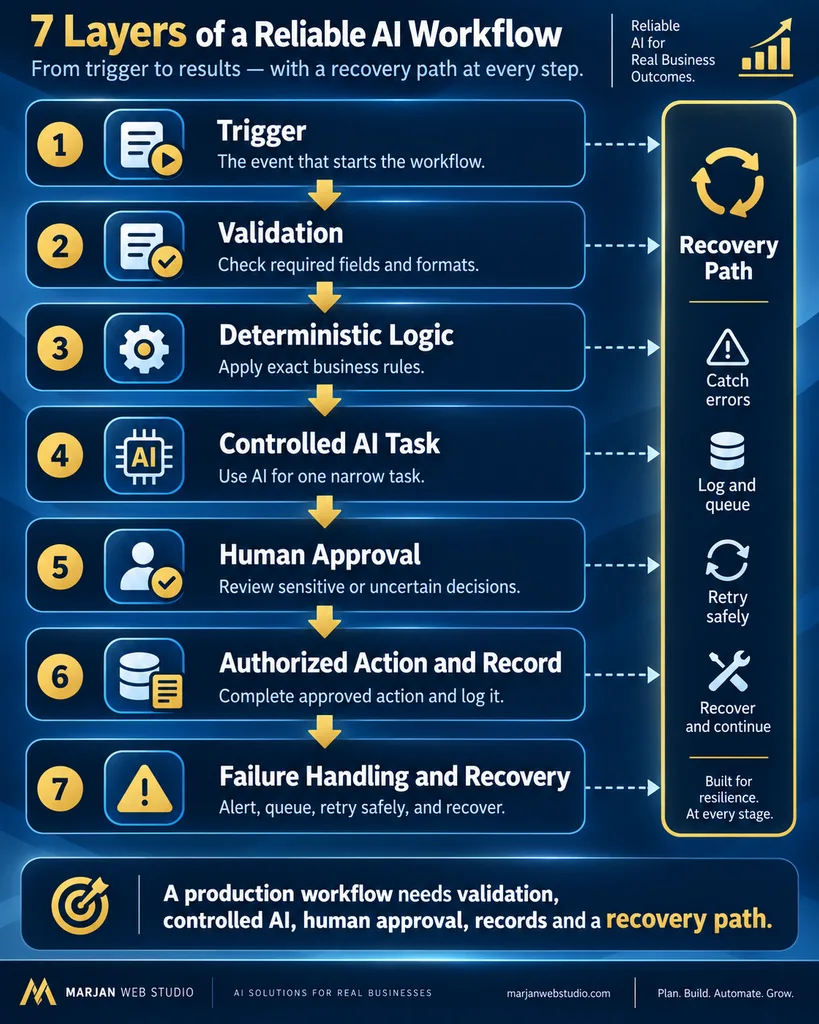
Use the following seven-layer structure.
1. Trigger
The trigger is the event that starts the workflow.
Examples include:
- Website form submission.
- New e-commerce order.
- Incoming customer message.
- Scheduled time.
- CRM status change.
- New spreadsheet record.
- Payment status update.
Triggers may be instant, frequently through a webhook, or checked periodically.
The source event should have a unique identifier, so repeated delivery does not create duplicate actions.
2. Validation
Check required fields, acceptable formats, consent, duplicate records, and permitted information before sending anything to AI or another service.
Invalid information should be rejected or placed in a review queue rather than being guessed or silently corrected.
3. Deterministic Logic
Use ordinary conditions for decisions that can be expressed exactly.
Examples include:
- Budget thresholds.
- Country codes.
- Service selections.
- Business hours.
- Duplicate checks.
- Consent requirements.
- Required contact information.
AI should not be used for a task that a reliable rule can complete more accurately and cheaply.
4. Controlled AI Task
Give the AI model one narrow responsibility.
Require structured output containing approved fields or categories whenever possible.
Do not allow the model to invent:
- Prices.
- Business policies.
- Delivery dates.
- Product availability.
- Customer records.
- Refund decisions.
- Legal conclusions.
- Financial information.
These facts should come from verified business systems or human review.
5. Human Approval or Escalation
Set approval requirements according to business risk.
Customer-facing promises, payments, refunds, contracts, sensitive records, and irreversible changes require human review.
n8n’s official documentation includes a human-fallback pattern, reflecting a wider design principle:
Uncertainty must have a destination.
6. Authorized Action and Record
After validation or human approval, the workflow performs the authorized action.
Record the:
- Input reference.
- Processing time.
- Decision.
- Final output.
- Platform response.
- Responsible owner.
- Error or exception status.
Avoid storing unnecessary personal or sensitive information in workflow logs.
7. Failure Handling
Define limited retries for temporary errors, but prevent repeated messages or duplicate records.
Create an alert and recovery queue for failures requiring manual action.
Make’s official error-handling documentation explains how scenario behavior changes when errors occur. This is why a workflow must be tested beyond its successful path.
AI Workflow Automation for Small Business: 8-Step Process
A reliable automation project begins with the business process, not the software.
These eight steps help a small business define, build, test, and manage an AI-assisted workflow without giving the system unnecessary authority.
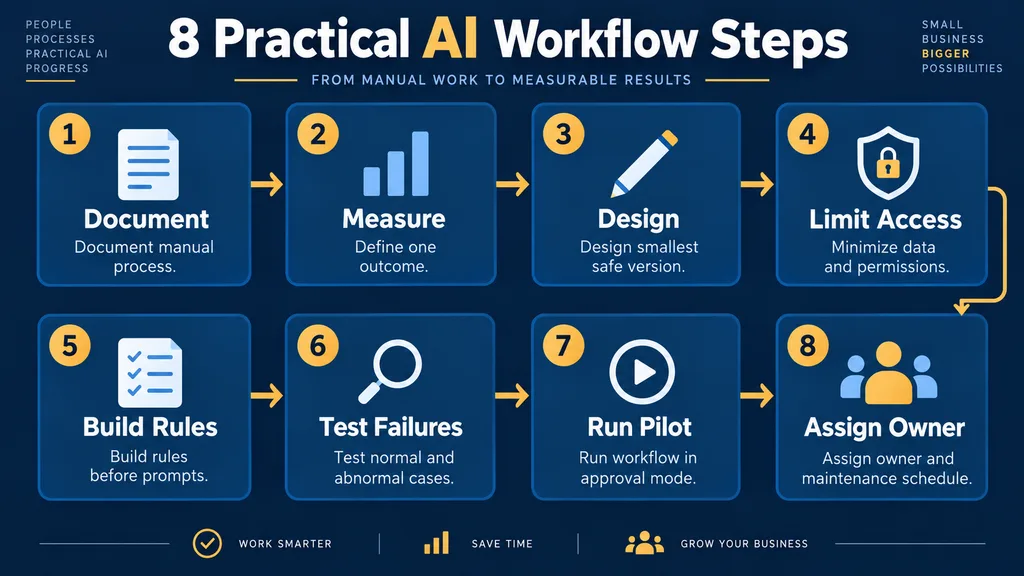
Step 1. Document the Manual Process
Observe the current process before changing it.
Write down:
- The event that starts the process.
- Every manual action.
- The person responsible for each step.
- The information required.
- The average handling time.
- Common errors.
- Exceptional cases.
- Approval requirements.
- The authoritative source of important information.
- The place where the final outcome is recorded.
A vague objective such as “automate customer service” is not buildable.
A more precise objective would be:
Record every website quotation request, preserve the original customer message, assign a responsible person and create a follow-up deadline.
Do not improve or automate the process while documenting it. First, capture how it actually works.
Different employees may follow different methods, skip required fields, or depend on undocumented knowledge. These inconsistencies must be identified before automation begins.
Required output: A simple process map, current handling-time baseline, responsible-person list, and record of common errors.
Step 2. Define One Measurable Outcome
Choose one operational result the business can observe before and after implementation.
Suitable measurements include:
- Average enquiry acknowledgement time.
- Number of unassigned leads.
- Manual data-entry time.
- Duplicate customer records.
- Missed follow-ups.
- Incorrect lead classifications.
- Failed workflow executions.
- Human review time.
Record the current value using a clearly defined method.
Use the same definition during the automation pilot. Otherwise, the before-and-after comparison will be unreliable.
Do not use “business growth” or “increased sales” as the only measurement. Sales can change because of pricing, demand, advertising, competition, staff performance, and wider economic conditions.
A workflow should first be judged against the operational problem it was designed to solve.
A useful primary measurement might be:
Percentage of valid website enquiries assigned to a responsible person within five minutes.
Supporting measurements could include workflow failure rate, human correction rate, and average review time.
Required output: One primary measurement, two supporting measurements, the baseline value, and a scheduled review date.
Step 3. Design the Smallest Safe Version
The first version should solve one narrow problem.
It should not attempt to connect every business application or automate an entire department.
A suitable first workflow may contain:
- One clearly defined trigger.
- Required-field validation.
- Duplicate checking.
- One optional AI task.
- One internal notification.
- One human approval point.
- One failure and recovery route.
Define what the workflow is allowed to do and what it must never do.
For example, a website lead workflow may:
- Record a new enquiry.
- Preserve the customer’s message.
- Classify the requested service.
- Create or update a CRM contact.
- Notify the business owner.
It should not automatically:
- Issue a final quotation.
- Promise a delivery date.
- Approve a refund.
- Delete a customer record.
- Change a contract.
- Complete an irreversible financial action.
Every additional integration creates another dependency, credential, usage limit, and possible failure point.
Complexity should be added only after the basic workflow operates reliably.
Required output: A visual workflow diagram showing the trigger, validation, normal path, AI task, human approval, and failure route.
Step 4. Minimize Data and Permissions
List the exact information required at every workflow stage.
Remove unnecessary personal or confidential information before sending data to an AI provider or another application.
For a basic lead-classification workflow, the AI may need:
- Requested service.
- Customer message.
- Business type.
- Preferred contact method.
It may not need:
- Payment information.
- Account passwords.
- Complete customer history.
- Private identification documents.
- Unrelated CRM notes.
- Confidential financial records.
Give every connected application the narrowest practical permission.
A lead-routing workflow may need permission to create or update contacts. It should not receive permission to delete the entire CRM database.
Credentials should be stored through the automation platform’s protected connection system.
They must not appear in:
- Public website content.
- Screenshots.
- AI prompts.
- Shared documents.
- Public code.
- Training examples.
Create separate business accounts where practical. Enable multifactor authentication and document who controls every connected account.
Required output: A data-flow map, list of required fields, permission register, and named account owner.
Step 5. Build Rules Before Prompts
Define the business rules before writing an AI prompt.
Rules should cover:
- Required information.
- Permitted categories.
- Valid formats.
- Consent requirements.
- Duplicate detection.
- Confidence thresholds.
- Prohibited actions.
- Human escalation.
- Failure handling.
- Data retention.
Use deterministic logic for exact decisions.
For example:
- Reject the submission when a required field is empty.
- Mark the record as duplicated when its event identifier already exists.
- Route enquiries received after business hours to the next-day queue.
- Require human approval when a customer requests a quotation.
- Prevent the workflow from sending a reply when consent is missing.
Use AI only for tasks where language interpretation adds value.
Suitable AI tasks include:
- Summarizing a customer message.
- Extracting project requirements.
- Assigning one approved service category.
- Identifying whether an enquiry needs urgent human attention.
Where the selected platform supports it, require AI output in a structured format with predefined fields or categories.
Unexpected or incomplete output should go to a review queue instead of being silently accepted.
A polished prompt cannot repair an undefined business process.
Required output: A written rule table and a narrow AI task defining its input, permitted output, prohibited actions, and escalation conditions.
Step 6. Test Normal and Abnormal Cases
Do not test only the successful workflow path.
Create a documented test plan containing normal, unusual, and deliberately broken cases.
Test scenarios should include:
- Complete and valid submission.
- Missing required field.
- Invalid email address.
- Duplicate form submission.
- Unexpected language.
- Extremely long message.
- Malicious instructions inside the customer message.
- Invalid AI output.
- AI service timeout.
- CRM service failure.
- Expired connection.
- API rate limit.
- Notification failure.
- Repeated webhook delivery.
For every test, record:
- Test input.
- Expected result.
- Actual result.
- Pass or fail status.
- Required correction.
- Responsible person.
- Retest date.
Confirm that a failure does not:
- Lose the original customer enquiry.
- Expose credentials.
- Delete an existing record.
- Send repeated messages.
- Create duplicate leads.
- Complete an unauthorized action.
- Hide the failure from the workflow owner.
Use synthetic information or properly protected testing data.
Do not expose genuine sensitive customer records merely to test an automation.
Required output: A dated test log, unresolved-issues register, and evidence that failed records can be recovered safely.
Step 7. Run the Workflow in Approval Mode
During the pilot, allow the workflow to prepare actions without automatically completing sensitive or customer-facing steps.
A person should review:
- AI-generated classifications.
- Customer-message summaries.
- Draft responses.
- Qualification decisions.
- Unusual routing.
- Low-confidence results.
- Pricing or deadline requests.
Record every correction.
This evidence reveals where the business rules, AI instructions, categories, or source information need improvement.
Before starting the pilot, define:
- Pilot duration.
- Maximum number of records.
- Responsible reviewer.
- Acceptable correction rate.
- Acceptable failure rate.
- Maximum review time.
- Conditions requiring the workflow to stop.
One successful demonstration is not enough.
A workflow may operate correctly on an ideal example and fail when real information is incomplete, duplicated, or ambiguous.
At the end of the pilot, make one of three decisions:
- Continue with the existing controls.
- Revise the workflow and test it again.
- Stop because the workflow is unsafe or commercially unjustified.
Required output: Approval rate, correction rate, failure count, human review time, and a documented continue, revise, or stop decision.
Step 8. Assign an Owner and Maintenance Schedule
Every production workflow needs one named owner and a backup person.
The workflow owner should be responsible for:
- Checking critical alerts.
- Reviewing failed executions.
- Renewing expired credentials.
- Monitoring platform and API changes.
- Reviewing monthly costs.
- Approving workflow modifications.
- Updating documentation.
- Responding to security incidents.
- Restoring failed records.
- Pausing the workflow safely.
Create a practical maintenance schedule.
Weekly checks:
- Failed executions.
- Unprocessed records.
- Duplicate actions.
- Human escalations.
- Customer complaints.
- Unusual AI output.
Monthly checks:
- Software and API costs.
- User permissions.
- Active integrations.
- AI instructions.
- Business rules.
- Data retention.
- Platform changes.
- Workflow performance against the baseline.
Event-based checks:
Revalidate the workflow whenever an application, API, website form, CRM field, privacy requirement, business policy, or customer process changes.
Document how the workflow can be paused without losing incoming information.
The business must also know how failed records will be replayed without creating duplicate actions.
“The automation runs itself” is not a responsible operating model.
Required output: Named owner, backup person, maintenance schedule, escalation contact, pause procedure, and documented recovery process.
Choosing Between Zapier, Make, and n8n
The right platform depends on workflow complexity, available skills, maintenance capacity, required integrations, data requirements, and total operating cost.
This section provides a high-level decision framework. It is not a substitute for testing the intended business workflow.
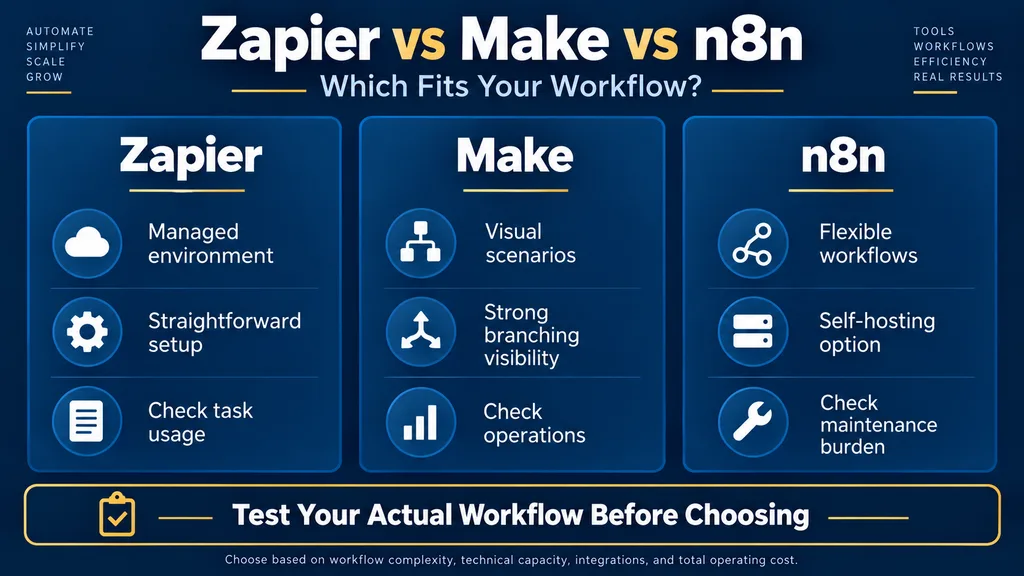
Zapier
Zapier is designed around triggers and actions and offers a broad integration ecosystem.
It can be a practical choice for owners who value a managed environment and a relatively straightforward setup.
Before selecting it, evaluate:
- Required applications.
- Monthly task usage.
- Branching requirements.
- Error handling.
- Monitoring.
- Current plan limits.
- Total cost at the expected volume.
Make
Make uses a visual scenario model and supports routers, webhooks, and error-handling routes.
It can suit workflows that benefit from visible data paths and multi-step branching.
Business owners still need to understand:
- Operations usage.
- Error routes.
- Webhook behavior.
- Incomplete executions.
- Data volume.
- Connection failures.
- Recovery procedures.
n8n
n8n provides flexible workflow construction and a self-hosting option.
That flexibility can be useful when the implementer has sufficient technical capability.
However, self-hosting transfers responsibility for deployment, updates, security, backups, and availability to the business or its technical provider.
The software subscription is not the only cost. Hosting, monitoring, maintenance, and security expertise must also be considered.
Platform Decision Table
| Business condition | Likely direction | Verify before choosing |
|---|---|---|
| Simple workflow and limited technical capacity | Managed no-code platform | Required applications, usage limits and support |
| Visual multi-step process with branching | Visual scenario platform | Operations, error handling and data volume |
| Need for technical control or self-hosting | Flexible developer-oriented platform | Hosting, security, maintenance and recovery cost |
| Sensitive or high-impact process | Controlled architecture regardless of platform | Permissions, retention, approval and auditing requirements |
Do not trust a definitive “best platform” verdict without testing the intended workflow.
Features and prices change. Comparisons published by platform providers may naturally favor their own products.
How Much Does AI Workflow Automation Cost?
AI workflow automation cost depends on workflow complexity, connected applications, monthly usage, AI API charges, testing, security and ongoing maintenance.
There is no honest universal price.
Online estimates differ dramatically because some providers describe a basic single-workflow setup, while others describe custom systems, ongoing consulting or enterprise deployments.
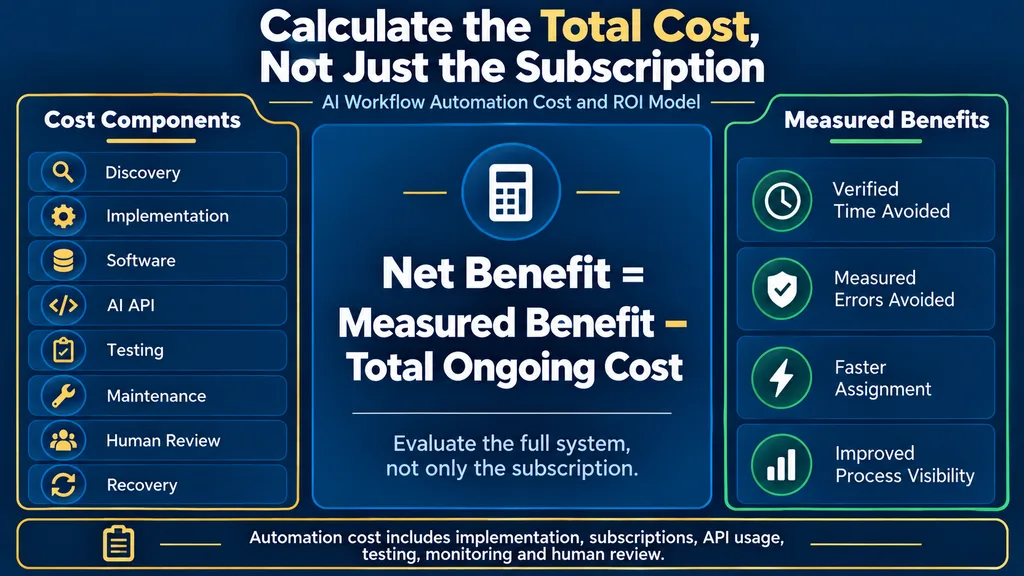
Calculate the total cost using the following components:
- Process discovery and workflow design.
- Platform subscription or self-hosting.
- AI model or API usage.
- Implementation and integration work.
- Testing and security review.
- Staff training and documentation.
- Monitoring and maintenance.
- Incident investigation and recovery.
- Messaging, CRM, email or other connected services.
- Future modifications when business rules change.
Before accepting an automation quotation, ask:
- What is included in the initial price?
- Which third-party costs remain separate?
- Who owns the workflow?
- Who controls the connected accounts?
- How will additional changes be charged?
- Who monitors failed executions?
- What happens when an integration stops working?
- Is technical documentation included?
- Can the workflow be moved to another provider?
- What support is available after delivery?
The Marjan Web Studio pricing page provides a starting point for website and integration planning.
However, a final automation quotation should be based on the actual workflow, selected platforms, expected volume, required permissions, and maintenance responsibilities.
A Transparent Automation ROI Formula
Use a conservative calculation:
Monthly gross benefit = verified manual hours avoided × realistic hourly labor cost + directly measured error cost avoided
Monthly net benefit = monthly gross benefit − recurring workflow cost − ongoing review and maintenance cost
Payback period = initial implementation cost ÷ monthly net benefit
Do not count every automated minute as saved labor.
Include the time spent:
- Reviewing AI output.
- Resolving exceptions.
- Correcting mistakes.
- Monitoring failures.
- Maintaining integrations.
- Updating business rules.
If the monthly net benefit is zero or negative, the automation may still provide a customer-service, consistency, or reliability benefit.
However, it should not be sold as a cost-saving project without evidence.
AI Workflow Automation Risks and Mistakes
| Mistake | Business risk | Required control |
|---|---|---|
| Automating an unclear process | The wrong process runs faster | Standardize and document it first |
| Giving AI excessive authority | Unauthorized or damaging actions | Restrict tools, records and permissions |
| Trusting unvalidated output | Incorrect information reaches customers or systems | Validate fields and escalate exceptions |
| Ignoring duplicate events | Repeated messages or duplicate records | Use a unique event or record identifier |
| Retrying unsafe actions | A failed action is repeated destructively | Define which actions are safe to retry |
| Failing to monitor | Expired connections or changed APIs go unnoticed | Assign alerts, reviews and an owner |
| Sending unnecessary sensitive information | Privacy and security exposure increases | Minimize data and define retention |
| Hiding automation | Customers are misled or cannot reach help | Identify automation and provide human support |
| Claiming guaranteed savings | Decisions rely on invented benefits | Measure the baseline, costs and actual outcomes |
Security and Governance Checklist
- Use separate business accounts instead of personal credentials where possible.
- Enable multifactor authentication.
- Apply least-privilege permissions.
- Keep secrets outside prompts, public code, and screenshots.
- Record who can edit and activate workflows.
- Maintain a current data-flow diagram.
- Define approved AI tasks and prohibited actions.
- Validate inputs and outputs.
- Protect against duplicate processing.
- Set timeouts and limit retries.
- Create alerts and a manual recovery queue.
- Document human approval points.
- Review logs without retaining unnecessary personal information.
- Test backups and workflow export procedures.
- Recheck the system after platform, API, or business-policy changes.
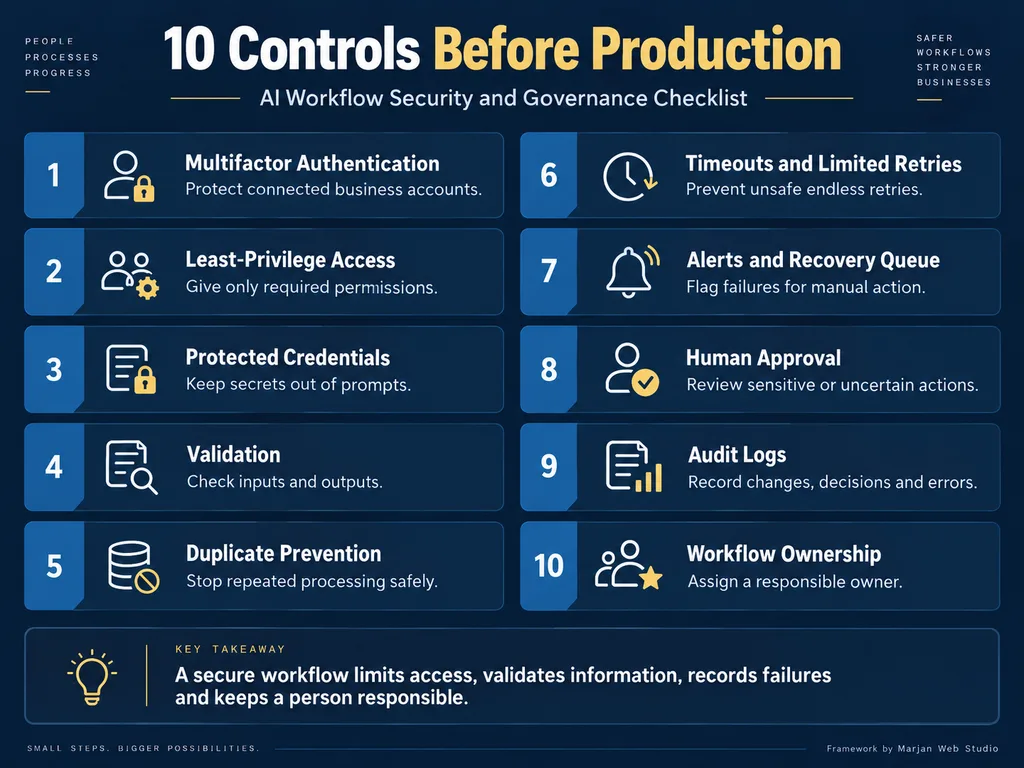
Security hardening does not end after launch.
Workflows connected to a WordPress website should be included in the website’s wider maintenance and monitoring process.
How to Measure AI Workflow Automation Success
Measure success by comparing the same operational indicators before and after the pilot.
These indicators may include:
- Handling time.
- Workflow failures.
- Human corrections.
- Review time.
- Duplicate events.
- Missed records.
- Completed business outcomes.
Start with operational measurements, not publicity metrics.
Baseline Measurements
Before automation, record:
- Monthly task volume.
- Average manual handling time.
- Average response time.
- Existing error rate.
- Missed items.
- Duplicate records.
- Escalation rate.
- Customer complaints.
Pilot Measurements
During the limited pilot, track:
- Successful executions.
- Failed executions.
- Duplicate events.
- AI corrections.
- Human review time.
- Customer complaints.
- Escalated cases.
- Recovery time.
Use the same definitions during the baseline and pilot periods.
Business Measurements
For lead workflows, measure:
- Enquiry acknowledgement time.
- Lead assignment time.
- Qualified lead rate.
- Missed lead rate.
- Completed enquiries.
- Conversion outcomes where reliable tracking exists.
For customer-support workflows, measure:
- Correct resolution.
- Human escalation.
- Reopened cases.
- Response time.
- Customer feedback.
- Incorrect automated answers.
Automation activity itself is not a business result.
Workflow Review Schedule
Check critical alerts immediately.
Review error logs, failed records, and pending cases weekly.
Review costs, permissions, AI instructions, business rules, and platform changes monthly.
Revalidate the complete workflow after any important integration, API, security, or business-policy update.
AI Workflow Automation in Pakistan and Worldwide
The underlying design principles are universal, but implementation context differs.
A Pakistani small business may depend heavily on:
- WordPress.
- WooCommerce.
- WhatsApp.
- Smaller software budgets.
- English, Urdu, or Roman Urdu communication.
- Manual payment verification.
- Local customer-support practices.
A business targeting the United States, United Kingdom, Canada, or Australia may use different CRM systems, consent procedures, messaging providers, payment services, and customer expectations.
Do not create a separate article for every city or country by merely changing place names.
That approach provides little unique value and creates scaled-content and keyword-cannibalization risks.
A regional page is justified only when it contains genuinely different:
- Prices.
- Providers.
- Regulations.
- Payment methods.
- Language requirements.
- Business workflows.
- Customer behavior.
- Case evidence.
For Marjan Web Studio, the strongest position is the connection between a conversion-focused website and the business systems operating behind it.
The service opportunity is not “AI for everything.”
It is helping a business capture, validate, route, measure, and follow up on genuine customer enquiries with appropriate human control.
A 30-Day AI Workflow Automation Plan
Week 1. Process Discovery
Choose one workflow, document its manual steps, establish the performance baseline, and identify sensitive information and high-risk decisions.
Complete the following tasks:
- Identify the workflow owner.
- Document the current process.
- Record manual processing time.
- Identify repeated errors.
- List required information.
- Identify approval requirements.
- Define one measurable outcome.
Week 2. Controlled Development
Connect the minimum required tools, create deterministic rules, add one narrow AI step where justified, and establish a failure queue.
The first version should not receive unnecessary permissions or complete irreversible actions.
Week 3. Testing and Approval Mode
Run normal, unusual, and failure cases.
Keep customer-facing or irreversible actions under human approval.
Correct:
- Field mappings.
- Business rules.
- AI instructions.
- Output formats.
- Confidence thresholds.
- Escalation routes.
- Error notifications.
Week 4. Limited Production Pilot
Activate the workflow for a restricted volume.
Monitor every execution, compare results with the baseline, and document recovery requirements.
Expand the automation only when the collected evidence supports expansion.
Frequently Asked Questions
What Is AI Workflow Automation for Small Business?
AI workflow automation for small business is the use of connected software, business rules, and selected AI capabilities to complete repetitive processes while keeping human control over sensitive, uncertain, or high-impact decisions.
What Should a Small Business Automate First?
Begin with a frequent, stable, low-risk, and measurable process.
Website lead capture, internal notifications, appointment reminders, and structured data entry are generally better starting points than autonomous financial or customer decisions.
Which Business Tasks Should Never Be Fully Automated?
Tasks involving payments, refunds, contracts, medical or legal judgment, employee dismissal, sensitive customer complaints, or irreversible actions should not be fully automated without appropriate human review.
How Do I Know Whether a Workflow Is Ready for AI?
A workflow is ready for evaluation when its trigger, required information, business rules, expected output, failure behavior, responsible owner, and human approval points can be clearly documented and tested.
AI should be added only when it improves a defined task that ordinary rules cannot handle adequately.
Does AI Workflow Automation Require Coding?
Not always.
No-code and low-code platforms can build many workflows.
Coding or technical support may still be required for custom APIs, complex security requirements, self-hosting, advanced error handling, or high-volume systems.
What Is the Difference Between Automation and an AI Agent?
Automation follows predefined steps and conditions.
An AI agent may interpret a broader goal and choose actions with greater autonomy.
Agents can address less predictable tasks but introduce greater uncertainty, security risk, and supervision requirements.
Can AI Automate WhatsApp Enquiries?
Yes, when the selected provider, WhatsApp Business Platform rules, approved templates, consent process, and business workflow permit it.
Click-to-chat integration and automated WhatsApp messaging are different implementations.
How Much Does a Small-Business AI Workflow Cost?
Cost depends on process discovery, platform fees, API usage, connected services, implementation complexity, testing, security, maintenance, and support.
Compare quotations using the same defined workflow and expected volume rather than relying on one universal average.
Can AI Workflow Automation Make Mistakes?
Yes.
AI output can be inaccurate, while connected applications and APIs can also fail.
Production workflows need validation, restricted permissions, human escalation, logs, alerts, and recovery procedures.
Which Is Better for Small Businesses: Zapier, Make, or n8n?
The answer depends on required integrations, workflow complexity, technical ability, maintenance capacity, hosting requirements, and total cost.
Test the intended workflow and review current official documentation before selecting a platform.
How Can a Business Calculate Automation ROI?
Measure the verified time and error costs avoided.
Subtract software, API, human review, and maintenance costs.
Include exception handling and review time rather than treating every automated minute as a financial saving.
Will AI Automation Improve Google Rankings?
Not directly.
A workflow may improve operations, lead handling, or content processes, but Google does not guarantee rankings because a business uses AI.
Search visibility still depends on useful content, technical eligibility, relevance, originality, quality, and numerous other signals.
Final Decision
AI workflow automation is valuable when it solves a defined operational problem with clear boundaries and measurable outcomes.
It becomes dangerous or wasteful when a small business purchases a tool before understanding the process, gives AI authority it cannot safely exercise, or ignores failures and maintenance.
Start with one boring but expensive administrative bottleneck.
Map it. Measure it. Automate its deterministic steps. Use AI only where interpretation adds value. Keep a person responsible for exceptions and important decisions.
That approach may not produce the most impressive demonstration, but it is far more likely to produce a workflow the business can trust.
If your website receives enquiries but your team still copies leads manually, loses follow-ups, or cannot measure outcomes, Marjan Web Studio can assess the process and define an appropriately scoped website and automation solution.
Review the AI Chatbot and Business Automation Services page or request a project quote.
The recommendation should be based on the actual workflow, not a promise that every business needs AI.
About the Author
Syed Abdul Quddus is the founder of Marjan Web Studio and has more than 13 years of administrative and digital documentation experience.
His work includes website development, structured information systems, technical SEO, digital services, and workflow planning.
This guide separates documented platform capabilities from illustrative examples and does not present untested workflows as client results.