Table of Contents
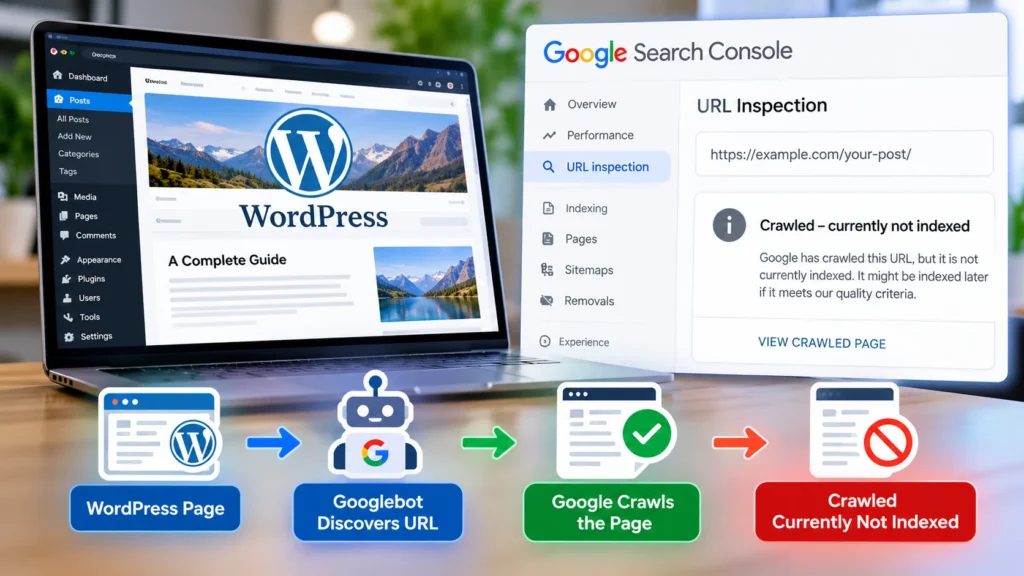
Seeing Crawled Currently Not Indexed WordPress inside Google Search Console can be frustrating, especially when Google has already visited your page but still refuses to show it in search results.
The good news is that this status does not automatically mean your WordPress website is broken.
When Google Search Console reports a URL as Crawled, currently not indexed, Google has successfully discovered and crawled the page, but the URL is not currently included in Google’s search index.
That distinction matters.
Repeatedly clicking Request Indexing is rarely the real solution. The better approach is to determine why Google does not currently consider the page valuable, unique, relevant, technically accessible, or important enough to index.
This guide explains what the status means, why WordPress pages become crawled but not indexed, how to diagnose the actual cause, and how to improve your chances of getting important pages indexed.
If indexing problems affect multiple important pages, a broader technical SEO audit can help identify crawlability, canonical, sitemap and internal architecture problems.
What Does Crawled Currently Not Indexed Mean in WordPress?
Crawled currently not indexed means Googlebot has visited and fetched a URL, but Google has chosen not to add that page to its search index at this time.
Google may reconsider the page later.
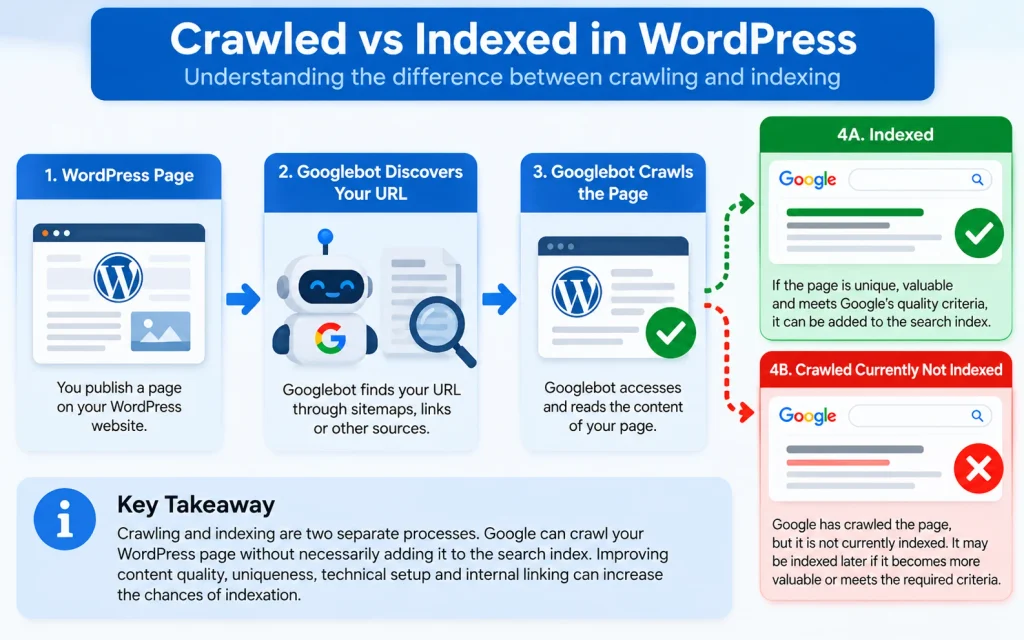
This is different from a page that Google cannot crawl.
For example, a URL blocked by robots.txt, unavailable because of a server error, or inaccessible to Googlebot has a crawling problem. A WordPress page crawled but not indexed, however, has already passed the basic crawling stage.
Google’s own documentation explains that crawling and indexing are separate processes and that a page may be crawled without ultimately appearing in search results.
In practical terms:
Crawled means Google accessed the URL.
Not indexed means Google is not currently storing that page as an eligible search result.
That is why fixing the problem usually requires more than simply asking Google to crawl the page again.
Why Is My WordPress Page Crawled but Not Indexed?
There is no single cause.
A WordPress page may be technically accessible while still failing Google’s indexing selection process.
Common causes include:
- Thin or low-value content.
- Content that is too similar to another page.
- Weak search intent satisfaction.
- Poor internal linking.
- Incorrect canonical signals.
- Soft 404 characteristics.
- Weak site architecture.
- JavaScript rendering problems.
- Duplicate archive or taxonomy pages.
- Low differentiation from competing pages.
- Pages Google does not consider important enough to index.
The most useful question is therefore not:
“Why has Google not indexed my page?”
A better question is:
“What unique value does this URL provide that makes it worth adding to Google’s index?”
That shift in thinking usually leads to much better SEO decisions.
Crawled Currently Not Indexed vs Discovered Currently Not Indexed
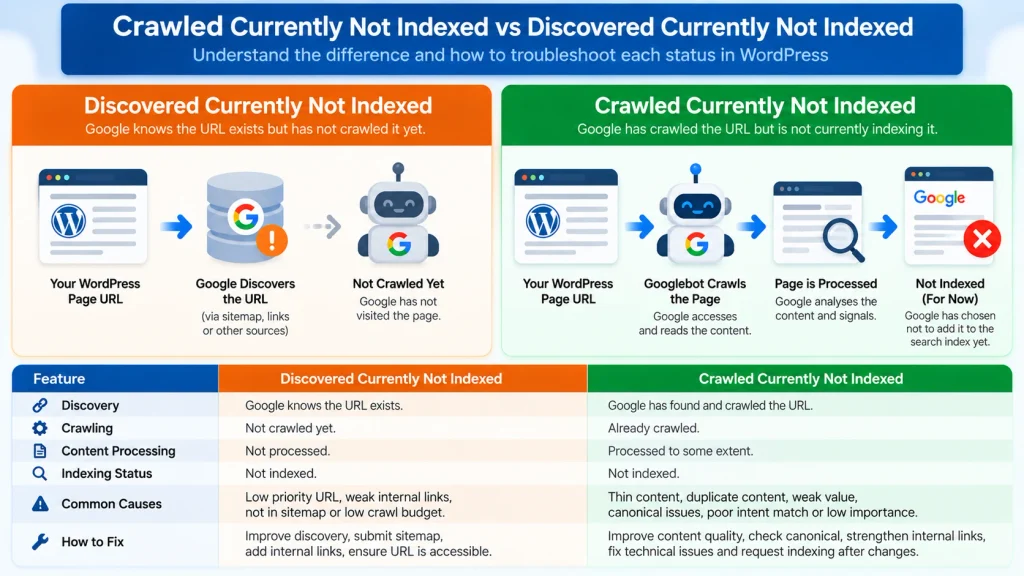
These two Search Console statuses are often confused.
Crawled Currently Not Indexed
Google has:
- Found the URL.
- Crawled the URL.
- Processed it to some extent.
- Decided not to index it currently.
Discovered Currently Not Indexed
- Google knows the URL exists but has not yet crawled it.
- The troubleshooting process is therefore different.
- If Google has discovered a page but not crawled it, crawl discovery, server capacity, site architecture, or crawl prioritization may deserve attention.
- If Google has already crawled the page, improving the page itself and its relationship with the rest of the website becomes much more important.
1. Inspect the Exact URL in Google Search Console
Start with evidence rather than assumptions.
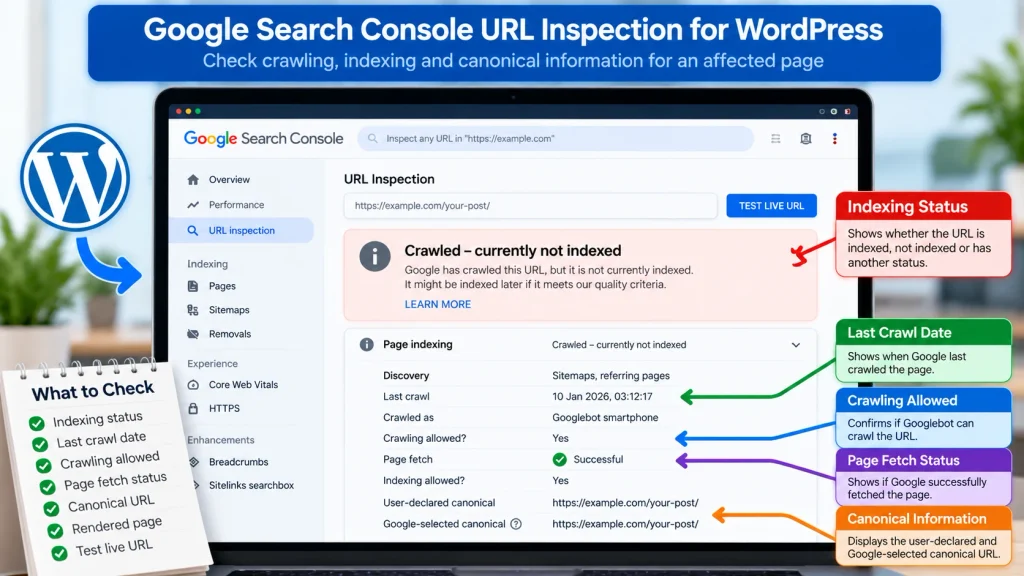
Open Google Search Console and use URL Inspection for the affected WordPress page.
Review:
- Indexing status.
- Last crawl date.
- Crawling allowed status.
- Page fetch status.
- User-declared canonical.
- Google-selected canonical.
- Referring pages where available.
- Sitemap discovery.
- Rendered page information.
Then use Test Live URL.
A live test can reveal whether Google can currently access and render the page.
This is especially important when the website uses caching systems, JavaScript, security plugins, Cloudflare rules, or dynamic WordPress functionality.
2. Make Sure the Page Returns HTTP 200
An indexable page should normally return a successful HTTP response.
For an ordinary WordPress article or service page that you want indexed, confirm that the URL returns:
200 OK
Avoid situations where the page appears normal in a browser but actually produces an incorrect server response.
Check for:
- 404 errors.
- Soft 404 behavior.
- 5xx server errors.
- Redirect chains.
- Redirect loops.
- Temporary redirects being used unnecessarily.
Google’s technical requirements state that pages intended for indexing need accessible, indexable content and an appropriate successful response.
3. Check for Accidental Noindex Settings
WordPress websites can unintentionally prevent indexing.
Check the page source and SEO plugin settings for:
noindex- Also inspect:
- WordPress Reading settings.
- Rank Math settings.
- Yoast settings.
- Custom robots directives.
- Theme-level SEO controls.
- Plugin-generated meta robots tags.
- A common mistake is fixing content repeatedly while the page is still explicitly telling search engines not to index it.
- If the page is important and should appear in Google, its indexing directives must support that goal.
4. Check the Canonical URL
Canonical problems can make a perfectly good page appear excluded.
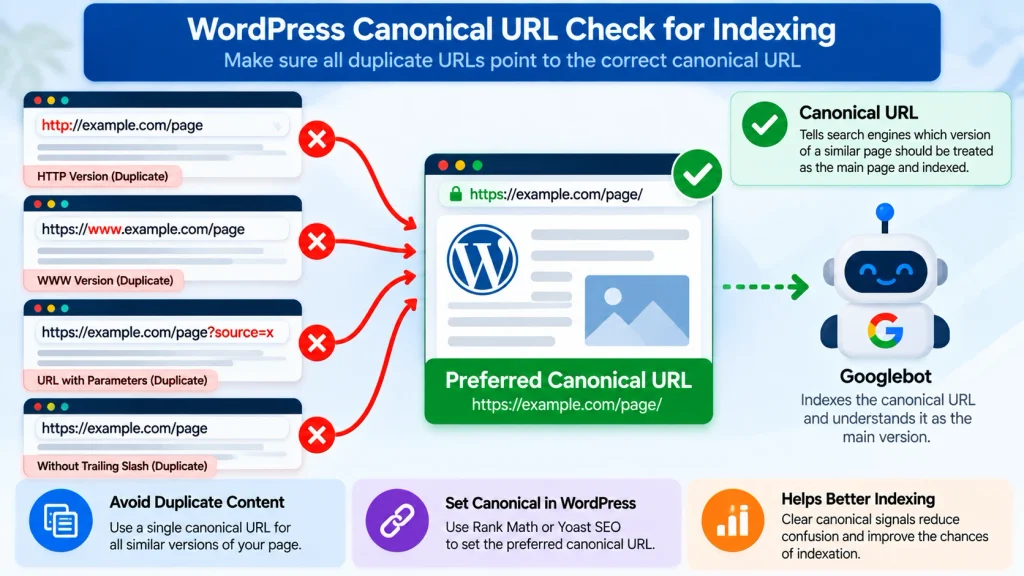
Inspect both:
User declared canonical
and
Google selected canonical
If your WordPress page points to another URL as canonical, Google may reasonably decide that the other URL should represent the content.
Common WordPress canonical conflicts can occur between:
- HTTP and HTTPS.
- www and non-www versions.
- URLs with parameters.
- Category archives.
- Tag archives.
- Pagination.
- Duplicate landing pages.
- Old and new slugs.
- Trailing slash variations.
- HTTP and HTTPS issues should usually be standardized across the site.
Do not change canonical tags simply because a page is not indexed. First determine whether the canonical is actually wrong.
Canonical tags should work together with internal links, redirects and XML sitemaps. Our Technical SEO Guide 2026 explains these relationships in more detail.
5. Improve Thin or Generic Content
One of the most important checks is content value.
A page can contain grammatically correct text and still offer very little reason for Google to index it.
Ask:
- Does this page solve a specific problem?
- Does it answer the main search intent quickly?
- Does it provide information beyond what dozens of existing pages already say?
- Does it contain examples?
- Does it explain the process clearly?
- Does it address common mistakes?
- Does it provide actionable steps?
- Does it demonstrate experience or expertise?
- Would a user need another Google search immediately after reading it?
Google recommends creating content primarily for people, with substantial, useful, and trustworthy information rather than pages created mainly to attract search traffic.
Weak example
A 500-word article that defines website maintenance and repeats the same definition several times.
Stronger example
An article that explains:
- What website maintenance includes.
- How often maintenance should be performed.
- Typical problems caused by neglect.
- WordPress-specific maintenance tasks.
- Security considerations.
- Backup procedures.
- Performance checks.
- Estimated costs.
- A practical checklist.
- Real scenarios.
- Frequently asked questions.
- The second page gives search engines significantly more context and gives users significantly more value.
6. Check for Duplicate and Near Duplicate WordPress Pages
Duplicate content does not always mean someone copied your article.
WordPress itself can create substantial URL overlap.
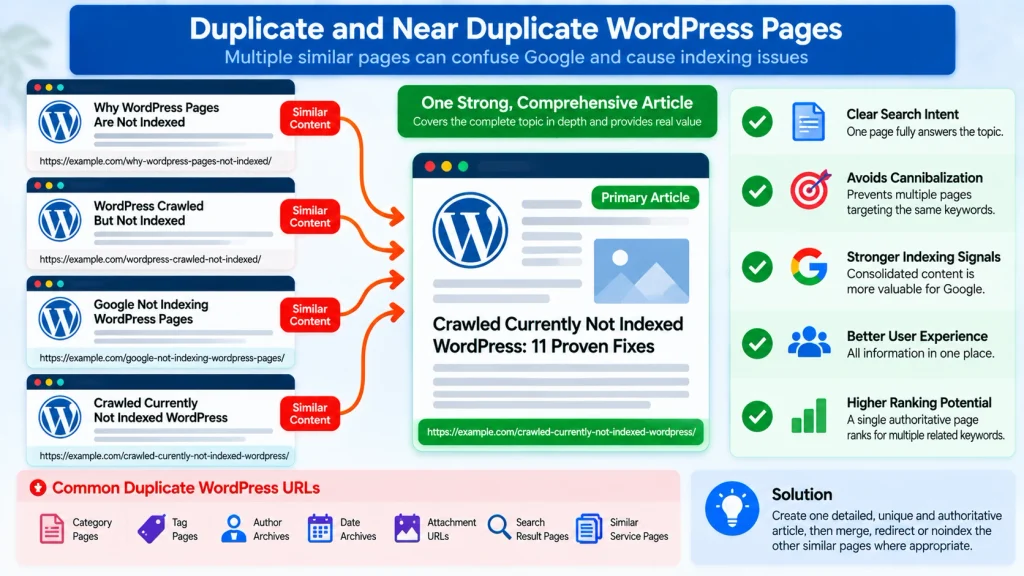
Examples include:
- Category pages.
- Tag archives.
- Author archives.
- Date archives.
- Attachment URLs.
- Pagination.
- Search result pages.
- Duplicate service pages.
- Very similar blog posts.
- Printer-friendly pages.
- Parameter-based URLs.
- HTTP variations.
- Multiple URLs targeting the same query.
- Suppose you have these articles:
- “How to Fix WordPress Pages Not Indexed”
- “Why WordPress Pages Are Not Indexed”
- “WordPress Crawled But Not Indexed Fix”
- “Crawled Currently Not Indexed WordPress”
- If all four pages solve essentially the same problem, creating four URLs may weaken the overall topic instead of strengthening it.
- Consider consolidating overlapping content into one authoritative resource.
One strong page should normally own one dominant search intent.
A clear keyword to page map should ideally be planned before publishing multiple related URLs. Use this website planning checklist to organize search intent, URLs and content architecture before creating new pages.
7. Strengthen Internal Links to the Page
Internal links help both users and search engines understand which pages matter.
An isolated article with almost no internal links can appear less important within your website architecture.
Link to the affected page from relevant existing content.
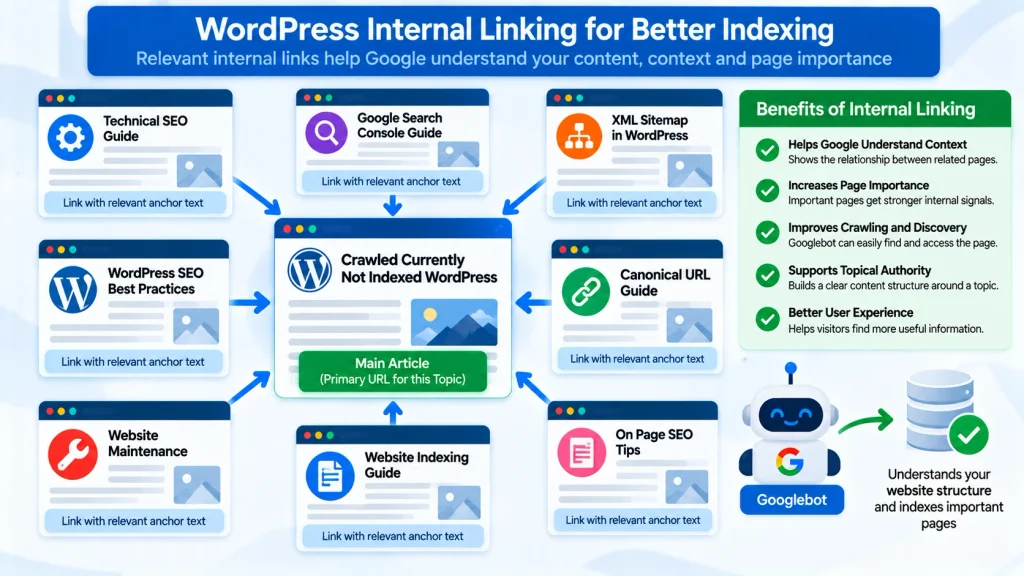
For example, an article about Crawled Currently Not Indexed WordPress could naturally receive contextual links from pages discussing:
- Technical SEO.
- Google Search Console.
- WordPress SEO.
- XML sitemaps.
- Website indexing.
- SEO audits.
- Canonical URLs.
- Website maintenance.
- Do not add dozens of artificial links.
- A few highly relevant contextual links are more useful than placing the same anchor text everywhere.
- Also make sure important pages are reasonably accessible through your navigation or content hierarchy.
8. Improve Search Intent Satisfaction
A page can be technically excellent and still target the wrong intent.
Imagine somebody searches:
how to fix crawled currently not indexed WordPress
They probably want:
- What the error means.
- Why it happens.
- How to diagnose it.
- Step-by-step fixes.
- Search Console instructions.
- WordPress-specific causes.
- What not to do.
- How long recovery may take.
- If your article spends most of its time explaining general SEO history, it does not satisfy that query efficiently.
- Place the direct answer near the beginning.
- Then provide depth.
- This structure helps traditional search users and also makes the page easier for answer engines and generative search systems to interpret.
9. Make Sure Google Can Render the Main Content
Some WordPress websites depend heavily on JavaScript.
Google can process JavaScript, but rendering problems can still prevent Google from seeing the same meaningful content that users see.
In Search Console:
- Use URL Inspection.
- Run Test Live URL.
- Open the tested page information.
- Review the rendered screenshot where available.
- Check whether the primary content appears correctly.
- If Google receives an almost empty page before scripts load, investigate:
- JavaScript errors.
- Theme problems.
- Optimization plugins.
- Lazy loading configurations.
- CDN settings.
- Firewall restrictions.
- Caching problems.
- Script delays.
- Broken API requests.
The important question is simple:
Can Googlebot actually see the useful content you expect it to evaluate?
10. Improve Topical Context Around the Page
A single isolated article may be harder for a website to establish authority around than a logically connected topical cluster.
For example, a technical SEO website could build a coherent indexing cluster containing resources about:
- Google indexing.
- Crawling.
- Google Search Console.
- XML sitemaps.
- Canonicalization.
- Robots directives.
- Internal linking.
- Duplicate content.
- Technical SEO audits.
- WordPress indexing problems.
- Each article should have a distinct search intent.
- They should support each other through useful internal links.
- This creates stronger topical relationships without publishing near-duplicate content.
11. Request Indexing Only After Meaningful Improvements
After correcting genuine issues, use Google Search Console’s Request Indexing option for important URLs.
Do not repeatedly submit the same unchanged page.
Google states that requesting another crawl does not guarantee indexing, and repeatedly requesting the same URL does not make crawling happen faster.
A better workflow is:
- Audit.
- Fix.
- Improve.
- Test.
- Request indexing.
- Monitor.
- Allow Google time to reassess the URL.
Should You Keep Every Crawled but Not Indexed Page?
No.
- This is one of the most overlooked SEO decisions.
- Not every WordPress URL deserves indexation.
- Some URLs may have little standalone search value.
- Examples can include:
- Thin tag archives.
- Empty category pages.
- Internal search results.
- Duplicate attachment pages.
- Temporary pages.
- Near-duplicate templates.
- Obsolete content.
- Low-value utility URLs.
Ask whether each URL genuinely deserves to appear as an independent Google search result.
If the answer is no, forcing indexation is not necessarily beneficial.
Depending on the situation, you may:
- Improve the page.
- Merge it with a stronger page.
- Redirect an obsolete URL.
- Use an appropriate noindex directive.
- Remove genuinely unnecessary content.
- Keep the page accessible without targeting Google Search.
- The right solution depends on the page’s purpose.
Does Request Indexing Fix Crawled Currently Not Indexed?
Not by itself.
Request Indexing tells Google that you would like the URL recrawled.
It does not force Google to include the page in its index.
If the underlying problem is duplicate content, weak value, incorrect canonicalization, or poor intent satisfaction, submitting the same page repeatedly does not solve the underlying issue.
Improve the page first.
Then request another crawl when there is something meaningful for Google to reevaluate.
How Long Does Crawled Currently Not Indexed Take to Fix?
There is no universal timeline.
Google does not provide a guaranteed indexing schedule.
A changed page may be revisited within days, but other URLs can take considerably longer.
Factors may include:
Website quality.
Page importance.
Internal linking.
Crawl frequency.
Content usefulness.
Site architecture.
Technical accessibility.
How substantial the update was.
Do not treat indexation as a fixed timer.
Track the page over time using URL Inspection and the Page Indexing report.
Should You Resubmit Your Sitemap?
Your XML sitemap should contain canonical URLs that you actually want search engines to discover and index.
If an important URL is missing from your sitemap, fix that.
If it is already included correctly, continually resubmitting the same sitemap is unlikely to solve a content quality or duplication problem.
Think of a sitemap primarily as a discovery signal, not an indexing guarantee.
Can Internal Links Help a Crawled but Not Indexed Page?
Yes, especially when the page is important but poorly connected to the rest of the website.
Relevant internal links can help communicate:
Page relationships.
Topic hierarchy.
Context.
Relative importance.
Discovery paths.
Use descriptive anchors naturally.
Instead of repeatedly writing:
“click here”
a contextual link such as:
“technical SEO audit”
or
“Google indexing problems”
provides more meaning when it accurately describes the destination.
Avoid manipulating anchors through excessive repetition.
Is Crawled Currently Not Indexed Always an SEO Problem?
No.
Some URLs should not necessarily be indexed.
Google may crawl files, feeds, archives, and other URLs that were never intended to become independent search results.
The real goal is not:
Get every URL indexed.
The better goal is:
Make every strategically important page technically accessible, unique, useful, and worthy of indexation.
A website with 100 valuable indexed pages can be healthier than a website trying to force thousands of weak URLs into Google’s index.
A Practical WordPress Indexing Checklist
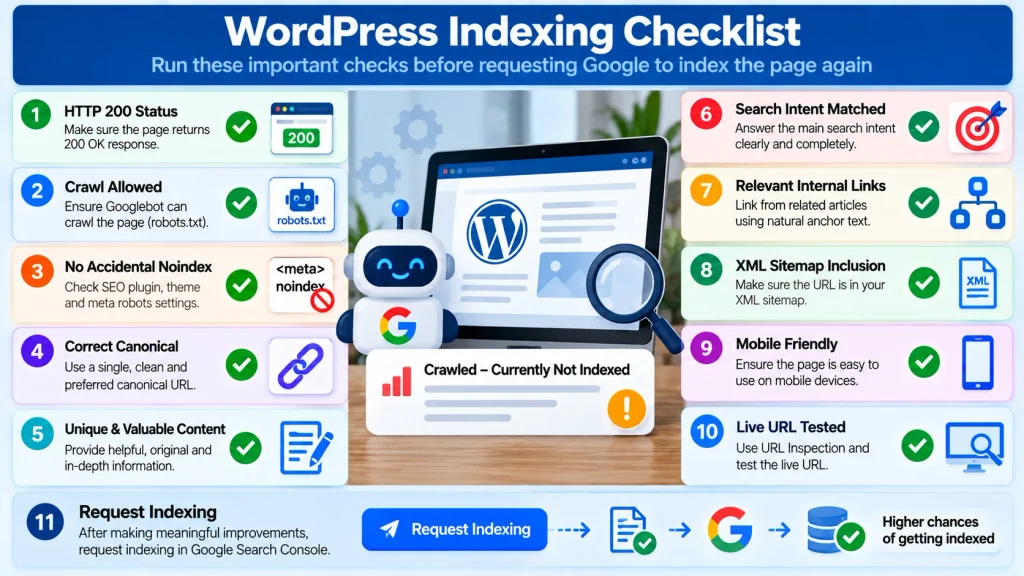
Before requesting indexing again, check the following:
- The page returns HTTP 200.
- Googlebot is allowed to crawl it.
- The page does not contain an accidental noindex directive.
- The canonical URL is correct.
- Google can render the main content.
- The content solves a clear search intent.
- The page contains substantial original value.
- The article is not substantially duplicated elsewhere.
- Relevant internal pages link to it.
- The URL appears in the appropriate XML sitemap.
- The page is useful on mobile devices.
- Important content is easy to access.
- Headings accurately describe the content.
- The page has a clear title.
- Images have descriptive context where useful.
- The page is not overloaded with intrusive elements.
- Related articles do not compete for the same dominant intent.
- Outdated or redundant content has been consolidated where appropriate.
- The live URL passes inspection.
- You have made meaningful improvements before requesting another crawl.
How to Prevent Crawled Not Indexed Problems in WordPress
Prevention is more efficient than repeatedly repairing indexing problems.
Build your content strategy around clear URL ownership.
Before publishing a new article, ask:
- Does another page already answer this question?
- Is the search intent genuinely different?
- What unique information does this article provide?
- Which existing pages should link to it?
- Where does it belong within the site’s topical structure?
- Does the page deserve an independent place in search results?
This approach reduces:
- Keyword cannibalization.
- Near-duplicate articles.
- Thin content.
- Index bloat.
- Conflicting canonical signals.
- Unnecessary archive URLs.
- Weak topical architecture.
- Publishing fewer but more useful URLs is often better than continuously producing overlapping content.
Crawled Currently Not Indexed WordPress: Final Takeaway
If Google Search Console shows Crawled Currently Not Indexed WordPress, do not assume that repeatedly requesting indexing will solve the problem.
Google has already crawled the URL.
Your job is to determine why the page has not earned or retained a place in Google’s index.
Start by checking technical accessibility, HTTP status, robots directives, canonicalization, and rendering.
Then evaluate the harder questions:
- Is the page genuinely useful?
- Is it substantially different from existing pages?
- Does it solve the searcher’s problem completely?
- Is it strongly connected to relevant content on the website?
- Does the page provide enough unique value to deserve its own search result?
Fixing those issues produces a much stronger long-term strategy than trying to force every URL into Google’s index.
Build pages that users would want to find.
Make those pages easy for search engines to crawl and understand.
Give each important search intent a clear primary URL.
Then allow Google to reassess the improved content.
Frequently Asked Questions
What does Crawled Currently Not Indexed mean in WordPress?
It means Google has crawled the WordPress URL but is not currently including it in the Google index. The page may be indexed later, but indexing is not guaranteed.
Why did Google crawl my page but not index it?
Possible reasons include limited unique value, duplicate or highly similar content, weak internal linking, canonical conflicts, poor search intent satisfaction, or rendering issues. In some cases, no serious technical problem exists.
How do I fix Crawled Currently Not Indexed in WordPress?
Inspect the URL in Search Console, verify HTTP status and indexability, check canonicalization, evaluate rendering, improve content quality and uniqueness, strengthen relevant internal links, and request indexing after meaningful changes.
Is Crawled Currently Not Indexed a WordPress error?
Not necessarily. It is a Google Search Console indexing status rather than a WordPress software error.
Should I keep requesting indexing?
No. Repeated requests do not guarantee faster indexing. Make meaningful improvements first and request indexing when Google has something new to reevaluate.
Can a page become indexed automatically later?
Yes. Google may revisit and reconsider URLs over time. However, there is no guaranteed schedule or guarantee that every crawled page will eventually be indexed.
Does submitting an XML sitemap guarantee indexing?
No. A sitemap helps Google discover important URLs, but inclusion in a sitemap does not guarantee indexing.
Can duplicate content cause WordPress pages not to be indexed?
Highly similar or redundant pages can make it harder to justify indexing every version. Consolidating overlapping content and using clear canonical signals can help create a cleaner site structure.
Does internal linking help indexing?
Relevant internal links can help search engines understand page relationships, hierarchy, and importance. They also make useful content easier for visitors to discover.
How long should I wait after requesting indexing?
There is no fixed indexing period. Monitor the URL using Search Console rather than repeatedly submitting it.
Should all WordPress pages be indexed?
No. Some archives, utility pages, duplicate URLs, and low-value pages may not need to appear independently in search results. Focus on making strategically valuable URLs index-worthy.
What to Do Next
If your WordPress page is showing Crawled Currently Not Indexed, avoid making random changes or repeatedly requesting indexing.
Follow this order:
- Inspect the affected URL in Google Search Console.
- Confirm that the page returns a successful HTTP 200 response.
- Check that crawling and indexing are allowed.
- Verify the canonical URL.
- Compare the page with similar content already published on your website.
- Improve any weak, outdated, duplicated, or generic sections.
- Add relevant internal links from related pages.
- Confirm that the canonical URL appears in your XML sitemap.
- Test the live URL in Google Search Console.
- Request indexing only after meaningful improvements.
- Monitor the URL rather than repeatedly resubmitting it.
The objective is not to force Google to index every URL. The objective is to make each important page useful, technically accessible, clearly differentiated, and valuable enough to deserve its own place in search results.
If multiple important WordPress pages continue to experience crawling, canonicalization or indexing problems, a broader technical SEO review may help identify site-wide issues that cannot be diagnosed from a single URL.