Table of Contents
Search Intent: Commercial investigation with informational purchase support
Content Type: Research-based VPS hosting review and buying guide
Last Fact Check: August 14, 2026
Editorial disclosure: This is a research based review, not a hands on benchmark. Plan specifications, pricing, renewal rates, features and policies were checked against current Hostinger product pages and documentation. No performance benchmark, uptime result or personal testing claim has been invented. Prices and product specifications can change, so verify the final checkout information before purchasing.
Hostinger VPS Review: Quick Verdict
Hostinger VPS is best considered by users who need something ordinary managed hosting deliberately does not provide: substantial control over the server environment.
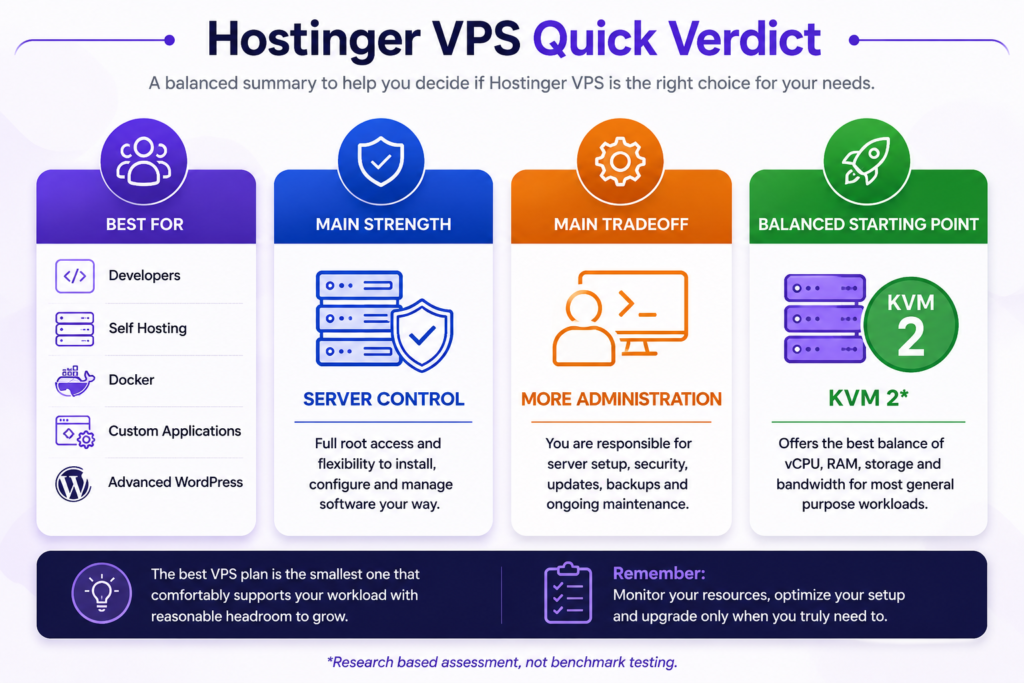
Hostinger currently organizes its main VPS range into four KVM tiers: KVM 1, KVM 2, KVM 4 and KVM 8. Moving upward increases vCPU, RAM, NVMe storage and bandwidth in a predictable progression.
That makes the plans easy to compare. It does not make the buying decision automatic.
For developers, agencies, self-hosting users, application owners and technically capable businesses that need root access, Docker, custom software or greater infrastructure flexibility, Hostinger VPS has a strong feature set.
For someone who simply wants to launch a WordPress blog or business website without managing a server, a managed WordPress or Cloud hosting product may be the better choice.
Research-based recommendation: Based on the currently verified resource allocations, pricing structure, and typical general-purpose VPS requirements, KVM 2 appears to provide the most balanced starting configuration for many users. This is an editorial assessment based on specifications and use case analysis, not a hands-on performance benchmark.
How This Hostinger VPS Review Was Evaluated
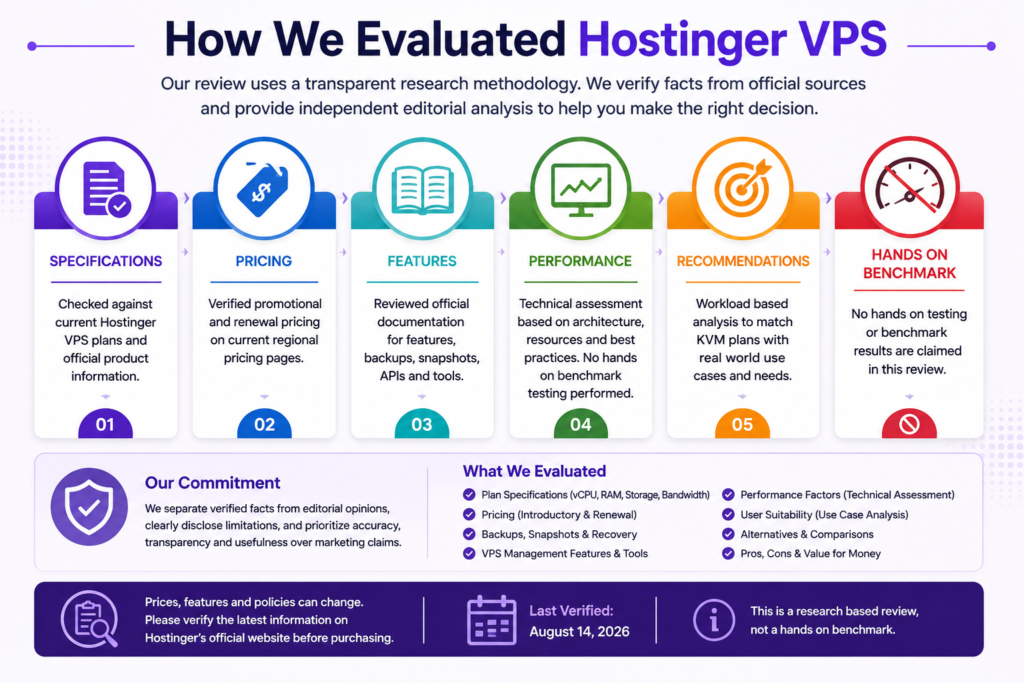
Transparency matters especially for commercial reviews.
This article separates verified product information from editorial interpretation.
| Evaluation Area | Method |
|---|---|
| Plan names | Checked against current Hostinger VPS pages |
| CPU, RAM, storage and bandwidth | Checked against current Hostinger plan specifications |
| Promotional pricing | Checked on current Hostinger regional pricing pages |
| Renewal pricing | Checked against displayed renewal information |
| Backups and snapshots | Checked against Hostinger documentation |
| VPS management features | Checked against current Hostinger documentation and product pages |
| Performance | Architecture and resource based assessment only |
| WordPress suitability | Evaluated from available resources, deployment options and management requirements |
| Beginner suitability | Evaluated from management requirements and available assistance tools |
| Plan recommendations | Editorial judgment based on verified specifications and workload requirements |
| Hands on benchmark | Not performed |
| Customer rating | Not used for the editorial conclusion |
The purpose is to help readers determine whether Hostinger VPS fits their workload, rather than to turn Hostinger’s marketing claims into independent findings.
Hostinger VPS Plans at a Glance
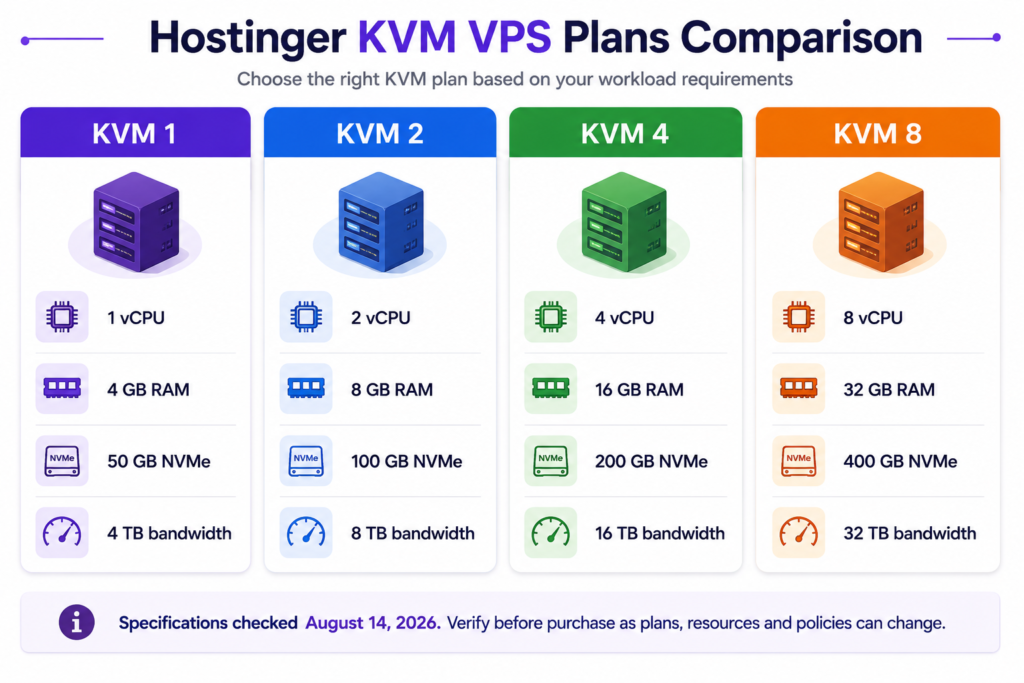
Hostinger currently offers four principal KVM VPS configurations.
| Plan | vCPU | RAM | NVMe Storage | Bandwidth |
|---|---|---|---|---|
| KVM 1 | 1 core | 4 GB | 50 GB | 4 TB |
| KVM 2 | 2 cores | 8 GB | 100 GB | 8 TB |
| KVM 4 | 4 cores | 16 GB | 200 GB | 16 TB |
| KVM 8 | 8 cores | 32 GB | 400 GB | 32 TB |
Specifications checked August 14, 2026. Verify current specifications before purchase because hosting plans can change.
The pattern is unusually easy to understand. Each move up the lineup doubles the four headline resource allocations.
That does not mean every user should buy the largest affordable plan. VPS sizing should begin with the workload.
What Is Hostinger VPS?
A virtual private server provides an isolated virtual environment running on physical server infrastructure.
Traditional shared hosting abstracts much of the underlying server environment. The hosting company typically controls the operating system and many server-level settings while customers manage websites through a simplified interface.
A VPS gives the customer considerably greater administrative freedom.
Hostinger uses KVM, or Kernel-based Virtual Machine, virtualization for its current VPS range.
This allows users to run isolated virtual server environments with allocated resources and greater control over operating systems, software, and server configuration.
That flexibility is the main reason to consider a VPS.
It is also the reason VPS hosting demands more technical responsibility than ordinary managed hosting.
Hostinger VPS vs Shared or Managed Hosting
The most important difference is not simply CPU or RAM.
It is control and responsibility.
| Area | Managed Hosting | Hostinger VPS |
|---|---|---|
| Server administration | Mostly provider-managed | More customer-controlled |
| Root access | Usually unavailable | Available |
| OS control | Limited | Extensive |
| Custom software | Restricted | Flexible |
| Docker and custom stacks | Often restricted | Stronger fit |
| Maintenance complexity | Lower | Higher |
| Security responsibility | More provider managed | Greater customer responsibility |
| Beginner friendliness | Higher | Lower |
| Infrastructure customization | Limited | Major advantage |
A VPS should therefore not be viewed simply as “faster shared hosting.”
It represents a different infrastructure model.
Hostinger KVM 1 vs KVM 2 vs KVM 4 vs KVM 8
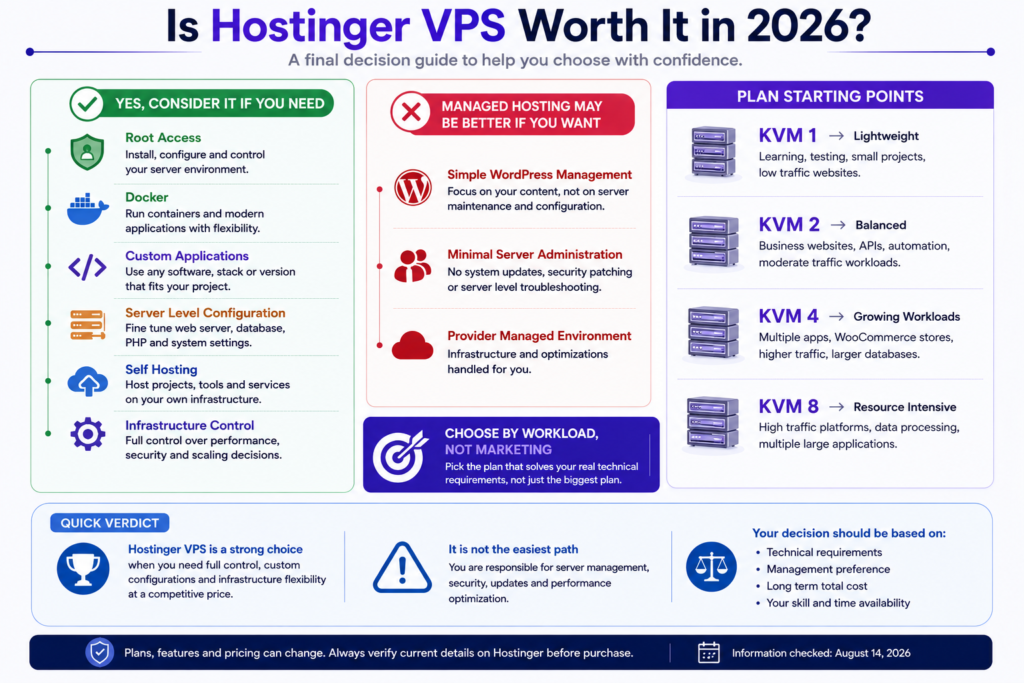
The best Hostinger VPS plan is the smallest configuration that can comfortably support your real workload while leaving sensible operating headroom.
KVM 1
KVM 1 currently provides:
- 1 vCPU core
- 4 GB RAM
- 50 GB NVMe storage
- 4 TB bandwidth
This configuration makes the most sense for lightweight projects, development environments, VPS learning, relatively modest applications and workloads where cost matters more than generous resource headroom.
Its most important constraint is the single vCPU core.
A server can have available memory and still encounter a CPU bottleneck. Dynamic applications, database operations, concurrent requests, and background jobs can all increase processor demand.
Best suited to: lightweight projects, development, experimentation, and modest workloads.
Main limitation: limited CPU concurrency compared with higher tiers.
KVM 2
KVM 2 currently provides:
- 2 vCPU cores
- 8 GB RAM
- 100 GB NVMe storage
- 8 TB bandwidth
This is the configuration that appears most balanced for many general-purpose VPS deployments.
Compared with KVM 1, every headline resource allocation doubles.
The additional CPU core is particularly meaningful because it provides more concurrency rather than merely increasing memory and storage.
Potential uses include:
- Small production applications.
- Several lightweight websites.
- WordPress environments requiring VPS control.
- Development and staging.
- APIs.
- Smaller Docker environments.
- Automation platforms.
- Self-hosted applications.
Best suited to: users who want a general-purpose VPS with more headroom than an entry-level configuration.
Research-based assessment: KVM 2 is the strongest general starting point in the current lineup for many users, based on its resource balance rather than a claimed benchmark advantage.
KVM 4
KVM 4 currently provides:
- 4 vCPU cores
- 16 GB RAM
- 200 GB NVMe storage
- 16 TB bandwidth
This configuration is more relevant when multiple services or heavier workloads make KVM 2 restrictive.
Potential use cases include:
- Multiple active websites.
- Larger container environments.
- More demanding applications.
- Higher concurrency.
- Development infrastructure.
- Business applications.
- More demanding WordPress deployments.
- Ecommerce workloads where server-level control is required.
There is no responsible way to translate these specifications into a universal visitor limit.
Traffic capacity depends on application design, caching, database behavior, PHP or runtime configuration, background processes, page complexity, and many other variables.
Best suited to: growing or multi-application workloads with a genuine need for additional CPU and memory.
KVM 8
KVM 8 currently provides:
- 8 vCPU cores
- 32 GB RAM
- 400 GB NVMe storage
- 32 TB bandwidth
It is the largest of the four standard configurations reviewed here.
The resources make KVM 8 relevant to considerably heavier workloads, but the highest specification does not automatically make it the best plan.
If KVM 2 or KVM 4 comfortably supports your workload, unused KVM 8 resources may simply represent additional cost.
Best suited to: resource-intensive environments where monitoring or credible workload forecasts justify the additional capacity.
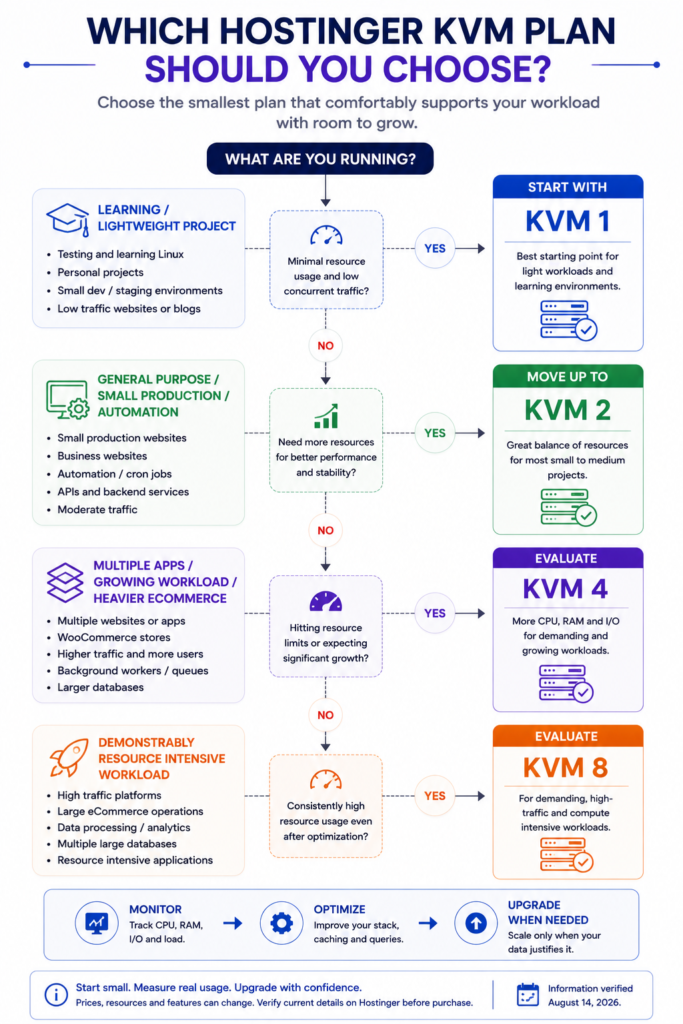
Which Hostinger VPS Plan Should You Choose?
Use this as a starting framework rather than a capacity guarantee.
| Workload | Plan to Evaluate First |
|---|---|
| Learning VPS administration | KVM 1 |
| Lightweight development server | KVM 1 |
| Modest self-hosted application | KVM 1 or KVM 2 |
| General purpose production VPS | KVM 2 |
| Several lightweight websites | KVM 2 |
| Small automation environment | KVM 2 |
| Growing application | KVM 2 or KVM 4 |
| Multiple active applications | KVM 4 |
| More demanding ecommerce workload | KVM 4 after workload assessment |
| Larger container environment | KVM 4 |
| Demonstrably resource intensive workload | KVM 8 |
These are editorial starting points. They are not guaranteed workload limits.
Hostinger VPS Pricing in 2026
Price should be evaluated in two stages:
- What will you pay initially?
- What will the same plan cost when it renews?
The second question is often more important for a production server.
Hostinger VPS Pricing in Pakistan
When checked on August 14, 2026, Hostinger’s Pakistan-facing VPS page displayed:
| Plan | Promotional Price | Listed Renewal Price |
|---|---|---|
| KVM 1 | Rs. 2,099/mo | Rs. 3,399/mo |
| KVM 2 | Rs. 2,699/mo | Rs. 4,099/mo |
| KVM 4 | Rs. 3,699/mo | Rs. 8,099/mo |
| KVM 8 | Rs. 7,399/mo | Rs. 14,799/mo |
Pricing verified August 14, 2026. Hostinger states that plans are paid upfront and the displayed monthly rate reflects the total plan price divided across the selected term. Prices, promotions, taxes, currencies, and renewal terms can change.
The table highlights why promotional pricing should never be evaluated in isolation.
For example, KVM 4 may look particularly attractive during its promotional period, but its listed renewal rate creates a substantially different long-term cost profile.
Hostinger VPS Renewal Price Matters More Than It First Appears
A production server is often a long-term infrastructure decision.
Once applications, databases, DNS, deployment workflows, and business processes depend on a server, moving elsewhere can require planning and technical work.
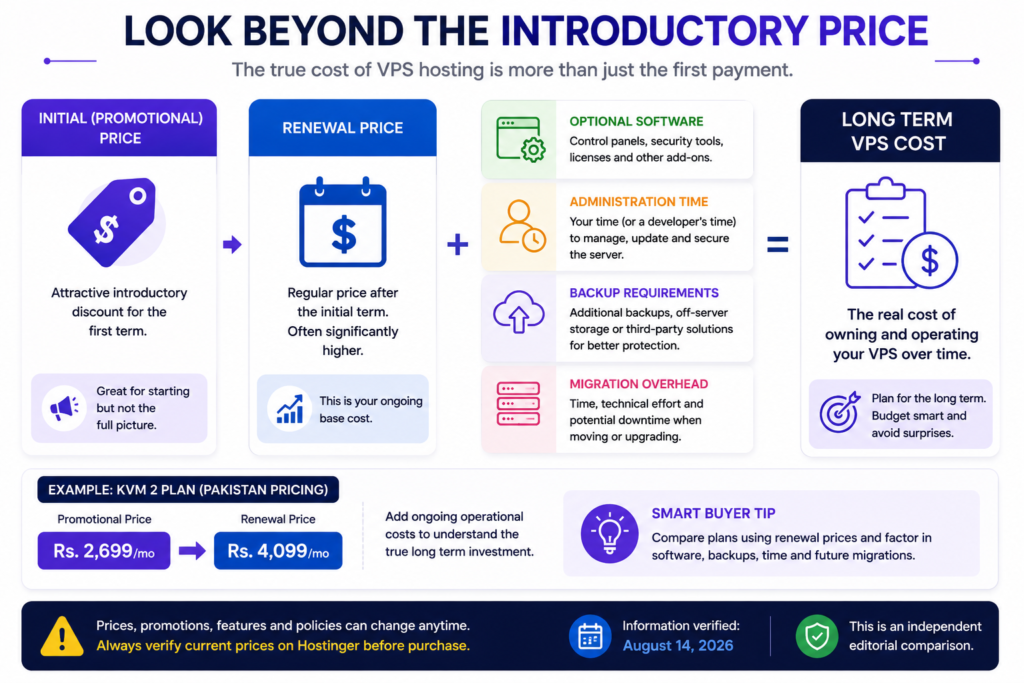
A more useful cost model is therefore:
Long-term VPS cost = initial hosting cost + renewal cost + software licenses + administration time + backup requirements + migration overhead
For businesses, technical administration time can eventually cost more than the server subscription itself.
This is one reason the cheapest introductory VPS is not necessarily the cheapest operational choice.
What Is Included With Hostinger VPS?
Hostinger currently advertises a combination of infrastructure and management features across its VPS platform.
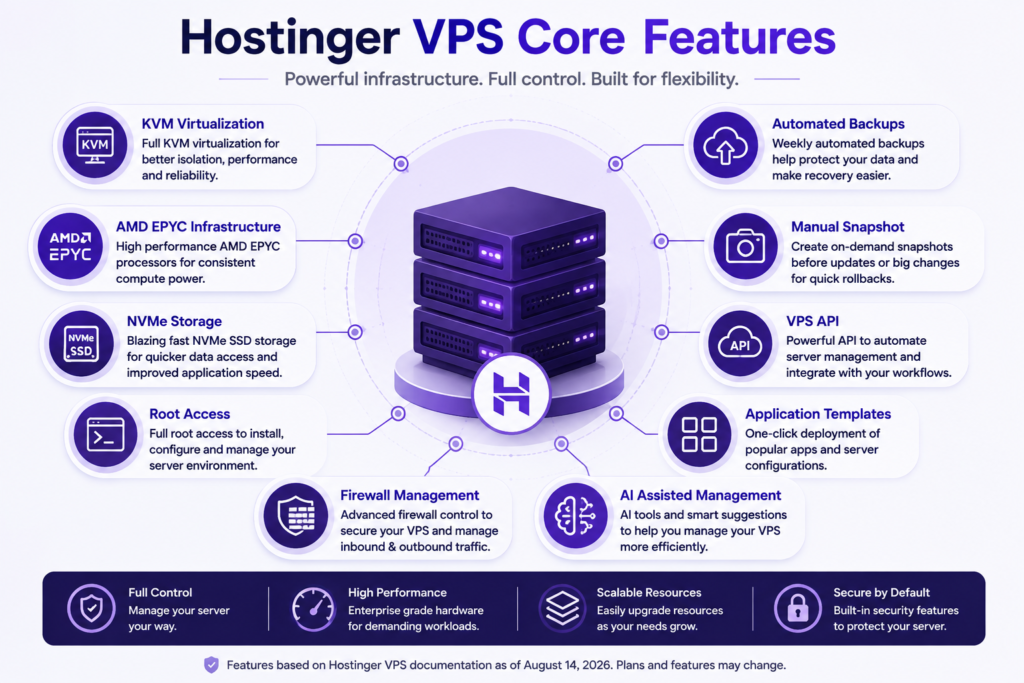
AMD EPYC Processors
Hostinger identifies AMD EPYC processors as part of its VPS infrastructure.
That is a useful hardware specification, but it should not be converted into an unsupported claim that Hostinger is faster than competitors.
Processor family alone cannot establish application performance.
NVMe Storage
The current KVM plans use NVMe storage.
NVMe provides a modern high-performance storage interface, but real application performance also depends on database design, software configuration, caching, and workload characteristics.
1 Gbps Network Speed
Hostinger currently advertises 1 Gbps network speed across its VPS plans.
This describes network capacity rather than guaranteed website speed.
End user performance also depends on application processing, visitor location, routing, CDN use, and page weight.
Root Access
Hostinger VPS provides root-level administrative control.
This is one of the strongest reasons to choose VPS instead of conventional managed hosting because it allows much deeper customization of the server environment.
It also increases the consequences of configuration mistakes.
Firewall Management and DDoS Protection
Hostinger currently advertises firewall management and DDoS-related protection as part of its VPS offering.
These features provide useful infrastructure protections, but they do not remove the administrator’s responsibility to secure the operating system and applications.
VPS API
Hostinger provides a public VPS API that can be used for infrastructure management and automation.
This is particularly useful for developers and organizations building repeatable deployment or server management workflows.
AI-Assisted VPS Management
Hostinger increasingly integrates AI-assisted server management into its VPS platform, including Kodee and browser-based management features.
These tools may make common administrative tasks easier.
They should not be treated as substitutes for understanding the consequences of security-sensitive or destructive server changes.
Hostinger VPS Backups and Snapshots
Hostinger currently provides automated VPS backups and manual snapshots.
Its documentation distinguishes the two.
Backups are designed for scheduled recovery protection, while snapshots provide temporary server state checkpoints that can be useful before configuration changes.
Hostinger’s current documentation states that automated weekly backups are available and that only one manual snapshot can be stored at a time. The documentation also notes that snapshots expire after one day.
That distinction is important.
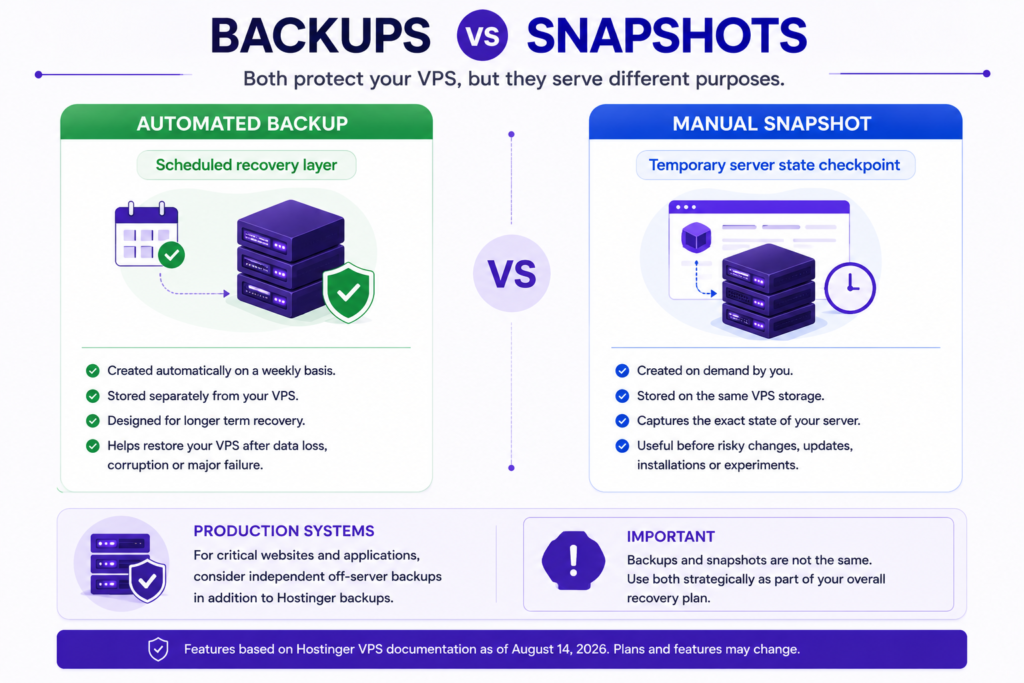
A snapshot is useful before:
- Major configuration changes.
- Operating system-level changes.
- Application deployments.
- Risky package updates.
- Infrastructure experiments.
A snapshot should not automatically be treated as a complete long-term backup strategy.
Think Beyond “Backups Included”
For important production systems, ask two questions.
Recovery Point Objective: How much recent data could the business afford to lose?
Recovery Time Objective: How long could the system remain unavailable?
A weekly backup may be sufficient for a slowly changing website.
It may be inadequate for an e-commerce database receiving frequent orders.
Forbusiness-criticall workloads, consider an independent off-server backup strategy in addition to provider recovery tools.
Hostinger VPS for WordPress
Is Hostinger VPS Good for WordPress?
Yes. WordPress can run on Hostinger VPS, and Hostinger currently offers WordPress among its VPS deployment options.
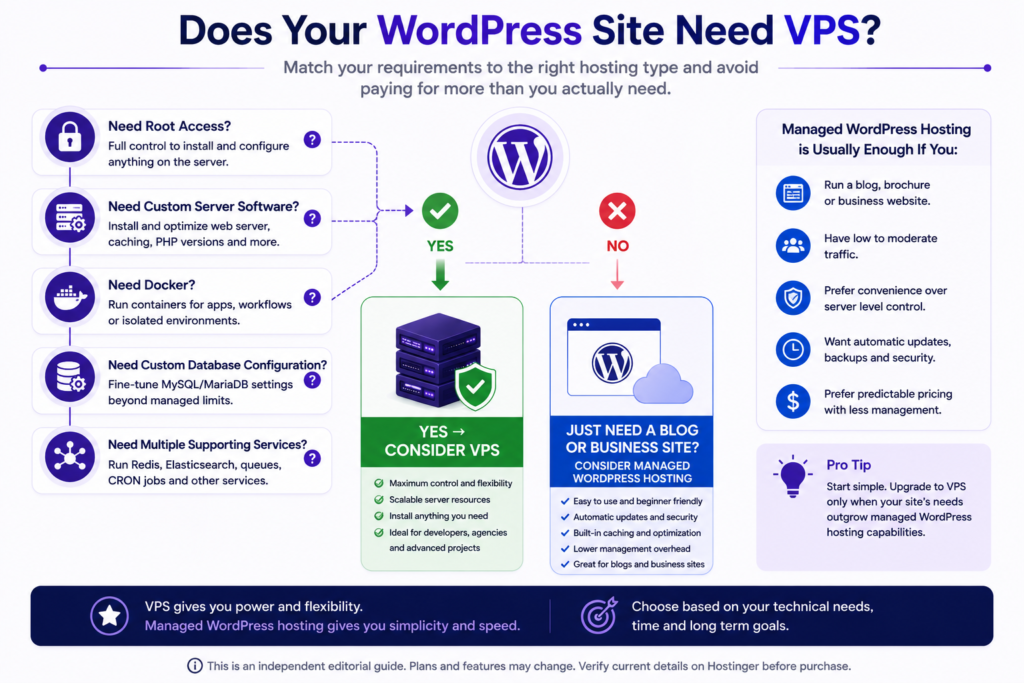
But that does not mean every WordPress website should use a VPS.
A VPS becomes relevant when WordPress requires something conventional managed hosting cannot comfortably provide, such as:
- Root access.
- Custom server software.
- Custom web server configuration.
- Specialized database configuration.
- Containerized infrastructure.
- Multiple supporting services.
- Advanced server-level optimization.
For a normal blog, portfolio, or small business website, managed WordPress hosting can be considerably easier.
WordPress Performance Depends on More Than VPS Size
A larger VPS cannot compensate indefinitely for:
- Inefficient plugins.
- Poor database queries.
- Missing caching.
- Oversized pages.
- Poorly optimized images.
- Excessive background jobs.
- Inefficient application architecture.
Server resources and software optimization should be considered together.
Is Hostinger VPS Good for Beginners?
Hostinger has reduced some of the traditional friction of VPS management through templates, browser-based tools, and AI-assisted management.
Nevertheless, VPS hosting remains more technical than conventional managed hosting.
A beginner should first answer:
Do I want to learn server administration, or do I simply want to publish a website?
If the goal is learning Linux, server configuration, containers, or application deployment, a VPS can provide a valuable environment.
If the goal is simply getting a website online, managed hosting may save considerable time.
VPS users may need to understand:
- Operating system updates.
- SSH security.
- Firewall configuration.
- Application updates.
- Database administration.
- Resource monitoring.
- Backups.
- Recovery.
- Permissions.
- Logs.
Hostinger can simplify some of those tasks. It cannot eliminate the underlying responsibility.
Hostinger VPS Performance
This review does not claim independent Hostinger VPS benchmark results.
No fabricated numbers have been added for:
- Uptime.
- Server response time.
- Load testing.
- CPU benchmarking.
- Database performance.
- Concurrent visitors.
- WordPress speed scores.
What can be verified is the infrastructure Hostinger currently advertises, including KVM virtualization, AMD EPYC processors, NVMe storage, and 1 Gbps network connectivity.
Those specifications create a credible infrastructure foundation.
They do not prove a universal real-world performance result.
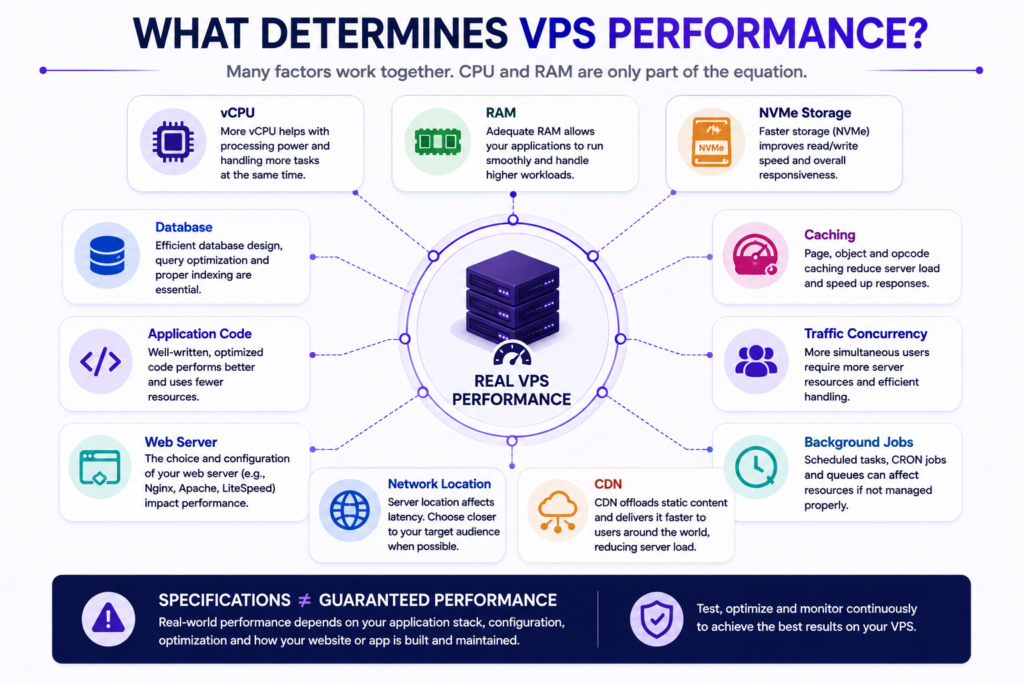
What Determines Actual VPS Performance?
Real performance depends on the interaction between:
- CPU allocation.
- Available memory.
- Storage behavior.
- Database workload.
- Application architecture.
- Web server configuration.
- Caching.
- Runtime configuration.
- Traffic concurrency.
- Background processes.
- Container overhead.
- Network location.
- CDN configuration.
- Software efficiency.
This is why two websites using the same VPS plan can perform very differently.
How to Measure Your VPS After Deployment
Once a VPS is running, measurement becomes more valuable than speculation.
Monitor:
- CPU utilization.
- Load average.
- RAM utilization.
- Swap activity.
- Disk utilization.
- Disk I/O.
- Network traffic.
- Database resource consumption.
- Application response time.
- Error rates.
Look for persistent bottlenecks.
An occasional CPU spike does not automatically justify an upgrade.
Persistent CPU saturation, sustained memory pressure, excessive swapping, or storage constraints are more meaningful signals that optimization or additional resources may be required.
Hostinger VPS for WooCommerce
WooCommerce can create more demanding dynamic workloads than a mostly cached informational website.
A store may repeatedly process:
- Cart actions.
- Checkout requests.
- Account pages.
- Product searches.
- Filters.
- Inventory queries.
- Payment callbacks.
- Database writes.
- Scheduled jobs.
This means VPS sizing should not be based simply on monthly visitor counts.
KVM 2 may suit some smaller VPS-based WooCommerce deployments, while KVM 4 can provide more headroom for heavier workloads.
Neither recommendation is a guaranteed capacity statement.
For revenue-critical e-commerce, server administration, monitoring, backups and recovery planning are at least as important as headline RAM and CPU figures.
Hostinger VPS for Docker and Applications
Hostinger currently offers Docker among its VPS deployment options.
Containerized infrastructure can be particularly useful for:
- Multiple applications.
- Repeatable deployments.
- Development environments.
- Microservices.
- Self-hosted software.
- Automation.
- Testing.
Each container consumes part of the server’s available CPU, memory, storage, and network resources.
A small container stack may fit comfortably on KVM 2, while a larger multi-service deployment may justify KVM 4 or higher.
Resource monitoring should determine when an upgrade is necessary.
Hostinger VPS for n8n and Automation
Automation platforms are another practical VPS use case.
Hostinger currently presents n8n among its VPS deployment options and uses KVM 2 as an example configuration for medium-scale applications.
Real n8n resource requirements can vary according to:
- Workflow volume.
- Execution frequency.
- Concurrent workflows.
- Database activity.
- Data size.
- Execution duration.
- External integrations.
A personal automation server and a business-critical automation platform should not be sized identically.
KVM 2 is therefore a reasonable configuration to evaluate first for moderate automation workloads, not a universal requirement.
Hostinger VPS Security
VPS security follows a simple principle:
Greater administrative control also creates greater administrative responsibility.
A practical baseline includes:
- Keep the operating system and applications patched.
- Use strong authentication and protect SSH access.
- Expose only necessary network services.
- Configure firewall rules deliberately.
- Remove unused software and services.
- Apply least privilege where possible.
- Monitor authentication and system logs.
- Maintain reliable backups and test recovery.
- Protect administrative credentials.
- Periodically review exposed services and server activity.
Security is an ongoing operational process rather than a hosting feature that can be permanently switched on.
Hostinger VPS Data Center Location
Hostinger advertises VPS data centers across multiple global regions.
The appropriate location is normally one close to the primary audience or application users, subject to any technical, legal, or business requirements.
A shorter geographic network path can help reduce latency, but server location is only one performance variable.
For globally distributed audiences, an appropriately configured CDN can complement the origin server.
Choose the location according to the users of the application, not simply according to where the website owner lives.
Hostinger VPS Pros and Cons
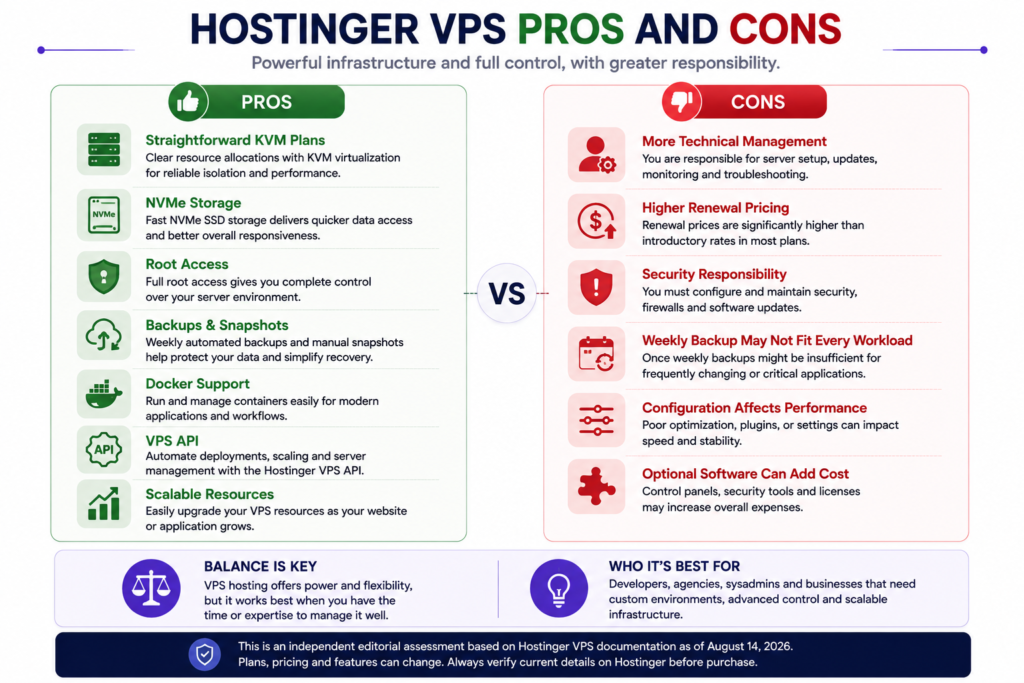
Pros
Simple plan structure
KVM 1 through KVM 8 follow a predictable resource progression.
NVMe storage
NVMe storage is included across the current standard KVM lineup.
AMD EPYC infrastructure
Hostinger currently advertises AMD EPYC-based VPS infrastructure.
Full root access
Advanced users can customize the server environment extensively.
Backups and snapshots
Automated backups and manual snapshots provide useful recovery tools.
Large deployment catalog
Hostinger supports numerous operating systems, applications, and deployment templates.
Docker support
The platform is suitable for containerized workloads.
Public API
Developers can automate parts of VPS infrastructure management. AI-assisted
AI-assisted management
Kodee and related tools can simplify some server management workflows.
Straightforward upgrade path
Users can begin with smaller resources and move to higher tiers as their requirements grow.
Cons
More technical responsibility than managed hosting
Server maintenance becomes a more direct customer responsibility.
Renewal prices are higher than introductory rates
Long-term buyers should calculate renewal cost before committing.
Weekly backups may not satisfy every recovery requirement
Frequently changing applications may require additional backup strategies.
VPS can be unnecessary for ordinary websites
Many WordPress websites do not require root access.
Configuration affects performance
Buying larger specifications does not automatically optimize an application.
Security mistakes have greater consequences.
Root access provides freedom but also makes responsible server administration important.
Optional commercial software may increase total cost
Control panels and other software can carry separate licensing costs depending on the selected configuration.
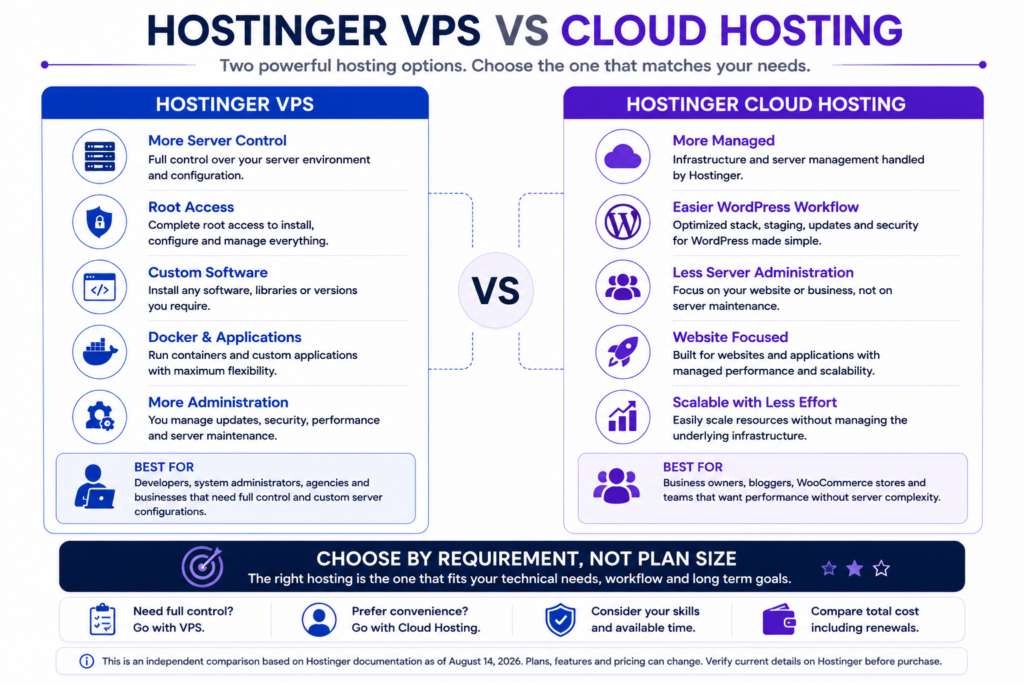
Hostinger VPS vs Hostinger Cloud Hosting
Hostinger VPS and Cloud hosting solve different problems.
| Factor | Hostinger VPS | Hostinger Cloud Hosting |
|---|---|---|
| Server control | High | More managed |
| Root access | Core advantage | Not the primary model |
| Custom server software | Strong flexibility | More restricted |
| WordPress convenience | Requires more administration | Stronger managed experience |
| Docker and custom apps | Better suited | Not primary use case |
| Maintenance responsibility | Higher | Lower |
| Beginner friendliness | Lower | Higher |
| Best suited to | Developers and custom workloads | Websites needing more managed resources |
If your website simply needs more managed resources, Cloud hosting may be easier.
If your current hosting prevents you from installing or configuring something essential, VPS is the more relevant option.
Hostinger VPS vs Managed WordPress Hosting
Choose managed WordPress hosting when your main objective is operating WordPress with minimal server administration.
Choose VPS when your requirements extend to controlling the infrastructure underneath WordPress.
A VPS is therefore not automatically a WordPress upgrade.
It is an infrastructure change that trades simplicity for control.
Is Hostinger VPS Worth It in 2026?
Hostinger VPS is worth considering when the additional control solves a genuine technical requirement.
Hostinger VPS Is Best Suited To
- Developers.
- Self-hosting users.
- Technically capable website owners.
- Agencies with server administration capability.
- Custom application owners.
- Docker users.
- Automation workloads.
- Businesses requiring custom server environments.
Consider Managed Hosting Instead If
- You only need a conventional website.
- You do not need root access.
- You do not want to maintain a server.
- You prefer provider-managed optimization.
- Your current managed hosting already handles the workload comfortably.
Which Plan Offers the Best Balance?
Based on current verified specifications and pricing rather than hands-on benchmark results:
KVM 1 is the economical starting point for learning and lightweight projects.
KVM 2 appears to offer the strongest balance for many general-purpose deployments.
KVM 4 becomes more compelling for growing, multi-application, or more resource-intensive workloads.
KVM 8 makes sense when actual monitoring or credible capacity planning demonstrates the need for significantly more resources.
The correct plan is not necessarily the biggest one.
It is the smallest tier that comfortably handles the workload with reasonable operating headroom.
Hostinger VPS Refund Considerations
Hostinger currently advertises a 30-day money-back guarantee for its VPS plans, subject to its refund policy.
Refund eligibility and exclusions can change and should be checked before purchasing, especially when upgrading or purchasing additional products.
Do not make a buying decision based only on the phrase “30-day money-back guarantee.”
Read the current refund terms that apply to the exact transaction.
How to Choose a Hostinger VPS Plan
Step 1. Define What Will Run on the Server
List every major workload:
- WordPress.
- WooCommerce.
- Docker.
- n8n.
- API.
- Database.
- Multiple websites.
- Custom application.
Step 2. Estimate CPU Demand
Consider application processing and expected concurrency rather than looking only at RAM.
Step 3. Estimate Memory Requirements
Include the operating system, database, application, caching services, and supporting processes.
Leave reasonable headroom.
Step 4. Estimate Storage Growth
Account for:
- Application files.
- Databases.
- Uploads.
- Logs.
- Container images.
- Temporary files.
Step 5. Consider Bandwidth
Estimate traffic and large file delivery requirements.
Step 6. Allow for Reasonable Growth
Do not size only for today’s average usage.
Step 7. Calculate Renewal Cost
Compare long-term cost rather than only the introductory rate.
Step 8. Start With the Smallest Sensible Tier
Overprovisioning wastes money.
Underprovisioning creates avoidable resource pressure.
Step 9. Monitor the Real Workload
Use CPU, memory, disk, and application measurements after deployment.
Step 10. Upgrade When Evidence Supports It
Scale according to actual requirements rather than plan prestige.
Final Verdict
Hostinger’s current VPS lineup has a major advantage: it is easy to understand.
KVM 1, KVM 2, KVM 4 and KVM 8 scale through a predictable progression of CPU, RAM, NVMe storage and bandwidth.
The platform also combines root access, KVM virtualization, AMD EPYC infrastructure, NVMe storage, backups, snapshots, firewall management, a public API, application templates, Docker support and increasingly prominent AI-assisted management features.
That creates a credible VPS option for developers, application owners, self-hosting users and technically capable businesses.
The main reason to choose it, however, should be control.
If you need root access, custom server software, containers, or infrastructure flexibility, Hostinger VPS deserves consideration.
If you simply need a WordPress website without server administration, managed hosting may provide a better overall experience.
Based on current specifications and pricing, KVM 2 is the most balanced general-purpose starting point in our research-based assessment. KVM 1 remains attractive for lighter workloads, KVM 4 provides more meaningful headroom for demanding environments, and KVM 8 should be chosen when the workload actually requires its larger resource allocation.
There is no universally best VPS tier.
The best Hostinger VPS plan is the smallest plan that can reliably support your workload, reasonable growth, and operating headroom at a long-term cost you are comfortable maintaining.
Frequently Asked Questions
Is Hostinger VPS good?
Hostinger VPS is a credible option for users who need root access, custom software, Docker, application hosting, or greater server control. Users who prioritize simplicity over infrastructure control may be better served by managed hosting.
Is Hostinger VPS worth it?
It can be worth it when VPS-level control solves a genuine requirement. It is less compelling when a conventional website already runs comfortably on managed hosting.
Which Hostinger VPS plan is best?
Based on current specifications, KVM 2 appears to offer the best general-purpose balance for many users. KVM 1 is better suited to lightweight workloads, while KVM 4 and KVM 8 target increasingly demanding environments.
Is Hostinger KVM 1 enough?
KVM 1 can be sufficient for lightweight applications, development, learning, and modest workloads. Its single vCPU core makes it less suitable for some concurrent or CPU-intensive workloads.
Is KVM 2 worth choosing over KVM 1?
KVM 2 doubles KVM 1’s current CPU, RAM, storage, and bandwidth allocations. For many production workloads, the additional CPU core and memory provide more useful headroom, although lightweight projects may not need the upgrade.
Is Hostinger VPS good for WordPress?
Yes. WordPress can run on Hostinger VPS. However, users who do not require root access or custom server configuration may find managed WordPress hosting simpler to operate.
Does Hostinger VPS include backups?
Hostinger currently provides automated backups and manual snapshots for its VPS products. Backup frequency and recovery requirements should still be evaluated against the needs of the individual application.
Does Hostinger VPS provide root access?
Yes. Full root access is a central feature of Hostinger’s current VPS offering and enables extensive control over the server environment.
Sources and Verification
Material product claims in this review should be supported by current primary Hostinger sources when published.
Recommended source categories include:
- Official Hostinger VPS pricing and specifications page.
- Hostinger regional VPS pricing page where regional prices are displayed.
- Official Hostinger VPS backup and snapshot documentation.
- Official Hostinger VPS API documentation.
- Official Hostinger refund policy.
- Relevant Hostinger documentation for operating systems, applications, and server management features.
Prices, discounts, specifications, and product features are volatile. Reverify them immediately before publication and whenever the article receives a substantive update.
Recommended Structured Data
Use Article or BlogPosting structured data when it accurately represents the published article.
Where applicable, also use:
- BreadcrumbList.
- Genuine Person information for the real author.
- Genuine Organization information for the publisher.
Do not invent:
- AggregateRating.
- Customer ratings.
- Review counts.
- Product scores.
- Testimonials.
- Author credentials.
Do not add structured data merely to pursue a rich result.
Author and Editorial Transparency
Publish the article with a visible real author byline.
The author profile should contain only genuine information such as:
- Real name.
- Actual role.
- Relevant areas of knowledge or professional work.
- Author profile page.
- Other genuinely relevant published work.
Do not invent certifications, degrees, hosting tests,s or years of experience.
If affiliate links are added, include a clear affiliate disclosure and maintain the same editorial conclusions regardless of commission.
Pre-Publication Verification
Before publishing:
- Recheck KVM 1 specifications.
- Recheck KVM 2 specifications.
- Recheck KVM 4 specifications.
- Recheck KVM 8 specifications.
- Recheck promotional prices.
- Recheck renewal prices.
- Verify the applicable regional pricing page.
- Verify refund terms.
- Verify backup and snapshot rules.
- Verify every external source.
- Confirm all internal URLs actually exist.
- Add genuine product screenshots where available.
- Confirm the real author.
- Add an affiliate disclosure when applicable.
- Do not claim hands-on testing unless it actually occurred.
- Do not invent performance benchmarks.
- Do not fabricate customer ratings.
- Do not change the update date without substantive verification.
Recommended Future Testing Upgrade
The largest remaining opportunity to strengthen this review is genuine hands-on testing.
If Hostinger VPS is later purchased and tested, document the methodology before adding results.
Useful evidence could include:
- Actual plan tested.
- Server location.
- Operating system.
- Deployment configuration.
- Original hPanel screenshots.
- WordPress installation workflow.
- Resource monitoring screenshots.
- Controlled performance measurements.
- Backup creation and restoration observations.
- Snapshot workflow.
- Upgrade workflow.
- Test date.
- Testing limitations.
Keep future test results separate from Hostinger’s own marketing claims.
Until such testing is actually performed, this article should remain explicitly described as a research-based review.
Internal Links:
External Links: