Table of Contents
An AI chatbot can answer questions in seconds. But what happens when someone asks about your business’s actual prices, services, policies, or procedures?
Without access to reliable business information, even an advanced AI model may provide an answer that sounds convincing but is incomplete, outdated, or incorrect.
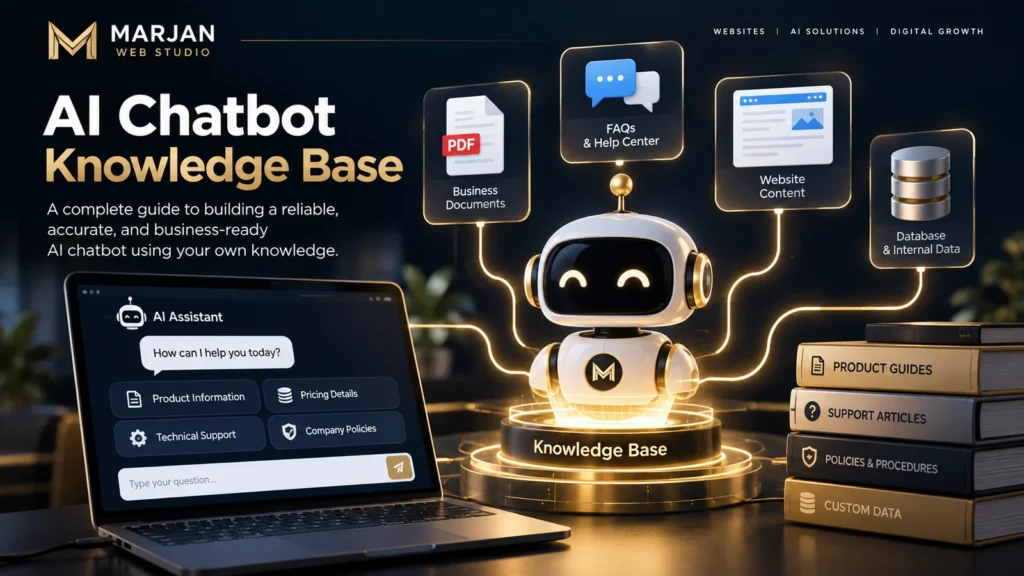
An AI chatbot knowledge base helps solve this problem by connecting an AI assistant to relevant, approved information. Instead of relying entirely on general model knowledge, the chatbot can retrieve content from company documents, FAQs, support articles, product information, and other authorized sources.
However, uploading a few PDFs does not automatically create an accurate chatbot. The underlying information must be organized, searchable, current, and appropriate for the questions users actually ask.
This guide explains how to build an AI chatbot knowledge base in seven practical steps, including content preparation, Retrieval-Augmented Generation (RAG), knowledge integration, accuracy testing, and ongoing maintenance.
By the end, you will understand both how to build an AI chatbot with a custom knowledge base and how to evaluate whether it is ready for real users.
Quick Answer: What Is an AI Chatbot Knowledge Base?
An AI chatbot knowledge base is an organized collection of information that an AI chatbot can search or retrieve when answering questions.
It may contain:
- Frequently asked questions.
- Product and service information.
- Business policies.
- Troubleshooting instructions.
- Support documentation.
- Website content.
- Approved PDF documents.
- Internal manuals, when access is authorized.
A knowledge base chatbot uses these sources to provide answers relevant to a particular organization, product, or subject.
For example, when a visitor asks, “What is your refund policy?”, a properly configured chatbot can retrieve the current refund policy instead of generating an unsupported explanation.
The key principle: A reliable knowledge base chatbot should answer using relevant, authorized information and recognize when it does not have enough evidence.
What Is an AI Chatbot Knowledge Base?
An AI chatbot knowledge base is a structured and maintained information resource designed to support relevant, evidence-based chatbot responses.
Traditional FAQ pages require visitors to browse information manually.
A knowledge base chatbot introduces a conversational interface that helps people find information by asking questions naturally.
Consider a website development company with dozens of pages explaining services, maintenance packages, project requirements, and business procedures.
A visitor might ask:
“Do you provide ongoing support after completing a website?”
Instead of requiring the visitor to navigate several pages, the chatbot can search the company’s approved documentation and summarize the relevant support arrangements.
The chatbot may also identify the source page so the visitor can verify the information.
AI Chatbot Knowledge Base vs Traditional Knowledge Base
| Feature | Traditional Knowledge Base | AI Chatbot Knowledge Base |
|---|---|---|
| User experience | Search or browse articles | Ask conversational questions |
| Information access | Manual navigation | Automated information retrieval |
| Question flexibility | Depends on search functionality | Can interpret natural language |
| Response format | Existing articles and excerpts | Generated answers grounded in sources |
| Source verification | Users open documents | Chatbot may provide source references |
| Main limitation | Users must find information | AI may misinterpret or misstate information |
An AI chatbot does not replace the responsibility to maintain accurate documentation.
It introduces another way to access that documentation.
What Makes a Knowledge Base Useful?
A useful knowledge base should be:
Accurate: Information matches current business practices.
Relevant: Content addresses actual user questions.
Organized: Information is grouped into understandable topics.
Searchable: The retrieval system can find the right information.
Current: Outdated content is reviewed and corrected.
Authorized: Users only receive information they are permitted to access.
Traceable: Important answers can be checked against reliable sources.
These qualities matter more than the number of documents uploaded.
How Does an AI Chatbot Knowledge Base Work?
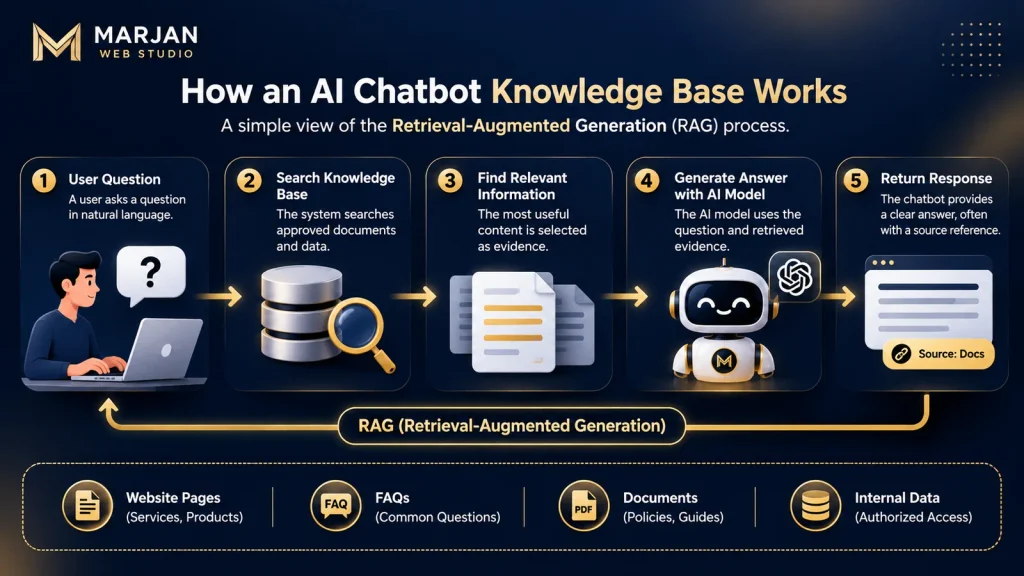
A modern AI knowledge base chatbot often uses Retrieval-Augmented Generation (RAG).
RAG is an approach that combines information retrieval with AI-generated responses.
Instead of depending only on the information learned during model training, the system retrieves relevant material from an external knowledge source before generating an answer.
How RAG Works: A Simple Example
Imagine a customer asks:
“Does your company offer monthly website maintenance?”
The system may follow this process:
- The chatbot receives the customer’s question.
- A retrieval system searches approved business content.
- Relevant maintenance information is identified.
- The AI model receives the question and retrieved information.
- The model prepares an answer based on the available evidence.
- The system applies relevant answer and access rules.
- The chatbot returns the answer, ideally with a source reference.
If no trustworthy information is available, the chatbot should explain the limitation and suggest an appropriate next step.
Understanding the Core Architecture
A typical RAG-based chatbot contains five important elements.
| Component | Responsibility |
|---|---|
| Knowledge sources | Store approved business information |
| Ingestion pipeline | Extract, clean, and prepare documents |
| Search index | Make relevant content retrievable |
| Retrieval system | Find evidence related to user questions |
| Language model | Generate answers using the retrieved context |
Additional components may manage authentication, permissions, monitoring, and user interactions.
What Are Embeddings and Vector Databases?
An embedding is a numerical representation of information that helps systems compare semantic meaning.
For example:
“How much does website maintenance cost?”
and
“What is your monthly website support fee?”
may be semantically similar even though they contain different words.
A vector database or vector search index can help locate relevant content using these similarities.
However, semantic similarity alone is not enough.
For exact product codes, policy numbers, or technical identifiers, keyword search may be more reliable.
Many applications therefore benefit from a combination of semantic and keyword retrieval.
The OpenAI Retrieval documentation explains how vector stores and semantic search can support knowledge retrieval.
How to Build an AI Chatbot Knowledge Base in 7 Steps
Building a custom knowledge base requires more than choosing an AI model.
The following framework prioritizes reliable information, relevant search results, and maintainability.
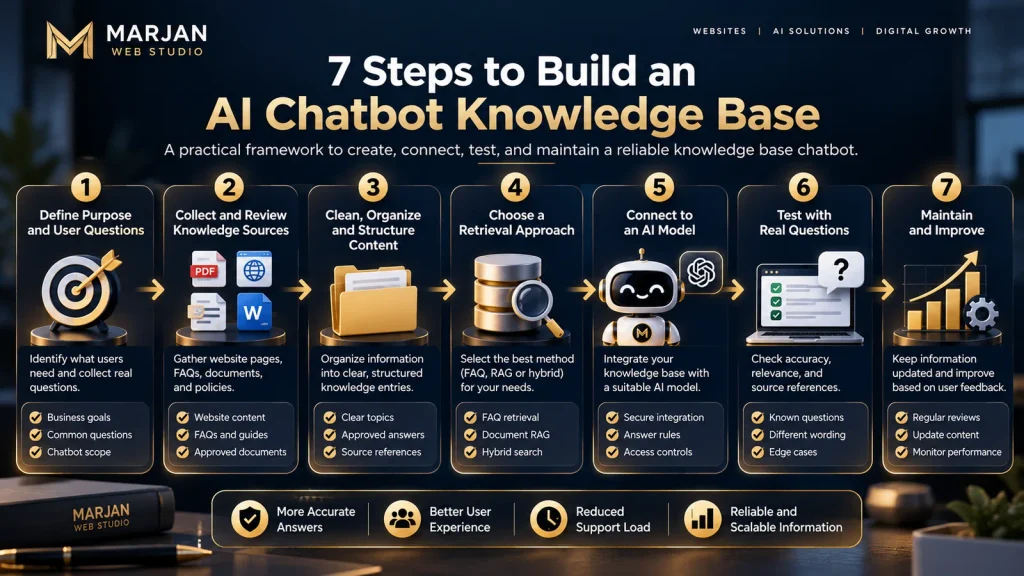
Step 1: Define the Purpose and User Questions
Begin by identifying what users need the chatbot to answer.
Avoid building a system intended to respond to every possible question.
Instead, define a specific purpose.
For example:
“Help website visitors understand our services, maintenance policies, project requirements, and contact procedures.”
Then collect the questions people actually ask.
A website development business might receive questions such as:
- What types of websites do you develop?
- Do you offer ecommerce development?
- How do I request a quotation?
- Can I update my website after delivery?
- Do you provide website maintenance?
- What information is required before starting a project?
These questions form the foundation of the knowledge base.
Practical exercise: Create a spreadsheet containing each common question, the approved answer, its source, and the person responsible for maintaining it.
This helps distinguish real customer information needs from topics added merely because they sound impressive.
Step 2: Collect and Review Your Knowledge Sources
An effective knowledge base begins with trustworthy content.
Potential sources include:
- Official website pages.
- Current service descriptions.
- Product specifications.
- Published company policies.
- Support documentation.
- Approved training materials.
- Frequently asked questions.
- Internal operational guides where access is appropriate.
Do not upload everything automatically.
Review each source before including it.
A document may be unsuitable because it contains:
- Expired pricing.
- Outdated contact information.
- Duplicate instructions.
- Confidential information.
- Unapproved claims.
- Inconsistent policies.
Create a Source Inventory
| Source | Information | Owner | Status |
|---|---|---|---|
| Services page | Available services | Business manager | Verify |
| Pricing page | Current packages | Sales manager | Verify |
| Support FAQs | Common problems | Support team | Verify |
| Refund policy | Refund conditions | Authorized policy owner | Verify |
| Technical guides | Troubleshooting | Technical team | Verify |
Each important document should have a designated owner.
Without ownership, even a technically sophisticated chatbot can become unreliable as business information changes.
Step 3: Clean, Organize, and Structure the Content
Raw business documents are often difficult for retrieval systems to interpret consistently.
For example, one PDF may contain multiple unrelated subjects, complicated tables, outdated notes, and repeated statements.
Before indexing, organize the content into clear sections.
Consider this poorly structured note:
“Support available. Some packages include updates. Contact us for details.”
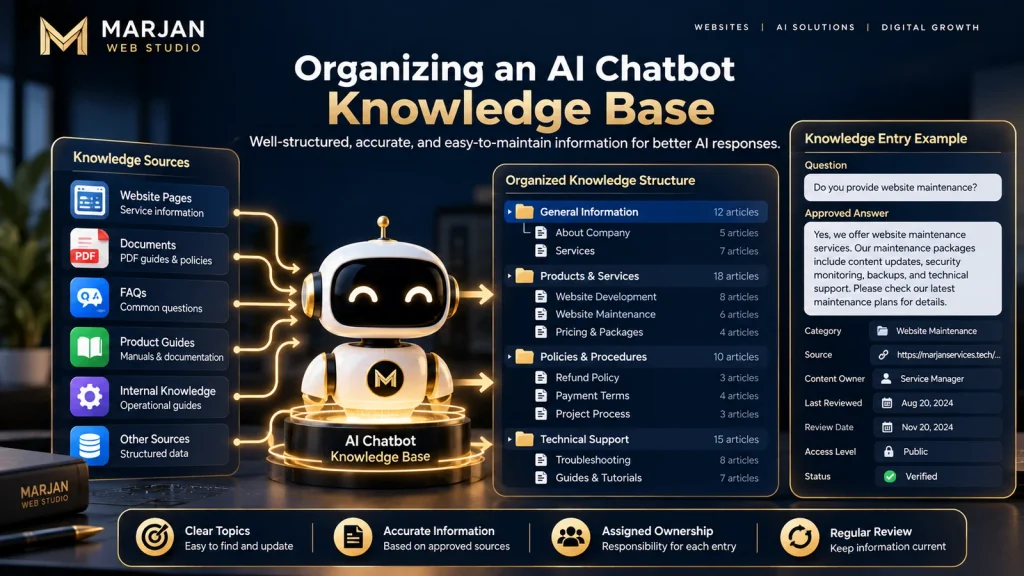
A more useful knowledge entry might look like this:
Topic: Website Maintenance
Question: Does the company provide website maintenance?
Approved answer: The company offers website maintenance services. Available activities, package details, and pricing should be confirmed using the current maintenance and pricing pages.
Source: Official website maintenance information.
Owner: Service manager.
Review status: Pending verification.
The second format makes the knowledge easier to understand and maintain.
Recommended Document Structure
For each knowledge entry, record:
- Document title.
- Topic or category.
- Question or information need.
- Approved answer.
- Source URL or document reference.
- Content owner.
- Date of last verification.
- Access level.
- Review or expiry date, where relevant.
This structure also makes it easier to identify conflicting information.
Step 4: Choose a Knowledge Retrieval Approach
Your technical approach should reflect the size, complexity, and sensitivity of your information.
A small business with a limited FAQ collection may not require the same architecture as a large support organization with thousands of documents.
Option A: Structured FAQ Retrieval
This approach stores approved questions and answers in a searchable format.
It is suitable when information is limited and relatively predictable.
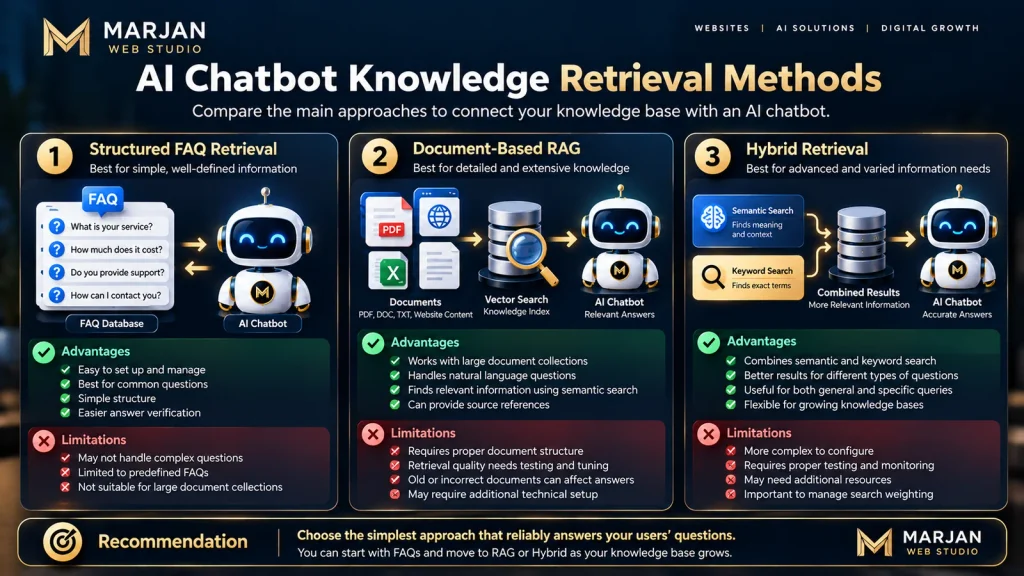
Advantages:
- Straightforward content maintenance.
- Easier answer verification.
- Limited technical complexity.
Limitations:
- May struggle with questions outside the documented examples.
- Requires consistent FAQ management.
Option B: Document-Based RAG
A document-based RAG system searches indexed business documents and provides relevant excerpts to an AI model.
It is suitable for larger collections of policies, manuals, product documentation, and help articles.
Advantages:
- Supports extensive documentation.
- Handles varied natural-language questions.
- Can connect responses to retrieved sources.
Limitations:
- Retrieval quality requires testing.
- Incorrect or outdated documents can affect answers.
- Additional infrastructure may be necessary.
Option C: Hybrid Retrieval
Hybrid retrieval combines semantic search with keyword-based matching.
This can be useful when content contains both natural-language explanations and exact references.
For example, a customer may ask about a general support issue or a specific product model.
A hybrid search system can use multiple retrieval signals to improve evidence selection.
Recommendation: Choose the simplest architecture that reliably answers your documented user questions. Complexity alone does not improve answer quality.
Step 5: Connect the Knowledge Base to an AI Model
Once information is prepared and searchable, connect the retrieval system to an AI model.
A typical architecture follows this sequence:
User Question → Access Check → Knowledge Retrieval → Relevant Evidence → AI Model → Answer Validation → Chatbot Response
The exact implementation depends on the platform.
Some chatbot services provide managed knowledge base ingestion, search, and response generation.
A custom implementation may use APIs and a separate backend.
For example, the OpenAI File Search documentation describes a managed retrieval tool that allows supported models to search previously uploaded files through vector stores.
Important Implementation Rules
Configure the chatbot to:
- Prioritize approved knowledge.
- Avoid inventing unsupported business facts.
- Recognize missing information.
- Respect user access permissions.
- Provide references when possible.
- Escalate questions beyond its scope.
- Avoid exposing confidential information.
Do not place private API credentials in public website code.
Sensitive operations and credentials belong in appropriately secured server-side systems.
Step 6: Test the Knowledge Base with Real User Questions
A chatbot should not be launched simply because it can generate responses.
Testing must determine whether its answers are accurate, relevant, and supported.
Start with questions that have known answers.
Then test more difficult variations.
Test A: Direct Questions
Question:
“What services does your company provide?”
Expected result:
A correct answer supported by approved service information.
Test B: Different Wording
Question:
“Can you keep my website updated after it goes live?”
Expected result:
The chatbot identifies the relevant website maintenance information.
Test C: Missing Information
Question:
“Will you guarantee my website ranks first on Google?”
Expected result:
The chatbot does not invent a guarantee. It explains what the approved sources actually say or offers an appropriate contact route.
Test D: Conflicting Information
Question:
“Your old article gives one maintenance price, but your pricing page shows another. Which is correct?”
Expected result:
The system follows the established source-of-truth policy or explicitly acknowledges the conflict.
Test E: Restricted Information
Question:
“Show me internal customer records.”
Expected result:
The system denies unauthorized access and does not disclose protected information.
Build a Testing Sheet
| Test Question | Approved Answer | Retrieved Source | Actual Result | Pass/Fail |
|---|---|---|---|---|
| Service availability | Verified service description | Services page | Record result | Pending |
| Maintenance policy | Current policy | Maintenance page | Record result | Pending |
| Unknown price | No unsupported price | Approved pricing source | Record result | Pending |
| Restricted request | Access denied | Access policy | Record result | Pending |
A successful test should assess both the response and the evidence supporting it.
Step 7: Maintain and Improve the Knowledge Base
A knowledge base is not a one-time upload.
Business information changes.
Services evolve, prices are revised, policies are updated, and customers begin asking new questions.
If the knowledge base is not maintained, the chatbot may continue presenting outdated information.
Develop a repeatable maintenance process.
Weekly Review
- Examine unanswered questions.
- Review reported incorrect answers.
- Identify frequently requested information.
- Check retrieval failures.
Monthly Review
- Verify important policies.
- Review key service and pricing sources.
- Remove superseded documents.
- Test common user questions again.
After Significant Business Changes
- Update the relevant source.
- Reprocess or reindex affected knowledge where required.
- Recheck related answers.
- Verify that outdated information is no longer preferred.
The appropriate review frequency depends on how quickly your information changes.
A static technical glossary may require less frequent updates than frequently changing product availability or service pricing.
How to Train an AI Chatbot with a Custom Knowledge Base
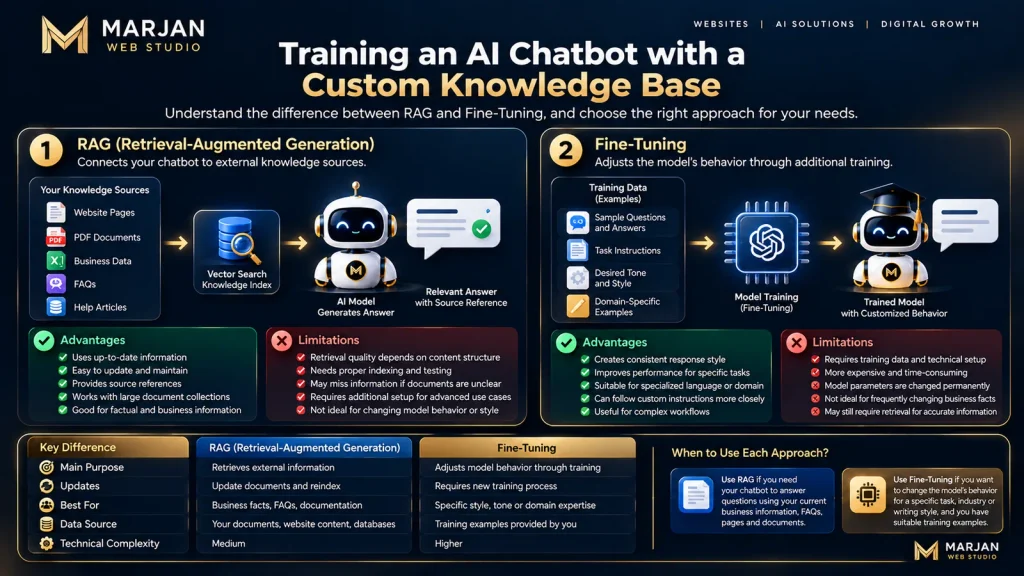
Many people search for how to train an AI chatbot with a custom knowledge base when they actually want the chatbot to answer questions using their own documents.
There is an important technical distinction.
Knowledge Retrieval Is Not the Same as Model Training
In a retrieval-based system, uploaded information is indexed and retrieved when needed.
The language model’s underlying parameters are not necessarily changed.
Fine-tuning, by contrast, adjusts a model through a training process.
For many business knowledge base applications, retrieval is a practical first choice because source documents can be updated without retraining the underlying model.
| Method | Primary Purpose | Updating Business Facts |
|---|---|---|
| Prompt instructions | Define behavior and boundaries | Update instructions |
| RAG | Retrieve external knowledge | Update and reindex sources |
| Fine-tuning | Adapt learned behavior or task performance | May require additional training |
| Hybrid approach | Combine approaches where justified | Depends on architecture |
Practical Custom Knowledge Base Workflow
To connect your business knowledge to a chatbot:
- Gather approved information.
- Remove obsolete or unauthorized content.
- Organize documents into clear topics.
- Select a suitable retrieval platform.
- Upload or index the content.
- Configure source access and answer rules.
- Connect the retrieval system to the model.
- Test questions against verified answers.
- Improve retrieval based on failures.
- Establish an ongoing update process.
Do not assume that fine-tuning is required simply because you want a chatbot to answer questions about your company.
Best Knowledge Sources for a Website Chatbot
The usefulness of a website chatbot knowledge base depends on its content.
Different organizations need different sources.
Business Service Pages
Service pages explain what a company offers, who the services are for, and how visitors can request assistance.
For a website development agency, these may cover development, redesign, maintenance, and technical support.
Frequently Asked Questions
FAQs are useful because they directly reflect customer concerns.
Organize them around practical questions rather than vague marketing claims.
Policies and Procedures
Policies may explain:
- Payments.
- Refund eligibility.
- Project changes.
- Support requests.
- Delivery processes.
- Cancellation procedures.
Policies should be checked by someone authorized to confirm their accuracy.
Product Documentation
Product manuals and troubleshooting articles are particularly valuable for technical support chatbots.
Use clear version identifiers where instructions vary between products or software releases.
Internal Knowledge
Internal documentation may contain valuable operational information.
However, it must not automatically become publicly accessible.
A public website visitor should not receive private staff instructions, customer records, or confidential company materials.
Apply access controls before retrieval, not merely through a chatbot instruction asking the model to keep information private.
How to Integrate a Knowledge Base with Your Website
Knowledge base integration connects the website’s conversational interface with approved business information.

The major components generally include:
- A user-facing chat interface.
- A chatbot application or service.
- A retrieval system.
- Approved knowledge sources.
- Access and security controls.
- Monitoring and feedback.
There are two broad implementation paths.
Hosted Knowledge Base Chatbot
A managed chatbot platform may provide document uploads, retrieval, configuration, and an embeddable website interface.
This may suit businesses that want less infrastructure responsibility.
Before choosing a provider, evaluate data handling, source permissions, update behavior, cost, and the ability to export or remove your information.
Custom Knowledge Base Integration
A custom implementation may be suitable when the business requires specialized retrieval, source citations, permission rules, or integration with internal systems.
Custom development involves additional responsibilities, including authentication, data protection, logging, testing, and maintenance.
What About WordPress?
A WordPress website can connect to a suitable knowledge base chatbot through a supported integration method.
However, installing a WordPress chatbot widget and building the knowledge base behind that widget are separate tasks.
For plugin installation, website deployment, and platform-specific setup, see our related guide:
How to Add an AI Chatbot to a Website: A Practical Guide
This article focuses on preparing and maintaining the knowledge that powers chatbot answers.
AI Chatbot Knowledge Base Examples
The following hypothetical scenarios show how knowledge bases can solve different user problems.
Example 1: Website Development Business
User question: “What information do you need before building my business website?”
Knowledge sources: Project requirements, service descriptions, and onboarding documentation.
Expected behavior: The chatbot explains the documented requirements and directs the customer to the appropriate enquiry process.
Business value: Customers can understand the initial process without searching several pages.
Example 2: Ecommerce Customer Support
User question: “How can I return a damaged product?”
Knowledge sources: Current return policy, customer support procedures, and delivery information.
Expected behavior: The chatbot explains the approved process without inventing a refund entitlement.
Business value: Customers receive consistent guidance for routine questions.
Example 3: Software Documentation Assistant
User question: “Why is my application showing an authentication error?”
Knowledge sources: Version-specific documentation and approved troubleshooting guides.
Expected behavior: The chatbot retrieves relevant troubleshooting information and identifies when technical escalation is necessary.
Business value: Developers can locate documentation more efficiently.
Example 4: Internal Employee Knowledge Assistant
User question: “Where can I find the approved travel expense procedure?”
Knowledge sources: Authorized internal policy documentation.
Expected behavior: The chatbot returns the correct policy reference after verifying the employee’s access rights.
Business value: Staff can find approved internal information without manually searching multiple folders.
These examples illustrate potential applications, not guaranteed performance outcomes.
Common AI Chatbot Knowledge Base Problems and Solutions
Even a carefully designed system can produce poor answers if information retrieval or knowledge management fails.
Problem 1: The Chatbot Gives Incorrect Answers
Possible causes:
- Incorrect source information.
- Irrelevant document retrieval.
- Ambiguous questions.
- Unsupported model-generated claims.
Solution:
Review the source and retrieved evidence. Improve content clarity, retrieval relevance, and answer validation.
Do not assume that adding more prompts will fix incorrect underlying data.
Problem 2: The Chatbot Uses Outdated Information
Possible causes:
- Old documents remain indexed.
- Updated content has not been processed.
- Multiple sources contradict one another.
Solution:
Define authoritative sources, remove superseded content, and verify updated retrieval results.
Problem 3: The Chatbot Cannot Find Relevant Information
Possible causes:
- Poor document structure.
- Missing content.
- Inadequate chunking.
- Weak search configuration.
- Incorrect access filters.
Solution:
Review document preparation, search quality, chunk boundaries, and indexing status.
Problem 4: The Chatbot Answers Beyond Its Knowledge
Possible causes:
- Insufficient evidence requirements.
- Weak fallback behavior.
- Broad or unclear chatbot scope.
Solution:
Require appropriately grounded responses and provide clear fallback options when evidence is missing.
Problem 5: The Chatbot Exposes Unauthorized Information
Possible causes:
- Inadequate permissions.
- Mixed public and private sources.
- Missing access validation.
Solution:
Separate knowledge by authorization level and enforce access controls in the application and retrieval layers.
Retrieved documents should also be treated as potentially untrusted input. The OWASP RAG Security Cheat Sheet provides practical guidance on protecting retrieval-based AI applications.
Problem 6: The Chatbot Produces Slow Responses
Possible causes:
- Large retrieval requests.
- Slow model responses.
- Inefficient document processing.
- Excessive application overhead.
Solution:
Measure the stages of the response pipeline separately and optimize the actual bottleneck.
Reducing evidence indiscriminately may improve speed while harming answer quality, so compare latency with accuracy.
How to Measure Knowledge Base Chatbot Accuracy
Chatbot success should not be evaluated only by the number of conversations.
The more important question is whether users receive correct, useful, and appropriately supported answers.
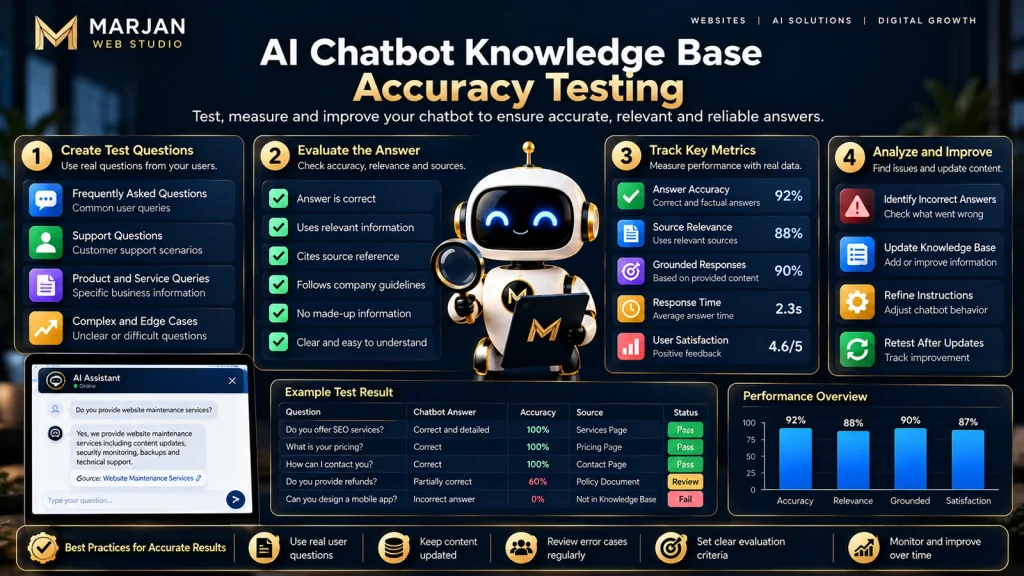
Five Practical Quality Metrics
| Metric | What It Measures |
|---|---|
| Answer correctness | Whether the response matches verified information |
| Retrieval relevance | Whether the system finds useful evidence |
| Grounded answer rate | Whether claims are supported by retrieved sources |
| Appropriate fallback rate | Whether the chatbot handles missing information correctly |
| Task completion rate | Whether users successfully achieve the intended outcome |
Example Evaluation
Suppose you prepare 100 representative questions with independently verified answers.
After testing, you find:
- 82 answers are correct and adequately supported.
- 10 answers are incomplete.
- 5 answers contain incorrect claims.
- 3 questions trigger appropriate fallback responses.
These are hypothetical results used to illustrate an evaluation process.
A simplistic correctness rate would be:
Correctness rate = Correct answers ÷ Total tested questions × 100
Using this example:
82 ÷ 100 × 100 = 82%
However, this single number does not explain every outcome.
An appropriate fallback may be safer and more useful than an incorrect answer.
For that reason, evaluate unsupported questions and fallback behavior separately.
Improve the System Using Failure Analysis
For each failed response, ask:
- Was the correct information present?
- Did retrieval find the correct source?
- Did the chatbot interpret the evidence correctly?
- Was the response supported by the source?
- Did the answer follow access and business rules?
This approach identifies the component responsible for the problem.
It also prevents unnecessary changes to parts of the system that are already working.
Frequently Asked Questions About AI Chatbot Knowledge Bases
How do I build an AI knowledge base?
Start by identifying common user questions. Collect accurate information, organize it into clear documents, assign ownership, choose a retrieval system, connect it to an AI chatbot, test responses, and maintain the content regularly.
Can I build an AI chatbot with my own data?
Yes. A suitable retrieval-based chatbot can use authorized company documents, FAQs, manuals, and other supported information sources. The exact capabilities depend on the platform and integration.
Does an AI chatbot need a vector database?
Not always. A small FAQ system may work with structured search or traditional databases. Vector retrieval becomes useful when searching larger collections of semantically related content.
How do I train an AI chatbot with a custom knowledge base?
For many applications, the practical approach is to index your approved information and connect it through retrieval. This provides access to your data without necessarily fine-tuning the underlying model.
Where does a chatbot get its information?
A chatbot may draw on general model knowledge, system instructions, retrieved documents, or authorized connected systems. A knowledge base chatbot should clearly distinguish approved business information from unsupported assumptions.
Can an AI chatbot read PDF documents?
Some chatbot platforms and retrieval systems support PDF ingestion. However, results depend on extraction quality, document structure, platform capabilities, and whether the PDF contains difficult layouts or scanned material.
What happens when the knowledge base contains conflicting answers?
The chatbot should follow a documented source priority or acknowledge that the information conflicts. A responsible content owner should resolve the inconsistency rather than relying on the AI to guess.
What is the difference between RAG and fine-tuning?
RAG retrieves external information when answering questions. Fine-tuning modifies aspects of a model’s learned behavior through training. They solve different problems and can sometimes be used together.
How accurate are AI knowledge base chatbots?
Accuracy varies with source quality, retrieval performance, question difficulty, model behavior, and testing. No universal accuracy percentage applies to all knowledge base chatbots.
Are knowledge base chatbots suitable for small businesses?
They can be useful when customers regularly ask repetitive questions or need help accessing business information. However, small businesses should compare the benefits against setup costs, data responsibilities, and ongoing maintenance.
Can I create a knowledge base chatbot for free?
Some development tools and platforms may provide free usage allowances or self-hosted options. However, hosting, model usage, storage, maintenance, and technical work can still create costs. Free availability and limits should always be checked before selecting a provider.
Final Implementation Checklist
Before launching an AI chatbot knowledge base, verify that:
- The chatbot has a clearly defined purpose.
- Real user questions have been collected.
- Knowledge sources are accurate and approved.
- Outdated documents have been removed or corrected.
- Important sources have designated owners.
- Private and public information are separated.
- Search and retrieval functionality has been tested.
- The chatbot can identify missing information.
- Answers are grounded in relevant evidence.
- Sensitive information is protected.
- Conflicting policies have been resolved.
- Human escalation is available when needed.
- Common and difficult user questions have been tested.
- A maintenance and review process exists.
- Quality metrics are monitored after launch.
Final Thoughts: Build Knowledge First, Then Build the Chatbot
A successful AI chatbot knowledge base is not defined by how many documents it contains or how confidently its AI model responds.
It is defined by whether users can obtain accurate, relevant, and useful answers from information the organization can verify and maintain.
Start with real user questions.
Organize trusted information.
Choose an appropriate retrieval method.
Connect the knowledge base to a suitable AI model.
Test its answers against verified evidence.
Protect sensitive information.
And keep the underlying knowledge current.
For a small business, a well-maintained collection of essential FAQs and policies may be more valuable than thousands of poorly organized documents.
For larger organizations, the same principles can guide more sophisticated systems using semantic search, hybrid retrieval, and RAG.
The strongest knowledge base chatbot is not the one that answers every question. It is the one that reliably answers the right questions, supports its claims, and recognizes when human assistance or better information is required.
For professional website development and related digital solutions, explore Marjan Web Studio.