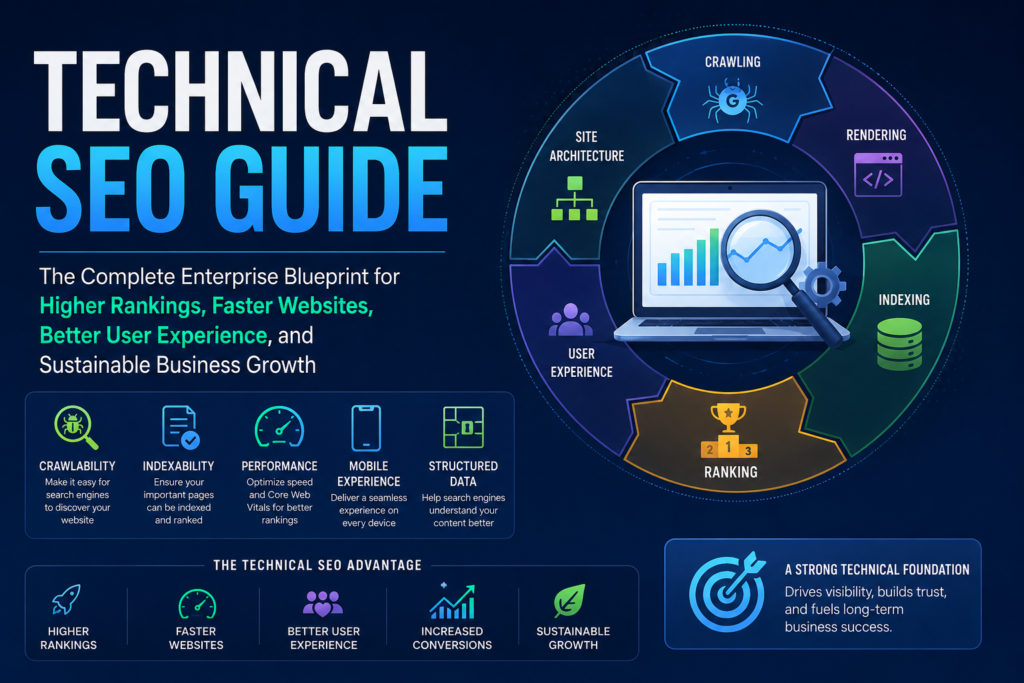
Table of Contents
Introduction
Technical SEO Guide: Technical SEO improves the technical systems that help search engines
discover, crawl, render, understand, and index a website. It covers areas such as crawlability, indexability, canonicals, sitemaps, redirects, Core Web Vitals, JavaScript rendering, structured data, and website architecture.
You can invest thousands of dollars in a professionally designed website, publish exceptional content, launch advertising campaigns, and still struggle to generate meaningful organic traffic or qualified leads. In many cases, the underlying problem is not the content itself or the marketing strategy. Instead, it often lies in the website’s technical foundation.
Technical SEO provides the infrastructure that enables search engines to efficiently crawl, render, understand, and index your website. Without that foundation, even the highest-quality content may never reach its full potential in search results.
Modern SEO extends far beyond keywords and backlinks. Search engines increasingly evaluate website performance, accessibility, usability, and technical quality alongside content relevance. A technically optimized website not only helps search engines process your content more effectively but also delivers a faster, more reliable experience for visitors.
In 2026, search continues to evolve with AI-powered experiences, richer search results, and greater emphasis on user satisfaction. Businesses that ignore technical SEO often find themselves competing with technically stronger websites, even when their content is equally valuable.
This guide is designed to be more than a collection of definitions. It is a practical implementation resource for business owners, marketers, developers, and SEO professionals who want to build technically sound websites that support long-term organic growth.
Throughout this guide, you will learn how to:
- Build a strong technical SEO foundation.
- Improve crawlability and indexability.
- Optimize Core Web Vitals and website performance.
- Implement structured data correctly.
- Prepare your website for AI-powered search experiences.
- Conduct comprehensive technical SEO audits.
- Prioritize technical improvements based on business impact.
- Evaluate professional technical SEO services when additional expertise is required.
Expert Insight
Many organizations invest heavily in content marketing while overlooking technical issues that prevent search engines from efficiently crawling or indexing their most valuable pages. Establishing a strong technical foundation often delivers greater long-term value than simply publishing additional content.
Why Technical SEO Matters More Than Ever in 2026
Technical SEO is no longer a discipline reserved for developers. It has become a fundamental component of digital marketing, user experience, and sustainable business growth. Every aspect of a website’s technical health influences how efficiently search engines discover content and how confidently users interact with it.
Search Has Become More Sophisticated
Search engines no longer focus solely on matching keywords with web pages. They evaluate how effectively a website serves users by considering multiple technical and quality-related signals.
Common technical issues such as:
- Broken redirects.
- Duplicate URLs.
- Incorrect canonical implementation.
- Slow-loading pages.
- Mobile usability problems.
- JavaScript rendering limitations.
can reduce a website’s ability to be discovered, understood, and presented effectively in search results.
Technical SEO helps eliminate these barriers so search engines can process your content more efficiently.
User Experience Directly Influences Business Outcomes
Every visitor arrives on your website with a purpose. They may want to:
- Purchase a product.
- Request a quote.
- Compare services.
- Schedule a consultation.
- Learn about a solution.
If your website loads slowly, displays layout issues, returns errors, or provides confusing navigation, visitors may leave before completing their objective.
Technical SEO helps create a stable, accessible, and predictable browsing experience that supports both user satisfaction and business goals.
Technical SEO Supports Every Other SEO Strategy
Technical SEO does not replace content marketing, on-page optimization, or link building. Instead, it provides the infrastructure that allows those efforts to perform effectively.
| SEO Activity | Without Strong Technical SEO | With Strong Technical SEO |
|---|---|---|
| Content Marketing | New content may be discovered or indexed more slowly. | Search engines can efficiently crawl and process new content. |
| On-Page SEO | Optimizations may not achieve their full potential. | Well-optimized pages are easier to understand and index. |
| Link Building | Link equity may not flow efficiently throughout the site. | Internal architecture helps distribute authority more effectively. |
| Local SEO | Important local landing pages may struggle to gain visibility. | Technical structure supports stronger local discoverability. |
| Conversion Optimization | Slow performance may reduce user engagement. | Faster, more reliable experiences encourage conversions. |
This comparison illustrates that technical SEO serves as the foundation for every other SEO initiative.
Technical SEO Is an Ongoing Process
One of the most common misconceptions is that technical SEO is completed only once during a website launch.
In reality, websites continually evolve through:
- New content.
- Plugin updates.
- Theme changes.
- Product additions.
- Website migrations.
- Redirect implementations.
- Third-party integrations.
Each change introduces the potential for new technical issues.
For this reason, technical SEO should be viewed as an ongoing maintenance process rather than a one-time project.
The Business Perspective
For business owners, technical SEO is not simply about rankings.
A technically healthy website can contribute to:
- Better website performance.
- Improved user satisfaction.
- Greater crawl efficiency.
- More reliable indexing.
- Stronger long-term scalability.
- Reduced maintenance risks.
- Better support for future marketing initiatives.
Rather than focusing exclusively on short-term ranking improvements, technical SEO helps establish a durable digital foundation that supports sustainable business growth.
Business Action Plan
After completing this section, consider taking the following actions:
- Evaluate your current website loading performance.
- Review your mobile usability across multiple devices.
- Confirm that your most important pages are accessible to search engines.
- Schedule regular technical SEO audits.
- Reassess your technical health after every major website update or migration.
What Is Technical SEO?
Technical SEO is the process of improving a website’s underlying structure, performance, and search accessibility so search engines can efficiently discover, crawl, render, understand, and index its content.
It focuses on the systems operating beneath the visible page, including:
- Website architecture.
- Crawlability.
- Indexability.
- Server responses.
- URL structure.
- Internal linking.
- Canonicalization.
- XML sitemaps.
- Robot’s directives.
- Mobile performance.
- Core Web Vitals.
- JavaScript rendering.
- Structured data.
- Website security.
Google Search generally processes web content through crawling, indexing, and serving stages. Technical SEO helps remove barriers that could interfere with these processes, but no optimization can guarantee that Google will crawl, index, serve, or rank a particular page.
Technical SEO is therefore not a shortcut to higher rankings. It is the infrastructure that allows valuable content, internal links, structured data, and other optimization efforts to function more effectively.
A Simple Technical SEO Example
Consider a business that publishes a detailed service page targeting potential customers.
The page may contain:
- Professionally written content.
- Relevant commercial keywords.
- Customer-focused benefits.
- Strong calls to action.
- Original images.
- Useful comparison tables.
However, the page may still struggle to appear in search if:
- It contains an unintended
noindexdirective. - Its canonical tag points to another URL.
- No internal page links to it.
- The server returns an incorrect status code.
- Important content appears only after a failed JavaScript execution.
- The mobile version contains less content than the desktop version.
- The page is blocked through robots.txt.
In this situation, writing more content may not solve the underlying problem. The technical barrier must be identified and corrected first.
The Four Functional Layers of Technical SEO
A practical way to understand technical SEO is to divide it into four functional layers.
| Technical SEO Layer | Primary Objective | Typical Elements |
|---|---|---|
| Discovery | Help search engines find important URLs | Internal links, XML sitemaps, crawlable navigation |
| Access and Rendering | Allow search engines to retrieve and process content | Robots.txt, JavaScript, server responses, resource accessibility |
| Indexing and Consolidation | Help search engines identify the preferred page | Canonicals, noindex directives, duplicate management, redirects |
| Experience and Performance | Deliver a fast, stable, secure experience | Core Web Vitals, mobile usability, HTTPS, caching, image optimization |
These layers are connected. A page cannot generate organic visibility if it performs well for users but remains undiscoverable. Similarly, a crawlable page may still underperform if it is slow, unstable, duplicated, or difficult to use on mobile devices.
How Technical SEO Supports Search Engines
Search engines use automated crawlers to discover pages and follow links across the web. Google’s documentation explains that most pages are discovered automatically through crawling rather than through manual submission.
Technical SEO supports this process by helping ensure that:
- Important pages have crawlable internal links.
- Search engines receive appropriate HTTP responses.
- Robots’ directives do not unintentionally block essential content.
- Canonical signals identify preferred URLs.
- JavaScript-generated content can be rendered.
- XML sitemaps contain relevant, canonical, indexable URLs.
- Mobile and desktop content remain substantially consistent.
Google also recommends using crawlable links so its systems can discover additional pages and understand their relationships.
How Technical SEO Supports Users
Technical SEO is sometimes described as work performed only for search engines. That interpretation is incomplete.
Many technical improvements directly affect visitors.
For example:
| Technical Improvement | Search Benefit | User Benefit |
| Faster loading | More efficient content delivery and processing | Less waiting and frustration |
| Responsive design | Supports mobile-first indexing | Better mobile usability |
| HTTPS | Provides a secure delivery protocol | Greater confidence and data protection |
| Clear architecture | Improves page discovery and context | Easier navigation |
| Correct redirects | Consolidates moved content | Prevents broken journeys |
| Stable layouts | Supports visual performance | Reduces unexpected page movement |
| Accessible navigation | Creates crawlable pathways | Helps users find important information |
The strongest technical SEO strategies improve both search accessibility and human experience.
Technical SEO vs. On-Page SEO
Technical SEO and on-page SEO are closely related, but they address different layers of optimization.
Technical SEO
Technical SEO focuses on whether a page can be efficiently:
- Discovered.
- Crawled.
- Rendered.
- Indexed.
- Consolidated.
- Delivered to users.
Common technical SEO tasks include:
- Fixing crawl errors.
- Managing canonical tags.
- Improving Core Web Vitals.
- Correcting redirect chains.
- Optimizing XML sitemaps.
- Resolving JavaScript rendering problems.
- Improving website architecture.
- Reviewing HTTP status codes.
On-Page SEO
On-page SEO focuses primarily on the content and visible elements of an individual page.
Common on-page SEO tasks include:
- Writing an accurate page title.
- Creating a useful meta description.
- Structuring headings logically.
- Matching content to search intent.
- Adding descriptive image alt text.
- Improving topical coverage.
- Optimizing internal anchor text.
- Strengthening calls to action.
Technical SEO vs. On-Page SEO Comparison
| Factor | Technical SEO | On-Page SEO |
| Primary Focus | Website infrastructure and search accessibility | Page content and relevance |
| Main Question | Can search engines access and process the page correctly? | Does the page satisfy the searcher’s intent? |
| Typical Scope | Entire website or template system | Individual pages |
| Common Tools | Search Console, crawlers, server logs, PageSpeed tools | Content editors, keyword tools, Search Console |
| Common Problems | Noindex tags, slow pages, duplicate URLs, rendering failures | Weak headings, thin content, unclear intent, poor titles |
| Business Impact | Makes digital assets technically accessible and reliable | Helps pages attract and persuade the right audience |
Neither discipline replaces the other.
A technically perfect page with weak content may not satisfy users. A highly useful page with serious indexing problems may never reach them.
Expert Insight
Technical SEO creates access. On-page SEO creates relevance. Sustainable organic growth usually requires both.
Technical SEO vs. Off-Page SEO
Off-page SEO focuses on authority, reputation, and signals generated outside the website.
These may include:
- Editorial backlinks.
- Digital public relations.
- Brand mentions.
- Relevant citations.
- Industry recognition.
- Third-party reviews.
Technical SEO focuses on the website itself.
Key Difference
Technical SEO asks:
Can search engines efficiently access, process, and understand this website?
Off-page SEO asks:
Does the wider web provide credible signals that this website or brand deserves attention?
Comparison Table
| Area | Technical SEO | Off-Page SEO |
| Environment | Primarily on the website and server | Primarily outside the website |
| Main Objective | Accessibility, performance, and indexation | Authority, reputation, and recognition |
| Examples | Sitemaps, canonicals, speed, redirects | Backlinks, mentions, digital PR |
| Level of Control | Generally high | Limited or indirect |
| Common Risk | Blocking or confusing search engines | Low-quality or manipulative link acquisition |
| Long-Term Role | Creates a stable technical foundation | Strengthens external credibility |
A website should not attempt to compensate for major technical problems by acquiring more backlinks. External authority cannot reliably correct broken indexing, incorrect canonicalization, inaccessible content, or severe performance issues.
Technical SEO vs. Content SEO
Content SEO focuses on creating, organizing, and improving information that satisfies user needs and search intent.
It includes:
- Topic selection.
- Keyword mapping.
- Search intent analysis.
- Content structure.
- Semantic coverage.
- Information gain.
- Editorial quality.
- Content updates.
- Internal linking.
Technical SEO ensures that search systems can access and process that content.
Practical Example
A company may publish an excellent guide containing original research and expert commentary. However, its visibility may remain limited if:
- It is buried too deeply in the website.
- No relevant internal pages link to it.
- It’s canonical points elsewhere.
- Its mobile version omits key content.
- A JavaScript error prevents the main text from rendering.
- The URL returns a soft 404 signal.
Content quality and technical accessibility must operate together.
Google’s people-first content guidance emphasizes creating reliable information for users rather than producing content primarily to manipulate rankings. Technical optimization should support that content, not disguise weak or unhelpful material.
Technical SEO vs. Local SEO
Local SEO helps businesses improve their visibility for geographically relevant searches.
It commonly includes:
- Local service pages.
- Accurate business information.
- Google Business Profile optimization.
- Local citations.
- Location-specific content.
- Customer reviews.
- Local backlinks.
Technical SEO supports local SEO by ensuring that location and service pages are:
- Crawlable.
- Indexable.
- Mobile-friendly.
- Fast.
- Secure.
- Properly linked.
- Free from conflicting canonical signals.
- Supported by appropriate structured data where relevant.
Example
A company may operate in several cities and create a landing page for each location. Technical problems can arise when:
- Pages use nearly identical content.
- Canonicals point all locations to one page.
- Location pages are absent from internal navigation.
- URL parameters create duplicate variations.
- Mobile pages omit addresses or service details.
- Structured data does not match visible business information.
Technical SEO does not replace local relevance, but it protects the infrastructure supporting local landing pages.
Technical SEO vs. User Experience Optimization
Technical SEO and user experience optimization overlap significantly, but they are not identical.
User experience optimization focuses on how easily visitors can:
- Understand a page.
- Navigate the website.
- Complete a task.
- Read the content.
- Submit a form.
- Purchase a product.
- Contact the business.
Technical SEO focuses more specifically on technical accessibility, processing, performance, and search compatibility.
However, both disciplines share several priorities:
- Mobile responsiveness.
- Page speed.
- Layout stability.
- Accessible navigation.
- Logical architecture.
- Reliable functionality.
- Secure browsing.
Google uses the mobile version of a site’s content for indexing and ranking, making mobile parity and usability critical technical considerations.
Technical SEO vs. Website Development
Website development creates and maintains the website’s functional systems.
Technical SEO ensures that those systems support search accessibility and organic visibility.
A developer may build:
- Page templates.
- Navigation systems.
- Databases.
- Forms.
- JavaScript applications.
- Server configurations.
- E-commerce functionality.
A technical SEO specialist evaluates how these systems affect:
- Crawling.
- Rendering.
- Indexing.
- Canonicalization.
- Internal linking.
- Structured data.
- Performance.
- Search visibility.
Where Development and Technical SEO Must Collaborate
| Development Area | Technical SEO Requirement |
| New Page Template | Correct headings, canonicals, metadata, internal links, and schema |
| Website Migration | Redirect mapping, canonical review, sitemap updates, and monitoring |
| JavaScript Application | Renderable content, crawlable links, and accessible resources |
| E-commerce Filters | Faceted navigation and duplicate URL control |
| Mobile Redesign | Content parity, responsive design, and performance testing |
| Server Change | Correct status codes, HTTPS behavior, caching, and redirects |
| CMS Update | Indexation, template, plugin, and performance validation |
Technical SEO should therefore be included during planning and development, not added only after a website has launched.
Technical SEO vs. Structured Data
Structured data is one component of technical SEO, not a separate replacement for it.
Structured data uses standardized markup to describe content and entities in a machine-readable format. Google may use eligible structured data to better understand page content and generate certain search features.
However, structured data:
- Does not guarantee rich results.
- Does not automatically improve rankings.
- Must match visible page content.
- Must follow applicable policies.
- Should be tested and maintained.
- Cannot compensate for low-quality content.
Google states that structured data violations can cause a page to lose eligibility for rich-result appearances, even though such a manual action does not directly change its ordinary web-search ranking.
Structured Data Should Be Used When
- The schema type accurately represents the page.
- Required properties are present.
- The marked-up information is visible to users.
- The content meets relevant eligibility requirements.
- The implementation can be maintained over time.
Where Technical SEO Fits in the Complete SEO Ecosystem
Technical SEO works as one part of a larger organic growth system.
A simplified model is:
Technical Accessibility
↓
Content Relevance
↓
Authority and Trust
↓
User Experience
↓
Conversion
Each layer contributes something different.
| SEO Layer | Core Responsibility |
| Technical SEO | Makes the website accessible, processable, stable, and efficient |
| Content SEO | Provides relevant, useful, and original information |
| On-Page SEO | Optimizes individual pages for clarity and search intent |
| Off-Page SEO | Builds authority and external recognition |
| Local SEO | Improves geographic relevance and local trust |
| Conversion Optimization | Helps visitors complete meaningful business actions |
Weakness in one layer can restrict the value produced by the others.
What Technical SEO Cannot Do
Technical SEO is essential, but it has limits.
It cannot:
- Guarantee first-page rankings.
- Replace useful and original content.
- Create demand for an unwanted product.
- Compensate for a poor business reputation.
- Automatically earn high-quality backlinks.
- Fix an unclear value proposition.
- Guarantee inclusion in AI-generated search experiences.
- Turn misleading content into trustworthy content.
- Force Google to crawl or index every page.
Google explicitly states that compliance with Search Essentials does not guarantee crawling, indexing, or serving.
Technical SEO should therefore be presented as a foundation and risk-management discipline, not as a guaranteed ranking formula.
When a Business Should Prioritize Technical SEO
A technical SEO review should become a priority when:
- Important pages are not indexed.
- Organic visibility drops after a redesign or migration.
- The website has many duplicate URLs.
- Core Web Vitals consistently perform poorly.
- Mobile content differs substantially from desktop content.
- Search Console reports crawling or indexing problems.
- The website relies heavily on JavaScript.
- Redirect chains or loops are present.
- Product filters generate thousands of URL combinations.
- The business is expanding into new countries or languages.
- A large number of pages have been added or removed.
- Website traffic declines after a CMS, theme, or server change.
Technical SEO Priority Table
| Situation | Priority Level | Recommended Action |
| Important revenue pages are deindexed | Critical | Investigate directives, canonicals, responses, and indexing signals immediately |
| Website migration caused traffic loss | Critical | Audit redirects, URL mapping, canonicals, internal links, and sitemaps |
| Checkout or lead forms fail on mobile | Critical | Correct functionality and mobile usability immediately |
| Core Web Vitals need improvement | High | Review field data, templates, images, scripts, and server performance |
| Orphan pages exist | High | Add relevant internal links or reassess whether pages should remain |
| Duplicate metadata appears on several pages | Medium | Improve page differentiation and templates |
| Old sitemap URLs remain submitted | Medium | Generate and resubmit a clean canonical sitemap |
| Minor URL formatting inconsistencies exist | Low | Correct during routine maintenance unless they create duplicates |
Expert Insight
The objective of a technical SEO audit is not to produce the longest possible list of errors. Its purpose is to identify which technical conditions are preventing valuable pages from being discovered, processed, trusted, or used effectively.
Key Takeaway
Technical SEO is the operational foundation of organic search performance. It helps search engines access and interpret a website while helping users experience faster, safer, and more reliable pages.
It works alongside on-page SEO, content strategy, off-page authority, local SEO, development, and conversion optimization. It does not replace these disciplines, and it cannot guarantee rankings. Its role is to eliminate technical barriers and create the conditions in which high-quality content and credible businesses can compete more effectively.
Who Needs Technical SEO?
One of the most common misconceptions is that technical SEO is only necessary for large corporations or enterprise websites.
In reality, any website that wants to improve its organic visibility, user experience, and long-term search performance can benefit from technical SEO. The scale of implementation may differ, but the underlying principles remain the same.
Whether you operate a small local business, an e-commerce store, a SaaS platform, or an international organization, technical SEO helps create a stronger foundation for sustainable growth.
Small Business Websites
Small businesses often believe they can postpone technical SEO until their website grows.
In practice, establishing a solid technical foundation early is usually more cost-effective than correcting widespread technical issues later.
Common Challenges
- Slow shared hosting.
- Poor internal navigation.
- Missing XML sitemaps.
- Duplicate service pages.
- Weak mobile performance.
- Broken internal links.
- Outdated plugins or themes.
Why It Matters
Small businesses often compete against larger companies with stronger domain authority. Technical improvements can help ensure that search engines efficiently discover and understand their content, allowing quality pages to compete more effectively.
Priority Checklist
- Create a logical website structure.
- Optimize mobile usability.
- Improve Core Web Vitals.
- Submit an XML sitemap.
- Fix crawl errors.
- Secure the website with HTTPS.
- Monitor indexing through Google Search Console.
Corporate Websites
Corporate websites typically contain hundreds or thousands of pages across multiple departments.
As websites expand, technical complexity increases significantly.
Common Challenges
- Duplicate content.
- Multiple navigation systems.
- Large document libraries.
- Complex internal linking.
- Legacy URLs.
- Multiple development teams.
- Inconsistent templates.
Technical SEO Priorities
- Information architecture.
- Canonical management.
- XML sitemap segmentation.
- Crawl efficiency.
- Structured data consistency.
- Website governance.
- Ongoing technical monitoring.
Corporate websites benefit from regular technical audits because small issues can quickly multiply across thousands of pages.
E-commerce Websites
E-commerce websites are among the most technically demanding environments for SEO.
Online stores often generate thousands of dynamic URLs through categories, filters, sorting options, and product variations.
Common Technical Issues
- Duplicate product URLs.
- Faceted navigation.
- Parameter-based pages.
- Thin category pages.
- Out-of-stock products.
- Pagination challenges.
- Image optimization issues.
Business Impact
Technical SEO directly supports e-commerce operations by helping search engines understand:
- Product pages.
- Category pages.
- Brand pages.
- Collections.
- Navigation hierarchy.
- Product availability.
Poor technical implementation can make it more difficult for important commercial pages to be crawled and indexed efficiently.
WordPress Websites
WordPress powers a significant portion of the web, making it one of the most widely used content management systems.
While WordPress is SEO-friendly, its flexibility can introduce technical challenges if not managed carefully.
Common WordPress Issues
- Duplicate archive pages.
- Excessive plugins.
- Slow themes.
- Broken redirects.
- Poor image optimization.
- Outdated software.
- Incorrect canonical implementation.
Technical SEO Focus Areas
- Theme performance.
- Plugin quality.
- XML sitemap validation.
- Internal linking.
- Image optimization.
- Structured data.
- Performance monitoring.
Website owners should evaluate every plugin for both functionality and performance rather than installing unnecessary extensions.
Shopify Stores
Shopify simplifies e-commerce management but also introduces platform-specific technical considerations.
Typical Challenges
- Duplicate collection URLs.
- Product variants.
- Automatic URL generation.
- Large image libraries.
- Third-party application scripts.
- Theme customization.
Technical SEO Priorities
- Collection architecture.
- Product indexing strategy.
- Canonical consistency.
- Structured data.
- Core Web Vitals.
- Image optimization.
- JavaScript performance.
A technically optimized Shopify store helps search engines better understand product relationships while improving customer experience.
SaaS Platforms
Software-as-a-Service companies often rely heavily on organic search for customer acquisition.
Their websites typically include:
- Product pages.
- Pricing pages.
- Documentation.
- Knowledge bases.
- Blog content.
- Support centers.
Technical Challenges
- JavaScript-heavy applications.
- Dynamic rendering.
- Documentation duplication.
- Multiple subdomains.
- Login-protected content.
- Versioned documentation.
Technical SEO helps ensure that public-facing content remains accessible while protecting private application areas.
News and Publishing Websites
Publishing websites frequently add new content every day.
Technical SEO helps search engines discover, crawl, and evaluate new content efficiently.
Priorities
- News sitemaps.
- Fast indexing.
- Mobile performance.
- Article structured data.
- Internal linking.
- Archive management.
Large publishing websites also benefit from crawl efficiency because search engines have limited resources to spend on each site during crawling.
Educational Institutions
Universities, colleges, schools, and online learning platforms often manage thousands of pages.
These may include:
- Course pages.
- Faculty profiles.
- Research publications.
- Admissions information.
- Department websites.
- Event pages.
Common Challenges
- Duplicate PDFs.
- Legacy URLs.
- Multiple website owners.
- Large navigation structures.
- Accessibility requirements.
Technical SEO helps maintain consistent website quality across diverse academic content.
Healthcare Organizations
Healthcare websites require exceptional accuracy and trust.
Although technical SEO cannot establish medical expertise, it supports accessibility and discoverability.
Important Areas
- Secure browsing.
- Mobile usability.
- Fast loading.
- Structured data where appropriate.
- Clear navigation.
- Reliable internal linking.
Healthcare organizations should ensure that technical improvements complement high-quality medical content and editorial review processes.
Government and Public Sector Websites
Government websites often serve millions of users and provide critical public information.
Their priorities include:
- Accessibility.
- Stability.
- Security.
- Mobile compatibility.
- Clear navigation.
- Reliable indexing.
Technical SEO supports these objectives by improving discoverability without compromising usability.
Enterprise Websites
Enterprise organizations often manage:
- Multiple brands.
- Multiple countries.
- Multiple languages.
- Multiple CMS platforms.
- Large development teams.
- Frequent website releases.
Technical SEO becomes an ongoing operational discipline rather than a one-time project.
Enterprise Priorities
- Governance.
- Scalable architecture.
- Crawl budget management.
- International SEO.
- Log file analysis.
- Automation.
- Continuous monitoring.
Which Websites Benefit the Most?
| Website Type | Technical SEO Priority | Primary Focus |
|---|---|---|
| Small Business | High | Strong technical foundation |
| Corporate | Very High | Governance and scalability |
| Ecommerce | Critical | Product visibility and crawl efficiency |
| WordPress | High | Performance and content accessibility |
| Shopify | High | Product architecture and indexing |
| SaaS | Very High | JavaScript rendering and documentation |
| News | Critical | Fast discovery and indexing |
| Educational | High | Information architecture |
| Healthcare | Very High | Accessibility, trust, and performance |
| Enterprise | Critical | Scale, governance, and operational efficiency |
Signs Your Website Needs a Technical SEO Audit
Your website should be reviewed if you notice any of the following:
- Organic traffic declines without a clear explanation.
- Important pages are missing from search results.
- Google Search Console reports indexing or crawling issues.
- Website migrations caused visibility losses.
- Core Web Vitals consistently underperform.
- Mobile users experience usability problems.
- Website speed has declined after recent updates.
- Duplicate URLs appear in search results.
- Redirect errors continue to increase.
- Large sections of the website receive little or no organic traffic.
These signs do not always indicate a technical SEO problem, but they justify a structured investigation.
Technical SEO Is an Investment, Not a One-Time Task
Many organizations view technical SEO as a project that ends once an audit is completed.
In reality, websites evolve continuously through:
- New content.
- Platform updates.
- Server changes.
- Design revisions.
- Third-party integrations.
- Product launches.
- Website migrations.
Each change introduces opportunities for both improvement and technical risk.
The organizations that maintain consistent organic performance typically treat technical SEO as part of an ongoing website governance strategy rather than an occasional repair project.
Technical SEO Fundamentals
A strong technical SEO strategy begins with a solid foundation. Before optimizing page speed, structured data, or Core Web Vitals, your website must have an architecture that both users and search engines can understand.
Think of your website as a modern office building. Even if every office is beautifully designed, visitors cannot reach their destination if the building lacks hallways, elevators, room numbers, or clear directions. Search engines index websites in much the same way.
Technical SEO fundamentals establish the framework that allows every other optimization effort to succeed.
Website Architecture
Website architecture refers to how pages are organized and connected throughout a website.
A well-planned architecture helps search engines discover content efficiently while making navigation easier for visitors.
Poor architecture often results in:
- Important pages are difficult to discover.
- Duplicate navigation paths.
- Weak internal linking.
- Orphan pages.
- Reduced crawl efficiency.
- Poor user experience.
A logical website structure generally follows a clear hierarchy.
Home
│
├── Services
│     ├── Technical SEO
│     ├── Website Development
│     ├── Local SEO
│
├── Blog
│     ├── Technical SEO Guide
│     ├── Core Web Vitals
│     ├── Schema Markup
│
├── About
│
└── Contact
This type of structure allows both visitors and search engines to understand the relationships between pages.
Characteristics of Good Website Architecture
A technically healthy website architecture should be:
- Logical.
- Predictable.
- Easy to navigate.
- Scalable.
- Crawlable.
- Mobile-friendly.
- Free from unnecessary complexity.
Search engines should be able to reach important pages through normal internal links rather than relying only on XML sitemaps.
Business Benefits
A strong architecture helps:
- Improve crawl efficiency.
- Strengthen internal linking.
- Support topical authority.
- Improve user navigation.
- Reduce duplicate content.
- Simplify future website expansion.
As websites grow, architecture becomes increasingly important because poor organization creates technical debt that becomes more expensive to fix later.
URL Structure
URLs are more than website addresses.
They communicate hierarchy, organization, and page relationships.
Well-structured URLs are easier for users to understand and easier to manage over time
Example of a Good URL
https://example.com/services/technical-seo/
This URL clearly indicates:
- Website.
- Section.
- Service.
Compare it with:
https://example.com/page?id=4837&cat=22
The second version provides little meaningful information to users.
URL Best Practices
Whenever appropriate:
- Keep URLs descriptive.
- Use lowercase letters consistently.
- Separate words with hyphens.
- Avoid unnecessary parameters.
- Keep URLs reasonably short without removing important context.
- Maintain consistency across the website.
Changing established URLs unnecessarily can introduce redirect complexity and should be planned carefully.
URL Structure Comparison
| Good Practice | Poor Practice |
|---|---|
| /technical-seo-guide/ | /page?id=127 |
| /website-development/ | /service123 |
| /seo-audit/ | /new-page-final-v8 |
| /blog/core-web-vitals/ | /blog/post45 |
Clean URLs improve usability, even though descriptive URLs alone do not guarantee higher rankings.
Internal Linking
Related Guides: Learn more about Core Web Vitals, Image Optimization, Browser Caching, and JavaScript Optimization in our detailed technical SEO resources.
Internal links connect pages within the same website.
They help search engines discover new pages while helping visitors navigate related information.
Without effective internal linking:
- Valuable pages may receive little attention.
- Search engines may discover pages more slowly.
- Users may struggle to find related resources.
- Topical relationships become less clear.
Internal Linking Example
Technical SEO Guide
        │
        ▼
Core Web Vitals
        │
        ▼
Website Speed Optimization
        │
        ▼
Image Optimization
        │
        ▼
Schema Markup
This creates a logical learning path for users while strengthening topical relationships.
Internal Linking Best Practices
Use internal links to:
- Support related topics.
- Guide users naturally.
- Connect service pages.
- Link supporting articles to pillar content.
- Reduce orphan pages.
- Improve navigation.
Anchor text should accurately describe the destination page instead of using vague phrases such as “click here.”
Google recommends using descriptive anchor text because it helps users and search systems better understand linked pages.
Breadcrumb Navigation
Breadcrumbs show users where they are within a website.
Example:
Home

↓

Services

↓

Technical SEO

↓

Technical SEO Guide
Benefits include:
- Better navigation.
- Improved user orientation.
- Clear hierarchy.
- Additional internal links.
- Easier movement between related sections.
Breadcrumb structured data may also help search engines better understand page hierarchy.
Website architecture refers to how pages are organized and connected throughout a website. A well-planned architecture helps search engines discover content efficiently while making navigation easier for visitors.
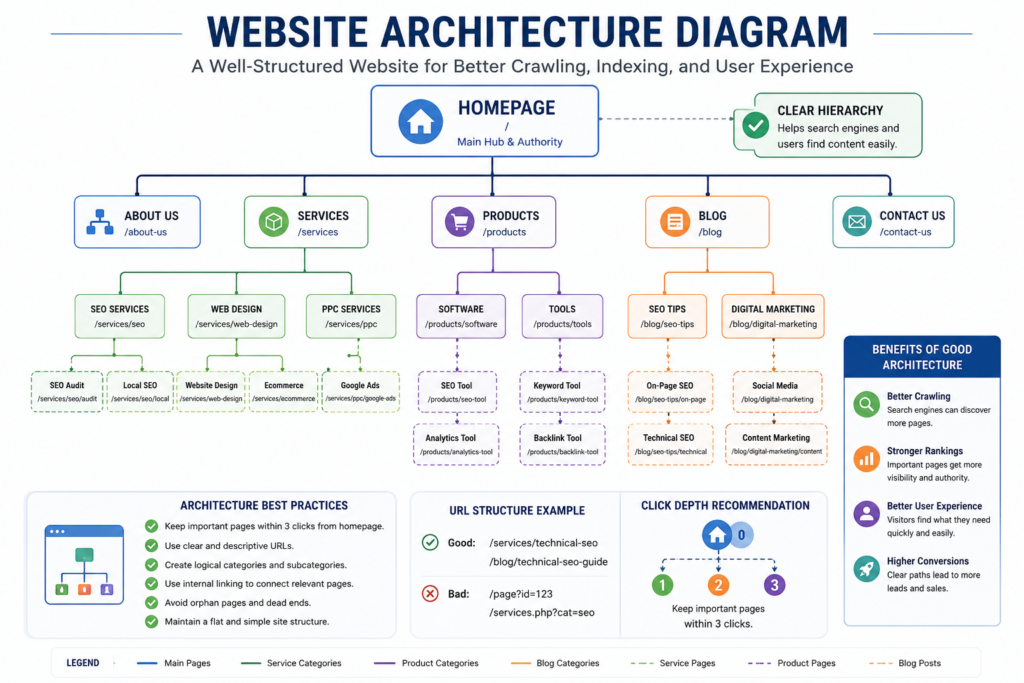
Figure 1. SEO-Friendly Website Architecture Diagram showing a logical hierarchy of pages, categories, and internal linking that improves crawlability, indexability, and user navigation.
Reference:
As illustrated in the diagram above, a clear website hierarchy helps search engines understand page relationships while making navigation easier for users. Keeping important pages within a few clicks of the homepage also supports efficient crawling and a better user experience.
Canonical Tags
Duplicate or highly similar pages can create confusion about which version should be considered the preferred URL.
Canonical tags help communicate the preferred version.
Example:
<link rel="canonical" href="https://example.com/technical-seo-guide/">
This does not force Google to index that URL, but it provides a strong signal about the preferred version.
Common Canonical Issues
- Canonical is pointing to the wrong page.
- Self-referencing canonicals are missing.
- Conflicting canonical signals.
- Multiple canonicals on one page.
- Canonical chains.
- Canonicalizing unrelated content.
These issues can reduce indexing efficiency and complicate search engine processing.
XML Sitemaps
An XML sitemap lists the important URLs you want search engines to discover.
A sitemap should generally contain:
- Canonical URLs.
- Indexable pages.
- Current URLs.
- Important content.
It should generally avoid:
- Redirected pages.
- 404 pages.
- Duplicate URLs.
- Noindex pages.
- Temporary URLs.
An XML sitemap complements internal linking but does not replace it.
XML Sitemap Example
<urlset>

<url>

<loc>https://example.com/technical-seo-guide/</loc>

</url>

<url>

<loc>https://example.com/core-web-vitals/</loc>

</url>

</urlset>
Robots.txt
The robots.txt file provides crawling guidance for compliant search engine crawlers.
Example:
User-agent: *

Disallow: /admin/

Allow: /

Sitemap: https://example.com/sitemap.xml
Important considerations:
- robots.txt controls crawling, not indexing by itself.
- Sensitive information should not rely on robots.txt for protection.
- Blocking essential CSS or JavaScript resources can interfere with rendering.
Review robots.txt after website migrations or major structural updates to avoid accidental blocking of important content.
Website Navigation
Navigation is both a usability feature and a technical SEO component.
A good navigation system should:
- Highlight important pages.
- Remain consistent.
- Avoid unnecessary nesting.
- Works well on desktop and mobile.
- Support logical internal linking.
Visitors should not need excessive clicks to reach key commercial pages.
Flat vs. Deep Website Structure
| Flat Structure | Deep Structure |
|---|---|
| Fewer clicks to important pages | Multiple navigation levels |
| Better crawl efficiency | Important pages may become difficult to discover |
| Easier navigation | Higher risk of orphaned content |
| Supports topical authority | Can dilute internal linking signals |
Many websites benefit from keeping high-value pages relatively close to the homepage, although the ideal structure depends on the website’s size and purpose.
Technical SEO Foundation Checklist
Before moving to advanced optimization, verify that your website has:
- Logical architecture.
- Descriptive URLs.
- Consistent navigation.
- Strong internal linking.
- Breadcrumb navigation where appropriate.
- Valid canonical implementation.
- Accurate XML sitemap.
- Proper robots.txt configuration.
- Mobile-friendly navigation.
- Secure HTTPS implementation.
Common Foundation Mistakes
Organizations frequently encounter issues such as:
- Publishing pages without internal links.
- Creating multiple URLs for the same content.
- Overly complex navigation.
- Ignoring canonical implementation.
- Leaving outdated URLs in XML sitemaps.
- Blocking important resources in robots.txt.
- Creating inconsistent URL structures.
Most of these problems become more expensive to resolve as websites grow.
Expert Insight
The strongest technical SEO strategy does not begin with advanced tools or automation. It begins with a clean website structure that allows both users and search engines to understand how every important page relates to the rest of the site. Advanced optimizations become significantly more effective when this foundation is already in place.
Crawlability and Indexability
A page cannot earn sustainable organic visibility if search engines cannot discover, access, render, and evaluate it correctly. Crawlability and indexability are therefore two of the most important components of technical SEO, but they are not the same thing.
As shown in Figure 2, crawlability depends on much more than allowing Googlebot to access a page. Internal linking, server responses, robots .txt directives, rendering, and overall website architecture all contribute to efficient crawling.
A page cannot earn sustainable organic visibility if search engines cannot discover, access, render, and evaluate it correctly. Crawlability and indexability are therefore two of the most important components of technical SEO, but they are not the same thing.
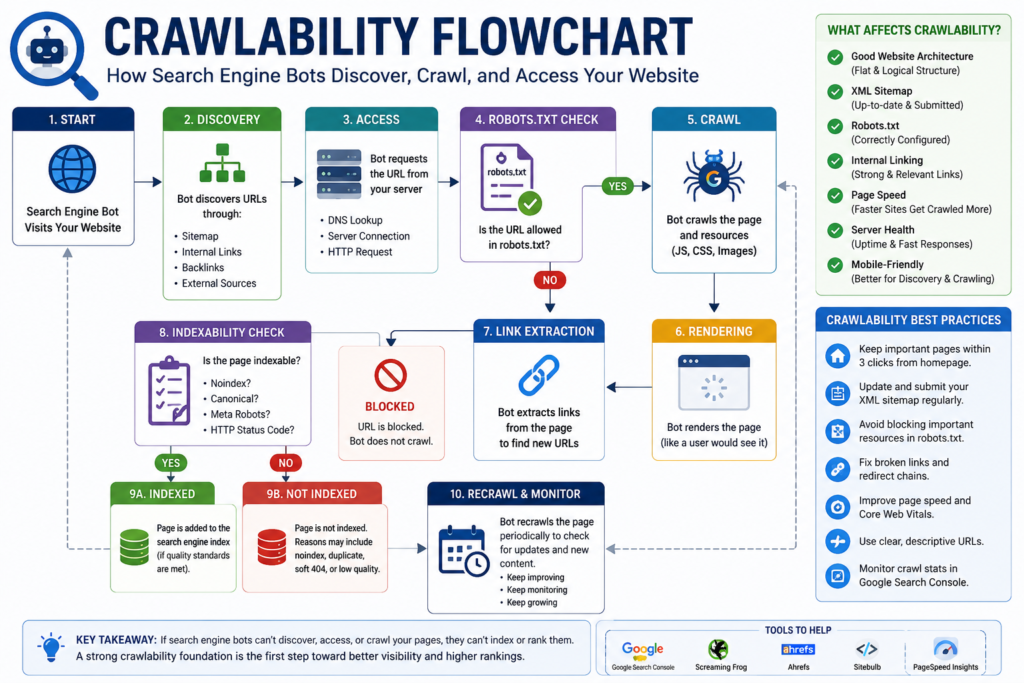
The diagram above illustrates the complete crawlability workflow. Search engines typically begin by discovering URLs through internal links, XML sitemaps, and external references. They then evaluate access permissions, retrieve resources, render page content, assess indexability, and revisit important pages over time. Understanding this workflow helps website owners identify technical barriers before they affect organic visibility.
Crawlability describes whether a search engine can discover and request a URL.
Indexability describes whether the retrieved page can be processed and considered for inclusion in the search engine’s index.
A page may be crawlable but not indexable. It may also be indexable in theory, but difficult to discover because no crawlable links lead to it.
Understanding this distinction prevents businesses from treating every indexing problem as a content problem or every crawl warning as a ranking emergency.
Google describes Search as a sequence that broadly includes crawling, indexing, and serving results. During crawling, automated systems discover and retrieve content. During indexing, Google analyzes the retrieved page and determines how to represent it in its index.
What Is Crawlability?
Crawlability is the ability of search engine crawlers to discover and request pages and resources from a website.
A page is more likely to be crawlable when:
- It is linked from another crawlable page.
- The internal link uses a standard HTML anchor.
- The server responds reliably.
- Robots.txt does not block the URL.
- Important CSS and JavaScript resources are accessible.
- The website does not trap crawlers in unnecessary URL variations.
- The page is included in an accurate XML sitemap.
- Navigation works without requiring unsupported interactions.
Google uses links both to discover new pages and to understand relationships among pages. It recommends creating crawlable links with descriptive anchor text so users and search systems can understand the destination.
How Search Engines Discover URLs
Search engines can discover URLs through several channels:
- Internal links.
- External links.
- XML sitemaps.
- Redirects.
- Previously known URLs.
- Structured navigation.
- Certain feeds and platform integrations.
An XML sitemap can assist discovery, but it does not replace internal linking. A page listed only in a sitemap may technically be discoverable, yet its isolation from the website’s normal structure can indicate that it is not an important part of the user journey.
Crawlability Example
Imagine an e-commerce store publishes a new category page:
The URL appears in the XML sitemap, but:
- No menu links to it.
- No product pages link back to it.
- No related category mentions it.
- The blog does not reference it.
Google may eventually discover the URL through the sitemap, but the absence of internal links makes the page harder to reach and weakens its structural context.
A stronger implementation would connect the page from:
- The main laptop category.
- Relevant product pages.
- Buying guides.
- Breadcrumb navigation.
- Related collection pages.
What Is Googlebot?
Googlebot is the general name for Google Search’s web crawler. It requests URLs, follows permitted links, retrieves resources, and sends discovered content for further processing. Google provides separate user agents for different purposes, including smartphone-oriented crawling.
Website owners should not block or alter content solely based on a claimed Googlebot user-agent string, as user-agent strings can be spoofed. Google recommends verifying crawler requests through its published methods when authentication matters.
Googlebot and Mobile-First Indexing
Google uses the mobile version of a website’s content for indexing and ranking under mobile-first indexing. This makes mobile content parity a technical requirement for websites that provide separate or materially different mobile experiences.
The mobile version should include the same essentials:
- Main content.
- Headings.
- Images and relevant alt text.
- Structured data.
- Metadata.
- Internal links.
- Canonical signals.
- Robot’s directives.
Reducing mobile content to create a cleaner design can unintentionally remove information that Google uses to understand the page.
Crawl Queue and Rendering Queue
A discovered URL is not necessarily processed immediately.
Googlebot manages URLs through crawling and processing systems. For JavaScript-dependent pages, crawling and rendering may occur as separate stages. Google explains that pages can wait in queues for crawling and rendering, which means rendered content may not be processed at exactly the same time as the initial HTML response.
This matters for websites where important information exists only after JavaScript execution.
Potential problems include:
- Empty initial HTML.
- Client-side links that are not crawlable.
- Content is loaded only after user interaction.
- JavaScript errors that prevent rendering.
- Blocked scripts or stylesheets.
- API responses unavailable to crawlers.
- Infinite loading states.
Practical Rendering Test
Use Google Search Console’s URL Inspection tool or Google’s Rich Results Test to review how Google retrieves and renders a page. These tools can reveal loaded resources, JavaScript errors, rendered HTML, and other diagnostic information.
The test should verify:
- Whether the main content appears in rendered HTML.
- Whether important links are present.
- Whether scripts return errors.
- Whether the required resources load successfully.
- Whether structured data is available after rendering.
- Whether rendered content matches what users see.
Crawl Budget
Crawl budget refers broadly to the amount of crawling activity Google is willing and able to perform on a website within a given period.
It is most relevant to:
- Very large websites.
- Frequently updated publishers.
- Large ecommerce platforms.
- Websites with millions of parameter URLs.
- Websites are experiencing server-capacity problems.
- Websites with extensive duplicate URL inventories.
Most small websites do not need advanced crawl-budget optimization. Their problems are more often caused by weak internal linking, low-value pages, server failures, duplicate URLs, or inconsistent directives.
Google advises large website owners to manage crawl priorities and avoid wasting crawling resources on low-value URL inventories. It may reduce crawling when a server appears unable to handle requests reliably.
What Can Waste Crawl Resources?
Crawl resources may be consumed by:
- Faceted navigation combinations.
- Tracking parameters.
- Session identifiers.
- Internal search-result pages.
- Calendar pages are generating endless dates.
- Duplicate print views.
- Filter and sort URLs.
- Broken redirect chains.
- Soft 404 pages.
- Large numbers of low-value tag archives.
- URLs created by malfunctioning plugins.
Crawl Budget Optimization Priorities
| Problem | Why It Matters | Recommended Response |
|---|---|---|
| Infinite parameter combinations | Creates a large low-value URL inventory | Control generation, linking, canonicals, and crawler access where appropriate |
| Slow or unstable server | May cause crawling to decrease | Improve hosting capacity, caching, and server reliability |
| Redirect chains | Requires multiple requests to reach the destination | Update links and redirect directly to the final URL |
| Large numbers of soft 404s | Wastes retrieval and processing resources | Return meaningful content or an accurate 404 or 410 response |
| Duplicate category pages | Splits crawl attention across similar URLs | Consolidate through architecture, canonicals, or redirects |
| Outdated sitemap URLs | Sends inconsistent discovery signals | Keep sitemaps limited to current canonical URLs |
| Orphan pages | Weakens discovery and context | Add relevant internal links or remove unneeded pages |
Crawl Depth
Crawl depth is the number of link steps required to reach a page from a starting point, commonly the homepage.
Example:
Homepage.
↓
Services.
↓
SEO Services.
↓
Technical SEO Services.
↓
Technical SEO Audit Packages.
The final page has a deeper position in the architecture than the main services page.
Deep pages are not automatically unimportant, and there is no universal maximum number of clicks suitable for every website. However, important commercial and editorial pages should generally be reachable through clear, logical navigation without unnecessary layers.
Problems Caused by Excessive Depth
Excessive crawl depth can:
- Make important pages difficult to discover.
- Reduce the frequency with which they are revisited.
- Weaken internal context.
- Frustrate users.
- Create reliance on sitemaps rather than normal navigation.
- Increase the chance of orphaned content.
Crawl Depth Prioritization
| Page Type | Recommended Structural Treatment |
|---|---|
| Homepage | Primary navigation hub |
| Main service or category pages | Directly linked from navigation or major hubs |
| High-value commercial pages | Linked from relevant service, category, and content pages |
| Supporting guides | Linked from pillar pages and related resources |
| Utility pages | Accessible where necessary but not overemphasized |
| Archived or outdated pages | Consolidate, update, redirect, or remove as appropriate |
Orphan Pages
An orphan page is a URL that has no crawlable internal links pointing to it.
The page may still be discovered through:
- An XML sitemap.
- An external backlink.
- A redirect.
- Search Console history.
- A previously known URL.
However, the lack of internal links weakens its role in the website architecture.
Common Causes of Orphan Pages
- Website redesigns.
- Navigation changes.
- Deleted category hubs.
- Imported content.
- Landing pages created for expired campaigns.
- CMS migrations.
- Incomplete internal linking.
- Old product pages.
- Pages created through forms or plugins.
How to Find Orphan Pages
Compare data from multiple sources:
- Crawlable website URLs.
- XML sitemap URLs.
- Analytics landing pages.
- Search Console pages.
- Server log URLs.
- CMS page exports.
A page appearing in one source but not in the crawl may be orphaned, blocked, or accessible only through a nonstandard path.
How to Handle Orphan Pages
Ask four questions:
- Is the page still useful?
- Does it serve a current user need?
- Should it generate organic visibility?
- Does another page already serve the same intent?
Then choose an action:
- Add relevant internal links.
- Update and reintegrate the page.
- Merge it with a stronger page.
- Redirect it to a closely relevant destination.
- Remove it and return an accurate status code.
- Keep it excluded if it is intentionally private or campaign-specific.
What Is Indexability?
Indexability describes whether a page is technically eligible to be considered for inclusion in a search engine’s index.
A page is not automatically indexed simply because it is crawlable.
Indexability describes whether a page is technically eligible to be considered for inclusion in a search engine’s index. A page is not automatically indexed simply because it is crawlable.
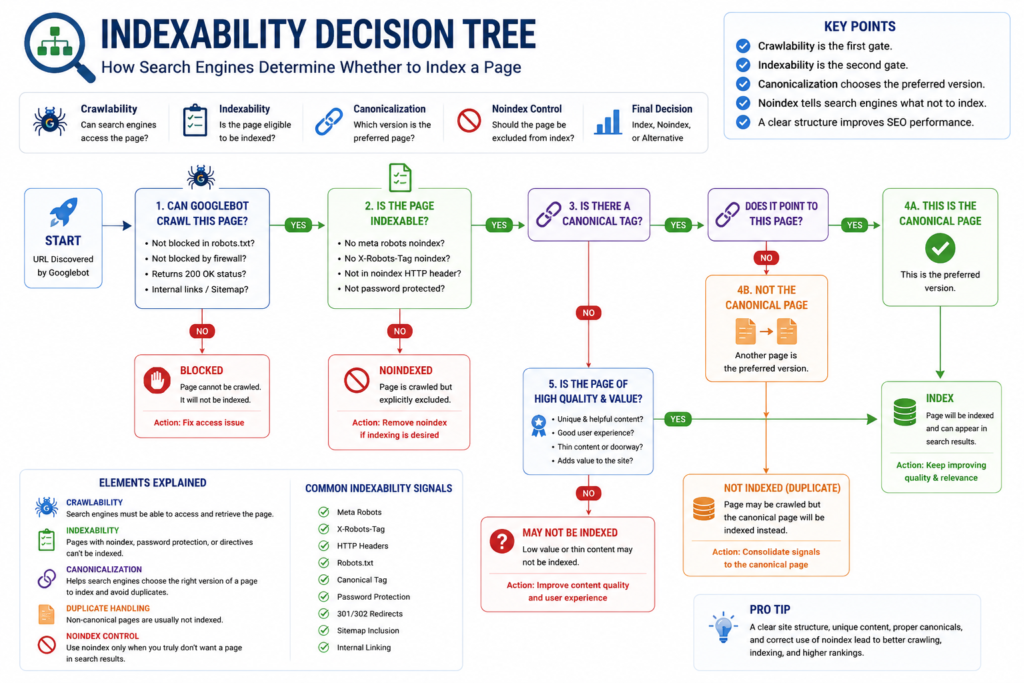
As shown in Figure 4, indexing is not an automatic outcome of crawling. Search engines first verify whether a page is accessible, eligible for indexing, free from conflicting directives, and designated as the preferred canonical version. They also evaluate whether the page provides unique value before deciding to include it in the search index.
Google may choose not to index a page because:
- It contains a
noindexdirective. - It returns an error response.
- It redirects elsewhere.
- It is considered a duplicate.
- Another canonical URL is selected.
- The content appears low-value or unhelpful.
- The page cannot be rendered properly.
- The URL has weak discovery and internal signals.
- The content is unavailable or inaccessible.
Google’s minimum technical requirements state that an indexable page must be accessible to Googlebot, return a successful HTTP 200 response, and contain indexable content. Meeting these requirements creates eligibility but does not guarantee inclusion.
Indexability vs. Ranking
Indexing and ranking are separate outcomes.
A page can be:
- Crawled but not indexed.
- Indexed but rarely shown.
- Indexed and shown for limited queries.
- Indexed and ranked prominently.
- Temporarily removed and later reconsidered.
Fixing an indexing issue does not guarantee competitive rankings. Once indexed, the page must still demonstrate relevance, quality, usefulness, trust, and competitive value.
Noindex Directives
A noindex A directive tells search engines not to include a page in search results.
Example:
<meta name="robots" content="noindex">
Google documents noindex As a rule, this prevents a page from appearing in Google Search after the crawler retrieves and processes the directive.
As illustrated in Figure 4, a
noindexdirective tells search engines not to include a page in search results after it has been crawled and processed.
Critical Noindex Rule
Google must be able to crawl the page to see its noindex directive.
If the URL is blocked in robots.txt, Google may be unable to retrieve the page and process the directive. Therefore, robots.txt should not be treated as a substitute for noindex.
Appropriate Uses of Noindex
Potential uses include:
- Internal search-result pages.
- Account or login areas.
- Temporary campaign pages.
- Staging environments that are also protected appropriately.
- Thank-you pages.
- Low-value utility pages.
- Certain filtered or generated views.
The decision should be based on user value and indexing strategy rather than applying noindex to every page that does not target a keyword.
Common Noindex Mistakes
- Leaving staging directives active after launch.
- Applying noindex across an entire template.
- Noindexing canonical destination pages.
- Blocking noindex pages in robots.txt.
- Removing important category pages.
- Using noindex to hide security-sensitive content.
- Adding conflicting directives through multiple plugins.
Canonicalization and Duplicate URLs
Canonicalization is the process through which Google selects a representative URL from a group of duplicate or highly similar pages. The selected URL is the canonical page Google may use in search results.
Figure 4 demonstrates that canonicalization plays a key role in helping search engines identify the preferred version of duplicate or substantially similar pages.
Website owners can indicate a preferred canonical through:
- Redirects.
rel="canonical"tags.- Sitemap inclusion.
- Consistent internal links.
- HTTPS and hostname consistency.
These signals should agree.
Duplicate URL Example
A product may be available through several URLs:
https://example.com/product/office-chair/
https://example.com/chairs/office-chair/
https://example.com/product/office-chair/?color=black
https://example.com/product/office-chair/?utm_source=email
The business must determine which URLs should:
- Remain separate.
- Be canonicalized.
- Redirect.
- Stay crawlable.
- Be excluded from internal linking.
- Appear in the sitemap.
Canonical Signals Should Align
| Signal | Preferred Implementation |
|---|---|
| Internal links | Point to the canonical URL |
| XML sitemap | Include the canonical URL only |
| Canonical element | Reference the preferred equivalent page |
| Redirects | Send retired duplicates to the preferred destination |
| HTTPS | Use the secure preferred version consistently |
| Navigation | Avoid linking to parameters or duplicate variants unnecessarily |
A canon is a strong signal, not an absolute command. Google may select a different canonical when signals conflict or when it believes another URL is more representative.
Duplicate Content Management
Duplicate content is not automatically a spam violation. It is common for websites to generate similar URLs through platform behavior, product variations, syndication, sorting, tracking, and navigation.
The practical technical risks are:
- Search engines select an unintended canonical.
- Crawl resources are being spent on unnecessary variations.
- Internal links point to inconsistent versions.
- Reporting is becoming fragmented.
- Users encounter confusing URLs.
- Ranking signals are being distributed across duplicates.
Common Duplicate Sources
- HTTP and HTTPS versions.
- WWW and non-WWW versions.
- Trailing-slash variations.
- Uppercase and lowercase URLs.
- Tracking parameters.
- Printer-friendly pages.
- Product filters.
- Pagination.
- Tag and category archives.
- Product variants.
- Syndicated content.
- Session IDs.
Duplicate Content Decision Framework
| Situation | Preferred Action |
|---|---|
| Old URL permanently replaced | Use a permanent redirect |
| Duplicate URL must remain available | Use a canonical where content is equivalent |
| Page should remain accessible but not appear in search | Use noindex when appropriate |
| Parameter creates no user value | Prevent unnecessary creation and internal linking |
| Similar pages serve distinct search intent | Keep separate and make each meaningfully useful |
| The page is obsolete with no replacement | Return an accurate 404 or 410 response |
HTTP Status Codes and Indexing
HTTP status codes communicate the result of a browser or crawler request.
Google’s technical requirements state that pages considered for indexing need to return HTTP 200 success responses. Client and server error responses are not indexed as normal content pages.
Important Status Codes
| Status Code | Meaning | Typical SEO Treatment |
|---|---|---|
| 200 | Successful response | Use for valid, indexable content |
| 301 | Permanent redirect | Use when a URL has permanently moved |
| 302 | Temporary redirect | Use when the move is genuinely temporary |
| 304 | Not modified | Supports efficient caching behavior |
| 404 | Not found | Use when a resource does not exist |
| 410 | Gone | Use when content has intentionally been removed |
| 429 | Too many requests | Indicates rate limiting |
| 500 | Internal server error | Investigate server or application failure |
| 502 | Bad gateway | Investigate upstream server communication |
| 503 | Service unavailable | Appropriate for temporary maintenance when configured correctly |
| 504 | Gateway timeout | Investigate server or network delays |
Soft 404 Errors
A soft 404 occurs when a page appears to be missing, empty, or invalid but returns a successful response 200 response instead of an accurate error code.
Examples include:
- An empty product page.
- A “page not found” message is returning 200.
- A category page with no meaningful content.
- A removed property listing that displays only a generic notice.
- A redirected page that lands on an unrelated homepage.
Why Soft 404s Matter
They can:
- Confuse crawlers.
- Waste processing resources.
- Create inaccurate reporting.
- Keep low-value URLs active.
- Provide a poor user experience.
Correct Soft 404 Treatment
- Restore meaningful content if the page should exist.
- Redirect only when a close replacement exists.
- Return 404 or 410 when the content is genuinely unavailable.
- Avoid redirecting every deleted URL to the homepage.
- Remove obsolete URLs from sitemaps and internal links.
Hard 404 Errors
A standard 404 indicates that the requested resource was not found.
A 404 is not automatically harmful. It is the correct response when a page no longer exists and has no suitable replacement.
The problem arises when:
- Important pages return 404 unexpectedly.
- Internal links point to missing pages.
- Backlinked URLs disappear without review.
- Sitemaps contain 404 URLs.
- Navigation sends users to broken pages.
404 Decision Guide
| Situation | Recommended Action |
|---|---|
| Page removed with a close replacement | Permanently redirect to the closest relevant page |
| Page removed with no replacement | Return 404 or 410 |
| URL contains a typo but attracts links | Redirect to the correct relevant page |
| Product temporarily unavailable | Keep the page useful and explain availability |
| Product permanently discontinued | Retain, replace, redirect, or remove based on demand and alternatives |
| Internal link is broken | Update the link directly |
Redirect Chains and Loops
A redirect chain occurs when one URL redirects through multiple intermediate URLs.
Example:
URL A.
↓
URL B.
↓
URL C.
↓
Final URL D.
A redirect loop occurs when URLs redirect back to one another and no final destination loads.
Example:
URL A.
↓
URL B.
↓
URL A.
Why Redirect Problems Matter
They can:
- Increase loading time.
- Waste crawl requests.
- Create poor user journeys.
- Complicated migrations.
- Cause rendering or access failures.
- Make internal linking less efficient.
Redirect Best Practices
- Redirect directly to the final destination.
- Update internal links after migrations.
- Remove obsolete redirect hops.
- Test desktop and mobile behavior.
- Preserve query parameters only when necessary.
- Avoid redirecting unrelated pages to a generic destination.
- Maintain a documented redirect map.
Robots.txt and Indexability
Robots.txt manages crawler access. It does not provide reliable content security, and it is not itself a guaranteed method for removing a known URL from search results. Google notes that robots’ instructions depend on crawler compliance and recommends using stronger security controls for private content.
Robots.txt Is Appropriate For
- Managing unnecessary crawler traffic.
- Blocking nonpublic utility paths from compliant crawlers.
- Controlling the crawling of certain generated URL patterns.
- Preventing access to selected resources when rendering is not required.
Robots.txt Is Not Appropriate For
- Protecting confidential files.
- Replacing authentication.
- Guaranteeing deindexation.
- Blocking resources required for page rendering.
- Correcting duplicate content by itself.
Index Coverage Investigation Workflow
When an important page is not indexed, follow a structured process.
Step 1. Confirm the Exact URL
Check:
- HTTPS version.
- Hostname.
- Trailing slash.
- Parameters.
- Uppercase variations.
- Redirect destination.
Step 2. Inspect the HTTP Response
Verify that the preferred URL returns:
200For a valid content page.- An appropriate redirect if it has moved.
- No server errors.
- No soft 404 behavior.
Step 3. Review Crawl Access
Check:
- Robots.txt.
- Firewall rules.
- CDN security.
- Bot protection.
- Authentication.
- Server capacity.
Step 4. Review Indexing Directives
Check:
- Robots meta tags.
- X-Robots-Tag headers.
- CMS indexing settings.
- Plugin configurations.
- Template-level directives.
Step 5. Review Canonicalization
Confirm:
- The canonical points to an equivalent preferred URL.
- Internal links use the preferred URL.
- The sitemap includes the same preferred URL.
- Redirects and canonical signals do not conflict.
Step 6. Evaluate Content Value
Ask:
- Does the page serve a distinct user need?
- Is its purpose clear?
- Is it substantially different from related pages?
- Does it provide original value?
- Is it complete and trustworthy?
Step 7. Evaluate Discovery
Confirm that:
- Crawlable internal links point to the page.
- Anchor text provides context.
- The page is included in the correct hub or category.
- It is not orphaned.
- The sitemap is current.
Step 8. Test Rendering
For JavaScript-dependent content:
- Inspect rendered HTML.
- Review JavaScript errors.
- Confirm that essential content appears.
- Check whether API calls are accessible.
- Verify that links exist in crawlable HTML.
Step 9. Request Reprocessing Carefully
After correcting material issues, use URL Inspection to request indexing for the most important URLs. Requests are not guarantees and should not replace fixing architecture, content, or crawling problems. Google advises reserving requests for important pages because the feature is subject to quotas.
Crawlability and Indexability Audit Checklist
Discovery
- Important pages have crawlable internal links.
- Anchor text is descriptive.
- XML sitemaps contain current canonical URLs.
- Orphan pages have been identified.
- Navigation works without unsupported interactions.
Access
- Robots.txt does not block important pages.
- Essential CSS and JavaScript resources are accessible.
- Security systems do not block legitimate crawlers.
- The server handles crawl requests reliably.
- Pages do not require a login unless intentionally private.
HTTP Responses
- Valid pages return 200.
- Retired URLs return appropriate redirects or error responses.
- Redirect chains are minimized.
- Redirect loops do not exist.
- Soft 404s are resolved.
Indexing Directives
- Important pages do not contain noindex.
- X-Robots-Tag headers are reviewed.
- Staging directives are absent from production.
- CMS and plugin settings are consistent.
- Robots rules and noindex directives do not conflict.
Canonicalization
- Canonical tags reference valid equivalent pages.
- Internal links point to canonical URLs.
- Sitemaps contain canonical URLs.
- HTTPS and hostname versions are consistent.
- Parameter variations are managed intentionally.
Content and Rendering
- Main content appears in rendered HTML.
- Mobile and desktop content remain consistent.
- JavaScript errors do not hide important content.
- Lazy-loaded content can be discovered.
- Pages provide distinct and useful information.
Crawlability and Indexability Priority Matrix
| Issue | Severity | Business Impact | Recommended Timing |
|---|---|---|---|
| Revenue page blocked by robots.txt | Critical | Page may not be retrieved | Immediate |
| Important page contains noindex | Critical | Page cannot appear in Search | Immediate |
| Canonical points to unrelated page | Critical | The wrong URL may be selected | Immediate |
| Main content fails to render | Critical | The page cannot be evaluated properly | Immediate |
| Widespread server errors | Critical | Crawling and user access are disrupted | Immediate |
| Migration redirect chains | High | Slower access and weak migration signals | Within days |
| Orphan commercial pages | High | Weak discovery and context | Within days |
| Outdated sitemap inventory | Medium | Inconsistent discovery signals | During current audit |
| Minor duplicate parameters | Medium | Possible crawl inefficiency | According to scale |
| Broken links to low-value archived pages | Low to Medium | Limited user and crawl impact | Routine maintenance |
Website Performance and Core Web Vitals
A technically optimized website is not only easier for search engines to crawl and understand but also significantly more enjoyable for visitors to use. Modern users expect websites to load quickly, respond immediately, and remain visually stable while browsing.
A technically optimized website is not only easier for search engines to crawl and understand but also significantly more enjoyable for visitors to use. Modern users expect websites to load quickly, respond immediately, and remain visually stable while browsing.
Website performance has therefore become much more than a speed metric. It directly affects user satisfaction, business credibility, conversion rates, and long-term website maintenance.
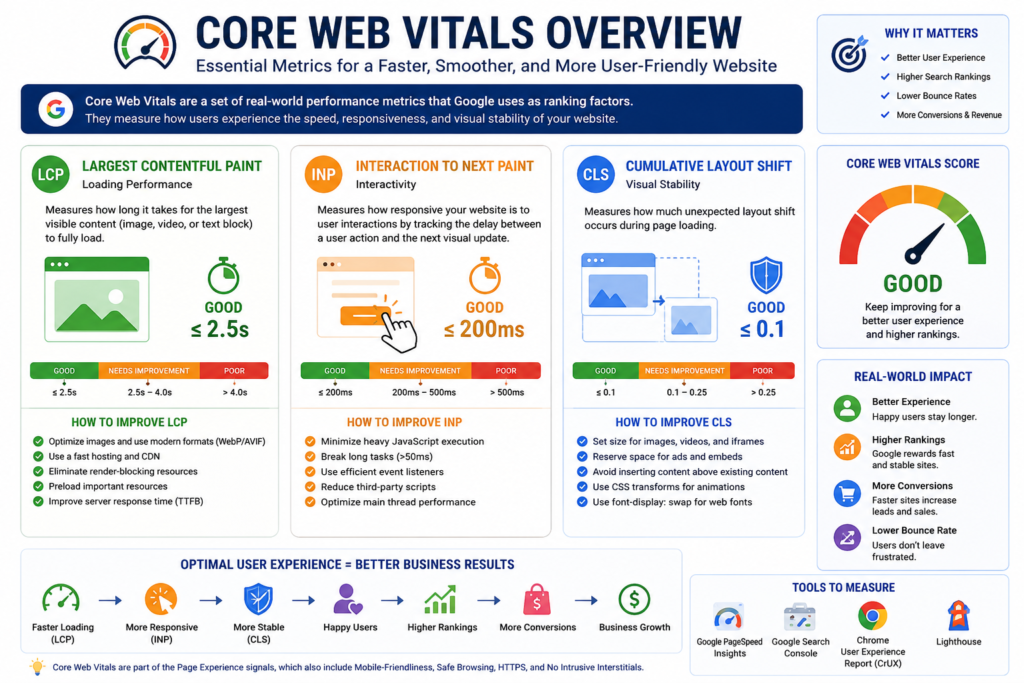
As illustrated in Figure 5, Core Web Vitals focus on three critical aspects of user experience: loading performance, interactivity, and visual stability. Together, these metrics help website owners identify opportunities to improve usability and technical quality. Rather than treating them as isolated benchmarks, they should be considered part of a broader strategy to create fast, responsive, and reliable websites.
Website performance has therefore become much more than a speed metric. It directly affects user satisfaction, business credibility, conversion rates, and long-term website maintenance.
Technical SEO and website performance work together because a fast, stable website creates a stronger technical foundation for both search engines and users.
Why Website Performance Matters
Every second matters online.
Research across the industry consistently shows that users are less likely to continue interacting with slow websites. Longer loading times often lead to:
- Higher bounce rates.
- Lower engagement.
- Reduced conversions.
- Poor customer satisfaction.
- Lower trust.
For businesses, slow performance can mean:
- Lost leads.
- Fewer sales.
- Increased advertising costs.
- Reduced return on marketing investment.
Website performance should therefore be viewed as a business objective rather than only a technical objective.
Website Speed vs. Website Performance
Many people use these terms interchangeably, but they describe different concepts.
Website Speed usually refers to how quickly a page begins loading.
Website Performance describes the complete user experience, including:
- Loading speed.
- Visual stability.
- Interactivity.
- Responsiveness.
- Resource efficiency.
- Overall usability.
A page may appear quickly but still perform poorly if users cannot interact with it or if page elements move unexpectedly.
How Google Evaluates Website Performance
Google evaluates website quality using many signals. Among the user experience metrics it has introduced are Core Web Vitals, which measure specific aspects of loading, responsiveness, and visual stability.
Core Web Vitals are not a standalone ranking system, nor does passing them guarantee higher rankings. However, they provide useful measurements that help website owners improve real-world user experience.
The three current Core Web Vitals are:
- Largest Contentful Paint (LCP).
- Interaction to Next Paint (INP).
- Cumulative Layout Shift (CLS).
These metrics are based on real user experience data, where available, and are designed to measure how users actually experience a webpage.
Understanding Core Web Vitals
Figure 5 provides a high-level overview of how the three Core Web Vitals work together. The following sections examine each metric individually, explain why it matters, and outline practical approaches for improvement.
Core Web Vitals focus on three simple questions.
- How Fast Does the Main Content Load?
- How Responsive Is the Page to User Interaction?
- Does the Layout Remain Visually Stable?
Core Web Vitals Overview
| Metric | Measures | User Experience Goal |
|---|---|---|
| Largest Contentful Paint (LCP) | Loading performance | Main content should appear quickly |
| Interaction to Next Paint (INP) | Responsiveness | User interactions should feel immediate |
| Cumulative Layout Shift (CLS) | Visual stability | The page should remain stable while loading |
Rather than trying to memorize numbers, businesses should focus on creating pages that feel fast, responsive, and stable for real users.
Largest Contentful Paint (LCP)
As shown in Figure 5, Largest Contentful Paint (LCP) measures loading performance by evaluating how quickly the largest visible content element appears within the initial viewport.
Largest Contentful Paint measures how long it takes for the largest visible content element within the initial viewport to become visible.
This element may be:
- A hero image.
- A featured image.
- A large heading.
- A video poster.
- A prominent content block.
LCP helps answer an important question:
“When does the visitor feel that the page has actually loaded?”
A page may technically begin loading very quickly, but users often judge performance by when the primary content becomes visible.
What Can Slow LCP?
Common causes include:
- Slow server response.
- Large, unoptimized images.
- Render-blocking CSS.
- Render-blocking JavaScript.
- Slow hosting.
- Excessive third-party scripts.
- Large web fonts.
- Missing caching.
- Poor CDN configuration.
How to Improve LCP
Focus on:
- Faster hosting infrastructure.
- Optimized images.
- Modern image formats where appropriate.
- Efficient caching.
- Reducing unnecessary JavaScript.
- Eliminating render-blocking resources where practical.
- Optimizing above-the-fold content.
- Using a content delivery network (CDN) when appropriate.
These improvements benefit both users and website maintainability.
Interaction to Next Paint (INP)
Figure 5 also highlights Interaction to Next Paint (INP), which measures how quickly a webpage responds after a user interacts with it.
Interaction to Next Paint measures how quickly a webpage responds after a user interacts with it.
Examples include:
- Clicking a button.
- Opening a navigation menu.
- Typing into a search field.
- Selecting a product option.
- Adding an item to a shopping cart.
If users click a button and nothing appears to happen for a noticeable period, the page feels slow even if it loaded quickly.
Common Causes of Poor INP
- Heavy JavaScript execution.
- Long-running browser tasks.
- Poor event handling.
- Large third-party scripts.
- Excessive DOM size.
- Unoptimized client-side rendering.
Improving INP
Recommended approaches include:
- Reducing unnecessary JavaScript.
- Breaking long tasks into smaller operations.
- Loading non-critical scripts later where appropriate.
- Removing unused libraries.
- Optimizing interactive components.
- Testing performance on mobile devices as well as desktops.
Cumulative Layout Shift (CLS)
As illustrated in Figure 5, Cumulative Layout Shift (CLS) measures visual stability by identifying unexpected movement of page elements while the page is loading.
- Cumulative Layout Shift measures unexpected visual movement while a page is loading.
- Almost everyone has experienced this situation:
- You try to click a button.
- Just before you click, an advertisement, image, or banner loads.
- The button suddenly moves.
- You accidentally click something else.
- That is a layout shift.
Common Causes
- Images without dimensions.
- Advertisements are loading dynamically.
- Embedded videos without reserved space.
- Web fonts are replacing fallback fonts unexpectedly.
- Content injected above existing content.
- Dynamic widgets.
Improving CLS
Best practices include:
- Reserve space for images.
- Reserve space for advertisements.
- Define image dimensions.
- Allocate space for embedded media.
- Avoid inserting new content above existing content unless initiated by the user.
- Optimize font loading strategies.
A visually stable page improves both usability and perceived quality.
Why Core Web Vitals Matter for Businesses
The three metrics shown in Figure 5 represent different aspects of website quality, but they share a common objective: delivering a faster, smoother, and more predictable experience for users. Organizations that monitor these metrics regularly are better positioned to identify technical issues before they affect customer satisfaction or business performance.
Many businesses assume Core Web Vitals are only relevant for SEO professionals.
In reality, they influence the experience every visitor has with your website.
A technically healthy website often provides:
- Faster navigation.
- Better usability.
- Greater customer confidence.
- More completed forms.
- Higher engagement.
- Better long-term maintainability.
Rather than chasing scores alone, organizations should focus on delivering consistently good experiences across devices and network conditions.
Measuring Website Performance
Performance should be measured regularly rather than guessed.
Common tools include:
- Google PageSpeed Insights.
- Google Lighthouse.
- Chrome DevTools.
- Google Search Console (Core Web Vitals report).
- Chrome User Experience Report (where applicable).
- WebPageTest.
- GTmetrix.
Each tool serves a different purpose. Some measure laboratory simulations, while others report real-world user experience data. Reviewing both perspectives provides a more complete understanding of website performance.
Business Impact Matrix
| Performance Issue | Potential Business Effect | Recommended Priority |
|---|---|---|
| Slow page loading | Higher abandonment | Critical |
| Poor responsiveness | Lower engagement | High |
| Layout instability | Reduced user trust | High |
| Large unoptimized images | Slower browsing | High |
| Excessive JavaScript | Poor interaction | High |
| Weak hosting performance | Site-wide delays | Critical |
| Missing caching | Repeated slow visits | Medium |
| Too many third-party scripts | Reduced reliability | Medium |
Advanced Website Performance Optimization
Once you understand Core Web Vitals, the next step is learning how to improve them systematically. Enterprise-level website performance is not achieved by installing a single plugin or enabling one caching feature. It results from multiple optimizations working together across the server, browser, network, and website code.
Once you understand Core Web Vitals, the next step is learning how to improve them systematically. Enterprise-level website performance is not achieved by installing a single plugin or enabling one caching feature. It results from multiple optimizations working together across the server, browser, network, and website code.
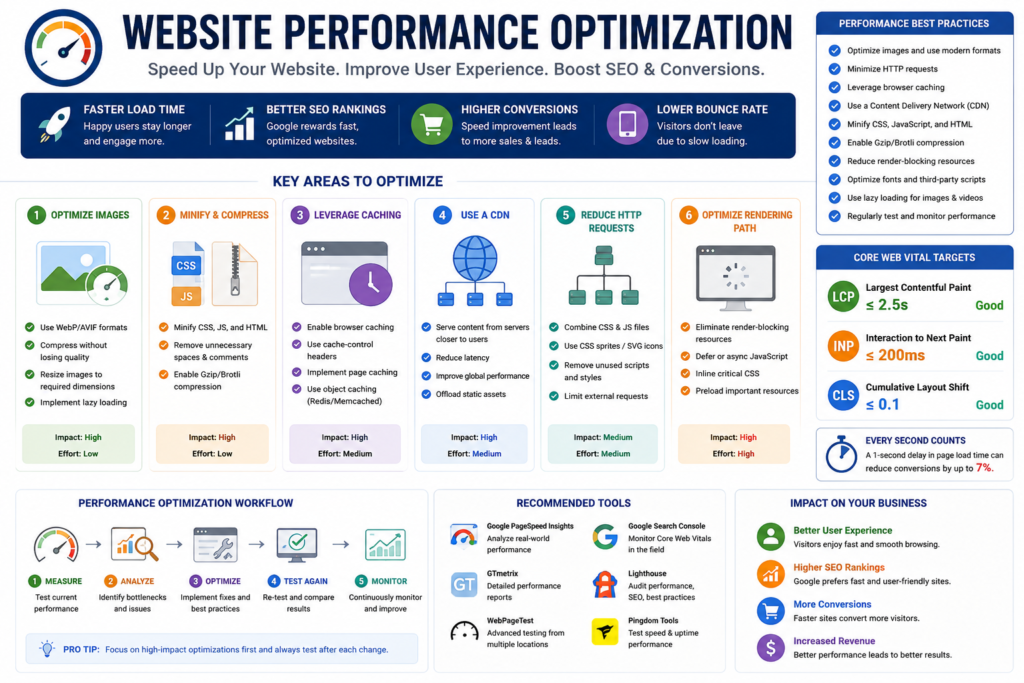
Figure 6 summarizes the most important website performance optimization techniques discussed throughout this chapter. While individual improvements such as image compression or browser caching can produce measurable gains, the greatest results are typically achieved when multiple optimizations work together as part of a comprehensive performance strategy.
The objective is simple:
- Deliver pages faster.
- Reduce unnecessary resource usage.
- Improve user experience.
- Support search engine crawling.
- Build a scalable technical foundation.
Server Response Time (TTFB)
As illustrated in Figure 6, server response time forms the foundation of website performance because every other optimization depends on a fast and reliable server response.
Before a browser can download your website, it must first receive a response from the server.
This initial delay is commonly referred to as Time to First Byte (TTFB).
TTFB measures the time between a browser requesting a page and receiving the first byte of data from the server.
A slow TTFB often indicates infrastructure issues rather than frontend problems.
Common Causes
- Slow hosting.
- Poor database performance.
- Unoptimized application code.
- Excessive plugins.
- High server load.
- Missing server caching.
- Slow DNS resolution.
- Network latency.
Optimization Strategies
- Choose reliable hosting.
- Upgrade server resources when necessary.
- Enable server-side caching.
- Optimize database queries.
- Reduce unnecessary plugins.
- Use a Content Delivery Network (CDN).
- Monitor server logs for bottlenecks.
Critical Rendering Path
The Critical Rendering Path is the sequence of steps a browser follows to convert HTML, CSS, and JavaScript into a visible webpage.
Every unnecessary resource requested during this process can delay the appearance of important content.
The primary goal is to display meaningful content as early as possible.
Best Practices
- Minimize render-blocking resources.
- Prioritize above-the-fold content.
- Reduce unnecessary CSS.
- Delay non-critical JavaScript.
- Compress HTML, CSS, and JavaScript.
- Reduce network requests.
Render-Blocking Resources
Certain CSS and JavaScript files can prevent the browser from displaying content until those files have finished downloading and processing.
Not every CSS or JavaScript file is harmful. The goal is to identify resources that unnecessarily delay rendering.
Common Solutions
- Inline critical CSS where appropriate.
- Load non-critical CSS efficiently.
- Use
deferorasyncfor suitable JavaScript files. - Remove unused CSS.
- Remove unused JavaScript.
- Split large JavaScript bundles.
Changes should always be tested thoroughly because loading strategies can affect website functionality.
Image Optimization
Figure 6 highlights image optimization as one of the highest-impact improvements for reducing page weight and improving loading performance.
Images are often the largest assets downloaded on a webpage.
Poor image optimization is one of the most common causes of slow websites.
Image Optimization Checklist
- Compress images before uploading.
- Serve images at appropriate dimensions.
- Use responsive images.
- Remove unnecessary metadata when practical.
- Replace oversized decorative graphics.
- Avoid scaling very large images through HTML alone.
Choosing the Right Image Format
| Format | Best Use Case | Advantages |
|---|---|---|
| JPEG | Photographs | Wide compatibility and efficient compression |
| PNG | Graphics requiring transparency | Lossless quality |
| WebP | General web images | Smaller files than many JPEG or PNG images while maintaining quality |
| AVIF | Modern websites are supported | Excellent compression efficiency |
The best format depends on browser support, image content, and your website’s requirements.
Responsive Images
A desktop monitor and a mobile phone should not necessarily download the same image size.
Responsive images allow browsers to choose the most appropriate image based on the visitor’s device and screen resolution.
Benefits include:
- Faster mobile loading.
- Reduced bandwidth usage.
- Improved user experience.
- Better resource efficiency.
Lazy Loading
Lazy loading delays the loading of off-screen images or media until they are needed.
Instead of downloading every image immediately, the browser loads images as users scroll.
This reduces:
- Initial page weight.
- Network requests.
- First-page loading time.
However, important above-the-fold images should generally load immediately rather than being delayed.
Font Optimization
Fonts influence both design and performance.
Large font files can delay rendering and create visual instability.
Best Practices
- Use only necessary font families.
- Limit the number of font weights.
- Prefer modern font formats where appropriate.
- Preload important fonts when justified.
- Use sensible fallback fonts.
- Avoid loading multiple unused font libraries.
CSS Optimization
CSS controls the appearance of every webpage.
Over time, websites often accumulate unused CSS from themes, plugins, frameworks, and redesigns.
Optimization Techniques
- Remove unused CSS.
- Minify production CSS.
- Reduce duplicated rules.
- Separate critical and non-critical styles where appropriate.
- Review third-party stylesheets regularly.
JavaScript Optimization
Modern websites frequently rely on JavaScript for interactive functionality.
Excessive JavaScript, however, can negatively affect responsiveness and rendering.
Common Problems
- Large JavaScript bundles.
- Unused libraries.
- Third-party tracking scripts.
- Heavy animations.
- Long-running browser tasks.
Optimization Strategies
- Remove unused code.
- Split large bundles.
- Delay non-essential scripts.
- Minimize third-party dependencies.
- Monitor long tasks during testing.
Optimization should always preserve functionality and accessibility.
Browser Caching
Browser caching and server-side caching, shown in Figure 6, reduce unnecessary resource downloads and improve repeat visits.
Browser caching stores website resources locally on a visitor’s device.
During future visits, many resources can be reused instead of being downloaded again.
Benefits include:
- Faster repeat visits.
- Lower bandwidth consumption.
- Reduced server load.
Caching policies should be reviewed whenever website assets change.
Server-Side Caching
Server-side caching reduces repeated processing on the server.
Instead of generating every page from scratch, previously generated responses can often be reused.
Common approaches include:
- Page caching.
- Object caching.
- Database query caching.
- Opcode caching.
The most appropriate solution depends on the platform and hosting environment.
Content Delivery Network (CDN)
Figure 6 also demonstrates how Content Delivery Networks (CDNs) reduce latency by delivering website assets from locations closer to users.
A CDN stores website assets on multiple geographically distributed servers.
Visitors download files from locations closer to them rather than from a single origin server.
Potential benefits include:
- Reduced latency.
- Faster global delivery.
- Improved scalability.
- Better resilience during traffic spikes.
Organizations serving international audiences often benefit from CDN implementation.
HTTP/2 vs. HTTP/3
Modern web protocols improve communication between browsers and servers.
| Feature | HTTP/2 | HTTP/3 |
|---|---|---|
| Multiplexing | Yes | Yes |
| Connection Handling | TCP | QUIC (built on UDP) |
| Performance in Unstable Networks | Good | Often improved |
| Modern Browser Support | Broad | Increasingly broad |
The availability of HTTP/3 depends on your hosting provider, CDN, and server configuration.
Compression
Compression techniques such as Gzip and Brotli, illustrated in Figure 6, reduce transfer sizes and improve loading efficiency.
Compression reduces the size of files transferred between servers and browsers.
The two most common compression methods are:
- Gzip.
- Brotli.
Comparison
| Compression Method | Characteristics |
|---|---|
| Gzip | Long-established and widely supported |
| Brotli | Often provides better compression for many text-based assets when supported |
Always verify that compressed files are served correctly after enabling compression.
Database Optimization
Dynamic websites rely heavily on databases.
As websites grow, inefficient databases can slow page generation.
Common maintenance tasks include:
- Removing obsolete records.
- Optimizing database tables.
- Cleaning expired cache entries.
- Removing unused revisions.
- Reviewing slow queries.
Database optimization should be performed carefully and preferably after proper backups.
Third-Party Scripts
Marketing platforms, analytics tools, advertising tags, chat widgets, social media integrations, and tracking pixels all consume resources.
Each additional script increases complexity.
Before adding a new script, ask:
- Is it necessary?
- Does it provide measurable business value?
- Can it load after the main content?
- Is there a lighter alternative?
Regular audits often identify scripts that are no longer needed.
Enterprise Performance Optimization Checklist
Server
- ✓ Reliable hosting.
- ✓ HTTPS enabled.
- ✓ HTTP/2 or HTTP/3 where available.
- ✓ Server caching.
- ✓ CDN configured when appropriate.
Frontend
- ✓ Responsive images.
- ✓ Optimized fonts.
- ✓ Minified CSS.
- ✓ Optimized JavaScript.
- ✓ Lazy loading implemented appropriately.
Media
- ✓ Compressed images.
- ✓ Correct dimensions.
- ✓ Modern image formats are practical.
- ✓ Optimized videos.
Code
- ✓ Remove unused CSS.
- ✓ Remove unused JavaScript.
- ✓ Reduce third-party dependencies.
- ✓ Avoid duplicate libraries.
Monitoring
- ✓ Google Search Console.
- ✓ PageSpeed Insights.
- ✓ Lighthouse.
- ✓ Chrome DevTools.
- ✓ Real User Monitoring, where available.
Performance Priority Matrix
| Issue | Priority | Business Impact |
|---|---|---|
| Slow server response | Critical | High |
| Poor Core Web Vitals | High | High |
| Large unoptimized images | High | High |
| Excessive JavaScript | High | High |
| Missing browser caching | Medium | Medium |
| Too many fonts | Medium | Medium |
| Third-party scripts | Medium | Medium |
| Minor CSS duplication | Low | Low |
Prioritize fixes based on business impact, not simply on the number of warnings reported by testing tools.
30-Day Website Performance Improvement Roadmap
Week 1
- Measure baseline performance.
- Identify critical bottlenecks.
- Audit hosting.
- Review Core Web Vitals.
Week 2
- Optimize images.
- Improve caching.
- Remove unused CSS.
- Review JavaScript.
Week 3
- Configure CDN if appropriate.
- Optimize fonts.
- Reduce third-party scripts.
- Validate mobile performance.
Week 4
- Re-test website performance.
- Compare results with baseline.
- Prioritize remaining issues.
- Document ongoing maintenance procedures.
Management and ongoing monitoring. Rather than chasing perfect benchmark scores, organizations should focus on delivering fast, responsive, stable, and reliable experiences that support users, search engines, and long-term business growth.
JavaScript SEO, Rendering, Structured Data, and Advanced Technical SEO
Modern websites are significantly more dynamic than they were a decade ago. JavaScript frameworks, interactive applications, headless content management systems, and API-driven architectures have transformed how websites are built.
While these technologies provide outstanding user experiences, they also introduce additional technical SEO considerations.
A modern website should not only look impressive to users but also remain accessible, understandable, and processable for search engines.
This chapter explores how JavaScript, rendering, structured data, international SEO, and advanced technical implementations influence search visibility.
Understanding JavaScript SEO
JavaScript SEO is the practice of ensuring that websites relying on JavaScript remain discoverable, crawlable, renderable, and indexable by search engines.
Many modern websites load content dynamically after the initial HTML response.
Examples include:
- E-commerce filters.
- Product search.
- Interactive dashboards.
- Booking systems.
- Documentation portals.
- Single Page Applications (SPAs).
- SaaS platforms.
If important content depends entirely on JavaScript and cannot be rendered correctly, search engines may have difficulty processing it.
Google can render JavaScript for many websites, but rendering requires additional processing. Developers should avoid assuming that every JavaScript implementation is automatically SEO-friendly.
How Google Processes JavaScript
Google generally follows this sequence:
Discovery
↓
Crawling
↓
Initial HTML Processing
↓
JavaScript Rendering
↓
Index Evaluation
↓
Search Eligibility
Unlike traditional HTML pages, JavaScript-powered pages may require an additional rendering stage before all content becomes available.
This is one reason why clean architecture and efficient rendering remain important.
Server-Side Rendering (SSR)
Server-Side Rendering generates HTML on the server before sending it to the visitor.
Advantages include:
- Faster initial rendering.
- Better accessibility for crawlers.
- Improved perceived performance.
- Easier content discovery.
- Better support for slower devices.
SSR is commonly used by enterprise websites, e-commerce platforms, and many modern frameworks.
Client-Side Rendering (CSR)
With Client-Side Rendering, the browser downloads JavaScript first and then builds the page.
Advantages:
- Highly interactive interfaces.
- Reduced server processing.
- Rich application experiences.
Potential SEO considerations:
- Delayed rendering.
- Larger JavaScript bundles.
- Increased browser processing.
- Rendering dependency.
CSR can perform well when implemented carefully, but developers should ensure that important content is available after rendering.
Static Site Generation (SSG)
Static Site Generation creates HTML files during the build process rather than during every request.
Benefits include:
- Extremely fast delivery.
- Reduced server workload.
- Excellent caching opportunities.
- Predictable performance.
This approach is well-suited for:
- Documentation.
- Marketing websites.
- Blogs.
- Knowledge bases.
- Landing pages.
Rendering Comparison
| Rendering Method | Primary Strength | Typical Use Cases |
|---|---|---|
| Server-Side Rendering (SSR) | Fast initial HTML delivery | E-commerce, enterprise websites, dynamic content |
| Client-Side Rendering (CSR) | Rich interactivity | Web applications and dashboards |
| Static Site Generation (SSG) | Maximum speed and scalability | Blogs, documentation, landing pages |
The appropriate rendering strategy depends on business requirements, development resources, and user experience goals rather than SEO alone.
Hydration
Modern JavaScript frameworks often use hydration.
Hydration allows:
- HTML to be delivered initially.
- JavaScript to attach interactive behavior afterward.
This combines many of the benefits of server-rendered content with modern application functionality.
When implemented correctly, hydration can improve perceived loading while maintaining interactive features.
Common JavaScript SEO Problems
Organizations frequently encounter issues such as:
- Content appears only after user interaction.
- Links generated entirely through JavaScript.
- Infinite scrolling without crawlable pagination.
- Broken API responses.
- Render-blocking scripts.
- Empty HTML responses.
- JavaScript errors are preventing page rendering.
- Duplicate routes.
- Missing metadata after rendering.
Each of these issues should be investigated during a technical SEO audit.
Testing JavaScript SEO
A proper JavaScript audit should verify:
- ✓ Rendered HTML.
- ✓ Internal links.
- ✓ Metadata.
- ✓ Canonical tags.
- ✓ Structured data.
- ✓ Mobile rendering.
- ✓ JavaScript errors.
- ✓ Network requests.
- ✓ API responses.
Testing should include both desktop and mobile environments whenever possible.
Structured Data
Structured data provides standardized information that helps search engines understand the meaning of page content.
Rather than describing how a page looks, structured data describes what the page represents.
Examples include:
- Articles.
- Products.
- Organizations.
- Services.
- FAQs.
- Breadcrumbs.
- Events.
- Recipes.
- Reviews.
Structured data should accurately reflect the visible content on the page and comply with Google’s eligibility requirements.
Why Structured Data Matters
Structured data may help search engines:
- Better understand page entities.
- Identify relationships.
- Interpret business information.
- Support certain search features when eligible.
- Improve content organization.
It should not be viewed as a ranking shortcut.
Common Schema Types
| Schema Type | Best Use |
|---|---|
| Article | Blog articles and guides |
| Organization | Company information |
| ProfessionalService | Service-based businesses |
| FAQ | Frequently asked questions |
| Breadcrumb | Website hierarchy |
| Product | E-commerce product pages |
| LocalBusiness | Physical business locations |
| WebSite | Overall website information |
Only implement a schema that accurately represents the page.
Schema Best Practices
A strong, structured data implementation should:
- Match visible page content.
- Remain updated.
- Use valid properties.
- Avoid misleading information.
- Be tested before deployment.
- Follow Google’s structured data policies.
Structured data should be maintained alongside website updates to prevent outdated or inconsistent information.
International SEO
Businesses serving multiple countries or languages require additional technical planning.
International SEO helps search engines understand:
- Which language does a page use?
- Which audience does it target?
- Which version should appear for different users?
hreflang
The hreflang An attribute helps indicate language and regional targeting for equivalent pages.
Example:
English (United States)
↓
English (United Kingdom)
↓
French (France)
↓
German (Germany)
Each language version should reference the others consistently.
Incorrect hreflang implementation can lead to indexing confusion and poor user experiences.
International Website Structure
Common approaches include:
| Structure | Example |
|---|---|
| Country Code Domains | example.ca |
| Subdomains | ca.example.com |
| Subdirectories | example.com/ca/ |
The most appropriate structure depends on business goals, operational resources, and long-term maintenance.
Advanced Technical SEO Components
Enterprise technical SEO also includes:
- Log file analysis.
- Crawl analysis.
- Redirect management.
- Website migrations.
- HTTPS management.
- CDN optimization.
- DNS configuration.
- XML sitemap segmentation.
- Image sitemap optimization.
- Video sitemap optimization.
- News sitemap optimization.
- Internal link optimization.
- Duplicate URL management.
- Faceted navigation control.
- Pagination strategy.
These topics become increasingly important as websites grow in size and complexity.
Technical SEO During Website Migrations
Website migrations introduce one of the highest technical SEO risks.
Common migration types include:
- Domain changes.
- HTTPS migrations.
- CMS migrations.
- Website redesigns.
- URL restructuring.
- Platform changes.
- Hosting migrations.
A successful migration should include:
- Redirect mapping.
- Canonical review.
- Internal link updates.
- XML sitemap updates.
- Structured data validation.
- Performance testing.
- Search Console monitoring.
Technical SEO for AI Search
AI-powered search experiences increasingly rely on:
- Clear website structure.
- Well-organized content.
- Strong entity relationships.
- Accurate structured data.
- Reliable internal linking.
- High-quality, people-first content.
Businesses should prioritize clarity, accuracy, and consistency rather than attempting to optimize specifically for any individual AI system.
Enterprise Technical SEO Checklist
JavaScript
✓ Important content renders correctly.
✓ Internal links remain crawlable.
✓ Metadata is present after rendering.
Structured Data
✓ Schema matches visible content.
✓ Required properties are included.
✓ Structured data is tested.
International SEO
✓ Language targeting is accurate.
✓ hreflang references are complete.
✓ Canonical signals remain consistent.
Website Migrations
✓ Redirect plan documented.
✓ Internal links updated.
✓ XML sitemap regenerated.
✓ Search Console monitored.
Advanced Technical Review
✓ Duplicate URLs managed.
✓ HTTPS implemented correctly.
✓ Server responses verified.
✓ Rendering tested.
✓ Mobile content reviewed.
Enterprise Decision Matrix
| Website Situation | Recommended Technical Priority |
|---|---|
| Large e-commerce platform | Crawl optimization and rendering |
| International business | hreflang and localization |
| JavaScript application | Rendering and discoverability |
| WordPress website | Performance and structured data |
| Shopify store | Product architecture and indexing |
| Enterprise organization | Governance and continuous monitoring |
Expert Insight
Advanced technical SEO is not about implementing every available technology. It is about selecting the right technical solutions that improve accessibility, maintainability, and user experience while supporting long-term business objectives.
Enterprise Technical SEO Audit Framework
A technical SEO audit is one of the most valuable investments an organization can make in its website. It provides a structured process for identifying technical issues that may affect crawling, indexing, user experience, and long-term website performance.
A technical SEO audit is one of the most valuable investments an organization can make in its website. It provides a structured process for identifying technical issues that may affect crawling, indexing, user experience, and long-term website performance.
A successful technical SEO audit is not about producing the longest list of warnings. It is about identifying the issues that have the greatest impact on users, search engines, and business objectives.
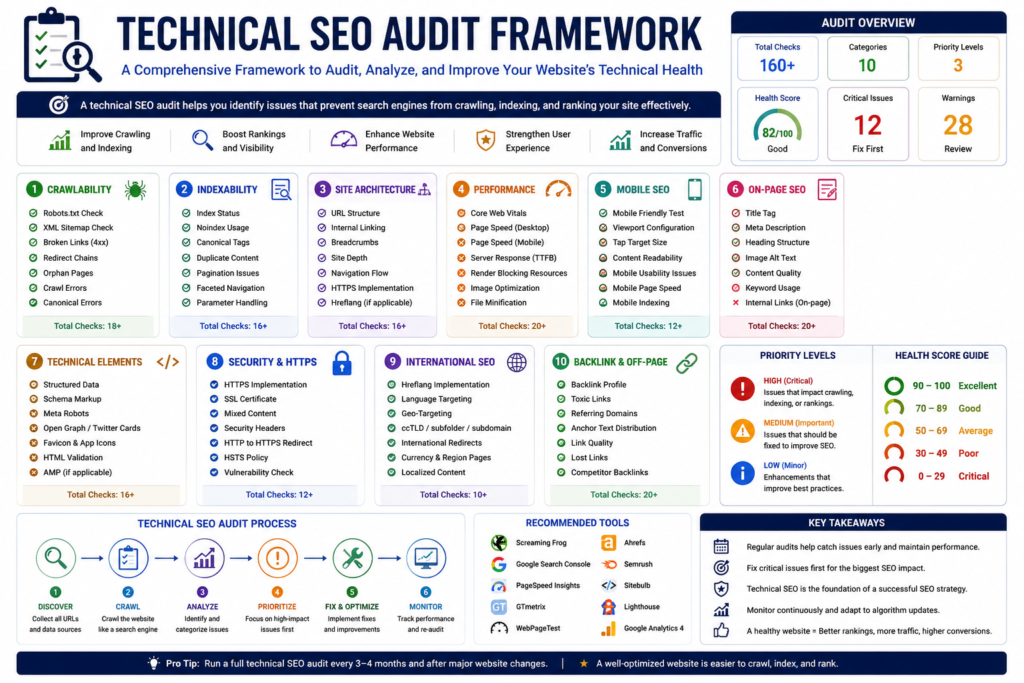
Figure 8 provides a high-level overview of a comprehensive technical SEO audit. Rather than focusing on a single issue, an effective audit evaluates multiple technical areas, including crawlability, indexability, website architecture, performance, mobile usability, structured data, security, and ongoing monitoring. Together, these components help identify technical barriers that may affect search visibility and user experience.
Many organizations perform audits only after experiencing a significant decline in organic traffic. A more effective approach is to treat technical audits as part of ongoing website governance, allowing issues to be identified before they become costly business problems.
A successful technical SEO audit is not about producing the longest list of warnings. It is about identifying the issues that have the greatest impact on users, search engines, and business objectives.
Why Technical SEO Audits Matter
As shown in Figure 8, a technical SEO audit is a structured process that examines every major component affecting website health rather than focusing on isolated technical issues.
- Websites constantly evolve.
- Content is published.
- Products are added.
- Themes are updated.
- Plugins change.
- Servers are migrated.
- Developers release new features.
- Marketing campaigns introduce new landing pages.
- Every change has the potential to introduce technical issues.
- Without regular auditing, these issues can accumulate over time and gradually reduce website quality.
Technical SEO audits help organizations:
- Detect problems early.
- Protect existing organic visibility.
- Improve website performance.
- Reduce technical debt.
- Support future website growth.
- Maintain a consistent user experience.
Enterprise Audit Philosophy
Every audit should answer four essential questions.
1. Can search engines discover the website?
Discovery depends on:
- Internal links.
- XML sitemaps.
- Crawlable navigation.
- Clean URL architecture.
2. Can search engines process the website correctly?
Processing depends on:
- Server responses.
- Rendering.
- Canonical signals.
- Indexing directives.
- Structured data.
3. Can users complete their tasks?
Evaluate:
- Navigation.
- Mobile usability.
- Website speed.
- Accessibility.
- Forms.
- Checkout process.
- Calls to action.
4. Does the website support business objectives?
Review whether the website helps visitors:
- Find information.
- Request services.
- Contact the business.
- Purchase products.
- Complete desired conversions.
Enterprise Technical SEO Audit Workflow
Figure 8 illustrates the logical sequence of an enterprise audit, beginning with website discovery and ending with implementation, validation, and continuous monitoring.
A complete enterprise audit should follow a structured sequence rather than fixing issues randomly.
Website Discovery
        │
        ▼
Crawl Analysis
        │
        ▼
Indexability Review
        │
        ▼
Performance Testing
        │
        ▼
Structured Data Validation
        │
        ▼
Internal Linking Analysis
        │
        ▼
Content & Architecture Review
        │
        ▼
Issue Prioritization
        │
        ▼
Implementation
        │
        ▼
Monitoring & Validation
Following a repeatable workflow improves consistency and reduces the risk of overlooking critical issues.
Crawl Audit
The first stage of every technical SEO audit is understanding how search engines and technical crawlers can access the website.
The crawlability section of Figure 8 highlights the importance of evaluating robots.txt, XML sitemaps, broken links, redirect chains, and orphan pages before addressing more advanced technical issues.
Review:
- Crawlable pages.
- Broken links.
- Redirect chains.
- Orphan pages.
- Internal navigation.
- XML sitemap coverage.
- Blocked resources.
Questions to ask:
- Can every important page be discovered?
- Are unnecessary URLs consuming crawl resources?
- Are important sections isolated from the website architecture?
Indexability Audit
After confirming crawlability, evaluate whether important pages are eligible for indexing.
Review:
- Noindex directives.
- Canonical tags.
- HTTP status codes.
- Duplicate pages.
- XML sitemap consistency.
- Search Console reports.
- Rendered HTML.
Priority should always be given to:
- Revenue pages.
- Service pages.
- Category pages.
- High-value informational content.
Website Architecture Audit
A strong website architecture allows both users and search engines to understand relationships between pages.
As illustrated in Figure 8, website architecture should be reviewed alongside internal linking, navigation, and URL structure to ensure search engines can efficiently understand relationships between pages.
Review:
- Navigation hierarchy.
- Category organization.
- URL hierarchy.
- Breadcrumb implementation.
- Internal linking.
- Page depth.
- Content hubs.
Warning signs include:
- Important pages require excessive clicks.
- Multiple navigation paths leading to duplicate content.
- Large groups of isolated pages.
Internal Linking Audit
Internal linking distributes context and helps search engines discover important pages.
During the audit, identify:
- Orphan pages.
- Weakly connected pages.
- Overused generic anchor text.
- Missing links between related resources.
- Broken internal links.
Evaluate whether pillar pages effectively connect to supporting content.
URL Structure Audit
Review every major URL pattern.
Check for:
- Consistency.
- Readability.
- Duplicate paths.
- Unnecessary parameters.
- Mixed capitalization.
- Redirect dependencies.
A consistent URL structure simplifies future website maintenance.
XML Sitemap Audit
An XML sitemap should accurately represent the website.
Verify that it includes:
- Canonical URLs.
- Indexable pages.
- Active content.
Ensure it excludes:
- Redirected pages.
- 404 pages.
- Duplicate URLs.
- Noindex pages.
- Temporary pages.
Large websites may benefit from multiple sitemap files organized by content type.
Robots.txt Audit
Review robots.txt carefully.
Verify that it:
- Does not block important content.
- Includes the correct sitemap location.
- Does not restrict essential CSS or JavaScript resources.
- Reflects the current website structure.
After redesigns or migrations, robots.txt should always be reviewed before launch.
Canonical Audit
Canonical signals should remain consistent throughout the website.
Review:
- Self-referencing canonicals.
- Canonical conflicts.
- Cross-domain canonicals.
- Parameter URLs.
- Pagination.
- Duplicate content.
Inconsistent canonical implementation can create confusion about the preferred version of a page.
Redirect Audit
Redirects should preserve user experience while maintaining website integrity.
Review:
- Permanent redirects.
- Temporary redirects.
- Redirect chains.
- Redirect loops.
- Legacy URLs.
- Broken redirects.
Whenever possible, redirect directly to the final destination instead of using multiple intermediate steps.
HTTP Status Code Audit
Server responses provide important technical information.
Review:
- 200 responses.
- 301 redirects.
- 302 redirects.
- 404 errors.
- 410 responses.
- 500 server errors.
- 503 maintenance responses.
Unexpected server responses should be investigated immediately, especially on important commercial pages.
Mobile-First Audit
Because Google primarily uses the mobile version of content for indexing, every audit should include mobile testing.
Verify:
- Responsive layout.
- Mobile navigation.
- Content parity.
- Font readability.
- Touch targets.
- Mobile performance.
- Structured data consistency.
A desktop website cannot compensate for a poor mobile experience.
Enterprise Issue Priority Matrix
| Priority | Description | Examples |
|---|---|---|
| Critical | Directly affects crawlability, indexing, or key business functions | Noindex on revenue pages, robots.txt blocking, server errors |
| High | Significantly affects performance or user experience | Slow Core Web Vitals, broken internal linking, redirect chains |
| Medium | Reduces efficiency but does not immediately block visibility | Duplicate metadata, outdated sitemaps, inconsistent canonicals |
| Low | Minor improvements with limited business impact | Small URL inconsistencies, isolated metadata refinements |
Issue prioritization should be based on business impact, not simply on the number of warnings reported by audit tools.
Regular technical reviews help identify emerging issues early, support better user experiences, and create a stronger foundation for sustainable organic growth.
Enterprise Technical SEO Reporting, Monitoring, and Continuous Improvement
Completing a technical SEO audit is only the beginning. The real value comes from implementing improvements, measuring their impact, and continuously monitoring website health.
Many organizations perform excellent audits but never establish an ongoing monitoring process. As a result, the same technical problems often return after website updates, redesigns, CMS upgrades, or plugin installations.
Technical SEO should therefore be viewed as a continuous operational process rather than a one-time project.
Log File Analysis
While crawl reports and Search Console provide valuable information, server log files reveal how search engine crawlers actually interact with your website.
Log file analysis helps answer questions such as:
- Which pages does Googlebot crawl most frequently?
- Which pages receive little or no crawler attention?
- Are important pages being crawled regularly?
- Are crawl resources being wasted on low-value URLs?
- Are server errors affecting crawler access?
- Are redirects consuming unnecessary crawl requests?
For enterprise websites with thousands or millions of URLs, log file analysis provides insights that cannot be obtained from page crawls alone.
What Information Do Log Files Contain?
Typical server logs include:
- Visitor IP address.
- Requested URL.
- Date and time.
- HTTP status code.
- User agent.
- Response size.
- Response time.
When filtered correctly, these records help identify search engine crawling patterns.
Business Benefits of Log Analysis
Log file analysis helps organizations:
- Improve crawl efficiency.
- Detect wasted crawl activity.
- Identify hidden technical issues.
- Monitor Googlebot behavior.
- Evaluate website migrations.
- Improve server performance.
- Support enterprise technical decision-making.
Crawl Diagnostics
A comprehensive technical audit should combine multiple data sources rather than relying on a single tool.
Useful sources include:
- Google Search Console.
- XML sitemaps.
- Technical crawlers.
- Analytics platforms.
- Server log files.
- CMS exports.
Comparing these datasets often reveals inconsistencies that individual tools cannot identify.
Technical SEO Key Performance Indicators (KPIs)
Measuring success requires meaningful performance indicators rather than simply counting technical warnings.
Recommended KPIs
Crawlability
- Percentage of important pages successfully crawled.
- Broken internal links.
- Redirect chain count.
- Orphan page count.
Indexability
- Indexed pages.
- Excluded pages.
- Canonical consistency.
- Duplicate page count.
Website Performance
- Core Web Vitals trends.
- Server response time.
- Page loading performance.
- Mobile usability.
Technical Health
- Structured data validity.
- Crawl errors.
- Server errors.
- Redirect errors.
- XML sitemap accuracy.
Business Performance
Technical SEO should ultimately support business goals.
Monitor:
- Organic traffic.
- Qualified leads.
- E-commerce revenue.
- Conversion rate.
- Contact form submissions.
- Local visibility.
Technical improvements should contribute to measurable business outcomes rather than technical scores alone.
Enterprise Technical SEO Dashboard
An executive dashboard should provide a clear overview of website health.
Example dashboard:
| Area | Current Status | Trend | Priority |
|---|---|---|---|
| Crawlability | Healthy | Improving | Medium |
| Indexability | Healthy | Stable | Medium |
| Core Web Vitals | Needs Improvement | Improving | High |
| Structured Data | Healthy | Stable | Low |
| Internal Linking | Good | Stable | Medium |
| Mobile Usability | Excellent | Stable | Low |
| Redirect Health | Good | Stable | Medium |
| Server Health | Excellent | Stable | Low |
This type of dashboard allows decision-makers to focus on strategic priorities rather than hundreds of individual technical warnings.
Technical SEO Reporting Framework
Every audit should produce a structured report.
Executive Summary
Summarize:
- Overall website health.
- Critical findings.
- Business risks.
- Recommended priorities.
Technical Findings
Group issues by category:
- Crawlability.
- Indexability.
- Performance.
- Mobile usability.
- Structured data.
- Internal linking.
- Website architecture.
- JavaScript.
- Security.
Business Impact
For every major issue, explain:
- Why it matters.
- Which pages are affected?
- Business impact.
- Recommended solution.
- Estimated implementation priority.
Action Plan
Separate recommendations into:
Immediate
Critical issues affecting important pages.
Short Term
Improvements with high business value.
Long Term
Strategic technical improvements.
Technical SEO Governance
Enterprise organizations benefit from clear technical governance.
Responsibilities should be defined across teams.
Example:
| Team | Primary Responsibility |
|---|---|
| SEO | Technical recommendations |
| Development | Implementation |
| Design | User experience |
| Content | Editorial quality |
| Marketing | Business priorities |
| IT | Infrastructure and hosting |
This reduces implementation delays and improves accountability.
Website Monitoring Strategy
Technical SEO monitoring should occur on multiple schedules.
Daily
- Server availability.
- Critical errors.
- Website uptime.
Weekly
- Crawl errors.
- Core Web Vitals.
- Search Console alerts.
- Broken links.
Monthly
- Complete technical crawl.
- XML sitemap review.
- Internal linking audit.
- Structured data validation.
- Redirect review.
Quarterly
- Comprehensive technical SEO audit.
- Architecture review.
- Website performance review.
- Technical debt assessment.
- Migration readiness evaluation.
90-Day Technical SEO Implementation Roadmap
Technical SEO improvements should be implemented in phases rather than all at once. A structured roadmap allows organizations to prioritize critical issues first, measure progress, and build a sustainable technical foundation without disrupting normal business operations.
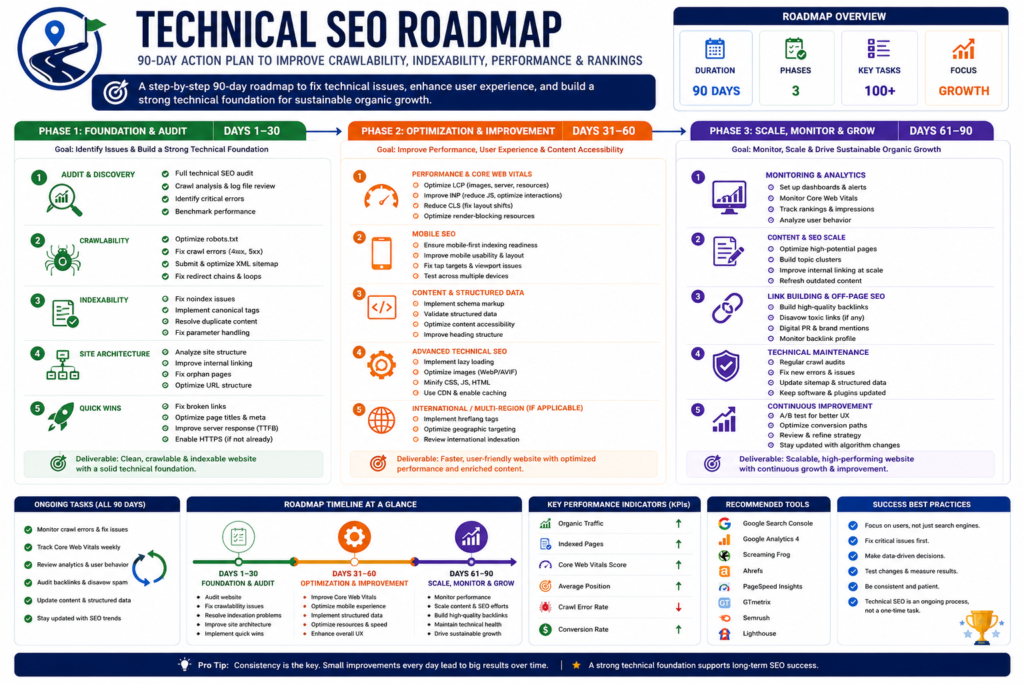
Month 1
Foundation
Week 1
- Complete technical crawl.
- Review Search Console.
- Validate robots.txt.
- Review XML sitemaps.
Week 2
- Correct indexing directives.
- Resolve critical redirects.
- Fix server errors.
- Remove broken internal links.
Week 3
- Improve website architecture.
- Review internal linking.
- Update canonical implementation.
Week 4
- Validate structured data.
- Test mobile usability.
- Establish performance baseline.
Month 2
Optimization
Week 5
- Improve Core Web Vitals.
- Optimize images.
- Review JavaScript.
Week 6
- Optimize CSS.
- Improve caching.
- Configure CDN if appropriate.
Week 7
- Review structured data.
- Audit duplicate content.
- Improve crawl efficiency.
Week 8
- Test implementation.
- Compare KPIs.
- Resolve remaining high-priority issues.
Month 3
Continuous Improvement
Week 9
- Analyze performance trends.
- Improve documentation.
Week 10
- Review new website changes.
- Audit new pages.
Week 11
- Review internal linking opportunities.
- Monitor Search Console.
Week 12
- Perform a complete technical review.
- Update the technical SEO roadmap.
- Schedule the next quarterly audit.
Enterprise Technical SEO Master Checklist
Crawlability
✓ Crawlable navigation.
✓ XML sitemap.
✓ Robots.txt reviewed.
✓ No orphan pages.
Indexability
✓ Correct status codes.
✓ Canonical consistency.
✓ No accidental noindex.
✓ Duplicate URLs reviewed.
Performance
✓ Core Web Vitals monitored.
✓ Images optimized.
✓ Caching configured.
✓ JavaScript reviewed.
Mobile
✓ Responsive design.
✓ Mobile content parity.
✓ Touch-friendly navigation.
Structured Data
✓ Valid implementation.
✓ Matches visible content.
✓ Regular testing.
Security
✓ HTTPS enabled.
✓ Mixed content resolved.
✓ Security headers reviewed where appropriate.
Monitoring
✓ Search Console monitored.
✓ Performance monitored.
✓ Quarterly audits scheduled.
✓ Documentation maintained.
Common Technical SEO Mistakes to Avoid
Many organizations repeatedly make the same mistakes.
Avoid:
- Treating every audit warning as equally important.
- Ignoring business priorities.
- Updating URLs without redirect planning.
- Blocking important resources.
- Leaving staging directives active.
- Publishing without testing.
- Ignoring mobile experience.
- Installing unnecessary plugins.
- Focusing only on benchmark scores.
- Performing audits only after traffic declines.
Continuous Improvement Framework
Technical SEO is never finished.
Successful organizations:
Measure.
↓
Analyze.
↓
Prioritize.
↓
Implement.
↓
Validate.
↓
Monitor.
↓
Repeat.
This cycle creates continuous improvement while reducing long-term technical debt.
Choosing Technical SEO Services, Pricing, ROI, and Building a Long-Term SEO Strategy
Technical SEO can be implemented internally, outsourced to an agency, assigned to a freelance consultant, or managed through a hybrid approach. The right solution depends on your organization’s goals, website complexity, available resources, and long-term digital strategy.
One of the most common mistakes businesses make is purchasing technical SEO services based solely on price rather than expertise, process, and measurable business value.
The objective should never be to buy “SEO.”
The objective should be to solve business problems through sound technical improvements.
When Should You Hire a Technical SEO Professional?
Not every website requires outside assistance immediately.
However, professional support becomes increasingly valuable when:
- Organic traffic declines unexpectedly.
- Important pages disappear from search results.
- Website migrations are planned.
- A CMS or platform migration is underway.
- Core Web Vitals remain consistently poor.
- JavaScript-heavy applications experience indexing issues.
- Large e-commerce catalogs continue to expand.
- International expansion requires multilingual implementation.
- Development teams need technical SEO guidance.
Professional assistance often reduces implementation mistakes that become expensive to fix later.
DIY vs. Professional Technical SEO
Many small businesses successfully manage basic technical SEO internally.
However, enterprise-level technical SEO often requires specialized knowledge of:
- Website architecture.
- Rendering.
- Structured data.
- Log file analysis.
- Crawl diagnostics.
- International SEO.
- Performance engineering.
- Enterprise CMS platforms.
Comparison
| Factor | DIY | Professional Consultant |
|---|---|---|
| Initial Cost | Lower | Higher |
| Learning Curve | Significant | Minimal for the client |
| Risk of Technical Mistakes | Higher | Usually lower |
| Speed of Implementation | Slower | Often faster |
| Enterprise Experience | Limited | Typically broader |
| Ongoing Support | Self-managed | Available through service agreements |
DIY approaches can work well for smaller websites, while larger organizations often benefit from experienced technical specialists.
Freelancer vs. Agency
Businesses frequently ask whether they should hire a freelancer or an agency.
There is no universal answer.
The decision depends on website complexity and project requirements.
Freelancers
Freelancers may be well-suited for:
- Small websites.
- One-time audits.
- Technical consulting.
- Limited implementation projects.
- Budget-conscious organizations.
Advantages:
- Direct communication.
- Flexible engagement.
- Lower operating costs.
Potential limitations:
- Limited capacity.
- Availability constraints.
- Narrow specialization.
Agencies
Agencies are often appropriate for:
- Enterprise websites.
- Large e-commerce stores.
- Ongoing technical SEO management.
- Cross-functional projects.
- International SEO.
Advantages:
- Multiple specialists.
- Broader technical resources.
- Larger implementation capacity.
- Ongoing support.
Potential considerations:
- Higher investment.
- More structured workflows.
- Larger project coordination.
Freelancer vs. Agency Comparison
| Factor | Freelancer | Agency |
|---|---|---|
| Best For | Small to medium projects | Medium to enterprise projects |
| Team Size | Individual | Multiple specialists |
| Availability | Varies | Generally more consistent |
| Specialized Expertise | Depends on experience | Often broader |
| Scalability | Limited | High |
| Long-Term Support | Varies | Usually structured |
The best choice depends on project scope rather than assuming one model is always superior.
What Should a Technical SEO Service Include?
A professional technical SEO engagement should begin with discovery rather than immediate implementation.
Typical deliverables may include:
- Technical website audit.
- Crawl analysis.
- Indexability review.
- Performance assessment.
- Structured data validation.
- Internal linking review.
- Mobile usability evaluation.
- Website architecture recommendations.
- Prioritized implementation roadmap.
- Executive summary.
- Technical documentation.
Implementation support may be offered separately, depending on the provider.
Questions to Ask Before Hiring
Before selecting a consultant or agency, consider asking:
- What technical audit process do you follow?
- Which tools do you typically use?
- How do you prioritize technical issues?
- How do you measure success?
- Will recommendations be documented?
- Will developers receive implementation guidance?
- How do you validate completed work?
- How do you handle website migrations?
- What ongoing monitoring do you recommend?
These questions help evaluate methodology rather than marketing claims.
Warning Signs to Avoid
Exercise caution if a provider:
- Guarantees first-page rankings.
- Guarantees Google indexing.
- Guarantees AI Overview placement.
- Promises immediate results.
- Refuses to explain recommendations.
- Uses vague or proprietary “secret” ranking systems.
- Focuses only on automated audit scores.
- Avoids discussing long-term maintenance.
Google’s search results depend on many factors, including content quality, competition, user intent, and website authority. No legitimate provider can guarantee rankings.
Understanding Technical SEO Pricing
Technical SEO pricing varies considerably depending on:
- Website size.
- Technical complexity.
- Platform.
- Number of templates.
- International requirements.
- E-commerce functionality.
- Ongoing monitoring.
- Reporting requirements.
Rather than choosing the lowest price, evaluate:
- Scope of work.
- Experience.
- Documentation quality.
- Implementation support.
- Communication.
- Long-term value.
Typical Service Models
| Service Type | Best For |
|---|---|
| One-Time Audit | Websites seeking an initial assessment |
| Audit + Implementation | Businesses need both recommendations and execution |
| Monthly Technical SEO | Ongoing monitoring and continuous improvement |
| Enterprise Consulting | Large organizations with dedicated development teams |
| Migration Consulting | Website redesigns and platform migrations |
Choose the engagement model that aligns with your operational needs.
Measuring Return on Investment (ROI)
Technical SEO should be evaluated through measurable business outcomes rather than technical metrics alone.
Potential indicators include:
- Improved organic traffic quality.
- Better crawl efficiency.
- Increased index coverage for important pages.
- Improved Core Web Vitals trends.
- Higher conversion rates.
- Reduced technical errors.
- Improved lead generation.
- Better ecommerce performance.
The timeline for measurable impact varies depending on the issues being addressed and the competitiveness of the market.
Building a Long-Term Technical SEO Strategy
Technical SEO should become part of normal business operations.
An effective long-term strategy includes:
Quarterly
- Full technical audit.
- Architecture review.
- Core Web Vitals review.
- Structured data validation.
Monthly
- Search Console review.
- Crawl monitoring.
- Internal linking review.
- Performance testing.
Weekly
- Critical error monitoring.
- Server availability.
- Broken link checks.
After Every Major Release
- Validate redirects.
- Test rendering.
- Review indexing.
- Confirm canonical implementation.
- Verify structured data.
Embedding these activities into your development workflow reduces technical risk over time.
Technical SEO Maturity Model
Organizations typically progress through several stages.
| Stage | Characteristics |
|---|---|
| Level 1. Reactive | Technical issues are addressed only after traffic declines or errors appear. |
| Level 2. Foundational | Basic technical best practices are implemented, but monitoring is limited. |
| Level 3. Managed | Regular audits, documentation, and performance reviews are established. |
| Level 4. Optimized | Technical SEO is integrated into development, content, and marketing workflows. |
| Level 5. Enterprise | Continuous monitoring, governance, automation, and cross-functional collaboration support ongoing improvement. |
The goal is not to reach the highest level immediately but to establish repeatable processes that improve website quality over time.
Frequently Asked Questions
Does Technical SEO guarantee higher rankings?
No. Technical SEO removes barriers that may prevent search engines from effectively crawling, rendering, and indexing your website. Rankings also depend on factors such as content quality, relevance, competition, website authority, and user satisfaction.
How often should a technical SEO audit be performed?
Most organizations benefit from a comprehensive audit at least quarterly, with ongoing monitoring after significant website changes, migrations, or platform updates.
Can technical SEO improve website speed?
Technical SEO often includes performance optimization recommendations that can improve loading speed, responsiveness, and overall user experience. The exact improvements depend on the underlying technical issues.
Is Technical SEO only for large websites?
No. Small business websites, blogs, ecommerce stores, SaaS platforms, and enterprise websites all benefit from a technically sound foundation, although the scope of work varies.
Should Technical SEO be completed before publishing new content?
A strong technical foundation makes it easier for search engines to discover and process new content. Technical SEO and content creation should support one another rather than being treated as separate initiatives.
Final Conclusion
Technical SEO is the foundation that supports every successful SEO strategy.
High-quality content, effective internal linking, authoritative backlinks, and exceptional user experiences all depend on a website that search engines can reliably discover, crawl, render, and understand.
Organizations that treat technical SEO as a continuous business process rather than a one-time checklist are better positioned to adapt to changing technologies, evolving search systems, and future website growth.
Instead of pursuing shortcuts or guaranteed rankings, focus on building a technically sound, user-centered website that provides clear value to visitors. Over time, that approach creates a stronger digital asset, improves operational efficiency, and supports sustainable organic growth.
Final Expert Insight
The strongest technical SEO strategy is not the one with the most tools or the longest audit report. It is the one that consistently aligns technical excellence, user experience, and business objectives. Sustainable search performance comes from disciplined execution, continuous monitoring, and a commitment to serving users first.
About the Author
This guide is intended for business owners, developers, marketers, SEO professionals, and decision-makers who want to understand and implement technical SEO using practical, sustainable, and search-engine-friendly approaches.
It follows publicly available Google documentation and widely accepted industry best practices while avoiding unsupported claims, ranking guarantees, and manipulative optimization techniques.
Final Business Checklist
Before publishing or auditing your website, verify that you have:
- ✓ A logical website architecture.
- ✓ Crawlable internal navigation.
- ✓ Accurate XML sitemaps.
- ✓ Proper robots.txt configuration.
- ✓ Correct canonical implementation.
- ✓ Healthy HTTP responses.
- ✓ Strong Core Web Vitals.
- ✓ Mobile-friendly experiences.
- ✓ Valid structured data where appropriate.
- ✓ Continuous technical monitoring.
Completing this checklist establishes a strong technical foundation that supports long-term website quality, user satisfaction, and sustainable organic search performance.
Internal References
- Technical SEO Services
- Google Search Console Guide 2026
- Website Maintenance Guide 2026 to 2027
- Generative Engine Optimization Guide
- Professional Website Development Services
- Marjan Web Studio
External References
- Google Search Essentials
- How Google Search Works
- Google Crawling and Indexing Documentation
- Google XML Sitemap Documentation
- Google Robots.txt Documentation
- Google Canonicalization Documentation
- Google Mobile-First Indexing Documentation
- Google JavaScript SEO Basics
- Google Structured Data Documentation
- Google Page Experience Documentation
- Google AI Features and Your Website
- Core Web Vitals
- PageSpeed Insights
- Google Search Console
- Google Rich Results Test
- Chrome Lighthouse Documentation
- Schema.org
- MDN Web Docs
- W3C Web Standards
16 Comments