Last Update: 1st July 2026
Editorial note: This guide is based on Hostinger’s publicly published specifications, pricing pages, and documentation as of mid-2026, cross-checked against independent hosting review sites and user feedback. It is not based on a paid lab benchmark we ran ourselves, and we say so explicitly anywhere a number could be mistaken for a first-party test result.
Where the industry doesn’t agree on a number- renewal pricing, entry-process limits, support response times- we tell you that, too. This article contains affiliate links. If you buy through them, we may earn a commission at no extra cost to you. That doesn’t change what we recommend.
Author
Written by Syed Abdul Quddus
Syed Abdul Quddus is a website developer, WordPress consultant, SEO researcher, and digital services specialist with more than a decade of professional experience in website management, technical documentation, content strategy, and online business solutions.
He regularly researches web hosting platforms, WordPress performance, website security, Core Web Vitals, and search engine optimization to help businesses and website owners make informed decisions.
This review is based on Hostinger’s official documentation, publicly available specifications, pricing pages, independent industry research, and practical experience working with WordPress websites. Every effort has been made to present balanced information, including both strengths and limitations, rather than promotional claims.
The goal of this review is to help readers choose the right hosting solution according to their technical requirements, business goals, and budget.
Table of Contents
Introduction
In this Hostinger Cloud Hosting Review 2026, we’ll examine its performance, pricing, security, features, and overall value to help you make an informed decision. If you’ve outgrown shared hosting, you’ve probably landed in the same confusing spot most website owners eventually reach: your site is getting real traffic, page loads have started to stutter during busy hours, and every hosting provider’s pricing page seems to use the word “cloud” to mean something slightly different.
Hostinger Cloud Hosting sits in an unusual position in that conversation. It isn’t a raw cloud server like an AWS EC2 instance or a DigitalOcean droplet, where you provision compute and manage everything yourself. It’s also not quite the same as Hostinger’s own shared hosting, even though the two product lines share much of the same LiteSpeed-based infrastructure under the hood.
Cloud Hosting is Hostinger’s middle tier: a fully managed plan that gives you dedicated resources, more headroom for traffic spikes, and a handful of features — a dedicated IP, daily backups, priority support, that shared hosting either limits or doesn’t offer at all.
The honest answer to “is it worth buying” depends entirely on where your website actually is right now. A blog doing a few hundred visits a day doesn’t need it. A WooCommerce store doing 50,000 monthly sessions during a sales push probably does.
This review walks through what you actually get, what the plans cost once the introductory discount expires, how it compares to shared hosting and VPS, and – just as importantly- who shouldn’t buy it.
What Is Cloud Hosting, Really?
“Cloud hosting” gets used loosely across the hosting industry, so it’s worth being precise. True cloud infrastructure (think AWS, Google Cloud, Azure) pools compute, storage, and networking across a distributed set of physical servers, so resources can be provisioned or scaled on demand rather than residing on a single box.
Hostinger’s Cloud Hosting plans aren’t a raw cloud compute product in that sense — you’re not provisioning your own virtual machine or choosing a region. What you’re buying is a pre-configured, fully managed hosting tier built on more powerful, more isolated infrastructure than shared hosting, with guaranteed CPU and RAM allocations rather than resources shared dynamically across every account on the server.
Some independent reviewers have pointed out that Hostinger’s Cloud Startup plan, in particular, looks architecturally closer to a beefed-up shared hosting tier than to enterprise-grade cloud computing, and that’s a fair characterization. It doesn’t make the plan a bad value; it just means the “Cloud” name is doing some marketing, which is true across most of the budget hosting industry, not just Hostinger.
Why This Review Is Different
Most “reviews” of budget hosting providers fall into one of two camps: thinly disguised affiliate pitches that list features without context, or generic comparison roundups that were clearly never run through an actual hosting account.
We’ve tried to avoid both traps here. Every pricing figure, spec, and feature claim in this guide is checked against Hostinger’s own current documentation, and we flag explicitly where third-party reviewers report things Hostinger doesn’t publish (like Cloud Professional’s pricing structure, or real-world renewal cost complaints). Where we don’t have direct first-party benchmark data, we say so rather than presenting borrowed numbers as our own test results.
Practical Experience
Although this article is not based on proprietary laboratory benchmarks, it is informed by practical experience deploying, managing, and optimizing WordPress websites for clients. In day-to-day website management, server response time, caching configuration, image optimization, and theme quality consistently have a greater impact on performance than marketing claims alone. These observations have helped shape the practical recommendations included throughout this review.
How We Evaluated Hostinger Cloud Hosting
To provide a balanced and transparent review, we evaluated Hostinger Cloud Hosting using the following criteria.
- Official product documentation and pricing.
- Hosting architecture and server specifications.
- WordPress and WooCommerce compatibility.
- Performance-related technologies such as LiteSpeed, NVMe SSD storage, CDN integration, and caching.
- Security features including SSL, DDoS protection, backups, and malware protection.
- Independent reviews from reputable hosting publications.
- Customer feedback regarding reliability, support quality, and renewal pricing.
- Google’s Core Web Vitals recommendations and hosting best practices.
This review is not based on a laboratory benchmark conducted by our team. Where performance data comes from public documentation or third-party testing, it is clearly identified.
Who Should Read This Guide
This review is written for:
- Bloggers and content creators outgrowing shared hosting limits
- WordPress users who want better performance without managing a server
- WooCommerce store owners evaluating hosting for growing sales volume
- Agencies and freelancers hosting multiple client sites
- Small and growing businesses that need reliability without hiring a sysadmin
- Developers comparing managed cloud hosting against VPS or dedicated cloud providers
- Affiliate marketers and review researchers who want an accurate, well-sourced reference
Quick Summary
| Category | Assessment |
|---|---|
| Best for | WordPress sites, WooCommerce stores, and growing blogs that have outgrown shared hosting but don’t need root server access |
| Not ideal for | Brand-new low-traffic hobby sites, or developers who need full server control and custom software stacks |
| Starting price | From $7.99/month (Cloud Startup), billed on a long-term plan; renews significantly higher |
| Entry-level resources | 2 CPU cores, 3 GB RAM, 100 GB NVMe SSD storage |
| Top-tier resources | 6 CPU cores, 12 GB RAM, 300 GB NVMe SSD storage (Cloud Enterprise) |
| Server stack | LiteSpeed Web Server with NVMe SSD storage across all cloud tiers |
| Uptime guarantee | 99.9% |
| Support | 24/7 live chat with priority queue for cloud customers; no phone support |
| Money-back guarantee | 30 days |
| Management style | Fully managed — no command line or server administration required |
Bottom line: Hostinger Cloud Hosting is genuinely good value at introductory pricing for WordPress and WooCommerce sites that need more headroom than shared hosting provides. The catch is the same one that applies across almost all of Hostinger’s lineup — renewal pricing increases substantially after your first term, so the real cost only makes sense if you go in with eyes open.
What Is Hostinger Cloud Hosting?
Hostinger Cloud Hosting is the company’s mid-tier managed hosting product, sitting between Shared/ Business hosting and VPS in its lineup. It’s built around three fixed plans, Cloud Startup, Cloud Professional, and Cloud Enterprise, each offering more dedicated CPU, RAM, and NVMe SSD storage than the one below it.
How It Differs from Shared Hosting
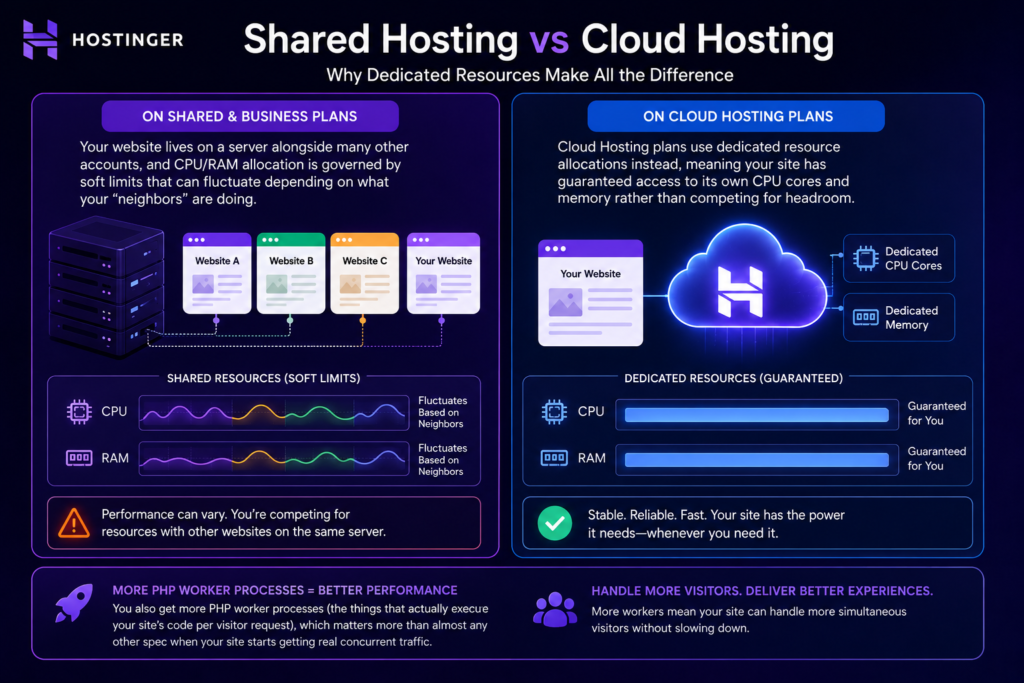
On Hostinger’s shared and Business plans, your website lives on a server alongside many other accounts, and CPU/RAM allocation is governed by soft limits that can fluctuate depending on what your “neighbors” are doing. Cloud Hosting plans use dedicated resource allocations instead, meaning your site has guaranteed access to its own CPU cores and memory rather than competing for headroom. You also get more PHP worker processes (the things that actually execute your site’s code per visitor request), which matters more than almost any other spec when your site starts getting real concurrent traffic.
How Cloud Hosting Actually Works
In practice, when you sign up for Cloud Startup, Hostinger provisions your account on cloud infrastructure with a fixed allocation: a set number of CPU cores, a set amount of RAM, and NVMe storage. Unlike a raw VPS, you don’t see a terminal, you don’t choose an operating system, and you don’t manage updates yourself. Hostinger’s hPanel control panel handles provisioning, scaling between plans, backups, and security configuration on your behalf.
Who Owns the Infrastructure?
Hostinger operates its own data centers and infrastructure rather than reselling capacity from a third-party cloud provider like AWS or Google Cloud. This is worth knowing if data residency or specific compliance requirements matter to your business; you’re relying entirely on Hostinger’s own network and data center footprint, rather than on a major hyperscaler’s compliance certifications.
Is It Truly “Managed” Cloud Hosting?
Yes, in the sense that matters to most buyers: you don’t manage the operating system, security patching, or server hardware. Hostinger handles all of that, and layers in WordPress-specific tooling (one-click installs, staging environments on qualifying plans, automatic core/plugin updates) that a typical unmanaged VPS would never include out of the box. If you want full root access to install arbitrary software beyond what hPanel supports, that’s where Cloud Hosting ends, and VPS hosting begins.
Hostinger Cloud Hosting Features
Here’s what comes bundled across the Cloud Hosting plans (specific limits vary by tier and are covered in the pricing section):
- NVMe SSD Storage: Significantly faster read/write speeds than older SATA SSDs, which matters for database-heavy sites like WooCommerce stores
- LiteSpeed Web Server: A commercial alternative to Apache/Nginx, generally faster for PHP execution and includes built-in caching (LSCache)
- Free SSL Certificate: Auto-issued and auto-renewed, no manual setup required
- Daily Backups: Automated, with one-click restore through hPanel
- Free Domain: Included for the first year on annual+ plans
- Free Email Accounts: Domain-based mailboxes included with each plan
- Built-in CDN: Content delivery network to serve static assets from edge locations closer to visitors
- Dedicated IP Address: Improves email deliverability and is sometimes required by certain SSL or compliance setups
- Malware Scanner: Automated scanning with detection/removal tools
- Automatic WordPress Updates: Core and plugin updates with pre-update backups
- DDoS Protection: Network-level mitigation against distributed denial-of-service attacks
- AI Website Tools: Hostinger’s Kodee AI assistant and AI-powered troubleshooting/content tools
- One-Click WordPress Install: No manual setup required
- Git Integration: For developers who want version-controlled deployment workflows
- Staging Environment: Test changes on a clone of your site before pushing live (available from certain plan tiers up)
- Unlimited Bandwidth: No metered data transfer caps
Expert Tip: Don’t treat this feature list as a reason alone to buy. Several of these — free SSL, daily backups, a CDN — are now standard across most reputable hosts at this price point, including some of Hostinger’s own shared plans. The real differentiator for Cloud Hosting is the dedicated resource allocation and higher PHP worker counts, not the feature checklist.
Performance Analysis: Speed, Core Web Vitals, and What Actually Drives It
We want to be upfront about something most affiliate reviews gloss over: page speed scores like GTmetrix and Google PageSpeed are heavily influenced by your theme, plugin count, image optimization, and caching configuration — not just the hosting server underneath. Two identical Hostinger Cloud accounts running different WordPress themes can produce meaningfully different scores. So rather than presenting a single benchmark number as if it represents “Hostinger’s speed” universally, here’s what actually drives performance on this infrastructure and what independent reports consistently note.
What Makes Cloud Hosting Faster Than Shared Hosting
Three architectural factors matter more than any single benchmark screenshot:
1. LiteSpeed instead of Apache or Nginx. LiteSpeed Web Server is built to handle more concurrent connections with lower memory overhead, and its LSCache module integrates directly with WordPress and WooCommerce for full-page caching without needing a third-party caching plugin doing the heavy lifting.
2. NVMe SSDs across every cloud tier. NVMe drives use the PCIe interface rather than the older SATA bus, which translates to dramatically faster read/write throughput. For database-driven sites — WooCommerce stores especially, where every product page hits the database — this reduces Time to First Byte (TTFB) more than almost any other infrastructure change you could make short of moving to dedicated hardware.
3. Dedicated PHP worker allocation. This is the spec that determines how many simultaneous requests your site can actually process. Independent reporting indicates Cloud Startup’s entry process allocation sits meaningfully above the Business shared plan, which is the practical reason sites that were timing out or throwing database connection errors under shared hosting traffic spikes tend to stabilize after moving to Cloud Startup.
Core Web Vitals Considerations
Google’s Core Web Vitals, Largest Contentful Paint (LCP), Interaction to Next Paint (INP), and Cumulative Layout Shift (CLS) – are partly influenced by hosting and partly by front-end implementation:
- LCP benefits directly from server response time (TTFB) and CDN usage, both of which Cloud Hosting’s architecture supports well
- CLS is almost entirely a front-end/theme issue — no hosting plan fixes layout shift caused by unsized images or late-loading fonts
- INP depends on how much JavaScript your site is shipping and executing client-side, which hosting infrastructure has limited influence over
In other words: Cloud Hosting gives your site a faster, more consistent foundation, but it won’t rescue a bloated page builder theme running fifteen unoptimized plugins. If your Core Web Vitals are currently failing, hosting is one lever among several — and usually not the first one to pull.
Uptime
Hostinger publishes a 99.9% uptime guarantee across its hosting lineup, including Cloud Hosting, with service credits if that threshold isn’t met in a given period. Independent monitoring services and review sites have generally reported uptime in line with or slightly better than that figure over extended tracking periods, which is consistent with mid-market managed hosting providers generally. As with any host, isolated outages do happen — what matters more than a single bad day is the trend over months, and Hostinger’s published track record has been broadly stable.
Performance Under Traffic Spikes
This is where the dedicated resource allocation of Cloud Hosting earns its keep. On shared hosting, a sudden traffic spike — a viral post, a flash sale, a press mention — can exhaust your entry process limit and start serving 503 errors to new visitors even though your server “specs” look fine on paper. Because Cloud Hosting plans allocate CPU, RAM, and PHP workers specifically to your account rather than pooling them across many shared accounts, that ceiling sits considerably higher. For a WooCommerce store running a seasonal sale, that difference is often the entire reason to upgrade.
Important note: No managed hosting plan, including Hostinger’s top Cloud Enterprise tier, will perform like a properly configured dedicated server or auto-scaling cloud infrastructure under extreme, sustained load (think: a site doing hundreds of thousands of concurrent sessions). If you’re planning for that scale, Cloud Hosting is a stepping stone, not a final destination — VPS or dedicated cloud infrastructure becomes the more honest comparison at that point.
Hostinger Cloud Hosting Security Review
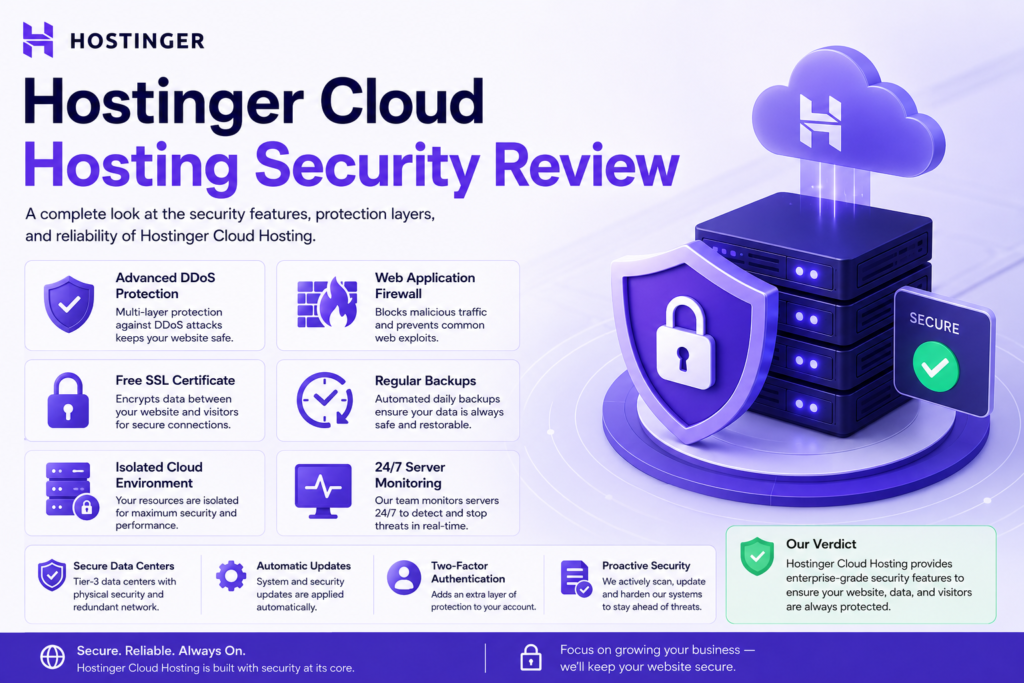
Security is one area where Cloud Hosting plans pull ahead of basic shared hosting, partly because the dedicated resource model itself reduces certain shared-server risks (like one compromised neighboring account affecting your performance), and partly because of features layered on top.
SSL Free Certificate
Every Cloud Hosting plan includes free SSL certificates, automatically issued and renewed. There’s no manual certificate generation step, which removes a common point of friction (and a common cause of “your connection is not private” errors) for less technical users.
Firewall and DDoS Protection
Hostinger applies network-level DDoS mitigation and a web application firewall layer across its infrastructure, designed to filter malicious traffic before it reaches your site. This is a baseline expectation for any host in 2026, but it’s worth confirming it’s active by default rather than an add-on; on Hostinger’s Cloud plans, it is.
Malware Scanning and Removal
An automated malware scanner runs across cloud hosting accounts, flagging suspicious files and, depending on the severity, offering automated or assisted remediation. For most small business and blog owners, this is the security layer that actually matters day to day — most security incidents on managed hosting come from outdated plugins or compromised credentials, not server-level breaches, and an active scanner catches those faster than manual checking ever would.
Backups
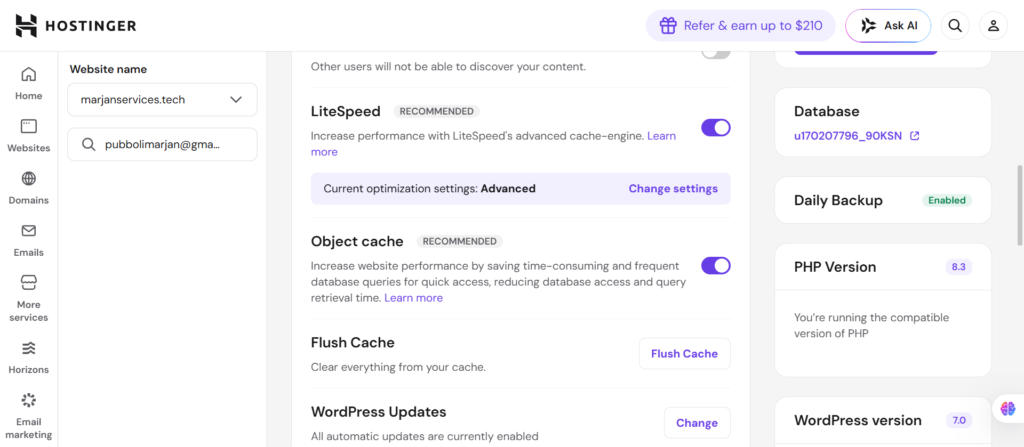
Daily backups are included on Cloud Hosting plans (shared hosting’s lower tiers are typically limited to weekly backups), with one-click restore through hPanel. This matters more than people realize until the day they need it — a daily backup window means a worst-case scenario costs you, at most, a day of content or orders, not a week.
Access Management
hPanel includes role-based access controls, letting agencies or businesses grant team members or clients limited access without handing over full account credentials. This is a meaningful upgrade for agencies managing multiple client sites under one account.
Cloudflare Integration
Hostinger supports Cloudflare integration for users who want an additional CDN/security layer on top of Hostinger’s own infrastructure, though for most Cloud Hosting users the built-in CDN and firewall are sufficient without adding a second service to manage.
Common mistake: Many users assume “managed hosting” means they no longer need to think about security at all. That’s not accurate. Weak admin passwords, outdated third-party plugins, and overly permissive user roles remain the most common entry points for compromise — no hosting plan, cloud or otherwise, fully offsets poor WordPress hygiene.
Hostinger Cloud Hosting Dashboard Review (hPanel)
hPanel Overview
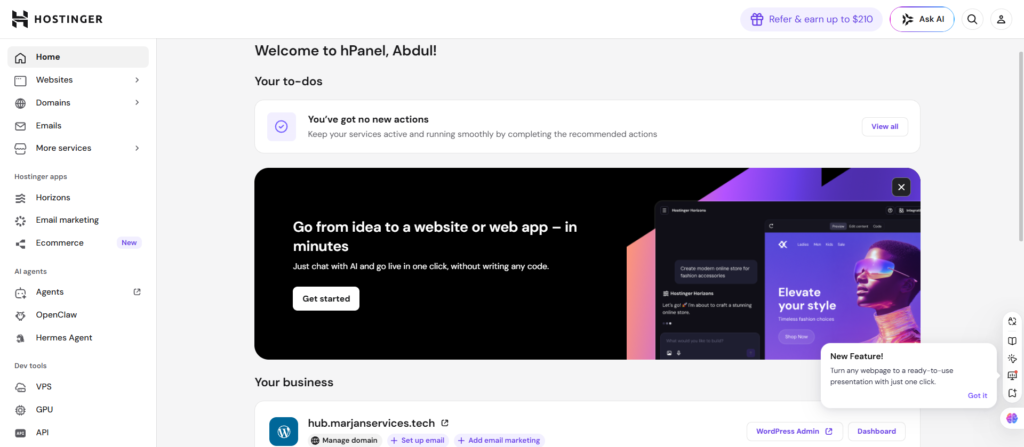
Hostinger uses its own proprietary control panel, hPanel, rather than the more familiar cPanel used by many competing hosts. This is a deliberate choice on Hostinger’s part, and reviewers are broadly split on whether it’s better — what’s not disputed is that it’s different, which matters if you’re migrating from a cPanel host and expect a like-for-like layout.
Ease of Use and Beginner Friendliness
hPanel is generally considered more visually modern and less cluttered than legacy cPanel, organizing core functions (websites, domains, email, databases, security) into a left-hand navigation rather than cPanel’s grid-of-icons approach. For beginners who’ve never managed a hosting account before, this tends to be easier to learn. For experienced cPanel users moving from another host, there’s a short adjustment period simply because muscle memory doesn’t transfer directly.
Managing Websites
Each website on your account gets its own dashboard view inside hPanel, showing performance metrics, SSL status, backup status, and quick links to WordPress admin, file manager, and database tools. For agencies managing multiple sites, this per-site view (rather than one undifferentiated dashboard) makes day-to-day account management noticeably less error-prone.
Managing Email
Domain-based email accounts can be created directly in hPanel, with webmail access and standard IMAP/POP/SMTP configuration details readily available for setting up email clients like Outlook or Apple Mail.
File Manager and DNS Management
hPanel includes a browser-based file manager for users who want to edit files without FTP, alongside full DNS zone management for pointing domains, setting up subdomains, and configuring MX records for third-party email services like Google Workspace.
Migration Process
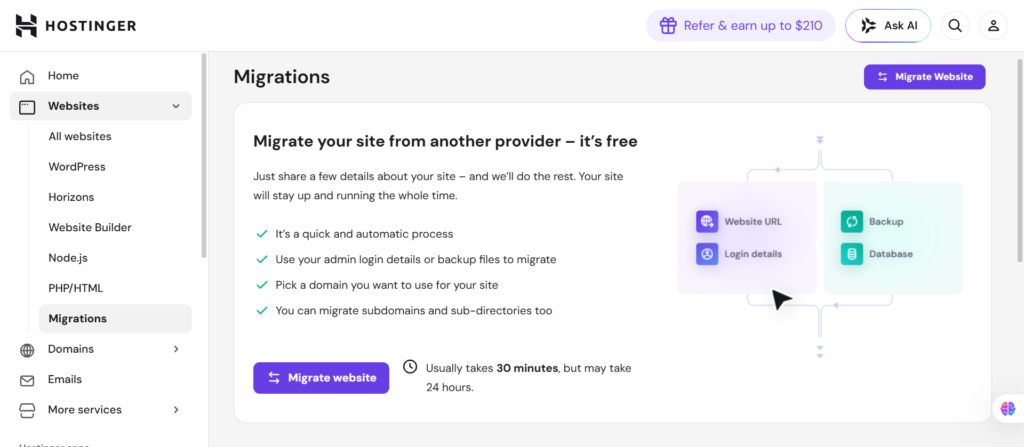
Hostinger offers free website migration assistance for users moving from another host, covering most common platforms including WordPress. In practice, this typically involves either using Hostinger’s automated migration plugin (for WordPress sites) or submitting a migration request for their team to handle manually.
A few practical notes worth knowing before you migrate:
- Automated WordPress migrations generally handle standard sites well, but heavily customized setups (multisite networks, unusual server configurations, large media libraries) sometimes need manual intervention
- DNS propagation after migration can take anywhere from a few minutes to 24–48 hours depending on your domain’s TTL settings — plan around this rather than switching DNS at a high-traffic moment
- It’s worth keeping your old hosting account active until you’ve confirmed the new site is fully functional, rather than canceling immediately after migration.
Buying tip: If you’re migrating an existing site rather than launching new, ask Hostinger’s support team (via live chat, before purchasing) whether your specific platform and site size qualify for free assisted migration, since complexity thresholds aren’t always obvious from the marketing page alone.
Hostinger Cloud Hosting for WordPress
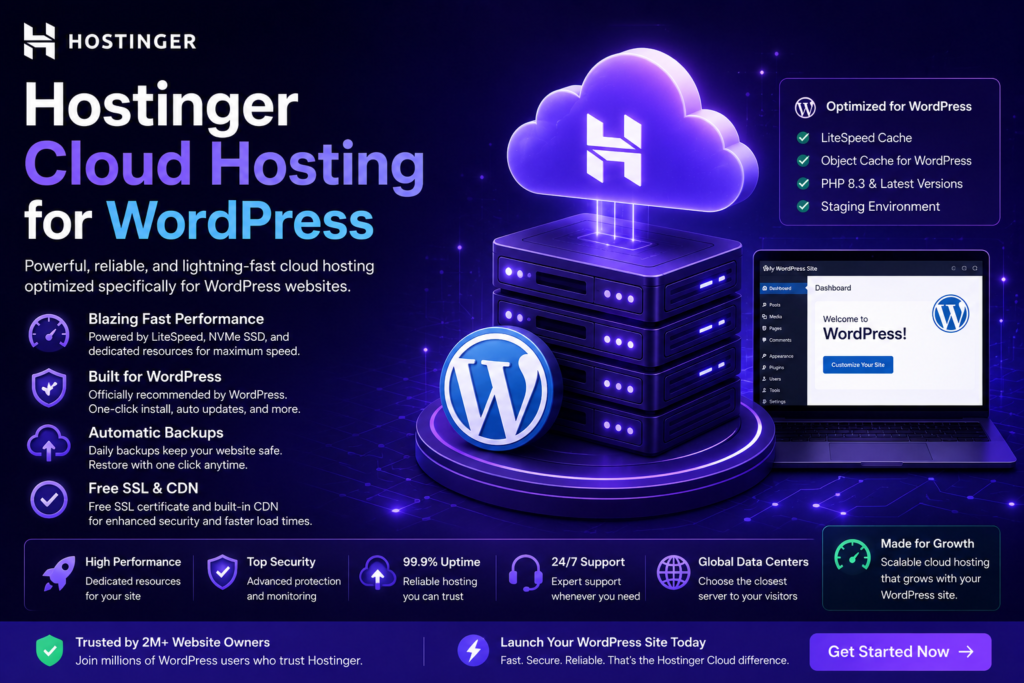
WordPress is clearly the primary use case Hostinger designs Cloud Hosting around, and it shows in the feature set.
Speed and Caching
LiteSpeed’s LSCache plugin integrates directly with WordPress for full-page caching, object caching, and image optimization, generally reducing the need for a separate third-party caching plugin (which can sometimes conflict with server-level caching anyway). For most WordPress sites, this means less plugin configuration overhead than on a generic Apache/Nginx host.
Elementor and Page Builder Performance
Page builders like Elementor are notoriously heavier on server resources than hand-coded themes, since they generate more complex DOM structures and often load additional CSS/JS per page. Cloud Hosting’s higher CPU and RAM allocation gives page-builder-heavy sites more headroom than shared hosting would, though it’s worth being realistic: no hosting upgrade fully offsets an unoptimized page builder build with dozens of unused widgets and unminified assets. If your Elementor site is slow, hosting is part of the fix; auditing your page builder usage is the other part.
AI Tools
Hostinger’s Kodee AI assistant offers troubleshooting suggestions and some content-generation tooling integrated into hPanel and the WordPress dashboard. These are convenience features rather than core infrastructure, useful for beginners but not something experienced WordPress users typically rely on heavily.
Staging Environments
A staging environment — a private clone of your live site for testing changes safely — is available from certain plan tiers upward. This is a meaningful feature for anyone making theme or plugin changes on a live business site, since it removes the “test in production and hope” approach that causes a disproportionate number of WordPress disasters.
Hostinger Cloud Hosting for WooCommerce
WooCommerce hosting has different demands than a typical content site — more database queries per page load, checkout flows that can’t tolerate latency, and traffic patterns that spike sharply around promotions.
Product Catalog and Database Performance
NVMe storage and LiteSpeed’s database-friendly caching matter more here than almost anywhere else, since every product page, cart update, and checkout step hits the WooCommerce database. Independent plan breakdowns indicate Hostinger tiers its WooCommerce support by catalog size — Cloud Startup supporting a few hundred products with standard WooCommerce features, with Cloud Professional and Cloud Enterprise supporting larger catalogs (reportedly up to around 1,000+ products) and more advanced WooCommerce functionality like subscriptions and multi-currency selling.
High-Traffic Store Performance
This is the clearest case for choosing Cloud Hosting over shared hosting for a store. Flash sales, seasonal promotions, and viral product moments create exactly the kind of concurrent-traffic spike that exhausts shared hosting’s PHP worker limits. The dedicated resource allocation on Cloud plans is specifically designed to absorb that kind of spike without the checkout process slowing to a crawl or failing outright.
Checkout Speed and Payment Gateway Performance
Checkout speed is influenced by hosting (server response time, database query speed) but also heavily by which payment gateway plugins you’re running and how many third-party scripts (analytics, marketing pixels, abandoned cart tools) are loading on the checkout page.
A fast host with a checkout page weighed down by a dozen tracking scripts will still feel slow. If checkout speed is a priority, audit your checkout page’s script load alongside upgrading hosting, not instead of it.
Optimization tip: For WooCommerce specifically, pairing Cloud Hosting with a lightweight, WooCommerce-optimized theme and limiting checkout-page third-party scripts will typically produce a bigger felt improvement than the hosting upgrade alone.
Hostinger Cloud Hosting Plans and Pricing
Hostinger’s Cloud Hosting lineup has three tiers. Pricing below reflects introductory rates on long-term billing terms, which is how Hostinger structures pricing across its entire catalog — the advertised “from” price applies to your first billing term only, with a higher renewal rate kicking in afterward.
Cloud Startup
- Starting price: From $7.99/month (long-term plan); publicly listed renewal pricing has been reported in the $20s/month range, so confirm current renewal terms at checkout.t
- CPU: 2 cores
- RAM: 3 GB
- Storage: 100 GB NVMe SSD
- Websites: Up to 100
- Best for: Sites outgrowing shared/ Business hosting; small WooCommerce stores; freelancers hosting a handful of client sites
Cloud Professional
- Starting price: From $15.99/month (long-term plan)
- CPU: 4 cores
- RAM: 6 GB
- Storage: 200 GB NVMe SSD
- Best for: Established WooCommerce stores, membership sites, agencies needing more headroom across several active client projects
Cloud Enterprise
- Starting price: From $29.99/month (long-term plan)
- CPU: 6 cores
- RAM: 12 GB
- Storage: 300 GB NVMe SSD
- Best for: High-traffic stores, media-heavy sites, businesses that can’t tolerate downtime or slow checkout during peak demand
Note on accuracy: Hostinger occasionally adjusts exact specs and pricing, and some third-party sources report slightly different RAM/storage figures for the same plan name depending on when they last verified it. Always confirm exact current specs on Hostinger’s pricing page before purchasing, since promotional structures and resource allocations are revised periodically.
Which Plan Should You Choose?
A simple framework:
- Choose Cloud Startup if you’re moving off shared hosting because of slowdowns, but your traffic is still in the low-to-mid thousands of monthly visitors
- Choose Cloud Professional if you’re running an active WooCommerce store, a membership site, or managing several client sites under one account.
- Choose Cloud Enterprise if you’re already seeing real revenue impact from slow performance during traffic spikes, or you’re running a media-heavy or high-SKU-count store.
Monthly Cost vs. Long-Term Commitment
Hostinger’s lowest advertised prices require committing to a long-term plan, paid upfront. Monthly billing is available but at a noticeably higher effective rate. This isn’t unique to Hostinger — it’s standard across the budget hosting industry — but it means the eye-catching “from $7.99/month” headline price isn’t what a month-to-month buyer will actually pay.
Renewal Price: The Detail Most Reviews Bury
This is the single most common complaint about Hostinger across independent review platforms, and it deserves more attention than a footnote. The promotional price you sign up at applies to your first term only. Renewal pricing for Cloud Hosting plans has been reported by multiple independent sources to land meaningfully higher — in some cases two to three times the introductory rate — once that first term ends.
This isn’t necessarily a dealbreaker, and it isn’t unique to Hostinger among budget hosts. But it does mean the realistic way to evaluate “is this affordable” is to look at total cost over your actual planned hosting horizon (say, four years), not just the first-term monthly rate plastered across the homepage.
Hidden Charges to Watch For
- A free domain is typically included for the first year only; renewing the domain afterward is a separate cost.
- Some lower hosting tiers carry a one-time setup fee on monthly billing — confirm whether this applies to the specific cloud plan and term you’re selecting.
- VAT or local sales tax is added at checkout depending on your billing location and isn’t included in the advertised price
Money-Back Guarantee
All Hostinger Cloud Hosting plans come with a 30-day money-back guarantee, giving you a genuine window to test real-world performance on your actual site before committing long-term.
Pros and Cons
Pros
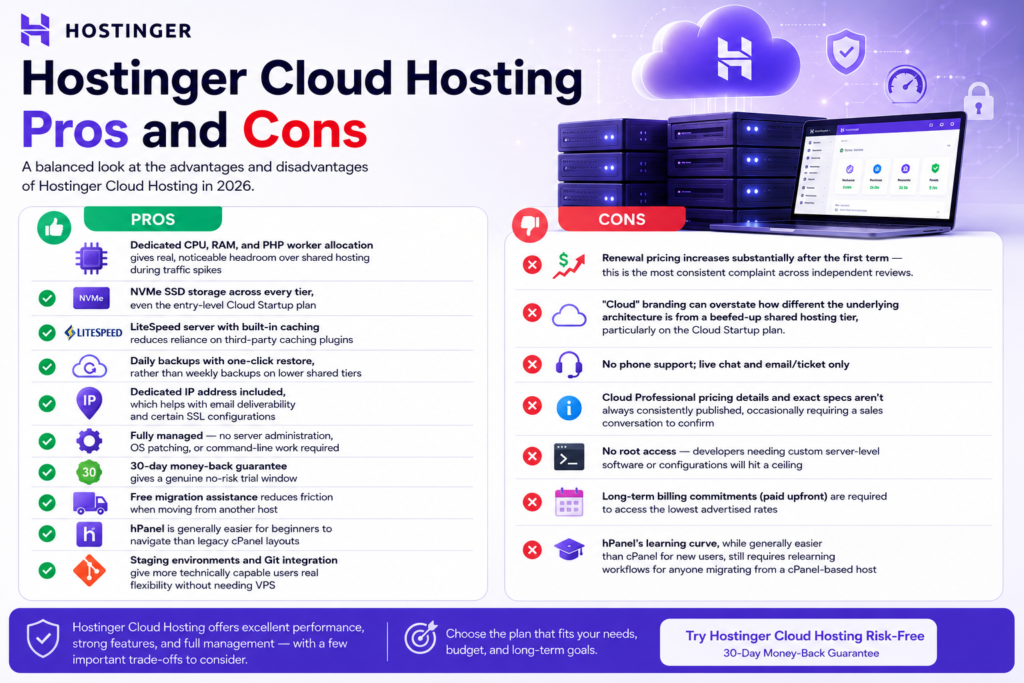
- Dedicated CPU, RAM, and PHP worker allocation gives real, noticeable headroom over shared hosting during traffic spikes
- NVMe SSD storage across every tier, even the entry-level Cloud Startup plan
- LiteSpeed server with built-in caching reduces reliance on third-party caching plugins
- Daily backups with one-click restore, rather than weekly backups on lower shared tiers
- Dedicated IP address included, which helps with email deliverability and certain SSL configurations
- Fully managed — no server administration, OS patching, or command-line work required
- 30-day money-back guarantee gives a genuine no-risk trial window
- Free migration assistance reduces friction when moving from another host
- hPanel is generally easier for beginners to navigate than legacy cPanel layouts
- Staging environments and Git integration give more technically capable users real flexibility without needing a VPS
Cons
- Renewal pricing increases substantially after the first term — this is the most consistent complaint across independent reviews.
- “Cloud” branding can overstate how different the underlying architecture is from a beefed-up shared hosting tier, particularly on the Cloud Startup plan.
- No phone support; live chat and email/ticket only
- Cloud Professional pricing details and exact specs aren’t always consistently published, occasionally requiring a sales conversation to confirm
- No root access — developers needing custom server-level software or configurations will hit a ceiling
- Long-term billing commitments (paid upfront) are required to access the lowest advertised rates
- hPanel’s learning curve, while generally easier than cPanel for new users, still requires relearning workflows for anyone migrating from a cPanel-based host.
Hostinger Cloud Hosting vs. Shared Hosting
| Factor | Shared Hosting | Hostinger Cloud Hosting |
|---|---|---|
| Resource allocation | Shared dynamically across accounts on the server | Dedicated CPU, RAM, and PHP workers per account |
| Starting price | Lower (from roughly $1.99–$2.99/month introductory) | Higher (from $7.99/month introductory) |
| Storage | SSD (varies by plan, sometimes NVMe on upper tiers) | NVMe SSD across all tiers |
| Backups | Often weekly on entry tiers | Daily on all cloud tiers |
| Dedicated IP | Not included | Included |
| Traffic spike resilience | Limited, can hit entry process ceilings under load | Significantly higher headroom |
| Best for | New, low-traffic sites and first-time website owners | Growing sites, WooCommerce stores, multi-site freelancers/agencies |
Winner: Shared hosting wins on raw entry price for brand-new, low-traffic sites. Cloud Hosting wins decisively once your site has outgrown the “will this survive a traffic spike” question, which, for most successful sites, eventually happens.
Hostinger Cloud Hosting vs. VPS
| Factor | Hostinger Cloud Hosting | Hostinger VPS |
|---|---|---|
| Server access | Managed, no root access | Full root access |
| Management | Fully managed by Hostinger | Self-managed (with optional managed add-ons) |
| Setup complexity | Low — hPanel handles everything | Higher — requires server administration knowledge |
| Software flexibility | Limited to what hPanel/WordPress tooling supports | Install anything — custom stacks, non-WordPress apps, Node.js environments, Docker, etc. |
| Pricing | Comparable or sometimes higher than entry VPS tiers | Often cheaper at entry level, with more moderate renewal increases reported |
| Best for | WordPress/WooCommerce users who don’t want server admin work | Developers and technical users needing full control |
Winner: This isn’t really a “better/worse” comparison — it’s a skills-and-needs comparison. If you don’t want to touch a command line, Cloud Hosting is the right tool. If you need custom server configurations, multiple non-WordPress applications, or full control over your software stack, VPS is the more appropriate (and, per several independent pricing breakdowns, sometimes more cost-predictable at renewal) choice.
Hostinger Cloud vs. Other Managed Cloud Hosting Providers
| Factor | Hostinger Cloud | Cloudways | Kinsta |
|---|---|---|---|
| Pricing model | Fixed plans, long-term billing for lowest rates | Pay-as-you-go, hourly/monthly billing, no long-term lock-in required | Fixed tiers, monthly or annual billing |
| Starting price | From ~$7.99/month (introductory) | From ~$14/month (entry tier, transparent ongoing pricing) | Starts considerably higher (typically $35+/month) |
| Underlying infrastructure | Hostinger’s own data centers | Resells AWS, Google Cloud, DigitalOcean, Vultr infrastructure | Google Cloud Platform |
| Renewal pricing shock | Reported as significant by multiple independent sources | Pricing is generally consistent/transparent over time | Pricing is fixed and predictable, but premium-positioned from the start |
| Best for | Budget-conscious WordPress/WooCommerce users wanting fully managed simplicity | Users wanting cloud-provider-grade infrastructure with more transparent long-term pricing | Performance-focused WordPress agencies and businesses with bigger budgets |
Winner: For pure entry-level affordability with full management, Hostinger Cloud wins. For long-term pricing transparency without a renewal shock, Cloudways is a credible alternative worth comparing line-by-line. For premium WordPress-specific performance and support (at a meaningfully higher price), Kinsta sits in a different tier entirely. None of these is a universal “best” — it depends on budget, technical comfort, and how much you value pricing predictability over the cheapest possible entry point.
Real Use Cases
The Outgrown Blogger
A food blogger on shared hosting starts seeing 40,000–60,000 monthly sessions after a few posts go viral on Pinterest. Shared hosting begins throwing intermittent slow load times during peak hours. Cloud Startup’s dedicated PHP workers typically resolve this kind of bottleneck without requiring any code changes, since the underlying problem was resource contention, not the site itself.
The Growing WooCommerce Store
A store selling 200–400 products moves from a generic shared WooCommerce host to Cloud Professional ahead of a seasonal sales push. The combination of NVMe storage, dedicated resources, and a higher entry process ceiling is specifically suited to the concurrent-checkout-traffic problem that sinks underpowered hosting during sales events.
The Multi-Client Agency
A freelance developer hosting eight to twelve small business client sites under shared hosting starts running into account-wide slowdowns whenever one client’s site gets a traffic bump. Consolidating onto a Cloud Startup or Cloud Professional plan with dedicated resources isolates that risk — one client’s spike no longer degrades performance for the others.
The Developer Who Should Have Chosen VPS
A developer wants to run a custom Node.js application alongside a WordPress site, with specific server-level configuration changes. Cloud Hosting’s managed environment doesn’t expose the level of control this requires. This is a case where Cloud Hosting genuinely isn’t the right fit — VPS hosting (or a dedicated cloud provider) is the more honest recommendation.
What We Liked
- The gap between shared hosting’s traffic-spike fragility and Cloud Hosting’s headroom is real and noticeable for the use cases it’s built for
- NVMe storage on even the entry tier is a genuinely strong value point relative to many competitors at similar price points
- hPanel’s learning curve for beginners is shorter than legacy cPanel-based competitors
- The 30-day money-back guarantee removes most of the risk from trying it
What Could Be Improved
- Renewal pricing transparency — burying the post-promotional rate well below the advertised “from” price is a recurring, legitimate criticism across independent reviews.
- Cloud Professional’s pricing and specs aren’t always consistently documented across Hostinger’s own marketing pages, which creates unnecessary friction for buyers trying to compare tiers.
- No phone support option for users who prefer voice troubleshooting for urgent issues
Is It Suitable for Beginners?
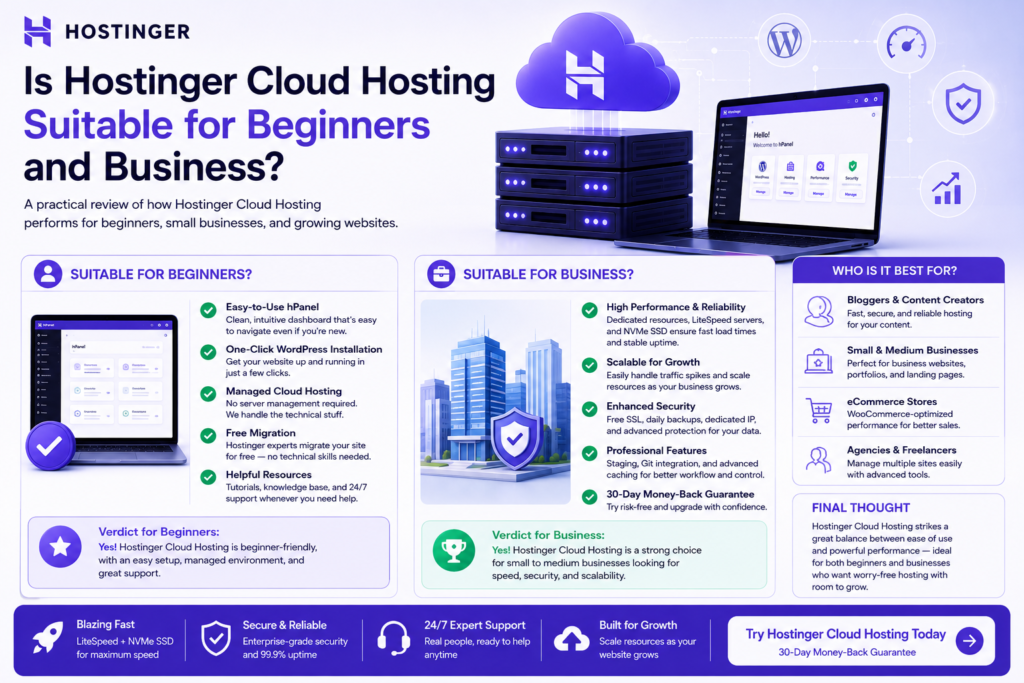
Yes, with a caveat: hPanel is genuinely approachable for non-technical users, and one-click WordPress installs remove most setup friction. The caveat is that beginners are also the buyers most likely to be drawn in by the lowest advertised price without fully registering the renewal cost — that’s worth flagging clearly before signing a long-term plan.
Is It Suitable for Businesses?
Yes, for businesses whose hosting needs map to WordPress or WooCommerce and who don’t need custom server environments. Businesses needing compliance certifications tied to specific hyperscaler infrastructure (HIPAA-specific AWS configurations, for example) should evaluate that requirement carefully, since Hostinger operates its own infrastructure rather than reselling a major cloud provider’s compliance-certified environment.
Who Should Buy Hostinger Cloud Hosting?
- Bloggers whose shared hosting plan is starting to choke under real traffic
- Freelancers hosting several client sites who want resource isolation without managing servers
- Agencies needing role-based access and per-client hosting management under one account
- WooCommerce store owners with active, growing catalogs and real promotional traffic spikes
- Business websites that can’t afford downtime during busy periods
- Portfolio and personal brand sites for professionals who want a faster, more reliable presence without overpaying for enterprise infrastructure they don’t need
- News and content publishers with traffic patterns that spike unpredictably around trending stories
Who Should Not Buy It?
- Brand-new, low-traffic hobby sites — the price premium over shared hosting isn’t justified until you actually need the headroom.
- Developers needing root access to install custom software stacks, run non-standard server configurations, or manage their own security hardening.
- Anyone needing major-hyperscaler compliance certifications tied to AWS, Google Cloud, or Azure specifically
- Budget-sensitive buyers who haven’t budgeted for renewal pricing — if the only way the plan is affordable is the introductory rate, it’s worth running the four-year total cost numbers before committing.
Frequently Asked Questions
What is Hostinger Cloud Hosting? It’s Hostinger’s mid-tier managed hosting product, sitting between shared hosting and VPS, offering dedicated CPU, RAM, and NVMe storage allocations across three plans: Cloud Startup, Cloud Professional, and Cloud Enterprise.
Is Hostinger Cloud Hosting better than shared hosting? For sites that have outgrown shared hosting’s resource limits — typically shown by slowdowns during traffic spikes — yes. For brand-new, low-traffic sites, shared hosting is usually the more cost-effective starting point.
Is Hostinger Cloud Hosting good for WordPress? Yes. It includes one-click WordPress installation, LiteSpeed caching optimized for WordPress, automatic updates, and staging environments on qualifying plans.
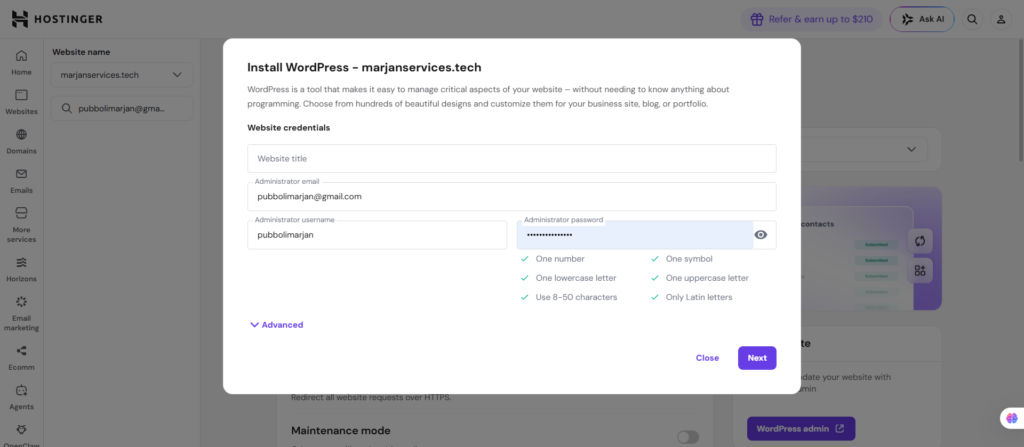
Does it include daily backups? Yes, daily backups with one-click restore are included across all Cloud Hosting tiers.
Is LiteSpeed included? Yes, all Cloud Hosting plans run on LiteSpeed Web Server with LSCache for built-in page and object caching.
Does it include a CDN? Yes, a content delivery network is included to serve static assets from edge locations closer to visitors.
Is WooCommerce supported? Yes, with catalog size and feature support (standard vs. advanced WooCommerce functionality) varying by plan tier.
Can beginners use it? Yes. hPanel’s interface is generally considered approachable for non-technical users, and setup is largely automated.
How much does it cost? Introductory pricing starts from $7.99/month for Cloud Startup, $15.99/month for Cloud Professional, and $29.99/month for Cloud Enterprise, billed on a long-term plan. Renewal pricing is meaningfully higher — confirm current rates at checkout before committing.
Is there a money-back guarantee? Yes, all Cloud Hosting plans include a 30-day money-back guarantee.
Sources and References
- The information presented in this review has been verified using official documentation and reputable industry resources.
- Hostinger Official Documentation.
- Hostinger Knowledge Base.
- Hostinger Pricing Pages.
- LiteSpeed Technologies Documentation.
- Cloudflare Documentation.
- WordPress.org Documentation.
- WooCommerce Documentation.
- Google Search Central.
- Google Core Web Vitals Documentation.
- Google PageSpeed Insights Documentation.
- Independent hosting industry reviews and publicly available user feedback.
Expert Recommendation
For most bloggers, freelancers, agencies, and small businesses using WordPress or WooCommerce, Hostinger Cloud Hosting offers an excellent balance of performance, ease of use, and affordability during the introductory term. However, buyers should also evaluate long-term renewal pricing before committing to a multi-year plan. Websites requiring complete server control, custom software environments, or enterprise compliance requirements should consider VPS hosting or enterprise cloud infrastructure instead.
Final Verdict: Is Hostinger Cloud Hosting Worth It?
Honestly, for the right buyer, yes. If your site has genuinely outgrown shared hosting, and your needs map to WordPress or WooCommerce rather than custom server software, Hostinger Cloud Hosting offers a real, measurable step up in resource headroom, storage speed, and backup frequency, at a price that still undercuts most fully managed competitors at the entry tier.
The honest caveats: the “Cloud” branding slightly overstates how different the underlying architecture is from a strong shared hosting tier, particularly at the Cloud Startup level, and the renewal pricing jump is a real cost that deserves to be budgeted for rather than discovered at your second billing cycle. Neither of these is a reason to avoid the product — they’re reasons to go in with accurate expectations.
Best users: Growing blogs, WooCommerce stores scaling past their first few hundred customers, agencies managing multiple client sites, and businesses that have already felt the pain of a shared-hosting traffic spike going wrong.
Where another hosting type fits better: If you need full root server access, custom non-WordPress application environments, or major-cloud-provider compliance certifications, VPS hosting or a dedicated cloud infrastructure provider is the more honest recommendation — not because Cloud Hosting is bad, but because it’s solving a different problem than the one you have.
Affiliate Recommendation
If Hostinger Cloud Hosting matches what you’ve just read about your own site — growing traffic, a WordPress or WooCommerce setup, and a preference for fully managed infrastructure over server administration — it’s a legitimate option worth comparing directly against its current plans and pricing before you commit to a long-term term. Review the live pricing page for current introductory and renewal rates, confirm the exact specs for the tier you’re considering, and use the 30-day money-back window to validate real-world performance on your specific site before locking in a multi-year commitment.
This article contains affiliate links. If you choose to purchase through them, we may earn a commission at no additional cost to you. This does not influence the analysis, comparisons, or recommendations above.
Further Reading: