Target Audience: Beginners, businesses, entrepreneurs, professionals, freelancers, website owners, developers, agencies, and decision-makers
Published: July 11, 2026
Last Updated: August 10, 2026
Author: Syed Abdul Quddus
Table of Contents
Quick Answer: What Are the Main Types of Websites?
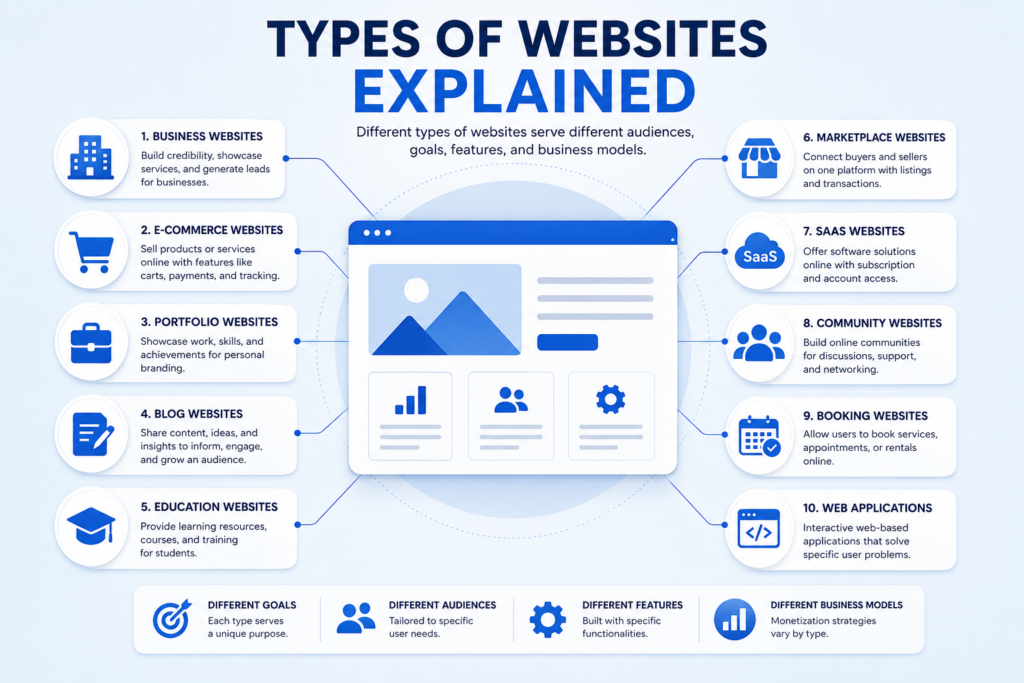
Types of Websites Explained: There are many types of websites, but most can be classified by their primary purpose, target audience, functionality, content model, and business objective.
The most common website types include:
- Business websites.
- Corporate websites.
- E-commerce websites.
- Portfolio websites.
- Personal websites.
- Blog websites.
- News and magazine websites.
- Landing pages.
- Educational websites.
- Membership websites.
- Directory and listing websites.
- Marketplace websites.
- SaaS websites.
- Web applications.
- Community and forum websites.
- Nonprofit and charity websites.
- Booking and reservation websites.
- Knowledge base and documentation websites.
A modern website does not always belong to only one category. A business website may include a blog, an online store, a booking system, a customer portal, and lead-generation landing pages within the same domain.
The right website type therefore depends less on a label and more on what the website must help its users and its owner accomplish.
Key Takeaways
If you only remember a few things from this guide, remember these:
- A website type should be selected according to its primary goal, not appearance alone.
- Business websites usually focus on credibility, leads, enquiries, and customer acquisition.
- E-commerce websites are designed around product discovery, checkout, payment, and order management.
- Portfolio websites emphasize work samples, skills, experience, and contact opportunities.
- Blogs, news sites, and educational websites prioritize content discovery and information.
- Marketplaces connect multiple buyers and sellers rather than representing only one store.
- SaaS websites combine marketing pages with access to a software product.
- Web applications normally provide interactive functionality rather than primarily publishing information.
- Many successful websites are hybrids combining several website types.
- Website architecture, platform, security, SEO, maintenance, and scalability should be chosen after the website’s purpose is clear.
Introduction
Choosing a website can appear simple until you begin planning one.
You may know that your business needs an online presence, but should you build a traditional business website, an e-commerce store, a portfolio, a booking website, a marketplace, a membership platform, a web application, or a combination of several formats?
Understanding the different types of websites helps answer that question before time and money are committed to design and development.
A website’s type affects almost everything that follows, including its page structure, features, content requirements, development complexity, hosting, security, search engine optimization, maintenance workload, conversion strategy, and long-term scalability.
A local professional service company, for example, usually needs a very different website from an online retailer. A photographer’s portfolio has different priorities from a membership community. A software company promoting a subscription application requires a different architecture from a simple informational website.
The most useful way to classify website types is therefore not by visual design alone. Instead, ask:
- What is the website supposed to achieve?
- Who will use it?
- What action should visitors take?
- What information or functionality must it provide?
- Will visitors need accounts?
- Will payments be accepted?
- Will content be published regularly?
- Will the site need thousands of dynamic pages?
- Does it need to support bookings, listings, subscriptions, courses, or software functionality?
- How much will the website need to grow?
This guide explains 18 major website types, what each one is used for, common features, ideal users, development considerations, monetization options, SEO requirements, and practical examples.
It also explains static versus dynamic architecture, website versus web application differences, common development platforms, costs, search optimization, accessibility, security, and how to choose the right website type for your business.
What Is a Website?
A website is a collection of connected web pages and digital resources that are normally accessible through a domain name using a web browser.
A website may contain text, images, video, forms, databases, product catalogs, user accounts, payment functions, interactive tools, downloads, search systems, or software-like functionality.
Some websites exist mainly to provide information. Others sell products, generate leads, deliver services, host communities, publish media, facilitate transactions, or provide access to software.
The purpose of a website therefore determines much of its structure.
For businesses planning a website from the beginning, our What Is Website Development? guide explains how planning, design, development, testing, deployment, and maintenance fit together.
How Are Websites Classified?
Websites can be categorized in several ways.
By Purpose
Examples include:
- Business.
- E-commerce.
- Portfolio.
- Blog.
- Education.
- Community.
- Entertainment.
- Lead generation.
- Booking.
- Software delivery.
By Functionality
A website may be:
- Informational.
- Transactional.
- Interactive.
- Content-driven.
- Database-driven.
- Account-based.
- Subscription-based.
By Technical Architecture
Common classifications include:
- Static websites.
- Dynamic websites.
- Single-page applications.
- Multi-page websites.
- Progressive web applications.
- Server-rendered websites.
- Headless websites.
By Business Model
A website may support:
- Direct product sales.
- Service sales.
- Advertising.
- Subscriptions.
- Memberships.
- Affiliate marketing.
- Lead generation.
- Commissions.
- Donations.
- Software subscriptions.
By Target Audience
Examples include:
- Consumers.
- Businesses.
- Students.
- Professionals.
- Employees.
- Members.
- Developers.
- Investors.
- Customers.
- Local communities.
This is why the same website may belong to several classifications at once.
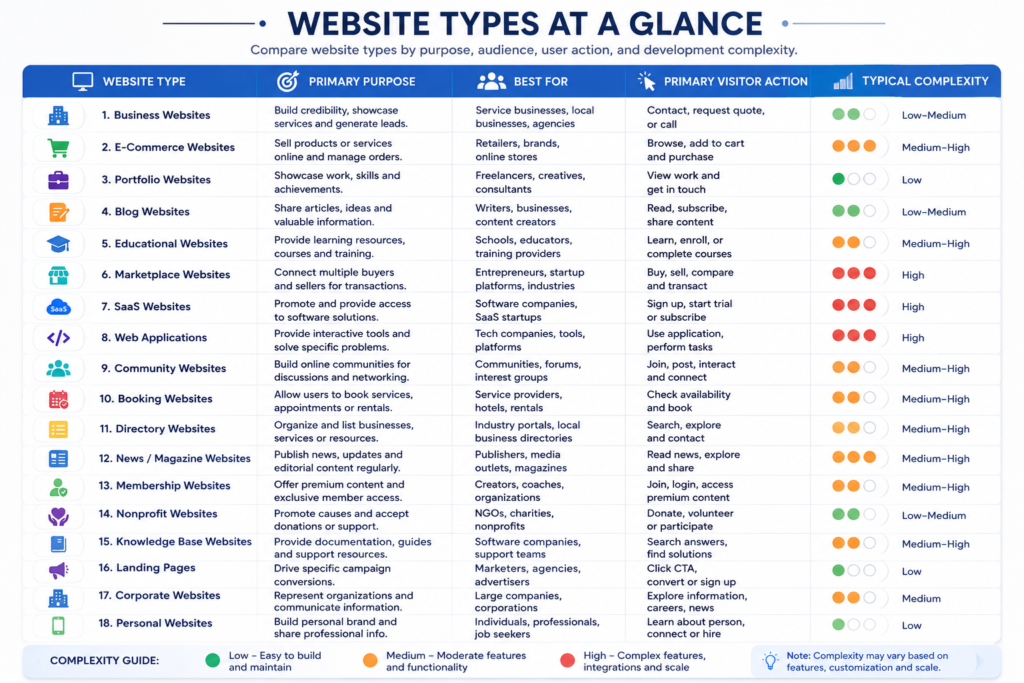
Website Types at a Glance
| Website Type | Primary Purpose | Best For | Main User Action | Typical Complexity |
|---|---|---|---|---|
| Business | Generate trust and leads | Service businesses | Contact or request quote | Low to Medium |
| Corporate | Represent an organization | Medium and large companies | Explore company information | Medium |
| E-commerce | Sell products online | Retailers and brands | Purchase | Medium to High |
| Portfolio | Showcase work | Freelancers and creatives | View work and contact | Low |
| Personal | Build personal presence | Individuals and professionals | Learn or connect | Low |
| Blog | Publish articles | Writers and businesses | Read and subscribe | Low to Medium |
| News or Magazine | Publish frequent content | Publishers | Read and explore | Medium to High |
| Landing Page | Drive one conversion | Marketing campaigns | Complete one CTA | Low |
| Educational | Deliver learning | Schools and educators | Learn or enroll | Medium to High |
| Membership | Restrict premium content | Communities and creators | Join or subscribe | Medium to High |
| Directory | Organize listings | Industry portals | Search listings | Medium to High |
| Marketplace | Connect buyers and sellers | Multi-vendor businesses | Buy or sell | High |
| SaaS | Sell software access | Software companies | Start trial or subscribe | High |
| Web Application | Provide interactive tools | Technology businesses | Use application | High |
| Community or Forum | Facilitate discussion | Communities | Post and interact | Medium to High |
| Nonprofit | Promote mission | Charities and NGOs | Donate or participate | Medium |
| Booking | Manage appointments | Service providers | Book | Medium to High |
| Knowledge Base | Provide documentation | Software and support teams | Find answers | Medium |
1. Business Websites
What Is a Business Website?
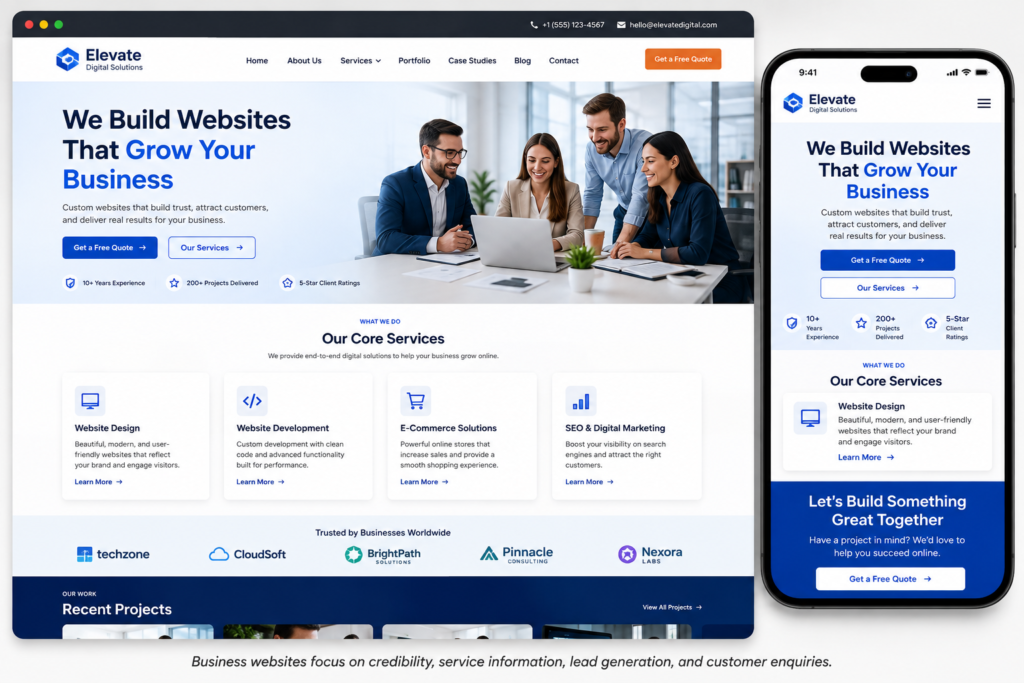
A business website is an online presence designed to represent a company, professional, agency, local business, or service provider and help that organization achieve commercial objectives.
For many service companies, the primary objectives are:
- Establish credibility.
- Explain services.
- Attract prospective customers.
- Generate enquiries.
- Collect leads.
- Showcase experience.
- Present testimonials or case studies.
- Answer common questions.
- Provide contact information.
A business website may be relatively simple, but its commercial importance can be substantial.
Common Business Website Features
A professional business website commonly includes:
- Home page.
- About page.
- Service pages.
- Contact page.
- Quote or enquiry form.
- Testimonials.
- Portfolio or case studies.
- Frequently asked questions.
- Blog or resources.
- Privacy policy.
- Terms and conditions where applicable.
More advanced business websites may also include appointment booking, client portals, live chat, customer dashboards, payment systems, multilingual content, location pages, or e-commerce functionality.
Best For
Business websites are particularly suitable for:
- Consultants.
- Accountants.
- Lawyers.
- Contractors.
- Clinics.
- Agencies.
- Professional services.
- Local businesses.
- Construction companies.
- Real estate professionals.
- Repair services.
- Technology companies.
- B2B service providers.
SEO Priorities for Business Websites
Business websites generally benefit from:
- Individual pages for important services.
- Clear geographic targeting where relevant.
- Descriptive page titles.
- Logical internal linking.
- Strong business identity.
- Expertise and trust signals.
- Case studies.
- Helpful informational content.
- Fast mobile performance.
- Clear conversion paths.
Google’s Search Essentials recommends creating helpful, reliable, people-first content, using language people actually search for in prominent page locations, and maintaining crawlable links between relevant pages.
Common Business Website Mistake
One recurring structural problem is trying to describe every service on a single generic page.
When separate services satisfy materially different customer needs, dedicated service pages often provide a clearer experience. Each page can explain the service, audience, process, benefits, questions, evidence, and next action without forcing users to search through unrelated information.
For a deeper comparison, see Business Website vs Personal Website.
2. Corporate Websites
What Is a Corporate Website?
A corporate website represents an established organization and communicates information to a broader set of stakeholders.
While a small business website may focus heavily on generating enquiries, a corporate website often serves multiple audiences simultaneously.
These can include:
- Customers.
- Employees.
- Job candidates.
- Investors.
- Media.
- Partners.
- Suppliers.
- Regulators.
- Communities.
Common Corporate Website Sections
A corporate website may include:
- Company overview.
- Leadership.
- History.
- Business divisions.
- Products or services.
- Investor relations.
- Careers.
- Newsroom.
- Corporate governance.
- Sustainability.
- Policies.
- Office locations.
- Reports.
- Contact information.
Business Website vs Corporate Website
| Factor | Business Website | Corporate Website |
|---|---|---|
| Primary Goal | Leads and sales | Organizational communication |
| Typical Organization | Small to medium business | Larger organization |
| Audience | Customers | Multiple stakeholder groups |
| Content Volume | Low to Medium | Medium to Very High |
| Governance | Relatively simple | Often complex |
| Careers | Optional | Usually important |
| Investor Information | Rare | May be essential |
| Multilingual Needs | Sometimes | More common |
The distinction is not based on a strict legal definition. It is primarily useful for planning content, governance, functionality, and audiences.
3. E-Commerce Websites
What Is an E-Commerce Website?
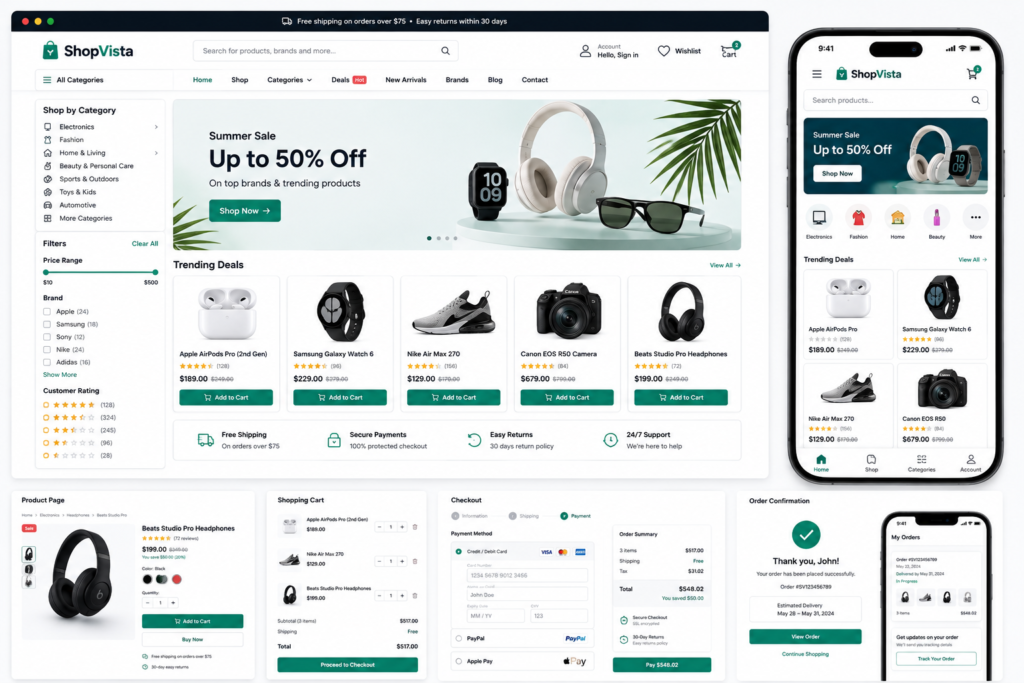
An e-commerce website allows customers to discover products or services, add items to a cart, complete checkout, make payments, and receive order-related information online.
The website is therefore both a marketing platform and a transactional system.
Essential E-Commerce Features
A typical online store may require:
- Product catalog.
- Product categories.
- Product search.
- Filters.
- Product pages.
- Images.
- Prices.
- Inventory information.
- Shopping cart.
- Checkout.
- Payment processing.
- Customer accounts.
- Order confirmation.
- Transactional emails.
- Shipping options.
- Returns information.
- Reviews where applicable.
Common Platforms
Depending on requirements, e-commerce sites may be built with platforms such as:
- Shopify.
- WooCommerce.
- Adobe Commerce.
- BigCommerce.
- Custom e-commerce systems.
The correct platform depends on catalog size, operational requirements, budget, integrations, staff skills, international selling needs, checkout requirements, and expected growth.
E-Commerce SEO
E-commerce SEO presents specific challenges because stores can generate large numbers of category, product, variant, filter, and search URLs.
Important considerations include:
- Product page quality.
- Category architecture.
- Internal linking.
- Canonicalization.
- Product availability.
- Duplicate or near-duplicate pages.
- Image optimization.
- Structured data where eligible.
- Page speed.
- Mobile usability.
- Crawl control.
A technically strong architecture becomes increasingly important as a product catalog grows.
Security Requirements
Because an e-commerce website may process account information, payment-related workflows, addresses, orders, and other customer data, security must be treated as a core requirement rather than an optional enhancement.
Typical controls include:
- HTTPS.
- Secure payment processing.
- Strong administrator authentication.
- Software updates.
- Backups.
- Access control.
- Logging.
- Vulnerability management.
- Protection against common web attacks.
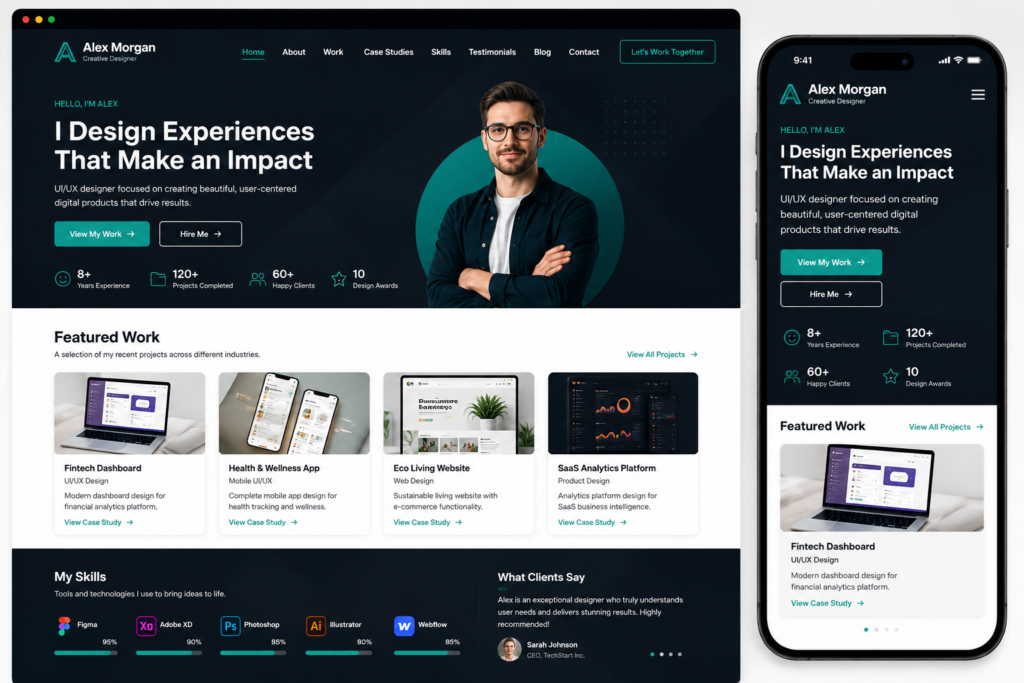
4. Portfolio Websites
What Is a Portfolio Website?
A portfolio website is designed to showcase a person’s or company’s work.
Its main goal is normally to demonstrate ability rather than publish large volumes of information.
Best For
Portfolio websites are particularly useful for:
- Designers.
- Photographers.
- Developers.
- Architects.
- Artists.
- Writers.
- Videographers.
- Consultants.
- Agencies.
- Freelancers.
Important Portfolio Features
A strong portfolio may include:
- Selected projects.
- Project descriptions.
- Role and contribution.
- Work samples.
- Before-and-after examples.
- Client context.
- Results where verifiable.
- Skills.
- About information.
- Testimonials.
- Contact call to action.
Portfolio SEO Strategy
A portfolio should not rely on images alone.
Search engines and potential clients need context.
Instead of displaying only a screenshot, explain:
- What the project was.
- What problem needed to be solved.
- What your responsibility was.
- What approach you used.
- What the outcome was.
- Which skills or services were involved.
That contextual information can transform a visual portfolio into a useful collection of case studies.
5. Personal Websites
What Is a Personal Website?
A personal website represents an individual rather than primarily representing a company.
It can function as:
- An online profile.
- Personal brand hub.
- Resume website.
- Thought leadership platform.
- Professional biography.
- Writing portfolio.
- Speaking profile.
- Personal blog.
Personal Website vs Portfolio Website
A portfolio website emphasizes work.
A personal website emphasizes the person.
They can overlap significantly.
A consultant, for example, might use a personal website containing:
- Biography.
- Services.
- Articles.
- Speaking engagements.
- Portfolio.
- Contact information.
In that situation, the website is both personal and commercial.
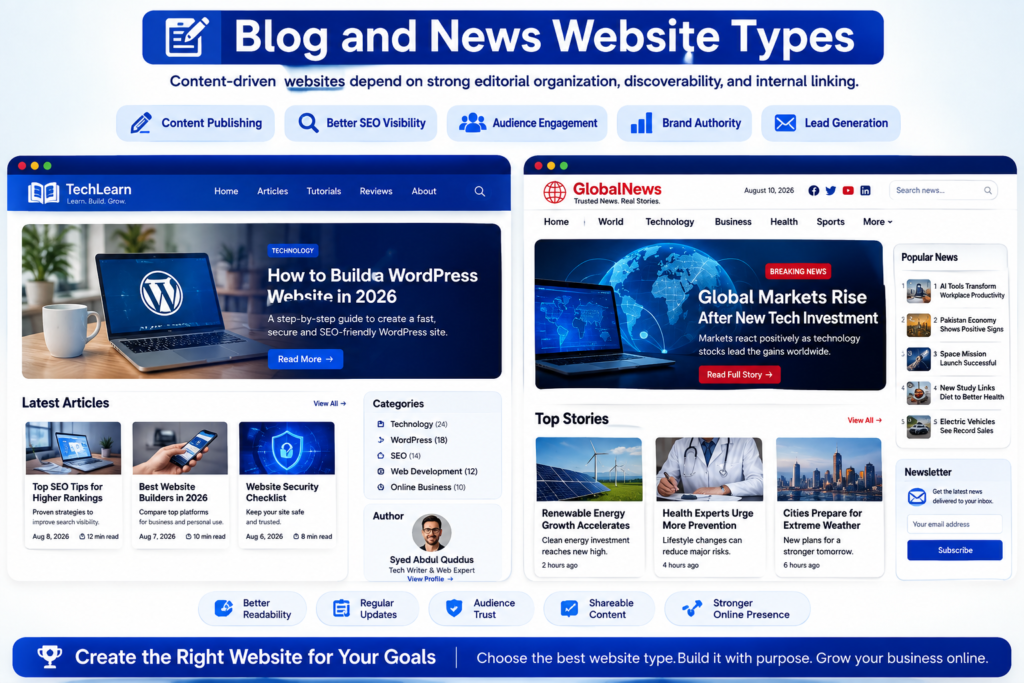
6. Blog Websites
What Is a Blog Website?
A blog is a website or section of a website where articles are published regularly.
Blog content is commonly organized using:
- Categories.
- Tags.
- Authors.
- Publication dates.
- Archives.
- Search.
- Related articles.
Who Uses Blogs?
Blogs are used by:
- Individuals.
- Businesses.
- Publishers.
- Nonprofits.
- Educators.
- Technology companies.
- Professional services.
- Affiliate publishers.
- Industry specialists.
Why Businesses Use Blogs
A business blog can support:
- Education.
- Organic search visibility.
- Customer support.
- Thought leadership.
- Internal linking.
- Product education.
- Lead nurturing.
- Brand discovery.
However, publishing large amounts of generic content merely to capture search traffic is not a sustainable quality strategy.
Google states that its systems are designed to prioritize content created to benefit people rather than content produced primarily to manipulate rankings.
Google’s guidance on generative AI content similarly warns that producing many pages without meaningful value can fall under scaled content abuse.
Blog SEO Priorities
Useful blog architecture includes:
- Clear content categories.
- Descriptive titles.
- Strong internal links.
- Author attribution.
- Original examples.
- Accurate references.
- Updated information.
- Logical article hierarchy.
- Avoidance of duplicate topics.
- Intent-based keyword mapping.
7. News and Magazine Websites
What Is a News or Magazine Website?
A news or magazine website publishes high volumes of frequently updated editorial content.
Its structure may include:
- Categories.
- Topics.
- Authors.
- Breaking stories.
- Features.
- Opinion.
- Search.
- Archives.
- Related coverage.
- Multimedia.
Important Requirements
Large publishing websites require particularly strong:
- Editorial workflows.
- Content categorization.
- Internal linking.
- Performance optimization.
- Mobile usability.
- Author and publication information.
- Content update processes.
- Image management.
- Search and filtering.
- Technical SEO governance.
Major Challenge
The challenge is not merely publishing frequently.
It is maintaining quality, accuracy, discoverability, editorial consistency, and technical performance as the number of URLs increases.
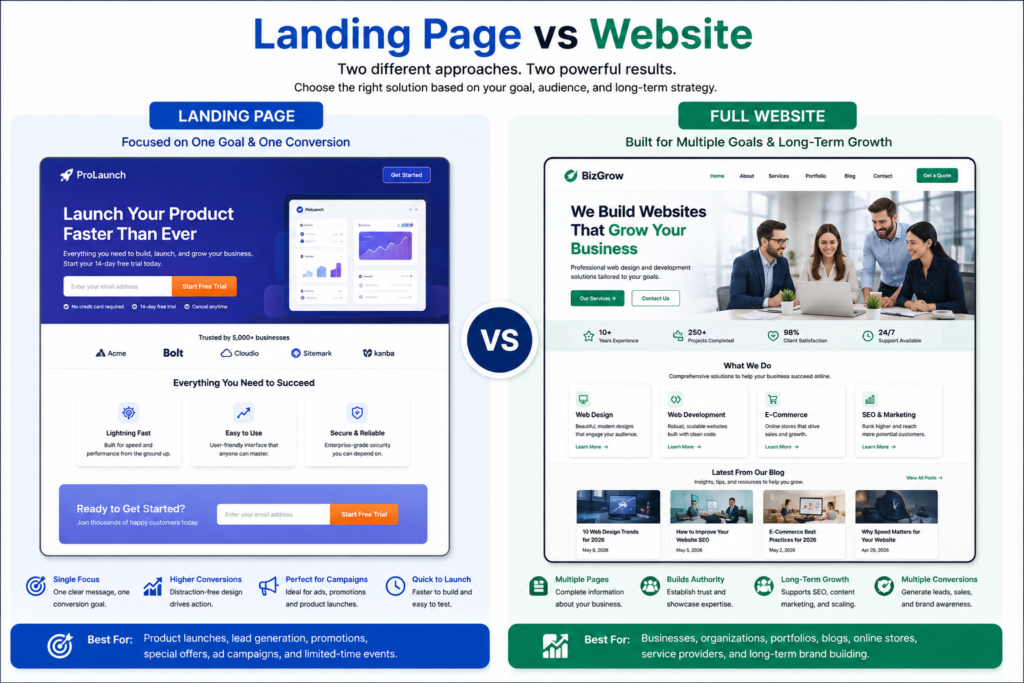
8. Landing Pages
What Is a Landing Page?
A landing page is a focused page designed around a specific audience, offer, campaign, or conversion objective.
Its primary goal is usually to encourage one main action.
Examples include:
- Request a quote.
- Book a consultation.
- Register.
- Download a resource.
- Start a free trial.
- Purchase an offer.
- Join a waiting list.
Landing Page vs Website
| Factor | Landing Page | Full Website |
|---|---|---|
| Main Purpose | One conversion | Multiple goals |
| Navigation | Often limited | Full navigation |
| Content Breadth | Focused | Broad |
| Number of Pages | Usually one | Usually several |
| Ideal Use | Campaigns | Long-term online presence |
| SEO Potential | Topic-specific | Broader topical coverage |
What Makes a Strong Landing Page?
A focused landing page commonly contains:
- Clear headline.
- Benefit-focused introduction.
- Problem or need.
- Offer.
- Evidence.
- Features or benefits.
- Objection handling.
- Call to action.
- Trust signals.
- Relevant FAQs.
A landing page should remove unnecessary distractions without withholding information required for an informed decision.
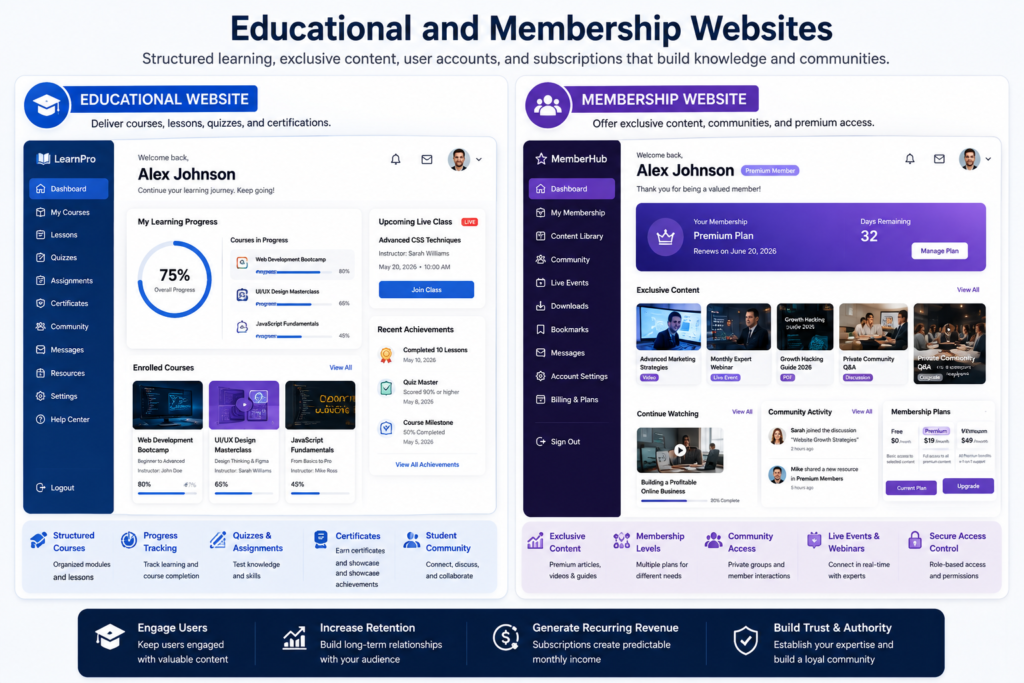
9. Educational Websites
What Is an Educational Website?
An educational website provides learning resources, instruction, courses, academic material, training, or structured knowledge.
It may range from a simple collection of lessons to a complete learning management platform.
Common Educational Features
Depending on scope, educational websites can include:
- Lessons.
- Courses.
- Videos.
- Downloads.
- Quizzes.
- Assessments.
- Progress tracking.
- Student accounts.
- Instructor profiles.
- Certificates.
- Discussion systems.
- Enrollment.
- Payments.
Educational Website Types
Examples include:
- School websites.
- University websites.
- Online course platforms.
- Training portals.
- Tutorial websites.
- Knowledge libraries.
- Professional certification platforms.
Important Considerations
Educational content requires clear organization.
A useful structure may follow:
Course → Module → Lesson → Activity → Assessment
For public educational content, clear headings, concise explanations, definitions, examples, and logical linking can also make information easier for both people and search systems to understand.
10. Membership Websites
What Is a Membership Website?
A membership website restricts some content, services, community features, or resources to registered users.
Membership may be:
- Free.
- Paid.
- Tiered.
- Invitation-only.
- Organization-based.
Common Features
Membership websites often require:
- Registration.
- Login.
- Password recovery.
- User profiles.
- Access control.
- Subscription management.
- Member-only content.
- Billing.
- Account management.
- Email notifications.
Membership Business Models
A membership site may earn revenue through:
- Monthly subscriptions.
- Annual subscriptions.
- Premium tiers.
- Exclusive resources.
- Training.
- Community access.
- Professional membership fees.
Main Development Challenge
Access control must be designed carefully.
The system must know:
- Who the user is.
- Which membership they have.
- Which content they can access.
- What happens if payment fails.
- When access expires.
- How account data is managed.
This makes membership websites structurally more complex than ordinary informational sites.
11. Directory and Listing Websites
What Is a Directory Website?
A directory website organizes listings around a particular category, location, industry, or topic.
Examples include directories of:
- Businesses.
- Professionals.
- Properties.
- Jobs.
- Events.
- Schools.
- Services.
- Suppliers.
- Restaurants.
- Organizations.
Common Directory Features
A directory may require:
- Listing pages.
- Categories.
- Search.
- Filters.
- Location data.
- User submissions.
- Claim listing functionality.
- Reviews.
- Maps.
- Paid listings.
- Featured listings.
Directory SEO Challenges
Directories can potentially create thousands of pages.
That creates both opportunity and risk.
Poorly controlled directories may produce:
- Empty category pages.
- Thin listings.
- Duplicate location combinations.
- Unhelpful search URLs.
- Near-duplicate pages.
- Orphan listings.
A strong directory should therefore have clear quality thresholds for indexable pages.
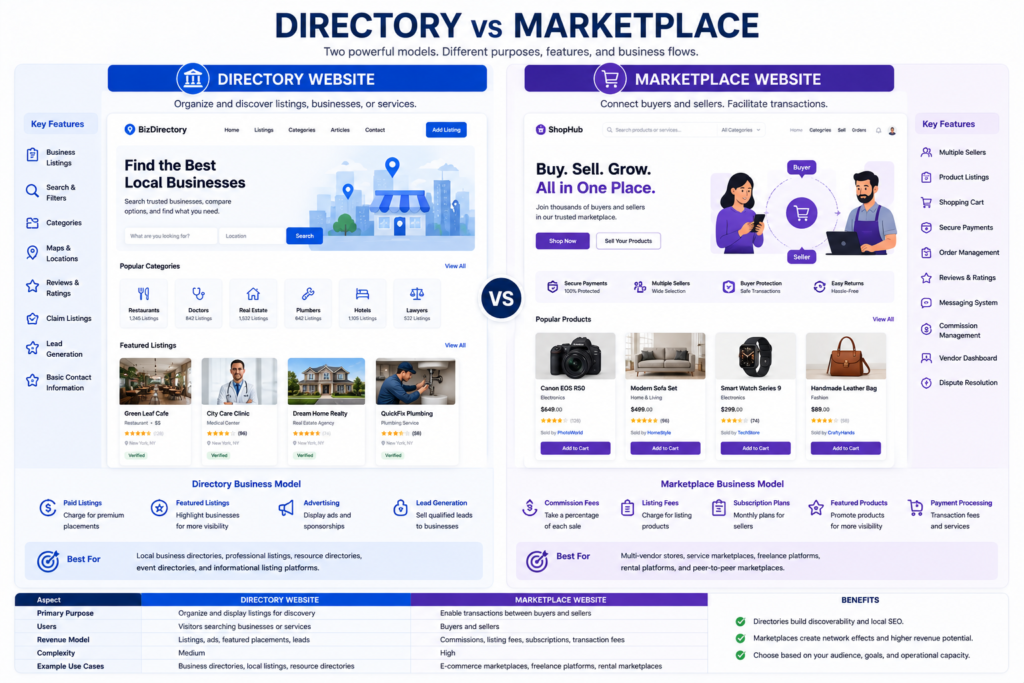
12. Marketplace Websites
What Is a Marketplace Website?
A marketplace connects multiple sellers or service providers with multiple buyers through one platform.
Unlike a conventional online store where one merchant normally sells its own inventory, a marketplace facilitates transactions or connections between multiple parties.
Typical Marketplace Features
A marketplace may require:
- Buyer accounts.
- Seller accounts.
- Seller dashboards.
- Listings.
- Search.
- Filters.
- Payments.
- Commission logic.
- Messaging.
- Reviews.
- Dispute workflows.
- Moderation.
- Notifications.
- Payout systems.
Marketplace vs E-Commerce Store
| Factor | Online Store | Marketplace |
|---|---|---|
| Sellers | Usually one business | Multiple sellers |
| Inventory | Controlled by store | Distributed |
| Accounts | Mainly customers | Buyers and sellers |
| Payments | Merchant receives payment | Platform may manage allocation |
| Complexity | Medium to High | High |
| Moderation | Limited | Often essential |
| Revenue Model | Product margin | Commission or fees |
Why Marketplaces Are Complex
The main challenge is not simply building product pages.
A marketplace must manage relationships among:
- Buyers.
- Sellers.
- Listings.
- Payments.
- Reviews.
- Policies.
- Moderation.
- Support.
- Transactions.
For that reason, marketplace development usually requires more planning than a standard online store.
13. SaaS Websites
What Is a SaaS Website?
A SaaS website promotes and provides access to software delivered as an online service.
SaaS stands for Software as a Service.
A typical SaaS website has two distinct layers.
Marketing Layer
This may contain:
- Home page.
- Features.
- Pricing.
- Use cases.
- Documentation.
- Comparisons.
- Blog.
- Demo.
- Contact or sales pages.
Product Layer
This may contain:
- User registration.
- Authentication.
- Dashboard.
- Application functionality.
- Subscription management.
- Billing.
- Settings.
- User data.
Main SaaS Conversions
Depending on the business model, the primary conversion may be:
- Start free trial.
- Create account.
- Request demo.
- Contact sales.
- Subscribe.
- Upgrade.
SaaS SEO
SaaS SEO can extend well beyond a homepage.
Useful organic content can include:
- Feature pages.
- Use cases.
- Integrations.
- Documentation.
- Tutorials.
- Comparison pages.
- Templates.
- Tools.
- Original research.
The important principle is that these pages should exist because they help users, not simply because every conceivable keyword variation can be generated.
14. Web Applications
What Is a Web Application?
A web application is an interactive software application accessed through a web browser.
Its main value comes from performing tasks rather than primarily publishing pages for reading.
Examples of functionality may include:
- Data processing.
- Project management.
- Editing.
- Communication.
- Reporting.
- Scheduling.
- Customer management.
- Financial calculations.
- Workflow automation.
Website vs Web Application
| Factor | Website | Web Application |
|---|---|---|
| Primary Function | Present information | Perform tasks |
| Interaction | Low to Medium | High |
| User Accounts | Optional | Often required |
| Data Processing | Limited | Often extensive |
| Development Complexity | Low to High | Usually Medium to Very High |
| Application State | Limited | Often significant |
| Examples | Company site, blog | Dashboard, online tool |
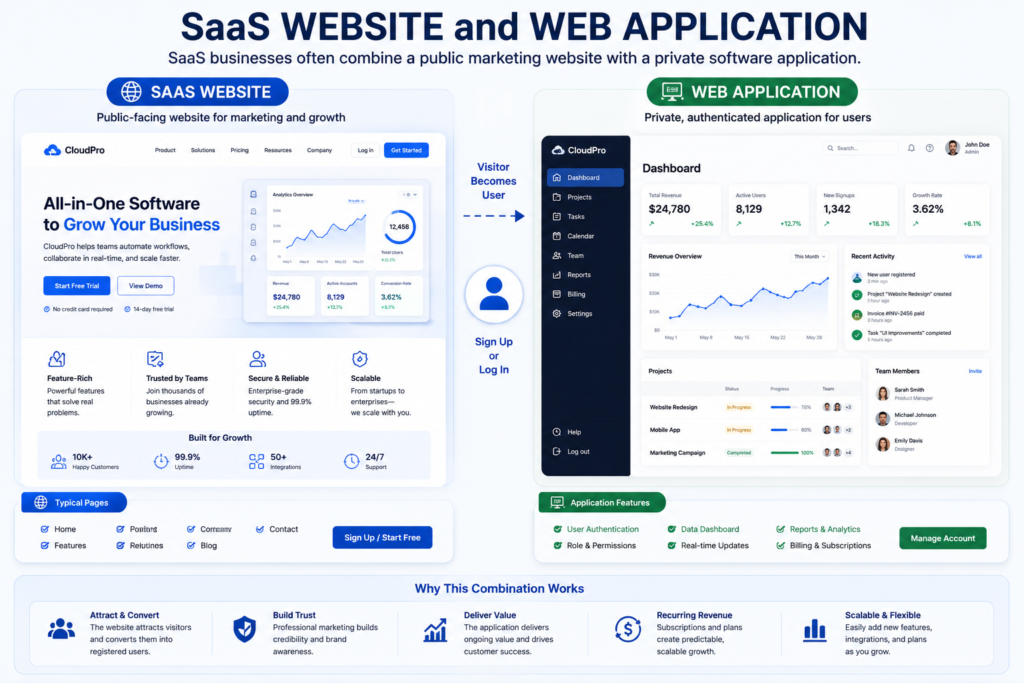
The boundary is not absolute.
Many modern websites combine public content with application functionality.
A SaaS company, for example, may have a public marketing website at the front and a sophisticated web application after login.
15. Community and Forum Websites
What Is a Community Website?
A community website allows users to interact with each other around shared interests, professions, locations, goals, products, or experiences.
Forums are one common form of community website.
Typical Features
Community platforms may require:
- User profiles.
- Posts.
- Comments.
- Threads.
- Reactions.
- Groups.
- Notifications.
- Search.
- Moderation.
- Reporting.
- Reputation systems.
- Private messaging.
Major Challenge: User-Generated Content
User-generated content requires governance.
A community needs policies and systems for:
- Spam.
- Harassment.
- Illegal content.
- Impersonation.
- Misleading claims.
- Copyright complaints.
- Privacy.
- Account abuse.
The larger the community becomes, the more important moderation and trust systems become.
16. Nonprofit and Charity Websites
What Is a Nonprofit Website?
A nonprofit website communicates an organization’s mission, activities, impact, programs, and opportunities for public involvement.
Its objectives may include:
- Education.
- Donations.
- Volunteering.
- Advocacy.
- Event participation.
- Membership.
- Reporting impact.
- Community support.
Important Nonprofit Website Elements
Useful sections may include:
- Mission.
- Programs.
- Impact.
- Leadership.
- Reports.
- Donation options.
- Volunteer opportunities.
- Events.
- Contact information.
- Transparency information.
Trust Is Essential
Visitors considering donations or participation need to understand:
- Who operates the organization.
- What it does.
- How resources are used.
- How to contact it.
- What evidence supports its impact claims.
Transparency should therefore be treated as a core website feature.
17. Booking and Reservation Websites
What Is a Booking Website?
A booking website allows users to choose an available service, date, time, resource, or reservation and confirm the booking online.
Common Uses
Booking functionality is useful for:
- Consultants.
- Clinics.
- Salons.
- Hotels.
- Restaurants.
- Rental businesses.
- Coaches.
- Training providers.
- Repair services.
- Professional services.
Essential Booking Features
Depending on the business, a booking system may require:
- Calendar.
- Availability.
- Time zones.
- Service duration.
- Staff selection.
- Capacity.
- Confirmation.
- Rescheduling.
- Cancellation.
- Payment.
- Reminders.
- Customer information.
Main Planning Question
A booking website should reflect actual operational rules.
For example:
- How far ahead can customers book?
- Can appointments overlap?
- How much preparation time is needed?
- Are deposits required?
- What happens after cancellation?
- Who receives notifications?
A booking interface cannot compensate for unclear business rules.
18. Knowledge Base and Documentation Websites
What Is a Knowledge Base Website?
A knowledge base organizes information so users can quickly find answers, instructions, troubleshooting steps, policies, or product documentation.
Common Uses
Knowledge bases are useful for:
- Software.
- Technology services.
- Customer support.
- Internal company procedures.
- Product documentation.
- Developer documentation.
- Training.
Important Features
A knowledge base may include:
- Search.
- Categories.
- Article hierarchy.
- Breadcrumbs.
- Related articles.
- Code examples.
- Screenshots.
- Version information.
- Feedback controls.
- Update dates.
What Makes Documentation Effective?
Good documentation should help a user complete a task with minimal ambiguity.
Useful documentation normally provides:
- Clear objective.
- Requirements.
- Step-by-step instructions.
- Expected result.
- Troubleshooting guidance.
- Related resources.
This makes documentation both searchable and actionable.
Other Important Website Types
The 18 categories above cover most common use cases, but websites can become much more specialized.
Other examples include:
- Job boards.
- Real estate portals.
- Event websites.
- Review websites.
- Comparison websites.
- Coupon websites.
- Affiliate websites.
- Crowdfunding websites.
- Government portals.
- Intranets.
- Employee portals.
- Customer portals.
- Social networks.
- Search engines.
- Media streaming websites.
- Online tools.
- Calculator websites.
- Download portals.
- Digital product stores.
These are often variations or combinations of the broader categories already discussed.
Static vs Dynamic Websites
Another important classification focuses on how a website is built and how its content is delivered.
What Is a Static Website?
A static website typically serves prebuilt page files.
Static architecture can be appropriate for websites where:
- Content changes infrequently.
- User personalization is limited.
- Database-driven functionality is unnecessary.
- Performance and deployment simplicity are priorities.
What Is a Dynamic Website?
A dynamic website can generate content based on templates, databases, user input, application logic, or other data.
Dynamic architecture is commonly used for:
- E-commerce stores.
- Membership sites.
- Directories.
- Blogs.
- Forums.
- Booking systems.
- Web applications.
Static vs Dynamic Website Comparison
| Factor | Static Website | Dynamic Website |
|---|---|---|
| Content Generation | Prebuilt | Generated from data or logic |
| Database | Not always required | Common |
| User Accounts | Uncommon | Common |
| Personalization | Limited | Easier to support |
| Complexity | Usually lower | Usually higher |
| Best For | Simple content sites | Interactive or content-heavy sites |
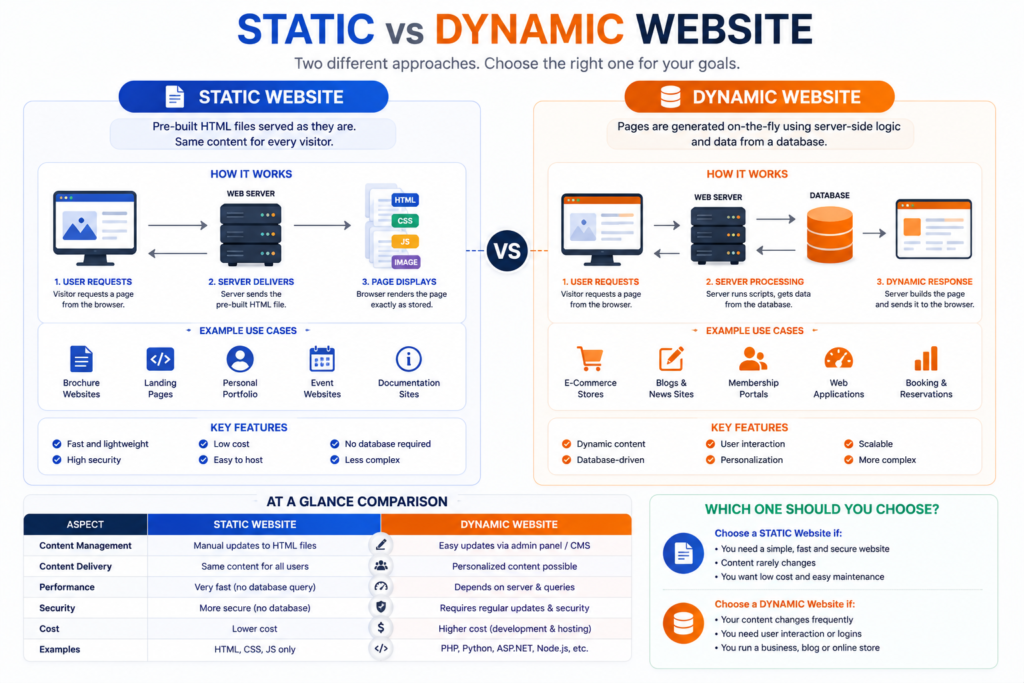
Neither approach is automatically better.
The correct architecture depends on the functionality required.
Read our complete Static vs Dynamic Website Guide for a deeper comparison.
Single-Page vs Multi-Page Websites
Single-Page Website
A single-page website places most important information on one long page.
It may be suitable for:
- Small campaigns.
- Events.
- Simple portfolios.
- Very small businesses.
- Focused offers.
Multi-Page Website
A multi-page website distributes information across multiple URLs.
It is usually more suitable when a business has:
- Multiple services.
- Multiple products.
- Several locations.
- A blog.
- Detailed case studies.
- Separate audience segments.
- Significant SEO goals.
Which Is Better for SEO?
There is no universal rule that a website with more pages automatically ranks better.
What matters is whether each page provides a distinct, useful purpose.
A business should not create dozens of pages simply to multiply keyword targets.
Conversely, forcing several unrelated subjects onto one URL can make information harder to navigate.
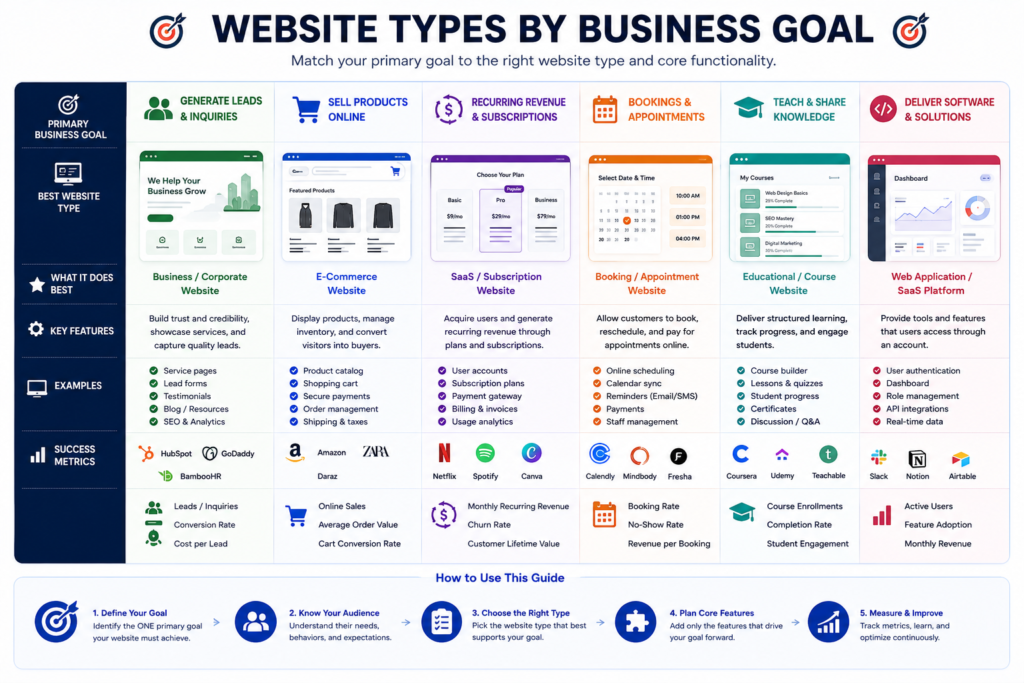
Website Types by Business Goal
One of the easiest ways to choose a website is to begin with the business objective.
| Goal | Recommended Website Type |
|---|---|
| Generate service leads | Business website |
| Sell products | E-commerce website |
| Showcase creative work | Portfolio |
| Build personal authority | Personal website |
| Publish articles | Blog |
| Publish high-volume editorial content | News or magazine |
| Convert paid campaign traffic | Landing page |
| Sell courses | Educational or membership website |
| Build recurring subscriptions | Membership or SaaS |
| Organize local providers | Directory |
| Connect buyers and sellers | Marketplace |
| Deliver software | SaaS or web application |
| Create discussion | Community or forum |
| Accept donations | Nonprofit website |
| Schedule appointments | Booking website |
| Provide product support | Knowledge base |
Website Types by Primary User Action
Another useful framework asks what visitors need to do.
Contact
Best fit:
- Business website.
- Portfolio.
- Corporate website.
Purchase
Best fit:
- E-commerce.
- Marketplace.
Subscribe
Best fit:
- Membership.
- SaaS.
- Publisher.
Book
Best fit:
- Booking website.
Learn
Best fit:
- Educational website.
- Knowledge base.
- Blog.
Participate
Best fit:
- Community.
- Forum.
- Nonprofit.
Use Software
Best fit:
- SaaS.
- Web application.
The website’s primary call to action should normally reflect this purpose.
Website Types by Revenue Model
| Revenue Model | Suitable Website Types |
|---|---|
| Service fees | Business, portfolio |
| Product sales | E-commerce |
| Subscription | SaaS, membership |
| Commission | Marketplace |
| Paid listings | Directory |
| Advertising | News, blog, community |
| Affiliate revenue | Blog, comparison content |
| Course fees | Educational website |
| Donations | Nonprofit |
| Booking fees | Booking platform |
| Digital products | E-commerce, membership |
| Sponsorships | Media, community |
A website can use multiple revenue models, but complexity increases as additional transaction types are introduced.
Which Type of Website Is Best for a Small Business?
For most small service businesses, a professional business website is the strongest starting point.
It should normally include:
- Clear homepage.
- Dedicated service pages.
- About information.
- Trust evidence.
- Contact information.
- Lead form.
- Calls to action.
- Mobile-friendly design.
- Local information where relevant.
- Helpful content where useful.
Additional functionality can be added only when justified.
For example:
- Add e-commerce if you sell online.
- Add booking if appointments are important.
- Add a blog if educational search traffic matters.
- Add a client portal if customers require secure access.
- Add multilingual content when multiple language audiences are genuinely served.
Do not make a simple business website unnecessarily complex.
Which Type of Website Is Best for Making Money?
There is no universally most profitable website type.
Profitability depends on:
- Demand.
- Audience.
- Offer.
- Business model.
- Margins.
- Customer acquisition.
- Competition.
- Operating costs.
- Conversion rate.
- Retention.
An e-commerce site may generate substantial revenue while also carrying product, fulfillment, advertising, and operational costs.
A service business site might receive less traffic but generate valuable leads.
A SaaS platform may produce recurring subscription revenue but require significant product development and support.
The useful question is therefore not:
Which website type makes the most money?
It is:
Which website model best supports a viable business I can operate effectively?
How to Choose the Right Type of Website
Choosing the right website should be a structured business decision.
Step 1. Define the Primary Goal
Write one sentence describing the main purpose.
Examples:
Generate qualified leads for our accounting firm.
Sell our clothing products online.
Allow customers to book consultations.
Showcase photography projects and attract clients.
Deliver subscription software to businesses.
If the purpose cannot be explained clearly, development requirements are probably not yet defined.
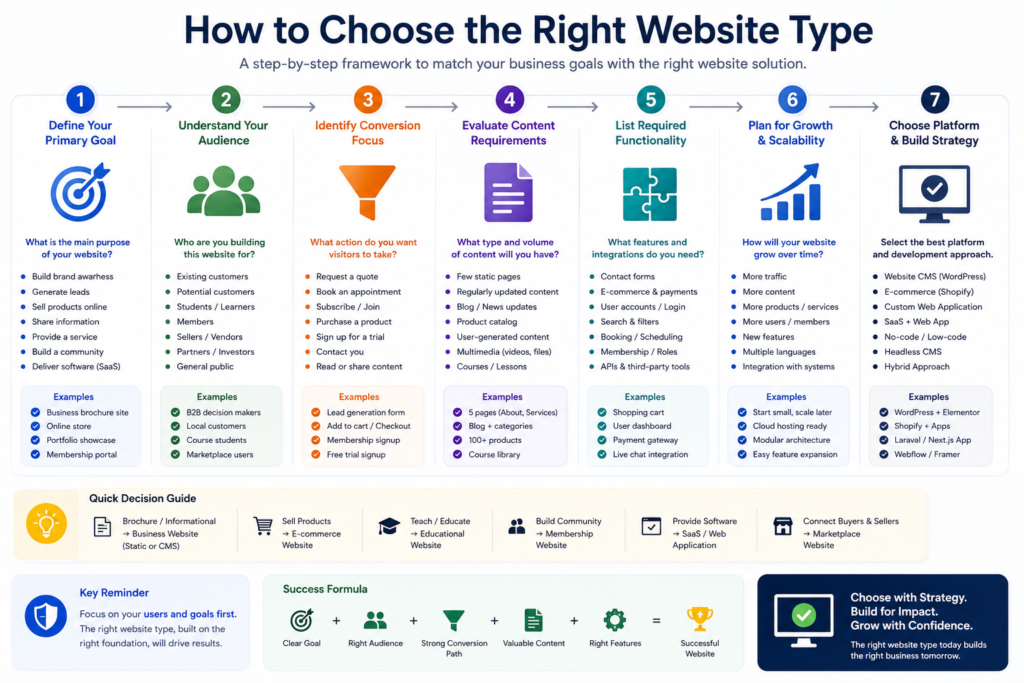
Step 2. Identify the Target Audience
Define:
- Who will visit?
- What do they need?
- What do they already know?
- What problem are they trying to solve?
- What makes them trust a provider?
- What device are they likely to use?
- What action should they take?
A website designed for corporate procurement teams requires different information from a website aimed at individual consumers.
Step 3. Define the Primary Conversion
Choose the most important action.
Examples:
- Purchase.
- Contact.
- Book.
- Register.
- Subscribe.
- Donate.
- Download.
- Request quote.
- Start trial.
Secondary actions can exist, but the primary conversion should remain clear.
Step 4. Define Required Content
List the content required to support the decision.
Examples include:
- Services.
- Products.
- Portfolio.
- Case studies.
- Pricing.
- Team.
- Locations.
- Documentation.
- Articles.
- Courses.
- Listings.
Consider both launch requirements and future growth.
A useful Website Planning Checklist can help document goals, pages, conversion paths, forms, technical requirements, and launch considerations before development begins.
Step 5. Define Functionality
Ask whether the website needs:
- Search.
- Filters.
- Accounts.
- Payments.
- Subscriptions.
- Booking.
- User-generated content.
- Dashboards.
- Messaging.
- Downloads.
- Course progress.
- Inventory.
- Integrations.
- APIs.
- Multilingual content.
Functionality affects development cost more significantly than appearance alone.
Step 6. Consider Scalability
Think beyond launch.
Ask:
- How many pages could exist after three years?
- How many products?
- How many users?
- How many locations?
- How frequently will content change?
- Will international expansion occur?
- Will another system need integration?
- Will the website eventually need mobile-app functionality?
Choosing an architecture that can reasonably support expected growth can reduce expensive rebuilding later.
Step 7. Select the Platform
Only after requirements are clear should platform selection begin.
Possible approaches include:
- WordPress.
- Shopify.
- Webflow.
- Other hosted website builders.
- Headless systems.
- Custom development.
A platform should be selected because it fits the project rather than because it is fashionable.
WordPress, Shopify, Website Builder, or Custom Development?
WordPress
WordPress can be suitable for:
- Business websites.
- Blogs.
- Content-heavy websites.
- Portfolios.
- Publications.
- Membership projects.
- WooCommerce stores.
Its flexibility makes it useful for projects requiring extensive content management.
Shopify
Shopify is primarily oriented toward online commerce and can be a strong fit where selling products is the central requirement.
Hosted Website Builders
Website builders can be appropriate when:
- Requirements are straightforward.
- Development resources are limited.
- Speed of setup is important.
- Platform limitations are acceptable.
Custom Development
Custom development becomes more appropriate when:
- Business logic is unique.
- Complex integrations are required.
- Application functionality is central.
- Existing platforms introduce serious constraints.
Custom development is not automatically superior. It creates additional engineering and maintenance responsibility and should be chosen only when justified.
Website Development Complexity by Type
| Website Type | Typical Complexity |
|---|---|
| Simple portfolio | Low |
| Personal website | Low |
| Small business website | Low to Medium |
| Blog | Low to Medium |
| Corporate website | Medium |
| Landing page | Low |
| Educational content site | Medium |
| E-commerce store | Medium to High |
| Booking website | Medium to High |
| Membership website | Medium to High |
| News publication | Medium to High |
| Directory | Medium to High |
| Community platform | Medium to High |
| SaaS | High |
| Marketplace | High |
| Custom web application | High to Very High |
These classifications are approximate.
A five-product online shop may be less complex than a multilingual corporate site containing thousands of pages.
Scope matters more than the category name.
What Determines Website Development Cost?
Website cost varies according to scope.
Important cost factors include:
- Number of unique page templates.
- Design requirements.
- Custom functionality.
- E-commerce features.
- Payment integrations.
- Booking systems.
- User accounts.
- Membership logic.
- Custom APIs.
- Content volume.
- Multilingual requirements.
- Accessibility requirements.
- SEO requirements.
- Data migration.
- Security requirements.
- Testing.
- Ongoing maintenance.
For detailed planning, see our Website Development Cost Worldwide Guide.
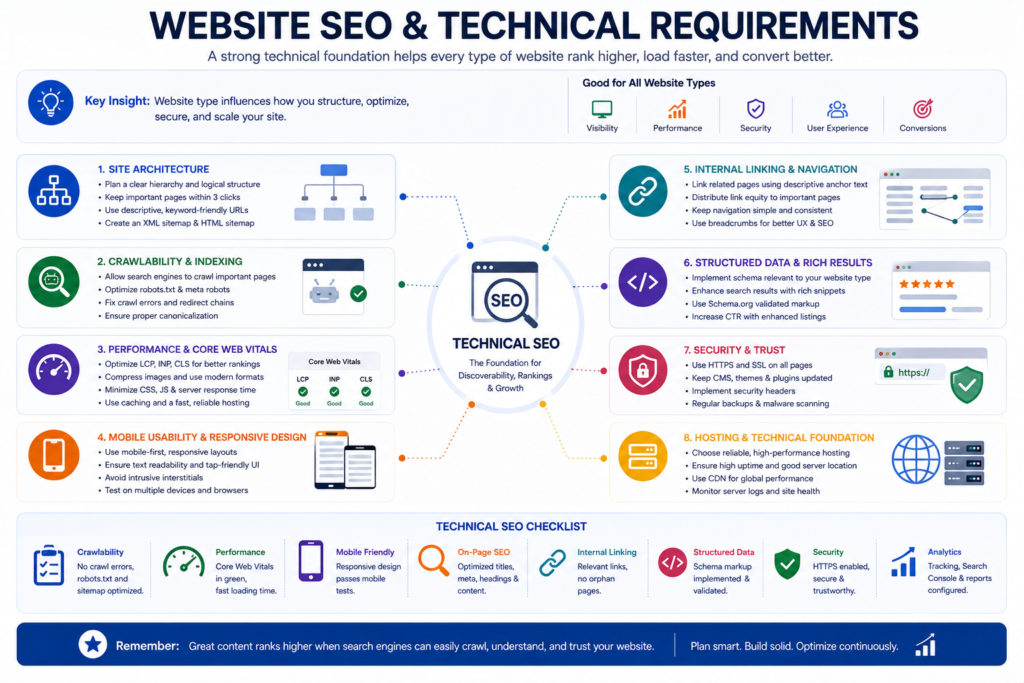
Website SEO Requirements by Type
Different website types create different search optimization challenges.
Business Websites
Focus on:
- Service intent.
- Trust.
- Local relevance where applicable.
- Case studies.
- Service architecture.
E-Commerce Websites
Focus on:
- Categories.
- Products.
- Duplicate URLs.
- Internal links.
- Product availability.
- Structured data eligibility.
Blogs and Publications
Focus on:
- Topic architecture.
- Editorial quality.
- Author information.
- Internal linking.
- Content maintenance.
Marketplaces and Directories
Focus on:
- Indexation quality.
- Thin pages.
- Faceted navigation.
- Duplicate URLs.
- Listing quality.
SaaS Websites
Focus on:
- Product features.
- Use cases.
- Documentation.
- Integrations.
- Comparisons.
- Educational content.
Universal SEO Principles
Regardless of website category:
- Pages should be crawlable when intended for search.
- Important URLs should be internally linked.
- Page titles should accurately describe content.
- Content should satisfy user intent.
- Mobile experience should be usable.
- Structured data must match visible content when implemented.
- Search optimization should support useful content rather than replace it.
Google’s current Search Essentials emphasizes people-first content, descriptive terminology in prominent locations, and crawlable links.
For a deeper technical implementation framework, read our Technical SEO Guide.
Types of Websites and Google AI Overviews
Search is increasingly incorporating generative AI experiences, but the fundamentals of good website publishing remain highly relevant.
In May 2026, Google published dedicated guidance for generative AI features in Search. Its recommendations emphasize strong SEO foundations and unique, useful, expert-led, non-commodity content rather than a separate set of artificial “AI SEO” tricks.
For a website article to be easy to interpret and cite, useful practices include:
- Answer questions directly.
- Use descriptive headings.
- Define important terms.
- Use comparison tables where useful.
- Keep factual relationships clear.
- Provide original expertise.
- Cite authoritative sources.
- Explain context rather than publishing isolated claims.
- Maintain clear authorship.
- Keep important pages crawlable.
- Use meaningful internal links.
These practices are useful for people first and also make information easier for search and AI systems to interpret.
E.E.A.T. for Different Types of Websites
E.E.A.T. refers to:
- Experience.
- Expertise.
- Authoritativeness.
- Trustworthiness.
It is better understood as a content-quality and trust framework than as a keyword to repeat on pages.
Google’s people-first content guidance encourages creators to consider who created content, how it was produced, and why it exists, with trust playing a central role in evaluation.
Business Website Trust Signals
Useful trust indicators may include:
- Real business identity.
- Contact details.
- Genuine testimonials.
- Case studies.
- Clear service information.
- Author information.
- Policies.
- Transparent pricing where appropriate.
E-Commerce Trust Signals
Important indicators include:
- Product accuracy.
- Clear pricing.
- Shipping information.
- Return policies.
- Secure checkout.
- Contact information.
- Order communication.
Educational Website Trust Signals
These may include:
- Instructor identity.
- Credentials where relevant.
- Sources.
- Updated information.
- Clear learning outcomes.
News Website Trust Signals
These may include:
- Author bylines.
- Editorial standards.
- Corrections.
- Sources.
- Publication dates.
- Clear separation of reporting and opinion.
Trust must be demonstrated through actual publishing practices rather than by simply adding an “E.E.A.T.” heading.
Website Security Requirements
Every professionally operated website needs an appropriate security baseline, although the exact controls depend on risk.
Common practices include:
- HTTPS.
- Software updates.
- Strong authentication.
- Least-privilege access.
- Backups.
- Malware monitoring.
- Secure forms.
- Input validation.
- Reliable hosting.
- Logging.
- Recovery procedures.
Security requirements increase significantly when websites contain:
- Customer accounts.
- Payments.
- Personal data.
- User-generated content.
- Administrative dashboards.
- Sensitive business workflows.
Our Website Security Guide covers website security considerations in more depth.
Website Performance and Core Web Vitals
Performance matters across website categories.
A slow brochure website can frustrate potential customers. A slow online store can interrupt shopping. A sluggish web application can make core functionality difficult to use.
Google’s Core Web Vitals currently include:
- Largest Contentful Paint.
- Interaction to Next Paint.
- Cumulative Layout Shift.
For a “good” experience, Google’s web.dev documentation identifies these commonly used thresholds at the 75th percentile of visits:
- LCP: 2.5 seconds or less.
- INP: 200 milliseconds or less.
- CLS: 0.1 or less.
Performance optimization may involve:
- Faster hosting.
- Image optimization.
- Caching.
- CDN usage.
- Reduced JavaScript.
- Efficient CSS.
- Font optimization.
- Server response improvements.
- Limiting unnecessary third-party scripts.
Core Web Vitals should be treated as part of the overall user experience rather than as a score-chasing exercise.
Website Accessibility
Accessibility means designing websites so people with different abilities and assistive technologies can use them effectively.
Practical areas include:
- Keyboard navigation.
- Sufficient contrast.
- Descriptive form labels.
- Meaningful alternative text.
- Logical heading structure.
- Visible focus indicators.
- Accessible interactive controls.
- Understandable error messages.
- Captions or alternatives for multimedia where applicable.
Accessibility should be considered during design and development rather than being treated only as a post-launch correction.
Mobile-Friendly Website Design
Modern websites should adapt effectively across:
- Phones.
- Tablets.
- Laptops.
- Desktops.
- Different viewport sizes.
Responsive design normally involves:
- Flexible layouts.
- Readable typography.
- Appropriately sized controls.
- Optimized images.
- Usable navigation.
- Forms that work on touch screens.
- Content that remains complete across devices.
The goal is not merely to make a desktop page smaller.
It is to maintain a usable experience at each screen size.
Website Maintenance by Type
Different website types require different maintenance workloads.
| Website Type | Typical Maintenance |
|---|---|
| Static portfolio | Low |
| Business website | Low to Medium |
| Blog | Medium |
| E-commerce | Medium to High |
| Membership | High |
| Directory | High |
| Marketplace | Very High |
| SaaS | Very High |
| Web application | Very High |
| News publication | High |
Maintenance activities can include:
- Updates.
- Backups.
- Security checks.
- Broken link reviews.
- Content updates.
- Performance monitoring.
- Analytics reviews.
- Form testing.
- Account management.
- Database maintenance.
- Search Console monitoring.
Read the complete Website Maintenance Guide for a structured maintenance framework.
Common Mistakes When Choosing a Website Type
1. Choosing Based Only on Appearance
Design inspiration is useful, but appearance does not define functionality.
Start with requirements.
2. Copying a Competitor Without Understanding Why
A competitor may have different customers, resources, goals, and technology.
Learn from competitors without blindly copying their architecture.
3. Overbuilding the First Version
A simple service business rarely needs marketplace-level complexity.
Build what supports the actual business model.
4. Ignoring Future Growth
A system that works for ten products may not work for ten thousand.
Plan for realistic growth.
5. Choosing a Platform Before Requirements
“WordPress or Shopify?” is not the first question.
The first question is:
What must the website do?
6. Mixing Unrelated Search Intent
Avoid creating one page that tries to rank for every possible service, product, audience, and location.
Create distinct pages where separate topics genuinely deserve them.
7. Ignoring Maintenance
Every dynamic feature creates an ongoing responsibility.
Consider who will manage:
- Content.
- Security.
- Updates.
- Orders.
- Accounts.
- Listings.
- Moderation.
- Backups.
8. Treating SEO as an Afterthought
Website architecture affects:
- URLs.
- Navigation.
- Internal links.
- Templates.
- Content hierarchy.
- crawlability.
Planning SEO after a site has already been built can create avoidable rework.
Website Selection Checklist
Before approving a website project, answer the following questions.
Business
- What is the primary business goal?
- Who is the target customer?
- What is the primary conversion?
- How will the website create value?
- How will success be measured?
Content
- What pages are required?
- Who will create the content?
- How often will content change?
- Will the website publish articles?
- Will multilingual content be required?
Functionality
- Are accounts required?
- Are payments required?
- Are bookings required?
- Is search required?
- Are filters required?
- Will users create content?
- Is a customer portal required?
- Are third-party integrations required?
Technical
- Which CMS or framework fits?
- How will the website be hosted?
- What security controls are required?
- How will backups work?
- What performance requirements exist?
- How will analytics be configured?
Growth
- How many users are expected?
- How many pages could exist later?
- How many products or listings?
- Will more locations be added?
- Will integrations expand?
- Will new business models be introduced?
If these questions cannot yet be answered, continue planning before development.
Website Type Decision Framework
Use this simple decision sequence.
Do You Mainly Sell Physical or Digital Products?
Yes: Start by evaluating an e-commerce website.
Do You Mainly Sell Professional Services?
Yes: Start with a business website.
Is Your Work Itself the Main Evidence?
Yes: Add a strong portfolio.
Is Publishing Content the Core Product?
Yes: Consider a blog, publication, news, or educational website.
Do Users Need Recurring Premium Access?
Yes: Evaluate a membership platform.
Do You Connect Multiple Buyers and Sellers?
Yes: Evaluate a marketplace.
Do Users Need to Perform Complex Tasks Online?
Yes: Consider a web application.
Do You Sell Access to Software?
Yes: Consider a SaaS architecture.
Is Appointment Scheduling the Main Conversion?
Yes: Add booking functionality.
Do Users Mainly Need Help Documentation?
Yes: Create a knowledge base or documentation system.
Most real-world projects combine more than one answer.
Can One Website Combine Multiple Types?
Yes.
In fact, many modern websites are hybrids.
For example, a professional agency website may contain:
- Business website pages.
- Portfolio case studies.
- Blog.
- Landing pages.
- Booking functionality.
- Client portal.
An educational business might combine:
- Public business pages.
- Blog.
- Paid courses.
- Membership area.
- Community forum.
- E-commerce.
An online marketplace could combine:
- Public editorial content.
- Directory listings.
- Buyer accounts.
- Seller dashboards.
- Transaction functionality.
- Knowledge base.
The key is to maintain a logical architecture so users understand where they are and what they can do.
Recommended Website Structure for a Service Business
A practical service website architecture might look like:
Home
│
├── About
│
├── Services
│   ├── Service A
│   ├── Service B
│   └── Service C
│
├── Portfolio
│   ├── Case Study A
│   └── Case Study B
│
├── Pricing
│
├── Resources
│   ├── Guide A
│   ├── Guide B
│   └── Guide C
│
├── FAQ
│
└── Contact
This structure separates commercial service intent from informational content while still allowing contextual internal linking.
Recommended Internal Links
- How to Build a Website in 2027
https://marjanservices.tech/how-to-build-a-website-2027/ - What Is Website Development?
https://marjanservices.tech/what-is-website-development/ - Website Planning Checklist
https://marjanservices.tech/website-planning-checklist/ - Business Website vs Personal Website
https://marjanservices.tech/business-website-vs-personal-website/ - Static vs Dynamic Website
https://marjanservices.tech/static-vs-dynamic-website/ - Complete Domain Name Guide
https://marjanservices.tech/domain-name-guide/ - Website Features Checklist
https://marjanservices.tech/website-features-checklist/ - Website Launch Checklist
https://marjanservices.tech/website-launch-checklist/ - Website Maintenance Guide
https://marjanservices.tech/website-maintenance-guide/ - Technical SEO Guide
https://marjanservices.tech/technical-seo-guide-2026/ - Google Search Console Guide
https://marjanservices.tech/google-search-console-guide/ - Website Development Cost Worldwide
https://marjanservices.tech/website-development-cost-worldwide/ - Website Development Cost in Pakistan
https://marjanservices.tech/website-development-cost-in-pakistan/ - Website Security Guide
https://marjanservices.tech/professional-website-security/ - SSL Certificate Guide
https://marjanservices.tech/ssl-certificate-guide/
Google recommends meaningful, descriptive anchor text because link text helps users and Google understand the destination being linked to.
Recommended External References
Use authoritative external references when they genuinely support a technical claim.
- Google Search Essentials
https://developers.google.com/search/docs/essentials - Google SEO Starter Guide
https://developers.google.com/search/docs/fundamentals/seo-starter-guide - Google People-First Content Guidance
https://developers.google.com/search/docs/fundamentals/creating-helpful-content - Google Generative AI Search Optimization Guide
https://developers.google.com/search/docs/fundamentals/ai-optimization-guide - Google Guidance on Generative AI Content
https://developers.google.com/search/docs/fundamentals/using-gen-ai-content - Google Search Link Best Practices
https://developers.google.com/search/docs/crawling-indexing/links-crawlable - Google Search Documentation
https://developers.google.com/search/docs - Core Web Vitals
https://web.dev/explore/learn-core-web-vitals - Largest Contentful Paint
https://web.dev/articles/lcp - Interaction to Next Paint
https://web.dev/articles/inp - Cumulative Layout Shift
https://web.dev/articles/cls - MDN Web Docs
https://developer.mozilla.org/ - W3C Web Standards
https://www.w3.org/ - Web Content Accessibility Guidelines
https://www.w3.org/WAI/standards-guidelines/wcag/ - OWASP
https://owasp.org/
Frequently Asked Questions About Types of Websites
What Are the Main Types of Websites?
The main types of websites include business websites, corporate websites, e-commerce stores, portfolios, personal websites, blogs, publications, landing pages, educational platforms, membership sites, directories, marketplaces, SaaS websites, web applications, communities, nonprofit websites, booking platforms, and knowledge bases.
The categories can overlap because modern websites often combine several functions.
How Many Types of Websites Are There?
There is no universally fixed number of website types.
Websites can be categorized by purpose, functionality, technology, audience, content, or business model. For practical planning, most websites can be understood through a relatively small number of broad categories with specialized variations beneath them.
What Type of Website Is Best for a Small Business?
For most small service businesses, a professional business website is the best starting point.
It should explain services, establish trust, answer customer questions, provide contact options, and create clear conversion paths. E-commerce, booking, blogging, or membership functionality can then be added if the business actually requires it.
What Type of Website Should I Build?
Choose your website according to the action you need users to take.
If you sell products, consider e-commerce.
If you sell services, start with a business website.
If you showcase work, build a portfolio.
If you sell software access, consider SaaS.
If users perform complex tasks, evaluate a web application.
If appointments are central, add booking functionality.
What Is the Most Common Type of Business Website?
A standard service-oriented business website is one of the most common formats for small and medium businesses.
It typically contains a homepage, service pages, About page, contact information, trust evidence, and conversion forms.
What Is the Difference Between a Business Website and an E-Commerce Website?
A business website primarily promotes a company and generates enquiries or leads.
An e-commerce website is specifically designed to facilitate online transactions through product pages, carts, checkout, payments, and order management.
A business website can also include an e-commerce section.
What Is the Difference Between a Static and Dynamic Website?
A static website generally serves prebuilt pages, while a dynamic website can generate or modify content using databases, application logic, user input, or other data.
Dynamic architecture is commonly used for stores, blogs, membership platforms, directories, and applications.
Is a Blog a Website?
Yes.
A blog can exist as a complete standalone website or as one section of a larger business, educational, news, or personal website.
Is a Landing Page a Website?
A standalone landing page can technically function as a very small website, but in marketing it is more commonly understood as a focused page designed around one campaign or conversion.
A full website normally supports broader navigation, topics, and goals.
What Is the Difference Between a Website and a Web Application?
A traditional website primarily presents information, while a web application emphasizes interactive software functionality.
The distinction is increasingly blurred because many modern websites combine both content and application features.
Can One Website Have Several Types?
Yes.
A single domain can combine business pages, e-commerce, a blog, booking, membership functionality, portfolios, documentation, or other sections.
The architecture should remain logical and understandable.
Which Type of Website Is Best for SEO?
No website category automatically ranks better simply because of its type.
Search performance depends on factors such as search intent, content usefulness, technical accessibility, website architecture, internal linking, competition, trust, and overall quality.
Google’s Search documentation emphasizes helpful, reliable, people-first content and sound technical foundations rather than a preferred website category.
Are Static Websites Good for SEO?
Static websites can perform well in search when they provide useful content, crawlable pages, appropriate metadata, strong internal linking, and a good user experience.
Dynamic architecture is not inherently better for rankings.
The correct technical approach depends on the website’s functional requirements.
Do All Websites Need a Content Management System?
No.
A CMS is useful when non-developers or editorial teams need to create and update content regularly.
Very simple or application-specific websites may use other architectures.
Do All Websites Need Structured Data?
No.
Structured data should be used when an appropriate supported type accurately represents visible page content.
It should not be added simply to increase the amount of markup on a page.
Do All Websites Need HTTPS?
Professional websites should use secure HTTPS connections.
HTTPS protects data in transit and is especially important when websites include logins, forms, payments, accounts, or sensitive information.
Which Type of Website Is Easiest to Build?
A simple informational or portfolio website with a limited number of pages and minimal interactive functionality is generally easier to build than an e-commerce store, marketplace, membership platform, SaaS product, or custom web application.
However, design complexity and content requirements can still make a seemingly simple project substantial.
Which Website Type Is Most Expensive?
Highly customized marketplaces, SaaS platforms, enterprise portals, and complex web applications are typically among the most expensive website types because they can require custom engineering, databases, authentication, integrations, security, testing, administration systems, and ongoing maintenance.
Actual cost depends on scope rather than category alone.
Which Type of Website Is Best for Making Money?
No single website type guarantees the highest revenue.
An effective website supports a viable offer, suitable audience, sustainable acquisition strategy, appropriate pricing, strong conversion process, and manageable operational costs.
How Often Should a Website Be Updated?
Updates should follow actual business and technical needs.
Content should be reviewed when information becomes inaccurate or incomplete. Software, security, backups, integrations, forms, analytics, and performance should be monitored on appropriate schedules.
A complex transactional website generally requires more frequent maintenance than a simple static portfolio.
Recommended Schema Markup
Schema should describe the actual visible content and organization rather than being added indiscriminately.
Article Schema
Recommended for the article itself.
Useful properties may include:
- Headline.
- Author.
- Date published.
- Date modified.
- Image.
- Publisher.
Person Schema
Appropriate for the author when accurate author information is publicly available.
Organization Schema
Appropriate for the publishing business where relevant.
BreadcrumbList Schema
Recommended when breadcrumb navigation exists and accurately represents site hierarchy.
WebSite Schema
Can describe the overall website where appropriate.
FAQPage
Do not assume FAQ rich results will appear simply because an FAQ section exists.
If FAQ structured data is used, it must accurately represent the visible content and comply with Google’s current structured data policies.
Service Schema
Use on actual service pages when appropriate rather than forcing it onto an informational article merely because professional services are mentioned.
Do Not Add Irrelevant Schema
Do not add:
- Product schema without a real product represented on the page.
- Review schema without genuine eligible reviews.
- Course schema merely because educational websites are discussed.
- LocalBusiness schema merely because local business websites are mentioned.
- Event schema merely because event websites are discussed.
Schema must describe what the page actually represents.
Editorial and E.E.A.T. Information
About the Author
Syed Abdul Quddus
Syed Abdul Quddus is the founder of Marjan Online Digital Services and works across professional website development, WordPress, technical documentation, SEO research, content strategy, website management, and digital business solutions.
His professional background includes more than 13 years of administrative, documentation, institutional communication, content, research, and digital publishing experience, combined with practical work involving websites, WordPress, SEO, and online business solutions.
Areas of Expertise:
- Website development.
- WordPress.
- Website planning.
- Technical SEO.
- SEO content strategy.
- Website maintenance.
- Web hosting research.
- Digital publishing.
- Online business solutions.
Published: July 11, 2026
Last Updated: August 10, 2026
Content Reviewed: August 10, 2026
Fact-Checking Statement
This article has been reviewed for technical accuracy, clarity, terminology, website-development relevance, and consistency with authoritative web and search documentation available at the time of the latest update.
Time-sensitive recommendations should be rechecked against the relevant official documentation before major technical implementation.
Sources Verification Statement
Technical search recommendations were checked against official Google Search Central and web.dev documentation.
Accessibility, security, and web-standard recommendations should be cross-checked against authoritative resources such as W3C, WCAG, MDN, and OWASP when implementing technical requirements.
AI Usage Disclosure
AI tools may be used to assist with research organization, editorial review, language refinement, structure, and quality assurance. Final publishing responsibility, factual verification, editorial judgment, website-specific experience, and recommendations remain with the publisher and author.
Google’s current guidance focuses on the quality and usefulness of content rather than treating the mere use of generative AI as automatically problematic. However, using AI to create large quantities of low-value pages may violate Google’s spam policies.
Editorial Policy
Marjan Services aims to publish content that is:
- Useful to real readers.
- Factually accurate.
- Clearly written.
- Research-based.
- Transparent about authorship.
- Updated when important information changes.
- Free from fabricated statistics.
- Free from misleading guarantees.
- Designed to help users make informed decisions.
SEO considerations are used to improve discoverability and organization without compromising readability or factual accuracy.
Content Update Policy
This article should be reviewed periodically and updated when:
- Major website technologies change.
- Important search documentation changes.
- Recommended platforms materially change.
- Technical standards are updated.
- Broken links are identified.
- Examples become outdated.
- New website categories become materially relevant.
- Reader feedback identifies an important gap.
The date modified should only be changed when meaningful editorial updates are actually made.
Final Types of Websites Comparison
| Website Type | Primary Purpose | Main Conversion | Complexity |
|---|---|---|---|
| Business | Generate leads | Contact | Low to Medium |
| Corporate | Inform stakeholders | Explore or contact | Medium |
| E-commerce | Sell products | Purchase | Medium to High |
| Portfolio | Showcase work | Contact | Low |
| Personal | Build personal presence | Connect | Low |
| Blog | Publish information | Read or subscribe | Low to Medium |
| News | Publish frequent content | Read or subscribe | Medium to High |
| Landing Page | Campaign conversion | CTA | Low |
| Educational | Teach | Learn or enroll | Medium to High |
| Membership | Premium access | Subscribe | Medium to High |
| Directory | Organize listings | Search or contact | Medium to High |
| Marketplace | Connect buyers and sellers | Transaction | High |
| SaaS | Sell software access | Trial or subscribe | High |
| Web Application | Perform tasks | Use application | High |
| Community | Facilitate interaction | Participate | Medium to High |
| Nonprofit | Promote mission | Donate or join | Medium |
| Booking | Schedule services | Book | Medium to High |
| Knowledge Base | Provide answers | Find solution | Medium |
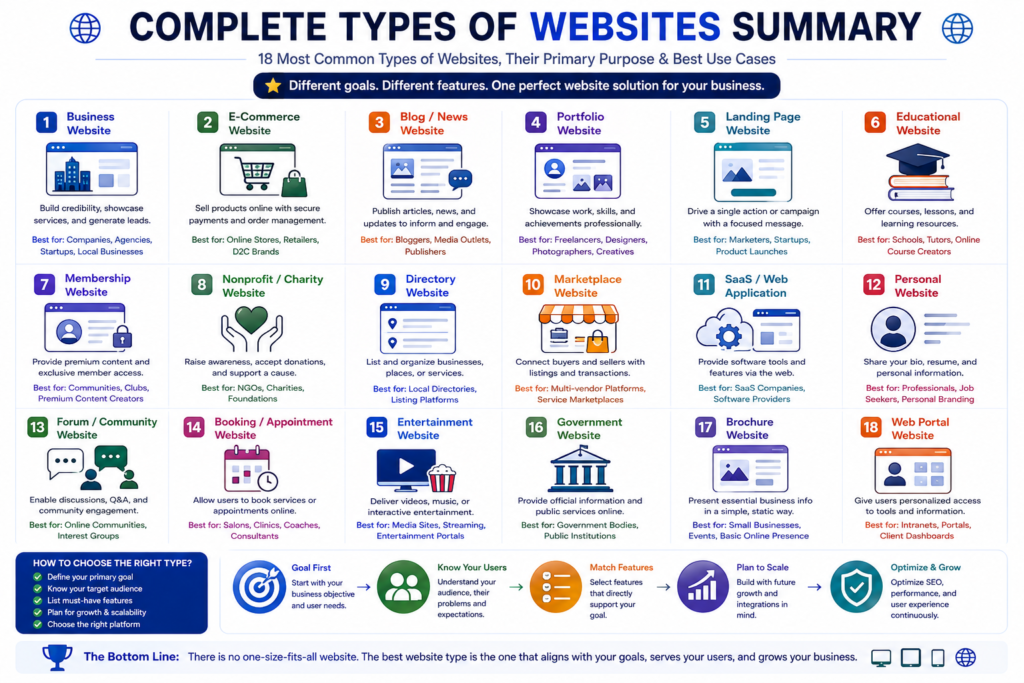
Conclusion
- Understanding the different types of websites is one of the most important early steps in planning an effective online presence.
- A website should not be chosen because a particular design looks impressive or because a platform is currently popular.
- It should be chosen according to purpose.
- A service company normally needs a business website focused on trust and lead generation.
- A retailer needs an e-commerce system designed around products and transactions.
- A creative professional may benefit most from a portfolio.
- A publisher needs strong content architecture.
- A membership business needs user accounts and access control.
- A marketplace must coordinate multiple buyers and sellers.
- A SaaS company needs both a marketing website and a functioning software environment.
- A booking business needs availability and scheduling.
- And many organizations ultimately require a hybrid combining several of these website types.
- The strongest planning process therefore follows this sequence:
- Business goal → Audience → Primary action → Content → Functionality → Growth → Platform → Development
- When those decisions are made in the correct order, website design and technology become easier to evaluate.
- Before starting development, define what the website must accomplish, what users need from it, how success will be measured, and how the system will grow.
- Then choose the website type and technical architecture that support those requirements.
Need Help Choosing the Right Website?
If you are unsure whether your project needs a business website, e-commerce store, WordPress website, portfolio, booking platform, marketplace, membership system, or custom solution, Marjan Web Studio can help you evaluate the requirements before development begins.
A professional website should be designed around your real business objectives rather than unnecessary features.
Explore:
- Website Development.
- WordPress Development.
- E-Commerce Development.
- Website Redesign.
- Website Maintenance.
- Technical SEO.
- Website Planning.
Discuss your website project with Marjan Web Studio and choose an architecture designed for usability, search visibility, scalability, security, and long-term business growth.
2 Comments