
Table of Contents
Introduction:
This Shopify Guide for Beginners 2026 explains everything you need to know about Shopify plans, store setup, costs, payments, SEO, marketing, and online sales. Whether you are launching your first store or moving an existing business online, this guide will help you make informed decisions and avoid common mistakes.
How this guide was prepared: This guide was developed by reviewing Shopify’s official documentation, current pricing information, payment availability, setup requirements, theme and app considerations, and practical e-commerce implementation factors. Time-sensitive details should always be reconfirmed through the official sources linked throughout the article.
Editorial and affiliate disclosure: This article is designed to help readers evaluate Shopify objectively. Some links may be affiliate links, which means Marjan Online Digital Services may receive a commission if you purchase through them, at no additional cost to you. Commercial relationships do not determine our conclusions or recommendations.
Launching an online store is easy to underestimate. A polished theme and an affordable subscription can make ecommerce appear simple. However, the most important decisions begin after signup: choosing the right plan, calculating the real cost, organising products, configuring payments and shipping, building trust, protecting SEO performance, and creating a checkout experience that customers will complete.
This Shopify guide for beginners provides a commercially realistic path from the initial business idea to a fully operational store. It covers Shopify pricing plans, hidden expenses, themes, apps, payments, professional services, migration, SEO, and conversion optimisation. It will help you determine whether Shopify suits your business model, budget, country, technical requirements, and long-term growth plan before you make a substantial investment.
Used as a Shopify setup guide, it also explains which tasks you can complete independently and when professional Shopify support may be commercially justified.
By following this Shopify Guide for Beginners 2026, you can understand the complete store-building process before investing your time and money.
Quick verdict: Shopify is suitable for businesses that want managed hosting, an integrated administration system, a professional checkout, inventory tools, themes, apps, and multiple sales channels. It may be less suitable for businesses requiring maximum server control, highly specialised workflows, or the lowest possible recurring software costs.
| Question | Short answer |
|---|---|
| Is Shopify suitable for beginners? | Yes, particularly for users who want managed hosting and a structured e-commerce platform. |
| What is the minimum Shopify cost? | It depends on the current regional plan price, billing cycle, promotion, payment route, and required apps. |
| Are Shopify themes and apps included? | Free options are available, but premium themes and paid apps can increase the total cost. |
| Can Shopify be used in Pakistan? | Yes, but payment-provider eligibility and transaction costs require careful evaluation. |
| Can I build a store without a developer? | A standard store can often be configured without coding. Custom requirements may require specialist support. |
| Is Shopify suitable for every business? | No. Payment availability, total cost, technical control, and custom workflow requirements may make another platform more suitable. |
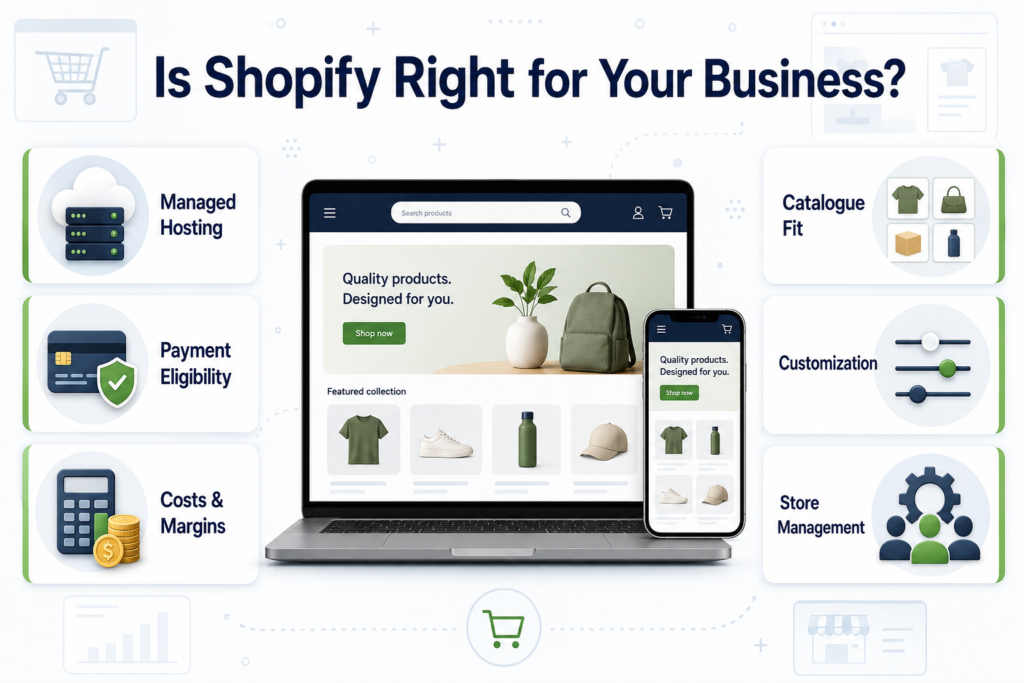
Shopify Guide for Beginners 2026: Step-by-Step Store Setup
This section of our Shopify Guide for Beginners 2026 walks you through choosing a plan, creating an account, selecting a theme, adding products, configuring payments, and preparing your store for launch.
What Is Shopify and How Does It Work?
Shopify is a hosted commerce platform used to create and operate online and in-person retail businesses. Merchants can manage products, inventory, customers, orders, payments, discounts, content, analytics, and sales channels through the Shopify Admin dashboard.
Hosting and SSL are included with the platform. Themes control the storefront’s appearance, while apps and custom development can extend its functionality.
Shopify’s main commercial advantage is convenience. Instead of combining separate hosting, security, checkout, inventory, and e-commerce systems, you pay for a managed platform. This arrangement can reduce technical administration and allow a business owner to focus more attention on products, customers, fulfilment, and marketing.
The trade-off is a recurring subscription, potential app charges, platform restrictions, and less infrastructure control than you would have with a self-hosted system.
The basic Shopify operating process is straightforward:
- Create a Shopify account and begin the available trial.
- Configure your business details, currency, markets, taxes, and policies.
- Add products, variants, SKUs, inventory, prices, and media.
- Choose and customise a Shopify theme.
- Connect your domain.
- Activate an eligible payment provider.
- Configure shipping, fulfilment, notifications, and customer-service processes.
- Test the complete buying journey.
- Remove the storefront password and launch.
- Measure performance and improve the store using reliable data.
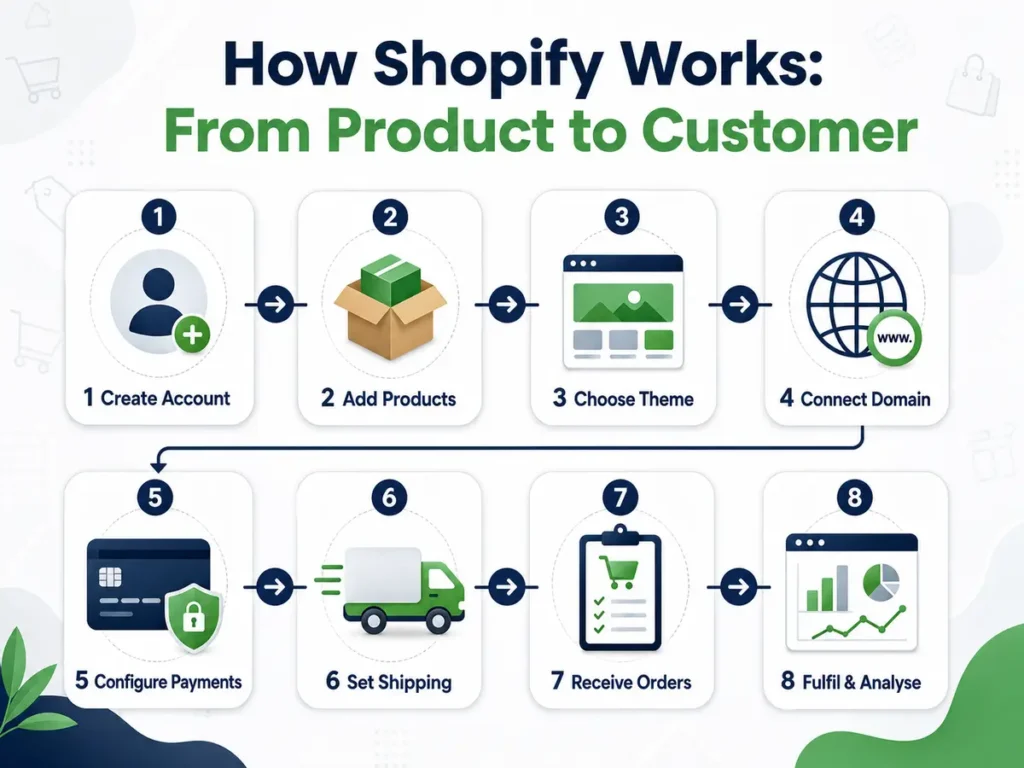
Shopify provides an official general checklist for starting a new store. Use it as a platform checklist, and then add business-specific testing for profitability, payment eligibility, delivery, returns, customer support, analytics, and marketing attribution.
The Business Problem Shopify Solves
The difficult part of e-commerce is not simply displaying products on a website. A commercial store must coordinate:
- Product data and inventory.
- Payments and refunds.
- Taxes and invoices.
- Shipping and fulfilment.
- Returns and exchanges.
- Customer communication.
- Analytics and attribution.
- Marketing channels.
- Security and privacy.
- Mobile usability.
- Customer support.
- Operational reporting.
When these systems are fragmented, business owners spend valuable time fixing technology instead of improving products, serving customers, and growing the business.
Shopify reduces this fragmentation by consolidating core ecommerce operations into a single environment. This can shorten the route to market, simplify routine administration, and reduce dependence on a developer for everyday store management.
However, Shopify does not remove the need for a viable business strategy. A technically functional store can still fail when:
- The product does not solve a meaningful problem.
- The offer is weak or poorly positioned.
- Profit margins are insufficient.
- Payment options do not suit the target market.
- Product pages fail to establish trust.
- Delivery costs or times are unclear.
- The checkout contains unnecessary friction.
- Customer-acquisition costs exceed the available profit.
- The business has no retention strategy.
- Customer service cannot meet the promises displayed on the website.
Before selecting Shopify, answer these commercial questions:
- What will you sell?
- Who is most likely to buy it?
- Why should customers choose your offer instead of an alternative?
- How much gross profit will remain after product, fulfilment, payment, platform, advertising, return, and support costs?
- Which countries will you serve?
- Which payment providers are available to your legally registered business?
- How many products, variants, staff members, inventory locations, and sales channels will you manage?
- Can a standard Shopify theme support the required customer journey?
- Will you require custom development or external integrations?
- Who will manage products, orders, support, analytics, SEO, apps, and security after launch?
Your answers will determine whether Shopify becomes a practical commercial solution or simply another monthly expense.
Shopify Pricing Plans and True Costs in 2026
At the time of review, Shopify displayed a three-day free trial followed by an introductory offer of $1 per month for three months.
The annual plan prices displayed in USD were:
- Basic: $29 per month.
- Grow: $79 per month.
- Advanced: $299 per month.
- Shopify Plus: From $2,300 per month.
Monthly billing was more expensive than annual billing.
These prices were displayed on Shopify’s official pricing page when this guide was reviewed on July 19, 2026. Taxes, currency conversion, regional offers, billing terms, and eligibility may affect the final amount charged. Always check the current official Shopify pricing before purchasing.
An important part of this Shopify Guide for Beginners 2026 is understanding the total cost of running a store. Your actual expenses may include the Shopify subscription, domain registration, premium themes, paid applications, transaction fees, marketing, and professional services.
| Plan | Annual billing price shown | Monthly billing price shown | Best suited to | Primary buying consideration |
|---|---|---|---|---|
| Basic | $29 per month | $39 per month | Solo entrepreneurs and new stores | A complete online store with no additional staff accounts and a higher third-party transaction fee. |
| Grow | $79 per month | $105 per month | Small business teams | Five staff accounts and lower payment-related platform fees than Basic. |
| Advanced | $299 per month | $399 per month | Growing international operations | More staff access, regional tools, reporting features, and third-party-calculated shipping rates. |
| Plus | From $2,300 per month | Contract-based | Complex, high-volume businesses | Advanced checkout features, B2B capabilities, organisational controls, and enterprise support. |
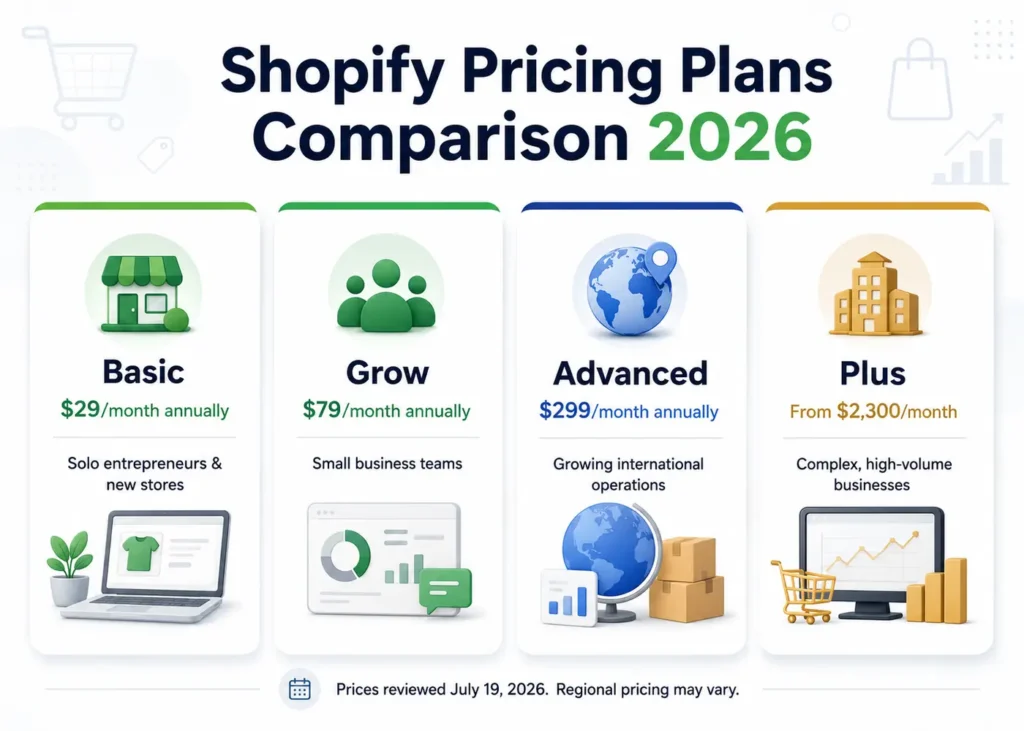
These figures are a dated reference, not a permanent quotation. Confirm the final subscription price and billing conditions inside your Shopify account before making a purchase.
Which Shopify plan is best for beginners?
For many solo beginners launching a standard online store, Basic is usually the most proportionate starting plan. However, the best Shopify plan for beginners depends on staff access, transaction costs, international selling, shipping requirements, reporting needs, and operational complexity.
Do not select a higher plan merely because it appears more professional. Upgrade when a measurable operational or financial requirement justifies the additional cost.
Reasons to upgrade may include:
- Separate access for multiple staff members.
- Lower third-party transaction fees.
- International market requirements.
- Advanced reporting.
- Third-party-calculated shipping.
- More complex inventory operations.
- Enterprise checkout requirements.
- B2B selling.
- Organisational governance and permissions.
Grow may be suitable when several team members require individual access, or when lower fees and additional features offer greater value than the higher subscription cost.
Advanced should be selected only when international selling, shipping, reporting, or operational requirements justify it.
Shopify Plus is an enterprise decision. Businesses considering it should evaluate total cost, technical scope, governance, integrations, expected return, and long-term operating requirements.
Shopify cost per month is more than the subscription
The advertised subscription represents only one part of the total Shopify cost per month. A realistic store budget may include the following expenses:
| Cost category | Typical decision | Why it matters |
|---|---|---|
| Subscription | Basic, Grow, Advanced, or Plus | Determines core features and certain platform fees. |
| Domain | Purchase a new domain or connect an existing one | Affects branding, ownership, and annual renewal costs. |
| Theme | Free, premium, or custom | Influences design flexibility, speed, functionality, and development requirements. |
| Apps | Free, usage-based, or recurring | Can add reviews, subscriptions, bundles, search, SEO, fulfilment, and analytics. |
| Payment processing | Shopify Payments or a third-party provider | Directly affects margins and checkout availability. |
| Platform transaction fee | Depends on the plan and payment route | May apply when an external payment provider is used. |
| Development | DIY, freelancer, or agency | Covers setup, customisation, integrations, testing, and documentation. |
| Product content | Photography, descriptions, video, and data entry | Strongly influences trust and conversion rates. |
| Marketing | SEO, email, social media, content, and paid advertising | A store without qualified traffic cannot generate consistent sales. |
| Operations | Shipping, packaging, returns, support, and taxes | Determines profitability and customer satisfaction. |
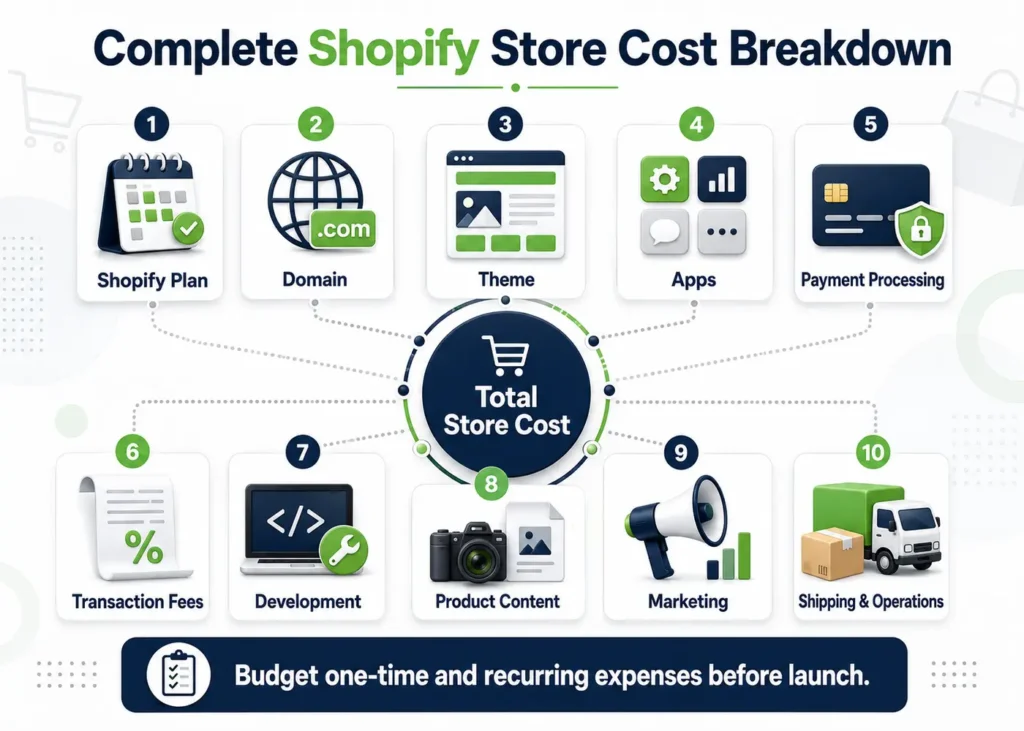
Business owners frequently search for “how much does a complete Shopify store cost.” A reliable answer must include every one-time and recurring expense in a twelve-month budget. The total should then be compared with projected gross profit—not revenue alone.
When estimating Shopify store setup cost for beginners, keep platform expenses separate from professional implementation charges. This makes one-time work and recurring expenses easier to compare.
Shopify transaction fees and hidden expenses
Shopify Payments removes Shopify’s third-party transaction fees for eligible orders processed through Shopify Payments. However, payment-processing charges may still apply.
When a merchant uses an external payment provider, Shopify may charge an additional platform transaction fee.
At the time of review, Shopify’s official pricing page displayed the following third-party transaction fees:
| Shopify plan | Third-party transaction fee displayed |
|---|---|
| Basic | 2% |
| Grow | 1% |
| Advanced | 0.6% |
| Plus | 0.2% |
Payment-provider charges may apply separately. Because pricing terms can change, confirm current rates before selecting a plan or payment gateway.
The most common Shopify hidden costs are not necessarily concealed. They are usually expenses that merchants overlook during planning:
- Premium apps that appear inexpensive individually but create a substantial combined monthly bill.
- A premium theme that still requires paid customisation.
- Payment-provider fees combined with Shopify transaction fees in markets where Shopify Payments is unavailable.
- Currency-conversion, international-card, duty, tax, and cross-border charges.
- Product photography, copywriting, translation, data cleaning, and product-upload expenses.
- Migration, redirects, analytics, email automation, and post-launch maintenance.
- Returns, chargebacks, fraud, replacement shipping, and customer support.
- Paid advertising that generates traffic but not profitable sales.
- Development costs for repairing poorly selected themes or incompatible apps.
- Currency fluctuations when the business earns in one currency but pays platform expenses in another.
Practical budgeting tip: Calculate the cost per order at three different monthly sales levels. A store processing ten orders per month experiences the same software subscription very differently from a store processing ten thousand orders. The right plan is the one that supports profitable operations—not the plan with the longest feature list.
Shopify Free Trial: Use It as a Commercial Test
The Shopify free trial is valuable only when you begin with a clear implementation plan.
At the time of review, Shopify advertised three free days followed by a promotional price of $1 per month for three months. Promotions may change, so confirm the current Shopify trial terms before registering.
Before starting the trial, prepare:
- Your proposed business and store name.
- A product spreadsheet.
- Product images and videos.
- Cost and selling prices.
- Inventory rules.
- Product categories and collections.
- Draft shipping and return policies.
- Your domain decision.
- Shipping zones and delivery estimates.
- A shortlist of eligible payment providers.
- Brand colours, fonts, and logo assets.
- A list of essential integrations.
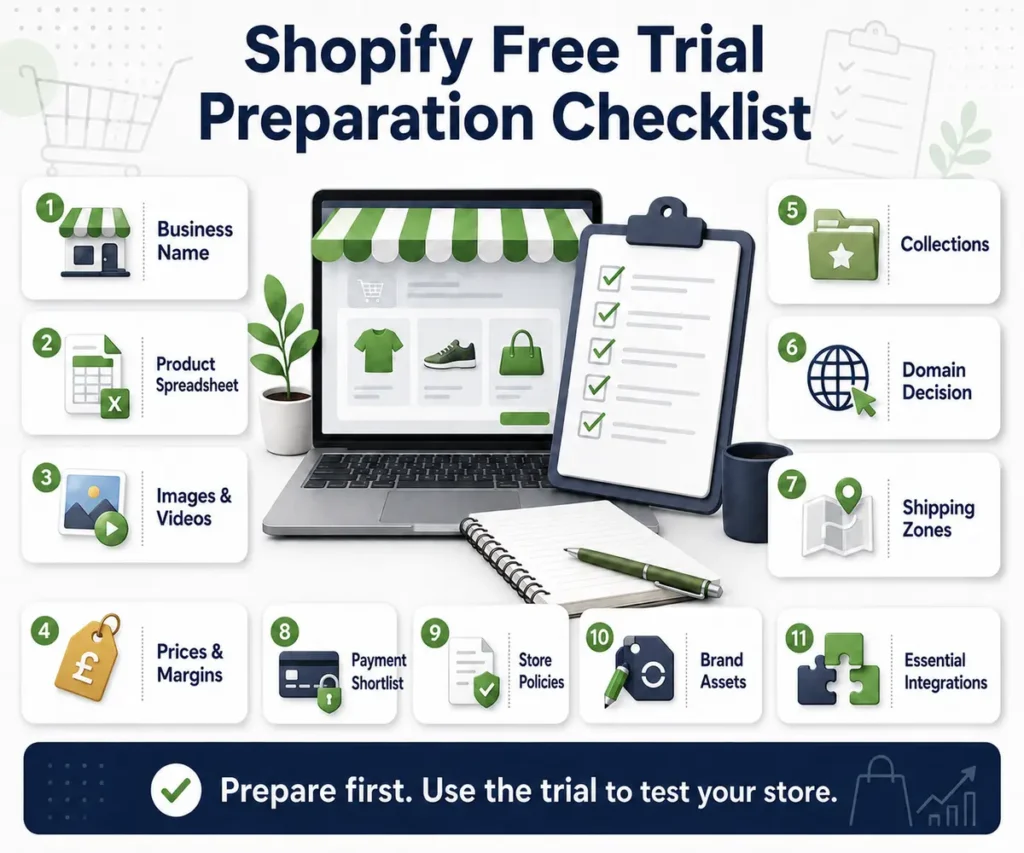
Preparing these materials in advance prevents the trial from being consumed by basic administrative work.
During the trial, test the questions that affect your buying decision:
- Can Shopify represent your product structure without expensive custom work?
- Does an available theme support your catalogue and customer journey?
- Is a suitable payment provider available for your country and business category?
- Can you configure shipping rates that protect your profit margin?
- Which apps are genuinely necessary?
- Can the owner manage products and orders without permanent technical support?
- What work remains before a real customer can place a secure and accurate order?
- Can Shopify connect with your accounting, fulfilment, marketing, or inventory systems?
- Does the total projected monthly cost remain commercially viable?
- Can the store deliver a satisfactory mobile buying experience?
Do not treat a promotional trial as evidence that the complete business will be inexpensive. Use it to produce a documented implementation scope and a twelve-month cost estimate.
How to Start a Shopify Store Step by Step
A professional store setup should follow business logic rather than the order of attractive theme settings. The following process reduces rework and makes each technical decision easier to justify.
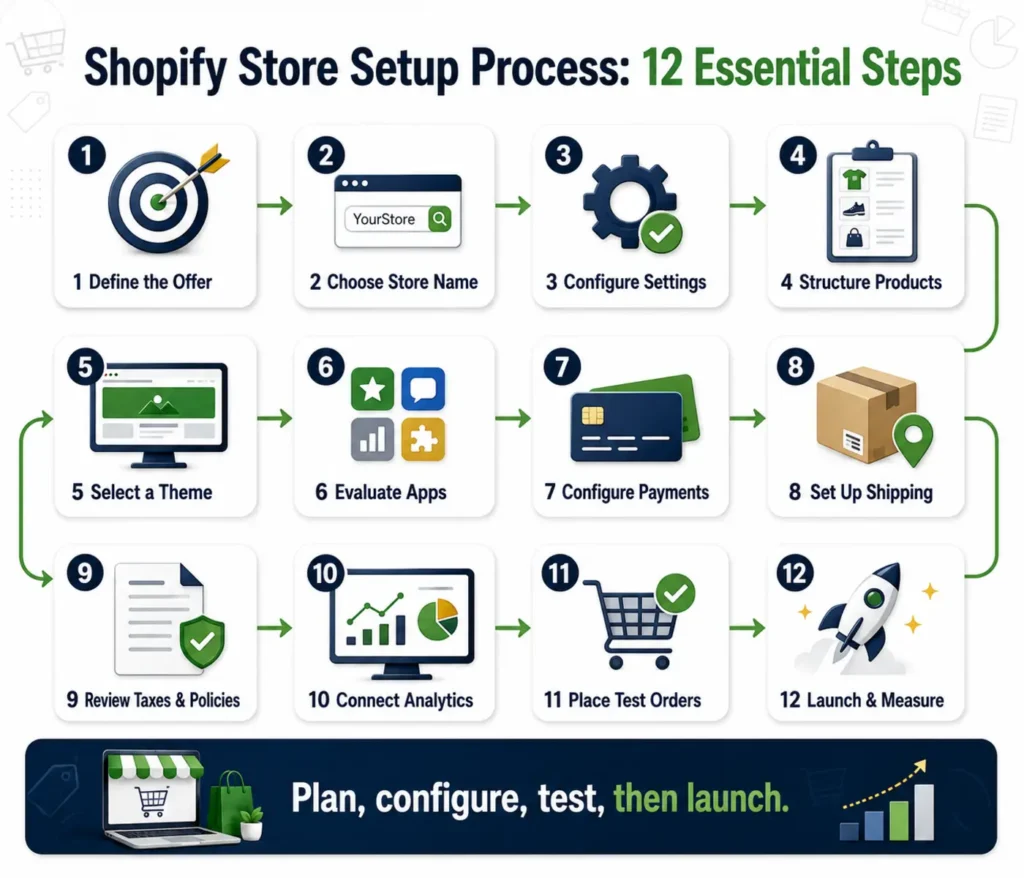
Step 1: Define the offer, customer, and commercial model
Write a one-page store brief before opening the theme editor.
Identify:
- Your target customer.
- The problem your product solves.
- The product category.
- The selling-price range.
- Your average-order-value goal.
- Gross profit margin.
- Primary delivery regions.
- Fulfilment method.
- Return conditions.
- Main acquisition channel.
- Expected monthly order volume.
- Customer-support requirements.
Decide whether the store will sell owned inventory, dropshipped products, print-on-demand products, digital goods, subscriptions, wholesale products, custom-made products, or a combination.
A Shopify dropshipping store setup service and a Shopify print-on-demand store setup service may appear similar, but supplier synchronisation, delivery promises, returns, branding, and quality-control requirements can differ substantially.
Step 2: Choose a memorable store name and domain
Choose a name customers can pronounce, remember, and type correctly.
Before investing in branding:
- Check for obvious trademark risks.
- Search for businesses using similar names.
- Check relevant social-media handles.
- Confirm domain availability.
- Consider common misspellings.
- Ensure the name remains suitable if the business expands.
Avoid choosing an unnecessarily narrow name if you may expand beyond one product, market, or location.
Keep domain ownership under an account controlled by the business owner. Enable renewal reminders and document access securely.
A developer should not permanently own your:
- Domain.
- Shopify owner account.
- Payment account.
- Analytics property.
- Advertising account.
- Business email.
- Customer database.
- Email-marketing list.
These assets belong to the business and should remain under the owner’s control.
Step 3: Configure essential business settings
Configure the following information carefully:
- Legal business name.
- Business address.
- Store currency.
- Time zone.
- Order numbering.
- Customer contact details.
- Sender email.
- Billing method.
- Markets.
- Measurement units.
- Inventory locations.
- Tax settings.
- Checkout preferences.
Confirm whether displayed prices include tax, and ensure that your approach complies with applicable legal and accounting requirements.
Create essential pages such as:
- About Us.
- Contact Us.
- Shipping Policy.
- Returns and Refunds Policy.
- Privacy Policy.
- Terms and Conditions.
- Frequently Asked Questions.
- Order Tracking.
- Payment Information.
Policies must reflect the company’s actual procedures. Do not publish generic promises that the business cannot fulfil.
This guide provides general business and platform information, not legal, tax, accounting, banking, or payment-provider advice. Requirements vary by jurisdiction, business structure, product category, and provider. Consult an appropriately qualified professional where necessary.
Step 4: Build a clean product architecture
Before uploading products in bulk, define:
- Collections.
- Product types.
- Vendors.
- Tags.
- Product options.
- Variants.
- SKUs.
- Inventory rules.
- Filters.
- URL structure.
- Product-status rules.
A clean product structure improves navigation, onsite search, reporting, inventory management, advertising feeds, and future migration.
Every product page should include:
- A clear and accurate product title.
- Benefit-led but factual product copy.
- Price, available variants, stock status, and expected fulfilment time.
- High-quality images and useful videos.
- Materials, measurements, compatibility, care instructions, or technical information.
- Shipping, returns, warranty, and payment details.
- A clear call to action.
- Genuine customer reviews when available.
- Related products or bundles that genuinely help the buyer.
- Product-specific questions where appropriate.
If your catalogue is extensive or inconsistent, compare Shopify product upload service pricing with the cost of staff time and preventable errors.
A professional product-upload project should include:
- Data cleaning.
- Variant mapping.
- Image matching.
- Collection assignment.
- SEO-field completion.
- Inventory verification.
- Product-status checks.
- Quality assurance.
It should provide more value than simply copying and pasting product information.
Step 5: Choose a Free or Premium Shopify Theme
The best Shopify themes for conversions are not automatically those with the most animations, pop-ups, or promotional widgets.
Conversion depends on connected factors:
- Offer quality.
- Page clarity.
- Website speed.
- Mobile usability.
- Customer trust.
- Product information.
- Navigation.
- Search and filtering.
- Payment availability.
- Checkout readiness.
Use this free vs. premium Shopify theme comparison for beginners:
| Decision factor | Free theme | Premium theme | Custom theme work |
|---|---|---|---|
| Initial cost | Lowest | One-time licence cost | Highest project cost |
| Launch speed | Fast | Fast to moderate | Moderate to slow |
| Brand distinction | Limited without customisation | Greater design flexibility | Maximum control |
| Built-in merchandising | Core features | Often includes broader features | Developed for defined requirements |
| Maintenance | Supported through theme updates | Depends on the vendor | Requires a managed development process |
| Best fit | New or simple stores | Growing, visually focused brands | Complex or differentiated customer journeys |
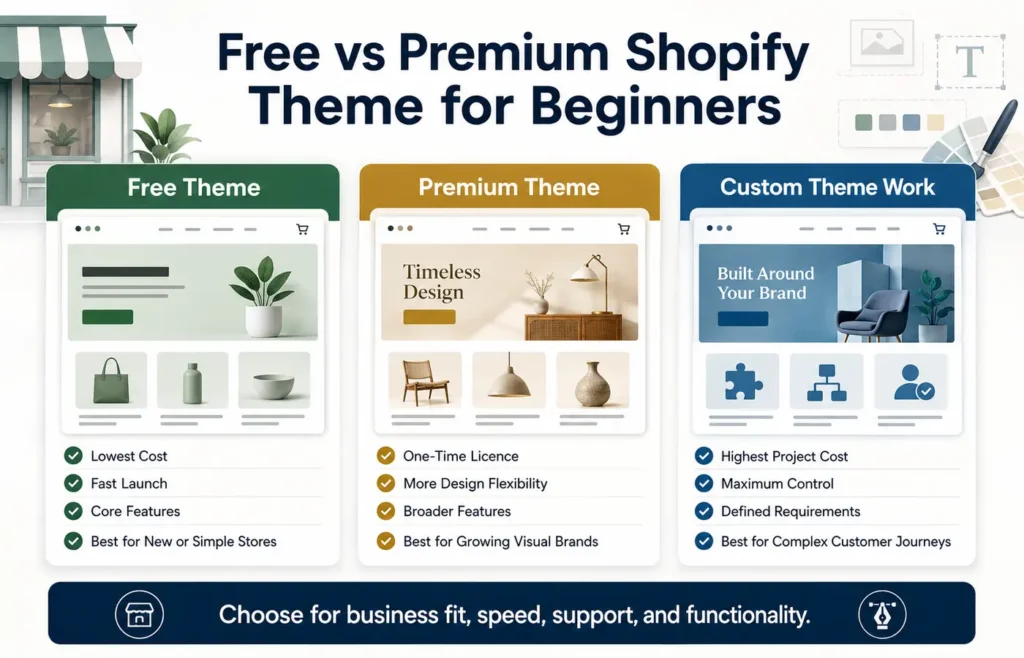
A free theme is sufficient when it supports your catalogue, content, navigation, speed, and conversion requirements.
A premium theme is justified when its built-in capabilities replace several paid apps or reduce development work.
Custom development is justified when a documented commercial requirement cannot be met effectively through standard configuration.
Before purchasing a premium theme:
- Test its demonstration store on mobile devices.
- Review product and collection layouts.
- Test navigation, search, and filtering.
- Evaluate page speed.
- Review localisation options.
- Check accessibility features.
- Read the support policy.
- Review the update history.
- Confirm compatibility with essential apps.
- Determine whether important demo features require additional apps.
Do not purchase a theme merely because its homepage demonstration looks impressive. A theme must support the complete buying journey—not only the homepage.
Step 6: Install only essential Shopify apps
The Shopify App Store offers applications for marketing, product reviews, subscriptions, search, delivery, analytics, customer support, fulfilment, and other business functions.
However, more apps do not automatically produce a better store.
The best free Shopify apps are not necessarily the right apps for every business. Begin by defining the problem, and then determine whether Shopify or the theme already provides the required feature.
The essential Shopify apps for a new store shortlist might include:
- Product reviews.
- Email marketing.
- Delivery integration.
- Product search.
- Digital-product fulfilment.
- Subscriptions.
- Analytics.
- Customer support.
The correct selection depends on the business model.
Use this app evaluation framework:
| Question | Acceptable answer |
|---|---|
| What problem does the app solve? | A specific problem with a measurable outcome. |
| Does Shopify or the theme already offer the feature? | The app does not unnecessarily duplicate existing functionality. |
| What is the complete cost? | Current and expected usage costs are documented. |
| What data does it access? | Permissions are limited to legitimate operational needs. |
| What happens if it is removed? | Data, content, and storefront consequences are understood. |
| Does it affect speed? | Performance is tested before and after installation. |
| Is support reliable? | Current documentation and dependable assistance are available. |
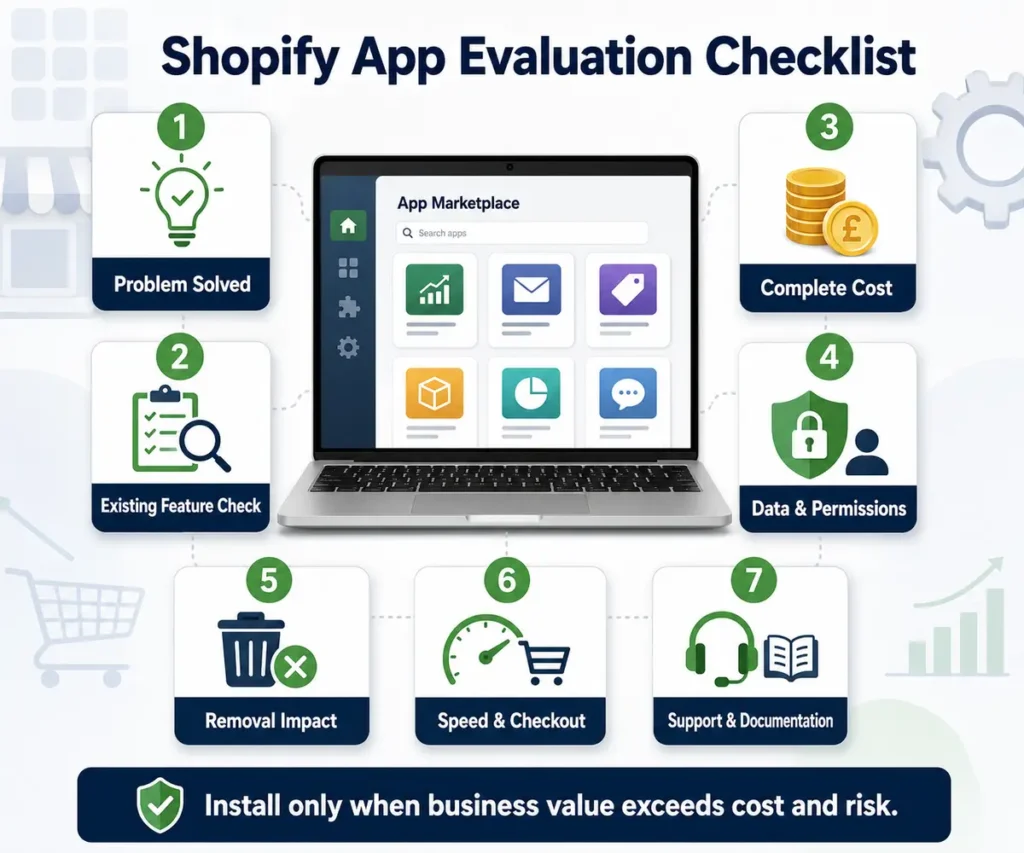
Shopify app costs for small businesses can rise quietly because many apps charge according to orders, contacts, usage, or feature tiers.
Review the app bill every quarter. Remove unused, overlapping, or commercially unjustified tools.
Step 7: Configure payments before perfecting the homepage
A store is not commercially ready until customers can pay through an eligible and trusted method.
Payment availability depends on:
- The country where the business is legally established.
- Business registration.
- Bank-account eligibility.
- Product category.
- Risk assessment.
- Expected volume.
- Provider rules.
- Settlement currency.
Shopify Payments simplifies payment administration where it is available. Shopify’s official documentation states that the service is available only in listed countries and regions. If your country is not listed, you will need an eligible third-party provider.
Check the official Shopify Payments country list and Shopify’s payment provider directory.
Do not register a payment account using false residency, borrowed company details, or an ineligible bank account. A shortcut that causes payment holds, frozen funds, or account closure can damage the entire business.
Step 8: Configure shipping and fulfilment
Define:
- Inventory locations.
- Packages and dimensions.
- Product weights.
- Delivery zones.
- Shipping-rate logic.
- Free-shipping thresholds.
- Handling times.
- Tracking procedures.
- Failed-delivery processes.
- Return routes.
- Fulfilment responsibilities.
Shopify’s shipping and fulfilment guidance explains how locations, packages, carriers, and order routing work.
Test shipping rates with real addresses from every market you plan to serve. Include light, heavy, remote, high-value, and mixed-cart orders.
Free shipping is valuable only when its cost has been included in product margins or average-order-value planning.
Step 9: Configure Taxes and Legal Information
Shopify provides tax-related tools, but merchants remain responsible for correct registration, collection, invoicing, record-keeping, and filing.
Tax obligations may depend on:
- Legal structure.
- Business location.
- Customer location.
- Product category.
- Sales thresholds.
- Cross-border activity.
- Registration status.
Display accurate business contact details, policies, delivery conditions, product restrictions, and refund terms. Trust improves when customers can easily understand:
- Who is selling the product.
- What they will receive.
- What the complete cost will be.
- When delivery is expected.
- What happens if something goes wrong.
Step 10: Connect Analytics and Marketing Foundations
Before launch, configure:
- Google Search Console.
- Google Analytics, where appropriate.
- Advertising pixels.
- Consent controls.
- Email capture.
- Campaign tracking.
- Order attribution.
- Search-engine access.
Test whether purchases, currency, taxes, shipping, discounts, cancellations, and refunds are recorded correctly.
Choose marketing channels according to your target customer and profit margin—not because a platform is currently popular.
Step 11: Place Test Orders
Test the store on real mobile devices and major browsers.
Use different:
- Products.
- Variants.
- Discount codes.
- Customer addresses.
- Shipping methods.
- Payment methods.
- Order outcomes.
Confirm that the following processes work correctly:
- Customer emails.
- Internal notifications.
- Inventory reduction.
- Fulfilment status.
- Refunds.
- Cancellations.
- Analytics events.
- Payment failures.
- Out-of-stock behaviour.
Your Shopify pre-launch checklist for beginners should include:
- Domain, HTTPS, favicon, and sender email.
- Navigation, search, filters, and broken links.
- Accurate product data, prices, inventory, variants, and images.
- Payment success, failure, cancellation, and refund processes.
- Shipping rates, delivery estimates, and tracking.
- Tax displays, invoices, discounts, and gift cards where applicable.
- Mobile product pages, cart, checkout, and customer accounts.
- Policies, contact details, and customer-support routes.
- Search Console, analytics, sitemap, and conversion events.
- Backup copies of theme code and critical business data.
Step 12: Launch with a controlled marketing plan
Remove the storefront password only after the full order journey works.
Launch to a small but relevant audience before substantially increasing advertising. A controlled launch can expose operational problems without placing the business under unnecessary pressure.
Monitor:
- Qualified sessions.
- Product-view rate.
- Add-to-cart rate.
- Checkout-start rate.
- Completed purchases.
- Average order value.
- Refund rate.
- Customer-acquisition cost.
- Gross profit.
- Repeat-purchase rate.
Revenue without sufficient margin and dependable fulfilment is not sustainable growth.
Shopify Payments and Payment Gateways in Pakistan
Shopify can be used to build and operate a store from Pakistan, but payment planning requires special attention.
As of July 19, 2026, Pakistan was not included in Shopify’s official list of countries supported by Shopify Payments. Shopify explains that merchants in unsupported countries need an eligible third-party payment provider.
This does not mean every provider mentioned online will approve every Pakistani merchant. Eligibility may depend on:
- Business registration.
- Company structure.
- Product category.
- Website readiness.
- Expected transaction volume.
- Banking arrangements.
- Supported currencies.
- Risk checks.
- Settlement requirements.
Choosing the best payment gateway for Shopify in Pakistan
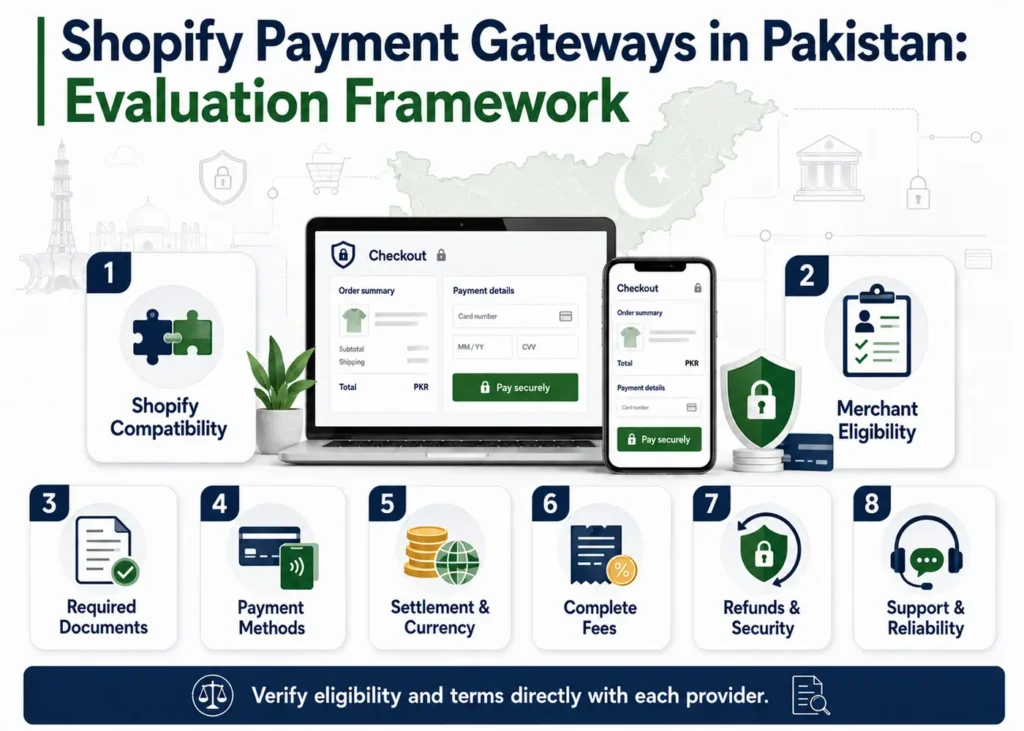
Use a documented comparison rather than selecting a provider from a promotional list.
| Evaluation factor | What to verify |
|---|---|
| Shopify compatibility | Native integration, approved app, API route, or hosted redirect. |
| Merchant eligibility | Pakistani business type, documents, bank account, and product category. |
| Payment methods | Cards, bank transfers, wallets, COD, or other relevant methods. |
| Settlement | Currency, timing, reserve requirements, and minimum payout. |
| Complete fees | Setup, monthly, transaction, refund, chargeback, conversion, and Shopify charges. |
| Customer experience | Onsite or redirect flow, mobile usability, error handling, and trust. |
| Security | PCI responsibilities, fraud controls, two-factor authentication, and data management. |
| Support | Onboarding, technical assistance, dispute procedures, and service availability. |
Queries such as Shopify JazzCash integration and Shopify EasyPaisa integration reflect genuine buyer demand. However, implementation may require a compatible third-party provider or aggregator rather than a simple native option.
Obtain written confirmation from the provider and test the complete payment, refund, settlement, and reconciliation process before advertising the method.
Manual options such as cash on delivery or bank transfer may suit certain domestic businesses. However, they can introduce:
- Fraudulent orders.
- Failed deliveries.
- Manual confirmation.
- Reconciliation difficulties.
- Slower cash flow.
- Higher customer-support requirements.
Your payment strategy should reflect customer behaviour and operational capacity.
Shopify pricing in Pakistan and the true local cost
Shopify pricing Pakistan should be calculated using:
- The billing currency actually charged.
- Current exchange rates.
- Bank charges.
- Applicable taxes.
- Theme expenses.
- App subscriptions.
- Payment-provider fees.
- Shopify transaction fees.
- Development and maintenance costs.
Do not publish a permanent PKR conversion without displaying the conversion date because exchange rates change.
The Shopify store setup cost in Pakistan or Shopify website price in Pakistan represents a separate professional service expense. It may depend on:
- Number of products.
- Theme choice.
- Customisation.
- Integrations.
- Product content.
- Payment requirements.
- Shipping logic.
- Migration.
- Analytics.
- Testing.
- Training.
- Post-launch support.
A low quotation that excludes product data, policies, payment testing, mobile quality assurance, and post-launch support may not represent a complete store.
A dedicated Shopify store setup service Pakistan page should define the exact deliverables. A Shopify payment gateway fees Pakistan guide should compare provider costs, platform fees, settlement, refunds, chargebacks, and currency conversion.
Businesses researching Shopify dropshipping Pakistan also require supplier, delivery, return, payment, quality-control, and product-compliance guidance—not generic promises of easy income.
When comparing a Shopify developer Pakistan, Shopify expert Pakistan, or Shopify development company Pakistan, request a written scope instead of accepting a general promise.
An affordable Shopify developer Pakistan may be appropriate for a clearly defined task. A specialist agency may be more suitable when strategy, design, development, data, SEO, payments, and ongoing support must be coordinated.
Shopify SEO Setup for Long-Term Growth
Shopify handles several technical foundations automatically. According to its official SEO documentation, the platform provides canonical tags, sitemap files, robots.txt controls, SSL, and certain theme-based metadata functions.
The SEO recommendations in this Shopify Guide for Beginners 2026 focus on creating helpful product pages, improving site structure, optimizing images, writing accurate metadata, and making the shopping experience easier for customers.
These foundations do not replace useful content, logical architecture, internal linking, accurate product data, authority, or technical quality. Review Shopify’s official SEO overview.
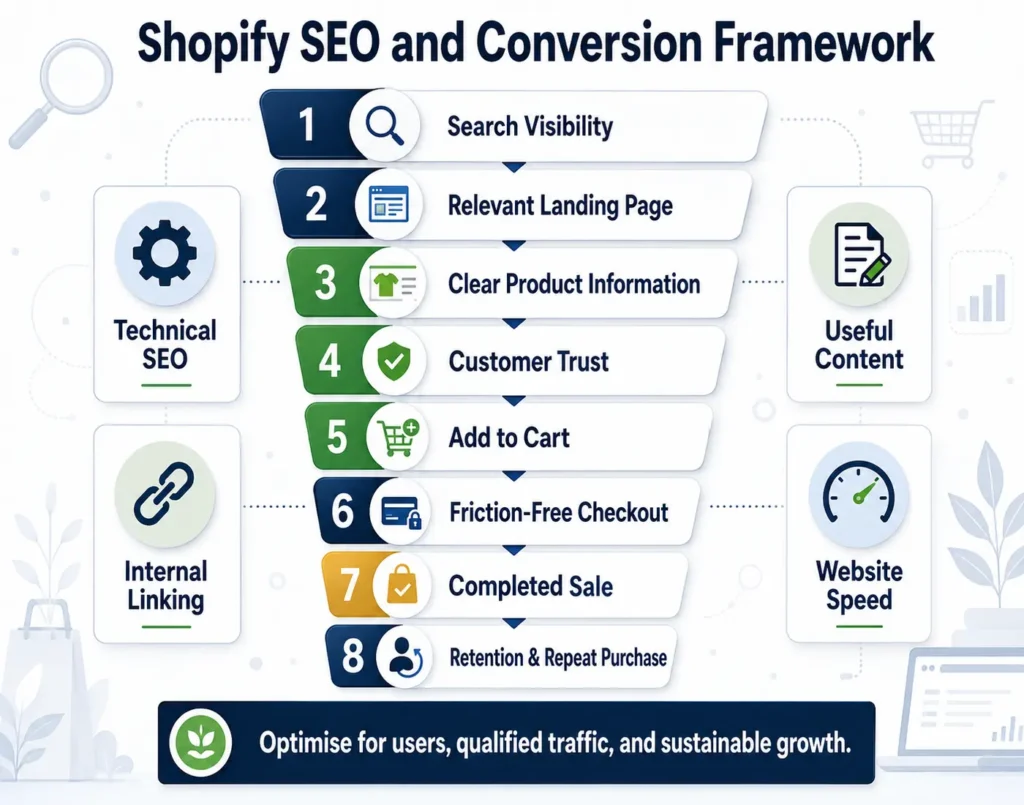
A practical Shopify SEO for beginners plan should include:
- One clear search intent for every important collection, product, service, and article page.
- Descriptive titles and meta descriptions written for users.
- Logical collections, navigation, breadcrumbs, and internal links.
- Unique product and collection copy that helps customers make decisions.
- Useful image filenames and accurate alternative text.
- Appropriate index controls for duplicate, filtered, internal-search, or low-value pages.
- Accurate product structured data.
- Merchant Center feeds where relevant.
- Mobile performance, image optimisation, and app discipline.
- Search Console monitoring for queries, clicks, indexing, and technical issues.
People-first content and E-E.A.T.
Google recommends creating helpful and reliable content primarily for users. E-E.A.T. is not a single ranking score.
For a Shopify website, meaningful trust signals may include:
- Accurate business information.
- Clear authorship.
- Genuine experience.
- Original product content.
- Transparent policies.
- Secure payment methods.
- Accessible customer support.
- Honest reviews.
- Reliable sources.
- Visible review dates for time-sensitive information.
Do not publish fake reviews, fake scarcity, fabricated credentials, invented statistics, or guaranteed results.
Shopify speed optimisation
Website speed affects user experience, conversion, and the ability of customers to complete purchases.
Common performance problems include:
- Oversized images.
- Unused apps.
- Duplicated scripts.
- Excessive tracking.
- Heavy theme sections.
- Third-party widgets.
- Unnecessary animation.
- Poorly implemented custom code.
A Shopify speed optimization service cost should be based on diagnosis and scope. Be cautious of anyone promising a perfect performance score without considering the store’s actual functionality, devices, markets, and customer experience.
How to Get Your First Shopify Sale
A store does not generate sales merely because it has been launched. The first sale normally requires a clear offer, a relevant audience, sufficient trust, and a low-friction buying process.
A practical first-sale plan is:
- Identify a small but relevant audience.
- Send visitors to the page that matches their intent.
- Present a clear offer without misleading discount claims.
- Use genuine trust signals.
- Test one acquisition channel at a time.
- Respond quickly to customer questions.
- Review analytics and checkout failures.
- Improve the offer before increasing advertising.
A Shopify marketing checklist should include:
- Customer research.
- Product positioning.
- Product-page quality.
- Email capture.
- Campaign tracking.
- Organic-search content.
- Creative testing.
- Remarketing consent.
- Profit measurement.
- Retention planning.
Traffic alone is not a commercial objective. The goal is profitable customer acquisition and dependable fulfilment.
Shopify vs WooCommerce and Other Alternatives
No ecommerce platform is universally best.
Shopify is often selected for managed hosting, integrated operations, and a structured ecommerce environment.
WooCommerce may appeal to businesses that want greater WordPress control and accept more responsibility for hosting, security, extensions, and maintenance.
Wix may suit smaller businesses that prioritise straightforward visual website building over advanced commerce requirements.
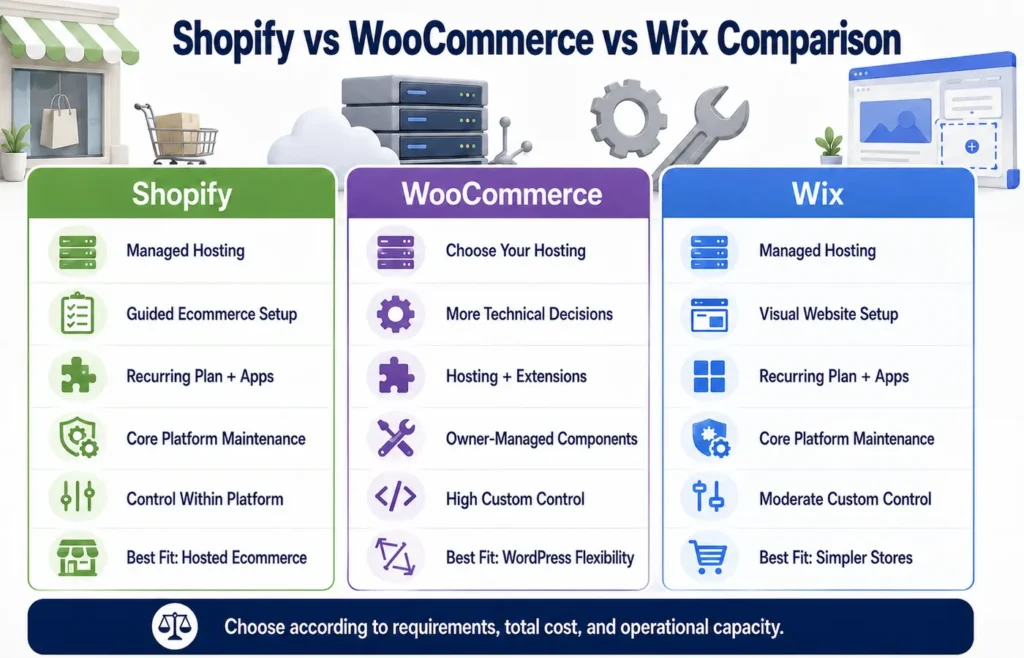
| Factor | Shopify | WooCommerce | Wix |
|---|---|---|---|
| Hosting | Managed within the platform | Merchant chooses and manages hosting | Managed |
| Setup | Guided and commerce-focused | Flexible but involves more technical decisions | Beginner-friendly |
| Software cost | Recurring plan plus possible apps | Core plugin is free, but hosting and extensions cost money | Recurring plan plus possible apps |
| Maintenance | Shopify manages core infrastructure | Owner or provider manages more components | Platform manages core infrastructure |
| Custom control | Strong within platform limits | Very high with WordPress development | Moderate |
| Extension risk | Apps can increase costs and scripts | Plugins can create compatibility and maintenance issues | Simpler app ecosystem |
| Best fit | Hosted ecommerce and multichannel retail | Businesses requiring ownership and technical flexibility | Small or less complex stores |
Is Shopify worth it?
Shopify is worth considering when the value of managed infrastructure, checkout, inventory, administration, sales channels, and reduced technical maintenance exceeds the subscription and ecosystem costs.
It may not be worth the investment when a business has:
- No validated product.
- Insufficient profit margins.
- No suitable payment route.
- Extremely unusual workflows.
- Requirements that depend on expensive customisation.
- No realistic customer-acquisition plan.
A balanced Shopify review 2026 should evaluate platform fit through total cost, payment eligibility, required apps, operational workflows, customisation, and long-term growth needs.
When a Shopify Alternative May Be Better
Consider Shopify alternatives for small businesses when:
- You already operate a successful WordPress website and require tightly integrated content and commerce.
- You need server-level control.
- You require a highly customised data model.
- Your ecommerce requirements are simple enough for a lower-cost website builder.
- A required payment, tax, fulfilment, or operational workflow is unsupported.
- Your team can securely manage an open-source platform.
- Shopify’s recurring costs cannot be justified by the expected commercial value.
The correct question is not, “Which platform has the most features?” It is, “Which platform supports this business model at an acceptable total cost and level of operational risk?”
WooCommerce to Shopify Migration
A WooCommerce to Shopify migration is not merely a product-copying exercise. It is a business-continuity project.
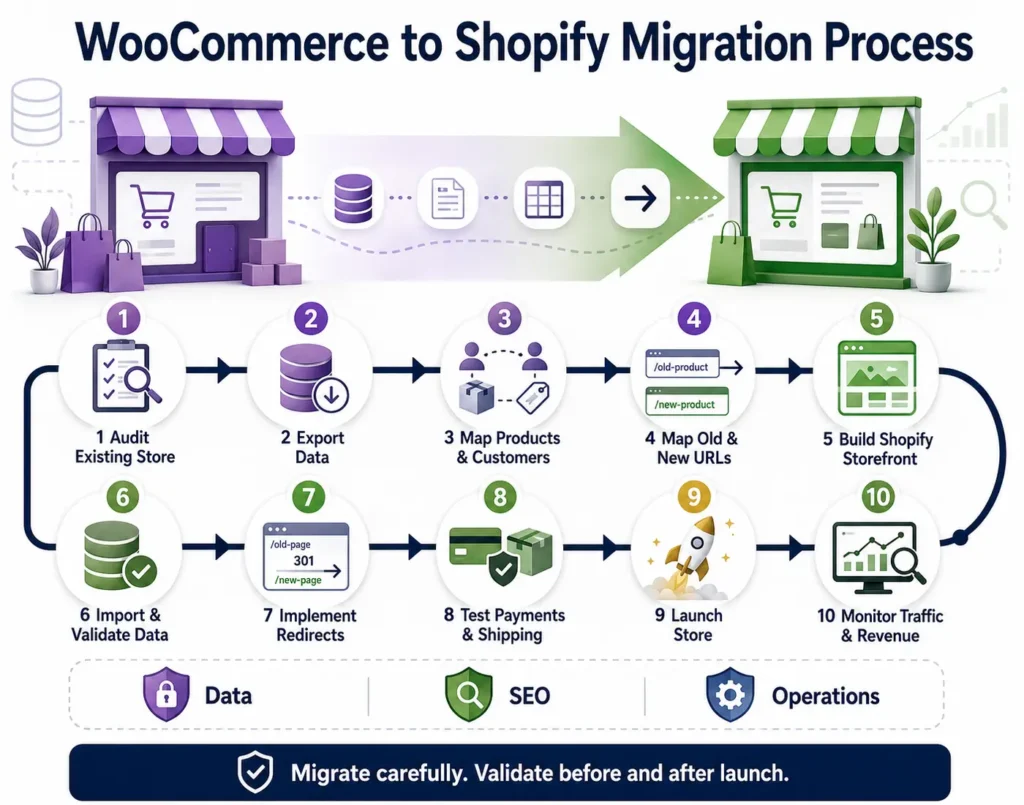
The migration may affect:
- Products and variants.
- Customers.
- Historical orders.
- Reviews.
- Images.
- Website content.
- URLs.
- Metadata.
- Redirects.
- Payment logic.
- Shipping rules.
- Tax settings.
- Analytics.
- Integrations.
Shopify’s official WooCommerce migration guide explains the platform’s migration options.
Shopify migration SEO checklist
- Crawl and export the existing website.
- Record every indexable URL and important organic landing page.
- Export titles, descriptions, canonicals, status codes, and internal links.
- Map old pages to the most relevant new URLs.
- Preserve valuable content and search intent.
- Implement one-to-one permanent redirects where equivalent pages exist.
- Avoid redirecting every removed URL to the homepage.
- Validate products, images, reviews, customers, and order data.
- Test structured data, canonicals, robots rules, sitemaps, and navigation.
- Test payments, shipping, taxes, emails, analytics, and product feeds.
- Monitor Search Console, rankings, traffic, and revenue after launch.
The WooCommerce to Shopify migration service cost depends on catalogue size, variants, customer volume, historical orders, reviews, content, URLs, theme work, custom fields, app replacements, integrations, and post-migration support.
Professional Shopify migration services are particularly valuable when the existing store has meaningful organic traffic, many products, custom plugins, subscriptions, international operations, ERP connections, or complex redirects.
Self-Build vs Hire a Shopify Expert
Many merchants can configure a simple store themselves. Professional support becomes more valuable when mistakes are expensive, integrations are complex, the deadline is important, or internal time is better spent on products, fulfilment, and customers.
| Approach | Best for | Advantages | Main risks |
|---|---|---|---|
| DIY | Small catalogues with standard requirements | Lowest service cost and direct learning | Slow execution, missed settings, weak testing, and opportunity cost |
| Freelancer | Defined setup or customisation tasks | Flexible and often affordable | Capacity, continuity, and scope may vary |
| Specialist agency | Strategy, design, development, data, SEO, and integrations | Coordinated delivery and broader expertise | Higher cost and the need for careful selection |
| In-house team | Ongoing, high-volume commerce | Continuous ownership and faster iteration | Recruitment, management, and fixed payroll costs |
A professional service is not necessary for every project. Businesses with a small catalogue, standard requirements, prepared content, and sufficient time may be able to configure Shopify independently.
Shopify store setup cost and developer cost
Shopify store setup cost depends on project scope. Configuring a basic theme with a small, clean catalogue costs less than developing a multilingual store with custom sections, payment integrations, subscriptions, ERP synchronisation, migration, SEO, and extensive testing.
Shopify developer cost may be calculated hourly, through a fixed project price, as a monthly retainer, or according to value.
Compare proposals using:
- Deliverables.
- Exclusions.
- Ownership.
- Timeline.
- Revision process.
- Testing.
- Documentation.
- Support.
- Acceptance criteria.
The lowest hourly rate does not necessarily produce the lowest total project cost.
When to hire a Shopify expert
Consider professional support when you need:
- Commercial planning before implementation.
- Theme customisation beyond the visual editor.
- Custom sections or app development.
- System or checkout integrations.
- A reliable Shopify payment gateway integration service.
- Large-catalogue cleaning and uploading.
- WooCommerce migration.
- International market configuration.
- Shopify SEO services or technical remediation.
- Ongoing Shopify maintenance service monthly support.
An affordable Shopify store setup service should still define what “complete” means.
At minimum, the scope should address:
- Products and variants.
- Essential pages.
- Theme work.
- Responsive testing.
- Payments.
- Shipping.
- Tax responsibility.
- Policies.
- Analytics.
- SEO foundations.
- Training.
- Backups.
- Post-launch support.
How to evaluate Shopify website design services
When comparing Shopify website design packages for small business, ask every provider the same questions:
- Which tasks are included and excluded?
- Is the theme free, licensed, or custom?
- Who will provide product copy, images, policies, and translations?
- How many products and variants are included?
- Which apps are required?
- Who will pay recurring app charges?
- Will payments and shipping be tested using real scenarios?
- Are analytics, redirects, and SEO foundations included?
- Will the owner receive complete access and documentation?
- What support is available after launch?
- Can the provider explain the commercial reason for every recommendation?
A provider should never permanently control the domain, Shopify owner account, payment account, advertising platforms, analytics, or customer data.
Common Shopify Buying and Setup Mistakes
Choosing a plan before defining requirements
A higher plan cannot replace a viable business model. Begin with operational requirements and upgrade only when the financial or practical case is clear.
Budgeting only for the subscription
Include themes, apps, payment fees, development, content, marketing, returns, and operations in your budget.
Designing before confirming payments
A beautiful website is commercially unusable if the business cannot activate a reliable payment method.
Installing too many apps
Apps can create recurring costs, overlapping features, performance problems, excessive permissions, and maintenance dependencies.
Buying a theme for appearance alone
Evaluate mobile layouts, catalogue fit, navigation, filtering, accessibility, speed, support, and compatibility.
Copying supplier content
Generic descriptions reduce differentiation and may create duplicate or low-value content. Add accurate and original buying information.
Hiding important policies
Shipping, returns, warranty, contact details, and delivery estimates should be easy to find before checkout.
Using false urgency or fabricated proof
Fake reviews, countdowns, scarcity, and sales notifications damage trust and may create legal or platform risks.
Launching without test orders
Test the complete order, payment, notification, inventory, fulfilment, cancellation, and refund cycle.
Migrating without redirects
Changing URLs without mapping and monitoring can damage organic visibility and break customer bookmarks.
Giving permanent ownership to a contractor
The business owner should control all critical accounts, customer data, and credentials.
Expecting Shopify to create demand
Shopify provides commerce infrastructure. Product value, positioning, trust, marketing, and customer service still determine sales.
Commercial Store Readiness Checklist
| Area | The store is ready when |
|---|---|
| Business model | Customer, offer, margin, fulfilment, and returns are defined. |
| Platform fit | Shopify has been compared with relevant alternatives. |
| Budget | Twelve-month platform, app, payment, service, and marketing costs are documented. |
| Plan | The plan meets current requirements and has a defined upgrade trigger. |
| Catalogue | Products, variants, SKUs, inventory, media, and collections are accurate. |
| Design | Mobile navigation, product pages, cart, and checkout are clear. |
| Payments | Eligibility, fees, settlement, refunds, and failure handling are verified. |
| Shipping | Zones, rates, delivery estimates, and tracking have been tested. |
| Trust | Contact details, policies, and genuine proof are visible. |
| SEO | Titles, content, links, canonicals, sitemap, and Search Console have been reviewed. |
| Analytics | Purchases, refunds, shipping, discounts, and campaigns are measured. |
| Operations | Order handling, customer support, returns, and stock updates are assigned. |
| Ownership | The owner controls all critical accounts and credentials. |
| Launch | Test orders pass on mobile and desktop. |
Frequently Asked Questions
What is Shopify and how does it work?
Shopify is a hosted commerce platform for selling online and in person. Merchants manage products, inventory, orders, customers, payments, discounts, content, and analytics through Shopify Admin.
How much does Shopify cost every month?
The monthly cost includes more than the plan. Budget for the subscription, domain, theme, apps, payment processing, transaction fees, content, development, marketing, and operations.
Which Shopify plan is best for beginners?
Basic is often suitable for a solo entrepreneur launching a standard store. The correct choice depends on staff access, fees, markets, shipping, and operational requirements.
Does Shopify charge a percentage of every sale?
Payment-processing charges may apply. Shopify may also charge a third-party transaction fee when an external payment provider is used. Check current official terms for your plan and payment route.
Can I start Shopify without inventory?
Yes. Shopify can support dropshipping, print on demand, digital products, preorders, subscriptions, and other models. Each model still requires payment planning, accurate delivery promises, customer support, and legal compliance.
Can I use Shopify in Pakistan?
Yes. However, Pakistan was not included in the Shopify Payments-supported country list when this guide was reviewed. An eligible third-party provider or suitable manual payment option may therefore be required.
Which payment gateway works with Shopify in Pakistan?
The answer depends on current Shopify compatibility, merchant eligibility, business documents, product category, bank account, currency, fees, settlement, and support.
Can I connect JazzCash or EasyPaisa with Shopify?
Possible routes may involve a compatible third-party provider or aggregator. Confirm eligibility and integration requirements directly with the provider before implementation.
Do I need a developer to start a Shopify store?
Not always. A standard store can often be configured without coding. A developer becomes valuable for custom themes, integrations, migration, technical SEO, performance work, or complex product logic.
How much does it cost to hire a Shopify expert?
The cost depends on project scope, provider, product volume, theme work, integrations, migration, SEO, testing, and support. Compare written deliverables rather than headline prices.
Is a free Shopify theme good enough?
Yes, if it supports your catalogue, navigation, speed, accessibility, content, and conversion requirements.
Which Shopify apps do beginners need?
Install only apps that solve a clearly defined problem that Shopify or the theme does not already address.
How do I migrate from WooCommerce to Shopify?
Create a data and URL inventory, choose a migration method, transfer and validate products and customers, rebuild required functionality, implement redirects, test operations, and monitor SEO after launch.
Will Shopify migration affect my Google rankings?
Any platform migration can affect organic visibility. Risk increases when URLs, content, internal links, canonicals, structured data, performance, or index controls change.
Is Shopify better than WooCommerce?
Shopify is often better for managed infrastructure and integrated commerce. WooCommerce may be better for businesses that require greater WordPress control and can manage hosting, security, extensions, and maintenance.
How long does it take to build a Shopify store?
A small store with prepared content and standard requirements may be configured quickly. Payment approval, custom development, integrations, migration, product volume, and stakeholder review can extend the timeline.
What should I test before launching?
Test your domain, emails, products, variants, prices, inventory, mobile design, navigation, payments, shipping, taxes, discounts, notifications, fulfilment, refunds, policies, analytics, and SEO access.
How do I get my first Shopify sale?
Match a clear offer with a relevant audience, build trust, direct visitors to the appropriate page, remove checkout friction, test one acquisition channel, and improve the experience using real customer feedback.
Final Verdict: Is Shopify the Right Commercial Choice?
This Shopify Guide for Beginners 2026 shows that launching a successful Shopify store involves more than selecting a theme and uploading products. You also need the right plan, secure payment methods, clear policies, effective SEO, reliable customer support, and a practical sales strategy.
Shopify is a capable commerce platform, but it should be selected as part of a complete business system.
The correct decision depends on:
- Product economics.
- Payment eligibility.
- Total cost.
- Team skills.
- Catalogue complexity.
- Required customisation.
- Target markets.
- Operational capacity.
- Long-term growth plans.
Use this Shopify guide for beginners to make four decisions before investing heavily:
- Confirm the business model.
- Calculate the complete twelve-month cost.
- Validate payments and fulfilment.
- Select the appropriate level of professional support.
When these foundations are sound, Shopify can provide a structured path from the first product to a scalable ecommerce operation.
If you need a store built, migrated, audited, or improved, request a written Shopify consultation and quotation. Provide your business model, product count, target countries, payment requirements, preferred theme, integrations, budget range, and proposed launch date.
A professional recommendation should clearly explain the scope, recurring costs, risks, ownership, and next steps before development begins.
Use this Shopify Guide for Beginners 2026 as a practical checklist while planning, building, launching, and improving your online store.
About the Author
Syed Abdul Quddus is the founder of Marjan Online Digital Services. His work focuses on website planning, Shopify and WordPress implementation, SEO-focused content, ecommerce research, and digital-business guidance.
He develops commercially useful resources to help entrepreneurs and businesses evaluate website platforms, costs, implementation requirements, and potential risks before investing.
This article is reviewed periodically because Shopify pricing, promotions, payment availability, themes, apps, and platform features can change. Readers should confirm all time-sensitive information through the official sources linked throughout this guide.
2 Comments