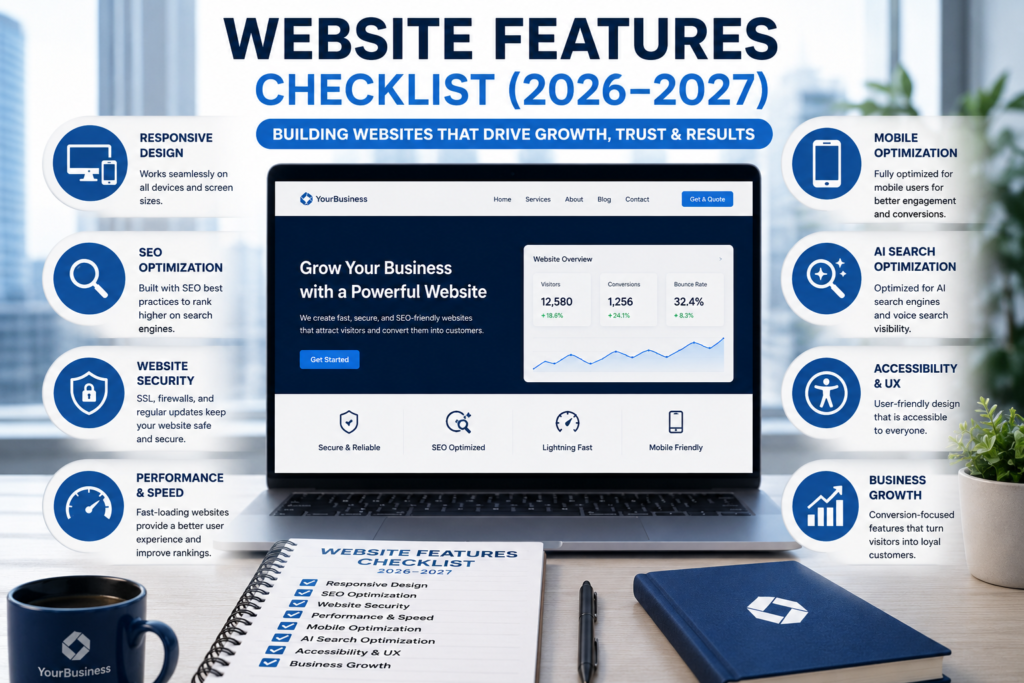
Table of Contents
Introduction
A professional website is no longer just an online brochure. It is your digital storefront, marketing engine, sales representative, customer support center, and one of your most valuable business assets.
Whether you’re creating a website for a startup, local business, eCommerce store, healthcare organization, educational institution, or enterprise company, every successful website follows a structured development process.
A Website Features Checklist ensures that every important feature is planned, implemented, tested, and optimized before your website goes live.
Modern websites must satisfy three different audiences:
- Visitors
- Search engines
- AI-powered search platforms
Simply creating beautiful pages is no longer enough. Today’s websites must also provide excellent user experience, strong security, outstanding performance, accessibility, and search visibility.
This guide explains every feature required to build a professional website that performs exceptionally well in 2026 and beyond.
What You Will Learn
After reading this guide, you’ll understand:
- What a Website Features Checklist is.
- Why every business should use one.
- The most important website features.
- Website design best practices.
- SEO and technical SEO requirements.
- Website security recommendations.
- User experience improvements.
- AI optimization strategies.
- Website launch requirements.
- Website maintenance best practices.
Quick Answer
A Website Features Checklist is a structured framework containing all the essential design, functionality, security, SEO, accessibility, and performance requirements needed to build a professional website. Following a checklist helps improve user experience, search rankings, website security, and business conversions.
What Is a Website Features Checklist?
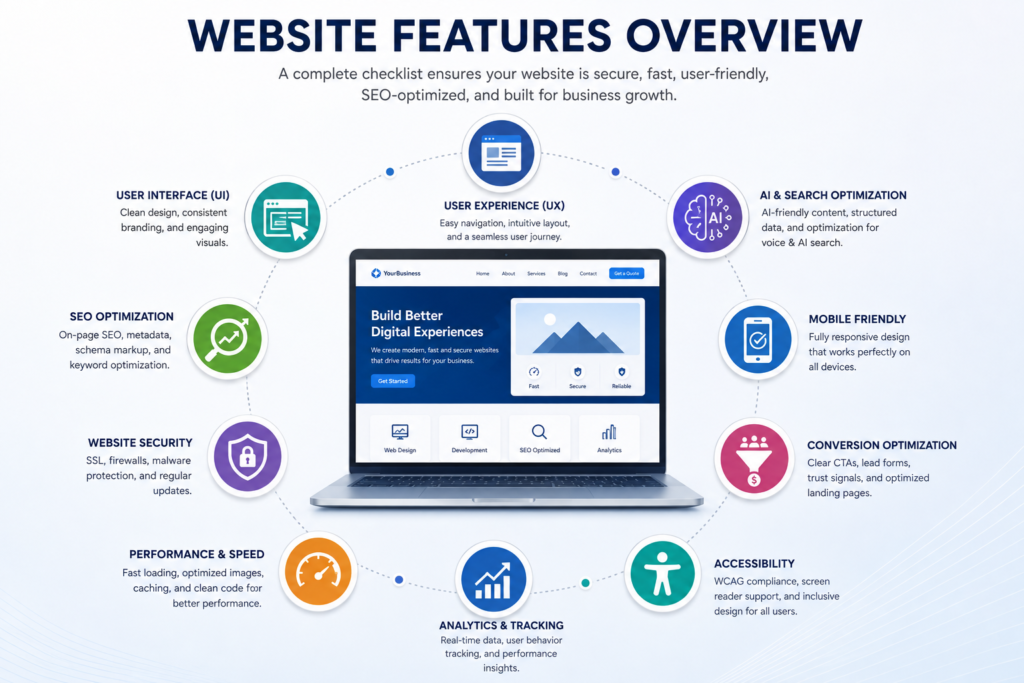
A Website Features Checklist is a comprehensive planning and quality assurance document that helps developers, designers, and business owners build complete, user-friendly, secure, and high-performing websites.
Instead of focusing only on visual appearance, a professional checklist covers every major aspect of website development, including:
- Website Design
- User Experience (UX)
- User Interface (UI)
- Website Functionality
- Search Engine Optimization (SEO)
- Technical SEO
- Website Security
- Website Performance
- Mobile Responsiveness
- Accessibility
- Lead Generation
- Conversion Optimization
- Analytics
- AI Optimization
- Website Maintenance
Using a structured checklist reduces development errors, improves project quality, and helps create websites that deliver long-term business value.
Why Every Business Needs a Website Features Checklist
Launching a website without proper planning often leads to poor navigation, slow-loading pages, weak search visibility, security vulnerabilities, and reduced customer trust.
A professional checklist ensures that every critical feature is reviewed before launch, reducing costly mistakes and improving the overall quality of the final website.
Whether you’re building a corporate website, portfolio, service website, online store, booking platform, or SaaS application, a structured checklist helps create a more reliable and successful website.
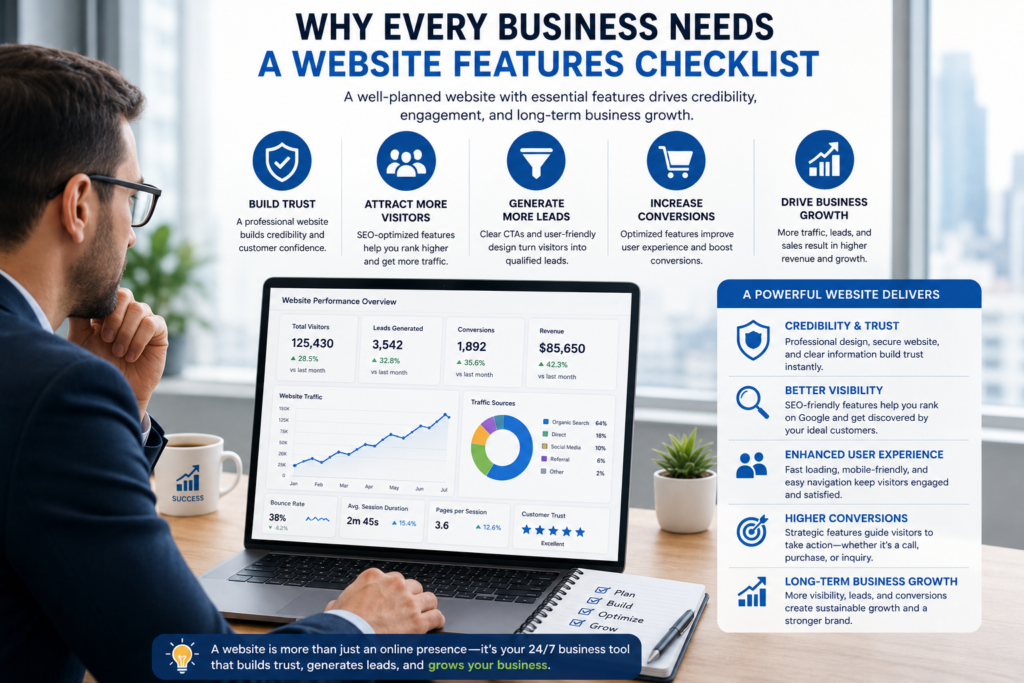
Benefits of Using a Website Features Checklist
| Benefit | Description |
|---|---|
| Better User Experience | Makes navigation easier and improves visitor satisfaction. |
| Higher Search Rankings | Supports technical SEO and content optimization. |
| Better Website Performance | Improves loading speed and Core Web Vitals. |
| Stronger Website Security | Protects customer data and business information. |
| Higher Conversion Rates | Encourages visitors to become customers. |
| Easier Website Maintenance | Simplifies future updates and improvements. |
| Better Accessibility | Makes the website usable for everyone. |
| AI Search Readiness | Improves visibility across AI-powered search platforms. |
Complete Website Features Checklist
The following sections explain every essential feature that should be included in a professional business website.
Responsive Website Design
Responsive design allows your website to automatically adapt to desktops, laptops, tablets, and smartphones without compromising usability or visual appearance.
A responsive website improves user experience, supports Google’s mobile-first indexing, and ensures visitors enjoy a consistent browsing experience regardless of the device they use.
Best Practices
- Design for mobile devices first.
- Use responsive layouts.
- Create flexible grid systems.
- Optimize images for different screen sizes.
- Use readable typography.
- Test on multiple devices and browsers.
Benefits
- Better user experience.
- Improved search visibility.
- Lower bounce rates.
- Higher engagement.
- Increased conversions.
Fast Website Loading Speed
Website speed directly influences user satisfaction, search rankings, and conversion rates.
Visitors expect websites to load quickly. Even small delays can increase bounce rates and reduce customer trust.
Recommended Performance Targets
| Metric | Recommended Target |
|---|---|
| Largest Contentful Paint (LCP) | Under 2.5 Seconds |
| Interaction to Next Paint (INP) | Under 200 ms |
| Cumulative Layout Shift (CLS) | Under 0.1 |
| Time to First Byte (TTFB) | Under 800 ms |
Optimization Checklist
- Compress images.
- Convert images to WebP.
- Enable browser caching.
- Minify CSS and JavaScript.
- Enable lazy loading.
- Use a Content Delivery Network (CDN).
- Optimize databases.
- Reduce unnecessary HTTP requests.
What Is a Website Features Checklist?
A Website Features Checklist is a comprehensive planning framework that helps businesses, developers, and designers create websites that are user-friendly, secure, search-engine optimized, and conversion-focused.
Rather than concentrating only on the visual appearance of a website, a professional checklist covers every essential aspect of website development, from planning and design to launch and ongoing maintenance.
Following a structured checklist helps ensure that every important feature is implemented before the website goes live, reducing costly mistakes and improving the overall quality of the final product.
A complete website features checklist generally includes the following areas:
- Website planning
- User experience (UX)
- User interface (UI)
- Responsive web design
- Navigation structure
- Homepage optimization
- Contact and lead generation
- Website security
- Search engine optimization (SEO)
- Technical SEO
- Website performance
- Accessibility
- Conversion optimization
- Analytics and tracking
- AI search optimization
- Website maintenance
By reviewing each of these areas before launch, businesses can build websites that provide a better experience for visitors while supporting long-term growth and higher search visibility.
Why Every Business Needs a Website Features Checklist
Building a website without a structured checklist often leads to overlooked functionality, inconsistent user experience, technical issues, and missed business opportunities.
A professional checklist serves as a quality assurance framework that ensures every important component has been reviewed before the website becomes publicly available.
Whether you’re creating a business website, portfolio, eCommerce store, booking platform, SaaS application, or corporate website, following a structured checklist significantly improves the outcome.
Some of the biggest benefits include:
- Better user experience.
- Faster loading pages.
- Improved website security.
- Higher search engine rankings.
- Better mobile usability.
- Increased customer trust.
- Higher conversion rates.
- Easier long-term maintenance.
Businesses that invest time in planning generally spend less time fixing problems after launch.
Benefits of Using a Website Features Checklist
| Benefit | Why It Matters |
|---|---|
| Better User Experience | Visitors can quickly find the information they need. |
| Improved SEO | Search engines can crawl and understand your website more effectively. |
| Better Performance | Faster websites reduce bounce rates and improve engagement. |
| Stronger Security | Protects business data and customer information. |
| Higher Conversion Rates | Encourages visitors to contact your business or make a purchase. |
| Easier Maintenance | Future updates become faster and more organized. |
| Better Accessibility | Makes your website usable for all visitors, including people with disabilities. |
| AI Search Readiness | Improves visibility across AI-powered search platforms and answer engines. |
Complete Website Features Checklist
A successful website is built by combining design, functionality, security, performance, user experience, and search optimization into one complete digital platform.
The following checklist explains every essential website feature in detail.
Responsive Website Design
Responsive website design ensures your website automatically adapts to different screen sizes and devices, including desktops, laptops, tablets, and smartphones.
A responsive layout provides visitors with a consistent browsing experience while supporting Google’s mobile-first indexing.
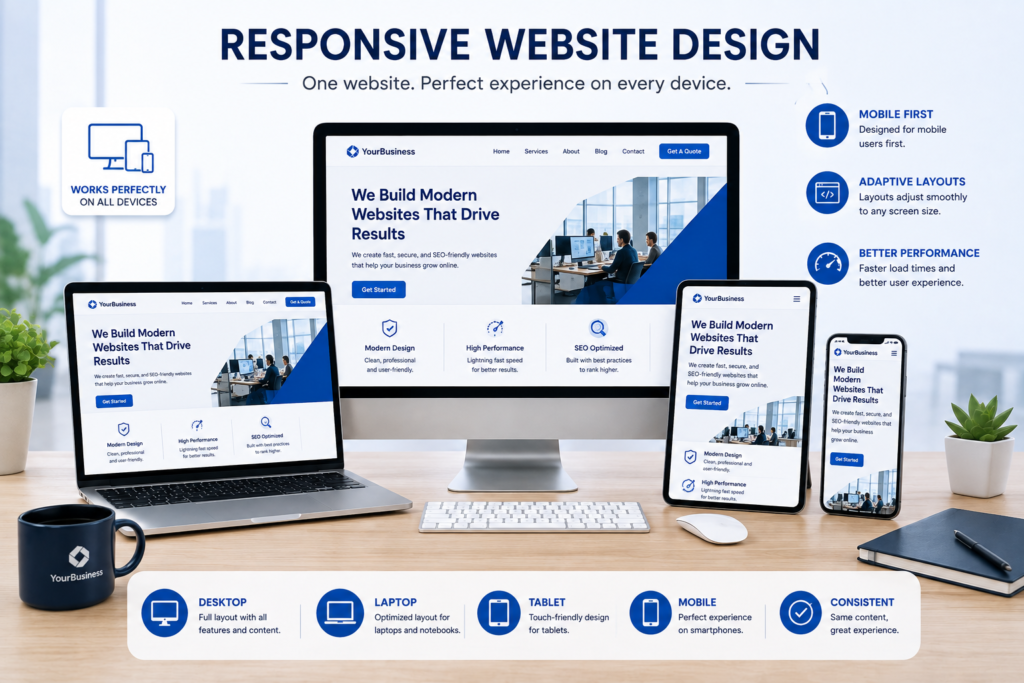
Why Responsive Design Is Important
Modern users expect websites to function perfectly regardless of the device they use. If visitors need to zoom, scroll horizontally, or struggle to click buttons, they are more likely to leave your website.
Responsive design improves:
- User experience
- Mobile usability
- Search engine rankings
- Customer engagement
- Conversion rates
Essential Responsive Design Features
- Mobile-first layout
- Flexible grid system
- Responsive images
- Adaptive typography
- Touch-friendly buttons
- Optimized spacing
- Mobile navigation
- Device compatibility
Best Practices
- Design for smartphones first.
- Test across multiple screen sizes.
- Maintain consistent spacing.
- Use scalable typography.
- Optimize images for different devices.
- Keep navigation simple.
Common Mistakes
- Fixed-width layouts.
- Tiny fonts.
- Small clickable buttons.
- Images extending beyond the screen.
- Horizontal scrolling.
- Poor mobile menus.
Professional Recommendation
Always test your website on real mobile devices instead of relying only on browser simulators. Real-world testing helps identify usability issues that automated tools may miss.
Fast Website Loading Speed
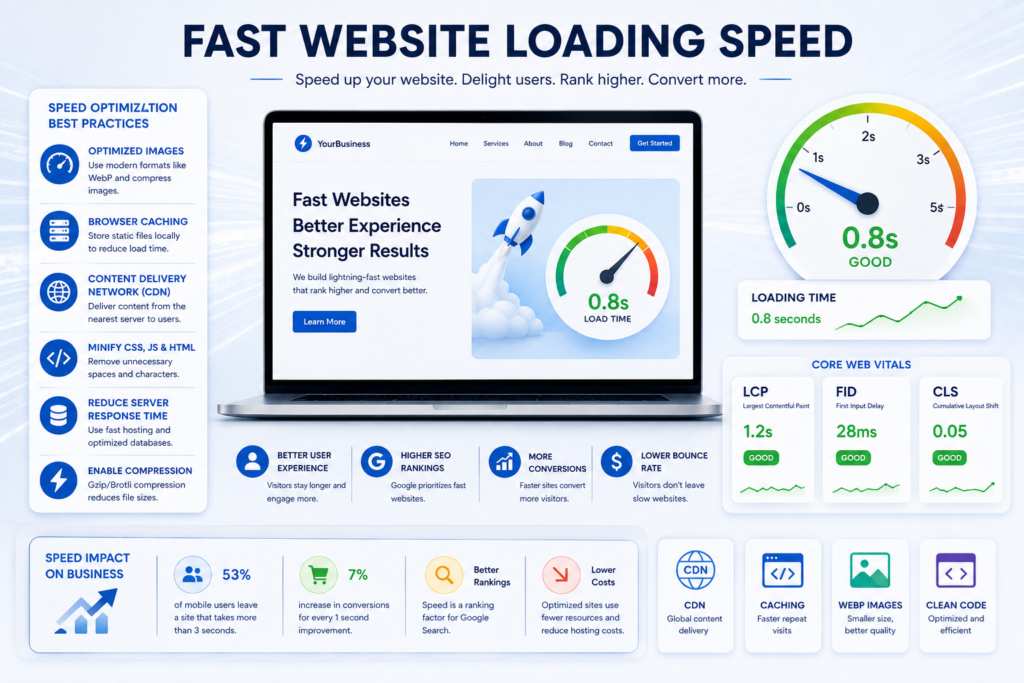
Website speed directly affects user satisfaction, search rankings, and business conversions.
Research consistently shows that users expect websites to load within just a few seconds. Slow websites often experience higher bounce rates and lower conversion rates.
Why Website Speed Matters
A fast website:
- Improves user experience.
- Supports Google’s ranking systems.
- Increases page views.
- Reduces bounce rates.
- Improves conversion rates.
- Encourages visitors to stay longer.
Recommended Performance Targets
| Performance Metric | Recommended Value |
|---|---|
| Largest Contentful Paint (LCP) | Less than 2.5 Seconds |
| Interaction to Next Paint (INP) | Less than 200 ms |
| Cumulative Layout Shift (CLS) | Less than 0.1 |
| Time to First Byte (TTFB) | Less than 800 ms |
Website Speed Optimization Checklist
- Compress all images.
- Convert images to WebP.
- Enable browser caching.
- Minify CSS.
- Minify JavaScript.
- Remove unused code.
- Enable lazy loading.
- Use a Content Delivery Network (CDN).
- Optimize database queries.
- Reduce HTTP requests.
- Enable GZIP or Brotli compression.
- Use high-performance hosting.
Common Speed Issues
- Oversized images.
- Cheap hosting.
- Too many plugins.
- Unoptimized JavaScript.
- Render-blocking CSS.
- Large videos.
- Poor database optimization.
Professional Recommendation
Measure website performance regularly using performance testing tools and optimize pages whenever Core Web Vitals begin to decline.
Professional Website Navigation
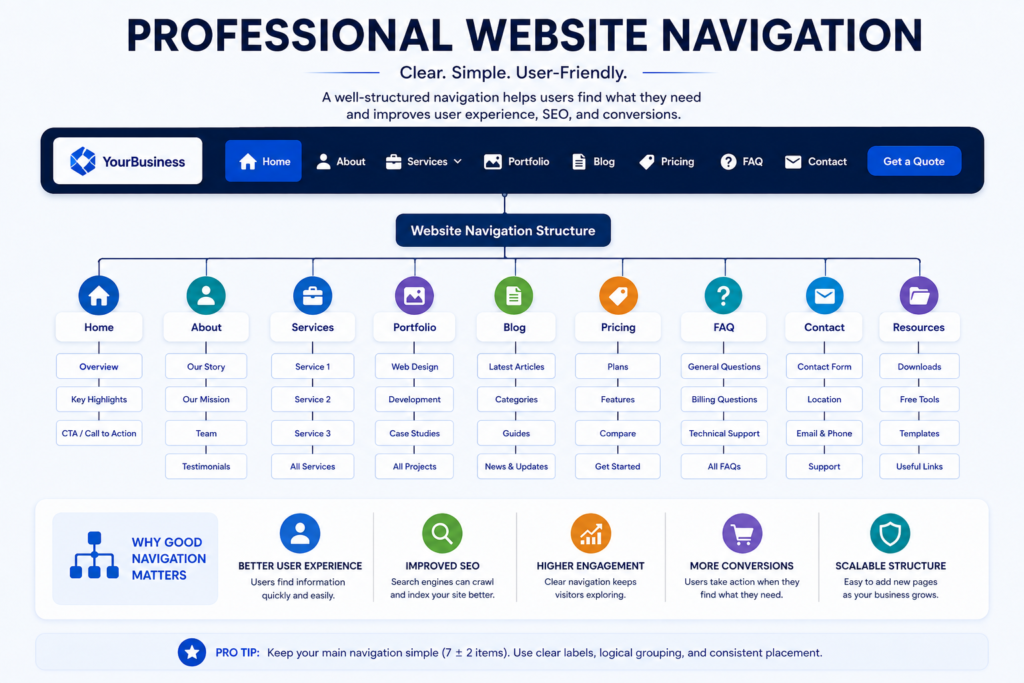
Navigation is the backbone of every successful website.
Visitors should be able to locate important information within a few clicks without confusion.
Poor navigation frustrates users and often results in higher bounce rates.
Essential Navigation Features
Every professional website should include:
- Primary navigation menu.
- Secondary navigation.
- Sticky header.
- Breadcrumb navigation.
- Search functionality.
- Footer navigation.
- Mobile navigation menu.
- Clear menu labels.
Recommended Main Menu Structure
- Home
- About
- Services
- Portfolio
- Pricing
- Blog
- Resources
- FAQ
- Contact
Navigation Best Practices
- Keep menu labels short.
- Use logical page hierarchy.
- Limit the number of top-level menu items.
- Group related pages together.
- Highlight the current page.
- Ensure navigation remains consistent throughout the website.
Common Navigation Mistakes
- Too many menu items.
- Hidden important pages.
- Confusing page names.
- Multiple navigation styles.
- Broken menu links.
- Missing search functionality.
Professional Recommendation
Visitors should be able to reach any important page within three clicks whenever possible. A simple navigation structure improves both usability and SEO.
Professional Homepage
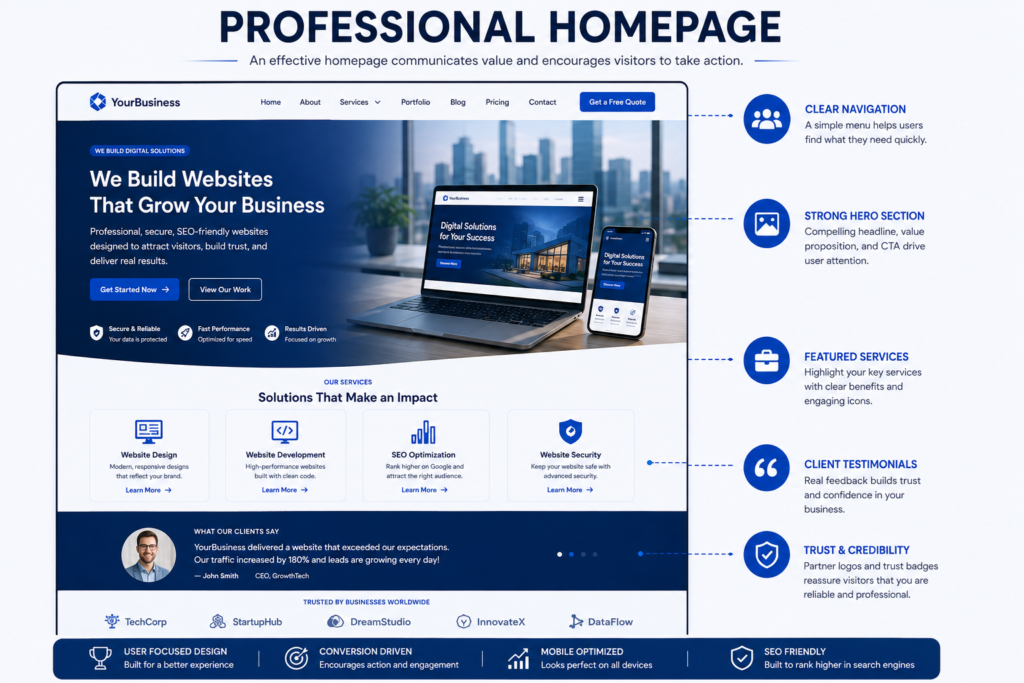
Your homepage is the most important page on your website. It is often the first interaction visitors have with your business and usually determines whether they continue exploring your website or leave.
A professional homepage should immediately communicate who you are, what you offer, and why visitors should trust your business.
Essential Homepage Elements
Every business homepage should include:
- Clear value proposition.
- Professional headline.
- Supporting subheading.
- Primary Call-to-Action (CTA).
- Featured services.
- Business introduction.
- Customer testimonials.
- Portfolio or recent projects.
- Trust badges.
- Client logos.
- Frequently Asked Questions.
- Contact information.
Homepage Best Practices
- Clearly explain your services above the fold.
- Use high-quality images.
- Keep the layout clean and organized.
- Highlight your unique selling proposition (USP).
- Place your primary CTA prominently.
- Add internal links to important service pages.
- Optimize for mobile devices.
Common Homepage Mistakes
- Cluttered design.
- Too much text.
- Weak headline.
- Missing CTA.
- Slow-loading images.
- Poor navigation.
- No trust signals.
Professional Recommendation
Visitors should understand your business within the first five seconds of arriving on your homepage.
About Us Page
The About Us page helps visitors understand your company, experience, mission, and values. It is one of the most visited pages on business websites because customers want to know who they are dealing with.
What to Include
A professional About page should contain:
- Company overview.
- Business story.
- Mission statement.
- Vision statement.
- Core values.
- Team introduction.
- Years of experience.
- Certifications.
- Awards and achievements.
- Office location.
- Professional photographs.
Why an About Page Matters
A well-written About page helps:
- Build trust.
- Increase credibility.
- Humanize your business.
- Improve conversion rates.
- Strengthen your brand identity.
Best Practices
- Write in a conversational tone.
- Use authentic team photos.
- Showcase expertise.
- Highlight achievements.
- Explain how your business helps customers.
- Include a Call-to-Action at the end.
Services Page
A dedicated Services page explains what your business offers and how your solutions solve customer problems.
Each service should have its own optimized landing page to improve both user experience and search engine visibility.
Every Service Page Should Include
- Service overview.
- Key benefits.
- Features.
- Target audience.
- Step-by-step process.
- Pricing (if applicable).
- Frequently Asked Questions.
- Customer testimonials.
- Related services.
- Call-to-Action.
Service Page Best Practices
- Focus on customer benefits rather than features.
- Use descriptive headings.
- Add relevant images.
- Include internal links.
- Add structured FAQs.
- Optimize for search intent.
Common Mistakes
- Combining multiple services on one page.
- Using generic descriptions.
- Missing CTAs.
- Thin content.
- No customer proof.
Contact Page
The Contact page should make it as easy as possible for visitors to reach your business.
A professional Contact page improves trust while increasing enquiries and conversions.
Essential Contact Page Features
- Contact form.
- Business email.
- Phone number.
- Office address.
- Interactive Google Map.
- Business hours.
- WhatsApp button.
- Live chat.
- Social media links.
- Emergency contact (if applicable).
Contact Form Best Practices
- Ask only for essential information.
- Use clear field labels.
- Validate user input.
- Protect forms against spam.
- Display confirmation messages.
- Keep forms mobile-friendly.
Professional Recommendation
The easier you make it for visitors to contact you, the more enquiries your website is likely to generate.
Strong Call-to-Action (CTA)
A Call-to-Action guides visitors toward the next step in their customer journey.
Without clear CTAs, visitors often leave without taking any meaningful action.
Examples of Effective CTAs
- Get a Free Quote.
- Book a Consultation.
- Contact Our Team.
- Request a Demo.
- Schedule a Meeting.
- Start Your Project.
- Download the Guide.
- Get Started Today.
- Talk to an Expert.
- View Pricing.
CTA Best Practices
- Use action-oriented language.
- Make CTA buttons highly visible.
- Place CTAs above the fold.
- Repeat CTAs naturally throughout long pages.
- Use contrasting button colors.
- Keep CTA text concise.
Common CTA Mistakes
- Weak button text.
- Too many CTAs on one page.
- Hidden buttons.
- Generic wording.
- Poor mobile visibility.
Trust Signals
Trust signals reassure visitors that your business is legitimate, experienced, and reliable.
They play a significant role in increasing conversions and reducing customer hesitation.
Essential Trust Signals
- Customer testimonials.
- Google Reviews.
- Client logos.
- Case studies.
- Industry certifications.
- Awards.
- Professional memberships.
- Years of experience.
- Secure payment badges.
- Money-back guarantees.
- Privacy Policy.
- Terms and Conditions.
- Business registration details.
Why Trust Signals Matter
Trust signals help:
- Increase credibility.
- Reduce customer uncertainty.
- Improve conversion rates.
- Strengthen brand reputation.
- Encourage purchasing decisions.
Best Practices
- Display genuine customer reviews.
- Update testimonials regularly.
- Showcase real project results.
- Highlight certifications and awards.
- Link to verified review platforms where possible.
Website Security
Website security is one of the most critical components of every professional website. A secure website protects customer information, business data, and your online reputation while reducing the risk of cyberattacks.
Modern websites face constant threats, including malware, brute force attacks, phishing attempts, spam, and data breaches. Implementing proper security features helps protect both your business and your visitors.

Essential Website Security Features
Every business website should include:
- SSL Certificate (HTTPS)
- Web Application Firewall (WAF)
- Daily Automatic Backups
- Malware Scanning
- Two-Factor Authentication (2FA)
- Strong Password Policy
- Login Attempt Protection
- Spam Protection
- File Integrity Monitoring
- Security Headers
- Secure Web Hosting
- User Role Management
Website Security Checklist
| Security Feature | Importance |
|---|---|
| SSL Certificate | ⭐⭐⭐⭐⭐ |
| HTTPS Redirect | ⭐⭐⭐⭐⭐ |
| Daily Backups | ⭐⭐⭐⭐⭐ |
| Firewall | ⭐⭐⭐⭐⭐ |
| Malware Scanner | ⭐⭐⭐⭐⭐ |
| Two-Factor Authentication | ⭐⭐⭐⭐ |
| Spam Protection | ⭐⭐⭐⭐ |
| Login Protection | ⭐⭐⭐⭐⭐ |
| Automatic Updates | ⭐⭐⭐⭐⭐ |
| Security Monitoring | ⭐⭐⭐⭐⭐ |
Best Practices
- Install an SSL certificate before launching your website.
- Update your CMS, plugins, and themes regularly.
- Remove unused themes and plugins.
- Schedule automatic daily backups.
- Enable login protection.
- Use strong administrator passwords.
- Monitor website security logs.
- Restrict administrator access.
Common Security Mistakes
- Using outdated software.
- Weak administrator passwords.
- No SSL certificate.
- Missing backups.
- Too many unnecessary plugins.
- Ignoring software updates.
- No firewall protection.
Search Engine Optimization (SEO)
A beautiful website is useless if people cannot find it through search engines.
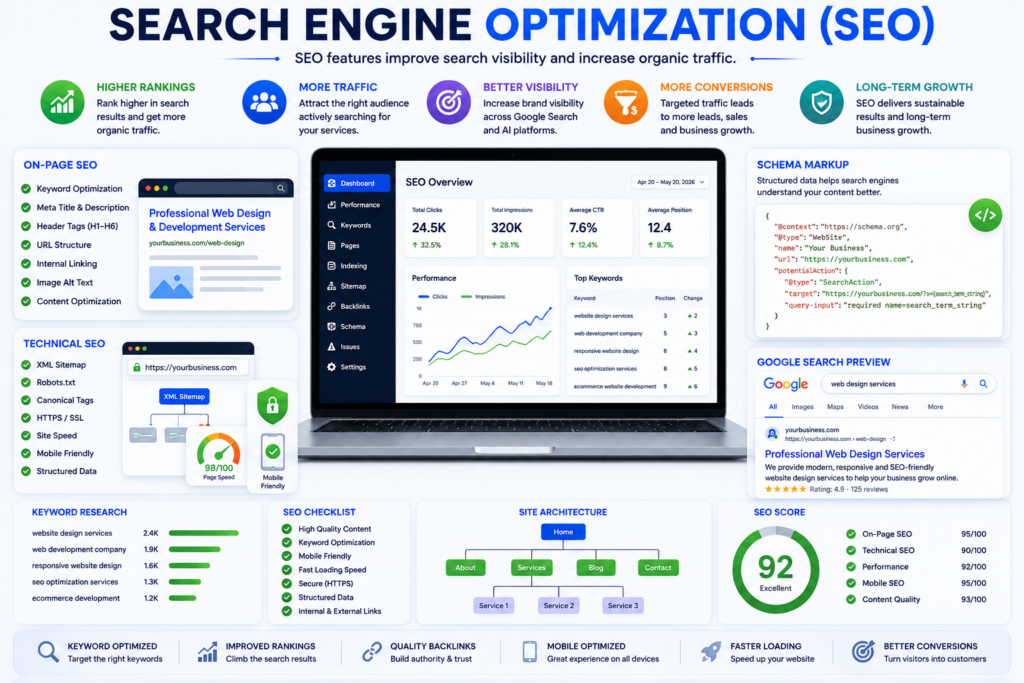
Search Engine Optimization (SEO) helps search engines understand, crawl, index, and rank your website.
A strong SEO foundation should be implemented during website development rather than after launch.
Essential SEO Features
Every website should include:
- SEO-friendly URLs
- Optimized Page Titles
- Meta Descriptions
- Proper Heading Structure
- XML Sitemap
- Robots.txt
- Canonical URLs
- Breadcrumb Navigation
- Internal Linking
- External References
- Optimized Images
- Structured Data
- Schema Markup
- Open Graph Tags
- Twitter Cards
SEO Checklist
| SEO Feature | Recommended |
|---|---|
| SEO-Friendly URLs | ✅ |
| Optimized Title Tags | ✅ |
| Meta Descriptions | ✅ |
| Heading Hierarchy | ✅ |
| XML Sitemap | ✅ |
| Robots.txt | ✅ |
| Canonical URLs | ✅ |
| Internal Linking | ✅ |
| Schema Markup | ✅ |
| Image Optimization | ✅ |
SEO Best Practices
- Use descriptive page titles.
- Write unique meta descriptions.
- Maintain a logical heading structure.
- Add internal links naturally.
- Use descriptive anchor text.
- Optimize images before uploading.
- Publish high-quality original content.
- Avoid duplicate content.
Common SEO Mistakes
- Missing meta descriptions.
- Duplicate page titles.
- Keyword stuffing.
- Poor internal linking.
- Broken links.
- Slow-loading pages.
- Thin content.
- Missing image alt text.
Technical SEO
Technical SEO ensures search engines can efficiently crawl and index your website.
Without proper technical optimization, your content may never achieve its full ranking potential.
Essential Technical SEO Features
- XML Sitemap
- Robots.txt
- Canonical Tags
- Structured Data
- Breadcrumb Navigation
- Custom 404 Page
- Redirect Management
- Crawl Error Monitoring
- Mobile-Friendly Design
- HTTPS Implementation
Technical SEO Checklist
- Validate structured data.
- Remove crawl errors.
- Fix broken links.
- Eliminate duplicate pages.
- Monitor indexing status.
- Improve crawl efficiency.
- Optimize Core Web Vitals.
- Ensure proper canonicalization.
Best Practices
- Submit your XML Sitemap to Google Search Console.
- Monitor crawl errors regularly.
- Keep your URL structure simple.
- Avoid redirect chains.
- Optimize server response times.
Core Web Vitals
Core Web Vitals measure the real-world experience visitors have when interacting with your website.
Improving these metrics results in a faster, smoother, and more enjoyable browsing experience.
Recommended Performance Targets
| Metric | Target |
|---|---|
| Largest Contentful Paint (LCP) | Under 2.5 Seconds |
| Interaction to Next Paint (INP) | Under 200 ms |
| Cumulative Layout Shift (CLS) | Under 0.1 |
Core Web Vitals Optimization Checklist
- Optimize server response time.
- Compress images.
- Enable browser caching.
- Remove unused CSS.
- Reduce JavaScript execution.
- Use lazy loading.
- Optimize web fonts.
- Use a Content Delivery Network (CDN).
Benefits
- Better user experience.
- Improved Google rankings.
- Lower bounce rates.
- Faster page loading.
- Higher conversion rates.
Image Optimization
Images make your website visually appealing, but they should also be optimized for speed and search engines.
Poorly optimized images can slow down your website and negatively impact SEO.
Image Optimization Checklist
- Use WebP format.
- Compress images before uploading.
- Use descriptive filenames.
- Write unique alt text.
- Add image captions where appropriate.
- Enable lazy loading.
- Specify image dimensions.
- Avoid oversized image files.
SEO-Friendly Filename Examples
| Poor Filename | Optimized Filename |
|---|---|
| image1.jpg | website-features-checklist.webp |
| photo.png | responsive-website-design.webp |
| img123.jpg | website-security-features.webp |
| banner.jpg | website-speed-optimization.webp |
Best Practices
- Keep file sizes as small as possible.
- Use meaningful filenames.
- Add descriptive alternative text.
- Place images close to the relevant content.
- Use responsive images for different screen sizes.
Accessibility Features
Website accessibility ensures that everyone, including people with disabilities, can use your website effectively.
An accessible website improves user experience, supports legal compliance, and reaches a wider audience.
Accessibility is no longer optional. It has become an essential part of modern website development.
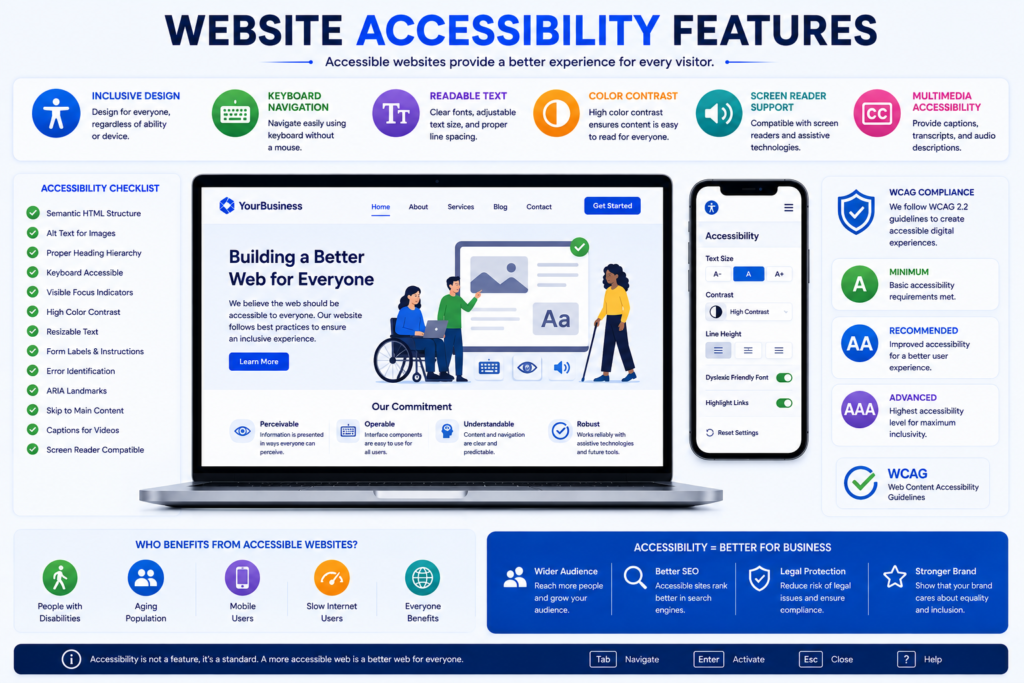
Why Accessibility Matters
An accessible website helps:
- Improve user experience.
- Reach a larger audience.
- Support inclusive design.
- Increase customer satisfaction.
- Improve search engine optimization.
- Meet international accessibility standards.
Essential Accessibility Features
Every professional website should include:
- Alternative (Alt) text for images.
- Proper heading hierarchy.
- Keyboard navigation.
- Screen reader compatibility.
- Sufficient color contrast.
- Descriptive link text.
- Accessible forms.
- Visible keyboard focus indicators.
- ARIA labels where required.
- Video captions and transcripts.
Accessibility Checklist
| Feature | Recommended |
|---|---|
| Image Alt Text | ✅ |
| Keyboard Navigation | ✅ |
| Screen Reader Support | ✅ |
| Proper Heading Structure | ✅ |
| Color Contrast | ✅ |
| Accessible Forms | ✅ |
| ARIA Labels | ✅ |
| Video Captions | ✅ |
| Visible Focus States | ✅ |
Best Practices
- Never rely only on color to communicate information.
- Use descriptive button labels.
- Maintain a logical heading structure.
- Ensure all interactive elements are keyboard accessible.
- Test accessibility regularly.
Common Accessibility Mistakes
- Missing image alt text.
- Poor color contrast.
- Incorrect heading order.
- Unlabeled form fields.
- Small clickable elements.
- Missing keyboard navigation.
Mobile Optimization
Mobile users represent a significant portion of website visitors. Your website should deliver the same excellent experience on smartphones as it does on desktop computers.
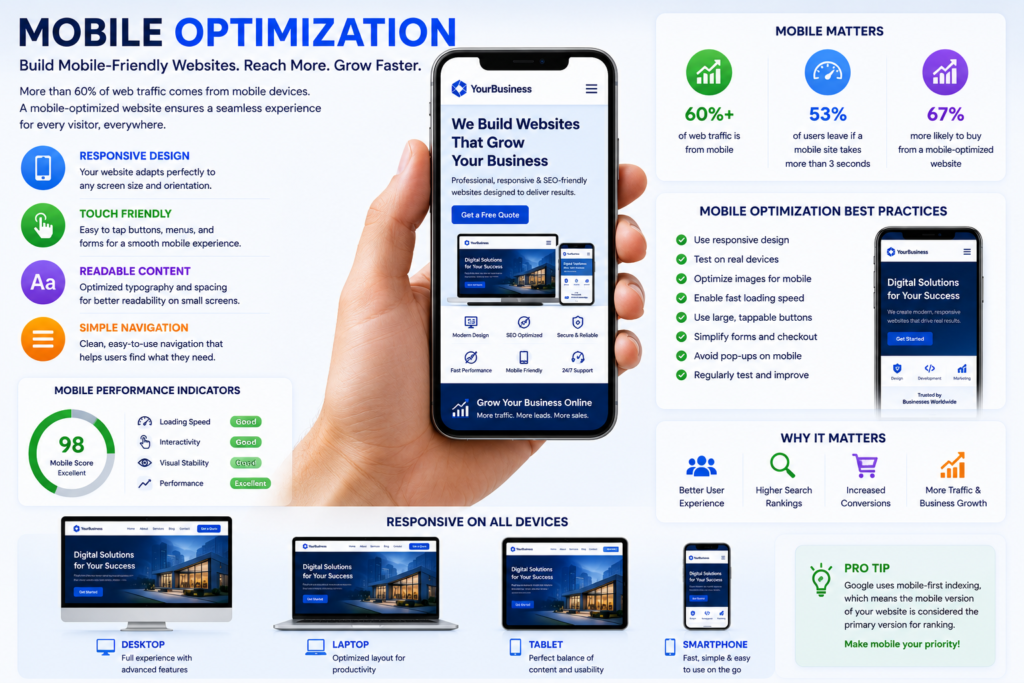
Essential Mobile Features
- Responsive layouts.
- Touch-friendly navigation.
- Fast-loading pages.
- Click-to-call buttons.
- Mobile-friendly forms.
- Optimized typography.
- Lightweight images.
- Sticky navigation.
- Mobile search functionality.
Mobile Optimization Checklist
- Test on Android and iPhone devices.
- Avoid intrusive pop-ups.
- Ensure readable font sizes.
- Optimize buttons for touch interaction.
- Compress mobile images.
- Minimize unnecessary animations.
Best Practices
- Design for mobile users first.
- Reduce page clutter.
- Keep navigation simple.
- Prioritize important content.
- Optimize mobile performance.
Conversion Optimization Features
A professional website should not only attract visitors but also convert them into leads or customers.
Conversion optimization focuses on improving the percentage of visitors who complete meaningful actions.
Essential Conversion Features
- Clear Call-to-Action buttons.
- Contact forms.
- Lead capture forms.
- Live chat.
- WhatsApp integration.
- Online booking system.
- Customer testimonials.
- Trust badges.
- Money-back guarantee.
- Pricing transparency.
Conversion Optimization Checklist
| Feature | Importance |
|---|---|
| Clear CTA | ⭐⭐⭐⭐⭐ |
| Contact Form | ⭐⭐⭐⭐⭐ |
| Testimonials | ⭐⭐⭐⭐⭐ |
| Trust Badges | ⭐⭐⭐⭐ |
| Live Chat | ⭐⭐⭐⭐ |
| Booking System | ⭐⭐⭐⭐ |
| Pricing Information | ⭐⭐⭐⭐ |
Best Practices
- Place CTAs above the fold.
- Use action-oriented language.
- Reduce unnecessary form fields.
- Highlight customer benefits.
- Display trust signals near CTAs.
Common Mistakes
- Hidden CTAs.
- Long contact forms.
- Weak button text.
- Too many distractions.
- Lack of social proof.
Lead Generation Features
Lead generation features help convert website visitors into potential customers by encouraging them to share their contact information.
Essential Lead Generation Features
- Contact form.
- Quote request form.
- Newsletter signup.
- Downloadable resources.
- Consultation booking.
- Live chat.
- WhatsApp integration.
- Callback request.
- Exit-intent popup.
- CRM integration.
Lead Generation Checklist
- Keep forms short.
- Clearly explain the benefits.
- Protect forms from spam.
- Send automatic confirmation emails.
- Integrate with your CRM.
- Track form submissions.
Best Practices
- Offer something valuable in exchange for contact information.
- Use persuasive headlines.
- Display privacy assurances.
- Follow up with leads promptly.
Analytics and Tracking
Without analytics, it is impossible to understand how visitors interact with your website.
Tracking tools provide valuable insights that help improve marketing performance and user experience.
Essential Analytics Tools
- Google Analytics 4 (GA4)
- Google Search Console
- Google Tag Manager
- Microsoft Clarity
- Conversion Tracking
- Event Tracking
- Call Tracking
- Heatmaps
- Scroll Tracking
- Form Analytics
Analytics Checklist
| Tool | Recommended |
|---|---|
| Google Analytics 4 | ✅ |
| Google Search Console | ✅ |
| Google Tag Manager | ✅ |
| Microsoft Clarity | ✅ |
| Conversion Tracking | ✅ |
| Event Tracking | ✅ |
Best Practices
- Track important conversions.
- Monitor traffic sources.
- Analyze user behavior.
- Review search performance regularly.
- Use insights to improve website performance.
AI Search Optimization Features
The way people search for information is changing rapidly. Alongside traditional search engines, millions of users now rely on AI-powered platforms such as ChatGPT, Gemini, Claude, Perplexity, and Microsoft Copilot to find answers.
A modern website should be optimized not only for Google Search but also for AI-generated responses.
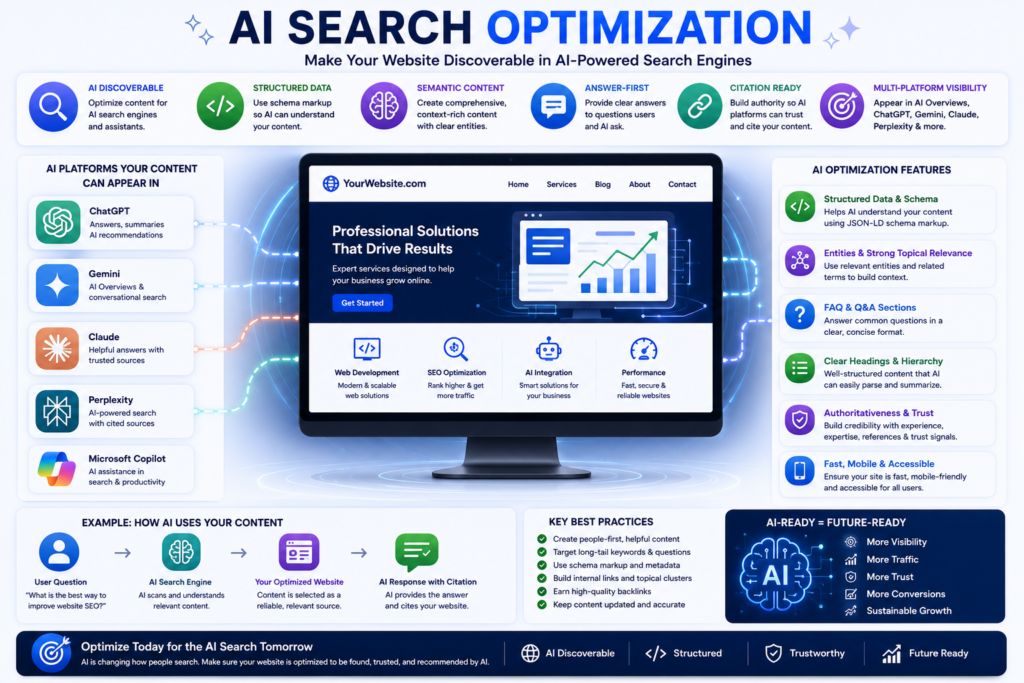
Why AI Optimization Matters
AI systems prefer content that is:
- Well structured.
- Easy to understand.
- Factually accurate.
- Comprehensive.
- Entity-rich.
- Clearly organized.
Proper AI optimization increases the chances of your content being referenced, summarized, or cited by AI-powered search engines.
Essential AI Optimization Features
- Clear heading hierarchy.
- Direct answers to common questions.
- Well-structured paragraphs.
- Entity-rich content.
- Comprehensive topic coverage.
- FAQ sections.
- Comparison tables.
- Step-by-step guides.
- Definition boxes.
- Summary sections.
AI Optimization Checklist
| Feature | Recommended |
|---|---|
| Clear Heading Structure | ✅ |
| Question & Answer Format | ✅ |
| FAQ Section | ✅ |
| Comparison Tables | ✅ |
| Definition Blocks | ✅ |
| Summary Boxes | ✅ |
| Entity Optimization | ✅ |
| Natural Language | ✅ |
Best Practices
- Write for humans first.
- Answer questions directly.
- Organize content logically.
- Cover the topic comprehensively.
- Avoid unnecessary repetition.
- Keep paragraphs concise.
- Support claims with credible sources.
Schema Markup
Schema markup is structured data that helps search engines understand your content more effectively.
It can improve your website’s eligibility for rich results and enhance how your pages appear in search results.
Recommended Schema Types
Every professional business website should consider implementing:
- Organization
- Local Business
- Website
- WebPage
- Article
- Service
- FAQ
- Breadcrumb
- Review
- Product (where applicable)
- Person (Author)
Schema Checklist
| Schema Type | Recommended |
|---|---|
| Organization | ✅ |
| Website | ✅ |
| WebPage | ✅ |
| Article | ✅ |
| FAQ | ✅ |
| Breadcrumb | ✅ |
| Service | ✅ |
| Review | ✅ |
Best Practices
- Validate schema before publishing.
- Keep structured data updated.
- Match schema with visible content.
- Avoid misleading markup.
- Test using Google’s Rich Results Test.
Privacy and Legal Compliance
Every professional website should comply with applicable privacy regulations and clearly communicate how user data is collected, stored, and processed.
Essential Compliance Pages
- Privacy Policy.
- Terms and Conditions.
- Cookie Policy.
- Disclaimer.
- Accessibility Statement.
- Refund Policy (if applicable).
- Shipping Policy (for eCommerce).
- Returns Policy (for eCommerce).
Compliance Checklist
- Display cookie consent banner.
- Secure user data.
- Explain data collection practices.
- Provide contact information.
- Update policies regularly.
Social Proof Features
Social proof demonstrates that real customers trust your products or services.
It helps reduce hesitation and encourages new visitors to take action.
Examples of Social Proof
- Customer testimonials.
- Google Reviews.
- Client success stories.
- Case studies.
- Client logos.
- Video testimonials.
- Awards and certifications.
- Media mentions.
- Industry partnerships.
- User-generated content.
Best Practices
- Use authentic testimonials.
- Include customer names where permission is granted.
- Update reviews regularly.
- Showcase measurable results.
- Highlight recent success stories.
Website Maintenance Features
A website should never be considered “finished.” Regular maintenance keeps it secure, fast, and compatible with evolving technologies.
Essential Maintenance Tasks
- Update CMS.
- Update plugins.
- Update themes.
- Check for broken links.
- Monitor uptime.
- Scan for malware.
- Optimize databases.
- Review analytics.
- Test forms.
- Refresh outdated content.
- Renew SSL certificates.
- Monitor Core Web Vitals.
Monthly Website Maintenance Checklist
| Task | Frequency |
|---|---|
| Backup Website | Daily |
| Security Scan | Weekly |
| Plugin Updates | Weekly |
| Broken Link Check | Monthly |
| Content Review | Monthly |
| SEO Audit | Monthly |
| Core Web Vitals Review | Monthly |
| Performance Testing | Monthly |
Best Practices
- Schedule automatic backups.
- Test updates before deploying them to a live website.
- Monitor website performance continuously.
- Keep all software up to date.
- Remove unused plugins and themes.
- Review analytics reports every month.
Website Launch Checklist
Before publishing your website, perform one final review to ensure everything is functioning correctly.
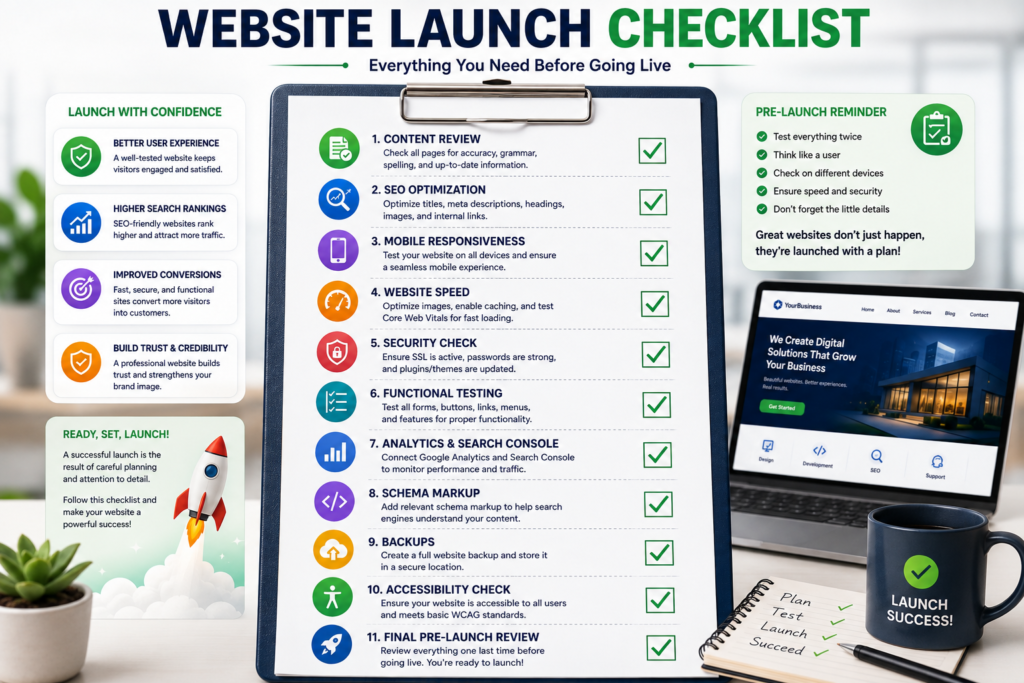
Pre-Launch Checklist
- Verify all pages.
- Test every form.
- Review internal links.
- Check external links.
- Optimize all images.
- Verify responsive design.
- Test website speed.
- Install SSL certificate.
- Submit XML Sitemap.
- Configure Google Analytics 4.
- Configure Google Search Console.
- Validate schema markup.
- Review meta titles and descriptions.
- Test on multiple browsers.
- Test on multiple devices.
Final Quality Assurance Checklist
| Item | Complete |
|---|---|
| Responsive Design | ☐ |
| Website Speed | ☐ |
| SSL Certificate | ☐ |
| SEO Optimization | ☐ |
| Technical SEO | ☐ |
| Schema Markup | ☐ |
| Analytics Setup | ☐ |
| Contact Forms | ☐ |
| Internal Links | ☐ |
| Accessibility Review | ☐ |
| Security Review | ☐ |
| Content Proofreading | ☐ |
Professional Recommendation
Never launch a website without completing a comprehensive quality assurance review. Even small issues can negatively affect user experience, search performance, and conversions.
Frequently Asked Questions (FAQs)
What is a Website Features Checklist?
A Website Features Checklist is a comprehensive list of essential design, functionality, security, SEO, performance, accessibility, and conversion features that should be implemented before launching a website. It helps ensure your website is user-friendly, search-engine optimized, secure, and capable of supporting long-term business growth.
Why is a Website Features Checklist important?
A structured checklist reduces development mistakes, improves website quality, enhances user experience, strengthens security, supports better search engine rankings, and increases conversion opportunities.
What are the most important features every business website should have?
Every professional business website should include:
- Responsive design.
- Fast loading speed.
- Professional navigation.
- SEO optimization.
- HTTPS security.
- Contact page.
- About page.
- Service pages.
- Strong Call-to-Action (CTA).
- Customer testimonials.
- Analytics integration.
- Mobile optimization.
- Accessibility features.
How many pages should a professional business website have?
Although requirements vary depending on the business, most professional websites should include:
- Home
- About
- Services
- Portfolio
- Pricing (if applicable)
- Blog
- FAQ
- Contact
- Privacy Policy
- Terms and Conditions
Additional pages can be created for individual services, industries, locations, case studies, and resources.
Why is responsive design important?
Responsive design ensures your website functions correctly across desktops, tablets, and smartphones. It improves user experience, supports mobile-first indexing, and helps increase conversions.
How does website speed affect SEO?
Website speed directly influences user experience and search engine rankings. Faster websites generally experience lower bounce rates, higher engagement, and better conversion rates.
What security features should every website include?
Every website should implement:
- SSL Certificate (HTTPS)
- Web Application Firewall (WAF)
- Daily Backups
- Malware Scanning
- Two-Factor Authentication
- Login Protection
- Strong Password Policies
- Spam Protection
Why is technical SEO important?
Technical SEO helps search engines crawl, understand, and index your website efficiently. It provides the foundation required for strong organic visibility.
What is schema markup?
Schema markup is structured data that helps search engines understand your content more effectively. It can improve your eligibility for rich results and enhance your visibility in search results.
How often should a website be maintained?
Routine maintenance should be performed throughout the year.
Recommended schedule:
| Task | Frequency |
|---|---|
| Website Backup | Daily |
| Security Monitoring | Weekly |
| Plugin Updates | Weekly |
| Performance Testing | Monthly |
| SEO Audit | Monthly |
| Content Review | Monthly |
| Technical Audit | Quarterly |
Which website features improve conversion rates?
Features that commonly improve conversions include:
- Strong CTAs.
- Contact forms.
- Live chat.
- Customer testimonials.
- Case studies.
- Trust badges.
- Online booking.
- Pricing transparency.
- FAQ sections.
- Simple navigation.
What features improve user experience?
An excellent user experience is supported by:
- Fast-loading pages.
- Responsive design.
- Clear navigation.
- Readable typography.
- Accessible design.
- Consistent layouts.
- Helpful content.
- Intuitive page structure.
How can I prepare my website for AI-powered search?
To improve visibility across AI-powered search platforms:
- Write comprehensive content.
- Use a logical heading hierarchy.
- Answer questions directly.
- Include FAQ sections.
- Add comparison tables.
- Implement structured data.
- Build topical authority.
- Keep information accurate and updated.
Conclusion
Building a successful website requires much more than an attractive design. Every professional website should combine outstanding user experience, responsive layouts, strong security, technical excellence, search engine optimization, accessibility, and conversion-focused functionality.
Following a structured Website Features Checklist helps ensure that every important component is implemented before launch. It reduces costly development mistakes, improves search visibility, strengthens customer trust, and creates a better overall experience for visitors.
Whether you’re launching a brand-new website or redesigning an existing one, investing time in proper planning will help create a website that supports long-term business growth and remains competitive in an increasingly AI-driven digital landscape.
Final Website Features Checklist
Before launching your website, confirm that you have completed the following:
- Responsive website design.
- Fast-loading pages.
- Professional navigation.
- Optimized homepage.
- About page.
- Service pages.
- Contact page.
- Strong Call-to-Action buttons.
- Customer testimonials.
- SSL Certificate.
- Technical SEO.
- On-page SEO.
- Schema markup.
- XML Sitemap.
- Robots.txt.
- Mobile optimization.
- Accessibility improvements.
- Analytics integration.
- AI optimization.
- Security review.
- Website backup.
- Performance testing.
- Content proofreading.
- Internal linking.
- External references.
- Privacy and legal compliance.
Completing this checklist provides a strong foundation for launching a professional, high-performing, and future-ready website.
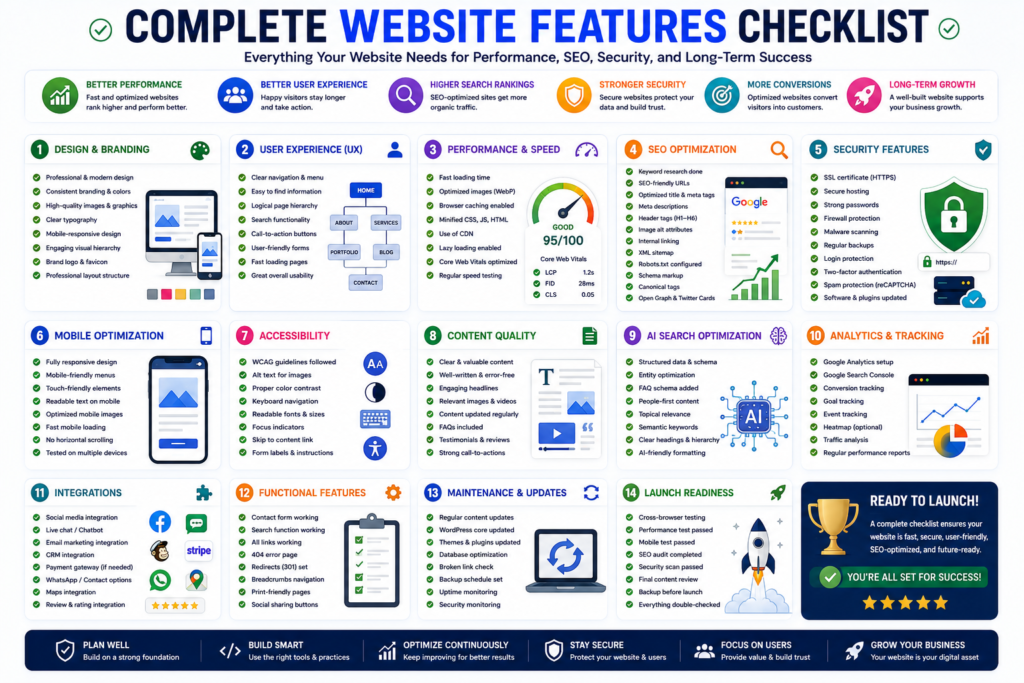
Related Articles You May Also Find Helpful
- How to Build a Website in 2027
- Complete Domain Name Guide 2026
- Technical SEO Guide 2026
- Complete Google Search Console Guide 2026–2027
- Website Mistakes to Avoid
- Professional Website Security Services
- Shopify Guide for Beginners 2026
- Professional Website Development & SEO Services
Recommended External References
- Google Helpful Content Guidance
- Google PageSpeed Insights
- Google Search Console Documentation
- Core Web Vitals
- Schema.org
- W3C Web Accessibility Initiative
- MDN Web Docs
- OWASP
- Let’s Encrypt
- Google Lighthouse
- Google Business Profile Help
- Bing Webmaster Tools
- Cloudflare Learning Center
- WordPress Developer Resources
- WCAG 2.2 Guidelines
Recommended Schema Types
Implement the following structured data where applicable:
- Article
- FAQ
- Organization
- Website
- WebPage
- Service
- Breadcrumb
- Person
- Review
- Local Business
- Product (if applicable)
Next Steps
After completing this Website Features Checklist:
- Audit your existing website.
- Identify missing features.
- Prioritize high-impact improvements.
- Test your website across multiple devices.
- Monitor performance regularly.
- Update your content consistently.
- Review SEO and security every month.
- Continue optimizing for both traditional search engines and AI-powered search experiences.
A website is never truly finished. Continuous improvement, regular maintenance, and a user-first approach are the keys to long-term online success.
Key Takeaways
Before publishing your website, ensure that it:
- Uses responsive web design.
- Loads quickly on all devices.
- Implements HTTPS security.
- Includes clear navigation.
- Contains strong calls-to-action.
- Provides valuable content.
- Follows SEO best practices.
- Meets accessibility standards.
- Tracks user behavior using analytics.
- Is optimized for AI-powered search engines.
Following this Website Features Checklist helps create a professional website that is secure, user-friendly, search-engine optimized, and designed for long-term business growth.
Website Features Checklist Summary
| Category | Status |
|---|---|
| Responsive Design | ✅ |
| Website Speed | ✅ |
| Homepage Optimization | ✅ |
| Navigation | ✅ |
| About Page | ✅ |
| Service Pages | ✅ |
| Contact Page | ✅ |
| Call-to-Action | ✅ |
| Trust Signals | ✅ |
| Website Security | ✅ |
| SEO | ✅ |
| Technical SEO | ✅ |
| Accessibility | ✅ |
| Mobile Optimization | ✅ |
| Conversion Optimization | ✅ |
| Lead Generation | ✅ |
| Analytics | ✅ |
| AI Optimization | ✅ |
| Website Maintenance | ✅ |
Final Thoughts
A successful website is never built by chance. It results from careful planning, strategic implementation, and continuous improvement.
By following this Website Features Checklist, businesses can create websites that deliver outstanding user experiences, rank well in search engines, perform efficiently across devices, and generate measurable business results.
Remember that your website is a long-term investment. Regular updates, performance monitoring, security improvements, and content optimization will help ensure it continues to meet user expectations and evolving search engine requirements.
Investing in quality website development today creates a stronger digital presence for tomorrow.
You can add this section near the end of your article before the Conclusion or Call to Action.
Related Articles You May Also Like
Continue expanding your knowledge with these in-depth guides and professional resources from Marjan Services.
- Complete Domain Name Guide (2026): Everything You Need to Know Before Registering a Domain
https://marjanservices.tech/domain-name-guide/ - Technical SEO Guide (2026): Complete Enterprise SEO Handbook
https://marjanservices.tech/technical-seo-guide-2026/ - Complete Google Search Console Guide (2026–2027): Powerful SEO Tips for Higher Rankings
https://marjanservices.tech/google-search-console-guide/ - Website Mistakes to Avoid: 25 Costly Problems Hurting Your Traffic, Trust, and Sales
https://marjanservices.tech/website-mistakes-to-avoid/ - Website Security Services
https://marjanservices.tech/website-security/ - Shopify Guide for Beginners (2026): The Ultimate Easy Guide to Plans, Costs, Setup, Payments, SEO, and Sales
https://marjanservices.tech/shopify-guide-for-beginners-2026/ - Professional Website Development & SEO Services for Businesses Worldwide
https://marjanservices.tech/
Recommended External References
- Google Search Essentials
https://developers.google.com/search/docs/essentials
Reference: Website SEO best practices, indexing, crawling, and Google Search requirements. - Google Core Web Vitals Guide
https://developers.google.com/search/docs/appearance/core-web-vitals
Reference: Website speed, loading performance, INP, LCP, and CLS optimization. - Google Page Experience Documentation
https://developers.google.com/search/docs/appearance/page-experience
Reference: Mobile usability, HTTPS, Core Web Vitals, and user experience signals. - Google Search Technical Requirements
https://developers.google.com/search/docs/essentials/technical
Reference: Crawlability, indexing, robots.txt, HTTP status codes, and technical SEO. - MDN Web Docs. Web Performance Best Practices
https://developer.mozilla.org/en-US/docs/Learn_web_development/Extensions/Performance/Best_practices
Reference: Website speed optimization, caching, JavaScript, CSS, and image optimization. - MDN. Understanding WCAG Accessibility Guidelines
https://developer.mozilla.org/en-US/docs/Web/Accessibility/Guides/Understanding_WCAG
Reference: Website accessibility and inclusive design standards. - Schema.org
https://schema.org/
Reference: Structured data and schema markup implementation for search engines. - PageSpeed Insights
https://pagespeed.web.dev/
Reference: Analyze website performance and Core Web Vitals. - Google Search Console
https://search.google.com/search-console/about
Reference: Website indexing, performance monitoring, and SEO diagnostics. - Google Lighthouse
https://developer.chrome.com/docs/lighthouse/overview
Reference: Website audits for SEO, accessibility, performance, and best practices. - W3C Web Accessibility Initiative (WAI)
https://www.w3.org/WAI/
Reference: International accessibility standards and best practices. - OWASP Top 10
https://owasp.org/www-project-top-ten/
Reference: Website security risks and secure development practices. - Web.dev
https://web.dev/
Reference: Modern web development, performance, responsive design, and user experience. - Google Analytics
https://analytics.google.com/
Reference: Website traffic analysis, user behavior, and conversion tracking. - Google Business Profile
https://www.google.com/business/
Reference: Local business visibility and online presence.
3 Comments