- Written by Syed Abdul Quddus
- Published: 13 July 2026
- Last Updated: 21 Sep 2026
- Estimated Reading Time: 50 Minutes
Table of Contents
Introduction:
A website can look polished, use a premium theme, and contain dozens of pages while still failing to generate meaningful business results. Visitors may arrive but leave without understanding the offer. Search impressions may increase without producing enquiries.
Contact forms may exist but remain unused because the website has not created enough clarity or trust.
These failures rarely come from one dramatic problem. They usually result from several smaller mistakes across website strategy, content, design, search optimization, performance, accessibility, credibility, and conversion planning.
The most expensive website mistakes are also not always visible. A business may focus on colors and animations while overlooking unclear service positioning, poor mobile usability, weak internal links, unsupported claims, inaccurate tracking, complicated forms, or accounts that are not properly owned by the business.
This guide explains 25 important website mistakes to avoid, how each mistake affects customers and business performance, and what should be done to correct it.
It is intended for business owners, freelancers, marketers, website managers, designers, developers, and anyone planning or reviewing a professional website.
By the end, you should be able to distinguish between a minor content issue, a technical problem, a conversion weakness, and a structural failure that may justify a more substantial redesign.
Who Should Read This Guide
This guide is designed for anyone who wants to build, manage, improve, or redesign a professional website.
Whether you are launching your first business website or reviewing an existing one, understanding these common website mistakes can help you improve user experience, search visibility, trust, and conversions.
This guide is especially useful for:
- ✔ Business Owners
- ✔ Small Business Owners
- ✔ Freelancers
- ✔ Website Developers
- ✔ WordPress Developers
- ✔ Digital Agencies
- ✔ UX Designers
- ✔ SEO Specialists
- ✔ Content Writers
- ✔ Marketing Professionals
- ✔ Students Learning Web Development
- ✔ Startup Founders
- ✔ E-commerce Store Owners
- ✔ Bloggers
- ✔ Website Managers
Key Takeaways
- ✔ The 25 most common website mistakes that reduce traffic, trust, and conversions.
- ✔ How to identify problems before investing in a redesign.
- ✔ Website planning mistakes that affect long-term business growth.
- ✔ SEO mistakes that reduce search visibility.
- ✔ User experience mistakes that frustrate visitors.
- ✔ Conversion mistakes that prevent enquiries and sales.
- ✔ Website performance and Core Web Vitals best practices.
- ✔ Website trust signals that improve credibility.
- ✔ A practical website audit checklist.
- ✔ Expert recommendations for prioritizing improvements.
- ✔ Guidance on when optimization is enough and when a redesign is justified.
By the end of this guide, you will have a clear action plan for identifying, prioritizing, and fixing the website issues that matter most to your business.
Why Website Mistakes Cost More Than Poor Design
A business website has several jobs.
It must help the right people discover the business, understand the offer, trust the provider, find relevant information, and complete an appropriate action.
That action might be requesting a quote, placing an order, booking an appointment, calling the business, downloading a resource, or visiting a physical location.
A weakness at any stage can damage the entire journey.
For example, good search rankings cannot compensate for unclear service pages. An attractive design cannot compensate for slow loading. Strong content cannot compensate for a broken enquiry form. A prominent call to action cannot compensate for the absence of evidence of trust.
The real website journey is:
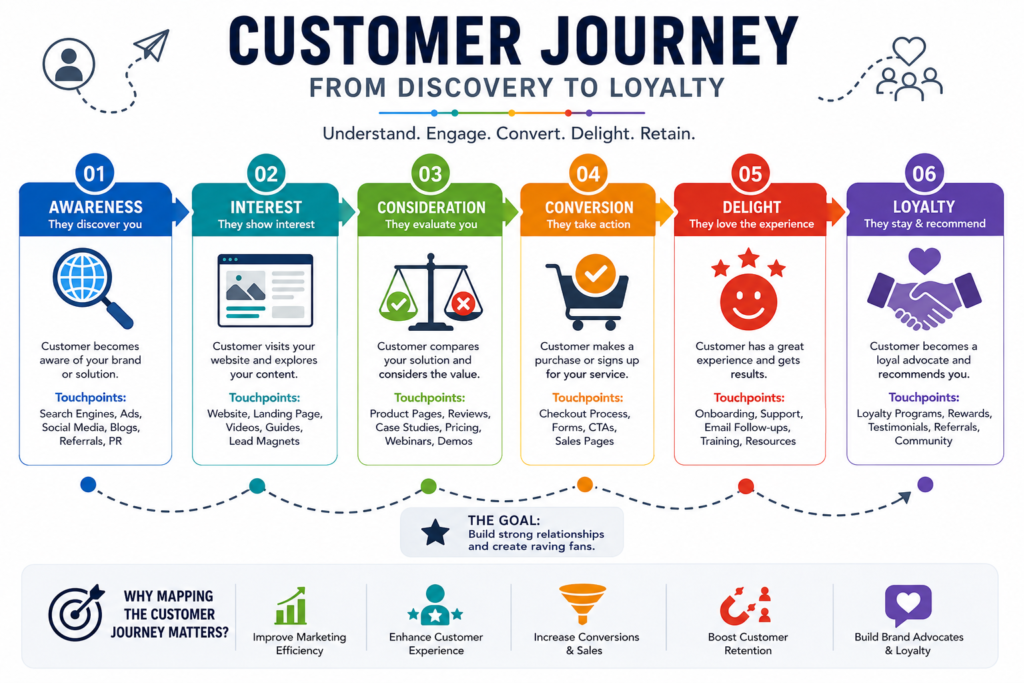
Search or referral → First impression → Relevance → Trust → Understanding → Action → Follow up
This is why website evaluation should not begin with the question, “Does the website look good?”
It should begin with four more useful questions:
- Can the right customers find it?
- Can they immediately understand the offer?
- Do they have enough evidence to trust the business?
- Can they complete the next step without difficulty?
Website Problem Priority Matrix
Not every website problem deserves the same level of attention. Some issues immediately affect traffic, trust, conversions, or security, while others are cosmetic improvements that can be addressed later. Use the following priority matrix to decide which problems should be fixed first.
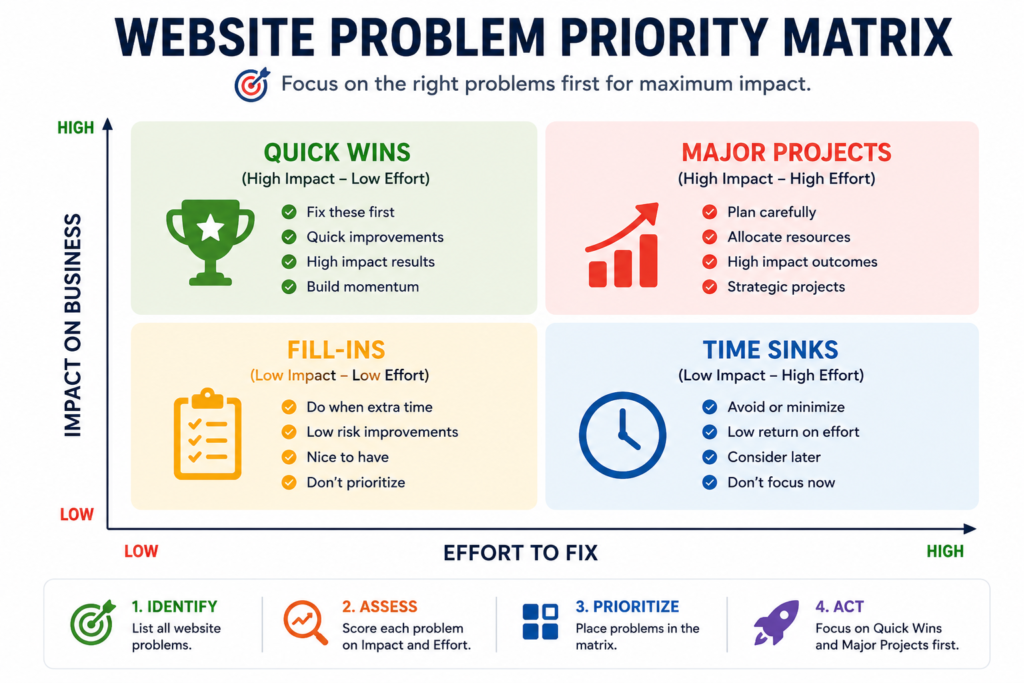
| Priority | Type of Problem | Examples | Recommended Action |
|---|---|---|---|
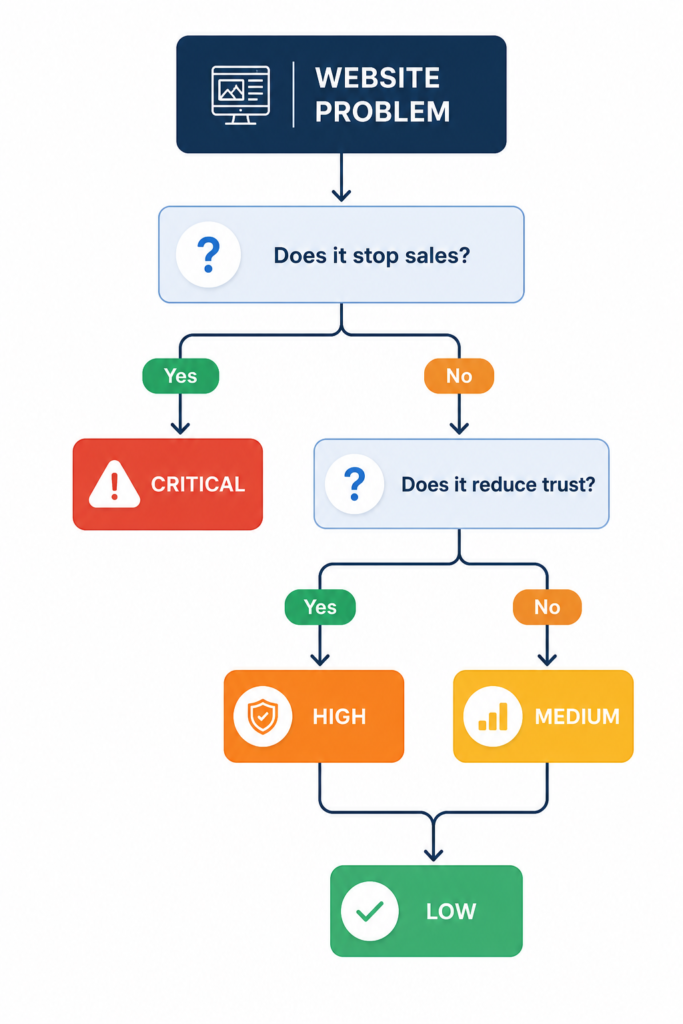
| Critical | Prevents access, action, security, or ownership | Broken checkout, failed form, malware warning, expired domain, lost administrator access | Fix immediately |
| High | Damages trust, leads, sales, or important search pages | Unclear offer, poor mobile usability, misleading claims, very slow service pages | Address first |
| Medium | Reduces usability or organic growth over time | Weak internal links, outdated content, confusing secondary navigation | Add to the next improvement cycle |
| Low | Primarily cosmetic and does not block the user journey | Minor spacing inconsistencies, decorative image changes | Correct after higher impact work |
How to Use This Matrix
Do not try to fix every website issue at the same time. Start by identifying the problems that have the greatest impact on your business and your visitors.
Use this simple process:
- Review every important page on your website.
- List all identified problems.
- Estimate how many visitors are affected.
- Identify whether the issue blocks traffic, trust, enquiries, sales, or usability.
- Assign a priority level using the matrix above.
- Fix Critical and High-priority problems before working on Medium or Low-priority improvements.
- Test the results after each major change.
This approach helps you spend time and budget on improvements that create the greatest business value instead of focusing on cosmetic changes.
Expert Tip
Many businesses redesign their entire website because of small visual issues while ignoring more serious problems, such as unclear messaging, poor calls to action, slow loading, or broken enquiry forms. Always prioritize business impact over appearance.
A useful prioritization formula is:
Priority = Business impact × Number of affected users × Frequency of the problem
A problem should move higher in the repair queue when it affects a commercially important page, prevents a core customer action, or appears repeatedly across the website.
How to Diagnose Website Problems Before Making Changes
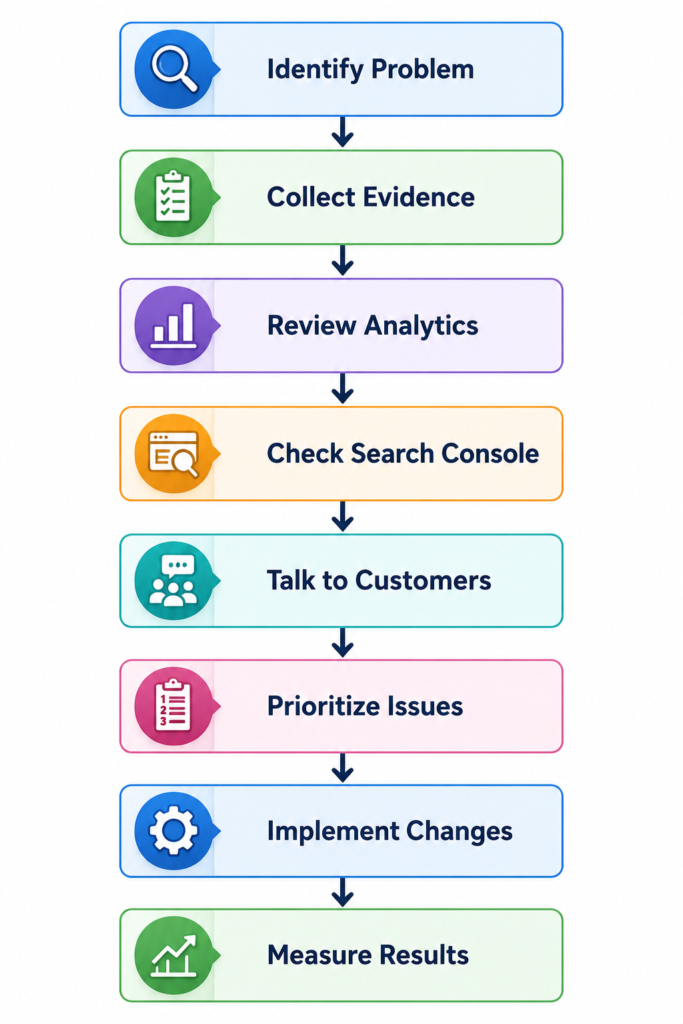
Avoid redesigning pages based only on personal taste. Begin with evidence.
Review Google Search Console to understand which searches generate impressions and clicks. Check analytics to identify important landing pages, device categories, enquiry paths, and abandonment points. Test forms, phone links, email links, menus, checkout steps, and buttons manually.
You should also speak to real customers or staff members who communicate with customers. Ask what people misunderstand, what questions they repeatedly ask, and what prevents them from making a decision.
Diagnostic Table:
Use this diagnostic sequence:
| Diagnostic Area | Key Question |
|---|---|
| Discovery | Can search engines find and understand the page? |
| Relevance | Does the page satisfy the visitor’s search intent? |
| Clarity | Can visitors understand the offer quickly? |
| Trust | Is there credible evidence supporting the claims? |
| Usability | Can visitors navigate and use the page easily? |
| Conversion | Is the next step visible, appropriate, and simple? |
| Measurement | Can important actions be tracked accurately? |
Once the actual weakness is known, you can improve the website without wasting money on unnecessary features.
Quick Summary
- ✔ Always diagnose the problem before redesigning your website.
- ✔ Base decisions on evidence, not assumptions.
- ✔ Review Google Analytics to understand visitor behaviour.
- ✔ Check Google Search Console for search performance and indexing issues.
- ✔ Talk to real customers to identify usability problems.
- ✔ Prioritize high-impact issues before making cosmetic improvements.
- ✔ Test every major change and measure the results.
A successful website improvement project starts with understanding the real problem, not guessing the solution. Careful diagnosis helps you invest time and budget where they create the greatest business value.
Expert Tip
Never redesign a website simply because it looks outdated. Many websites achieve better business results through improvements to content, navigation, trust signals, and conversion paths without requiring a complete rebuild.
Illustrative Scenario: Traffic Without Enquiries
Consider a local service website receiving regular impressions and clicks, but very few quotation requests.
The owner may assume that more traffic is required. A closer review could reveal a different sequence:
- The search query matches the service.
- The visitor lands on the correct page.
- The headline describes the company rather than the customer’s problem.
- No pricing guidance, process, work examples, or response expectations are available.
- The contact form contains twelve required fields.
- Form submissions are not being measured.
In this scenario, publishing more articles may not solve the underlying problem. The higher priority is improving the service page’s clarity, trust evidence, enquiry process, and conversion tracking.
This is an illustrative scenario, not a claim about a specific client or website.
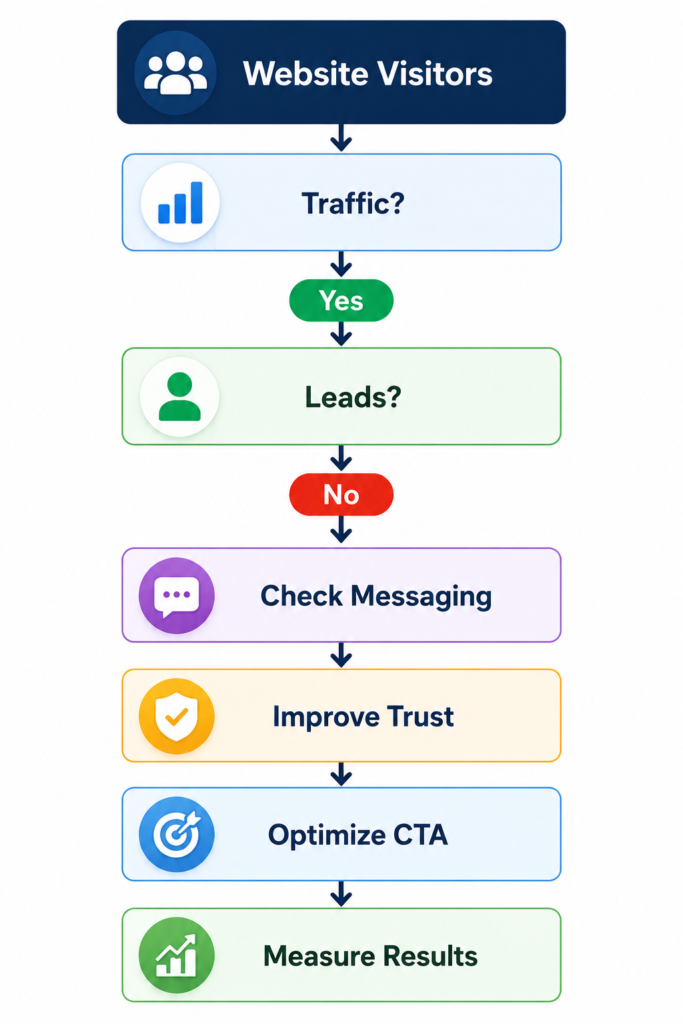
Scenario 1: Traffic but No Leads
Situation
A local business website receives regular traffic from Google, but almost nobody submits the contact form or requests a quotation.
Possible Causes
- Weak value proposition.
- Unclear calls to action.
- No trust signals.
- Poor service descriptions.
- Complicated enquiry form.
Recommended Action
Review the landing page, improve messaging, simplify the contact process, add trust elements such as testimonials or portfolio examples, and measure conversion performance before considering a complete redesign.
Lesson Learned
Traffic alone does not generate customers. A website must clearly communicate value and guide visitors toward taking action.
Scenario 2: High Bounce Rate
Situation
Visitors arrive on the website but leave within a few seconds without viewing additional pages.
Possible Causes
- Slow loading pages.
- Confusing navigation.
- Weak page layout.
- Poor mobile experience.
- Content that does not match search intent.
Recommended Action
Review page speed, improve navigation, strengthen page introductions, and ensure the content answers the visitor’s original search query.
Lesson Learned
High bounce rates often indicate that the page is failing to meet visitor expectations rather than simply attracting the wrong audience.
Scenario 3: Slow Website Performance
Situation
The website appears professional but takes several seconds to load, especially on mobile devices.
Possible Causes
- Large uncompressed images.
- Too many plugins.
- Heavy JavaScript.
- Poor hosting.
- No caching or optimization.
Recommended Action
Compress images, remove unnecessary scripts, optimize Core Web Vitals, enable caching, and review hosting performance.
Lesson Learned
Even well-designed websites lose potential customers when loading times create frustration before visitors can engage with the content.
The following scenarios are illustrative examples designed to explain common website problems. They do not describe real businesses or actual client projects.
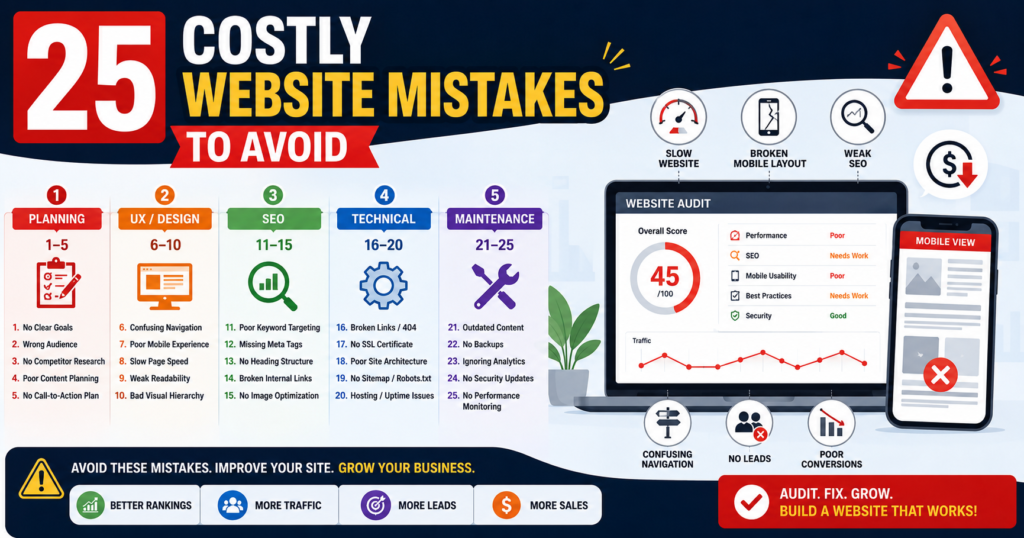
25 Website Mistakes to Avoid
The following website mistakes can affect search visibility, customer trust, usability, enquiries, sales, and long-term business performance. Each problem should be evaluated according to its actual impact on users rather than its visual appearance alone.
1. Starting Without Clear Business Goals
Problem
One of the most expensive website planning mistakes is beginning with themes, colors, animations, or page layouts before deciding what the website must accomplish.
A website without defined goals often becomes a disconnected collection of pages rather than a coordinated business and customer journey.
Business Impact
When goals are unclear, the website may attract visitors without generating meaningful actions. Businesses may also spend money on features that do not support enquiries, sales, bookings, subscriptions, or other measurable outcomes.
Root Cause
This problem commonly occurs when website planning begins with design preferences instead of business requirements. Stakeholders may focus on how the website should look before agreeing on its audience, purpose, priorities, and conversion objectives.
How to Fix
Define one primary objective and several supporting objectives before design or development begins.
For example:
Primary objective: Generate qualified website development enquiries.
Supporting objectives:
- Explain the available services.
- Demonstrate relevant expertise.
- Answer common customer concerns.
- Present authentic work examples.
- Encourage consultation or quotation requests.
Each important page should support at least one defined business objective.
Expert Tip
Do not measure website success only through page views. Define meaningful outcomes such as enquiries, bookings, purchases, calls, downloads, or completed forms.
2. Designing Before Researching the Audience
Problem
Businesses sometimes create the website they personally prefer instead of the website their customers actually need.
This may result in complicated language, irrelevant visuals, confusing navigation, or content that assumes too much prior knowledge.
Business Impact
A website that does not reflect customer needs can create confusion, reduce engagement, weaken trust, and prevent potential customers from completing the next step.
Root Cause
The underlying cause is usually limited audience research. The business may not have documented its ideal customers, their concerns, decision criteria, language, level of knowledge, or preferred communication methods.
How to Fix
Research and document:
- Who the intended customer is.
- What problem does the customer want to solve?
- Which words does the customer use to describe that problem?
- What concerns delay the buying decision?
- What evidence creates confidence?
- Which action is the customer ready to take?
- Which devices and channels does the customer commonly use?
Use customer conversations, enquiry records, search queries, feedback, and competitor reviews to improve audience understanding.
Expert Tip
Customer research should influence page structure, terminology, examples, calls to action, and trust elements. It should not be limited to demographic information.
3. Failing to Explain What the Business Does
Problem
Visitors should not need to study several paragraphs before understanding what the business provides.
Headlines such as “Transforming Ideas Into Digital Excellence” may sound attractive, but they do not clearly identify the service, customer, location, or outcome.
Business Impact
Unclear messaging increases uncertainty. Visitors may leave because they cannot quickly determine whether the business can solve their problem.
This can reduce enquiries even when the website receives relevant traffic.
Root Cause
Businesses often use broad marketing language because they want to sound creative or premium. However, this language may replace the specific information customers actually need.
How to Fix
Use a clear value proposition containing:
Service + Audience + Outcome + Differentiator
Example:
Professional WordPress website development for small businesses that need faster pages, clearer customer journeys, and more qualified enquiries.
The first visible section should normally explain:
- What the business provides.
- Who it serves.
- What problem does it solve?
- Why is the solution useful?
- What the visitor should do next.
Expert Tip
Test the homepage headline with someone unfamiliar with the business. If that person cannot explain the offer within a few seconds, the message needs improvement.
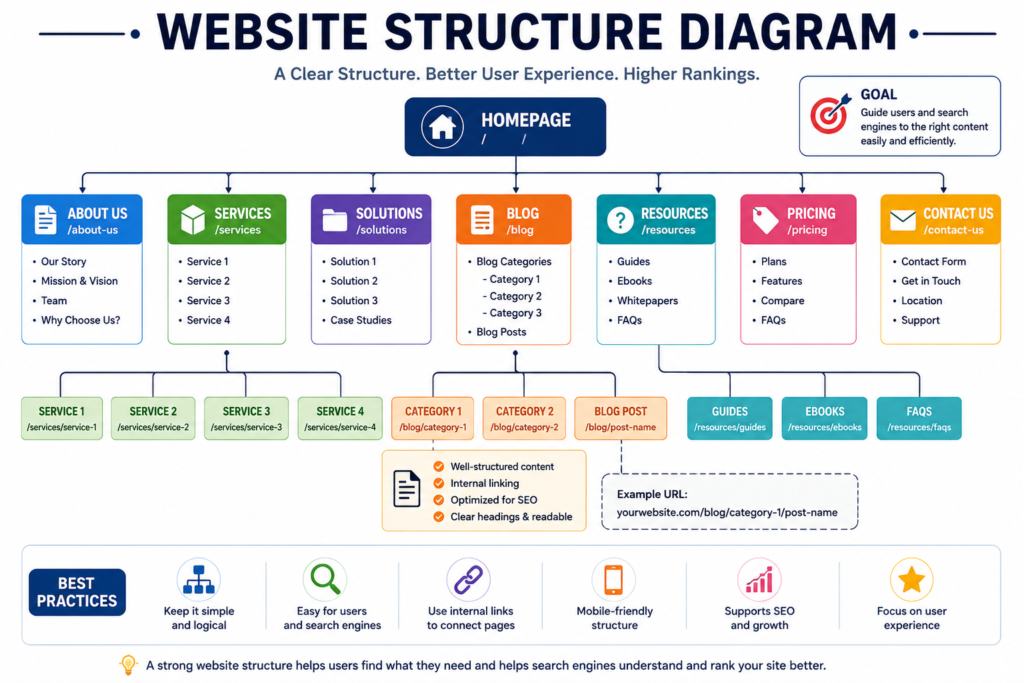
4. Using a Confusing Website Structure
Problem
Poor information architecture forces visitors to guess where pages, services, and important information are located.
Common issues include overcrowded menus, vague labels, hidden service pages, duplicated categories, orphan pages, and unrelated services combined on one page.
Business Impact
Confusing structure can increase abandonment, reduce page discovery, weaken internal linking, and make it harder for search engines to understand relationships between pages.
Root Cause
The structure is often based on internal departments, personal preferences, or the order in which content was created, rather than the way customers search and make decisions.
How to Fix
Create a logical hierarchy such as:
Home → Services → Individual Service Page → Supporting Information → Contact
Use familiar labels, including:
- Services.
- About.
- Portfolio.
- Pricing.
- Resources.
- Blog.
- Contact.
Create dedicated pages for important services when they serve different audiences, problems, or search intentions.
Expert Tip
A visitor should usually be able to reach an important service or contact page within a small number of clear steps. Simplicity is more valuable than clever navigation labels.
5. Prioritizing Appearance Over Usability
Problem
A visually impressive website can still be difficult to understand or use.
Oversized animations, moving backgrounds, automatic video, decorative fonts, unusual scrolling, low contrast, and hidden menus may distract visitors from the main message.
Business Impact
Design elements that compete for attention can reduce comprehension, slow down the website, create accessibility problems, and prevent users from finding important actions.
Root Cause
This problem occurs when design decisions are made to impress stakeholders rather than support the visitor’s task.
How to Fix
Evaluate every visual element by asking:
- Does it improve understanding?
- Does it establish visual hierarchy?
- Does it support trust?
- Does it guide the next action?
- Does it work on small screens?
- Can it be used with a keyboard?
- Does it negatively affect loading performance?
Remove visual effects that increase complexity without improving the customer journey.
Expert Tip
Good design should make decisions easier. If a design element attracts more attention than the service, message, or call to action, it may be working against the business.
Top Website Planning Mistakes
Table:
| Common Mistake | Business Risk | Priority |
|---|---|---|
| No business goals | Poor direction | Critical |
| No audience research | Wrong messaging | High |
| Unclear value proposition | Lost enquiries | High |
| Poor navigation | Bad UX | High |
| Design over usability | Lower conversions | Medium |
Key Lesson:
A successful website starts with strategy rather than design. Businesses that clearly define their goals, audience, messaging, and structure are more likely to create websites that attract qualified visitors and generate meaningful enquiries.
Expert Insight
Businesses often spend time improving visual design while overlooking the structural issues that have a greater impact on search visibility, customer trust, and conversions. Solving high-priority problems first usually produces better long-term results than making cosmetic changes.
6. Delivering a Poor Mobile Experience
Problem
Mobile design is not simply a desktop layout compressed onto a smaller screen.
Tiny buttons, crowded navigation, horizontal scrolling, intrusive popups, oversized headings, and difficult forms make mobile use frustrating.
Business Impact
Poor mobile usability can reduce enquiries, calls, purchases, and engagement. It may also create a negative first impression for users who primarily access the website through phones.
Root Cause
Websites are often designed and approved on desktop screens, while mobile testing receives limited attention or is performed only through a page-builder preview.
How to Fix
Test important pages on real mobile devices.
Check:
- Text readability.
- Button spacing.
- Menu operation.
- Image scaling.
- Form completion.
- Tap-to-call links.
- Sticky elements.
- Popup behaviour.
- Check out usability.
- Performance on mobile data.
Prioritize the tasks mobile users are most likely to complete.
Expert Tip
Test the complete journey, not just the homepage. A mobile homepage may work properly while the service page, form, cart, or checkout remains difficult to use.
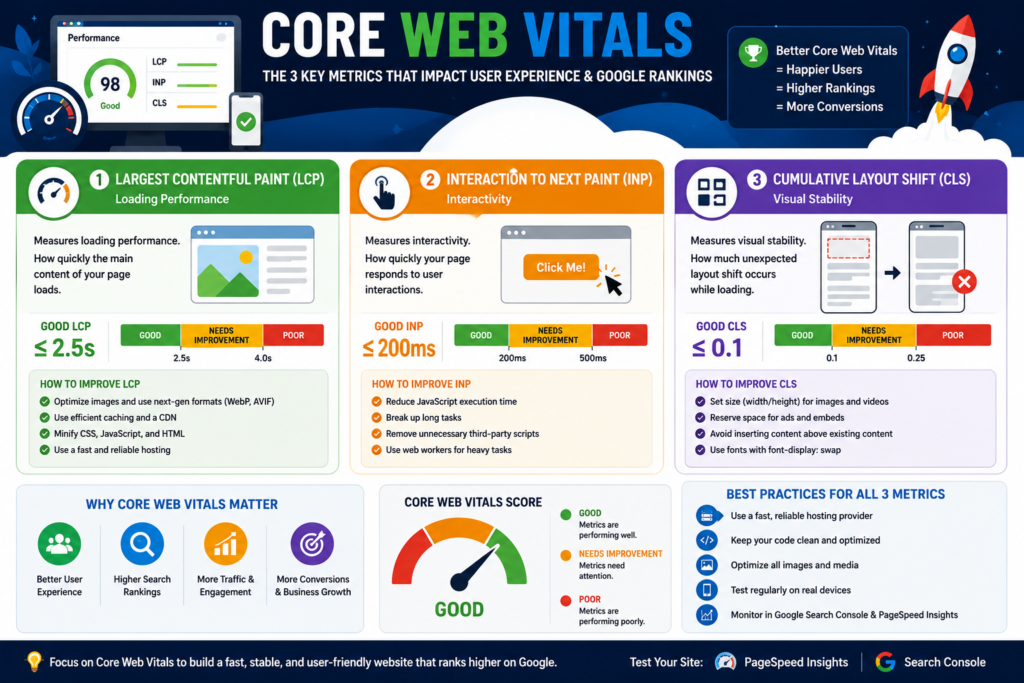
7. Allowing Pages to Load Slowly
Problem
Visitors cannot evaluate the content, offer, or trust evidence when a page takes too long to load or becomes unresponsive.
Large images, excessive scripts, poor hosting, too many fonts, autoplay media, and unnecessary plugins commonly create performance problems.
Business Impact
Slow performance increases friction, weakens user experience, and may reduce engagement and conversions, particularly on mobile connections.
Root Cause
Performance is often treated as a technical task to be handled after launch. Additional plugins, tracking tools, videos, widgets, and design effects are added without measuring their combined impact.
How to Fix
- Resize and compress images.
- Use suitable modern image formats.
- Remove unnecessary plugins and scripts.
- Reduce third-party widgets.
- Improve caching.
- Review hosting performance.
- Reserve dimensions for media.
- Test important templates.
- Compare field and laboratory data.
- Retest after major changes.
Expert Tip
Do not optimize only the homepage. Service pages, landing pages, product pages, forms, and checkout pages may have different performance problems.
8. Ignoring Website Accessibility
Problem
Accessibility problems can prevent people from perceiving, understanding, navigating, or operating a website.
Examples include low contrast, missing labels, weak keyboard support, unclear focus indicators, poor heading structure, and missing alternative text.
Business Impact
Inaccessible design excludes potential users, creates frustration, and may also make the website harder to use for people dealing with small screens, temporary limitations, weak connections, or difficult environments.
Root Cause
Accessibility is often treated as an optional compliance task rather than a fundamental part of usability and quality assurance.
How to Fix
Use:
- Semantic heading structure.
- Descriptive form labels.
- Keyboard-accessible controls.
- Visible focus indicators.
- Meaningful alternative text.
- Sufficient colour contrast.
- Clear error messages.
- Captions or transcripts where appropriate.
- Understandable instructions.
- Consistent interaction patterns.
Combine automated testing with manual keyboard testing and human review.
Expert Tip
Automated tools can identify some accessibility problems, but they cannot confirm complete accessibility. Manual review remains essential.
9. Using Weak or Conflicting Calls to Action
Problem
A visitor may understand the service but still leave because the next step is unclear.
Common problems include no visible action, too many unrelated buttons, generic labels such as “Submit,” and calls to action that do not explain what happens next.
Business Impact
Weak calls to action reduce enquiries, purchases, bookings, and other conversions because users are not given a clear or appropriate path forward.
Root Cause
Businesses often add several buttons to satisfy different departments or promote every available service at the same time.
How to Fix
Choose one primary action for each page.
Examples:
- Request a Website Review.
- Get a Project Quote.
- View Website Packages.
- Book an Initial Consultation.
- Download the Checklist.
Use a secondary action only when it supports users who are not ready for the primary step.
Expert Tip
A page can repeat the same primary call to action in several appropriate locations. The real problem is presenting multiple competing actions with equal importance.
10. Writing Vague, Business-Focused Content
Problem
Many websites talk extensively about the company but fail to explain how the service solves the customer’s problem.
Statements such as “We are committed to excellence” provide little value without evidence, process details, or customer relevance.
Business Impact
Vague content weakens differentiation and trust. Visitors may understand that a service exists but remain uncertain about its benefits, process, deliverables, limitations, or suitability.
Root Cause
Content is often written from the company’s internal perspective rather than the customer’s decision-making process.
How to Fix
Structure service content around:
- Customer problem.
- Business consequence.
- Recommended solution.
- Delivery process.
- Included deliverables.
- Evidence.
- Limitations.
- Pricing guidance where appropriate.
- Expected next step.
Translate technical features into practical benefits.
Expert Tip
Replace unsupported adjectives with specific information. “Professional service” is weaker than a clear explanation of what is included, how the work is completed, and what the customer receives.
Top UX and Performance Mistakes
| Problem | Effect on Visitors | Priority |
|---|---|---|
| Poor mobile design | Frustration | Critical |
| Slow loading | High abandonment | Critical |
| Accessibility issues | Difficult navigation | High |
| Weak CTA | Fewer enquiries | High |
| Business-focused messaging | Low engagement | Medium |
Visitors expect websites to load quickly, work smoothly on mobile devices, and clearly explain what they should do next. Improving usability often increases enquiries without changing the overall website design.
Expert Insight
Businesses often spend time improving visual design while overlooking the structural issues that have a greater impact on search visibility, customer trust, and conversions.
Solving high-priority problems first usually produces better long-term results than making cosmetic changes.
11. Publishing Thin or Unhelpful SEO Content
Problem
Publishing a large number of articles does not automatically create authority.
Pages that repeat existing information without practical guidance, original explanation, or clear purpose may provide little value.
Business Impact
Thin content can waste editorial resources, weaken topical focus, create overlapping pages, and fail to attract or satisfy the intended audience.
Root Cause
Content planning may be driven by keyword lists rather than genuine user problems, business relevance, and subject expertise.
How to Fix
Before publishing, ask:
- Does the page solve a real problem?
- Is its purpose clear?
- Does it add something useful?
- Are important claims supported?
- Has it been reviewed?
- Would it remain useful without search traffic?
- Does it deserve to exist as a separate page?
Merge or improve overlapping and weak pages.
Expert Tip
A smaller collection of useful, well-maintained resources is often more valuable than a large archive of repetitive articles.
12. Publishing Unverified or Low-Value AI-Assisted Content
Problem
AI tools can support planning, research organisation, drafting, and editing. The mistake occurs when output is published without verification, original contribution, or responsible editorial review.
Business Impact
Unverified content may contain incorrect claims, generic advice, fabricated examples, outdated information, and repetitive explanations. This can damage reader trust and brand credibility.
Root Cause
Publishers may focus on production speed rather than accuracy, usefulness, and editorial responsibility.
How to Fix
Use a controlled workflow:
Define the user need → Research reliable sources → Draft → Verify claims → Add original explanation → Edit → Review usefulness → Publish
Confirm that:
- Facts are supportable.
- Sources are genuine.
- Examples are clearly identified.
- No client, statistic, or quotation has been invented.
- A responsible person has reviewed the final article.
Expert Tip
AI should support the editorial process, not replace accountability. The publisher remains responsible for everything presented to the reader.
13. Targeting Keywords Without Understanding Search Intent
Problem
A keyword may appear relevant while representing a completely different user need.
For example, “website design examples” reflects inspiration intent, while “website design company near me” reflects service or hiring intent.
Business Impact
When a page targets the wrong intent, it may attract visitors who do not find what they expected. This can reduce engagement, enquiries, and ranking potential.
Root Cause
Keyword research may focus only on wording or search volume without examining why people search and what type of page they expect.
How to Fix
Assign one dominant intent to each important page:
- Informational.
- Commercial investigation.
- Transactional.
- Navigational.
Create separate page types for articles, comparisons, service pages, pricing pages, tools, and location pages when their purposes are genuinely different.
Expert Tip
Do not create multiple thin pages for minor keyword variations. One comprehensive page can often satisfy closely related queries sharing the same intent.
14. Neglecting Internal Links
Problem
Internal links help users discover related information and help search engines understand connections among pages.
Common mistakes include orphan pages, excessive linking, generic anchor text, and links that do not support the current topic.
Business Impact
Weak internal linking can reduce page discovery, interrupt user journeys, and limit the visibility of important service or supporting pages.
Root Cause
Internal linking is often added after publication rather than planned as part of the website’s information architecture and content strategy.
How to Fix
Link naturally to:
- Relevant service pages.
- Supporting guides.
- Pricing information.
- Work examples.
- Contact pages.
- Related problem-solving content.
Use descriptive anchor text that communicates the destination.
Expert Tip
Each internal link should help the reader answer the next logical question. Do not add links only to increase their number.
15. Using Duplicate or Missing Metadata
Problem
Missing or duplicated titles and meta descriptions reduce control over how important pages may appear in search results.
Business Impact
Users may struggle to distinguish between pages. Search listings may also fail to communicate the page’s actual purpose and value.
Root Cause
Metadata is often generated automatically or copied across similar pages without considering unique search intent.
How to Fix
Write a unique title and meta description for every important indexable page.
Each title should:
- Describe the page accurately.
- Use the primary topic naturally.
- Communicate a useful benefit.
- Avoid exaggeration.
- Match the visible page content.
Expert Tip
Metadata can influence whether the right person clicks the result, but it cannot compensate for a page that fails to satisfy the search intent.
Top SEO and Content Mistakes
| SEO Problem | Business Impact | Priority |
|---|---|---|
| Thin content | Weak visibility | High |
| Low-value AI content | Low trust | High |
| Wrong search intent | Poor rankings | High |
| Weak internal links | Poor discoverability | Medium |
| Duplicate metadata | Lower CTR | Medium |
Key Lesson:
Search visibility depends on useful content that satisfies search intent, supports the customer journey, and connects related pages through logical internal linking.
Expert Insight
Businesses often spend time improving visual design while overlooking the structural issues that have a greater impact on search visibility, customer trust, and conversions.Solving high-priority problems first usually produces better long-term results than making cosmetic changes.
16. Leaving Technical SEO Until Launch
Problem
Technical SEO decisions affect URLs, templates, internal linking, crawlability, canonicalisation, redirects, structured data, and mobile behaviour.
Waiting until development is complete can make corrections expensive and disruptive.
Business Impact
Late technical fixes may delay launch, create indexing issues, cause broken URLs, and require unnecessary redevelopment.
Root Cause
SEO is sometimes treated as a marketing activity that begins after design and development rather than as a requirement that should influence planning.
How to Fix
Plan before development:
- URL structure.
- Page hierarchy.
- Indexation rules.
- Canonical URLs.
- XML sitemap.
- Redirects.
- Heading templates.
- Internal linking.
- Mobile behaviour.
- Structured data.
- Pagination where relevant.
- Migration requirements.
Expert Tip
A pre-development SEO review is usually easier and less expensive than correcting template-wide problems after launch.
17. Making Unsupported Trust Claims
Problem
Claims such as “number one,” “best in the industry,” “guaranteed rankings,” or “trusted by thousands” can damage credibility when evidence is unavailable.
Business Impact
Unsupported claims create doubt and may make genuine strengths appear less credible. Fake testimonials, copied portfolios, and invented statistics can cause serious reputational harm.
Root Cause
Businesses may use exaggerated claims because they believe stronger language automatically creates more conversions.
How to Fix
Use verifiable trust evidence:
- Authentic work examples.
- Clear processes.
- Genuine client feedback used with permission.
- Transparent pricing principles.
- Relevant qualifications.
- Accurate author information.
- Updated contact details.
- Honest limitations.
- Real policies.
- Secure payment information where relevant.
Expert Tip
Specific evidence is more persuasive than superlatives. Explain what you do, how you do it, and what the customer receives.
18. Hiding Contact and Business Information
Problem
Visitors may hesitate when they cannot identify who operates the website, where the business is located, or how to make contact.
Business Impact
Missing information can weaken trust, reduce enquiries, and make the website appear temporary or unreliable.
Root Cause
Businesses may focus heavily on service descriptions while treating contact and identity information as minor footer content.
How to Fix
Provide appropriate details such as:
- Business or professional name.
- Service area.
- Phone or WhatsApp contact.
- Professional email.
- Working hours.
- Contact form.
- About page.
- Relevant policies.
- Physical address, where applicable.
- Response expectations.
Expert Tip
Provide enough information to support an informed decision, but do not publish unnecessary sensitive personal information.
19. Using Complicated Forms
Problem
Every unnecessary field creates additional work for the visitor.
A first enquiry rarely requires complete project history, multiple documents, full company information, and detailed technical requirements.
Business Impact
Long or confusing forms can reduce submissions, particularly on mobile devices.
Root Cause
Businesses often try to collect all possible information before the first conversation instead of requesting only what is needed for the next step.
How to Fix
A practical enquiry form may request:
- Name.
- Email or phone.
- Required service.
- Approximate budget.
- Short project description.
- Optional attachment.
Use clear labels, helpful instructions, understandable errors, and a confirmation message explaining what happens next.
Expert Tip
Collect additional information after the initial enquiry when a customer has already shown commitment. Do not make the first contact unnecessarily difficult.
20. Ignoring Security, Privacy, and Website Ownership
Problem
A business may pay for a website while another person controls the domain, hosting, administrator account, analytics, or recovery methods.
Business Impact
Lack of ownership creates operational, security, and continuity risks. The business may lose access to critical systems or struggle to change providers.
Root Cause
Ownership responsibilities are often not documented during website development or handover.
How to Fix
Maintain a secure record covering:
- Domain registrar.
- Hosting account.
- Website administrator.
- Business email.
- Analytics.
- Search Console.
- Payment gateway.
- Backup location.
- Software licences.
- Recovery methods.
Use secure passwords, appropriate account permissions, backups, HTTPS, updates, and multifactor authentication where available.
Expert Tip
The business should directly control its core accounts. Developers and agencies can receive appropriate access without becoming the sole owners.
Top Technical and Trust Mistakes
| Technical Problem | Risk | Priority |
|---|---|---|
| No technical SEO planning | Crawl issues | High |
| Unsupported claims | Low trust | High |
| Hidden contact details | Lost credibility | High |
| Long forms | Fewer enquiries | Medium |
| Weak ownership | Security risk | Critical |
Key Lesson:
Technical quality and trust signals are closely connected. Visitors are more likely to contact businesses that clearly explain who they are, how they work, and how personal information is protected.
Expert Insight
Businesses often spend time improving visual design while overlooking the structural issues that have a greater impact on search visibility, customer trust, and conversions.Solving high-priority problems first usually produces better long-term results than making cosmetic changes.
21. Installing Too Many Plugins and Scripts
Problem
Additional functionality can increase loading time, maintenance requirements, security exposure, and compatibility problems.
Business Impact
Unnecessary plugins and scripts may create slower pages, technical conflicts, failed updates, and unstable website behaviour.
Root Cause
Features are often added individually without assessing their combined impact or checking whether existing tools already provide the same function.
How to Fix
Audit each plugin and script.
Ask:
- Is it still necessary?
- Is it actively maintained?
- Does another tool duplicate it?
- Does it affect performance?
- Does it collect data?
- Is it compatible with the current platform?
- Can the function be implemented more efficiently?
Remove abandoned, duplicated, or unnecessary components.
Expert Tip
The total number of plugins is not the only issue. Quality, maintenance, compatibility, and implementation matter more than a simple count.
22. Failing to Configure Analytics Correctly
Problem
Traffic reports provide limited value when meaningful actions are not tracked or the tracking setup is inaccurate.
Business Impact
A business may make decisions based on page views while remaining unaware of which pages generate enquiries, calls, purchases, or other valuable outcomes.
Root Cause
Analytics is often installed without defining business conversions or testing whether important actions are recorded correctly.
How to Fix
Track meaningful actions such as:
- Form submissions.
- Phone link clicks.
- WhatsApp clicks.
- Quote requests.
- Checkout completion.
- Appointment bookings.
- Downloads.
- Email link clicks.
Document what each conversion means and test tracking after website changes.
Expert Tip
Do not track every click as a conversion. A conversion should represent an action that has genuine business or user value.
23. Ignoring Broken Links and Outdated Content
Problem
Old prices, expired offers, incorrect contact information, outdated screenshots, and broken resources weaken website reliability.
Business Impact
Outdated information can confuse visitors, damage trust, create poor user experiences, and lead to missed enquiries or complaints.
Root Cause
The website is treated as a completed project rather than an asset requiring ongoing review.
How to Fix
Create a maintenance schedule based on page importance.
Review:
- Links.
- Forms.
- Contact information.
- Prices.
- Service descriptions.
- Screenshots.
- Policies.
- Staff information.
- Citations.
- Publication and modification dates.
Update dates only when meaningful improvements have actually been made.
Expert Tip
High-value service, pricing, policy, and contact pages should usually be reviewed more frequently than low-traffic archive pages.
24. Treating Every Page as a Sales Page
Problem
Not every visitor is ready to purchase, book, or request a quotation immediately.
Someone researching website costs needs different information from someone already comparing service providers.
Business Impact
Aggressive sales content can reduce trust and fail to answer the visitor’s immediate question.
Root Cause
Businesses may expect every page to generate an immediate conversion rather than support different stages of the customer journey.
How to Fix
Create content for multiple stages:
| Customer Stage | Appropriate Content |
|---|---|
| Problem awareness | Educational guides |
| Solution awareness | Service explanations |
| Comparison | Options, pricing, and alternatives |
| Decision | Portfolio, process, FAQs, and trust evidence |
| Action | Quote, booking, or consultation page |
Informational content should solve the reader’s immediate problem before introducing a relevant next step.
Expert Tip
A useful article may contribute to a later conversion even when the visitor does not contact the business during the first visit.
25. Treating Website Launch as Completion
Problem
A website begins producing meaningful evidence only after real visitors use it.
Search behaviour changes, services evolve, links break, competitors improve, and customer questions reveal missing information.
Business Impact
An unmaintained website gradually becomes less accurate, less secure, and less useful. Opportunities for improvement remain undiscovered.
Root Cause
Launch is often treated as the final deliverable rather than the beginning of measurement and continuous improvement.
How to Fix
Use a recurring process:
Measure → Diagnose → Prioritize → Improve → Test → Document
Review:
- Search visibility.
- Conversion performance.
- Forms.
- Technical health.
- Content quality.
- Accessibility.
- Speed.
- Security.
- Customer feedback.
- Business changes.
Expert Tip
Do not change several major elements at the same time without documentation. Smaller, measured improvements make it easier to understand what produced the result.
Website Maintenance and Growth Summary
| Ongoing Issue | Business Effect | Priority |
|---|---|---|
| Too many plugins | Performance | Medium |
| Poor analytics | Wrong decisions | High |
| Outdated content | Lower trust | High |
| Every page sells | Poor UX | Medium |
| No maintenance | Long-term decline | Critical |
Key Lesson:
A website should continue improving after launch. Regular reviews, accurate measurement, and continuous updates help businesses maintain trust, improve user experience, and respond to changing customer needs.
Website optimization existing website ko behtar banane ka process hai, jabke website redesign mein structure, layout, content aur functionality ko dobara plan kiya jata hai. Har website ko redesign ki zarurat nahi hoti. Pehle audit karein, phir evidence ki bunyaad par faisla karein.
When NOT to Redesign
Many businesses assume that poor results always require a complete website redesign. In reality, many websites can achieve better performance through targeted improvements without rebuilding everything from the beginning.
| Situation | Recommended Action |
|---|---|
| The website is getting relevant traffic, but few enquiries | Improve messaging and calls to action |
| Mobile usability issues | Optimize responsive design |
| Slow loading pages | Improve performance |
| Weak content | Rewrite important pages |
| Poor internal linking | Improve website structure |
| Missing trust signals | Add portfolio, reviews, policies |
| Technical SEO issues | Fix technical problems |
Expert Recommendation
Do not redesign a website simply because it looks outdated. If the website already has useful content, search visibility, and a logical structure, targeted improvements are often more cost-effective than rebuilding everything.
When a Redesign May Be the Better Option
| Situation | Consider Redesign |
|---|---|
| The website uses outdated technology | Yes |
| Structure cannot be expanded | Yes |
| Complete navigation failure | Yes |
| Poor accessibility across templates | Yes |
| Major security limitations | Yes |
| The business model completely changed | Yes |
A redesign becomes more appropriate when the website’s underlying structure prevents meaningful improvements or no longer supports current business requirements.
Optimization vs Redesign Cost Comparison
| Factor | Website Optimization | Website Redesign |
|---|---|---|
| Cost | Usually lower | Usually higher |
| Project Duration | Shorter | Longer |
| Business Disruption | Limited | Greater |
| SEO Risk | Usually lower | Requires careful migration |
| Content Changes | Partial | Often extensive |
| Technical Changes | Targeted | Comprehensive |
The actual cost depends on website size, technology, business requirements, existing content, and technical complexity. A professional website audit should normally be completed before deciding between optimization and redesign.
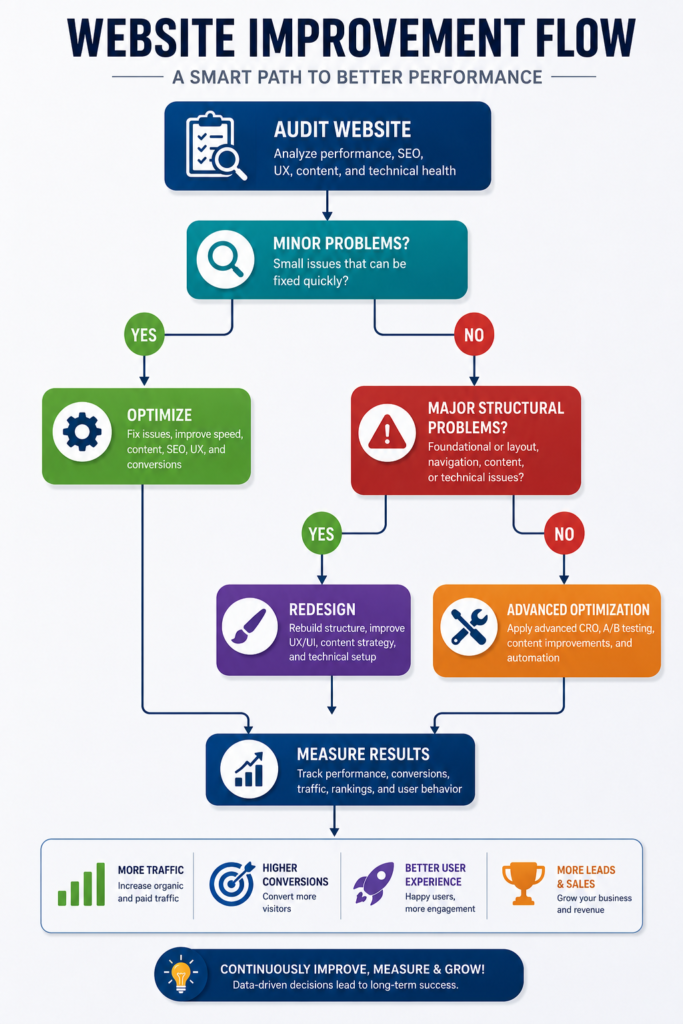
Quick Decision Guide
Website gets traffic?
↓
Yes
↓
Visitors convert?
↓
No
↓
Optimize Messaging
↓
Still poor?
↓
Technical Issues?
↓
Yes
↓
Optimize Website
↓
No
↓
Consider Redesign
The actual cost depends on website size, technology, business requirements, existing content, and technical complexity. A professional website audit should normally be completed before deciding between optimization and redesign.
Website Optimization Versus Website Redesign
An underperforming website does not automatically need a complete redesign.
In many cases, the existing website already has a workable technical foundation, useful content, established URLs, backlinks, search visibility, and functioning business processes. Rebuilding everything without a clear reason can add cost, extend the project timeline, and introduce unnecessary SEO migration risk.
The better approach is to begin with a structured website audit and determine whether the problems can be corrected through targeted optimization or whether the website has deeper structural, technical, branding, or usability limitations that justify a redesign.
| Choose Website Optimization When | Consider a Website Redesign When |
|---|---|
| The website structure is fundamentally sound | The existing architecture no longer supports the business, users, or content |
| Most important pages can be improved without rebuilding the entire site | Major templates or page types create widespread usability or conversion problems |
| Performance issues can be corrected through targeted technical improvements | The underlying technology, theme, framework, or CMS is obsolete, unsupported, or severely limiting |
| Existing branding still represents the business clearly and professionally | The current branding creates significant trust, clarity, positioning, or consistency problems |
| Content can be reorganized, expanded, consolidated, or improved within the existing structure | Content architecture and navigation require substantial restructuring |
| Internal linking and conversion paths need refinement rather than replacement | Core customer journeys are fundamentally confusing, incomplete, or broken |
| Existing URLs have useful search history, backlinks, rankings, or traffic worth preserving | A new URL structure or site architecture is necessary to support long-term growth |
| The site can meet current mobile, accessibility, performance, and security requirements with focused improvements | Meeting current usability, accessibility, performance, or security requirements would require extensive rebuilding |
| The design still supports the brand and user journey | The visual system, layout, and interface no longer meet user or business requirements |
| The website needs incremental improvements with lower implementation risk | The business requires a major change in functionality, positioning, platform, or customer experience |
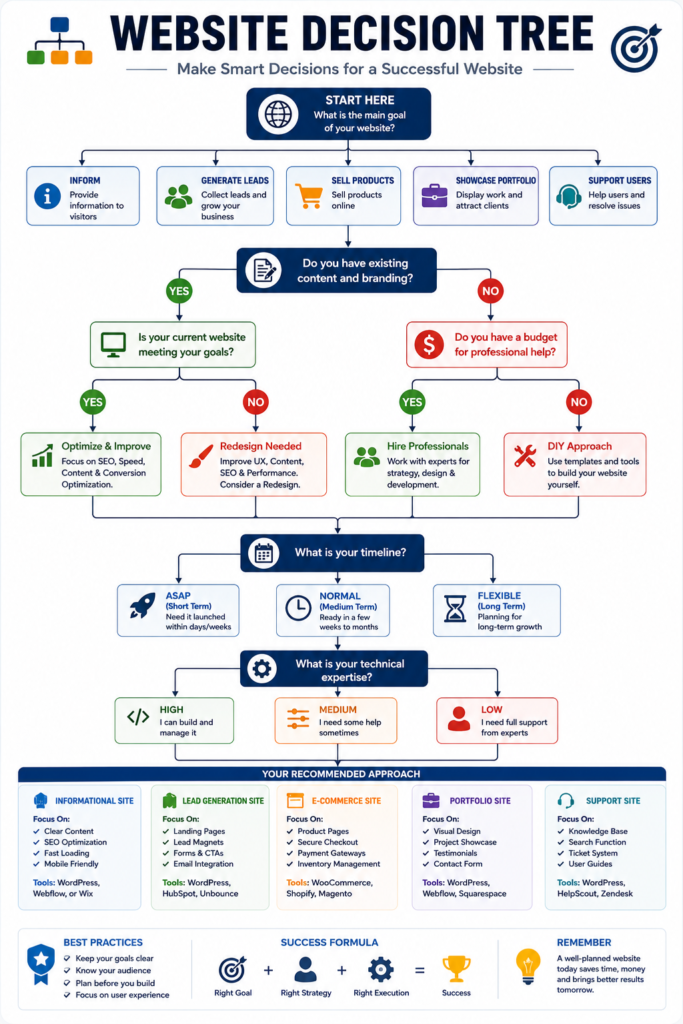
Start With Diagnosis, Not Design
Before deciding to redesign a website, identify the actual causes of poor performance.
A professional audit should evaluate:
- Organic search performance.
- Important landing pages.
- Search intent alignment.
- Website architecture.
- Navigation.
- Internal linking.
- Content quality.
- Duplicate or overlapping pages.
- Indexing and crawlability.
- Core Web Vitals and page performance.
- Mobile usability.
- Conversion paths.
- Forms and calls to action.
- Analytics and tracking.
- Security and platform health.
This diagnostic process helps separate problems that require a redesign from problems that can be fixed through targeted optimization.
SEO Considerations Before a Redesign
A redesign can affect organic search performance when it changes URLs, page content, internal linking, navigation, structured data, templates, or site architecture.
If URLs must change, prepare a clear one-to-one mapping between important existing URLs and their most relevant replacement URLs.
Use permanent redirects where appropriate, update internal links, regenerate XML sitemaps, confirm canonical URLs, test important pages before launch, and monitor Search Console and analytics after migration.
Avoid deleting valuable pages simply because they do not fit the new design.
Important pages with existing rankings, backlinks, traffic, or business value should be reviewed individually before they are removed, merged, redirected, or substantially changed.
Where practical, avoid combining several major migrations at the same time. For example, changing the domain, CMS, URL structure, design, and content architecture simultaneously can make problems harder to diagnose.
Which Option Is Better?
There is no universal answer.
Choose website optimization when the current platform and architecture are fundamentally capable of supporting the business and the main problems can be corrected through focused improvements.
Choose a website redesign when the website’s underlying structure, technology, navigation, branding, functionality, or user experience has become a fundamental limitation.
The decision should be based on evidence, not appearance alone.
A website that looks dated may still have strong SEO value and a sound technical foundation. A visually modern website may still require a deeper rebuild if its architecture, content structure, performance, or conversion paths are fundamentally weak.
Recommended Approach
Begin with an audit before approving a redesign.
Identify the highest-impact problems, estimate the cost and risk of repairing them, and compare that with the cost and long-term value of rebuilding the website.
If optimization can solve the core problems without disrupting valuable URLs, content, backlinks, and search visibility, it is often the lower-risk option.
If the website’s foundation itself is the problem, a carefully planned redesign may provide greater long-term value.
The objective is not to redesign more.
The objective is to make the website more useful, maintainable, accessible, search-friendly, and effective for the business.
Myths Versus Reality
| Myth | Reality |
|---|---|
| A premium theme guarantees a professional website | Strategy, content, implementation, and maintenance determine quality |
| More features create more value | Unnecessary features often increase friction |
| SEO begins after launch | Search considerations should influence planning and structure |
| More traffic always produces more customers | Relevance, trust, and conversion paths determine results |
| AI can publish complete expert content without review | Human verification and editorial responsibility remain essential |
| Accessibility only benefits disabled users | Accessible design often improves usability for a broader audience |
| A successful launch completes the project | Websites require measurement and continuous improvement |
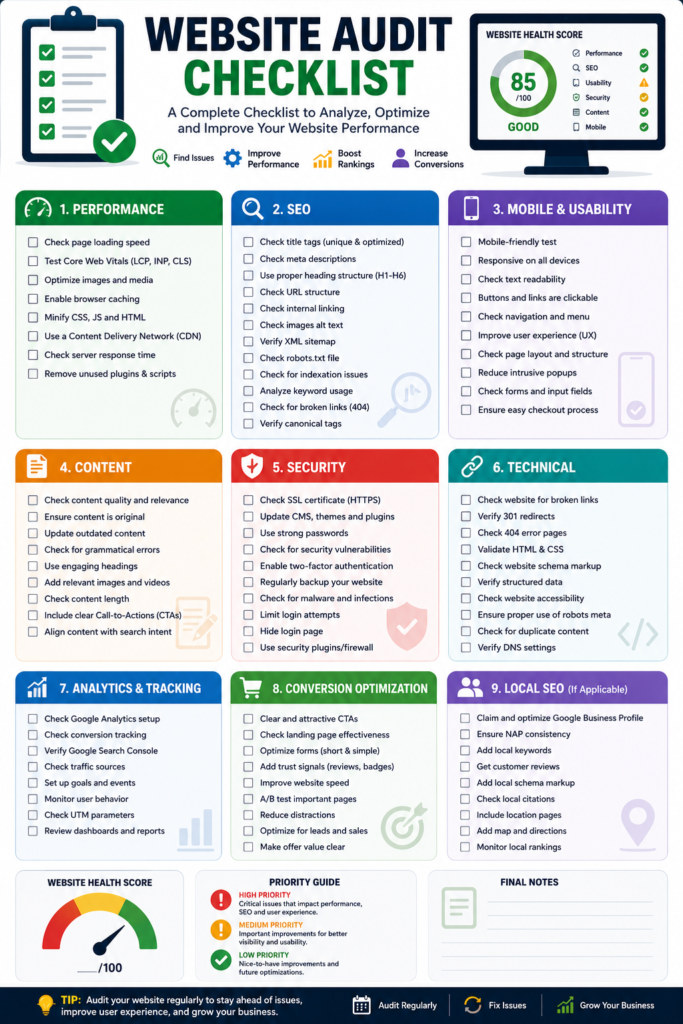
Website Mistakes Audit Checklist
Strategy
☐ The website has a defined primary objective.
☐ Each important page serves a clear audience and intent.
☐ The structure reflects customer needs.
Content
☐ The homepage explains the business clearly.
☐ Service pages address customer problems and outcomes.
☐ Claims are supported by evidence.
☐ Content is original, current, and useful.
User Experience
☐ Navigation is understandable.
☐ Important actions are visible.
☐ Mobile pages are easy to use.
☐ Forms are short and functional.
☐ Keyboard navigation has been tested.
SEO and Performance
☐ Important pages are crawlable and indexable.
☐ Titles and descriptions are unique.
☐ Internal links support relevant journeys.
☐ Core Web Vitals have been reviewed.
☐ Images and scripts are optimized.
Trust and Operations
☐ Contact information is accurate.
☐ Policies reflect actual practices.
☐ The business controls business accounts.
☐ Backups and security updates are maintained.
☐ Conversions are tracked and tested.
Frequently Asked Questions
What are the most common website mistakes?
The most common mistakes include unclear messaging, confusing navigation, slow loading, poor mobile usability, weak calls to action, thin content, limited trust evidence, inaccessible design, and lack of maintenance.
Why do business websites fail?
Business websites often fail because they are built around appearance rather than customer needs, business objectives, search intent, trust, and conversion paths.
What website mistakes hurt SEO?
Common SEO problems include weak content, inaccessible important pages, poor internal linking, duplicate metadata, slow performance, broken links, incorrect canonicalization, and pages that do not satisfy search intent.
Why does my website get traffic but no enquiries?
The traffic may be irrelevant, or visitors may encounter unclear messaging, insufficient trust, weak calls to action, complicated forms, inappropriate pricing information, or a mismatch between the search query and landing page.
How can I identify problems with my website?
Review Search Console, analytics, Core Web Vitals, forms, mobile usability, customer feedback, search intent, page messaging, navigation, and conversion tracking.
Does a slow website reduce conversions?
A slow or unresponsive website creates friction before visitors can evaluate the offer. Performance should therefore be assessed as part of both user experience and conversion optimization.
How do I make my website look trustworthy?
Use clear contact information, authentic work samples, realistic claims, transparent processes, relevant policies, secure browsing, professional content, and genuine testimonials used with permission.
How often should a website be updated?
Critical business information should be updated whenever it changes. Important pages should also be reviewed on a recurring schedule based on their traffic, risk, commercial value, and rate of change.
Should every service have a separate page?
Important services generally deserve separate pages when they solve different problems, serve different audiences, or represent distinct search intentions. Avoid creating thin pages for minor wording variations.
How many calls to action should a page contain?
A page can repeat the same primary call to action in appropriate locations. The greater problem is presenting several conflicting actions with equal visual importance.
Can AI-generated content damage SEO?
The tool itself is not the central issue. Risk arises when content is inaccurate, unoriginal, unhelpful, mass-produced for ranking manipulation, or published without responsible editorial review.
Do I need a complete website redesign?
Not necessarily. An audit may show that content, navigation, speed, trust elements, or conversion paths can be improved without replacing the complete website.
What should a professional website audit include?
It should evaluate business goals, search visibility, content, technical SEO, performance, mobile usability, accessibility, trust, conversion paths, analytics, security, and maintenance risks.
What is the difference between a website audit and a redesign?
An audit identifies problems and priorities. A redesign changes the website’s structure, interface, content presentation, technology, or branding based on those findings.
Are website builders bad for SEO?
A website builder is not automatically good or bad for SEO. Results depend on technical implementation, content quality, crawlability, performance, structure, and the publisher’s ability to manage the platform.
Final Thoughts
The most damaging website mistakes are rarely limited to outdated colors or unattractive layouts. They occur when the website fails to connect business goals with customer needs, useful content, search visibility, trust, usability, and a clear next step.
Begin with evidence. Review how people discover the website, what they see on important landing pages, where they become confused, which actions fail, and whether those actions are being measured correctly.
Some websites need targeted improvements to content, navigation, speed, mobile usability, or conversion paths. Others have deeper structural or technical weaknesses that justify a redesign. The correct decision should follow a professional diagnosis rather than personal preference.
Need an Independent Review of Your Website?
Marjan Services can review your website’s structure, content clarity, mobile experience, basic search visibility, trust signals, internal links, conversion paths, and common technical weaknesses.
The purpose of the review is to identify practical priorities, not to recommend a complete redesign when smaller improvements may be sufficient.
Request a Professional Website Review
Before contacting any provider, retain control of your domain, hosting, website administrator account, business email, analytics, Search Console, and backup access.
About the Author
Syed Abdul Quddus writes in-depth articles about website planning, WordPress development, technical SEO, Google Search Essentials, user experience, digital marketing, and website optimization.
His work focuses on helping businesses improve website performance, search visibility, usability, and conversions through practical, research-based guidance. Every article is reviewed for accuracy, clarity, and usefulness before publication.
Editorial Policy
This article was researched and written using current Google Search documentation, accessibility guidance, web performance standards, and professional website development best practices.
Every effort has been made to ensure the information is accurate at the time of publication. The recommendations provided are intended for educational purposes and should be adapted to the specific goals, audience, and technical requirements of each website.
Need Professional Help Fixing Your Website?
Identifying website problems is only the first step. Correctly prioritizing and fixing them requires a structured approach based on business goals, user experience, technical SEO, and conversion optimization. If your website is struggling with low traffic, poor search visibility, weak trust signals, slow performance, or declining enquiries, a Professional Website Audit Service can help identify the real issues before you invest in unnecessary changes.
At Marjan Services, we provide comprehensive Website Optimization Services, technical recommendations, and practical improvement strategies tailored to your business goals. If your website has deeper structural problems that cannot be resolved through optimization alone, we also offer Website Redesign Services focused on improving usability, performance, SEO, and long-term business growth. Request a Website Audit today to receive a professional evaluation and a prioritized action plan that helps you make informed decisions with confidence.
References
The recommendations in this article are based on current industry standards, official technical documentation, accessibility guidelines, and web performance best practices.
6 Comments