Table of Contents
By Syed Abdul Quddus | Marjan Web Studio | Updated November 9, 2026
Your website is live. Your articles are published. You’ve installed an SEO plugin, submitted your sitemap, and spent hours improving your content.
But Google still isn’t showing your pages the way you expected.
Maybe Search Console says “Crawled, currently not indexed.” Perhaps your sitemap shows “Couldn’t fetch.” Your traffic may have dropped after a WordPress update, or your website looks perfect on desktop while its mobile menu doesn’t work.
Now you’re wondering:
- Has Google stopped trusting my website?
- Did I accidentally block Googlebot?
- Is my WordPress theme damaging my SEO?
- Are my articles too similar?
- Should I change my domain or start again?
- Can I fix these problems myself without paying for expensive software?
- And how will I know whether a fix has actually worked?
These are reasonable questions. Unfortunately, many technical SEO guides explain terminology without helping you decide what to do next.
Here’s the answer that matters: most technical SEO problems should be diagnosed before anything is changed.
An indexing warning does not automatically mean your content is poor. A slow website does not automatically require a new host. And a sitemap error does not mean Google has penalized your domain.
This guide will help you identify the problem, understand its possible causes, choose a safe solution, and verify the result.
You won’t need to understand every technical term before getting started.
What Is Technical SEO? The Simple Answer
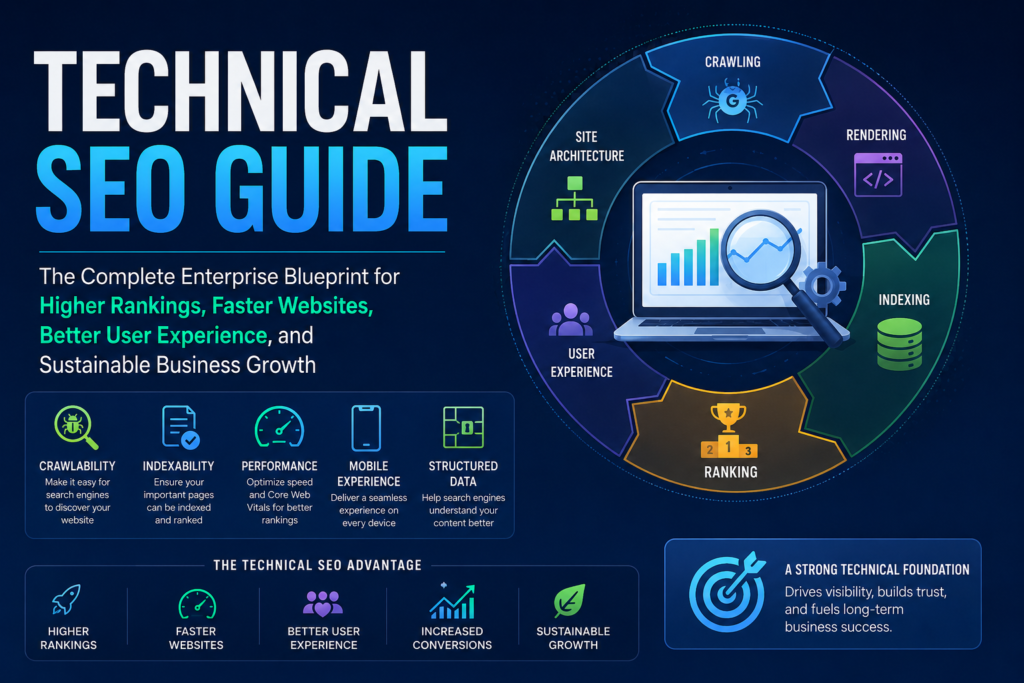
Technical SEO is the process of ensuring that search engines can appropriately discover, access, render, understand, and index your website.
It involves crawling, indexing, redirects, canonical URLs, robots directives, XML sitemaps, structured data, mobile accessibility, JavaScript rendering, website performance, and site architecture.
In practical terms, technical SEO helps answer five questions:
- Can Google find the page?
- Can Googlebot access it?
- Can Google process its main content?
- Is the page eligible and suitable for indexing?
- Can visitors use the page successfully?
If the answer to one of these questions is no, you may have a technical problem worth fixing.
However, a technically healthy website is not guaranteed to rank well. Search demand, relevance, originality, competition, and other signals still matter.
Technical SEO vs On-Page SEO
| Technical SEO | On-Page SEO |
|---|---|
| Crawl accessibility | Search intent |
| Indexing directives | Content usefulness |
| Canonical URL signals | SEO titles and descriptions |
| Redirects and HTTP responses | Headings and content organization |
| JavaScript rendering | Answer quality |
| XML sitemaps | Relevant keyword usage |
| Website performance | Topic coverage |
These disciplines overlap, but fixing one does not automatically fix the other.
Diagnose Your Website Before Changing Anything
One of the biggest mistakes website owners make is trying to solve every SEO warning simultaneously.
They install additional plugins, rewrite articles, delete pages, change their sitemap, modify robots.txt, and clear every cache setting.
Then, if something improves or breaks, they have no idea which change caused it.
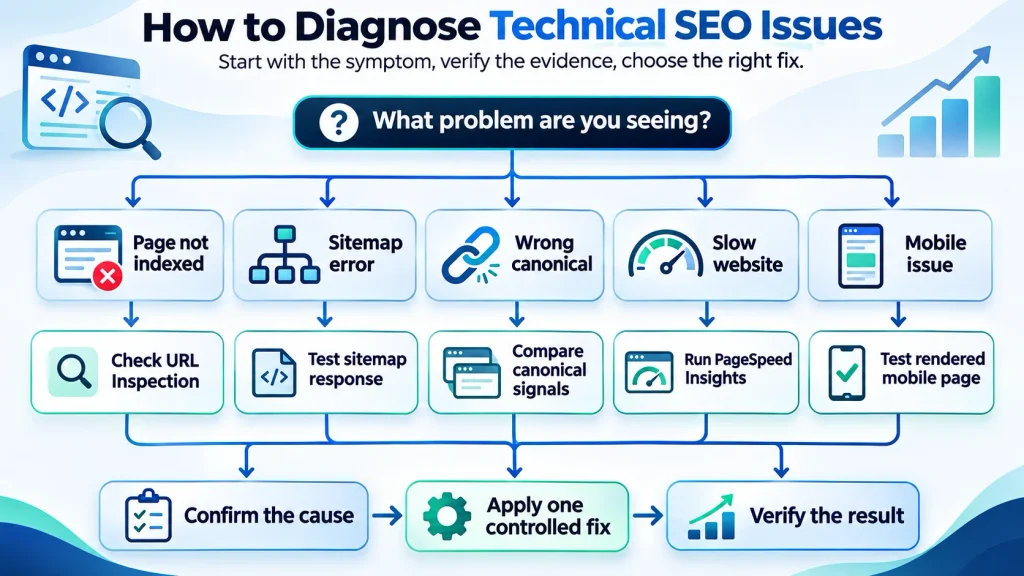
A better approach begins with one question:
What exactly is happening to the website?
Find Your Symptom in This Diagnostic Table
| What you’re experiencing | First investigation | What not to do immediately |
|---|---|---|
| Your homepage isn’t indexed | URL Inspection, robots directives, HTTP response | Change your domain |
| A new article isn’t indexed | Discovery, crawl status, canonical | Delete and republish |
| Google crawled a post but didn’t index it | Content differentiation and technical eligibility | Add keywords randomly |
| Sitemap says “Couldn’t fetch” | Sitemap response, XML, server access | Reinstall WordPress |
| Google shows another URL | Canonical and redirect consistency | Delete both URLs |
| Traffic declined after a theme update | Rendering, links, redirects, and timeline | Rewrite every article |
| Website is slow | Performance measurements and bottlenecks | Activate every optimization option |
| Mobile website is broken | Responsive CSS and JavaScript | Replace hosting |
| SEO plugin displays warnings | Confirm whether they represent real defects | Chase a perfect plugin score |
Use this table to identify where your investigation should begin.
What Should You Record Before Making Changes?
Create a small troubleshooting record.
Example:
- Affected URL:
https://example.com/important-page/ - Symptom: Important article is not indexed.
- First noticed: Date of observation.
- Search Console status: Record exact wording.
- Last relevant change: Theme update, migration, or article revision.
- Current HTTP response: Record verified status.
- Current canonical: Record the declared URL.
- Suspected cause: An unconfirmed hypothesis.
- Next test: The specific check you will perform.
- Result: Confirmed, rejected, or inconclusive.
This simple habit can save hours of unnecessary work.
A Safety Rule Before Every Technical Change
If you’re about to change redirects, themes, plugins, database records, or website configuration, create an appropriate backup.
For a production website, test potentially disruptive modifications in staging whenever practical.
Preserve a record of what you changed and how to reverse it.
Don’t turn a minor SEO problem into a complete website outage.
How Google Finds, Crawls, and Indexes Pages
Imagine publishing a new article about website development.
You can open it in your browser. Your friends can read it. The URL exists.
But that doesn’t necessarily mean Google has indexed it.
There are several different stages.
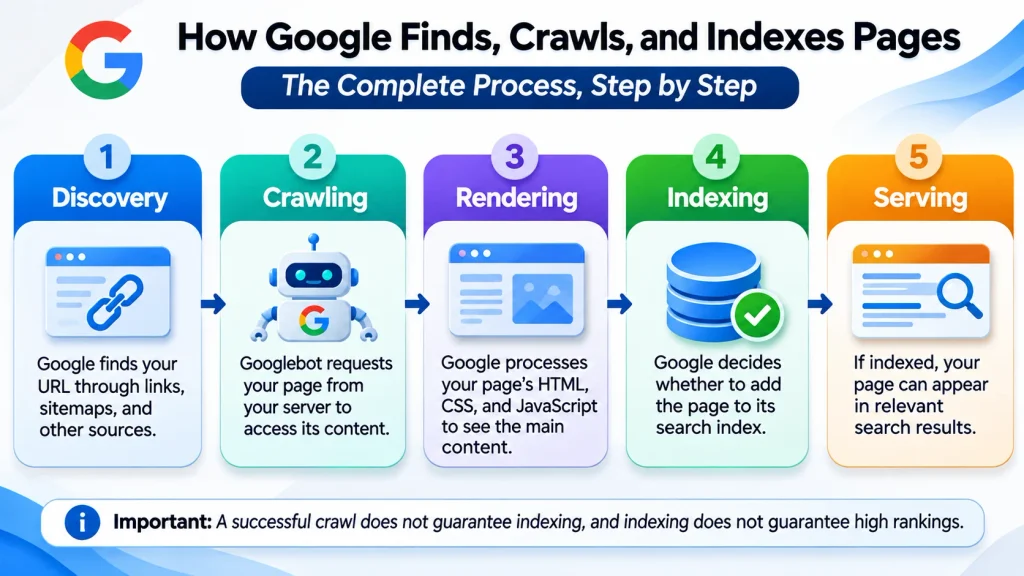
Discovery: Does Google Know the URL Exists?
Google discovers URLs through links, sitemaps, and other sources.
A page with no useful internal links may be harder to discover.
What to check: Does the page appear in your sitemap? Can visitors reach it from relevant navigation or related articles?
Crawling: Can Googlebot Retrieve the Page?
Googlebot requests URLs from your server.
Crawling can be interrupted by server errors, robots.txt restrictions, network failures, or security challenges.
What to check: Does the URL return the intended response, and is crawling permitted?
Rendering: Can Google Process the Main Content?
A webpage may depend on CSS, JavaScript, and templates.
If important content fails to render, Google may receive an incomplete representation.
What to check: Is the main article visible in the rendered page, not just inside the WordPress editor?
Indexing: Does Google Select the Page?
After crawling and processing a page, Google decides whether to include it in the index.
Indexing is not guaranteed.
What to check: Does Search Console report an indexing exclusion, a canonical selection, or another reason?
Serving: Does the Page Appear for Relevant Searches?
Even indexed pages may receive few impressions or rank poorly.
At this stage, examine content relevance, competition, user intent, and search performance.
Key distinction: A ranking problem is not necessarily an indexing problem, and an indexing problem is not necessarily a crawling problem.
Why Your Website Is Not Appearing in Google
You published an article several weeks ago, but it still doesn’t appear in search results.
Should you rewrite it?
Not yet.
First, inspect the URL using Google Search Console.

How to Inspect a URL
- Open your verified Search Console property.
- Enter the complete URL in the inspection bar.
- Review its page indexing information.
- Check the user-declared canonical and Google-selected canonical.
- Review crawl and page-fetch details where available.
- Use the live URL test to investigate current accessibility.
The indexed information and live test may represent different versions of the page. Don’t confuse them.
Problem: Discovered, Currently Not Indexed
Google knows about the page but hasn’t crawled it yet.
Possible contributing factors include discovery patterns, crawling priorities, server reliability, and website architecture.
Recommended action:
- Confirm that the URL is correct.
- Make sure important internal pages link to it.
- Include the preferred URL in an appropriate sitemap.
- Review server availability.
- Avoid creating large numbers of unnecessary URLs.
Expected verification: Search Console eventually reports a crawl or another updated indexing status.
A successful crawl is progress, but it does not guarantee indexing.
Problem: Crawled, Currently Not Indexed
Google has crawled the URL but hasn’t indexed it at the reported time.
This isn’t automatically a penalty or proof that the article is AI-generated.
Check whether the page is technically eligible and provides a genuinely distinct reason to exist.
If another article already answers essentially the same question, investigate content overlap.
For detailed troubleshooting, see our Crawled, Currently Not Indexed in WordPress guide.
Expected verification: Monitor the affected URL’s indexing status, canonical selection, and subsequent search impressions.
If the page remains unindexed, don’t repeatedly submit indexing requests without new evidence.
Problem: Excluded by Noindex
An accidental noindex directive can prevent a page from appearing in search results.
In WordPress, inspect:
Settings → Reading → Search engine visibility
Then check Rank Math or your SEO plugin’s post-level robots settings.
For an intended public page, remove unintended noindex directives.
But don’t remove noindex from pages you deliberately want excluded.
Expected verification: The live HTML or HTTP response no longer includes the unintended directive, and Search Console can process the updated page.
What If the Article Is Indexed but Receives No Traffic?
Don’t assume your technical SEO is broken.
Review Search Console’s Performance report.
Look at impressions, clicks, average position, and actual queries.
If there are no impressions, the page may have limited search demand or insufficient visibility.
If there are impressions but few clicks, investigate search intent, ranking position, and how the search result appears.
If traffic declined suddenly, compare dates and affected URLs before assigning a cause.
Fix Robots.txt and Crawling Problems
Robots.txt is useful, but it cannot solve every indexing problem.
It tells compliant crawlers which URL paths they may request.
It does not guarantee indexing or prevent every URL from appearing in search results.
How Do You Find Robots.txt?
Open the robots.txt file at the root of your website:
https://example.com/robots.txt
A simple illustrative WordPress configuration looks like this:
User-agent: *
Disallow: /wp-admin/
Allow: /wp-admin/admin-ajax.php

Sitemap: https://example.com/sitemap_index.xml
This is an example, not a configuration to paste blindly. Every website should preserve the rules appropriate to its own environment.

What If Googlebot Is Accidentally Blocked?
A broad rule such as:
User-agent: *
Disallow: /
disallows crawling throughout the site for compliant crawlers.
If it appears on a public website unintentionally, investigate why it was added.
It may originate from a staging environment, site configuration, or other administrative change.
How to verify: Inspect the exact robots.txt rules affecting the problem URL and confirm crawler permissions through appropriate testing.
Should You Use Robots.txt to Hide Private Pages?
No.
Robots.txt is a crawling instruction, not access control.
For sensitive information, use authentication and appropriate server security.
For public pages that should be excluded from search, a correctly implemented noindex directive may be appropriate.
Remember that a crawler blocked by robots.txt may not be able to retrieve the noindex directive.
What If Googlebot Is Blocked by a Firewall?
Sometimes your website works in Chrome while automated requests encounter restrictions.
Possible causes include CDN rules, security plugins, firewall challenges, and server rate limits.
Review the relevant request logs when available.
Do not trust a user-agent string alone as proof that a request came from Googlebot. Verify crawler identity using Google’s documented verification methods.
Expected verification: Legitimate crawler requests can access the intended resources without weakening unrelated security controls.
Diagnose XML Sitemap Errors
Your sitemap opens in Chrome, but Search Console says it couldn’t be fetched.
That can be frustrating because both results seem contradictory.
However, a successful browser request does not prove that all crawlers receive the same response.

What Is an XML Sitemap?
An XML sitemap helps search engines discover URLs you want them to consider.
It should normally contain preferred, indexable URLs.
A sitemap is a discovery tool, not an indexing guarantee.
How to Check a WordPress Sitemap
If you’re using Rank Math, the sitemap index commonly appears at:
https://example.com/sitemap_index.xml
First, confirm the actual address in your SEO plugin.
Then test the URL.
Check:
- Whether the response is successful.
- Whether the response body contains valid XML.
- Whether the sitemap redirects elsewhere.
- Whether it lists expected sitemap files.
- Whether those files contain intended URLs.
- Whether access is consistent across requests.
A browser displaying XML does not prove the file is fully valid or consistently accessible.
Common Sitemap Problems
| Symptom | Possible cause | Appropriate test |
|---|---|---|
| Sitemap returns 404 | Rewrite or plugin configuration | Check endpoint and permalink rules |
| Sitemap displays homepage HTML | Incorrect rewrite, redirect, or cache behavior | Inspect actual response body |
| Sitemap returns 500 | Server or application error | Review server error logs |
| Search Console cannot fetch | Access, response, or transient issue | Compare retrieval and server evidence |
| Sitemap lists redirected URLs | Outdated sitemap inclusion | Check canonical URL selection |
| Sitemap lists noindexed URLs | Configuration inconsistency | Compare robots directives and sitemap settings |
How to Fix a Rank Math Sitemap Issue
Open WordPress Dashboard → Rank Math SEO → Sitemap Settings.
Confirm that sitemap generation is enabled and that the intended public post types are included.
Next:
- Verify the sitemap URL.
- Inspect its actual response and XML.
- Review caching behavior.
- Investigate conflicting plugins or server rules if evidence points there.
- Check permalink and rewrite configuration when relevant.
- Resubmit the correct sitemap in Search Console.
Avoid changing several settings simultaneously.
How Do You Know the Sitemap Is Fixed?
You need more than a sitemap opening in Chrome.
Verify that the expected XML is returned consistently, that the required child sitemaps are accessible, and that Search Console successfully processes the submitted sitemap.
Even then, individual URLs remain subject to Google’s indexing decisions.
Canonical URLs, Redirects, and Duplicate Content
Imagine your website contains two pages:
- A complete technical SEO guide.
- A second article covering almost the same technical SEO questions.
You may think more articles mean more opportunities to rank.
But if both pages target the same reader and intent, maintaining them separately can create unnecessary overlap.
Before deleting either article, investigate their actual purpose and performance.
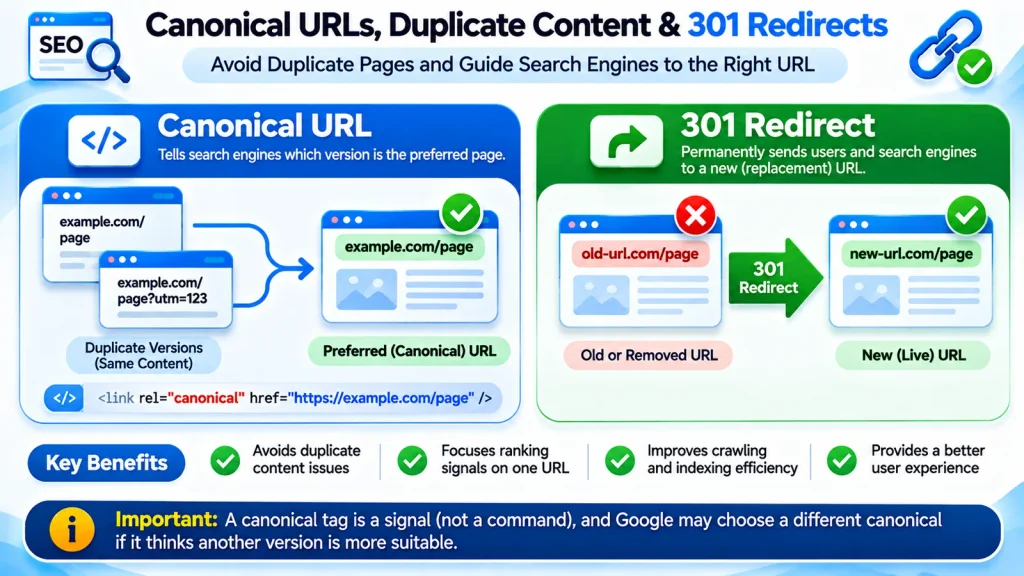
What Is a Canonical URL?
A canonical URL is the preferred representative of duplicate or substantially similar content.
For example:
<link rel="canonical" href="https://example.com/technical-seo-guide/">This signals your preferred URL.
However, Google ultimately selects the canonical based on multiple signals.
Why Does Google Choose a Different Canonical?
Possible explanations include conflicting canonical annotations, inconsistent internal links, redirects, sitemap signals, or content equivalence.
Diagnosis:
- Inspect the affected URL in Search Console.
- Record the user-declared canonical.
- Record Google’s selected canonical.
- Compare both URLs’ actual content.
- Check redirects and internal-link destinations.
- Review sitemap inclusion.
Expected verification: Technical signals consistently support the intended representative page, followed by monitoring Google’s canonical selection after reprocessing.
When Should You Merge Articles?
Consider consolidation when articles serve essentially the same search intent and provide limited unique value separately.
Before deciding:
- Export their Search Console queries.
- Compare clicks and impressions.
- Review backlinks.
- Identify unique useful sections.
- Determine which URL best owns the primary intent.
Preserve valuable information.
Use appropriate redirects if a page is genuinely replaced.
When Should You Use a 301 Redirect?
A 301 redirect is suitable for a permanent move when the old URL has a relevant replacement.
Redirect directly to the final destination where practical.
Don’t redirect every missing page to the homepage.
A legitimate 404 response is appropriate when a page no longer exists, and there is no suitable replacement.
Can Duplicate Content Cause a Google Penalty?
Ordinary duplication is not automatically a spam-policy violation.
Google frequently handles similar URLs through canonicalization.
However, creating large numbers of low-value pages primarily to manipulate rankings can raise separate spam concerns.
The objective is clear search intent ownership, not artificially maximizing the number of URLs.
Fix Slow, Broken, or Incomplete Pages
A website can be accessible to Googlebot and still provide a poor experience.
Imagine that your page loads, but the mobile menu doesn’t open.
Or the article title appears, yet the main content is missing.
These are functional problems that deserve investigation independently of search rankings.

What Are Core Web Vitals?
Core Web Vitals assess important aspects of the user experience.
| Metric | Measures | Good threshold |
|---|---|---|
| Largest Contentful Paint (LCP) | Loading of the largest visible content element | 2.5 seconds or less |
| Interaction to Next Paint (INP) | Interaction responsiveness | 200 milliseconds or less |
| Cumulative Layout Shift (CLS) | Unexpected visual movement | 0.1 or less |
These thresholds are generally evaluated using real-user data at the 75th percentile.
Why Is My Website Still Slow With a Cache Plugin?
Caching cannot fix every problem.
Your bottleneck may be:
- A large hero image.
- Slow server response.
- Heavy JavaScript execution.
- Render-blocking styles.
- Excessive third-party scripts.
- Poorly optimized fonts.
- Plugin conflicts.
- An inefficient page template.
Use PageSpeed Insights to investigate.
Distinguish real-user field data from laboratory simulations.
Do not interpret a single synthetic score as the complete user experience.
How Do You Improve LCP?
Identify the actual LCP element first.
If it’s an image, investigate compression, dimensions, delivery, and loading priority.
If server delay is the dominant issue, image optimization alone may not resolve it.
Avoid unnecessary lazy loading of critical above-the-fold content.
How Do You Improve INP?
Investigate expensive JavaScript tasks and delayed interactions.
Test navigation menus, forms, and other important controls.
Reducing unnecessary browser work can help, but aggressive script optimization can also break a website.
How Do You Improve CLS?
Specify image dimensions, reserve space for dynamic elements, and avoid unexpected changes to already visible content.
My Article Is in WordPress but Missing From the Live Page. Why?
This is a particularly important troubleshooting case.
The editor may contain the article while the public page displays only a heading, author details, and footer.
Possible explanations include:
- A post template isn’t rendering the main content.
- A page builder or theme displays the wrong content source.
- Conditional template logic omits article content.
- JavaScript errors affect client-side rendering.
- Caching serves incomplete output.
- The database content and displayed template are inconsistent.
Diagnostic workflow:
- Open the post in WordPress and confirm that its content exists.
- Check the public page in a private browser window.
- Inspect the page source for a distinctive paragraph.
- Inspect the rendered DOM using Chrome Developer Tools.
- Compare the results with another working blog post.
- Inspect the active WordPress post template.
- Check relevant PHP and JavaScript errors.
- Review cache behavior after identifying a likely cause.
For a classic WordPress theme, the template generally needs to render post content using the appropriate WordPress content function.
For a block theme, the relevant Single template needs the Post Content block.
How to verify the repair: The article’s actual heading, body paragraphs, links, and other important content should appear correctly in the public rendered page and accessible HTML.
Do not change databases or replace themes blindly.
Does Mobile-First Indexing Mean Desktop Content Doesn’t Matter?
No.
Google primarily uses mobile content for indexing, but both desktop and mobile experiences should remain functional.
Important information should not disappear from the mobile version.
Content hidden in ordinary accessible interface elements is not automatically a problem. The critical question is whether the content remains available and processable.
Structured Data and Internal Website Architecture
Search engines need to discover your pages, while visitors need clear paths to the information they want.
Website architecture helps both.
What Is a Good Website Structure?
A helpful structure organizes related topics logically.
For example:
Website Development → Technical SEO → Indexing Troubleshooting.
The broader technical SEO guide can explain the fundamentals, while a dedicated indexing article addresses a specific problem in more depth.
This prevents unnecessary duplication.
What Is an Orphan Page?
An orphan page lacks discoverable internal links from the website’s crawlable structure.
It may still be found through a sitemap or external link, but internal links make navigation and discovery more reliable.
Important articles should connect naturally to relevant content.
How Many Internal Links Should an Article Have?
There is no universal ideal number.
Link when the destination helps readers answer the next question.
For example, readers investigating a specific indexing status can continue to our WordPress indexing troubleshooting guide.
Visitors who need professional technical implementation can explore Technical SEO Services and Audits.
The first link serves informational intent. The second serves commercial intent.
What Is Structured Data?
Structured data provides machine-readable information about a page.
An article may use Article or BlogPosting schema with accurate properties such as headline, author, date, and publisher.
Structured data must match the visible content.
Your SEO plugin may generate it automatically.
Check the existing markup before introducing additional schema.
Does FAQ Schema Guarantee Rich Results?
No.
Google limits FAQ rich-result eligibility substantially, and adding FAQ markup does not guarantee a special search appearance.
Use FAQs because they’re helpful to visitors, not because they promise rankings.
Technical SEO for AI Search, AEO, and GEO
Search is changing, and website owners increasingly want visibility in AI-powered answers.
You may ask:
“How do I make ChatGPT, Google AI Overviews, and other AI systems recognize my content?”
There is no universal technique that guarantees citation.
The foundation remains accessible, useful, reliable information.
Does Google Need Special AI SEO Markup?
No.
Google’s AI Overviews and AI Mode do not require special AI-specific schema or a separate technical optimization system.
Search eligibility, including indexing and snippet eligibility, remains relevant.
Creating an llms.txt file is not a requirement for Google AI search eligibility.
What Is AEO?
Answer Engine Optimization focuses on making information understandable and useful for question-based discovery.
In practice, this means addressing real questions directly and accurately.
For example:
Question: Why isn’t my article indexed?
Useful answer: First inspect the URL in Search Console to determine whether Google has discovered, crawled, or excluded it. Then investigate the specific reported status rather than repeatedly requesting indexing.
This is more useful than a vague claim about improving SEO performance.
What Is GEO?
Generative Engine Optimization is a commonly used term for improving how information may be discovered, interpreted, and referenced by generative search systems.
Its precise definition and measurement are not universally standardized.
Practical improvements include:
- Original and verifiable information.
- Clear, accurate explanations.
- Transparent authorship.
- Descriptive headings.
- Appropriate citations.
- Well-organized website content.
- Accessible text and relevant links.
- Honest explanations of limitations.
These improvements benefit human visitors regardless of AI citation outcomes.
Can You Guarantee AI Citations?
No.
Different AI systems use different retrieval and citation processes.
Even technically accessible, well-written content may not be selected as a citation.
Avoid services promising guaranteed AI mentions without verifiable evidence.
Should You Publish Hundreds of AI Question Pages?
Only when those pages address genuinely distinct needs.
Publishing near-duplicate question pages can create maintenance burdens and overlap.
One excellent resource may be more useful than dozens of shallow pages.
Five Realistic Technical SEO Troubleshooting Scenarios
The following examples are illustrative diagnostic scenarios. They are not presented as completed client case studies or measured test results.
Scenario 1. A New Website Has No Google Visibility
The concern: “My website has been live for three weeks. Is Google ignoring it?”
What to investigate: Search Console verification, URL discovery, crawlability, indexing status, internal links, and robots settings.
What to do: Correct verified technical restrictions, provide useful internal navigation, and submit an appropriate sitemap.
What successful progress looks like: Important URLs become crawlable, and Search Console begins showing meaningful crawling or indexing information.
What it doesn’t prove: That the website will rank for competitive keywords.
Scenario 2. Google Crawled an Article but Didn’t Index It
The concern: “I spent days writing this article. Why doesn’t Google want it?”
What to investigate: Indexing eligibility, overlapping articles, canonical signals, and the page’s unique purpose.
What to do: Improve actual deficiencies and consolidate unnecessary overlap where justified.
What successful progress looks like: The intended URL receives updated indexing consideration and, if selected, begins appearing in relevant search reports.
What it doesn’t prove: That an indexing request or content update guarantees inclusion.
Scenario 3. Search Console Cannot Fetch the Sitemap
The concern: “My sitemap opens on my computer. Is Google broken?”
What to investigate: Exact HTTP response, valid XML, server access, caching, and intermittent errors.
What to do: Fix the verified delivery problem and resubmit the correct sitemap.
What successful progress looks like: Search Console processes the sitemap successfully.
What it doesn’t prove: That every listed URL will be indexed.
Scenario 4. A Theme Update Causes Missing Content
The concern: “My site looks different, and traffic dropped. Did Google penalize me?”
What to investigate: Timing, rendered HTML, theme templates, mobile behavior, server errors, and relevant Search Console data.
What to do: Restore confirmed missing content or broken functionality, ideally through a tested change with rollback available.
What successful progress looks like: Important content and user interactions are restored across relevant devices and templates.
What it doesn’t prove: That every traffic change was caused by the theme.
Scenario 5. Google Selects the Wrong Canonical
The concern: “My canonical tag is correct. Why is Google showing another URL?”
What to investigate: URL equivalence, redirects, internal links, sitemap signals, and canonical annotations.
What to do: Align conflicting signals and preserve the page that genuinely represents the intended content.
What successful progress looks like: Google eventually selects the intended representative URL, if supported by its evaluation.
What it doesn’t prove: That canonical annotations can force Google’s decision.
Can You Fix Technical SEO Problems Yourself?
Many technical SEO checks are suitable for website owners without advanced development experience.
Others require technical knowledge and careful change management.
What Can Beginners Safely Check?
| Task | Skill level | Risk |
|---|---|---|
| Review Search Console reports | Beginner | Low |
| Inspect a page’s indexing status | Beginner | Low |
| Open and review a sitemap | Beginner | Low |
| Check whether a live page displays its content | Beginner | Low |
| Test website performance | Beginner | Low |
| Review internal links | Beginner | Low |
| Change robots directives | Intermediate | High if incorrect |
| Modify canonical rules | Intermediate | High if incorrect |
| Configure redirects | Intermediate | Medium to high |
| Edit PHP theme templates | Developer | High |
| Modify production database records | Developer or administrator | High |
Which Free Tools Do You Actually Need?
You can investigate many common problems with:
- Google Search Console for indexing and search performance.
- Google PageSpeed Insights for performance diagnostics.
- Chrome Developer Tools for rendered HTML, console errors, and network requests.
- Google Rich Results Test for supported structured-data features.
- WordPress Site Health for selected environment checks.
Paid crawlers and specialized testing software can be useful, especially on large websites, but they aren’t prerequisites for basic troubleshooting.
When Should You Hire a Developer?
Consider professional help when:
- Main article content is missing from public pages.
- Theme or plugin changes produce server errors.
- Redirect rules affect large numbers of URLs.
- Website migrations require URL mapping.
- Structured content is stored in complex page-builder data.
- Production database changes may be necessary.
- You cannot confidently restore the original configuration.
The cost of a technically incorrect fix can exceed the cost of diagnosing the issue properly.
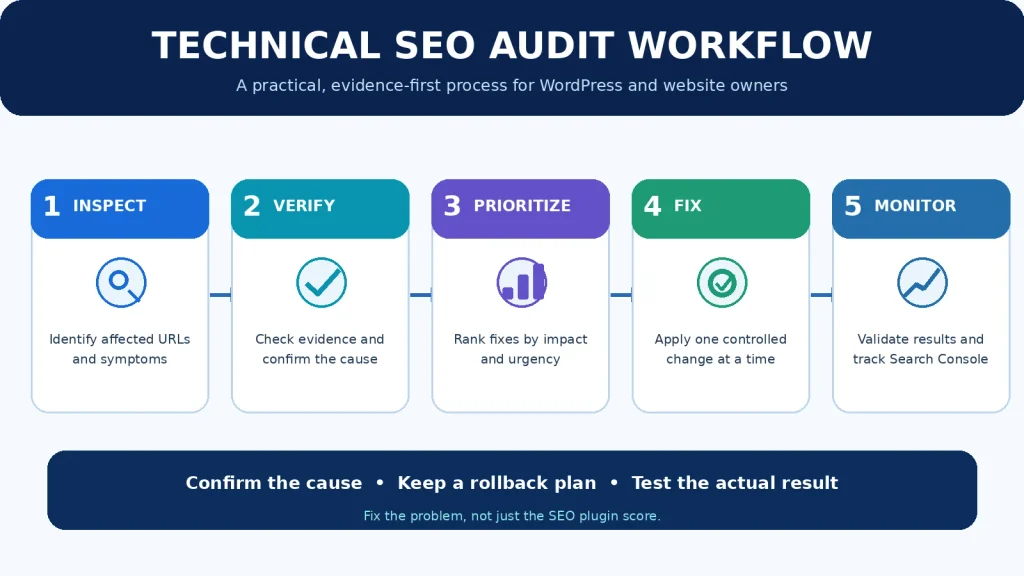
A Complete Technical SEO Audit Workflow
You don’t need to investigate everything in one session.
Start with your most valuable URLs.
Stage 1. Establish the Baseline
Record current Search Console performance.
Identify your homepage, most important service pages, and high-value articles.
Check their live availability and indexing status.
Stage 2. Verify Access and Indexing
Review HTTP responses, robots rules, noindex directives, canonical signals, and sitemap inclusion.
Document actual evidence rather than relying entirely on plugin warnings.
Stage 3. Inspect Content Delivery
Make sure titles, paragraphs, images, and important internal links are actually present in the rendered page.
Compare desktop and mobile.
Investigate missing or broken templates.
Stage 4. Check User Experience
Review major performance bottlenecks, navigation, forms, and interactive elements.
Use field data where available.
Stage 5. Review Architecture and Overlap
Identify important orphan pages.
Find broken internal links and conflicting URL signals.
Evaluate overlapping content only after reviewing its purpose and performance.
Stage 6. Prioritize Corrections
| Severity | Example | Action |
|---|---|---|
| Critical | Important content inaccessible | Investigate immediately |
| Critical | Public service pages accidentally noindexed | Correct confirmed restriction |
| High | Incorrect redirect destination | Repair and verify |
| High | Broken mobile navigation | Restore functionality |
| High | Conflicting canonical on valuable page | Diagnose and align signals |
| Medium | Sitemap warning with no confirmed indexing impact | Investigate systematically |
| Medium | Nonessential schema inconsistency | Correct after major issues |
| Low | Cosmetic plugin warning | Evaluate actual impact |
Stage 7. Apply One Controlled Change at a Time
Before each change, record:
- What you are changing.
- Why the change is justified.
- What result you expect.
- How you will test the result.
- How you will reverse the change if it fails.
For risky changes, use staging and a restorable backup.
Stage 8. Verify the Result
Technical fixes and search outcomes follow different timelines.
A corrected navigation menu can be verified immediately.
An indexing or ranking effect may require Google to recrawl and reprocess the page.
Confirm what has actually changed instead of declaring success based on an SEO plugin score.
Frequently Asked Questions
Why is my website not ranking despite having good technical SEO?
Technical SEO removes barriers but does not guarantee relevance or competitive rankings. Review search intent, content quality, demand, competition, and Search Console performance.
How do I know whether Google has penalized my website?
Check Search Console’s Manual Actions report for confirmed manual actions. A traffic decline or indexing exclusion does not automatically mean a penalty exists.
Can technical SEO fix a website receiving no traffic?
It can resolve verified crawl, indexing, rendering, or access problems. However, a website may receive no traffic for reasons unrelated to technical configuration.
Is Rank Math enough for WordPress SEO?
Rank Math manages important SEO settings, but it cannot resolve every server problem, content issue, or broken WordPress template.
Should I delete articles that Google hasn’t indexed?
Not automatically. Evaluate their usefulness, search intent, overlap, and technical status before deciding whether to improve, merge, retain, or remove them.
Does Google penalize AI-written articles?
AI assistance alone is not a violation. Google’s spam policies address abusive practices, including scaled low-value content created primarily to manipulate rankings.
How long does technical SEO take to work?
Technical repairs may take effect immediately on the website. Search engines may take varying amounts of time to crawl, process, and reflect changes. Rankings are not guaranteed.
Should every website have an XML sitemap?
Not every website requires one for discovery, but a sitemap can be valuable, especially for new, large, or complex websites.
Can Google index content generated with JavaScript?
Yes, but important content must be accessible through supported rendering processes. Broken scripts and inaccessible resources can cause problems.
Can I achieve a 100/100 SEO score?
An SEO tool’s perfect score is not equivalent to Google’s evaluation. Real content usefulness, technical reliability, and business outcomes matter more than satisfying every automated suggestion.
Final Thoughts
The most useful technical SEO skill is not memorizing dozens of terms.
It is learning to separate symptoms from causes.
When an article isn’t indexed, investigate why.
When a sitemap fails, test the actual response.
When a mobile page breaks, examine the relevant interface and rendering behavior.
When Google selects a different canonical, compare the conflicting signals.
And when traffic declines, don’t assume you’ve been penalized.
Identify the problem. Collect evidence. Make a controlled correction. Verify the result.
That process makes your website more reliable for visitors and easier for search engines to process.
It also prevents unnecessary changes that can create bigger problems than the ones you’re trying to solve.
Need Professional Technical SEO Assistance?
If your website has confirmed crawling, indexing, canonical, rendering, or performance problems that require specialist implementation, explore Marjan Web Studio’s Technical SEO Services and Audits.
A reliable technical audit should identify the affected URLs, show the supporting evidence, explain the recommended corrections, and distinguish confirmed defects from assumptions.
References and Further Reading
The following official resources support the technical concepts and procedures discussed in this guide.
- Google Search Technical Requirements
- Google Crawling and Indexing Documentation
- Google URL Canonicalization
- Google XML Sitemap Guidance
- Google Robots.txt Documentation
- Google Core Web Vitals
- Google AI Features and Your Website
- Google Search Spam Policies
- Google Search Console
- Google PageSpeed Insights
Editorial note: This guide explains general technical SEO principles and diagnostic procedures. Website configurations differ, and search engine processes evolve. Always validate technical modifications against your actual website environment.