Table of Contents
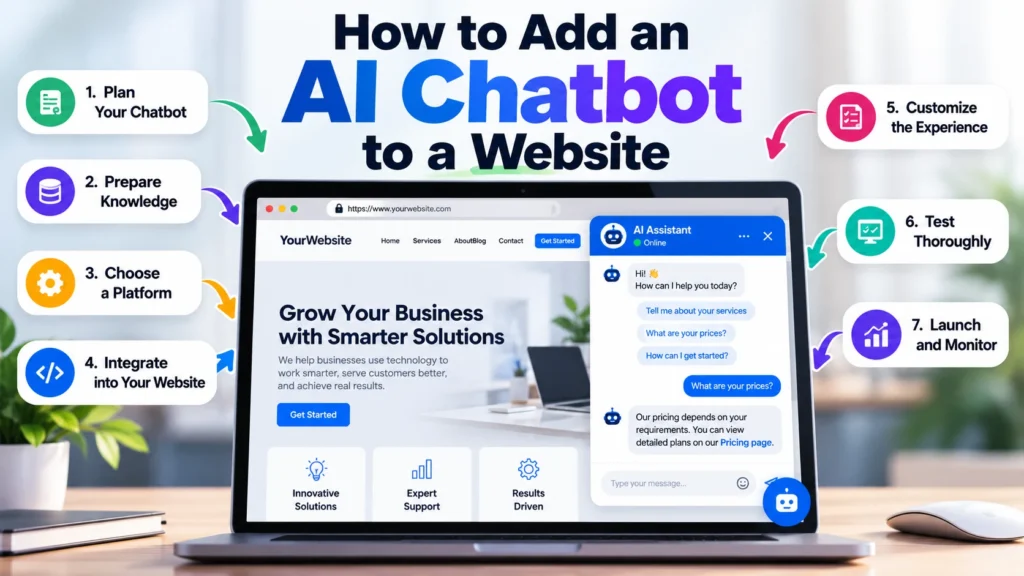
Learning how to add an AI chatbot to a website is no longer only about installing a chat bubble in the corner of a page. A useful AI chatbot needs a clear purpose, trustworthy information, sensible limits, secure integration, human escalation, realistic testing, and a way to measure whether it is actually helping visitors.
The technical installation can sometimes be completed with a plugin, widget, script, or API integration. The harder part is making sure the chatbot gives reliable answers and supports the visitor instead of creating another layer of confusion.
This guide explains the complete process using a practical nine-step framework that can be applied to WordPress, business websites, ecommerce stores, website builders, and custom web applications.
If your business requires professional implementation rather than a do-it-yourself setup, you can also explore Marjan Web Studio digital services for AI integration, website development, automation, performance, security, and related technical services.
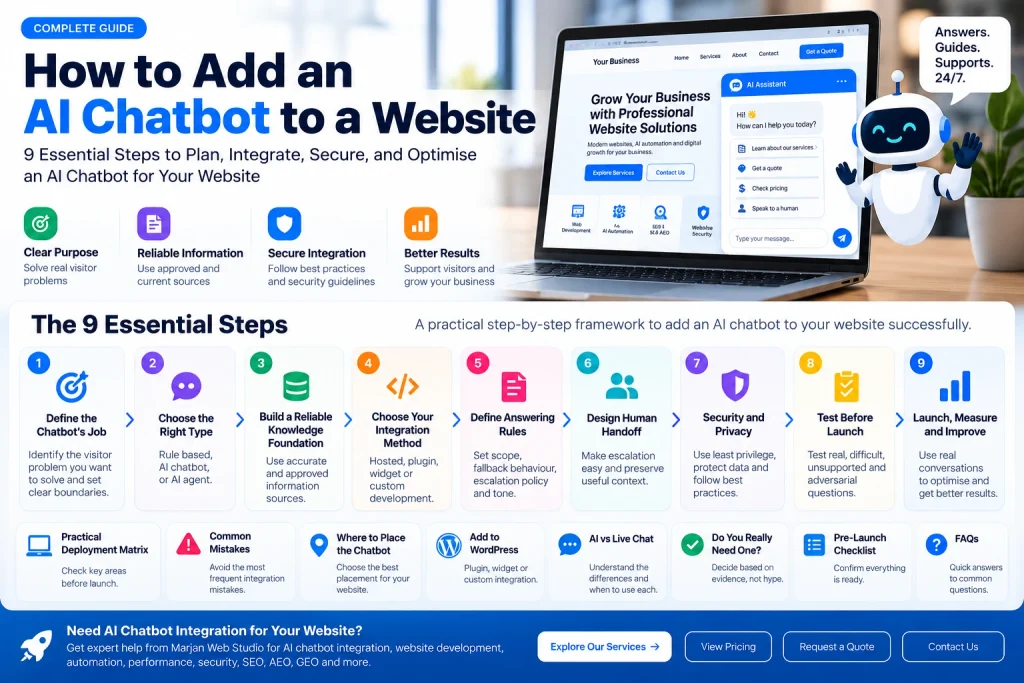
Quick Answer: How Do You Add an AI Chatbot to a Website?
To add an AI chatbot to a website:
- Define exactly what the chatbot should do.
- Choose the appropriate type of chatbot.
- Prepare reliable and approved knowledge sources.
- Choose an integration method.
- Define answering rules and fallback behaviour.
- Create a clear human handoff process.
- Apply appropriate security and privacy controls.
- Test normal, difficult, unsupported, and adversarial questions.
- Launch, measure performance, and improve the system using real conversation evidence.
A basic chatbot can be installed quickly. A dependable chatbot requires more planning because the quality of its knowledge, rules, security, testing, and escalation process determines whether visitors can trust it.
What Is an AI Website Chatbot?
An AI website chatbot is an interactive interface that uses artificial intelligence to understand visitor questions and generate relevant responses.
Traditional rule-based chatbots normally follow predefined paths.
Visitor selects an option → chatbot follows a rule → predefined answer appears.
An AI chatbot can interpret more flexible natural language.
For example, a website visitor might ask:
Do you build online stores?
Another visitor may ask:
Can you make an ecommerce website for my business?
A third might write:
I want to sell products online. Can you help me?
A properly configured AI chatbot can recognise that these questions are closely related even though the wording is different.
Modern website chatbots can also use approved information from service pages, product documentation, FAQs, policies, help articles, pricing information, or another controlled knowledge source.
However, an AI chatbot should never be treated as automatically knowledgeable about your organisation. Its usefulness depends heavily on the information, instructions, permissions, and systems behind it.
The Marjan TRUST Framework for AI Chatbot Integration
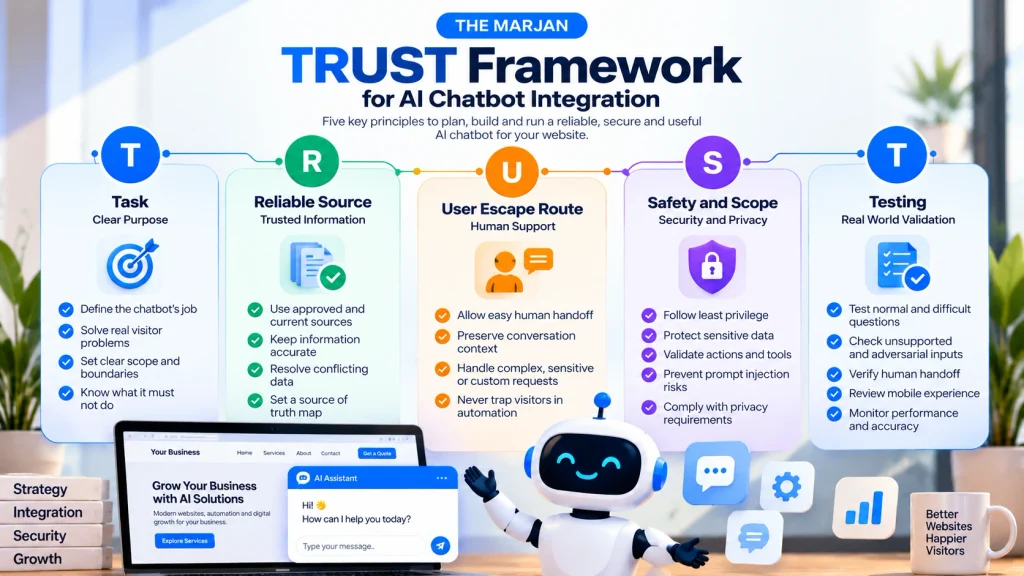
Before choosing a chatbot platform, evaluate the proposed system using five questions.
| Principle | Question |
|---|---|
| T. Task | Does the chatbot have a clearly defined job? |
| R. Reliable Source | Does it answer using approved and current information? |
| U. User Escape Route | Can the visitor reach a human when automation is not enough? |
| S. Safety and Scope | Are permissions, data access, sensitive information, and actions appropriately controlled? |
| T. Testing | Has the chatbot been tested with realistic, difficult, ambiguous, and unsupported questions? |
This framework shifts the decision away from simply asking:
Which AI chatbot should I install?
The platform matters, but the operating design matters just as much.
Step 1: Define the Chatbot’s Job Before Choosing a Tool
Do not begin by comparing chatbot software.
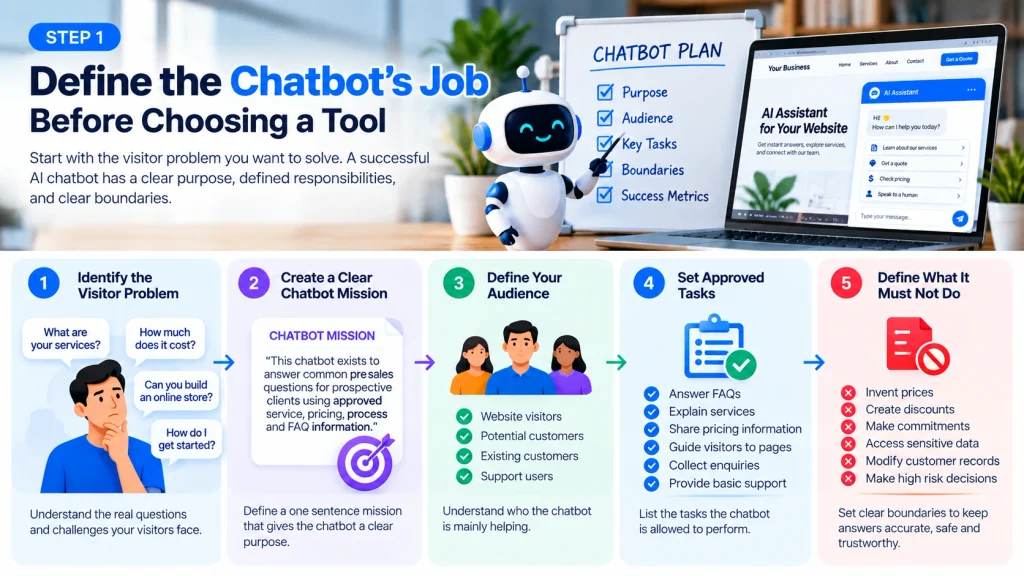
Begin with the visitor problem you want to solve.
A website chatbot might be designed to:
- Answer frequently asked questions.
- Explain products or services.
- Help visitors find the correct webpage.
- Qualify potential leads.
- Collect enquiry information.
- Provide first-line customer support.
- Explain booking or ordering procedures.
- Guide customers through simple processes.
- Route visitors to the correct department.
- Escalate complex enquiries to a person.
- Perform carefully controlled actions through connected systems.
These are not the same job.
A chatbot built primarily for customer support requires different information and escalation rules from one designed for lead qualification.
Create a One Sentence Chatbot Mission
Before implementation, complete this sentence:
This chatbot exists to ______ for ______ using ______.
For example:
This chatbot exists to answer common pre sales questions for prospective website development clients using approved service, pricing, process, and FAQ information.
That single statement gives the project a boundary.
Every proposed feature can then be evaluated against the chatbot’s actual purpose.
If the chatbot is intended to support a commercial website, its role should also align with the actual website services and business objectives instead of being added simply because AI chatbots are popular.
Define What the Chatbot Must Not Do
Negative scope is equally important.
Depending on the business, the chatbot may not be authorised to:
- Invent prices.
- Create discounts.
- Promise delivery dates.
- Make contractual commitments.
- Expose internal information.
- Modify customer records.
- Approve refunds.
- Access unrelated business systems.
- Make high-consequence decisions.
- Answer questions when reliable information is unavailable.
A trustworthy chatbot does not need to answer everything.
It needs to know where its responsibility ends.
Step 2: Choose the Right Type of Chatbot
Different websites require different levels of automation.
Rule-Based Chatbot
A rule-based chatbot follows predetermined logic.
It can work well when visitor interactions are predictable.
Examples include:
- Selecting a department.
- Choosing a service.
- Finding contact information.
- Following a fixed qualification process.
- Selecting from predefined support options.
Its main limitation is flexibility.
AI Chatbot
An AI chatbot interprets natural language and can respond to questions expressed in many different ways.
It is useful when customers are unlikely to use identical wording every time.
The chatbot can still be restricted to specific knowledge and purposes rather than behaving like a general-purpose AI assistant.
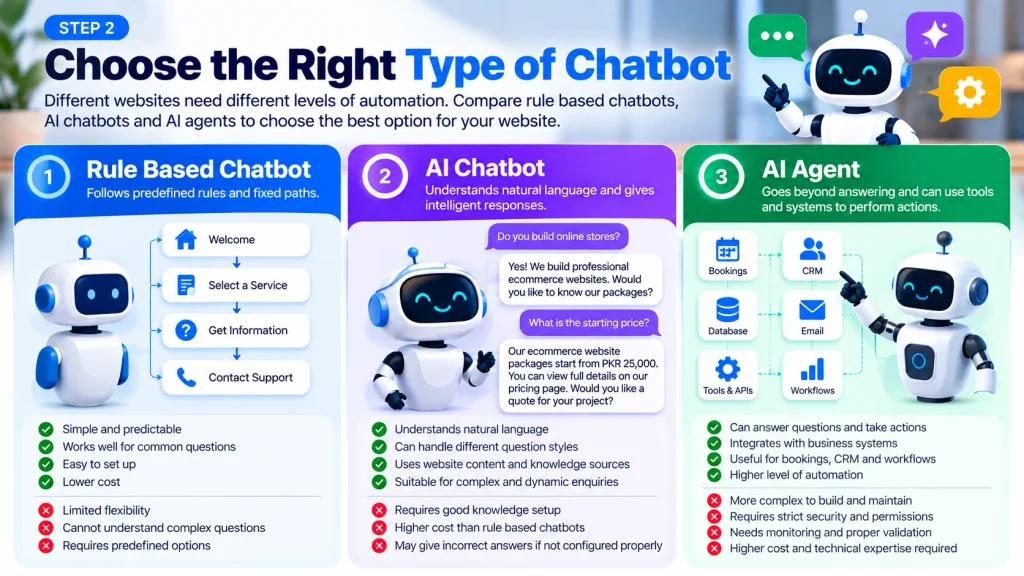
AI Agent
An AI agent may go beyond answering questions and use connected tools or systems to perform tasks.
For example, a sufficiently integrated system could interact with booking, CRM, support, or workflow applications.
That additional capability creates additional responsibility.
Systems with tool access require stronger permissions, validation, authentication, logging, monitoring, and approval controls.
The OWASP Prompt Injection Prevention Cheat Sheet recommends security measures such as least privilege, input and output controls, validation, and careful management of tool access.
For many small and medium business websites, a bounded AI chatbot that answers questions and escalates exceptions may be more appropriate than giving an autonomous system broad access to business operations.
Step 3: Build a Reliable Knowledge Foundation
The chat window is what visitors see.
The knowledge behind the chat window determines whether the answers are useful.
Possible approved sources include:
- Current service pages.
- Product information.
- Pricing pages.
- Frequently asked questions.
- Shipping and delivery policies.
- Refund or cancellation policies.
- Business hours.
- Support documentation.
- Onboarding information.
- Approved internal documentation that is appropriate for the chatbot to access.
For example, a chatbot operating on a professional service website should obtain pricing information from the current official pricing page rather than relying on an old article, cached promotion, or outdated document.
Do Not Automatically Feed the Chatbot Everything
More information is not always better information.
Imagine a business website contains:
An old service page with one price.
A new pricing page with another price.
An outdated PDF.
An expired promotional offer.
A current FAQ.
Which source should the chatbot trust?
If the business has not decided this before integration, inconsistent answers become much more likely.
Create a Source of Truth Map
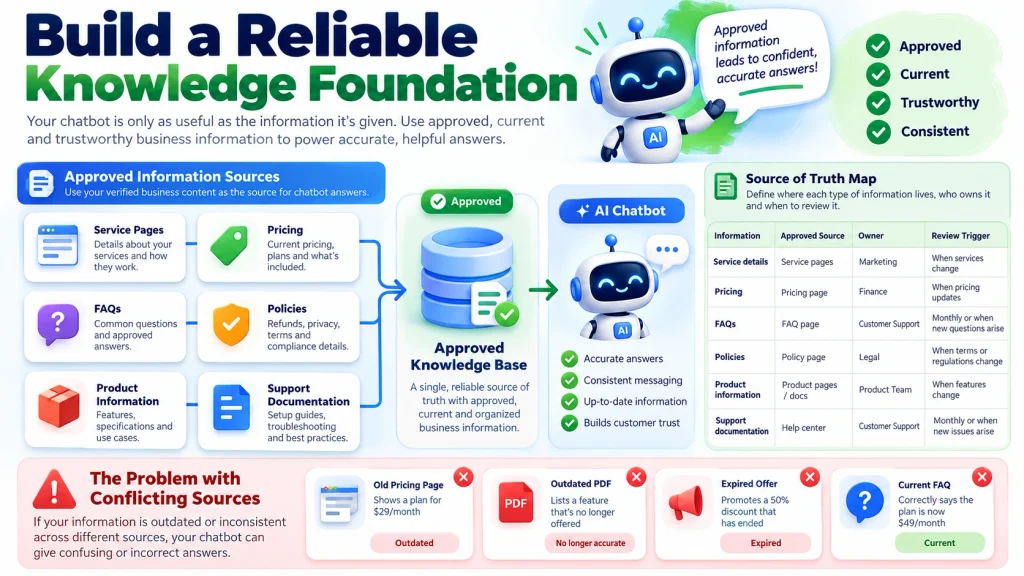
A simple governance table can prevent many avoidable problems.
| Information | Approved Source | Owner | Review Trigger |
|---|---|---|---|
| Service scope | Current service page | Service owner | Service changes |
| Pricing | Current pricing page | Business owner | Price changes |
| Refund policy | Approved policy page | Policy owner | Policy revision |
| Contact details | Contact page | Administrator | Contact details change |
| Opening hours | Official business source | Administrator | Schedule changes |
The objective is to determine:
What information is authoritative?
Who is responsible for it?
When must it be reviewed?
Training a Chatbot Does Not Always Mean Training a New AI Model
Website owners frequently say they want to “train an AI chatbot.”
In many chatbot implementations, a new foundation model is not being trained from scratch.
Instead, approved webpages, documents, FAQs, or records may be indexed and retrieved when a visitor asks a question. Relevant information is supplied to the AI so it can formulate an answer using that context.
This distinction matters for maintenance.
When a price, policy, service, or process changes, the approved source may need to be updated and then re-indexed, re-synced, or otherwise refreshed according to the chatbot platform being used.
Step 4: Choose Your AI Chatbot Integration Method
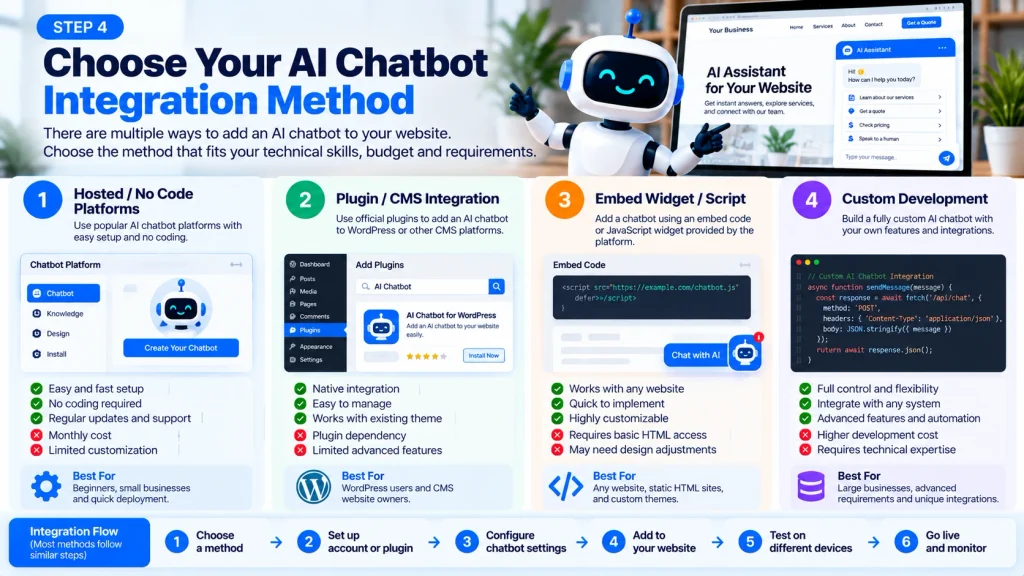
There is no single correct installation method for every website.
Option 1: Hosted or No-Code AI Chatbot
This is often the simplest approach for businesses without an AI development team.
A typical workflow looks like this:
Create chatbot → Add approved knowledge → Configure behaviour → Customise interface → Add integration code → Test → Launch
Advantages can include:
- Faster deployment.
- Less infrastructure management.
- Built-in interfaces.
- Easier knowledge management.
- Vendor-managed updates.
Possible limitations include:
- Subscription costs.
- Usage limits.
- Reduced technical control.
- Vendor dependency.
- Data handling considerations.
- Limited workflow customisation.
Evaluate the provider rather than choosing solely on the basis of installation speed.
Option 2: Plugin or CMS Integration
Content management systems such as WordPress may support AI chatbot integrations through plugins or vendor integrations.
Plugins can simplify installation, but convenience alone is not a sufficient selection criterion.
Review:
- Maintenance history.
- Compatibility.
- Security practices.
- Performance impact.
- Data handling.
- Update frequency.
- Documentation.
- Support.
- Required permissions.
- Whether the underlying chatbot meets your actual requirements.
The official WordPress Plugin Developer Handbook provides guidance on extending WordPress functionality through plugins.
WordPress also explicitly advises developers not to modify WordPress core files for custom functionality. See the official Introduction to Plugin Development for the underlying principle.
Option 3: Script or Widget Embed
Many hosted chatbot platforms provide an embed script or widget.
The general architecture may resemble:
Website → Chat Widget → Chatbot Service → AI and Knowledge Layer → Response
This method can be relatively straightforward, but the exact implementation depends on the website platform and chatbot provider.
Do not assume the same script placement or implementation method applies to every CMS or website builder.
Always follow the supported implementation method for the technology being used.
Option 4: Custom AI Chatbot
A custom AI chatbot gives developers greater control but creates substantially more engineering responsibility.
A production system may require:
- Frontend chat interface.
- Backend application.
- AI model or API integration.
- Retrieval architecture.
- Content ingestion.
- Authentication.
- Authorisation.
- Conversation state.
- Logging.
- Monitoring.
- Moderation.
- Analytics.
- Security controls.
- Error handling.
- Rate limiting.
- Ongoing maintenance.
Custom does not automatically mean better.
Choose a custom implementation when the business requirements justify its additional cost, complexity, security responsibility, and maintenance burden.
If a chatbot is being developed as part of a larger website project, the chatbot should also fit the overall website development architecture rather than being treated as an isolated feature.
Step 5: Define the Chatbot’s Answering Rules
An AI chatbot should not simply receive a knowledge base and be told:
Answer the user.
Define its operating rules.
Role
What is the chatbot?
Example:
You are the website information assistant for this business.
Approved Scope
Which subjects may it answer?
For example:
Services.
Pricing.
Business hours.
Ordering procedures.
Frequently asked questions.
Source Policy
Which information is the chatbot allowed to rely on?
If two sources conflict, which one takes priority?
Unknown Answer Policy
What happens when reliable information is unavailable?
A transparent fallback is usually more useful than confident speculation.
For example:
I do not have enough approved information to answer that accurately. I can help you contact the team instead.
Escalation Policy
Which situations should be referred to a person?
If a visitor needs an actual quotation rather than general information, the chatbot could guide them toward a structured project quote request.
Action Policy
Which actions may the chatbot perform?
Which require confirmation?
Which are prohibited?
Tone
Should answers be:
Professional.
Concise.
Friendly.
Technical.
Explanatory.
Conversational.
The objective is consistency, not artificial personality.
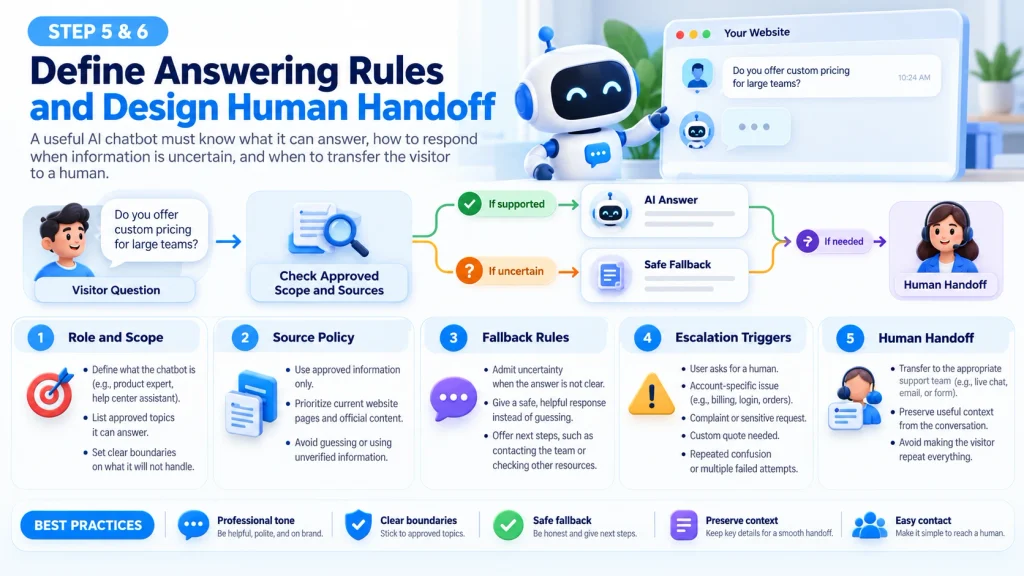
Step 6: Design Human Handoff Before Launch
Human escalation should be part of the system design rather than something added after problems appear.
A chatbot may need to escalate when:
- Reliable information cannot be found.
- The visitor says the answer is incorrect.
- The question requires account-specific information.
- The visitor explicitly requests a person.
- A complaint requires judgement.
- A custom quotation is required.
- Negotiation is involved.
- The request falls outside the chatbot’s scope.
- A significant action requires approval.
- The chatbot reaches its policy boundary.
Preserve Useful Context
A poor handoff looks like this:
Chatbot fails → visitor changes channel → visitor explains everything again.
Where technically appropriate and consistent with applicable privacy requirements, a better handoff can preserve useful context such as:
- What the visitor was trying to accomplish.
- Information already supplied.
- Where the chatbot became uncertain.
- What action the visitor requested next.
Visitors who need direct assistance should have an obvious route to the contact page instead of being trapped inside the automated conversation.
The purpose of an AI chatbot is not necessarily to remove humans from customer service.
It is to automate tasks that automation can handle effectively while preserving human judgement where it adds value.
Step 7: Treat Security and Privacy as Architecture
Adding a privacy policy link below a chatbot is not a complete security strategy.
A public chatbot accepts instructions from people you do not control.
That creates a trust boundary.
Understand Prompt Injection
Prompt injection occurs when manipulated input attempts to change an AI application’s intended behaviour.
Potential consequences can include attempts to bypass safeguards, reveal restricted information, or trigger unauthorised actions.
The OWASP Prompt Injection Prevention Cheat Sheet provides practical guidance for reducing prompt injection risks in systems built around large language models.
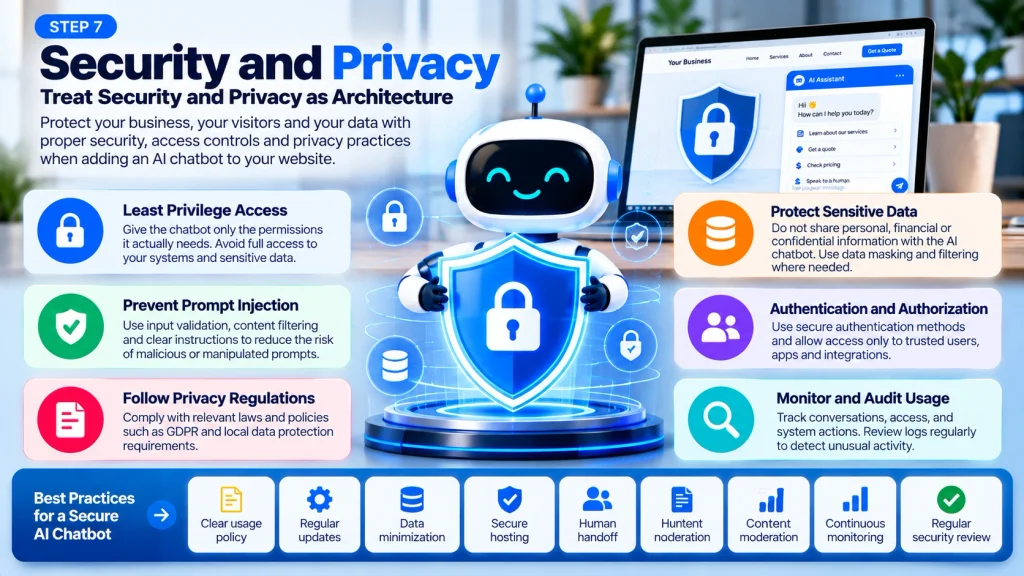
Never Store Secrets in Chatbot Instructions
Do not place credentials, API secrets, private keys, passwords, connection strings, or similar sensitive information inside instructions with the assumption that the prompt will remain hidden.
Security should be enforced through application architecture, authentication, authorisation, and proper secret management.
Apply Least Privilege
Give the system only the access required for its defined job.
If the chatbot only answers service questions, it does not need permission to edit customer records.
If it checks booking availability, that does not automatically mean it should be allowed to modify bookings.
If an action could create financial, legal, privacy, or operational consequences, additional verification or human approval may be appropriate.
For WordPress-based implementations, the official WordPress plugin best practices are also useful when custom functionality is being developed.
Review Personal Data Collection
Before collecting personal information through a chatbot, determine:
- Why the information is necessary.
- Where it is transmitted.
- Where it is stored.
- Who can access it.
- How long it is retained.
- Whether third parties receive it.
- Which privacy obligations apply to your organisation and users.
Avoid collecting information merely because the chatbot technically can.
Step 8: Test the AI Chatbot Before Real Visitors Depend on It
Do not test only the easy questions.
A chatbot that succeeds when asked exactly what its developers expect has not been tested thoroughly.
Test 1: Direct Questions
Ask questions whose answers clearly exist in the approved knowledge base.
Test 2: Paraphrased Questions
Ask the same question in different ways.
For example:
What is your starting price?
How much does the service cost?
What is the minimum budget?
Can you do this within my budget?
The chatbot should recognise related intent while distinguishing factual pricing from negotiation.
If pricing is involved, validate chatbot responses against the website’s current pricing information.
Test 3: Unsupported Questions
Ask about information that is deliberately absent.
The desired outcome may be a transparent admission of uncertainty rather than an invented answer.
Test 4: Contradictory Information
Test areas where multiple sources disagree.
If the chatbot produces conflicting answers, repair the information architecture rather than trying to hide the underlying problem with more prompting.
Test 5: Adversarial Questions
Test whether inputs can:
- Override intended instructions.
- Request information outside the approved scope.
- Manipulate permissions.
- Trigger actions outside established rules.
- Cause the chatbot to ignore its source policy.
The purpose is to verify that the system fails safely and stays within its intended scope.
Test 6: Human Handoff
Ask:
Can I speak to a person?
Verify that the escalation route actually works.
Test 7: Mobile User Experience
Check whether the chatbot:
- Blocks navigation.
- Covers important buttons.
- Interferes with forms.
- Conflicts with consent interfaces.
- Obscures checkout controls.
- Is difficult to close.
- Creates excessive screen clutter.
Test 8: Website Performance
Measure the website before and after chatbot integration.
A technically functional chatbot is not a successful implementation if it materially damages the wider website experience.
A chatbot should be evaluated alongside the site’s wider performance, security, accessibility, and conversion requirements.
Step 9: Launch, Measure, and Improve
Launching the chatbot is the beginning of optimisation rather than the end.
Real conversations reveal questions and behaviours that internal testing may never predict.
Useful signals include:
| Signal | What It May Reveal |
|---|---|
| Unanswered questions | Missing knowledge |
| Repeated corrections | Accuracy problems |
| Frequent escalation | Automation boundary |
| Frequently discussed subjects | Visitor priorities |
| Qualified enquiries | Business contribution |
| Abandoned conversations | UX or answer quality problems |
| Conflicting answers | Source governance problems |
| Repeated support questions | Website content gaps |
Do Not Optimise Only for Number of Chats
A large number of conversations does not automatically mean the chatbot is successful.
Visitors might be using the chatbot frequently because they cannot find important information elsewhere on the website.
Measurement should therefore reflect the chatbot’s defined mission.
For a lead qualification chatbot, useful metrics could include:
- Qualified enquiries.
- Completed contact actions.
- Appropriate handoffs.
- Quote requests.
For customer support:
- Successfully resolved routine questions.
- Unanswered question rate.
- Escalation quality.
- Repeat support questions.
For website navigation:
- Visitors reaching the correct information.
- Reduced repetitive navigation questions.
- Successful discovery of relevant services.
The metric should follow the purpose established in Step 1.
Practical AI Chatbot Deployment Matrix
Use this matrix before launch.
| Area | Question | Warning Sign | Recommended Response |
|---|---|---|---|
| Purpose | Does the chatbot have one clear job? | It attempts to answer everything | Narrow the scope |
| Knowledge | Are sources approved and current? | Conflicting answers | Clean and prioritise sources |
| Accuracy | Does it stay grounded in reliable information? | Unsupported claims | Improve retrieval and rules |
| Fallback | Can it admit uncertainty? | Confident guessing | Add fallback behaviour |
| Handoff | Can visitors reach a person? | Conversation dead end | Add escalation |
| Security | Are permissions minimal? | Excessive system access | Reduce permissions |
| Privacy | Is collected data necessary? | Unnecessary personal data | Minimise collection |
| UX | Does it work on mobile? | Widget blocks interface | Adjust design and placement |
| Performance | Does the website remain responsive? | Loading degradation | Optimise integration |
| Measurement | Is success clearly defined? | Only chat count is measured | Track task outcomes |
Common AI Chatbot Integration Mistakes
Mistake 1: Installing Before Planning
The chatbot is launched before anyone defines its purpose.
Better approach: establish mission, scope, knowledge, and escalation rules first.
Mistake 2: Using Outdated Content
The chatbot retrieves an old price, policy, service, or promotion.
Better approach: establish approved sources and content ownership.
Mistake 3: Forcing the Chatbot to Always Answer
The system behaves as though admitting uncertainty is a failure.
Better approach: make a responsible fallback an acceptable result.
Mistake 4: No Human Escape Route
Visitors become trapped inside automation.
Better approach: provide an obvious and functioning escalation path such as the website’s contact options.
Mistake 5: Excessive Permissions
The AI receives broad access because those permissions might be useful later.
Better approach: use least privilege and expand permissions only when a defined requirement justifies them.
Mistake 6: Testing Only Successful Scenarios
The team tests questions it already knows the chatbot can answer.
Better approach: test ambiguity, conflicting information, missing information, unusual wording, malicious inputs, and system failures.
Mistake 7: Using a Chatbot to Hide a Poor Website
If visitors repeatedly ask:
Where is your pricing?
the problem may not require a smarter chatbot.
It may require a clearer pricing page.
Chatbot data should improve both the automation system and the underlying website.
Where Should You Place an AI Chatbot on a Website?
A persistent bottom corner widget is common, but it is not automatically the best placement for every website.
Placement should follow the chatbot’s purpose.
A support chatbot may make sense across:
- Help pages.
- Customer areas.
- Documentation.
- Support resources.
A pre-sales chatbot may be more relevant on:
- Service pages.
- Pricing pages.
- Product pages.
- Comparison pages.
- High-intent landing pages.
For example, a commercial chatbot could appear on the Marjan Web Studio services page where visitors are already comparing solutions.
Avoid allowing the widget to cover:
- Primary calls to action.
- Accessibility tools.
- Mobile navigation.
- Forms.
- Checkout controls.
- Cookie or consent interfaces.
- Important contact options.
The chatbot should assist the user journey rather than compete with it.
How to Add an AI Chatbot to WordPress
There are several practical ways to add an AI chatbot to WordPress.
Method 1: Official Chatbot Plugin
Some chatbot providers offer their own WordPress plugin.
Installation usually involves:
- Installing the plugin.
- Connecting the account.
- Selecting the chatbot.
- Configuring placement.
- Testing the website.
Method 2: Supported Third-Party Integration
A reputable third-party plugin may be used when supported by the chatbot provider.
Review maintenance, compatibility, permissions, performance, and security before installation.
The official WordPress Plugin Handbook provides useful background for understanding how WordPress plugins extend site functionality.
Method 3: Script or Widget Integration
Some providers supply an embed script.
Use an appropriate WordPress integration mechanism rather than making fragile modifications to WordPress core.
The official WordPress introduction to plugin development states that custom functionality should not be added by directly modifying WordPress core files.
Method 4: Custom API Integration
A custom implementation may be appropriate when the website requires specialised UI, retrieval, authentication, workflows, analytics, or business system connections.
Custom integration requires more development and security responsibility.
After Installing the Chatbot on WordPress
Check:
- Desktop.
- Mobile.
- Logged-in and logged-out states where relevant.
- Important page templates.
- Forms.
- Checkout pages where applicable.
- Caching behaviour.
- Page performance.
- Knowledge retrieval.
- Human handoff.
- Error states.
- Website stability.
For developers creating custom WordPress integrations, review the official WordPress plugin best practices as part of development and testing.
AI Chatbot vs Traditional Live Chat
AI chatbots and live chat solve overlapping but different problems.
| AI Chatbot | Traditional Live Chat |
|---|---|
| Can answer automatically | Requires an available person |
| Handles repeated questions at scale | Better suited to nuanced human discussion |
| Can operate outside normal staffing hours | Availability depends on staffing |
| Depends on knowledge quality and configuration | Depends on staff knowledge and judgement |
| Requires escalation design | Human judgement is already present |
| Can produce incorrect or unsupported responses | Humans can also make mistakes but can apply contextual judgement |
The strongest architecture is sometimes a combination.
AI handles bounded and repetitive questions.
People handle exceptions, negotiation, sensitive situations, and complex judgement.
Should Every Website Have an AI Chatbot?
No.
An AI chatbot should solve a genuine visitor or business problem.
A website may not need one when:
- It receives very few repetitive enquiries.
- Visitors already complete important tasks easily.
- Information changes too quickly to maintain reliably.
- Nobody is responsible for monitoring the chatbot.
- There is no useful knowledge base.
- The system would create more complexity than value.
- A simpler FAQ, search function, form, or live chat would solve the problem better.
A chatbot may be worth testing when:
- Visitors repeatedly ask the same questions.
- Staff repeatedly provide identical answers.
- Leads arrive outside normal business hours.
- Visitors struggle to navigate a large knowledge base.
- Lead qualification consumes substantial manual time.
- Support teams spend significant time on routine enquiries.
The decision should be based on evidence rather than AI hype.
Pre-Launch AI Chatbot Checklist
Before publishing the chatbot, confirm the following.
Purpose
- The chatbot has a documented purpose.
- Its scope is clearly defined.
- Prohibited actions are documented.
Knowledge
- Approved information sources have been identified.
- Old information has been reviewed.
- Contradictory sources have been resolved.
- Someone owns the important source material.
Answer Behaviour
- Unknown question behaviour is configured.
- The chatbot can admit uncertainty.
- Human escalation works.
Security
- Permissions follow least privilege.
- Sensitive credentials are not stored in prompts.
- Connected tools have appropriate access controls.
- Higher consequence actions receive appropriate verification or approval.
Privacy
- Personal data collection has a defined purpose.
- Storage and retention have been reviewed.
- Third-party data handling is understood.
Testing
- Direct questions have been tested.
- Paraphrases have been tested.
- Unsupported questions have been tested.
- Contradictory information has been tested.
- Adversarial inputs have been tested.
- Human handoff has been tested.
- Mobile usability has been tested.
- Website performance has been checked.
Measurement
- Success metrics have been defined.
- Someone is responsible for ongoing monitoring.
- Conversation evidence will be used to improve both the chatbot and website.
A visible chat bubble does not mean an AI chatbot is ready for real customers.
Frequently Asked Questions
How do I add an AI chatbot to my website?
Define the chatbot’s purpose, prepare reliable information sources, choose a hosted, plugin-based, embedded, or custom integration method, configure its answering and fallback rules, install it on the website, apply appropriate security controls, test it thoroughly, and monitor real conversations after launch.
Can I add an AI chatbot to a website without coding?
Yes, in many cases. Hosted chatbot platforms frequently provide plugins, widgets, or embed integrations that reduce the amount of development required. Custom workflows, specialised interfaces, system integrations, or advanced actions may still require development work.
Can I add an AI chatbot to WordPress?
Yes. Depending on the provider, WordPress integration may use an official plugin, supported third-party plugin, embedded script, or custom API implementation.
WordPress developers should use supported extension methods and follow the official WordPress Plugin Handbook when developing custom functionality.
Can an AI chatbot learn from my website?
Many website chatbot systems can use selected webpages, FAQs, documents, and other approved sources as a knowledge base. This often involves indexing and retrieving relevant information rather than training an entirely new foundation model.
What information should I give an AI chatbot?
Provide accurate information required for its defined job. This might include service information, current pricing, FAQs, product details, policies, support documentation, and approved business information.
Avoid giving the chatbot unnecessary sensitive data.
What should happen when the chatbot does not know an answer?
The chatbot should follow a defined fallback process.
Depending on the use case, it may:
- Explain that reliable information is unavailable.
- Direct the visitor to an appropriate resource.
- Collect an enquiry.
- Offer human support.
- Direct the visitor to a contact page.
Can an AI chatbot give incorrect answers?
Yes.
AI-generated responses can be inaccurate, incomplete, or unsupported.
Reliable sources, carefully defined scope, appropriate retrieval, testing, monitoring, and human escalation can reduce this risk, but they should not be presented as a guarantee of perfect accuracy.
Is an AI chatbot secure?
Security depends on the full implementation rather than the AI model alone.
Authentication, authorisation, permissions, connected tools, data access, input handling, logging, monitoring, and application architecture all matter.
Prompt injection is also a recognised security concern for applications based on large language models. The OWASP Prompt Injection Prevention Cheat Sheet provides further technical guidance.
Should an AI chatbot replace customer service staff?
Not necessarily.
A practical approach is to automate appropriate repetitive tasks while keeping people available for exceptions, negotiation, sensitive issues, complaints, complex decisions, and situations where reliable information is unavailable.
How do I measure whether an AI chatbot is successful?
Measure results against the chatbot’s intended purpose.
Useful metrics may include:
- Resolved questions.
- Unanswered question rates.
- Qualified enquiries.
- Completed tasks.
- Appropriate human handoffs.
- Customer feedback.
- Recurring information gaps.
- Conversion actions relevant to the business.
Final Takeaway
Learning how to add an AI chatbot to a website should begin with a business and user problem, not an embed code.
Start by asking:
What useful job should this chatbot perform for the visitor?
Then build around that answer.
Define its purpose.
Give it trustworthy information.
Set clear boundaries.
Choose the appropriate integration method.
Create an escape route to a person.
Restrict access and permissions.
Protect sensitive systems and information.
Test difficult questions rather than only easy ones.
Measure meaningful outcomes rather than chat volume.
Use real conversations to improve both the chatbot and the website.
The most useful website chatbot is not necessarily the one that sounds the most human.
It is the one that understands its job, relies on trustworthy information, recognises its limits, protects the systems around it, and knows when a human should take over.
Need AI Chatbot Integration for Your Website?
If you need professional implementation instead of configuring everything yourself, explore Marjan Web Studio’s services for AI chatbot integration, automation, website development, performance, security, SEO, AEO, GEO, and related digital solutions.
You can review current service pricing before making a decision.
For a project-specific requirement, use the website project quote form so the scope, integrations, budget, and requirements can be reviewed before a final quotation is prepared.
For general questions or direct assistance, contact Marjan Web Studio.