Written by: Syed Abdul Quddus
Last updated: 21 Sep, 2026
Reading time: Approximately 18 minutes
Table of Contents
Introduction:
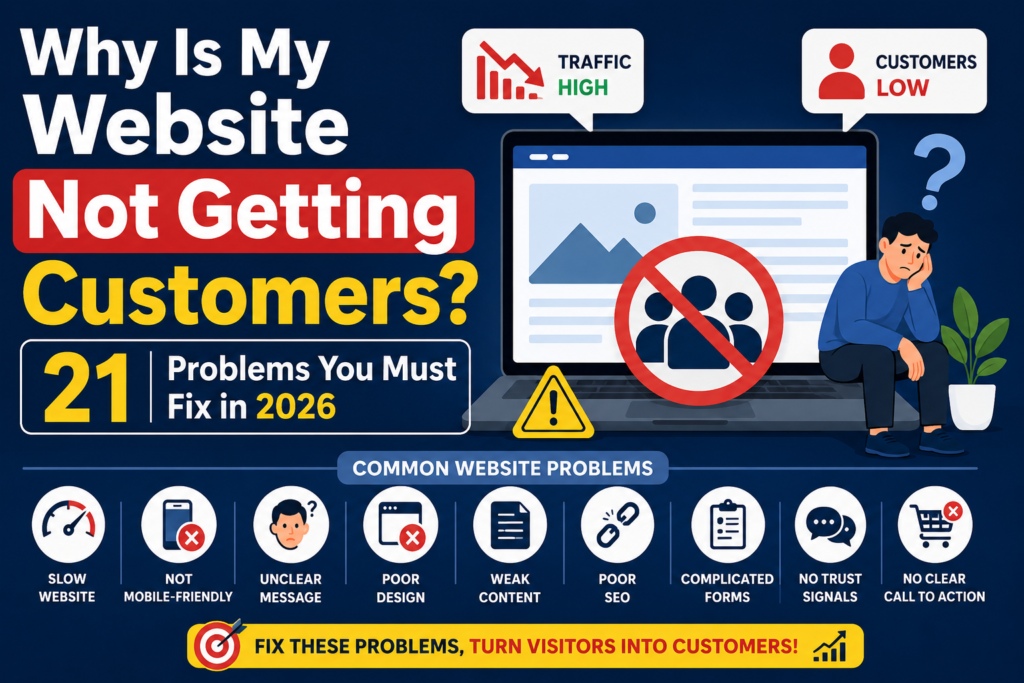
Why is my website not getting customers? It’s a frustrating question many business owners ask after investing time, money, and effort into a new site. You built a website because you expected it to generate enquiries, phone calls, bookings, or sales. You published your services, added contact information, and waited for potential customers to arrive. But the results never came. Perhaps your website receives a reasonable number of visitors each month, yet no one completes the contact form. Your phone rarely rings. Visitors view one or two pages and then disappear.
This raises an important question:
Why is my website not getting customers?
In most cases, the problem is not caused by one major failure. It is usually the result of several smaller issues working together. Weak trust signals, unclear messaging, slow pages, poor mobile usability, irrelevant traffic, confusing calls to action, and unnecessary form fields can quietly prevent visitors from becoming customers.
This guide explains 21 common reasons a website may receive traffic without generating leads or sales. It also provides practical steps for diagnosing and fixing each problem.
In this guide, you will learn:
- Why websites fail even when they receive traffic.
- How to identify whether your problem is traffic or conversions.
- The 21 most common website mistakes that prevent customers from contacting your business.
- Practical fixes that improve trust, SEO, user experience, and conversions.
- A step-by-step action plan you can start implementing today.
Quick Answer
A website usually fails to generate customers because visitors cannot quickly understand the offer, do not trust the business, experience usability problems, arrive through the wrong search terms, or face too much friction before taking action.
The most effective solution is to improve the website in this order:
- Build trust.
- Clarify the offer.
- Improve usability and speed.
- Attract relevant visitors.
- Simplify the conversion process.
- Track results and test improvements.
Website Conversion Problems at a Glance
| Website problem | Likely effect | Recommended solution |
|---|---|---|
| Outdated design | Low credibility | Modernize the layout and visual hierarchy |
| No testimonials | Visitors hesitate | Add genuine reviews and case studies |
| Slow pages | Increased abandonment | Optimize images, scripts, hosting, and caching |
| Weak headline | Visitors do not understand the offer | State the audience, service, and outcome clearly |
| Generic CTA | Low engagement | Use specific, benefit-led action text |
| Wrong keywords | Irrelevant traffic | Target commercial and intent-based search terms |
| Complicated forms | Fewer enquiries | Ask only for essential information |
| No follow-up system | Lost potential leads | Use email nurturing and ethical remarketing |
| No conversion tracking | Decisions based on guesswork | Configure analytics, events, and lead tracking |
Before Fixing the Website, Identify the Real Problem
Not every website has the same conversion problem.
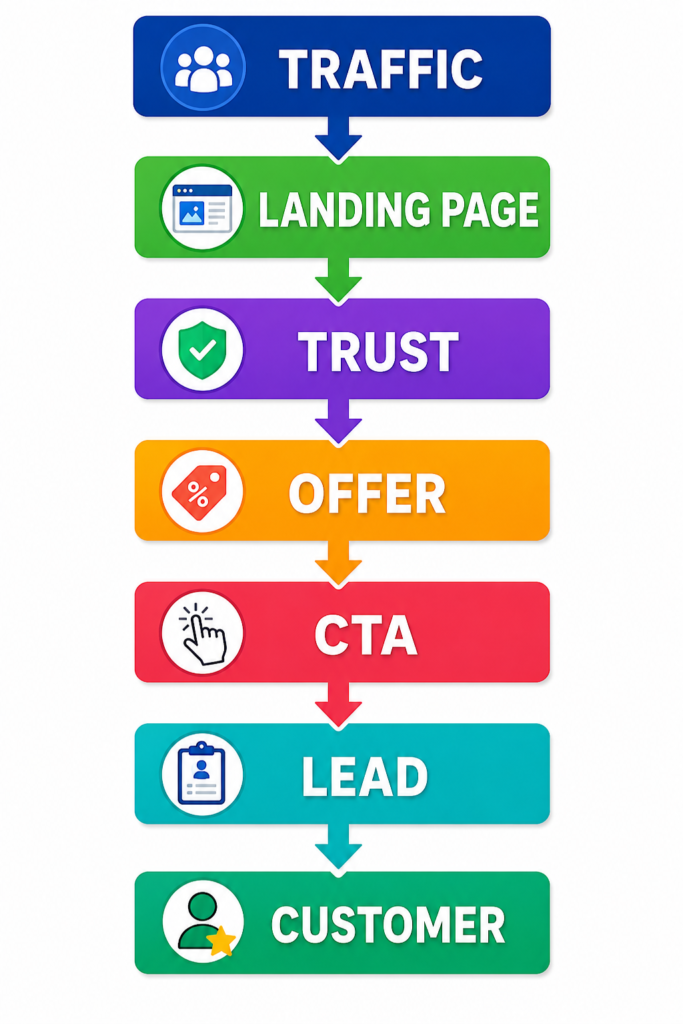
A site with no traffic has a visibility problem. A site with traffic but no enquiries has a conversion problem. A site with enquiries but no sales may have a problem with pricing, qualification, follow-up, or the sales process.
Start by identifying where the customer journey breaks.
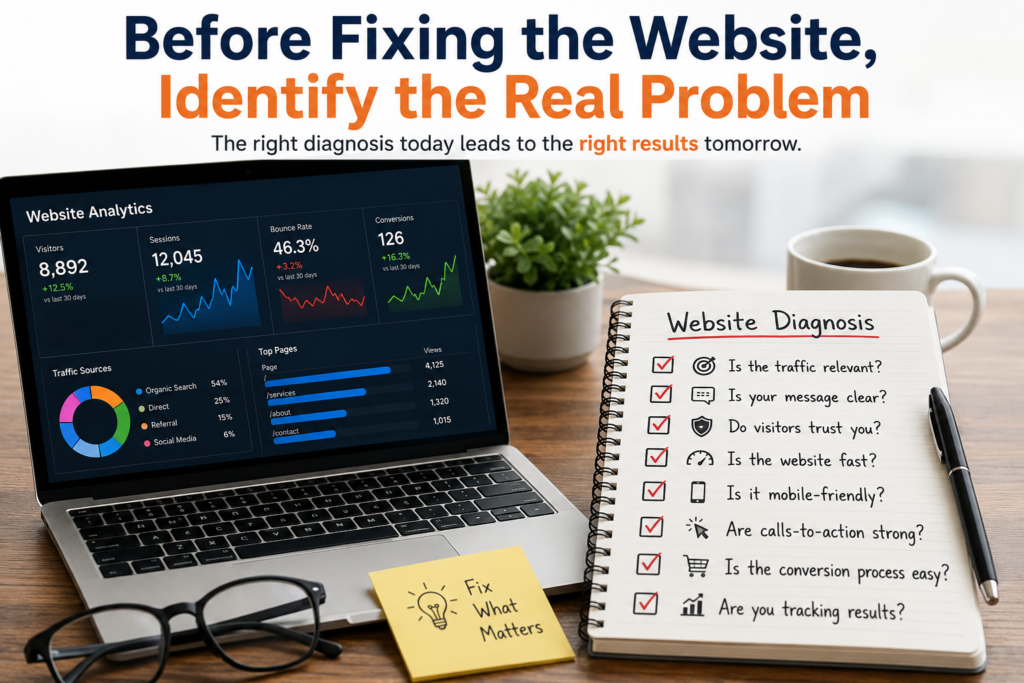
Ask these questions:
- Are the right people visiting the website?
- Do visitors understand the service immediately?
- Do they trust the business?
- Can they find the information they need?
- Is it easy to contact, book, or buy?
- Are enquiries being followed up promptly?
- Are conversions being measured accurately?
Do not assume that more traffic will solve the problem. Sending additional visitors to a website that cannot convert them may only increase advertising costs.
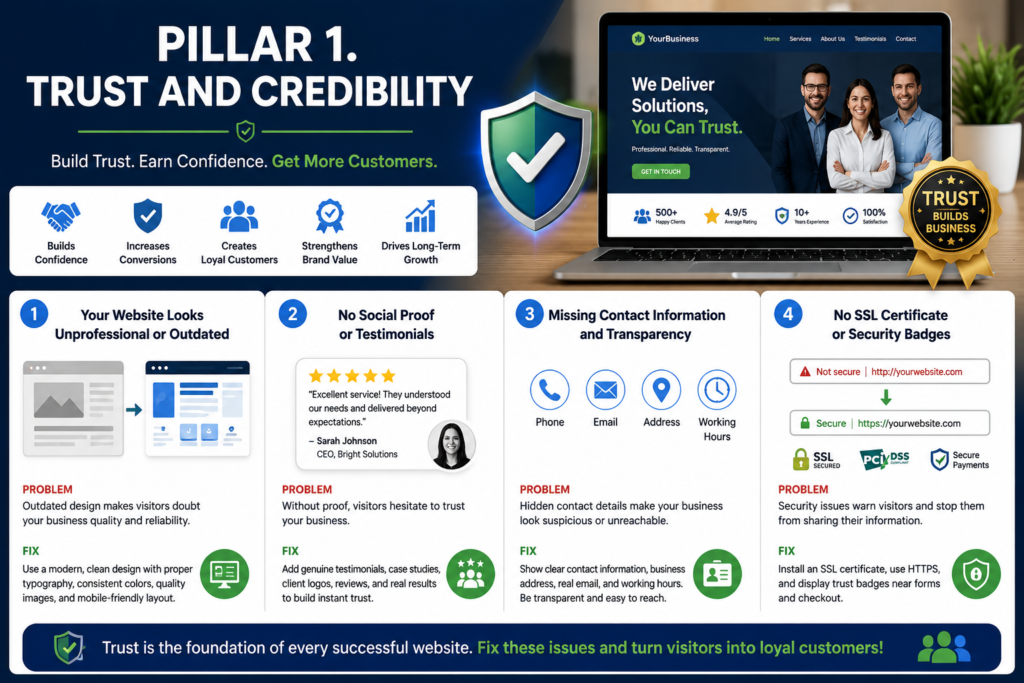
Pillar 1. Trust and Credibility
Problem 1. Your Website Looks Outdated or Unprofessional
Visitors form an impression of a business quickly. They may not consciously analyze typography, spacing, imagery, navigation, or layout, but they notice when these elements feel inconsistent or neglected.
An outdated website can make visitors question whether:
- The business is still operating.
- The information is current.
- The company is reliable.
- Their personal information will be handled safely.
- The service quality will match the quality of the website.
An effective website does not need excessive animation, expensive effects, or a complicated design. It needs to look intentional, current, clear, and consistent.
Example
A local accounting firm’s website used outdated colours, blurry images, and inconsistent fonts.
After redesigning the homepage, improving spacing, and simplifying navigation, enquiry quality improved significantly because visitors perceived the business as more trustworthy.
How to Fix It
Review the following elements:
- Typography and font consistency.
- Heading sizes.
- Button styles.
- Spacing between sections.
- Image quality.
- Color contrast.
- Mobile layout.
- Header and footer design.
- Alignment and visual hierarchy.
Remove unnecessary design elements that distract visitors from the main offer.
Use professional images where they add value. Avoid low-quality stock photographs, stretched graphics, broken icons, and outdated sliders.
The goal is not to impress visitors with decoration. The goal is to help them understand the business and take action confidently.
Problem 2. There Is No Visible Social Proof
A business can describe itself as professional, experienced, and reliable, but these claims carry limited weight without evidence.
Potential customers often look for proof that other people have already used the service and received a satisfactory result.
Useful social proof may include:
- Genuine customer testimonials.
- Public review ratings.
- Case studies.
- Client logos used with permission.
- Before-and-after examples.
- Project screenshots.
- Industry certifications.
- Relevant awards.
- Verifiable business statistics.
How to Fix It
Add testimonials near important decision points rather than hiding them on a separate page.
For example, place relevant testimonials:
- Below the homepage value proposition.
- Near pricing information.
- Beside a contact form.
- Within service pages.
- Near the final call to action.
A strong testimonial should explain the problem, service, and result.
A weak testimonial says:
Excellent service. Highly recommended.
A stronger testimonial says:
Our previous website generated very few enquiries. After redesigning our service pages and improving page speed, we began receiving more qualified leads every month.
Only use genuine testimonials. Do not invent customer names, ratings, company logos, or results. Fabricated proof creates legal, ethical, and reputational risks.
Problem 3. Contact Information Is Difficult to Find
Visitors want evidence that a real and accountable business operates the website.
A website that only provides a generic contact form may create unnecessary suspicion, particularly when the business sells services, accepts payments, or collects personal information.
How to Fix It
Make legitimate contact information easy to locate.
Depending on the business model, include:
- Business phone number.
- Professional email address.
- Office or service location.
- Working hours.
- Contact page.
- About page.
- Team or founder information.
- Business registration details where appropriate.
- Links to genuine social profiles.
- Customer support information.
Do not publish a private residential address simply to look credible. Use accurate and appropriate business information that protects privacy while allowing customers to verify the organization.
The header, footer, contact page, and relevant service pages should provide consistent contact details.
| Icon | Information |
|---|---|
| 📱 Phone | +92 XXX XXX XXXX |
| info@yourdomain.com | |
| 🏢 Office | Your Office Address, City, Pakistan |
| Chat on WhatsApp | |
| 🕒 Business Hours | Monday to Saturday. 9:00 AM to 6:00 PM |
| 📍 Google Map | View Our Location |
| 🌐 Social Links | Facebook. LinkedIn. X. Instagram. YouTube |
Problem 4. The Website Does Not Demonstrate Security and Transparency
Visitors may hesitate when they see browser security warnings, unclear payment conditions, vague refund terms, or missing privacy information.
Security and transparency are especially important for websites that collect:
- Contact details.
- Login information.
- Payment information.
- Uploaded documents.
- Identity documents.
- Application data.
- Health, employment, or financial information.
How to Fix It
Ensure the website uses HTTPS across all pages.
Also add and maintain:
- Privacy Policy.
- Terms and Conditions.
- Refund or cancellation policy.
- Shipping policy for physical products.
- Cookie information where legally required.
- Secure payment processing.
- Clear form consent language.
- Transparent data-retention practices.
- Contact details for privacy questions.
Avoid adding meaningless security badges that cannot be verified. Genuine security practices are more important than decorative trust icons.
Expert Tip
Visitors decide whether they trust a website within seconds. A professional appearance alone is not enough. Genuine testimonials, clear contact information, and transparent policies build confidence before visitors even read your content.
Pillar 2. User Experience and Website Design
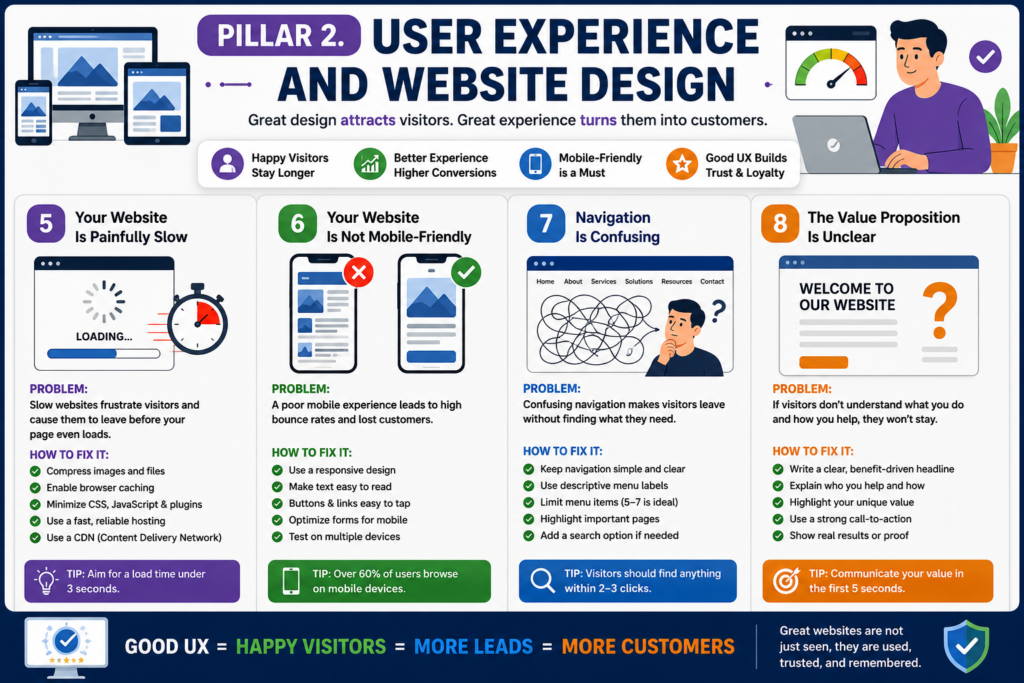
Problem 5. Your Website Loads Too Slowly
Visitors are unlikely to wait patiently for a slow page, particularly on mobile connections.
Page speed can affect:
- User satisfaction.
- Bounce rate.
- Product discovery.
- Form completions.
- Checkout completion.
- Search visibility.
- Advertising efficiency.
Large images, unnecessary plugins, poor hosting, unoptimized scripts, and badly configured caching are common causes of slow performance.
How to Fix It
Test important pages using tools such as Google PageSpeed Insights.
Prioritize:
- Compressing large images.
- Using modern image formats where supported.
- Removing unused plugins.
- Reducing unnecessary JavaScript.
- Minifying CSS and JavaScript carefully.
- Enabling browser and server caching.
- Using a content delivery network where appropriate.
- Improving hosting quality.
- Reducing third-party tracking scripts.
- Avoiding heavy autoplay videos.
- Reserving image dimensions to reduce layout movement.
Do not focus only on a perfect performance score. Test the real experience on common devices and mobile networks.
Problem 6. The Mobile Experience Is Poor
A website may technically be responsive but still be difficult to use on a phone.
Common mobile problems include:
- Small text.
- Buttons placed too close together.
- Menus that are difficult to open.
- Forms that require excessive typing.
- Pop-ups that cover the screen.
- Images extending beyond the page.
- Slow loading.
- Important CTAs appearing too far down the page.
- Tables that cannot be read without horizontal scrolling.
How to Fix It
Review every important page on several mobile screen sizes.
Check whether users can:
- Read the text without zooming.
- Tap buttons comfortably.
- Open and close the menu.
- Complete forms easily.
- View prices clearly.
- Call the business with one tap.
- Use WhatsApp or chat links correctly.
- Reach the checkout without errors.
- Understand the page without unnecessary scrolling.
Mobile optimization should be treated as a conversion requirement, not merely a technical checkbox.
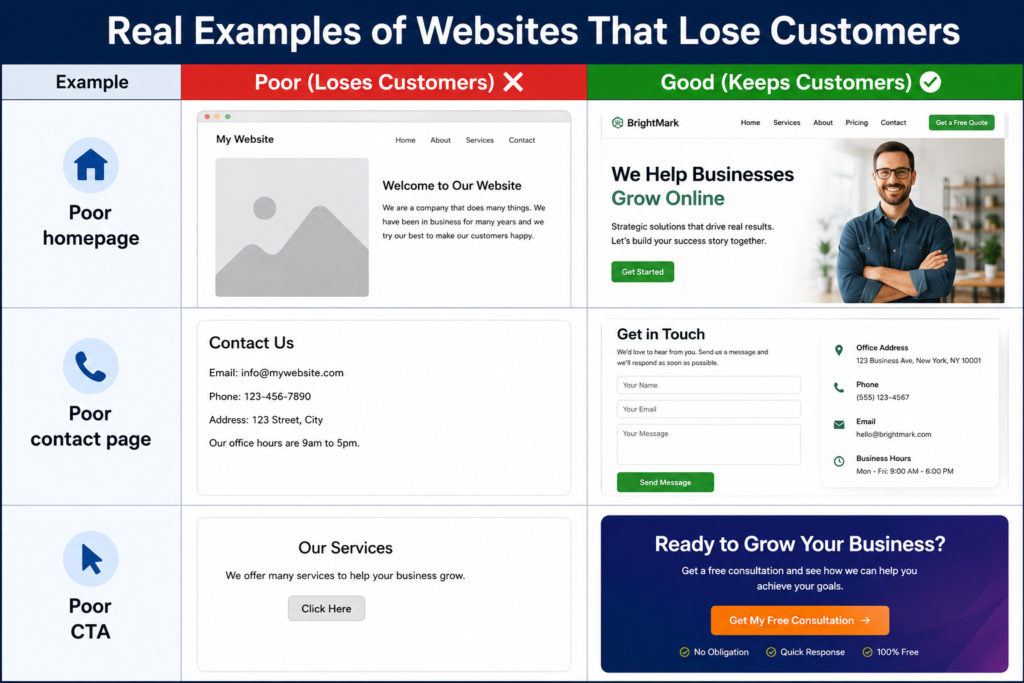
Real Examples of Websites That Lose Customers
Problem 7. Navigation Is Confusing
Visitors should not have to study the navigation menu to understand where to go.
Navigation becomes confusing when:
- Too many menu items are displayed.
- Labels are vague.
- Several pages cover the same service.
- Important pages are buried in dropdowns.
- Product categories overlap.
- Visitors cannot return to the homepage.
- The mobile menu differs significantly from desktop navigation.
How to Fix It
Keep the main navigation focused on high-value destinations.
A typical service website may use:
- Home.
- Services.
- Portfolio or Case Studies.
- Pricing.
- About.
- Blog or Resources.
- Contact.
Use labels that customers understand.
For example, “Website Design Services” is clearer than “Digital Transformation Solutions.”
Important pages should generally be reachable within a few logical clicks. Internal linking should also guide visitors from informational content to relevant services.
Problem 8. The Value Proposition Is Unclear
The homepage should answer three questions quickly:
- What does the business provide?
- Who is it for?
- What result or benefit does it offer?
Bad
Welcome to Our Website
Good
Professional WordPress Website Development Services for Businesses That Want More Customers
How to Fix It
Use a specific value proposition.
A practical formula is:
We help [specific audience] achieve [specific outcome] through [service or method].
Example:
We design fast, conversion-focused WordPress websites for small businesses that need more enquiries and online sales.
Add a supporting line that explains the service in slightly more detail.
Then include one primary CTA, such as:
- Request a Website Audit.
- Book a Consultation.
- View Website Packages.
- Get a Project Estimate.
Do not force visitors to search the page to understand what the business does.
Expert Tip
Visitors decide whether they trust a website within seconds. A professional appearance alone is not enough. Genuine testimonials, clear contact information, and transparent policies build confidence before visitors even read your content.
Pillar 3. Content and Messaging
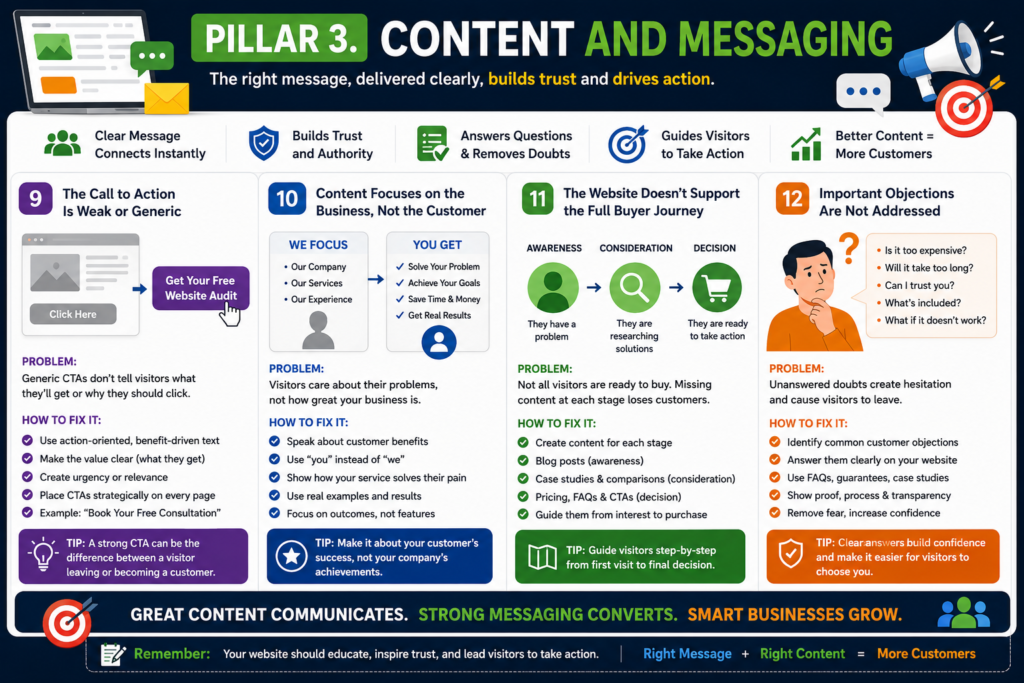
Problem 9. The Call to Action Is Weak or Generic
A call to action tells visitors what to do next.
Generic phrases such as “Submit,” “Click Here,” and “Learn More” provide little context or motivation.
A good CTA should communicate:
- The action.
- The expected outcome.
- The level of commitment.
- What happens next.
How to Fix It
Use action-oriented language that matches the offer.
Examples include:
- Get My Free Website Audit.
- Request a Custom Quote.
- Book a 15-Minute Consultation.
- Check Project Availability.
- Download the Website Checklist.
- Start My Order.
- Compare Website Packages.
Every page should have one primary action. Secondary actions may be used where necessary, but they should not compete visually with the main CTA.
Repeat the primary CTA naturally after major sections, particularly on longer pages.
| Weak CTA | Strong CTA |
|---|---|
| Submit | Get My Free Website Audit |
| Contact | Book a Free Consultation |
| Learn More | Compare Website Packages |
| Click Here | Request My Quote |
Problem 10. The Content Focuses on the Business Instead of the Customer
Many websites begin with statements such as:
We are a leading company with years of experience.
This information may support trust, but it does not directly address the visitor’s immediate concern.
Customers usually want to know:
- Can you solve my problem?
- Is this service suitable for me?
- What will I receive?
- How much will it cost?
- How long will it take?
- What makes your approach different?
- What happens after I contact you?
How to Fix It
Write from the customer’s perspective.
Instead of:
We provide responsive website design.
Use:
Your website will work smoothly across phones, tablets, and desktop screens, allowing customers to contact or buy from you without layout problems.
Instead of:
We offer ongoing support.
Use:
You receive post-launch support to resolve technical issues and keep the website operating correctly.
Features still matter, but they should be connected to practical benefits.
Poor
We build websites.
Better
We help businesses generate more enquiries through fast, conversion-focused websites.
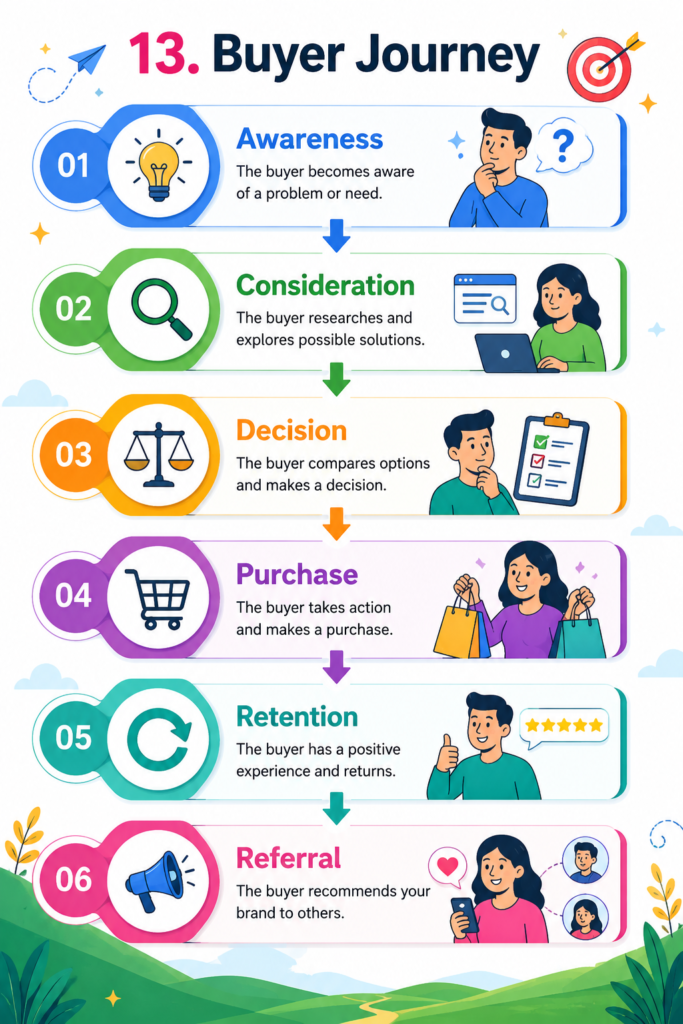
Problem 11. The Website Does Not Support the Full Buyer Journey
Not every visitor is ready to buy immediately.
Some visitors are discovering the problem. Others are comparing providers. A smaller group may be ready to request a quotation.
A website that only says “Contact us now” may fail to help visitors who still need information.
How to Fix It
Create content for each stage.
Awareness Stage
The visitor is identifying a problem.
Useful content includes:
- Educational blog posts.
- Beginner guides.
- Checklists.
- Definitions.
- Mistake-based articles.
- Diagnostic tools.
Consideration Stage
The visitor is comparing possible solutions.
Useful content includes:
- Service comparisons.
- Case studies.
- Pricing explanations.
- Process pages.
- Frequently asked questions.
- Feature and benefit comparisons.
Decision Stage
The visitor is ready to act.
Useful content includes:
- Clear service packages.
- Testimonials.
- Guarantees.
- Consultation booking.
- Quotations.
- Contact forms.
- Purchase or checkout options.
Connect these stages using internal links and relevant CTAs.
Problem 12. Important Objections Are Not Answered
Visitors often hesitate because they still have unanswered questions.
Common objections include:
- The service may be too expensive.
- The process may take too long.
- The provider may not understand the industry.
- The result may not meet expectations.
- The customer may lose control of the website.
- Ongoing maintenance may be difficult.
- Hidden charges may appear later.
How to Fix It
Answer objections honestly on relevant service and pricing pages.
A useful objection-handling section may explain:
- What is included.
- What is not included.
- Typical turnaround time.
- Revision terms.
- Payment schedule.
- Support arrangements.
- Ownership and access.
- Refund or cancellation conditions.
- Additional costs.
- Customer responsibilities.
Do not hide important limitations. Clear expectations can improve both conversions and customer satisfaction.
Expert Tip
Visitors decide whether they trust a website within seconds. A professional appearance alone is not enough. Genuine testimonials, clear contact information, and transparent policies build confidence before visitors even read your content.
Pillar 4. SEO and Discoverability
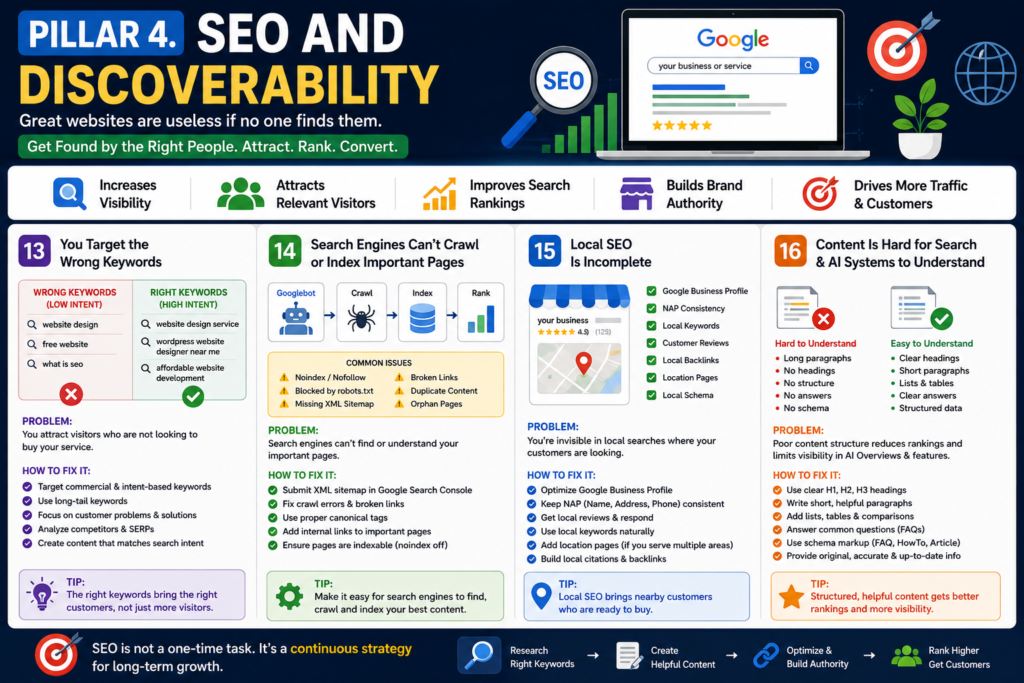
Problem 13. The Website Targets the Wrong Keywords
Traffic does not automatically produce customers.
A website may attract visitors who are:
- Looking for free information.
- Searching for jobs.
- Researching a school assignment.
- Located outside the service area.
- Looking for a different product.
- Comparing options without purchase intent.
- Searching for a meaning rather than a service.
How to Fix It
Prioritize keywords that match both the service and the customer’s intent.
For example, a broad keyword such as:
website design
may be less commercially focused than:
small business website design service
or:
WordPress website designer for local businesses
Use a balanced keyword strategy that may include:
- Service keywords.
- Location keywords.
- Industry-specific keywords.
- Problem-based keywords.
- Comparison keywords.
- Pricing keywords.
- Action-oriented keywords.
- Long-tail queries.
Do not select keywords only because a tool labels them as low competition. Evaluate whether the query is relevant to the business and likely to attract the intended customer.
Problem 14. Search Engines Cannot Properly Crawl or Index Important Pages
A page cannot generate organic traffic if search engines cannot discover or index it.
Common causes include:
- Accidental
noindexsettings. - Pages blocked through robots.txt.
- Broken internal links.
- Missing XML sitemap.
- Duplicate canonical tags.
- Redirect chains.
- Orphan pages.
- Thin or duplicated service content.
- Server errors.
- Incorrect staging-site settings.
How to Fix It
Use Google Search Console to review indexing and page discovery.
Check:
- Whether important pages are indexed.
- Why excluded pages are not indexed.
- Whether the sitemap is submitted.
- Whether canonical URLs are correct.
- Whether mobile and desktop versions are consistent.
- Whether important pages receive internal links.
- Whether redirects lead to the correct destination.
- Whether deleted pages return an appropriate status.
Technical SEO should support useful content. Indexing a weak page will not automatically make it rank.
Problem 15. Local SEO Is Incomplete
A business that serves a specific town, city, region, or service area should make that location clear.
Local visibility may suffer when:
- The business has no optimized Google Business Profile.
- The name, address, and phone number are inconsistent.
- The website does not mention service areas naturally.
- Location pages contain duplicated text.
- Reviews are ignored.
- Local business information is incomplete.
- The contact page lacks directions or service details.
How to Fix It
Complete and maintain the Google Business Profile using accurate information.
Also:
- Use consistent business details across legitimate directories.
- Add the service area to relevant pages.
- Create useful location pages only where genuine services are available.
- Publish local case studies.
- Request honest customer reviews.
- Respond professionally to reviews.
- Add appropriate local business structured data.
- Embed a map where it genuinely helps visitors.
- Include local contact and availability information.
Avoid producing dozens of near-identical location pages. Each page should provide meaningful, location-specific value.
Problem 16. The Content Is Difficult for Search Features and AI Systems to Extract
Search results increasingly present direct answers, summaries, lists, comparisons, and related questions.
Content becomes harder to interpret when it contains:
- Long walls of text.
- Vague headings.
- Unsupported claims.
- No definitions.
- No concise answers.
- Poorly structured tables.
- Repetitive filler.
- Important information buried deep in paragraphs.
How to Fix It
Use a clear information structure.
Include:
- Descriptive headings.
- Concise answers beneath relevant questions.
- Comparison tables.
- Numbered processes.
- Definitions.
- Checklists.
- Examples.
- Expert-reviewed explanations.
- Original observations.
- Transparent source attribution.
Write for readers first. Structured content should improve understanding rather than exist only to target search features.
AI Friendly Content Checklist
- Clear headings
- Tables
- FAQs
- Definitions
- Lists
- Real examples
- Original research
- Author details
- Sources
Expert Tip
Visitors decide whether they trust a website within seconds. A professional appearance alone is not enough. Genuine testimonials, clear contact information, and transparent policies build confidence before visitors even read your content.
Pillar 5. Conversion and Customer Psychology
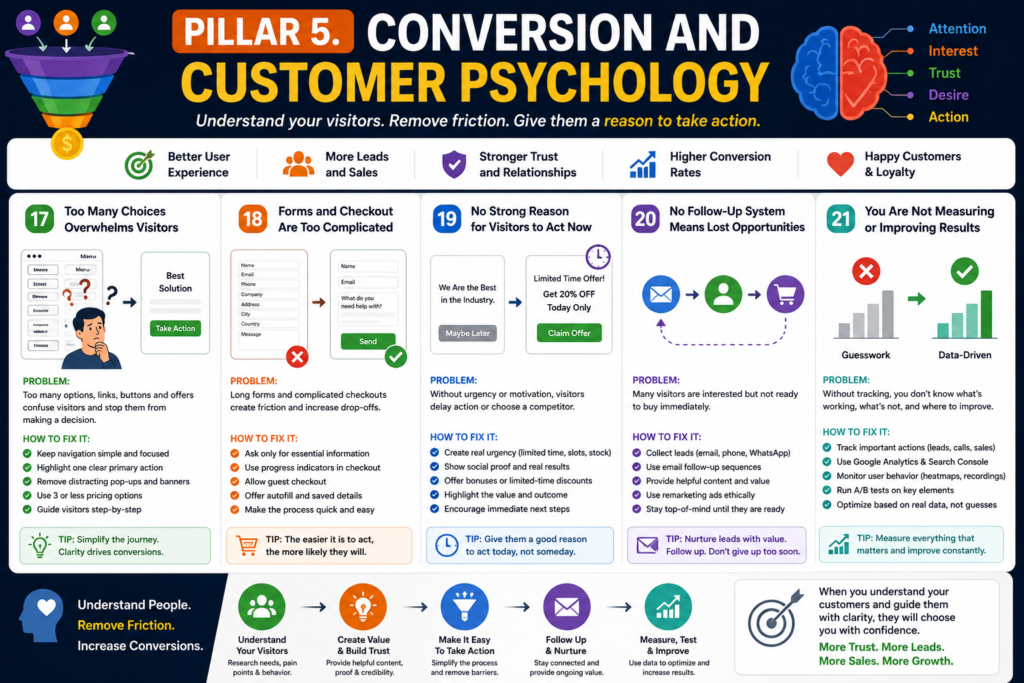
Problem 17. The Website Presents Too Many Choices
Too many competing options can make decisions difficult.
A visitor may see:
- Several services.
- Multiple packages.
- Two chat buttons.
- A newsletter pop-up.
- Several menu promotions.
- Repeated banners.
- Different CTA styles.
- Unrelated product categories.
The page may contain many opportunities to click but no obvious path.
How to Fix It
Give each page one primary purpose.
For example:
- A service page should encourage a quotation or consultation.
- A product page should encourage a purchase.
- A blog article should guide visitors to a related service or resource.
- A pricing page should help visitors compare and select an option.
Reduce unnecessary CTAs, banners, pop-ups, and competing offers.
Where pricing packages are appropriate, three clearly differentiated options are often easier to compare than a long list of similar packages.
Problem 18. The Contact Form or Checkout Is Too Complicated
Every unnecessary field creates additional effort.
Visitors may abandon a form when it requests information that does not appear necessary at the first stage.
How to Fix It
For a basic enquiry form, request only essential information.
A simple initial form may include:
- Name.
- Email or phone number.
- Required service.
- Brief message.
Additional qualifying information can be collected after the initial enquiry.
For ecommerce websites:
- Allow guest checkout where appropriate.
- Display delivery charges before the final step.
- Explain payment methods.
- Show progress through a multi-step checkout.
- Preserve entered information after validation errors.
- Use autofill where supported.
- Provide a clear order summary.
- Make return, refund, and delivery information easy to access.
Test forms regularly. A broken contact form can make a healthy website appear unsuccessful.
Problem 19. There Is No Genuine Reason to Act Now
Visitors may intend to return later but forget the business or choose a competitor.
A genuine reason to act may help them make a decision.
How to Fix It
Use honest urgency only when it reflects a real condition.
Examples include:
- A confirmed offer end date.
- Limited appointment capacity.
- Seasonal availability.
- A genuine stock limit.
- A booking deadline.
- A documented price change date.
- A free consultation available for a defined period.
Avoid fake countdown timers, false stock warnings, or offers that restart every time the page reloads. Manipulative urgency can damage trust.
Problem 20. The Website Does Not Capture or Nurture Interested Visitors
Many visitors are not ready to buy during their first visit.
Without a follow-up method, they may never return.
How to Fix It
Offer a useful low-commitment option, such as:
- Newsletter subscription.
- Website audit checklist.
- Pricing guide.
- Project planning template.
- Free consultation.
- Product restock alert.
- Saved cart.
- Quote request.
- Webinar or demonstration.
Build an email sequence that provides useful information before promoting the service.
Where remarketing is used, comply with consent, privacy, advertising, and platform requirements. Visitors should understand how their data may be used.
Problem 21. You Are Not Measuring Website Performance
Without accurate measurement, changes are based on personal opinion.
Traffic alone does not explain whether a website is helping the business.
Important actions may include:
- Contact form submissions.
- Phone calls.
- WhatsApp clicks.
- Consultation bookings.
- Product purchases.
- Quote requests.
- Email sign-ups.
- File downloads.
- Account registrations.
How to Fix It
Configure analytics and conversion tracking.
At minimum, consider:
- Google Analytics.
- Google Search Console.
- Form submission tracking.
- Click-to-call tracking.
- Purchase tracking.
- Booking completion tracking.
- Relevant advertising conversion tags.
Tools such as Microsoft Clarity or another privacy-appropriate behavior analytics platform may help identify where visitors click, scroll, hesitate, or abandon a page.
Use testing carefully.
Change one meaningful element at a time, such as:
- Headline.
- CTA text.
- Form length.
- Pricing layout.
- Hero image.
- Testimonial placement.
- Page order.
Document the original version, test conditions, results, and final decision.
Website Audit Checklist
Use this checklist to identify the highest-priority conversion problems.
Trust
- Is the business name clearly displayed?
- Are contact details easy to find?
- Does the website use HTTPS?
- Are testimonials genuine?
- Are policies available?
- Is the About page credible?
- Are claims supported by evidence?
- Are prices and terms transparent?
User Experience
- Does the homepage load quickly?
- Is the website easy to use on mobile?
- Is the navigation clear?
- Are buttons easy to tap?
- Are forms working correctly?
- Is the content readable?
- Are pop-ups controlled?
- Are broken links removed?
Messaging
- Does the headline explain the offer?
- Is the intended audience clear?
- Are benefits explained?
- Is there one primary CTA?
- Are objections answered?
- Is pricing explained?
- Are service inclusions clear?
- Does each page have a defined purpose?
SEO
- Are relevant keywords targeted?
- Are important pages indexed?
- Is the XML sitemap submitted?
- Are internal links useful?
- Are title tags unique?
- Are meta descriptions persuasive?
- Are service areas clearly explained?
- Is duplicate content controlled?
Conversion
- Are important actions tracked?
- Is the form short enough?
- Is checkout easy to complete?
- Are testimonials close to the CTA?
- Is follow-up prompt?
- Are leads recorded?
- Are abandoned enquiries reviewed?
- Are high-traffic pages tested?
Expert Tip
Visitors decide whether they trust a website within seconds. A professional appearance alone is not enough. Genuine testimonials, clear contact information, and transparent policies build confidence before visitors even read your content.
Psychological Triggers That Increase Website Conversions
A successful website is not built on attractive design alone. It also understands how people make decisions. The most effective websites use proven psychological principles to build confidence, reduce hesitation, and encourage visitors to take action naturally. When applied ethically, these triggers can significantly improve conversion rates.
Authority helps establish credibility. Displaying professional certifications, industry experience, awards, case studies, or expert insights reassures visitors that your business is knowledgeable and trustworthy.
Social Proof shows potential customers that others have already had positive experiences. Genuine client reviews, testimonials, ratings, success stories, and real project portfolios increase confidence and reduce uncertainty.
Scarcity creates a sense of urgency when used honestly. Limited time offers, seasonal promotions, or limited availability encourage visitors to act sooner instead of delaying their decision.
Consistency keeps your branding, messaging, design, and user experience uniform across every page. A consistent website appears more professional and makes it easier for visitors to trust your business.
Reciprocity is based on providing value before asking for a commitment. Offering free guides, helpful blog articles, tools, templates, or consultations builds goodwill and increases the likelihood that visitors will become customers.
Risk Reduction removes common concerns that prevent people from purchasing. Clear pricing, transparent policies, secure payment methods, privacy protection, and responsive customer support help visitors feel more comfortable.
A strong Guarantee, such as a money-back policy, satisfaction guarantee, or free revisions where appropriate, further reduces buying anxiety and demonstrates confidence in your products or services.
Finally, Trust is the foundation of every successful website. Secure HTTPS encryption, accurate contact information, an informative About page, authentic customer feedback, and high-quality, experience-based content all contribute to long-term credibility.
When these psychological triggers are combined with excellent user experience, fast-loading pages, and valuable content, visitors are far more likely to become loyal customers. Rather than persuading people through pressure, they create confidence, improve decision-making, and support sustainable business growth.
How AI Search Is Changing Website Conversions in 2026
Artificial intelligence is rapidly changing how people search online and how websites attract customers. Instead of browsing multiple search results, users now receive direct answers from AI-powered platforms such as Google AI Mode, Google AI Overviews, ChatGPT, Gemini, Claude, and Perplexity. This means websites must focus on providing accurate, trustworthy, and well-structured information rather than relying only on traditional SEO.
To stay competitive in 2026, businesses should optimize their websites for Entity SEO, which helps search engines understand people, brands, products, services, and locations more accurately. Another growing strategy is Answer Engine Optimization (AEO), where content is written to directly answer user questions in a clear and concise format. Generative Engine Optimization (GEO) is also becoming increasingly important, ensuring that AI search engines can easily discover, understand, and reference your content.
Using Structured Data (Schema Markup) allows search engines and AI systems to interpret website content more effectively, increasing the chances of appearing in rich results, AI summaries, and featured answers. Organizing content in a Question and Answer format further improves readability for both users and AI models, making it easier for your website to be selected as a trusted source.
The future of website conversions will depend not only on ranking in traditional search results but also on being cited and recommended by AI-powered search engines. Businesses that create helpful, experience-based, and well-structured content while following Google E.E.A.T. principles will have a stronger chance of gaining visibility, building trust, and converting more visitors into customers. Adapting to AI-driven search today is essential for long-term online growth and higher conversion rates.
How to Prioritize the Fixes
Do not redesign the entire website without evidence.
Use the following order.
Step 1. Confirm That Tracking Works
Make sure enquiries, calls, bookings, and purchases are recorded correctly.
Otherwise, the website may be generating results that are not being measured.
Step 2. Fix Technical Failures
Resolve:
- Broken forms.
- Checkout errors.
- Mobile layout problems.
- HTTPS issues.
- Slow loading.
- Broken buttons.
- Indexing mistakes.
Step 3. Improve Trust
Add accurate contact information, policies, reviews, case studies, author information, and business details.
Step 4. Clarify the Offer
Rewrite the homepage headline, service descriptions, benefits, and calls to action.
Step 5. Improve Traffic Quality
Review search queries, advertising keywords, audience targeting, location settings, and referral sources.
Step 6. Reduce Conversion Friction
Shorten forms, simplify navigation, clarify prices, reduce competing choices, and improve the booking or checkout process.
Step 7. Test and Refine
Use actual data to improve high-traffic and high-value pages.
A Practical 30-Day Website Improvement Plan
Week 1. Measurement and Technical Review
- Test every form.
- Test the checkout.
- Check mobile usability.
- Review page speed.
- Configure conversion tracking.
- Review Google Search Console.
- Fix broken links and redirect errors.
Week 2. Trust and Messaging
- Improve the homepage headline.
- Add accurate contact information.
- Review the About page.
- Add genuine testimonials.
- Clarify policies.
- Improve service descriptions.
- Strengthen CTA wording.
Week 3. SEO and Content
- Review keyword intent.
- Improve title tags and meta descriptions.
- Strengthen internal linking.
- Update thin service pages.
- Add FAQs.
- Create one useful decision-stage resource.
- Review local SEO information.
| Keyword | Intent |
|---|---|
| Website | Informational |
| Website Design | Commercial |
| Website Design Services | Transactional |
| Hire Website Developer | High Buying Intent |
Week 4. Conversion Optimization
- Shorten forms.
- Reduce competing CTAs.
- Improve the mobile contact experience.
- Add testimonials near conversion points.
- Review pricing presentation.
- Start one controlled page test.
- Create a follow-up process for new leads.
Frequently Asked Questions
Why is my website getting traffic but no customers?
The traffic may be irrelevant, the offer may be unclear, visitors may not trust the business, or the conversion process may be too difficult. Review traffic sources, landing pages, engagement, form performance, and conversion tracking before purchasing more traffic.
How do I know whether my website has a traffic problem or a conversion problem?
A website with very few relevant visitors has a traffic problem. A website with relevant visitors but few enquiries or sales has a conversion problem. Accurate analytics and lead tracking are required to distinguish between the two.
Can website design affect sales?
Yes. Design affects clarity, credibility, usability, and the ease with which visitors can take action. Good design supports the customer journey. Decorative design that makes navigation or reading difficult may reduce conversions.
What should appear above the fold?
The top section should usually include a clear headline, supporting explanation, relevant visual or proof, and one primary call to action. Visitors should understand the offer without searching through the page.
How many calls to action should a page have?
A page should generally have one primary conversion goal. The same CTA may appear several times on a long page, but unrelated actions should not compete for attention.
Why are visitors abandoning my contact form?
The form may request too much information, appear untrustworthy, fail on mobile devices, load slowly, or provide no clear explanation of what happens after submission.
Should I show prices on my website?
Price transparency can help qualify leads and reduce uncertainty. The appropriate level of detail depends on the service. If final pricing varies, show starting prices, typical ranges, package information, or the factors that affect the quotation.
Do testimonials improve website conversions?
Relevant and authentic testimonials can reduce uncertainty by showing that real customers have used the service. They are most effective when they describe the customer’s original problem, the service provided, and the outcome.
How can I make my website more trustworthy?
Use accurate contact information, HTTPS, clear policies, genuine reviews, author or founder details, case studies, transparent pricing, secure payment methods, and verifiable business information.
Why is my website not appearing on Google?
Possible causes include indexing restrictions, weak or duplicated content, poor internal linking, technical errors, low relevance, limited authority, or targeting highly competitive queries. Google Search Console can help identify indexing problems.
How can I attract customers through local SEO?
Maintain an accurate Google Business Profile, use consistent contact details, publish useful local service content, request genuine reviews, and create location pages only for areas genuinely served.
Is more traffic always better?
No. Relevant traffic is more valuable than high traffic. A small number of visitors with strong commercial intent may produce more customers than thousands of irrelevant visits.
How long does it take to improve website conversions?
Technical fixes may produce immediate improvements. Messaging, SEO, trust development, and testing usually require longer observation. The timeframe depends on traffic volume, industry, website condition, and the changes being made.
What is a good website conversion rate?
There is no universal conversion rate that applies to every website. A useful benchmark must consider the industry, traffic source, offer, price, device, location, and type of conversion. Compare performance against your own previous results and qualified lead quality.
Should I redesign the whole website?
Not necessarily. Start by identifying the specific problem. A complete redesign may be justified when the website has widespread usability, technical, branding, or structural issues. Otherwise, targeted improvements may be faster and less expensive.
What should I track besides traffic?
Track form submissions, phone calls, bookings, purchases, quote requests, email sign-ups, WhatsApp clicks, checkout abandonment, qualified leads, and completed sales.
Can SEO fix a website that does not convert?
SEO can attract more relevant visitors, but it cannot compensate for weak trust, poor messaging, broken forms, unclear prices, or a complicated checkout. Visibility and conversion must be improved together.
Should every service have its own page?
Separate service pages are useful when each service has a distinct audience, search intent, process, benefits, pricing, or set of questions. Avoid creating thin pages that repeat the same content with only minor wording changes.
How often should a business website be audited?
A basic technical and conversion review should be performed regularly and after major changes. High-traffic e-commerce or lead-generation websites may require more frequent monitoring than small informational websites.
What is the first thing I should fix?
Start with broken tracking, forms, checkout processes, security issues, mobile usability, and page speed. Then improve the value proposition, trust signals, calls to action, and traffic quality.
Neeche diye gaye FAQs SEO friendly, human-readable, aur Google E.E.A.T. ke mutabiq likhe gaye hain. Har jawab concise hai, lekin readers ko value bhi deta hai.
How much traffic should a website receive?
There is no fixed number of visitors that every website should receive. The right amount of traffic depends on your industry, target audience, and business goals. A website with 500 highly targeted visitors per month can generate more leads than another website with 10,000 untargeted visitors. Instead of focusing only on traffic, measure qualified visitors, engagement, conversions, and revenue.
Can AI write website content?
Yes, AI can help create website content, generate ideas, and improve productivity. However, AI-generated content should always be reviewed, fact-checked, edited, and enhanced with real experience and expertise before publishing. The best-performing content combines AI assistance with human editing to ensure accuracy, originality, trustworthiness, and a natural writing style.
Should I redesign my homepage?
You should redesign your homepage if it looks outdated, loads slowly, performs poorly on mobile devices, has confusing navigation, or fails to convert visitors into customers. A modern homepage should clearly explain what your business offers, build trust, highlight key services, and encourage visitors to take action.
Why do visitors leave after one page?
Visitors often leave after one page because the content does not match their expectations, the website loads slowly, navigation is confusing, or there is no clear next step. Improving page speed, internal linking, readability, user experience, and strong calls to action can significantly reduce single-page exits.
Can website speed affect Google rankings?
Website performance can contribute to overall page experience, and Core Web Vitals are used by Google’s ranking systems. However, speed is only one part of search performance and
good Core Web Vitals do not guarantee higher rankings.
Should I use live chat?
Yes, if you regularly receive customer inquiries. Live chat allows visitors to get instant answers, increases trust, and often improves lead generation and sales. If live support is unavailable, an AI chatbot or contact form can still help guide visitors and collect valuable leads.
How important is HTTPS?
HTTPS is essential for every modern website. It encrypts data between visitors and the server, protects sensitive information, improves user trust, and is a confirmed Google ranking signal. Websites without HTTPS may display browser security warnings that discourage visitors from continuing.
Do popups reduce conversions?
Not always. Well-designed popups that appear at the right time and provide genuine value can increase email signups and lead generation. However, aggressive or intrusive popups that interrupt the browsing experience may increase bounce rates and reduce conversions. The key is to use popups carefully and prioritize user experience.
Should I hire a web designer?
If your website represents your business or generates revenue, hiring an experienced web designer is often a worthwhile investment. A professional designer can create a fast, secure, mobile-friendly, SEO optimized website that improves credibility, user experience, and conversion rates. For small personal projects, high-quality website builders may also be suitable.
What is bounce rate?
Bounce rate is the percentage of visitors who leave your website after viewing only one page without taking another action. A high bounce rate may indicate that the page does not meet visitor expectations, although it is not always negative. Informational articles often have naturally higher bounce rates. To improve engagement, provide helpful content, clear navigation, internal links, and relevant calls to action.
| Problem | Solution |
|---|---|
| No Trust | Add testimonials |
| Slow Website | Improve speed |
| Poor SEO | Target commercial keywords |
| Weak CTA | Use action-based CTA |
| Confusing Design | Improve UX |
Final Thoughts
A website rarely fails because of one isolated problem.
An outdated design may reduce trust. A vague headline may confuse visitors. Slow loading may cause them to leave. A long form may prevent the remaining visitors from making contact.
These issues compound.
The solution is not to make random changes or purchase more traffic immediately. It is to identify where the customer journey breaks and improve the website in a logical order.
Begin with measurement. Fix technical failures. Strengthen trust. Clarify the offer. Improve traffic quality. Simplify the path to action. Then use real data to test and refine the website.
A website should not be treated as a one-time design project. It is a working business asset that requires accurate information, maintenance, testing, and continuous improvement.
When visitors can understand the offer, trust the business, navigate easily, and take action without unnecessary friction, the website becomes far more capable of generating enquiries, customers, and sales.
Key Takeaway:
- Build trust first.
- Improve website speed.
- Simplify your navigation.
- Focus on customer problems.
- Target commercial keywords.
- Use stronger calls to action.
- Track conversions accurately.
- Test continuously.
About the Author
Syed Abdul Quddus is the founder of Marjan Online Digital Services and an independent website developer, WordPress specialist, Shopify developer, SEO researcher, and digital solutions provider based in Pakistan.
He specializes in building fast, secure, mobile-friendly, and search engine-optimized websites that help businesses improve their online presence, generate qualified leads, and increase conversions. His work focuses on practical website development, technical SEO, user experience (UX), Core Web Vitals optimization, website security, and conversion rate optimization (CRO).
Every article published on Marjan Online Digital Services is researched, written, reviewed, and updated personally by Syed Abdul Quddus. The goal is to provide accurate, experience-based, and actionable information that helps business owners, entrepreneurs, freelancers, students, and organizations make informed decisions about website development and digital growth.
Areas of expertise include:
- Website Development
- WordPress Development
- Shopify Store Development
- Website Redesign
- Technical SEO
- Local SEO
- Website Speed Optimization
- Core Web Vitals Optimization
- Website Security
- User Experience (UX)
- Conversion Rate Optimization (CRO)
- Website Maintenance
- Business Website Consulting
The content published on Marjan Services follows Google’s Search Essentials, Helpful Content principles, and E.E.A.T. framework, with an emphasis on practical value, transparency, and long-term usefulness rather than keyword stuffing or short-term ranking tactics.
Why You Can Trust This Guide
This guide has been researched, written, and reviewed personally by Syed Abdul Quddus using practical website development knowledge, current SEO best practices, and official guidance from Google where applicable.
Rather than relying on generic advice, the recommendations are based on real-world website analysis, user experience principles, technical SEO practices, and conversion optimization strategies. Every effort is made to ensure the information is accurate, up to date, and genuinely helpful for website owners.
This article has been prepared following widely accepted best practices, including:
- Google Search Essentials
- Google Helpful Content Guidelines
- Google E.E.A.T. Principles
- Semantic SEO
- Technical SEO
- Core Web Vitals Optimization
- Mobile-First Design
- User Experience (UX)
- Conversion Rate Optimization (CRO)
- Website Accessibility Best Practices
The objective is to help readers build websites that are trustworthy, user-friendly, technically sound, and capable of generating meaningful business results.
Editorial Policy
Every article published on Marjan Services is personally researched, written, reviewed, and updated by Syed Abdul Quddus before publication.
Each article is checked for:
- Accuracy
- Search intent satisfaction
- Technical correctness
- Readability
- Originality
- SEO best practices
- User experience
- Google policy compliance
Content is created primarily for people, with search engine optimization applied naturally to improve discoverability without compromising quality.
Content Review and Updates
The digital landscape changes continuously. To maintain accuracy and relevance, this article is reviewed periodically and updated whenever significant changes occur in website development, SEO, Google Search, Core Web Vitals, or user experience best practices.
Need Professional Website Assistance?
If you need help improving your website’s performance, search visibility, user experience, or conversion rate, you can contact Syed Abdul Quddus through Marjan Services for professional website development, WordPress development, Shopify development, technical SEO, website optimization, and digital consulting services.
The goal is to create fast, secure, user-friendly, and search engine-optimized websites that deliver long-term value for businesses and their customers.
Disclaimer
This article is intended for educational and informational purposes only. Although every effort has been made to provide accurate and up-to-date information, website performance depends on many factors, including competition, industry, user behavior, content quality, technical implementation, and ongoing optimization. Following the recommendations in this guide does not guarantee specific rankings, traffic levels, or business outcomes.
2 Comments