Table of Contents
Target Audience: Beginners, freelancers, entrepreneurs, small businesses, service businesses, creators, and prospective online store owners evaluating Hostinger Website Builder.
Content Type: Research-based commercial review and buying guide
Research Status: Research-based analysis. This article does not claim to have conducted hands-on testing.
Information Verified: August 14, 2026
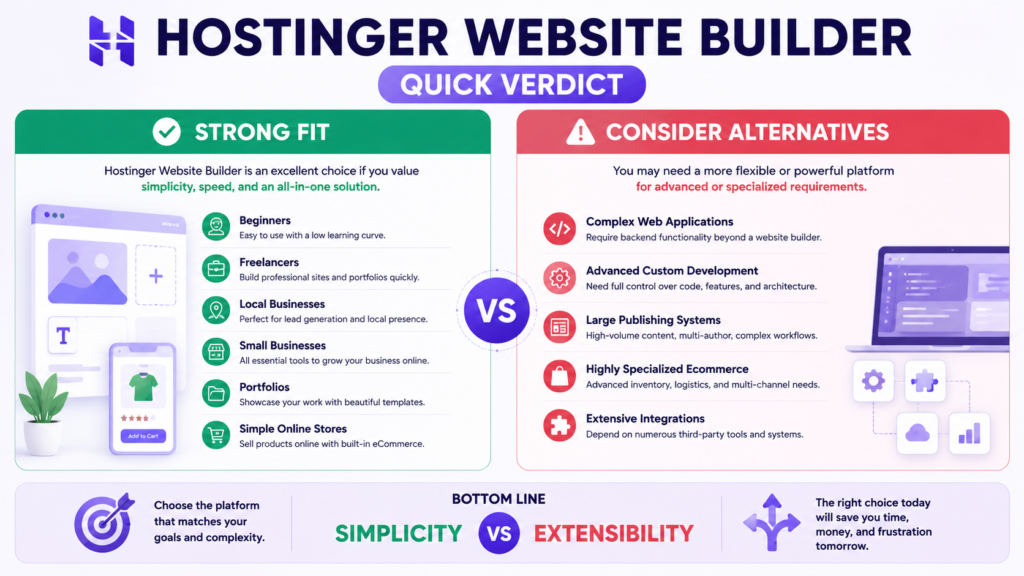
Quick Verdict: Hostinger Website Builder is a strong option for beginners, freelancers, and small businesses that want an affordable, integrated website-building platform without managing WordPress, plugins, themes, or a separate hosting stack. Its drag-and-drop editor and AI-powered tools reduce the technical work required to launch a website. The tradeoff is extensibility. Businesses requiring sophisticated integrations, extensive third-party functionality, complex content architecture, or maximum developer control should also evaluate WordPress or a more specialized platform.
Choosing a website builder is no longer simply a question of which platform has the most templates.
The more important questions are whether the platform can support your business, whether you can manage it comfortably, what it will cost after the introductory offer ends, and whether you are likely to outgrow it.
This Hostinger Website Builder Review 2026 evaluates Hostinger from that perspective.
Rather than treating every feature as automatically valuable, this review examines the areas that materially affect a purchasing decision: ease of use, AI functionality, pricing, renewal costs, ecommerce, SEO, design flexibility, platform limitations, scalability, and long-term suitability.
Hostinger Website Builder is particularly interesting because it combines website creation and hosting in one ecosystem. Instead of assembling a hosting service, a content management system, themes, plugins, security tools, and a page builder separately, users can create and manage their website through an integrated visual platform.
That simplicity is its biggest advantage.
It can also become its biggest limitation.
A freelancer launching a portfolio may benefit enormously from having fewer technical decisions to make. A developer building a sophisticated web project may find the same controlled environment restrictive.
So, is Hostinger Website Builder good in 2026?
For the right project, yes.
But whether it is worth your money depends much more on what you intend to build than on the promotional price displayed on the sales page.
Hostinger Website Builder Review 2026: The Short Answer
Hostinger Website Builder is worth considering if you want an accessible, no-code website builder with hosting, AI-assisted creation, templates, and business tools integrated into one platform.
It is particularly suitable for:
- Beginners creating their first website.
- Freelancers building portfolios.
- Consultants and professional service providers.
- Local businesses.
- Small companies.
- Personal brands.
- Landing pages.
- Straightforward business websites.
- Small online stores.
- Entrepreneurs validating new business ideas.
The platform becomes less compelling when a project depends on:
- Extensive third-party integrations.
- Specialized plugins.
- Complex database functionality.
- Advanced custom development.
- Highly specialized publishing workflows.
- Sophisticated enterprise ecommerce.
- Maximum control over the underlying technology.
The fundamental buying decision is therefore not whether Hostinger Website Builder is universally good or bad.
It is whether its controlled simplicity matches your requirements.
What Is Hostinger Website Builder?
Hostinger Website Builder is a hosted, no-code website creation platform from Hostinger.
It provides a visual environment for creating and publishing websites without requiring users to build pages manually with HTML, CSS, JavaScript, or a traditional content management system.
The platform combines several functions that would otherwise potentially require separate products:
- Website creation.
- Web hosting.
- Visual editing.
- Templates.
- AI-assisted website generation.
- Domain integration.
- SSL.
- Business email benefits on eligible subscriptions.
- SEO tools.
- Marketing functionality.
- Analytics.
- Ecommerce capabilities on the appropriate plan.
- AI-assisted content and design tools.
This integrated approach is important.
A conventional WordPress setup, for example, can involve hosting, WordPress itself, a theme, plugins, security configuration, backups, caching, updates, and potentially several paid third-party services.
Hostinger Website Builder reduces many of those decisions by providing a more controlled environment.
That makes website creation easier to understand for beginners, but it also means you operate within the capabilities Hostinger provides.
How This Hostinger Website Builder Review Was Evaluated
Transparency matters particularly for commercial reviews.
This article is a research-based analysis, not a hands-on laboratory test.
We did not invent page-speed benchmarks, claim to have operated a store that we did not operate, or present documentation research as personal product experience.
The evaluation focuses on the following decision factors:
| Evaluation Area | What We Consider |
|---|---|
| Ease of use | Technical difficulty and learning curve |
| Website creation | Templates, visual editing and AI-assisted creation |
| AI tools | Practical usefulness and limitations |
| Pricing | Introductory pricing and billing structure |
| Renewal cost | Cost after the promotional subscription |
| Ecommerce | Product selling, payments and store suitability |
| SEO | Available optimization capabilities and practical limitations |
| Flexibility | Ability to customize and extend the website |
| Scalability | Suitability as website requirements become more complex |
| Value | Whether capabilities reasonably match the intended user |
| Limitations | Important reasons to choose another platform |
| Alternatives | Situations where WordPress or specialized platforms may be more appropriate |
Current product facts should always be rechecked before purchase because pricing, plan names, promotions, limits, and functionality can change.
Who Is Hostinger Website Builder Best For?
Hostinger Website Builder makes the most sense when reducing technical complexity is more valuable than maximizing technical control.
Beginners
Beginners are among its clearest target users.
Building a conventional website can introduce unfamiliar concepts such as:
- Hosting.
- DNS.
- Content management systems.
- Themes.
- Plugins.
- Databases.
- Caching.
- SSL.
- Software updates.
- Server resources.
A hosted website builder abstracts much of that infrastructure.
Instead of managing the technology stack, users can concentrate primarily on pages, text, images, navigation, branding, products, and calls to action.
Freelancers and Professionals
Freelancers, consultants, photographers, writers, tutors, marketers, and other professionals frequently need a website for one primary purpose:
turning their expertise into an understandable online presence.
A typical professional website may require:
- Homepage.
- About page.
- Services.
- Portfolio.
- Testimonials.
- Contact information.
- Lead form.
That does not necessarily require a highly extensible CMS.
Small Businesses
A local or small business often needs a website to establish credibility, explain services, attract enquiries, and provide essential information.
For this use case, an integrated website builder can be more practical than maintaining a complex technology stack.
Entrepreneurs
Entrepreneurs testing an idea may also benefit from rapid website creation.
Instead of investing substantial time in infrastructure before knowing whether the idea has demand, they can create an initial website, collect feedback, and refine the business proposition.
Small Ecommerce Businesses
Hostinger’s Business Website Builder extends the platform into ecommerce.
This can make it relevant to smaller online stores that need straightforward product management and payment functionality without immediately adopting a more specialized ecommerce ecosystem.
The important qualification is smaller and relatively straightforward.
An ecommerce startup selling a manageable catalog has different technical requirements from a large retailer coordinating warehouses, complex inventory, international tax systems, extensive automation, and multiple sales channels.
How Hostinger Website Builder Works
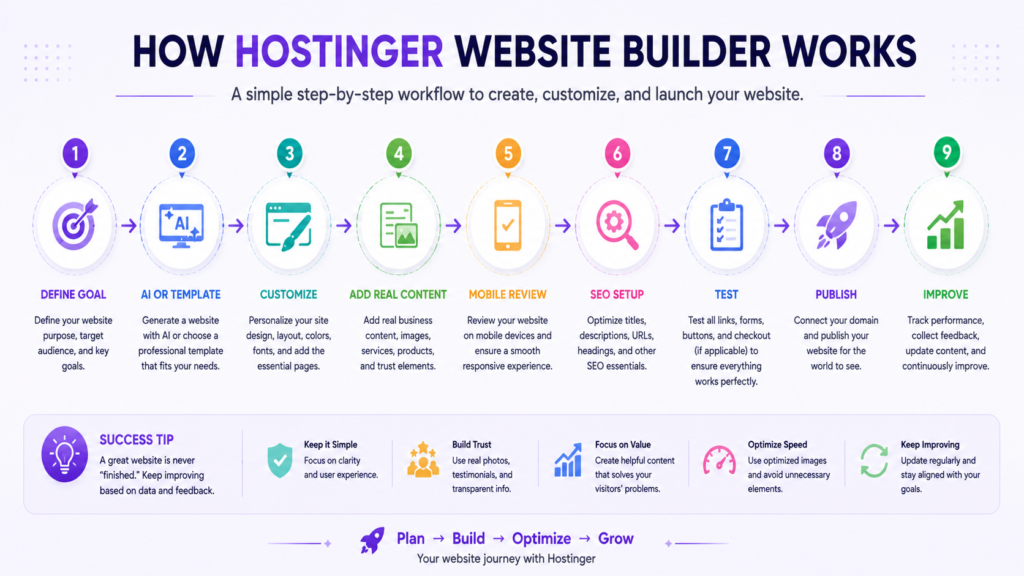
Users can generally begin in one of two ways.
Generate a Website With AI
Hostinger’s AI-assisted workflow can generate an initial website from information about the business or project.
This approach can accelerate tasks such as:
- Initial layout creation.
- Section planning.
- Content starting points.
- Visual direction.
- Page structure.
AI is most valuable here as an accelerator.
It should not be treated as an automatic replacement for business knowledge.
An AI system does not inherently know your actual:
- Customers.
- Prices.
- Services.
- Competitive advantages.
- Experience.
- Credentials.
- Testimonials.
- Policies.
- Brand voice.
- Conversion strategy.
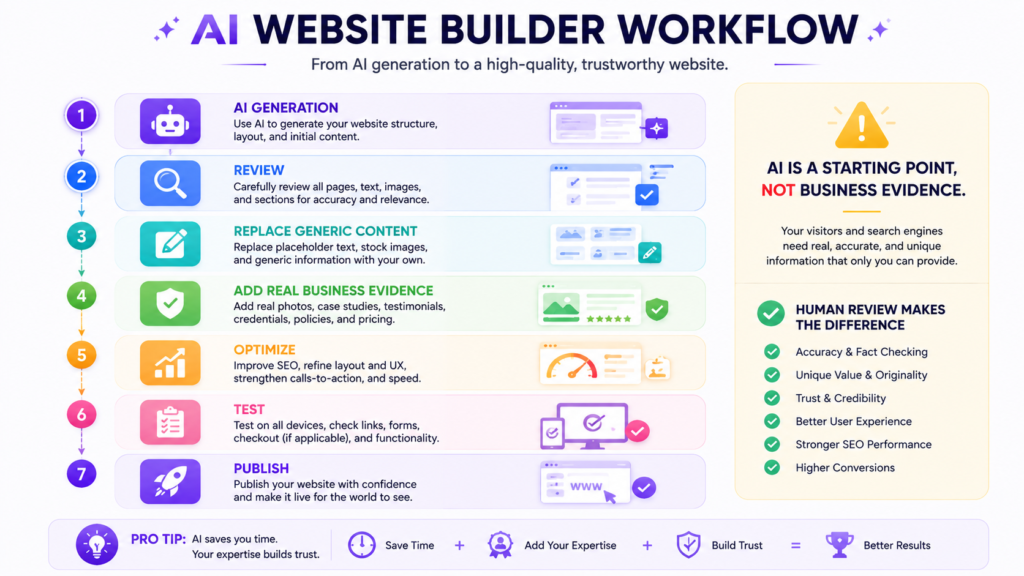
The responsible workflow is:
Generate → Review → Replace generic information → Add real evidence → Optimize → Test → Publish
rather than:
Generate → Publish
Start With a Template
Users who prefer more direct design control can begin with a prebuilt template and customize it.
A template provides the initial visual framework while allowing users to modify elements such as:
- Text.
- Images.
- Sections.
- Colors.
- Fonts.
- Buttons.
- Navigation.
- Spacing.
- Calls to action.
Templates can save substantial setup time, but visual appearance should not be the only selection criterion.
A good business template should also support:
- Clear navigation.
- Strong information hierarchy.
- Mobile readability.
- Accessible text.
- Appropriate CTA placement.
- Easy scanning.
- Business-specific content requirements.
A visually impressive template that hides essential business information may perform worse for users than a simpler, clearer design.
Hostinger Website Builder Plans
Hostinger currently positions Website Builder options around different levels of business requirements.
For many users, the most important distinction is between the entry-level website-building experience and the Business Website Builder functionality required for broader AI and ecommerce use.
| Decision Factor | Premium Website Builder | Business Website Builder |
|---|---|---|
| Primary purpose | Informational and smaller websites | Business and ecommerce websites |
| Visual website builder | Yes | Yes |
| Hosting | Included | Included |
| AI-assisted website creation | Available | Available |
| Domain benefit | Available on eligible terms | Available on eligible terms |
| Advanced AI functionality | More limited | Broader toolset |
| Ecommerce focus | Not the main reason to choose it | Yes |
| Best fit | Portfolio, personal and service websites | Businesses and online stores |
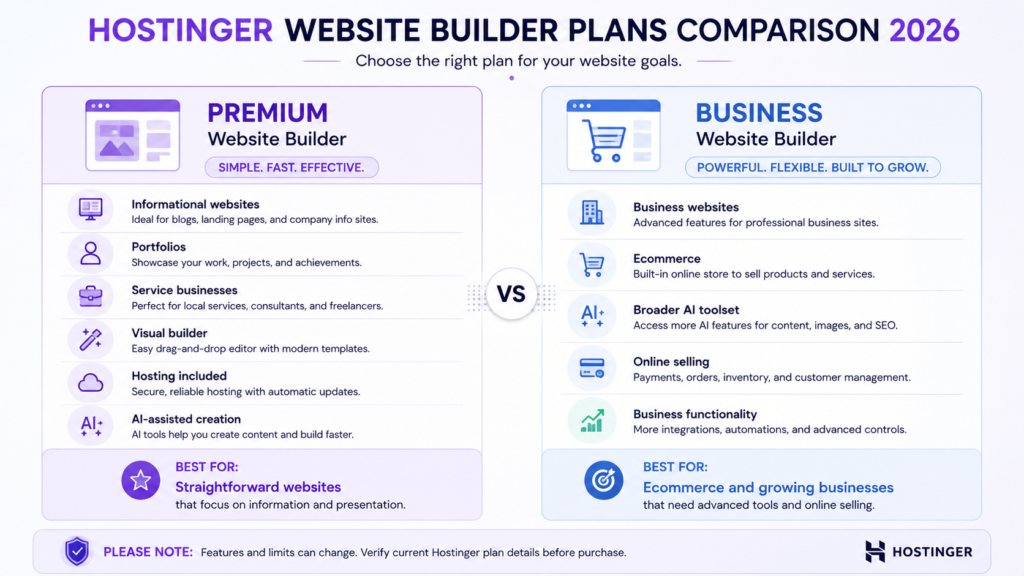
Plan structures can change.
Before purchasing, verify the exact plan page for your country rather than relying on an old review, screenshot, YouTube tutorial, or promotional article.
Hostinger Website Builder Pricing 2026
Pricing is one of the areas where website-builder reviews can easily become misleading.
Hostinger frequently uses introductory promotions, and the headline monthly equivalent can be significantly lower than the subsequent renewal price.
The advertised monthly figure also may represent a longer subscription paid upfront rather than a month-to-month payment arrangement.
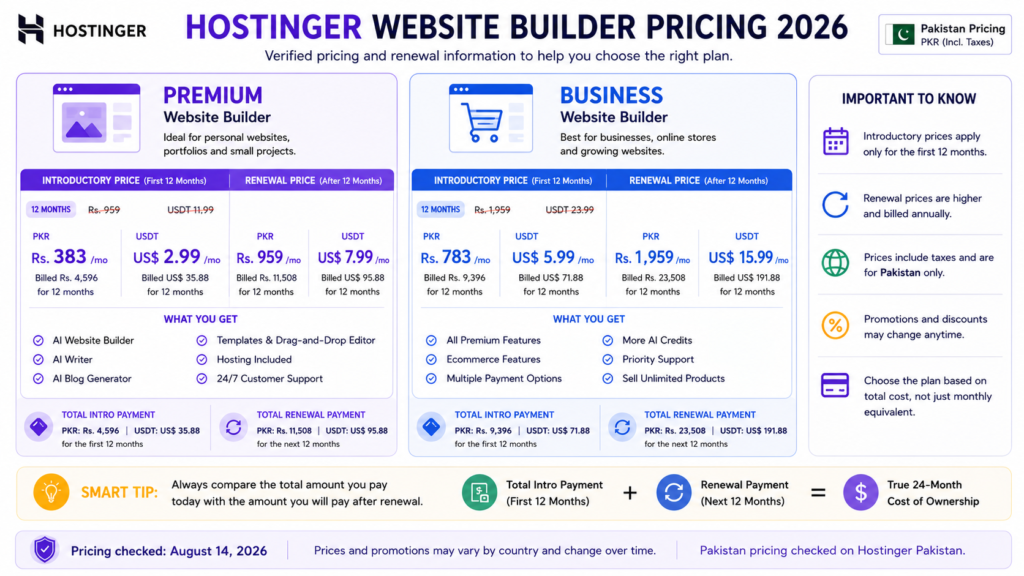
Therefore, do not evaluate Hostinger Website Builder solely by asking:
What is the advertised monthly price?
Ask instead:
What is the total cost during the period I realistically expect to use the website?
How to Evaluate the Real Cost
Consider:
Initial subscription + renewal + domain renewal + email costs + payment-processing fees + necessary extras = realistic ownership cost
The exact numbers can vary by:
- Country.
- Currency.
- Promotion.
- Subscription duration.
- Taxes.
- Plan.
- Renewal cycle.
- Optional services.
Why Renewal Pricing Matters
Suppose a website builder appears extremely inexpensive because the initial subscription is heavily discounted.
That can still represent excellent value.
But it is only a good purchasing decision when you understand what happens after the promotional term.
Before checkout, confirm:
- Total amount payable today.
- Initial subscription duration.
- Renewal rate.
- Domain renewal cost.
- Email renewal conditions.
- Ecommerce requirements.
- Applicable taxes.
- Refund conditions.
- Payment-processing fees.
- Which AI tools are actually included.
This approach gives you a more realistic picture than comparing promotional monthly equivalents alone.
Promotional Pricing vs Long-Term Cost
A useful way to evaluate Hostinger is to separate acquisition price from ownership price.
| Cost Stage | What to Verify |
|---|---|
| Promotional period | Monthly equivalent and total upfront payment |
| First renewal | Renewal rate shown at checkout |
| Domain renewal | Cost after any included period |
| Included duration and future cost | |
| Ecommerce | Required plan and payment-provider charges |
| Optional services | Any additional tools your business actually needs |
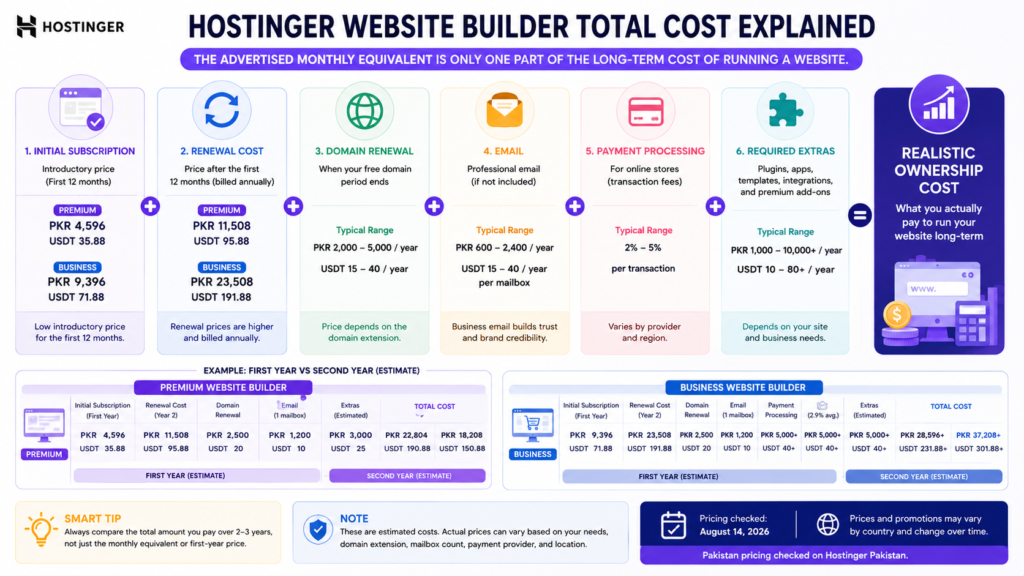
This matters because a platform that looks cheaper during year one is not necessarily cheaper over four or five years.
Conversely, a higher renewal price does not automatically make a product poor value if it still eliminates other software, hosting, and maintenance expenses.
Total cost should be evaluated against the functionality you actually use.
Hostinger AI Website Builder Review
AI is one of Hostinger Website Builder’s most prominent features.
Its main value is not that AI magically produces a perfect business website.
Its value is reducing the amount of work required to create a useful starting point.
Where AI Can Help
AI-assisted website generation can reduce:
- Blank-page friction.
- Initial design decisions.
- Basic layout work.
- Early content drafting.
- Section planning.
- Initial visual selection.
For someone creating a first website, these tasks can otherwise consume substantial time.
Where AI Still Needs Human Review
Generated content can be generic, inaccurate, or inappropriate for the real business.
Review:
- Company descriptions.
- Product claims.
- Service descriptions.
- Pricing.
- Contact information.
- Images.
- Calls to action.
- Testimonials.
- Credentials.
- Legal information.
Never publish generated claims about your business simply because they sound professional.
AI Content and Search
Using AI assistance does not automatically make content useful or harmful.
The quality of the final result depends on whether the published content provides genuine value.
For a business website, this means adding information that an AI generator cannot know automatically:
- Actual services.
- Real experience.
- Original photographs.
- Genuine examples.
- Real policies.
- Accurate prices.
- Original expertise.
- Verified customer evidence.
AI can accelerate production.
It cannot manufacture trust.
Hostinger Website Builder AI Tools
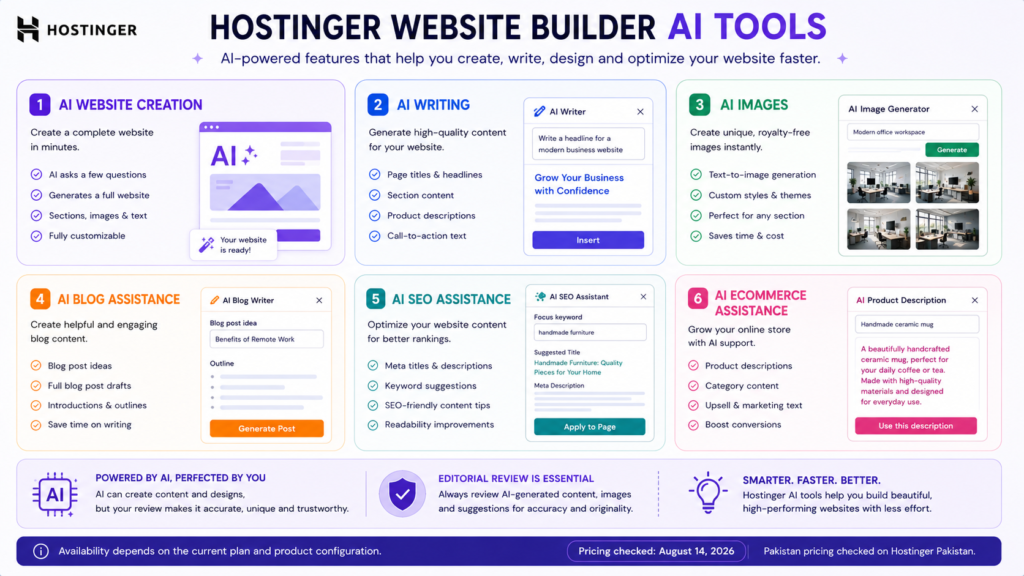
Hostinger has expanded its website-building proposition beyond initial site generation.
Depending on the selected plan and current product configuration, AI-assisted tools can support areas such as content, images, blogging, branding, products, and SEO.
AI Text Tools
AI-assisted text tools can help:
- Rewrite content.
- Adjust tone.
- Simplify explanations.
- Generate alternatives.
- Refine headings.
The output still requires fact-checking and editorial review.
AI Image Generation
AI-generated visuals can be useful for illustrative purposes.
However, they should never be represented as genuine photographs of:
- Your employees.
- Your premises.
- Your products.
- Your customers.
- Your completed projects.
when they are not.
Real business evidence should remain real.
AI Blog Assistance
AI can accelerate research, organization, and drafting, but publishing large quantities of generic posts is not a sustainable quality strategy.
A useful article still requires:
- Clear purpose.
- Search-intent satisfaction.
- Original value.
- Factual accuracy.
- Appropriate evidence.
- Editorial judgment.
- Genuine expertise where relevant.
AI SEO Assistance
SEO tools can make optimization more accessible to beginners.
They cannot guarantee:
- Rankings.
- Indexing.
- Traffic.
- Featured snippets.
- AI Overview inclusion.
- Conversions.
Organic search performance depends on the complete website and competitive environment.
Is Hostinger AI Website Builder Worth It?
Yes, if your main problem is getting from an idea to an editable website efficiently.
It is particularly useful when you:
- Do not know where to begin.
- Need an initial page structure.
- Want to reduce setup time.
- Have limited design experience.
- Want a visual starting point you can customize.
Its value decreases when you already have:
- Professional designers.
- Developers.
- Detailed wireframes.
- A finished design system.
- Complete website copy.
- Complex custom requirements.
AI is most valuable when it eliminates repetitive setup rather than when it attempts to replace expertise.
Ease of Use
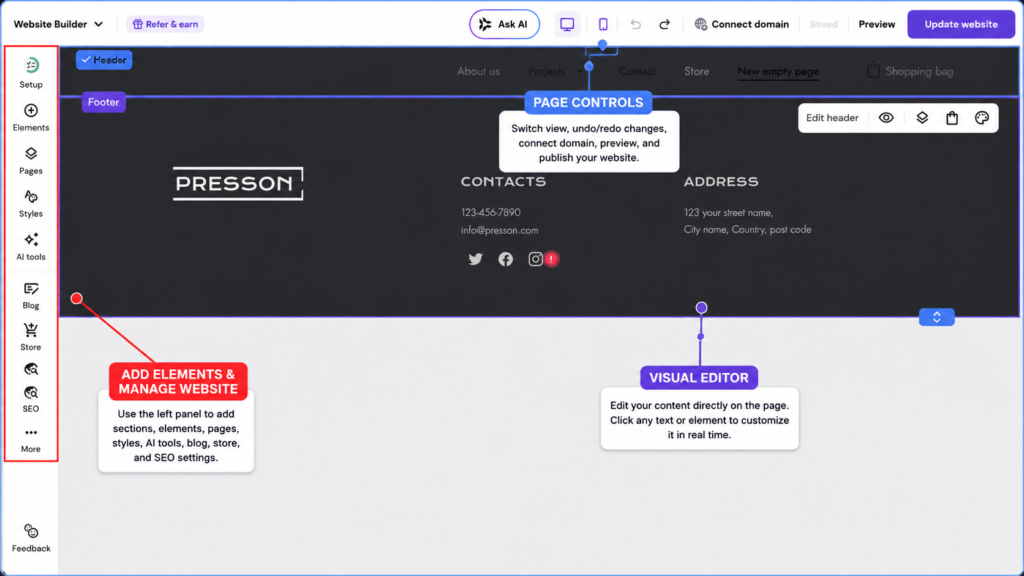
Ease of use is one of Hostinger Website Builder’s most important competitive advantages.
The visual editing approach reduces many technical decisions associated with conventional CMS development.
Instead of working primarily with code or assembling multiple systems, users can interact with the website visually.
Independent reviewers have also highlighted Hostinger’s relatively intuitive editing experience and beginner-friendly positioning.
However, simplicity always involves a tradeoff.
Easy to use does not mean infinitely customizable.
A controlled environment can be ideal for a first-time website owner and restrictive for an advanced developer.
That is why ease of use should be evaluated together with flexibility rather than in isolation.
Hostinger Website Builder for Beginners
Hostinger Website Builder is particularly compelling for beginners because it reduces the number of separate systems they need to understand.
A beginner does not necessarily have to start by independently choosing:
- A CMS.
- Hosting architecture.
- Theme.
- Page builder.
- Backup plugin.
- Security plugin.
- Caching system.
- Ecommerce plugin.
That can significantly reduce setup friction.
A Practical Beginner Workflow
- Define the website’s purpose.
- Select the appropriate Hostinger plan.
- Register or connect the domain.
- Generate the initial website with AI or choose a template.
- Apply real branding.
- Replace generic content with accurate business information.
- Add the essential pages.
- Configure forms and contact options.
- Add products if e-commerce is required.
- Review the mobile version.
- Configure basic SEO information.
- Test navigation, forms, and checkout.
- Review privacy and other applicable policies.
- Publish.
- Improve the website using real visitor and business data.
The most important step is actually the first one.
Do not begin by choosing colors.
Begin by deciding what the website must accomplish.
Hostinger Website Builder for Small Business
Small businesses are among the strongest use cases for Hostinger Website Builder.
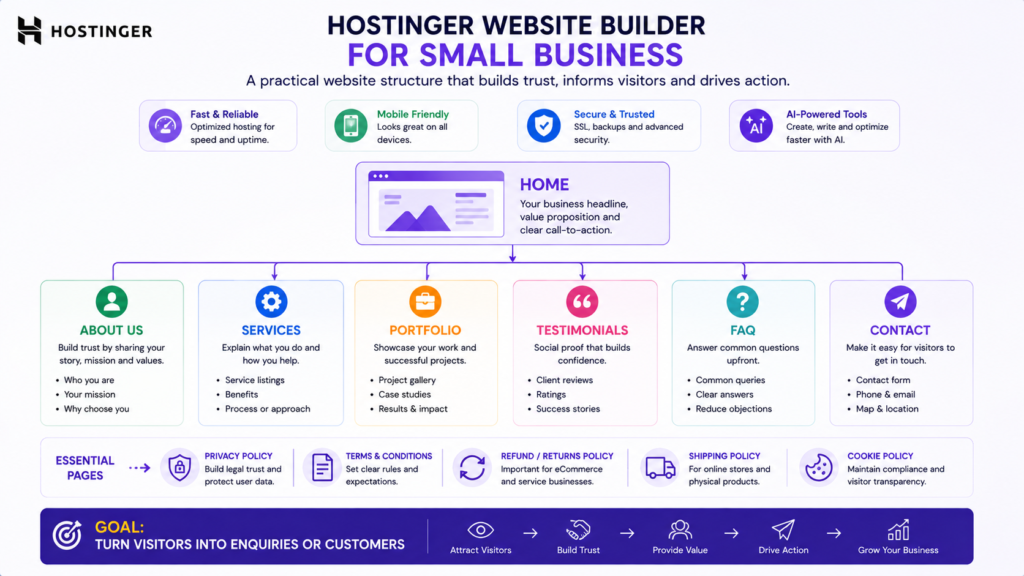
A typical service business website needs to answer several straightforward questions:
Who are you?
What do you offer?
Who is the service for?
Why should a customer trust you?
How can the customer contact or buy from you?
A well-designed website builder can handle these requirements without introducing unnecessary technical complexity.
Example Small Business Architecture
A typical website might include:
- Home.
- About.
- Services.
- Portfolio or case studies.
- Testimonials.
- Pricing where appropriate.
- FAQ.
- Contact.
- Privacy information.
- Terms where applicable.
The builder makes these pages possible.
It does not automatically make them persuasive.
Business results still depend on positioning, content quality, trust, usability, and the strength of the underlying offer.
Hostinger Website Builder for Ecommerce
Hostinger’s Business Website Builder extends the platform into ecommerce.
This makes it relevant to entrepreneurs who want to combine a business website and online store without maintaining a separate ecommerce CMS.
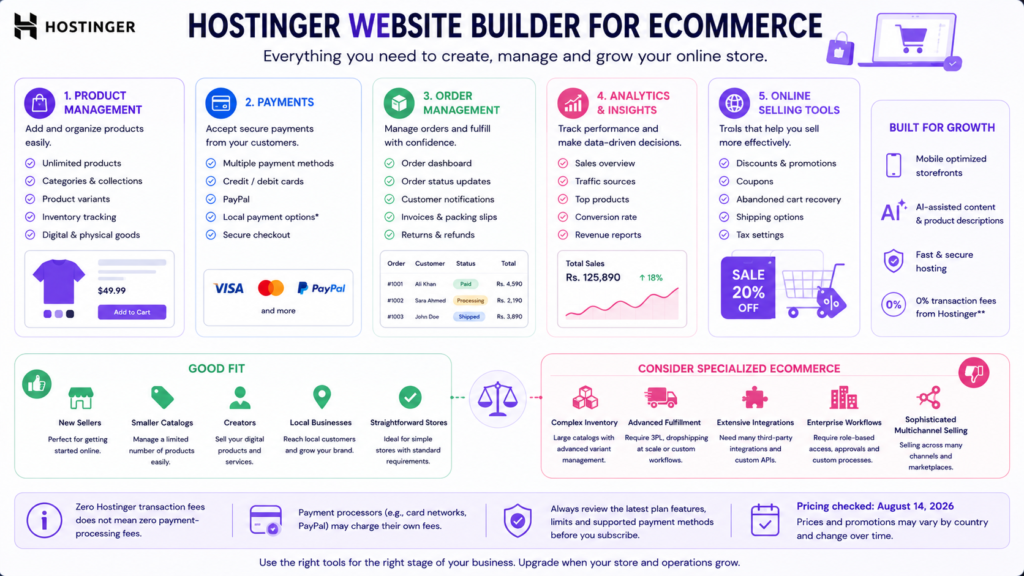
Hostinger currently promotes ecommerce functionality including product management, payment options, analytics, AI-assisted product tools, and integrations.
An Important Transaction-Fee Distinction
When Hostinger advertises zero Hostinger transaction fees, that does not mean every payment is universally fee-free.
There are two different costs:
Platform transaction fee
and
payment-processing fee.
A payment provider can still charge its normal processing fees.
This distinction should be included in any realistic cost calculation.
Who Is Hostinger Ecommerce Best For?
It is most attractive for:
- New sellers.
- Smaller catalogs.
- Creators.
- Local businesses.
- Simple direct-to-consumer brands.
- Businesses adding a store to an informational website.
- Entrepreneurs testing ecommerce demand.
A dedicated ecommerce platform deserves consideration when the business requires:
- Sophisticated inventory management.
- Advanced fulfillment.
- Extensive app integrations.
- Complex international commerce.
- Highly specialized checkout functionality.
- Advanced multichannel selling.
- Enterprise workflows.
Do not choose ecommerce infrastructure only according to how easy it is to upload your first product.
Consider what happens after your first hundred or thousand orders.
Hostinger Website Builder SEO
One of the most common questions is:
Can a Hostinger Website Builder website rank on Google?
Yes. Using a website builder does not inherently prevent a website from appearing in organic search.
A particular CMS is not a prerequisite for Google Search visibility.
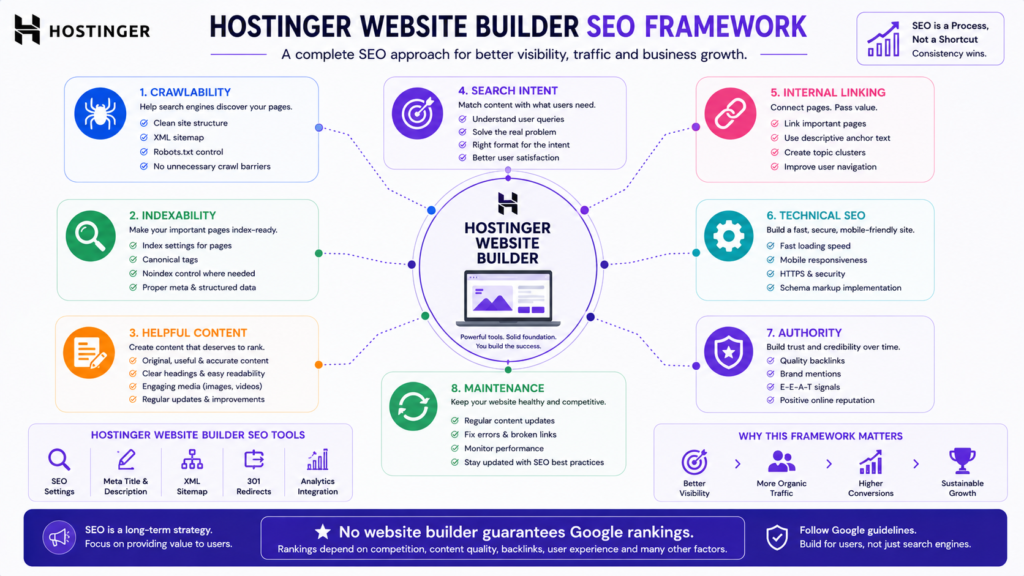
The more important considerations include whether pages are:
- Crawlable.
- Indexable.
- Useful.
- Relevant.
- Technically accessible.
- Well organized.
- Original.
- Trustworthy.
- Internally connected.
Hostinger provides SEO-related functionality intended to make common optimization tasks accessible.
However, built-in SEO tools do not automatically create an effective SEO strategy.
What Website Owners Still Need to Do
A broader SEO program can include:
- Audience research.
- Keyword research.
- Search-intent analysis.
- Helpful content creation.
- Descriptive titles.
- Useful meta descriptions.
- Logical headings.
- Internal linking.
- Image optimization.
- Descriptive alt text.
- Crawlable navigation.
- Search Console monitoring.
- Structured data where appropriate.
- Relevant backlinks.
- Topical authority development.
- Content maintenance.
- Technical auditing.
The builder provides infrastructure.
The website owner still needs strategy and useful content.
Can Hostinger Website Builder Rank in Google AI Overviews?
There is no special Hostinger-specific mechanism that guarantees AI Overview visibility.
The same principle applies to AI Mode and other generative search experiences.
Clear answers, useful information, accurate facts, strong technical foundations, original value, and accessible content can improve the quality and eligibility of a website.
But no website builder, schema type, AI writing tool, or GEO tactic can guarantee inclusion.
Avoid artificial strategies designed solely to make content look optimized for AI systems.
Build pages that are genuinely useful to humans first.
Performance
Performance is an important consideration, but responsible evaluation requires actual controlled testing.
Page speed can be affected by:
- Image sizes.
- Fonts.
- Third-party scripts.
- Video embeds.
- Tracking systems.
- Page complexity.
- Device.
- Network conditions.
- Geographic distance.
Because this review does not present original controlled benchmarks, it would be misleading to publish invented load times or Core Web Vitals measurements.
After building your website, test the actual pages you intend visitors to use.
Pay particular attention to:
- Oversized images.
- Unnecessary video.
- Excessive third-party scripts.
- Heavy tracking.
- Unnecessary animation.
A provider’s performance marketing should not be substituted for measurements from your actual website.
Mobile Experience
A website should be usable across screen sizes because many customers may discover and evaluate a business entirely from a smartphone.
Regardless of automatic responsive behavior, manually inspect:
- Navigation.
- Headings.
- Buttons.
- Forms.
- Product pages.
- Pricing tables.
- Image cropping.
- Checkout.
- Contact information.
Responsive automation reduces design work.
It does not eliminate the need for quality assurance.
Security and SSL
Hostinger includes SSL functionality within its website ecosystem.
SSL enables encrypted HTTPS connections between a visitor and the website.
That is an important baseline, particularly for websites that collect form submissions or process purchases.
However:
SSL is not the same thing as complete website security.
Website owners still need to protect:
- Account credentials.
- Domain access.
- Email accounts.
- Payment accounts.
- Administrative access.
- Customer information.
Use unique passwords and appropriate account-security controls.
Domain and Email
Eligible Hostinger plans can include a domain benefit for an initial period.
Do not interpret this as permanently free domain ownership.
Before purchasing, check:
- Eligible domain extensions.
- Included period.
- Renewal cost.
- Registration details.
- Transfer conditions.
Email benefits can also depend on the plan and subscription period.
Verify what remains included after promotional periods expire.
Hostinger Website Builder Pros and Cons
A useful commercial review needs to explain both sides of the decision.
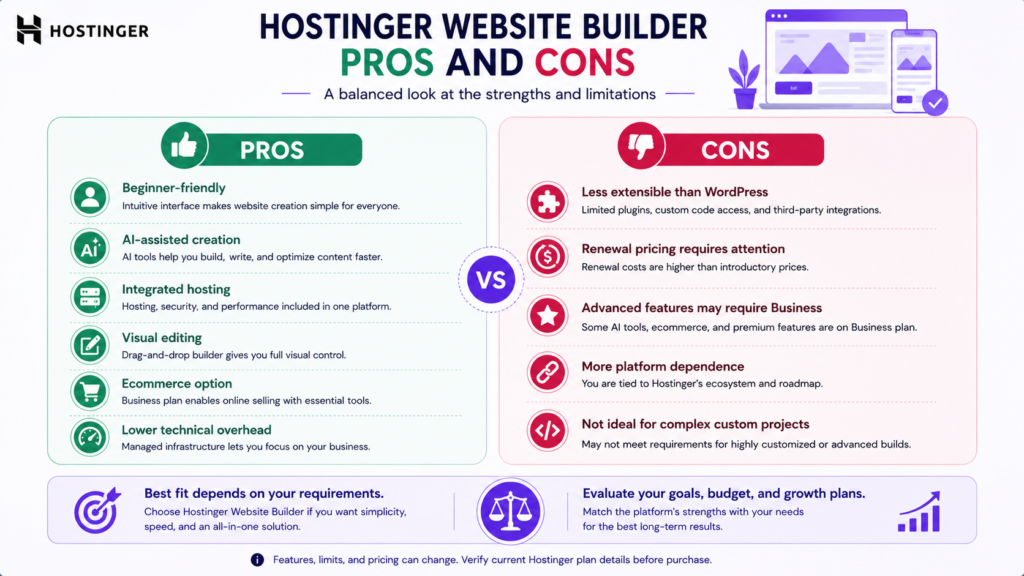
Pros
Beginner-friendly workflow
The visual approach lowers the technical barrier to website creation.
AI-assisted website generation
AI can reduce the time required to produce an initial editable website.
Integrated hosting
Users do not need to purchase separate hosting for a website created within the Website Builder ecosystem.
Competitive introductory positioning
Promotional subscriptions can make initial website creation relatively affordable.
Template-based creation
Templates provide a faster starting point than designing every page from scratch.
Ecommerce capability
The Business Website Builder can support online selling without requiring a separate ecommerce CMS.
AI business tools
Higher-tier functionality can extend AI assistance beyond initial site generation.
Domain benefits
Eligible subscriptions can include a domain for an initial period.
SSL
HTTPS functionality is integrated into the platform.
Cons
Less extensible than WordPress
Hostinger Website Builder does not provide an ecosystem equivalent to WordPress’s enormous collection of plugins, themes, and developer tooling.
Renewal costs need careful evaluation.
The introductory monthly equivalent should not be confused with long-term pricing.
Advanced functionality can require the higher tier
Businesses requiring ecommerce and broader AI capabilities may need Business Website Builder.
Limited third-party extensibility compared with open ecosystems
Highly specialized requirements can become more difficult to implement.
Platform dependence
A hosted website builder places more of the website workflow inside the provider’s ecosystem.
Not appropriate for every complex project
Sophisticated web applications, highly customized publishing systems, and advanced ecommerce operations may require a different architecture.
Buyer Fit Matrix
Instead of asking whether Hostinger Website Builder is universally good, compare your requirements with the platform’s strengths.
| User or Project | Fit | Main Reason |
|---|---|---|
| First website | Excellent | Low technical overhead |
| Freelancer portfolio | Excellent | Fast setup and straightforward management |
| Local service business | Strong | Suitable for lead-generation websites |
| Consultant | Strong | Professional site without complex maintenance |
| Small company | Strong | Integrated website and business functionality |
| Small online store | Good | Ecommerce available through Business |
| Content-heavy publisher | Mixed | WordPress may offer greater publishing flexibility |
| Growing complex ecommerce operation | Mixed | Specialized commerce platforms may scale more naturally |
| Developer-led custom project | Weak | Controlled environment limits extensibility |
| Web application | Weak | A website builder is not a substitute for custom application architecture |
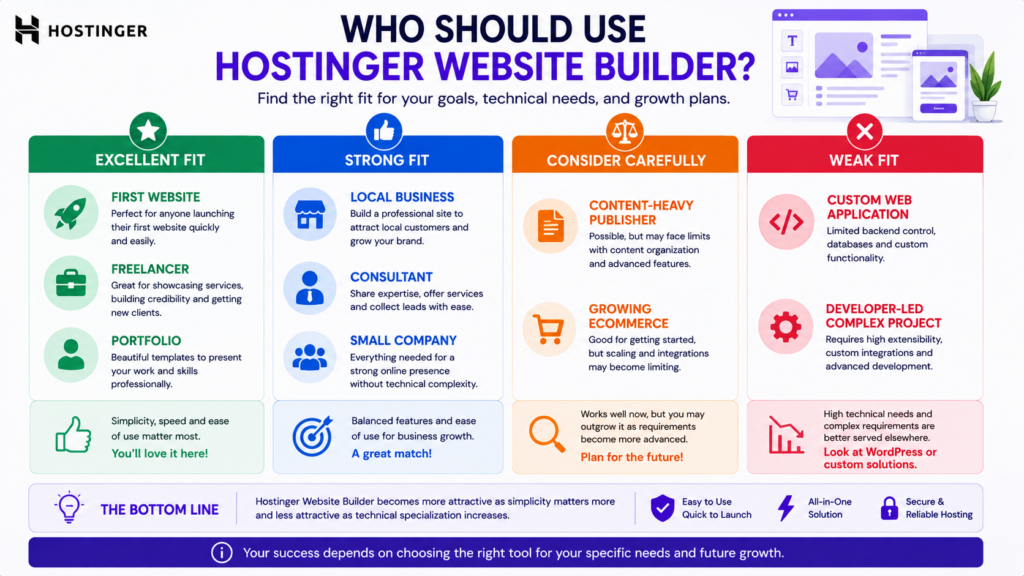
This matrix reveals the central tradeoff.
The more conventional your website requirements are, the more attractive Hostinger Website Builder becomes.
The more specialized they become, the more important extensibility becomes.
Is Hostinger Website Builder Good?
Yes, for users whose priorities align with its strengths.
Hostinger Website Builder is particularly attractive when you prioritize:
- Simplicity.
- Integrated hosting.
- Visual editing.
- AI assistance.
- Relatively fast deployment.
- Lower technical maintenance.
Its suitability decreases as the project requires more specialized functionality.
Strong Fit
Hostinger Website Builder is particularly suitable for a first website, portfolio, consultant website, local business, personal brand, or straightforward small business site.
Consider Alternatives When Complexity Increases
WordPress or another platform deserves consideration when the project depends on specialized plugins, complex publishing, extensive integrations, or custom development.
Dedicated ecommerce systems may make more sense when ecommerce operations themselves become technically sophisticated.
Is Hostinger Website Builder Worth It?
Hostinger Website Builder can provide strong value when you actually benefit from its integrated simplicity.
Value should not be measured by feature count alone.
A platform containing thousands of capabilities provides little additional value if you use only a small fraction of them.
For a beginner, avoiding plugin management, hosting configuration, and multiple software subscriptions may itself be valuable.
For an experienced developer, those restrictions may have the opposite effect.
It Is Worth Considering When
- You want an integrated platform.
- You prefer visual editing.
- You want AI assistance.
- You do not want to manage WordPress.
- You are building a relatively straightforward website.
- You value convenience over maximum extensibility.
- You need straightforward ecommerce.
Look Elsewhere When
- You require maximum technical control.
- Your project depends on specialized plugins.
- You need custom server-side functionality.
- Your business requires complex integrations.
- You operate a sophisticated publishing platform.
- You need enterprise-level ecommerce capabilities.
Hostinger Website Builder vs WordPress: The Essential Difference
A complete Hostinger Website Builder vs WordPress comparison deserves a separate article because it addresses a distinct purchasing decision.
The essential difference, however, is straightforward.
| Hostinger Website Builder | WordPress |
|---|---|
| Hosted integrated platform | Open-source CMS |
| Simpler initial setup | More setup decisions |
| Visual-builder approach | Broad theme and page-builder ecosystem |
| Hosting integrated | Hosting selected separately |
| Controlled ecosystem | Extensive plugin ecosystem |
| Lower learning curve for many beginners | Greater flexibility |
| Less maintenance complexity | More maintenance responsibility |
| Strong for straightforward sites | Strong for extensible content-driven sites |
| AI integrated into Hostinger workflow | AI functionality varies by tools and host |
| More limited extensibility | Extensive developer control |
The useful question is not:
Which platform is universally better?
Ask:
Which platform introduces fewer unacceptable constraints for the website I intend to operate?
Choose Hostinger Website Builder when simplicity matters more.
Consider WordPress when extensibility and technical control matter more.
What Happens If You Outgrow Hostinger Website Builder?
This question is easy to overlook when buying a website builder.
A platform may perfectly serve a five-page business website today but become less suitable if the company later requires:
- Advanced membership functionality.
- Complex content relationships.
- Specialized integrations.
- Large-scale publishing.
- Custom application features.
- Advanced ecommerce workflows.
Before committing, consider your likely requirements over the next several years.
Do not overengineer a small website for hypothetical future requirements.
But do not ignore foreseeable growth either.
Platform Lock-In and Portability
Hosted website builders are integrated systems.
That simplicity can make migration less straightforward than moving content between highly portable or open systems.
If long-term portability is critical, investigate the platform’s current export and migration options before building a large website.
The more proprietary functionality your site depends on, the more important migration planning becomes.
This does not automatically make a hosted builder a poor choice.
It simply means convenience today should be weighed against flexibility tomorrow.
Hostinger Website Builder vs Hiring a Developer
Website-building software and professional web development solve different problems.
A builder provides tools.
A professional developer or agency can provide:
- Strategy.
- Information architecture.
- Custom design.
- Conversion optimization.
- Technical implementation.
- Accessibility work.
- Advanced SEO architecture.
- Analytics.
- Integrations.
- Custom functionality.
A straightforward website may not require custom development.
A complex business system may.
The availability of easy website-building software therefore does not eliminate professional web development. It changes which projects genuinely require it.
Should I Use Hostinger Website Builder?
Use this simple decision framework.
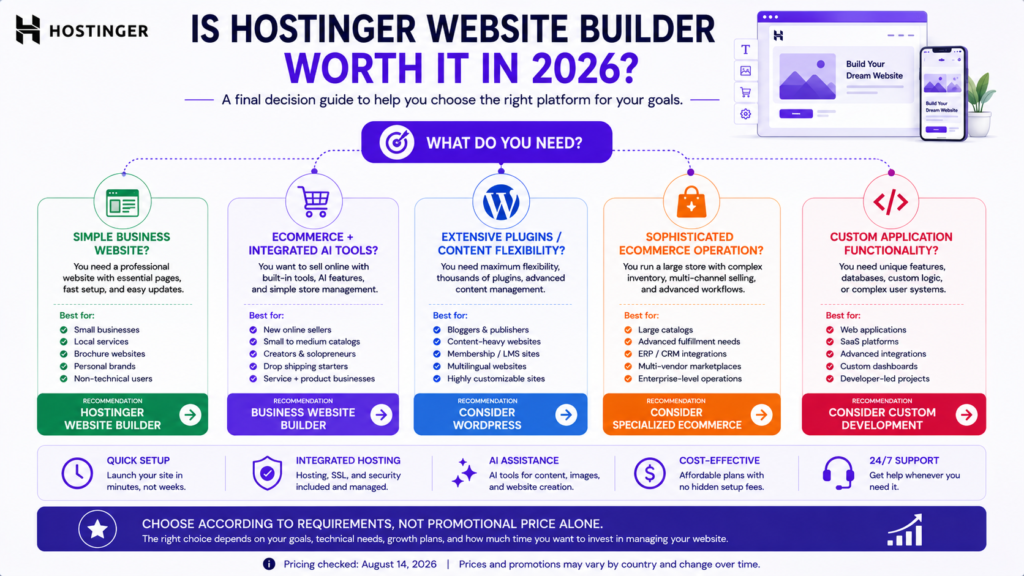
Choose Hostinger Website Builder if you want a relatively easy, integrated website-building environment and your project does not require extensive customization.
Consider WordPress if content publishing, plugins, extensibility, or developer control are central requirements.
Consider a dedicated ecommerce platform if sophisticated commerce operations are the core of the business.
Consider custom development if the project behaves more like specialized software than a conventional website.
The right decision depends on requirements, not brand popularity.
Which Hostinger Website Builder Plan Should You Choose?
Choose Premium Website Builder When
The primary goal is an informational or service-oriented website.
Typical projects include:
- Portfolio.
- Consultant website.
- Personal brand.
- Local service website.
- Small company website.
Choose Business Website Builder When
Ecommerce or Hostinger’s broader AI functionality is important.
Typical projects include:
- Online stores.
- Product businesses.
- Ecommerce startups.
- Businesses using AI-assisted content tools.
- Entrepreneurs who need integrated selling functionality.
Do not choose the higher plan merely because it contains more features.
Choose it when those features solve actual requirements.
How to Get Better Results From Hostinger Website Builder
1. Define One Primary Website Goal
Determine the most important visitor action.
For example:
- Request a quote.
- Buy a product.
- Book an appointment.
- Call the company.
- View a portfolio.
- Subscribe.
- Visit a physical location.
2. Understand the Audience
Write for real prospective customers rather than an undefined general audience.
3. Keep the Information Architecture Focused
Create pages because visitors need them, not because a template contains them.
4. Treat AI as a Starting Point
Replace generic generated material with real business knowledge.
5. Add Genuine Trust Evidence
Where appropriate, use:
- Real photographs.
- Genuine testimonials.
- Actual portfolio examples.
- Clear contact information.
- Real policies.
- Accurate credentials.
6. Review Mobile Pages
Test important pages on actual mobile screen sizes.
7. Configure SEO Fundamentals
Use descriptive titles, useful content, logical headings, appropriate internal links, and accurate metadata.
8. Optimize Media
Avoid unnecessarily large images and heavy embedded media.
9. Test Conversion Paths
Check:
- Forms.
- Buttons.
- Email links.
- Telephone links.
- Product pages.
- Checkout.
- Confirmation messages.
10. Improve the Website After Launch
A website should evolve using real visitor behavior, customer questions, search data, and business results.
Common Hostinger Website Builder Mistakes
Publishing AI Content Without Review
Generated text can contain generic or inaccurate information.
Choosing a Template Based Only on Appearance
A business website must support usability and conversion, not merely visual appeal.
Ignoring Renewal Pricing
Evaluate the long-term cost before committing.
Assuming Built-In SEO Guarantees Rankings
SEO tools help with implementation. They do not guarantee organic visibility.
Using AI Images as Fake Business Evidence
Illustrative AI imagery should not be represented as real people, premises, products, or completed work.
Building Unnecessary Pages
More pages do not automatically create more authority.
Ignoring Mobile Quality Assurance
Responsive design still requires human testing.
Ignoring Future Requirements
The easiest platform today can become restrictive later if the business changes substantially.
Hostinger Website Builder Review 2026: Final Verdict
Hostinger Website Builder has a clear value proposition.
It reduces the technical complexity involved in launching and maintaining a conventional website.
For beginners, freelancers, consultants, local businesses, entrepreneurs, and smaller companies, that can be a meaningful advantage.
The combination of visual editing, hosting, AI-assisted website creation, templates, business tools, and e-commerce functionality creates a relatively cohesive environment.
But the platform should not be evaluated according to how many features appear on a sales page.
Its real advantage is simplicity.
Its real limitation is extensibility.
If you need a portfolio, service website, local business site, personal brand, or relatively straightforward online store, Hostinger Website Builder deserves serious consideration.
If you expect complex integrations, highly customized functionality, sophisticated publishing requirements, or extensive developer control, evaluate WordPress or another specialized solution before committing.
For ecommerce, the same principle applies.
A small or relatively straightforward store can benefit from having website creation and commerce integrated in one platform. A technically sophisticated retail operation may eventually need deeper commerce infrastructure.
Final Recommendation
Hostinger Website Builder is worth considering in 2026 for users who prioritize ease of use, integrated hosting, AI assistance, relatively straightforward website management, and a lower technical learning curve.
Choose the Premium option when your main requirement is a conventional informational or service website.
Consider Business Website Builder when ecommerce and the broader AI toolset are materially useful.
Do not choose either plan solely because of the promotional monthly price.
Compare the initial total payment, renewal rate, domain and email costs, payment-processing expenses, required functionality, and your likely long-term website requirements.
The best website builder is not necessarily the one with the most features.
It is the one that meets your requirements without creating unnecessary complexity today or unacceptable limitations tomorrow.
Frequently Asked Questions
Is Hostinger Website Builder good in 2026?
Yes. Hostinger Website Builder is a strong option for beginners, freelancers, small businesses, and users who want an integrated website-building environment. It becomes less suitable when a project requires extensive customization or specialized integrations.
Is Hostinger Website Builder good for beginners?
Yes. Its visual editing, AI-assisted creation, integrated hosting, and controlled platform reduce many of the technical decisions associated with building a website through a traditional CMS.
Is Hostinger Website Builder worth it?
It can be worth it when simplicity, affordability, AI assistance, and integrated hosting are more important than maximum extensibility. Users who require extensive customization should also evaluate WordPress or another platform.
Is Hostinger AI Website Builder worth it?
It can be useful for accelerating initial website creation, particularly for beginners. Generated websites and content should still be reviewed and customized before publication.
How much does Hostinger Website Builder cost?
The cost depends on the country, subscription term, promotion, plan, taxes, and renewal cycle. Hostinger commonly advertises discounted introductory monthly equivalents for longer subscriptions. Always verify both the total initial payment and renewal rate before purchasing.
Does Hostinger Website Builder include hosting?
Yes. Hosting is integrated into the Website Builder ecosystem, so a separate hosting subscription is not required for a site created under the applicable Website Builder plan.
Does Hostinger Website Builder include a domain?
Eligible subscriptions can include a domain for an initial period. Verify eligible extensions, duration, and subsequent renewal pricing before purchase.
Can I use Hostinger Website Builder for ecommerce?
Yes. Hostinger’s Business Website Builder includes ecommerce capabilities. Confirm current product limits, supported payment options, and geographic availability before choosing it for an online store.
Does Hostinger charge transaction fees?
Hostinger advertises zero Hostinger platform transaction fees for applicable ecommerce functionality. Payment processors can still charge their own fees.
Can Hostinger Website Builder rank on Google?
A website built with Hostinger Website Builder can be eligible for Google Search. Rankings depend on the quality, relevance, technical accessibility, authority, competition, and usefulness of the website rather than the builder alone.
Can Hostinger Website Builder appear in AI Overviews?
Potentially, but there is no guaranteed inclusion mechanism. Google Search quality and technical fundamentals remain important for generative search experiences.
Is Hostinger Website Builder better than WordPress?
Neither is universally better. Hostinger Website Builder emphasizes simplicity and integration, while WordPress generally provides greater extensibility and developer control.
Is Hostinger Website Builder good for small businesses?
Yes, particularly for small businesses that need a professional service, portfolio, lead-generation, informational, or relatively straightforward ecommerce website.
Should I use Hostinger Website Builder?
Consider it when ease of use, integrated hosting, AI assistance, and simpler maintenance are priorities. Consider alternatives when extensive customization, specialized integrations, or greater technical control are essential.
Editorial Transparency
This article is a research-based analysis.
It does not claim hands-on testing where such testing has not occurred.
Product functionality, pricing, plan structures, promotional terms, limits, and availability can change. Current Hostinger documentation and the checkout page applicable to your country should be verified before making a purchasing decision.
Promotional prices should not be confused with permanent pricing.
Renewal rates, subscription duration, taxes, domain renewal, email terms, payment-processing charges, and regional availability can materially affect the actual cost of ownership.
If affiliate links are included when this article is published, an appropriate affiliate disclosure should be displayed clearly.
Suggested Affiliate Disclosure
Affiliate Disclosure: This article may contain affiliate links. If you purchase through one of these links, we may earn a commission at no additional cost to you. Affiliate relationships do not determine the conclusions or recommendations in this review.
Recommended Structured Data
Where technically appropriate and supported by the visible page, consider:
ArticleorBlogPosting.BreadcrumbList.Personfor a genuine displayed author.Organizationfor the actual publisher.
Do not create fabricated customer ratings, review counts, testimonials, or aggregate ratings for structured data.
Do not assume valid structured data guarantees a rich result.
Publication Verification Checklist
Before publishing this article:
- Verify current Hostinger Website Builder plan names.
- Verify introductory pricing.
- Verify total upfront cost.
- Verify renewal pricing.
- Verify website limits.
- Verify storage limits.
- Verify ecommerce product limits.
- Verify current payment functionality.
- Verify current AI tools.
- Verify domain benefits.
- Verify email inclusions.
- Verify refund conditions.
- Add genuine screenshots if available.
- Add the real author.
- Add an affiliate disclosure if affiliate links are used.
- Verify every internal URL.
- Verify every external source.
- Test important pages on mobile.
- Check heading hierarchy.
- Check accessibility.
- Review all commercial claims manually.
- Recheck volatile information immediately before publication.
- Do not describe the article as hands-on tested unless genuine testing is completed.
Recommended Update Triggers
Review this article whenever:
- Hostinger changes Website Builder plan names.
- Introductory pricing changes materially.
- Renewal pricing changes.
- Website or storage limits change.
- Ecommerce limits change.
- Important AI tools are introduced or removed.
- Payment functionality changes.
- Domain or email benefits change.
- The Website Builder interface changes substantially.
- Independent testing reveals materially different limitations or capabilities.
Update the displayed modification date only after a meaningful editorial review.
Recommended Internal References
- Hostinger Review 2026: Honest Review for Beginners
- Complete Domain Name Guide 2026
- Technical SEO Guide 2026
- Shopify Guide for Beginners 2026
- Website Mistakes to Avoid