Table of Contents
Last updated: November 5, 2026
On-page SEO is the process of improving individual web pages so people can find relevant answers, understand the content easily, and navigate to useful information. It involves search intent, page titles, headings, content quality, internal links, images, and other elements that influence how a page is understood.
The most effective on-page SEO strategy in 2026 is to make each page genuinely useful for its intended audience while ensuring search engines can access and interpret its content.
You do not need to repeat the same keyword dozens of times, make every article thousands of words long, or achieve a perfect score in an SEO plugin.
Instead, focus on answering the right question, organizing information logically, supporting important claims, and removing obstacles that make your page difficult to use.
This guide explains how to perform on-page SEO step by step, with practical examples, a reusable checklist, common mistakes, and current recommendations for traditional and AI-powered search.
What Is On-Page SEO?
On-page SEO, also called on-site SEO, involves optimizing the content and relevant elements of an individual web page to improve its usefulness, clarity, and suitability for relevant searches.
These improvements may include:
- Understanding what visitors want to accomplish.
- Selecting a clear primary topic for each page.
- Writing accurate, descriptive page titles.
- Organizing information using meaningful headings.
- Answering important questions in the main content.
- Adding relevant internal links.
- Using descriptive image alternative text.
- Improving readability on mobile devices.
- Reviewing search snippets and page experience.
- Updating outdated information.
- Avoiding unnecessary duplication between pages.
For example, someone searching for “how to optimize a website page” typically wants instructions they can follow.
A page that explains the process, shows examples, and provides a useful checklist is likely to meet that informational need more effectively than a page filled with promotional language.
On-page SEO is therefore not simply a collection of technical settings. It is also a method for aligning a page’s purpose with the expectations of its visitors.
A Simple On-Page SEO Example
Imagine a website publishes an article about improving WordPress website speed.
The original page contains a general introduction, a few plugin recommendations, and very little explanation.
An improved version might:
- Explain the most common reasons WordPress websites load slowly.
- Show readers how to measure loading performance.
- Distinguish hosting problems from image and JavaScript problems.
- Explain which changes are safe for beginners.
- Include screenshots or examples where useful.
- Link to related technical guides.
- Describe how readers can verify whether performance improved.
Both pages may target the same broad topic, but the second offers a clearer path from problem to solution.
That is what useful on-page optimization should accomplish.
Why Is On-Page SEO Important?
On-page SEO helps connect relevant searches with pages capable of satisfying them.
Its value extends beyond adding keywords to titles and headings.
It Helps Search Engines Understand Page Content
Search engines use multiple signals to interpret a page. Clear titles, visible content, descriptive links, and meaningful structure provide useful context.
For instance, an article about WordPress maintenance should explain maintenance tasks rather than repeatedly mentioning the phrase “WordPress maintenance.”
It Makes Information Easier to Find
Visitors often scan a page before reading it carefully.
Clear headings, short paragraphs, useful tables, and specific examples make it easier to locate relevant information.
A well-organized article should allow someone to identify the next useful step without reading every paragraph.
It Supports Search Intent
Search intent describes the purpose behind a query.
Someone researching a concept needs a different experience from someone comparing products or looking for a business.
On-page optimization should reflect that distinction.
It Improves the Value of Existing Content
A page does not always need a complete rewrite.
Sometimes a better introduction, missing explanation, updated example, or useful internal link can make existing content substantially more helpful.
The correct change depends on the page’s actual weaknesses.
It Creates a Better Foundation for Search Visibility
Useful content, descriptive headings, relevant links, and accessible information remain important for traditional search and AI-powered discovery.
However, on-page improvements do not guarantee rankings, traffic, or inclusion in AI-generated answers.
Competition, technical accessibility, authority, changing search behavior, and other factors can influence outcomes.
When Does a Website Need On-Page SEO?
A website may need on-page improvements when its pages are difficult to understand, outdated, poorly organized, or inconsistent with their intended search queries.
Common warning signs include:
| Warning sign | Possible explanation | Suggested action |
|---|---|---|
| Impressions but few clicks | Search snippet may be unclear or the query may not fit the page | Review queries, title, and content relevance |
| Visitors leave without finding an answer | Content may be incomplete or difficult to navigate | Improve the direct answer and page structure |
| Multiple pages address the same question | Search intent overlap | Map the purpose of each URL |
| Important content is outdated | Examples or facts are no longer current | Verify and update affected sections |
| Weak internal navigation | Related resources are difficult to discover | Add relevant contextual links |
| Poor mobile readability | Layout and content presentation problems | Test actual mobile rendering |
| Important pages are not indexed | Possible technical or quality issues | Diagnose indexing before rewriting |
| Traffic declines | Search demand, competition, technical changes, or content issues | Compare historical performance and isolate the cause |
Not every performance problem is an on-page SEO problem.
A page blocked by a noindex directive, an incorrect canonical, or a server error requires technical diagnosis. Rewriting its headings will not fix those issues.
Similarly, low impressions may reflect limited demand rather than poor optimization.
The correct starting point is diagnosis, not assumptions.
What Are the Essential Elements of On-Page SEO?
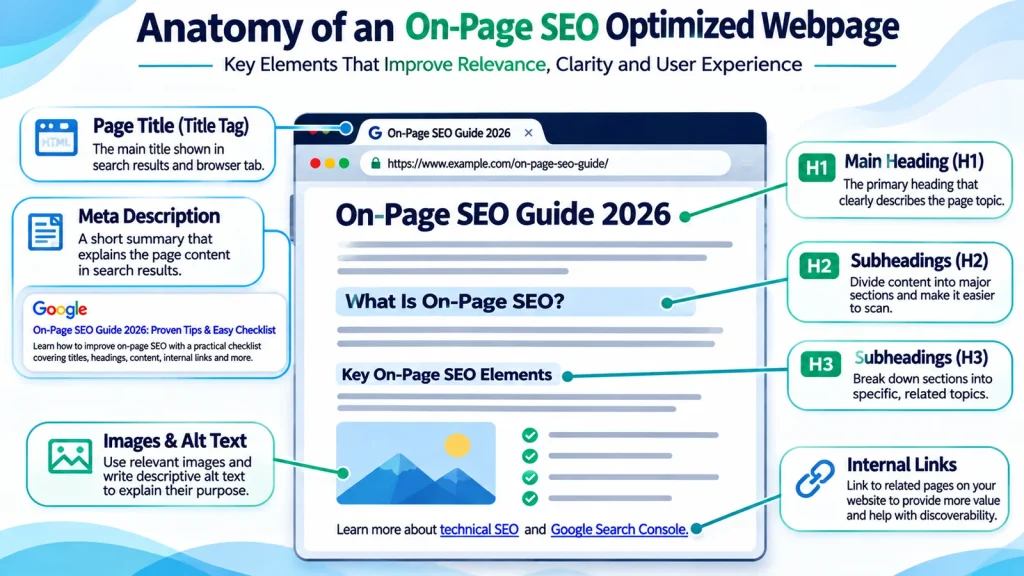
Effective on-page optimization involves several connected elements. Each serves a different purpose.
1. Search Intent Analysis
Search intent identifies what someone is trying to accomplish when entering a query.
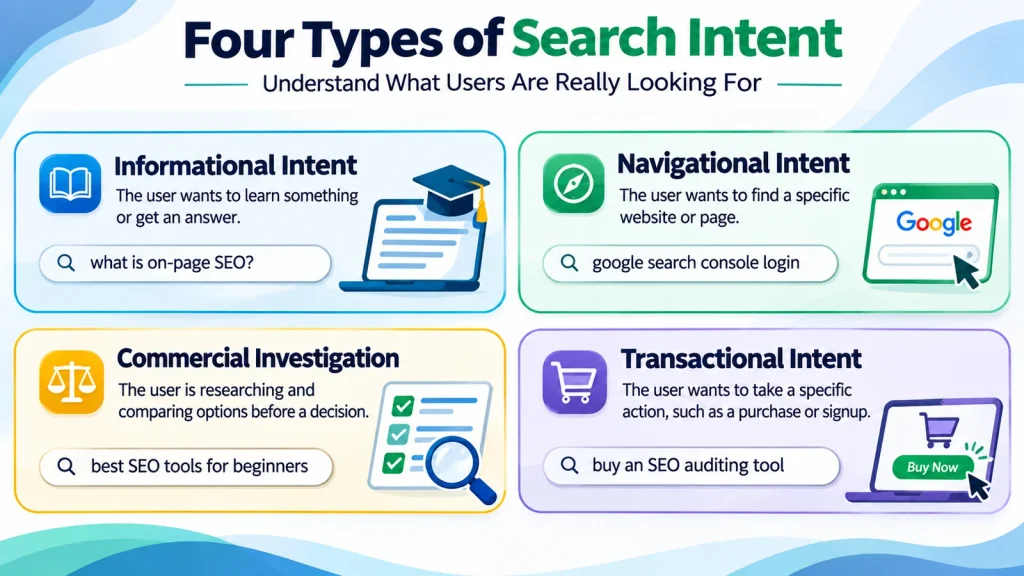
Four commonly used intent categories are:
| Intent | Example query | What the visitor expects |
|---|---|---|
| Informational | What is on-page SEO? | A clear explanation |
| Navigational | Google Search Console login | A particular website or destination |
| Commercial investigation | Best SEO tools for beginners | Comparisons and evidence |
| Transactional | Buy an SEO auditing tool | A way to complete a purchase |
These categories are useful starting points, not rigid classifications.
A query may have mixed intent, and its meaning may change depending on wording or context.
Before optimizing a page, ask:
- Who is searching?
- What problem are they trying to solve?
- How much do they already know?
- Do they need a definition, instructions, examples, or a comparison?
- What would make them satisfied after visiting the page?
For example, a beginner asking “what is on-page SEO” generally needs terminology explained.
Someone searching “on-page SEO checklist” expects a structured list of tasks.
Those searches are related, but their preferred answer formats differ.
2. Keyword-to-Page Mapping
Keyword mapping assigns related search topics to appropriate URLs.
Its purpose is to prevent unnecessary content overlap and help each page serve a clear role.
Imagine a website has these articles:
- How to Do On-Page SEO
- On-Page SEO Techniques
- On-Page SEO Best Practices
- On-Page SEO Checklist
Publishing four articles is not automatically wrong.
The problem arises when all four provide almost identical information, target the same audience, and offer no meaningful reason to exist separately.
In that situation, one comprehensive guide may serve visitors better.
A useful keyword map records:
- Page URL.
- Primary topic.
- Intended audience.
- Dominant search intent.
- Main query or keyword.
- Closely related subtopics.
- Existing competing pages.
- Planned internal links.
- Recommended action.
The action may be to improve, consolidate, reposition, or retain the page.
Do not create a new article just because a keyword variation exists.
Create a separate page when it addresses a genuinely distinct need that existing content cannot adequately satisfy.
3. Page Title Optimization
A page’s HTML title element helps communicate its subject and can influence the title link shown in search results.
An effective title should be accurate, concise, readable, and consistent with the page’s content.
Example:
Weak title:
SEO Guide | SEO Tips | Best SEO Techniques | SEO Optimization
Improved title:
On-Page SEO Checklist: 15 Practical Optimization Steps
The improved version communicates the subject and the expected format.
However, a title promising 15 steps must lead to content that actually contains those steps.
Avoid:
- Repeating the same keyword.
- Making unsupported promises.
- Adding unnecessary years.
- Creating titles that misrepresent the article.
- Making multiple pages use nearly identical titles.
Google may generate title links using several sources, so the HTML title is not guaranteed to appear exactly as written.
A fixed character limit is not an official ranking rule. Prioritize usefulness, clarity, and reasonable display length.
4. Meta Description Optimization
A meta description provides a concise summary of a page.
Search engines may use it when generating a result snippet, although they can also select relevant text from the page.
Example:
Weak description:
Learn SEO, best SEO techniques, SEO tips, and SEO optimization for your website.
Improved description:
Learn how to improve on-page SEO with a practical checklist covering titles, headings, content, internal links, images, and common mistakes.
A useful description should:
- Reflect the actual content.
- Explain what readers will learn.
- Use natural language.
- Avoid exaggerated guarantees.
- Be distinct from descriptions on unrelated pages.
A meta description is not a substitute for useful content. It also is not a direct ranking factor in the same way as content relevance.
5. Heading Structure
Headings organize content into sections and make information easier to scan.
A straightforward structure normally uses:
- One primary H1 describing the main page topic.
- H2 headings for major sections.
- H3 headings for subsections within those sections.
- Additional heading levels only when the document requires them.
For example:
H1: On-Page SEO Guide
H2: How to Optimize Page Titles
H3: Writing Titles for Informational Articles
H3: Common Title Optimization Mistakes
H2: How to Improve Internal Linking
Headings should communicate meaning rather than serve as places to insert keywords.
Multiple H1 elements are not automatically an SEO violation, but a clear primary heading is generally easier to manage.
The hierarchy should also make sense to readers using assistive technology.
6. Content Quality and Search Intent Alignment
Content quality is central to on-page optimization.
The objective is not to publish the longest article possible.
The objective is to provide enough accurate, relevant, and useful information for readers to accomplish their goal.
Review each page by asking:
- Does the introduction answer the main question?
- Does the content explain unfamiliar terms?
- Are important steps missing?
- Are claims supported by credible sources?
- Are examples realistic and relevant?
- Is outdated information presented as current?
- Are there unnecessary repeated paragraphs?
- Can readers understand what to do next?
- Does the page provide value beyond generic summaries?
- Is the content consistent with its title?
Consider an article about WordPress contact forms not sending emails.
A useful article should explain possible causes, show a logical troubleshooting sequence, clarify when SMTP configuration matters, and describe how to test delivery.
Adding unrelated background information only to increase word count can make the page less useful.
Good content answers the actual question before expanding into supporting detail.
7. Keyword Cannibalization and Content Overlap
Keyword cannibalization is commonly used to describe situations in which multiple URLs compete for substantially the same search intent.
But two pages mentioning the same keyword does not automatically mean there is a problem.
A blog article explaining SEO techniques and a landing page describing SEO work can reasonably coexist.
Their roles differ.
Problems become more likely when multiple pages:
- Target essentially the same query.
- Offer nearly identical answers.
- Have overlapping titles and headings.
- Use interchangeable internal anchors.
- Confuse readers about which page provides the intended information.
A practical content review should identify whether pages need to be:
- Retained.
- Improved.
- Repositioned.
- Combined.
- Redirected.
- Supported with clearer internal links.
Do not merge pages merely because both receive impressions for the same keyword.
Compare their actual purposes, content, search queries, and performance before making changes.
8. Internal Linking Optimization
Internal links connect related pages within the same website.
They help readers explore useful information and help search engines discover and interpret page relationships.
Suppose an article discusses poor website performance.
A contextual internal link may point readers toward a guide explaining Core Web Vitals.
Another link might lead to a resource about diagnosing indexing problems if the article discusses search visibility.
Good internal linking follows three principles:
Relevance: The linked page genuinely helps with the current topic.
Clarity: The anchor text describes the destination.
Purpose: The link supports a useful next step for the visitor.
Avoid inserting links simply because another page needs more internal links.
Also avoid repeating the same exact-match anchor unnaturally across many pages.
A strong internal link should feel like a natural continuation of the reader’s task.
9. Image Optimization
Images can explain processes, illustrate examples, and make complicated information easier to understand.
Useful image optimization includes:
- Choosing an image that adds information.
- Using appropriate dimensions.
- Compressing files without unacceptable quality loss.
- Selecting modern formats such as WebP or AVIF where supported.
- Providing descriptive alternative text for informative images.
- Adding width and height attributes when appropriate.
- Using responsive images.
- Avoiding unnecessary loading delays.
- Adding captions when they provide useful context.
Example image:
An original diagram showing the relationship between search intent, content structure, and internal links.
Possible alternative text:
Diagram showing how search intent, content structure, and internal links support on-page SEO.
Alternative text should describe the image’s meaning or function, not repeat keywords mechanically.
Decorative images may require empty alternative text so assistive technology can ignore them.
An original screenshot or explanatory diagram can be more useful than a generic stock photo.
10. URL Structure
A useful URL is understandable and reasonably descriptive.
For example:
example.com/on-page-seo-checklist/
is easier to interpret than:
example.com/post?id=47382
However, short URLs are not automatically better than long ones.
Existing URLs should not be changed simply to remove a word or improve their appearance.
A URL migration may require:
- A suitable permanent redirect.
- Updated internal links.
- Correct canonical signals.
- Updated sitemap references.
- Checks for redirect loops.
- Monitoring in Search Console.
For an established page, improving its content while retaining the existing URL may be the safer choice.
11. Structured Data
Structured data provides machine-readable information about a page and its entities.
For an informational article, suitable structured data may include:
ArticleorBlogPosting.BreadcrumbList, when appropriate.- Accurate author and publisher information.
The markup should reflect content actually visible on the page.
Do not invent ratings, awards, qualifications, reviews, or business claims.
Structured data does not guarantee enhanced search appearance.
Important 2026 update: Google discontinued FAQ rich results in May 2026. Questions and answers remain useful for readers, but adding FAQ structured data should not be treated as a strategy for obtaining the discontinued FAQ search feature.
Structured data should be validated whenever it is added or modified.
12. Core Web Vitals and Page Experience
Page experience is not limited to written content.
Slow rendering, unstable layouts, and unresponsive controls can make an otherwise useful page frustrating.
Google’s Core Web Vitals focus on three aspects of user experience:
| Metric | What it measures | Good threshold |
|---|---|---|
| Largest Contentful Paint (LCP) | Loading performance | 2.5 seconds or less |
| Interaction to Next Paint (INP) | Responsiveness | 200 milliseconds or less |
| Cumulative Layout Shift (CLS) | Visual stability | 0.1 or less |
These thresholds are typically evaluated at the 75th percentile of relevant user experiences.
Useful actions may include:
- Optimizing large images.
- Avoiding unnecessary blocking resources.
- Reducing excessive JavaScript work.
- Reserving space for media.
- Improving mobile layout stability.
- Testing navigation and interactive controls.
Technical performance improvements frequently require development work beyond routine content optimization.
Passing Core Web Vitals does not guarantee high rankings.
The objective is to provide a fast, stable, and usable experience.
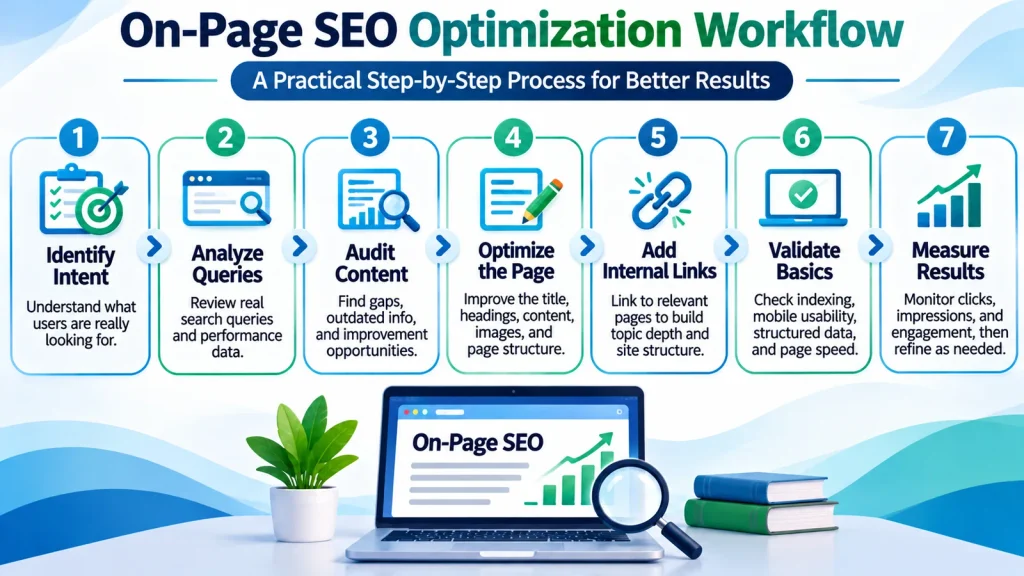
How to Do On-Page SEO Step by Step
The following workflow can be used for a new article or an existing page that needs improvement.
Step 1. Identify the Page’s Primary Purpose
Before changing anything, write down the main question the page should answer.
For an article about XML sitemaps, the purpose might be:
“Help website owners understand what XML sitemaps do and how to check whether their sitemap works.”
That statement becomes the basis for the article’s headings, examples, and supporting information.
If the page tries to answer too many unrelated questions, its purpose may become unclear.
Step 2. Examine Actual Search Queries
If the page has existing search visibility, review its performance in Google Search Console.
Look at:
- Queries generating impressions.
- Queries generating clicks.
- Country and device patterns.
- Changes over time.
- The relationship between queries and the current content.
Do not assume the highest-impression query is automatically the correct primary keyword.
Some impressions may come from loosely related searches.
Compare query relevance with the page’s intended audience.
For a new article without performance data, review relevant search results and the questions that users are trying to answer.
Step 3. Check for Existing Content Overlap
Search your website for related articles before creating new content.
Compare their:
- Titles.
- Topics.
- Search intent.
- Target audience.
- Main sections.
- Internal links.
For example, an existing comprehensive guide to WordPress speed optimization may already cover image compression.
A separate image optimization article is worthwhile only if it provides a distinct, more focused explanation.
Otherwise, improving the existing guide may be a better use of resources.
Step 4. Write a Direct Answer
The opening should explain the subject without unnecessary introductions.
For example:
“An XML sitemap is a file that lists selected website URLs to help search engines discover important content. It can support crawling, but submitting a sitemap does not guarantee indexing.”
The reader receives a useful answer immediately.
Subsequent sections can then explain implementation, common errors, and verification.
Step 5. Improve the Content Structure
Arrange the article around the visitor’s natural learning process.
A practical sequence is:
- Explain the concept.
- Clarify why it matters.
- Identify relevant problems.
- Explain the process.
- Show practical examples.
- Discuss limitations.
- Provide verification steps.
- Answer closely related questions.
Not every article needs all eight stages.
Use only the sections that make the information more useful.
Step 6. Optimize the Title and Description
Write an accurate title that identifies the subject and expected benefit.
Prepare a meta description that summarizes the page naturally.
Check that both align with the actual article.
Avoid changing titles repeatedly without a clear reason or enough information to evaluate the result.
Step 7. Add Relevant Examples and Internal Links
Review whether readers would benefit from:
- A screenshot.
- A comparison table.
- A short workflow.
- A realistic example.
- An internal link.
- A reference to authoritative documentation.
Every addition should help answer a specific question.
Step 8. Review Mobile Readability
Open the page on a mobile device or use appropriate browser testing tools.
Check:
- Whether headings are readable.
- Whether tables overflow awkwardly.
- Whether navigation works.
- Whether text is hidden behind interface elements.
- Whether images load correctly.
- Whether interactive elements respond.
An article that looks excellent on desktop may still be difficult to use on a phone.
Step 9. Validate Technical Basics
Before considering optimization complete, verify that:
- The page loads successfully.
- It is not accidentally blocked from indexing.
- Its canonical signal is appropriate.
- Important content is accessible.
- Internal links point to the intended pages.
- Images load.
- Structured data, if present, is valid.
- The mobile version remains usable.
These are important checks even when the main project focuses on content.
Step 10. Monitor Results
After publishing changes, compare performance over a meaningful period.
Review relevant queries, impressions, clicks, and other useful measures.
Account for seasonality, search demand, technical changes, and external factors.
Do not attribute every increase or decline to a single content edit.
If a change fails to solve the visitor’s problem, reconsider the page’s actual intent and quality rather than adding more keywords.
On-Page SEO Checklist for 2026
Use this checklist when publishing or updating an important web page.
| No. | Optimization check | What to verify |
|---|---|---|
| 1 | Primary search intent | The page serves a clear reader need |
| 2 | Keyword-to-URL mapping | No unnecessary overlap with existing pages |
| 3 | Primary heading | The H1 accurately describes the content |
| 4 | Page title | Descriptive, useful, and not keyword-stuffed |
| 5 | Meta description | Accurately summarizes the page |
| 6 | Opening answer | The reader receives a useful answer early |
| 7 | Content completeness | Important questions are addressed |
| 8 | Heading hierarchy | Sections follow a logical structure |
| 9 | Original value | Includes useful explanations or examples |
| 10 | Internal links | Connects relevant pages naturally |
| 11 | Image optimization | Helpful images, suitable formats, and accurate alt text |
| 12 | Source accuracy | Important claims have credible support |
| 13 | Mobile readability | Content and navigation work on mobile |
| 14 | Indexability | No unintended technical exclusion |
| 15 | Measurement | Performance can be reviewed after changes |
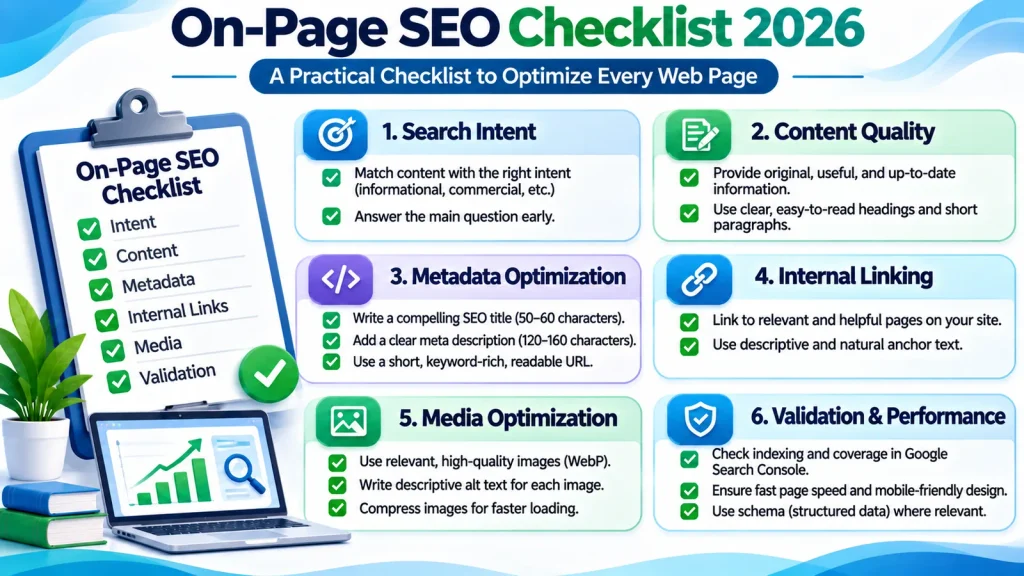
This is a practical publishing checklist, not a Google ranking formula.
A page does not gain a guaranteed advantage merely because every item is checked.
Prioritize the changes that matter most for the page’s actual purpose.
On-Page SEO vs Technical SEO
On-page SEO and technical SEO overlap, but they have different primary responsibilities.
| Area | On-Page SEO | Technical SEO |
|---|---|---|
| Primary focus | Content relevance and usefulness | Technical accessibility and site systems |
| Search intent | Core responsibility | Usually supporting |
| Page titles | Core responsibility | May involve templates |
| Headings | Core responsibility | Template issues may overlap |
| Content quality | Core responsibility | Usually not primary |
| Internal links | Context and relevance | Architecture and crawl paths |
| Canonicals | Review for page intent | Technical configuration |
| XML sitemaps | Supporting consideration | Core technical responsibility |
| Rendering | Content accessibility review | Deeper implementation |
| Core Web Vitals | Page experience review | Performance diagnosis and implementation |
| Structured data | Content accuracy | Markup implementation and validation |
Consider a page with excellent writing that is accidentally marked noindex.
Improving its title will not remove the indexing restriction.
Conversely, a technically accessible page may still perform poorly if it does not answer the visitor’s question.
Both disciplines matter, but they solve different types of problems.
For additional background, consult Google’s SEO Starter Guide.
On-Page SEO vs Off-Page SEO
Off-page SEO concerns signals and activities beyond the content and structure of your own website.
Examples include earned backlinks, relevant third-party references, digital public relations, and brand recognition.
On-page SEO focuses on what your website communicates through its own pages.
| On-Page SEO | Off-Page SEO |
|---|---|
| Page content and relevance | External references |
| Titles and headings | Earned backlinks |
| Internal links | Digital PR |
| Image descriptions | Third-party mentions |
| Content organization | Broader reputation signals |
Neither should be treated as a universal replacement for the other.
If a page fails to explain its topic clearly, earning additional backlinks will not automatically make its content useful.
Similarly, excellent content alone does not guarantee visibility in highly competitive search environments.
The appropriate priority depends on the website’s actual condition.
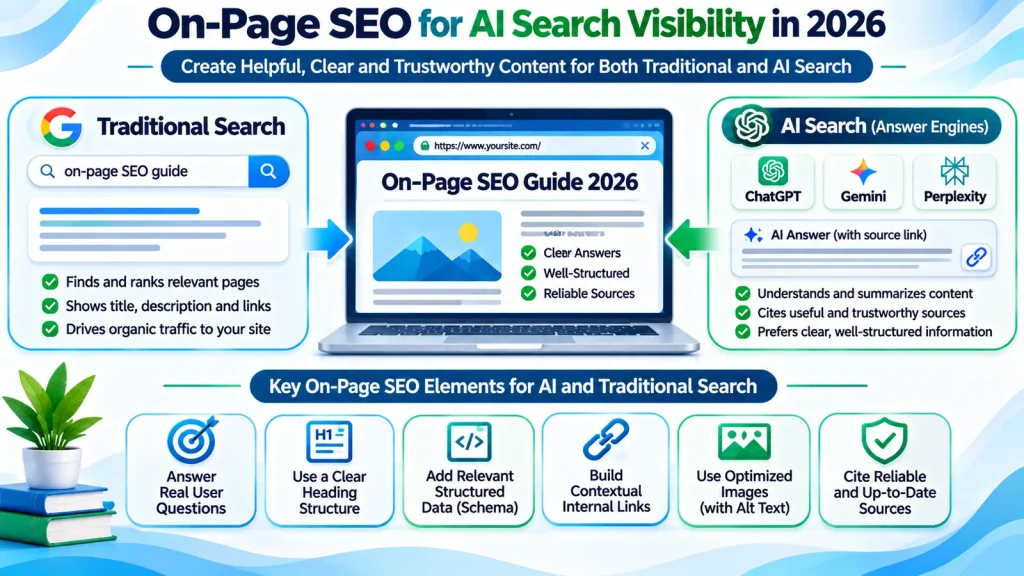
On-Page SEO for AI Search in 2026
AI-powered search experiences have changed how people discover and explore information.
Google’s AI Overviews and AI Mode can surface supporting links to web pages in response to user questions.
However, appearing in those experiences does not require a separate set of special AI-specific SEO rules.
Google’s guidance continues to emphasize useful content, technical accessibility, and established search fundamentals.
Write Clear Answers to Specific Questions
A page should provide direct explanations when the query calls for them.
For example, a question about canonical URLs should first explain what a canonical URL is.
A lengthy introduction about the history of SEO is unlikely to help someone who needs a specific answer.
Make Information Easy to Understand
Use:
- Descriptive headings.
- Accurate terminology.
- Clear definitions.
- Relevant examples.
- Useful tables where comparisons matter.
- Logical relationships between concepts.
These practices improve readability and help clarify the subject.
Do not create artificial question-and-answer sections simply to repeat every possible search variation.
Provide Information Beyond Generic Summaries
Content should contribute something useful.
Depending on the topic, that might include:
- A documented troubleshooting process.
- Original examples.
- A comparison based on stated criteria.
- An explanatory diagram.
- A reusable checklist.
- A carefully explained calculation.
- Verified observations from an actual test.
Do not claim firsthand testing or experience that has not occurred.
Original value comes from useful evidence and explanation, not from claiming that content is unique.
Establish Transparent Sources and Context
Readers should be able to understand where important information comes from.
For technical topics, use official documentation where appropriate.
Distinguish established guidance from personal recommendations or hypotheses.
If a tool, feature, or process has changed, identify what is current and avoid presenting outdated information as universal.
Avoid AI Search Optimization Myths
There is no reliable evidence that adding a special “AI SEO” paragraph, repeating entity names, or manufacturing dozens of conversational keyword pages guarantees citations in AI-generated answers.
AEO and GEO can be useful labels for studying answer-oriented content and generative search visibility.
They should not replace essential SEO principles or be presented as guaranteed ranking systems.
For Google Search, pages generally need to meet the standard technical requirements and be eligible for indexing and snippets to appear as supporting links in its AI search features.
Even when those conditions are satisfied, inclusion is not guaranteed.
Read Google’s official AI Search optimization guidance for current recommendations.
How to Perform an On-Page SEO Audit
An on-page SEO audit reviews whether a page is serving its intended audience and identifies improvements supported by evidence.
The process should be structured rather than based entirely on automated scores.
Phase 1. Diagnose
Start by reviewing available information.
Examine:
- Search Console performance.
- Important landing pages.
- Current titles and descriptions.
- Existing content quality.
- Search intent.
- Internal links.
- Indexing status.
- Relevant competing pages.
Identify the actual problem before proposing a solution.
For example, a page with low clicks may need a better search snippet, but it may also be appearing for unrelated queries.
Those situations require different responses.
Phase 2. Map
Assign a clear purpose to each important URL.
Decide whether the page should remain as it is, be improved, be consolidated with another page, or be repositioned.
Document the decision so future articles do not recreate the same overlap.
Phase 3. Prioritize
Not all issues deserve equal attention.
A useful prioritization framework considers:
| Priority | Example problem | Reason |
|---|---|---|
| Critical | Important page accidentally excluded from indexing | Prevents normal search eligibility |
| High | Article fails to answer its primary query | Directly affects usefulness |
| High | Multiple near-duplicate pages serving the same intent | Creates unnecessary overlap |
| Medium | Weak internal links | Makes related content harder to discover |
| Medium | Missing practical examples | May reduce usefulness |
| Lower | Minor wording improvement with no clear visitor benefit | Usually less urgent |
This is an editorial prioritization framework, not an official Google scoring system.
Phase 4. Implement and Validate
Make the necessary changes and record them.
Afterward, verify that:
- The page still loads.
- Important text remains visible.
- Internal links work.
- The selected canonical is appropriate.
- Structured data remains accurate.
- Mobile layouts function correctly.
Avoid applying many unrelated changes without documenting what was modified.
Otherwise, it becomes difficult to interpret later performance changes.
Phase 5. Measure and Improve
Review the page again after search engines have had an opportunity to process its updates.
Focus on relevant search queries and actual reader needs.
If performance improves, document the changes and evaluate whether they are useful elsewhere.
If performance declines, investigate competing explanations before reversing the work.
An audit is valuable when it leads to informed action, not merely a long list of warnings.
Common On-Page SEO Mistakes
Keyword Stuffing
Repeating the same phrase unnaturally can make content difficult to read.
Weak example:
“On-page SEO techniques are the best on-page SEO techniques for on-page SEO optimization.”
Improved example:
“Effective on-page optimization improves content clarity, headings, internal links, and relevance.”
Use words naturally and include related terminology when it improves the explanation.
Targeting the Same Intent Across Too Many Pages
Creating separate articles for every small keyword variation can produce redundant content.
Before publishing, determine whether the query deserves a dedicated page or should be answered within an existing article.
Writing for Search Engines Instead of People
A page that repeats search phrases without solving a problem offers little value.
Start with what the reader needs to know, then support the answer with relevant details.
Copying Competitor Content Structures
Competitor research can reveal common questions and content gaps.
It should not become a process of copying headings and reproducing generic explanations.
Use research to understand user expectations, then create accurate and useful content based on your own analysis.
Changing URLs Without a Clear Reason
Changing a slug may introduce redirect problems, broken internal links, or inconsistent canonical signals.
Retain established URLs unless the benefit of changing them justifies the migration work.
Treating SEO Plugin Scores as Ranking Guarantees
An SEO plugin can identify useful checks and omissions.
Its score is not a measurement of Google’s likelihood of ranking a page.
A high score cannot compensate for misleading content, poor search intent alignment, or serious technical problems.
Adding Unsupported Claims
Avoid publishing invented test results, false credentials, imaginary case studies, or unsupported ranking promises.
If a statement cannot be verified, remove it, qualify it appropriately, or provide a reliable supporting source.
Treating Structured Data as a Shortcut
Schema markup should describe the page accurately.
Adding irrelevant schema types or unsupported properties does not automatically improve search visibility.
Ignoring Mobile Readers
Large blocks of text, broken tables, unreadable images, and overlapping interface elements can undermine otherwise useful content.
Always inspect the published mobile experience.
Ignoring Changes in Search Behavior
Search behavior evolves.
An article may become outdated when tools, interfaces, terminology, or official recommendations change.
Review content when meaningful changes occur rather than updating dates without reviewing the information.
How to Measure On-Page SEO Performance
The right metrics depend on the purpose of the page.
For informational articles, the primary objective may be to help readers find and understand reliable information.
Useful measurements include:
| Metric | What it helps evaluate | Important limitation |
|---|---|---|
| Search impressions | Visibility for queries | Impressions do not equal useful traffic |
| Organic clicks | Visits generated from search | Clicks alone do not prove satisfaction |
| Search queries | Relevance of search visibility | Queries may include unrelated searches |
| Click-through rate | Search result interaction | Position and query type influence CTR |
| Landing-page engagement | How visitors interact with content | Tracking configuration affects interpretation |
| Internal navigation | Whether readers explore related resources | More clicks are not always better |
| Assisted conversions | Whether content contributes to later outcomes | Requires reliable attribution |
Review Query Relevance Before Traffic Volume
A page receiving impressions for irrelevant queries may not be reaching its intended audience.
Improving query relevance can be more useful than increasing impressions without context.
Compare Similar Time Periods
Search performance can change with seasonality, competition, demand, and search interface changes.
Use comparable periods where possible and avoid drawing strong conclusions from small datasets.
Check Whether Users Can Complete Their Task
Not every informational visitor needs to submit a form or visit another page.
Someone who reads a short explanation and leaves after finding the answer may have completed their task successfully.
Do not treat every short visit as evidence of failure.
Document Meaningful Content Changes
Record when you modify titles, rewrite sections, add resources, or update important technical information.
This helps distinguish intentional changes from unexplained performance fluctuations.
The purpose of measurement is to understand whether the page is becoming more useful and relevant, not simply whether a plugin score increases.
Frequently Asked Questions
What is on-page SEO in simple terms?
On-page SEO means improving the content and structure of an individual webpage so it answers relevant questions clearly and is easier for people and search engines to understand.
What are the most important on-page SEO elements?
The most important elements generally include search intent, useful content, descriptive titles, clear headings, relevant internal links, accurate information, and a readable page experience. Their relative importance depends on the page.
How do beginners start on-page SEO?
Start with one page. Identify its main purpose, review its title and content, answer the primary question clearly, organize the sections, add useful internal links, and check that the page works on mobile devices.
How many keywords should one page target?
There is no universal number. A page should have a clear primary topic and can naturally address closely related terms and questions. Avoid forcing unrelated keywords into the same page or creating unnecessary duplicates.
Does on-page SEO guarantee first-page rankings?
No. On-page optimization can improve clarity, usefulness, and relevance, but search rankings depend on multiple factors and cannot be guaranteed.
Is on-page SEO different from technical SEO?
Yes. On-page SEO primarily addresses content and page-level relevance. Technical SEO focuses more heavily on crawling, indexing, rendering, site architecture, and technical configuration. Some responsibilities overlap.
Are backlinks part of on-page SEO?
Backlinks from external websites are generally classified under off-page SEO. Internal links between pages on your own website are an important part of on-page optimization.
Does word count affect on-page SEO?
There is no universal ideal word count. Content should be sufficiently complete for the query without unnecessary repetition. A short, accurate answer may satisfy a simple question better than a lengthy article.
Should every page have a meta description?
Writing unique, relevant meta descriptions for important pages is a useful practice. However, Google may generate snippets from page content, and manually written descriptions are not guaranteed to appear.
Can two pages target similar keywords?
Yes, when they serve meaningfully different needs. Similar keyword wording is not automatically a problem. Review the purpose, content, and search intent of each page.
Does on-page SEO help with AI search visibility?
Useful, accessible, clearly structured, trustworthy content provides a sound foundation for AI-powered search discovery. Google does not require special additional optimization to qualify for AI Overviews or AI Mode, and inclusion is not guaranteed.
How long does on-page SEO take to show results?
There is no guaranteed timeline. Search engines need time to discover and process changes, while search demand, competition, site conditions, and other factors influence performance.
Which tools can help with an on-page SEO audit?
Google Search Console can help analyze search queries, clicks, impressions, and indexing information. PageSpeed Insights can help assess performance. Browser inspection tools can reveal layout and rendering issues. SEO plugins can provide supplementary checks, but their scores should not replace independent evaluation.
How often should on-page SEO be updated?
Update a page when its information becomes outdated, the visitor’s needs change, its purpose is unclear, or reliable evidence identifies an improvement. Do not change content or its publication date merely to make it appear fresh.
Conclusion
Successful on-page SEO is not about inserting the same keyword into every heading or achieving an arbitrary optimization score.
It begins with understanding what people are searching for and why.
A useful page provides a clear answer, explains the topic accurately, uses logical headings, supports important claims, and connects readers to relevant information.
Technical accessibility, mobile usability, and accurate structured data provide additional support.
In 2026, these fundamentals remain relevant to both traditional search and AI-powered discovery.
The most effective approach is to identify each page’s purpose, improve the elements that genuinely matter, avoid unnecessary content overlap, and measure results using reliable evidence.
Related Articles and Helpful Resources
To learn more about website optimization, search visibility, and technical SEO, explore these helpful guides from Marjan Web Studio.
- Technical SEO Guide 2026. Learn about crawling, indexing, website structure, and technical optimization.
- Google Search Console Guide. Understand how to monitor search performance, analyze queries, and identify indexing problems.
- Website Planning Checklist. Learn how to organize website content, structure pages, and improve the user experience.
- SEO Services. Explore professional SEO support if your website requires additional optimization or technical assistance.