Table of Contents
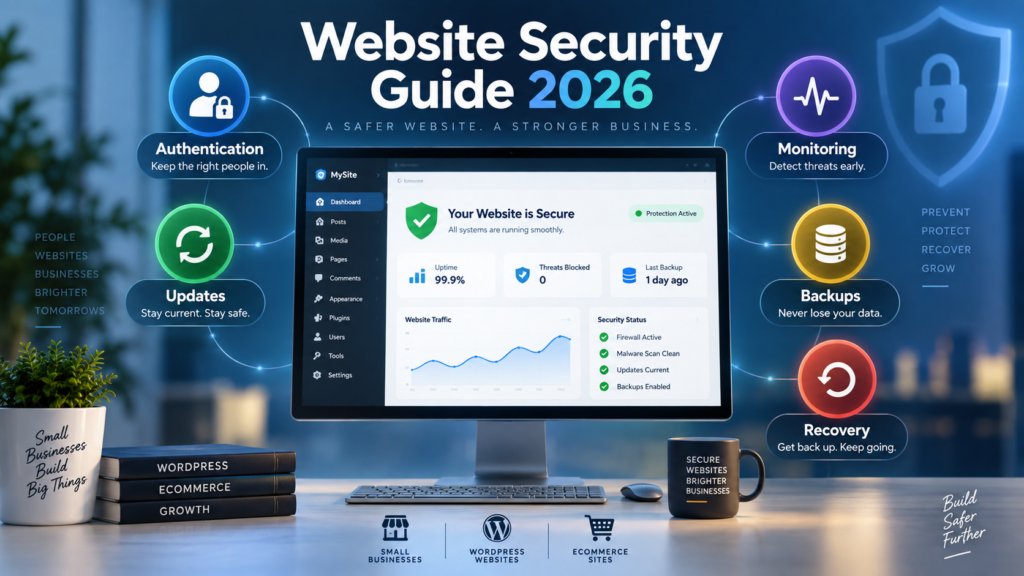
Website Security Guide 2026: Website security requires more than installing a security plugin or enabling HTTPS. A secure website depends on several controls working together, including software updates, strong authentication, controlled access, reliable backups, security monitoring, safe configuration, and a clear recovery process.
This website security guide explains the practical steps website owners can use to reduce common security risks, identify important weaknesses, and prepare for recovery if something goes wrong.
It is written for small business owners, WordPress users, ecommerce website managers, bloggers, and people responsible for maintaining a business website. It focuses on practical website security rather than advanced penetration testing or offensive cybersecurity.
No public website can be guaranteed to remain completely free from every possible security incident. The realistic objective is to reduce avoidable exposure, detect suspicious changes earlier, limit potential damage, and improve recovery readiness.
Quick Answer: How Do You Secure a Website?
To secure a website, keep its software updated, protect administrator accounts with strong authentication, limit user privileges, use HTTPS, maintain tested backups, remove unused components, monitor important changes, review third-party integrations, and prepare an incident recovery process.
WordPress websites should also regularly review plugins, themes, user roles, administrator access, file permissions, backups, and security notifications.
The strongest approach is layered. No single security tool replaces the need for good security practices across the website, hosting account, domain, email, and administrator environment.
What Is Website Security?
Website security is the combination of technical controls, operational practices, and recovery procedures used to protect a website from unauthorized access, malicious changes, malware, data exposure, account misuse, and service disruption.
A modern website can depend on far more than the pages visitors see.
It may include:
- A content management system such as WordPress.
- A hosting account.
- A domain registrar.
- Business email.
- Administrator accounts.
- Plugins and themes.
- Databases.
- Contact forms.
- E-commerce systems.
- Payment integrations.
- Analytics platforms.
- APIs.
- Third-party scripts.
- Backup systems.
- Development or staging environments.
Every component creates something that must be maintained, controlled, or monitored.
This is why website security should be treated as a system rather than a product.
The Marjan Five-Layer Website Security Framework
For this guide, website security is organized into five practical layers. This framework is not a security certification. It is a simple method for helping small business owners understand where important security controls belong.
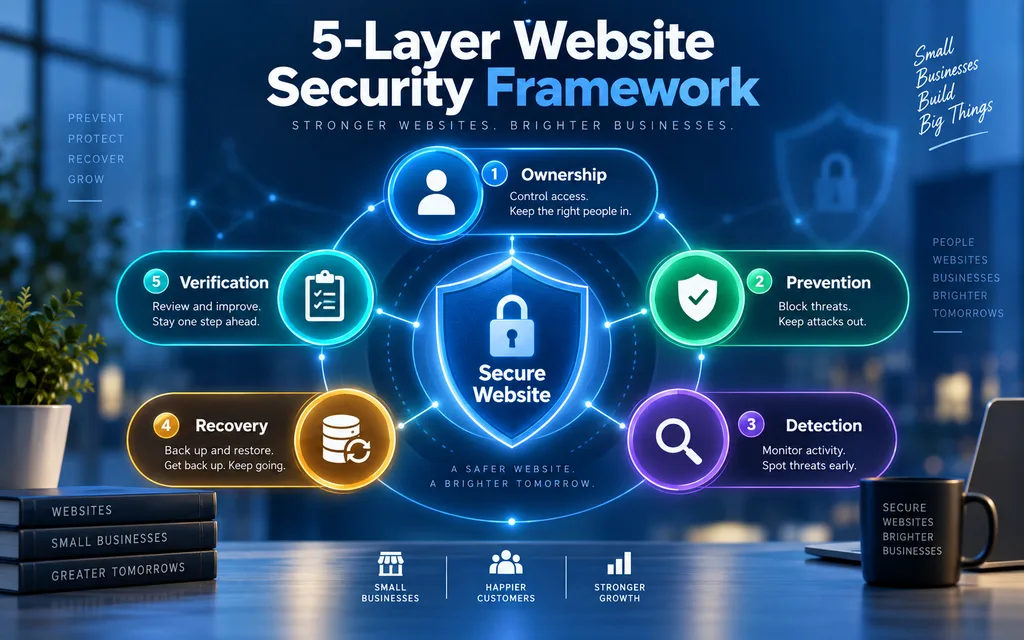
Layer 1. Ownership
The first layer is the control of the accounts that make the website possible.
You should know who controls:
- The domain registrar.
- The hosting account.
- The website administrator account.
- Business email.
- Backup storage.
- Analytics.
- Search Console.
- E-commerce administration.
- Important integrations.
A website cannot be managed securely if the business does not know who owns or controls its critical accounts.
Layer 2. Prevention
Preventive controls reduce unnecessary exposure.
Examples include:
- Software updates.
- Strong passwords.
- Multifactor authentication.
- Limited administrator access.
- HTTPS.
- Secure configuration.
- Removal of unused plugins and accounts.
- Appropriate security headers.
- Safe handling of forms and user input.
Prevention does not guarantee that an incident will never occur. It reduces avoidable risk.
Layer 3. Detection
Detection helps answer one important question.
Did something unexpected happen?
Examples include:
- Login monitoring.
- New administrator account alerts.
- Malware alerts.
- File change monitoring.
- Hosting notifications.
- Search Console security warnings.
- Unexplained redirects.
- Unexpected website changes.
Without useful monitoring, a website owner may not recognize a problem quickly.
Layer 4. Recovery
Recovery controls determine how well the business can respond after a problem.
Important recovery elements include:
- Reliable backups.
- More than one restore point.
- Backup access outside the live website where practical.
- Restoration testing.
- Incident documentation.
- Account recovery procedures.
- A clear response plan.
Backups become valuable only when they can actually be restored.
Layer 5. Verification
Security controls should be reviewed rather than simply assumed to be working.
Verification can include:
- Reviewing administrator accounts.
- Testing important website functions after updates.
- Checking backup restoration.
- Reviewing security settings.
- Examining monitoring alerts.
- Documenting changes.
- Conducting periodic security reviews.
The five layers work together. Strong prevention with no recovery plan is incomplete. Good backups with weak account security are also incomplete.
Why Website Security Matters for Small Businesses
Small businesses often depend on their websites for enquiries, bookings, orders, customer communication, business information, and reputation.
A security problem can affect several parts of the business at once.
A compromised or poorly maintained website may:
- Become unavailable.
- Display unexpected redirects.
- Contain unauthorized content.
- Generate browser security warnings.
- Lose important data.
- Expose administrator accounts.
- Stop processing enquiries.
- Break checkout or login functions.
- Damage customer confidence.
- Require emergency recovery work.
Security therefore should not begin only after a crisis.
Routine maintenance, account ownership, backups, monitoring, and controlled updates are usually more valuable than reacting without preparation.
For related operational maintenance, see the Website Maintenance Guide.
Website Security Checklist for Small Business Owners
A small business website security checklist should help the owner answer three questions.
What do we control?
What could fail?
How would we recover?
Use the following baseline checklist.
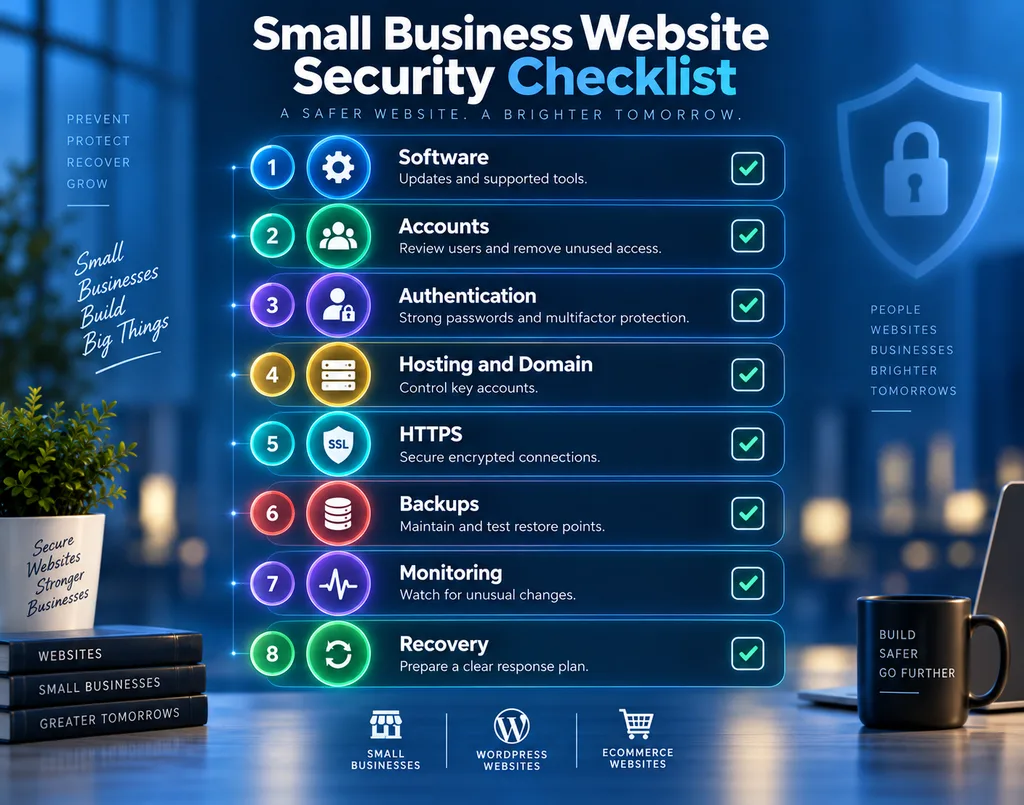
Software
Confirm that the website platform is current.
Review plugins, themes, extensions, and integrations.
Remove unsupported or unnecessary software.
Accounts
Review every administrator and editor account.
Remove users who no longer need access.
Avoid shared administrator accounts where possible.
Authentication
Use unique strong passwords.
Enable multifactor authentication where available.
Protect the email accounts used for password recovery.
Hosting and Domain
Know who controls the hosting account.
Know who controls the domain registrar.
Make sure important account recovery information is current.
HTTPS
Confirm that the website loads correctly over HTTPS.
Investigate mixed content or certificate problems.
For a deeper explanation of certificates and HTTPS, see the SSL Certificate Guide.
Backups
Maintain recent backups.
Keep more than one restore point.
Store at least one recoverable copy separately from the live environment where practical.
Test restoration.
Monitoring
Know where security alerts appear.
Monitor unexpected account changes, malware warnings, redirects, and other meaningful events.
Recovery
Document what should happen if the website becomes unavailable or compromised.
Know who has the access required to recover it.
1. Keep Website Software Updated
Outdated software creates unnecessary risk.
A website may depend on:
- WordPress or another CMS.
- Plugins.
- Themes.
- Server software.
- Libraries.
- Payment integrations.
- Analytics scripts.
- Custom code.
When security updates become available, website owners should avoid leaving affected components outdated without a reason.
For WordPress websites, updates are especially important because the platform, themes, and plugins may all receive independent updates.
A practical update process is:
- Confirm that a recent backup exists.
- Review any known compatibility requirements.
- Apply the update.
- Test important functions.
- Monitor the website for unexpected behavior.
For an e-commerce website, test checkout.
For a lead generation website, test contact forms.
For a membership website, test login and account functionality.
Security updates matter, but controlled updates matter too.
2. Use Strong Authentication
Authentication determines whether a person should be allowed into an account.
Important website-related accounts may include:
- Website administrator.
- Hosting.
- Domain registrar.
- Business email.
- Backup storage.
- E-commerce administration.
- Analytics.
- Search Console.
Use unique passwords for important accounts.
Do not reuse the website administrator password for email or hosting.
Enable multifactor authentication where available, especially for high-privilege accounts.
A website can have good application security and still be exposed if the associated email or hosting account is poorly protected.
Website security should cover the whole account chain.
3. Limit Administrator Access
Administrator access should be treated as a high privilege.
Not everyone who works on a website needs full administrative permissions.
For example:
An author may only need publishing access.
A product editor may only need e-commerce content permissions.
A marketing assistant may not need plugin installation access.
A temporary developer may not need permanent administrator access after completing work.
Periodically review:
- Who has access?
- Who has administrator privileges?
- Which accounts are inactive?
- Which accounts belong to former staff or contractors?
- Are credentials shared?
- Could lower permissions achieve the same task?
This approach follows the principle of least privilege.
Give each user only the level of access required for their legitimate work.
4. Improve WordPress Security
WordPress security depends on more than one plugin.
A practical WordPress security baseline includes:
- Keeping WordPress core updated.
- Keeping active plugins updated.
- Keeping active themes updated.
- Removing unused plugins and themes.
- Using software from trustworthy sources.
- Limiting administrator accounts.
- Using strong authentication.
- Reviewing user roles.
- Maintaining backups.
- Monitoring unexpected changes.
- Reviewing file permissions where appropriate.
- Protecting important configuration and account access.
Avoid installing multiple overlapping security plugins simply because they are labelled as security tools.
Every additional plugin is another component that must be maintained.
Security tools should have a clear purpose.
5. Understand HTTPS Correctly
HTTPS protects communication between the visitor’s browser and the website by encrypting data in transit.
This is important.
It does not make a website completely secure.
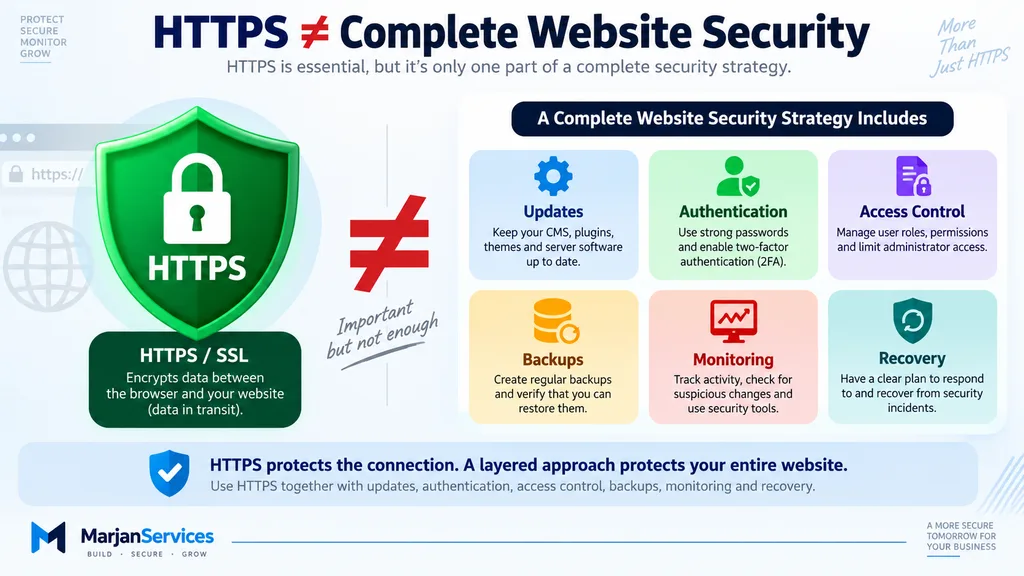
HTTPS does not automatically prevent:
- Stolen administrator credentials.
- Vulnerable plugins.
- Malware is already present on the server.
- Unauthorized account access.
- Poorly configured permissions.
- Unsafe custom code.
- Weak backup practices.
Think of HTTPS as one layer.
A secure website still requires updates, authentication, access control, monitoring, backups, and recovery planning.
6. Use Appropriate Security Headers
Security-related HTTP response headers can help browsers handle website content more safely.
Examples include:
- Content Security Policy.
- Strict Transport Security, where appropriate.
- X-Content-Type-Options.
- Referrer Policy.
- Permissions Policy.
- Controls that reduce unwanted framing.
These controls should be configured carefully.
A poorly planned Content Security Policy, for example, may block legitimate analytics, fonts, scripts, payment integrations, or other website functions.
Do not copy random security header configurations simply because a tool reports a higher score.
Implement controls according to the actual website and test important functionality.
7. Remove Unused Components
Unused components increase maintenance responsibility.
Examples include:
- Old plugins.
- Inactive themes.
- Former employee accounts.
- Temporary administrator accounts.
- Old API integrations.
- Forgotten staging websites.
- Development subdomains.
- Test pages.
- Obsolete scripts.
- Unused marketing integrations.
Before deleting anything, confirm whether another service depends on it.
Then remove components that are genuinely no longer needed.
The objective is to reduce unnecessary complexity.
A smaller and better-understood website environment is easier to maintain and monitor.
8. Maintain Tested Website Backups
A backup is a recovery control.
A good backup strategy should answer:
What is being backed up?
How frequently?
Where is it stored?
How many restore points exist?
Can the website actually be restored?
For database-driven websites, copying only website files may not capture all important data.
For e-commerce websites, order information can change continuously.
For frequently updated websites, backup frequency should reflect the amount of data the business can realistically afford to lose.
A practical backup strategy includes:
- Automated backups.
- Multiple restore points.
- Restricted backup access.
- A separate recoverable copy where practical.
- Clear retention.
- Restoration testing.
A backup that has never been tested provides less certainty than a backup that has been successfully restored.
9. Monitor Important Website Activity
Prevention attempts to reduce risk.
Monitoring helps detect meaningful changes.
Useful security monitoring may include:
- Administrator logins.
- New privileged accounts.
- Plugin or theme changes.
- Unexpected file changes.
- Malware alerts.
- Unusual redirects.
- Hosting security alerts.
- Search Console security warnings.
- Backup failures.
- Important configuration changes.
Not every alert means the website has been compromised.
Monitoring creates evidence that can be reviewed.
The goal is not maximum noise.
The goal is useful visibility.
10. Protect Forms and User Input
Contact forms, login screens, search functions, comments, checkout pages, account areas, and upload forms all accept information from users.
These features should be maintained carefully.
Website owners should ask:
- Is the form or plugin actively maintained?
- Does it collect information that is actually needed?
- Who can access submissions?
- Are uploads necessary?
- Are high-privilege actions protected by authentication?
- Are integrations still required?
- Is sensitive information retained longer than necessary?
Reducing unnecessary data collection and unnecessary functionality can reduce exposure.
For custom web applications, secure development and testing become even more important because generic CMS security tools may not understand custom business logic.
11. Treat a Web Application Firewall as One Layer
A web application firewall can help filter or block certain unwanted web requests.
It may be provided through:
- Hosting.
- A content delivery network.
- A security platform.
- A dedicated firewall service.
A WAF can be useful.
It cannot replace:
- Updates.
- Secure authentication.
- Access control.
- Removal of vulnerable software.
- Backups.
- Recovery planning.
A firewall should complement other controls rather than become the entire security strategy.
12. Strengthen E-commerce Website Security
E-commerce websites usually have more security dependencies than basic informational websites.
They may include:
- Customer accounts.
- Order data.
- Checkout.
- Payment integrations.
- Shipping information.
- Product administration.
- Transactional email.
- Analytics.
- Advertising scripts.
- Third-party extensions.
An e-commerce website security checklist should therefore include:
- Strong administrator authentication.
- Minimal privileged access.
- Current e-commerce software.
- Current plugins and extensions.
- HTTPS.
- Reliable backups.
- Checkout testing after significant updates.
- Monitoring.
- Review of third-party scripts.
- Clear understanding of what customer and payment data the website handles.
Do not collect sensitive information simply because a form technically allows it.
Only collect information that is genuinely required for the business process.
13. Conduct Periodic Website Security Reviews
Security should be reviewed as the website changes.
A website security audit checklist can examine:
- Software versions.
- Administrator accounts.
- Hosting access.
- Domain access.
- Authentication.
- HTTPS.
- Backups.
- Security headers.
- Monitoring.
- Forms.
- Integrations.
- Publicly exposed files.
- Development environments.
- Recovery procedures.
The depth of the review should reflect the website.
A five-page informational website does not have the same security profile as an e-commerce platform containing customer accounts, payment integrations, and custom code.
Website Security Audit vs Vulnerability Scan vs Penetration Testing
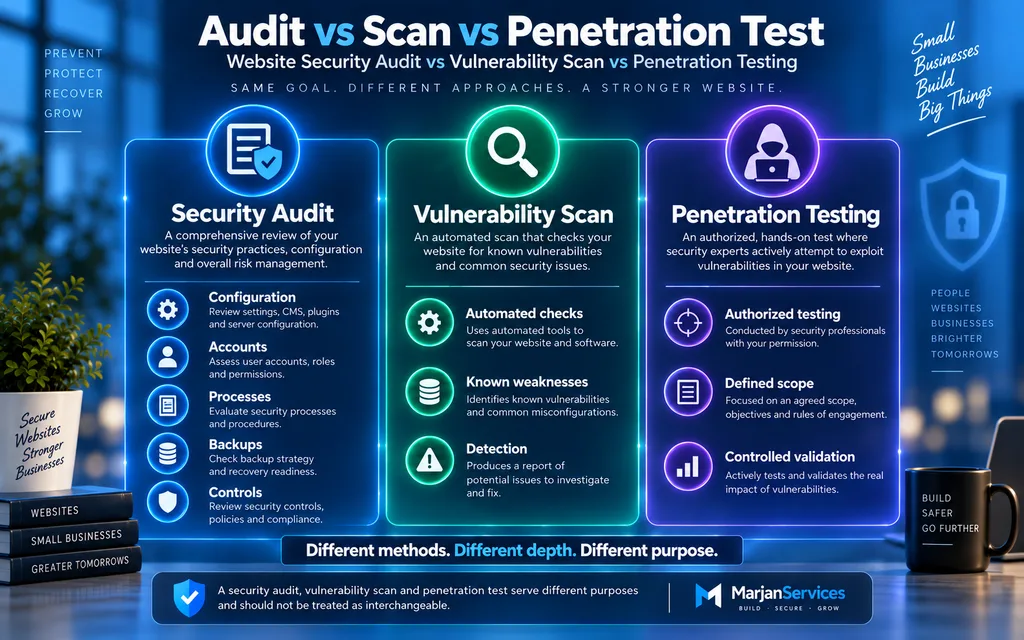
These terms should not be treated as interchangeable.
Website Security Audit
A security audit can examine configuration, access, software, operational processes, backups, and security controls.
Vulnerability Scan
A vulnerability scan commonly uses automated tools to identify detectable weaknesses or known vulnerabilities.
Penetration Testing
Penetration testing is a controlled, authorized security assessment used to evaluate selected weaknesses within an agreed scope.
An automated scan should not automatically be described as a complete security audit.
Likewise, a checklist is not penetration testing.
Clear terminology helps website owners understand what has actually been reviewed.
14. Recognize Website Security Warning Signs
Unexpected behavior deserves investigation.
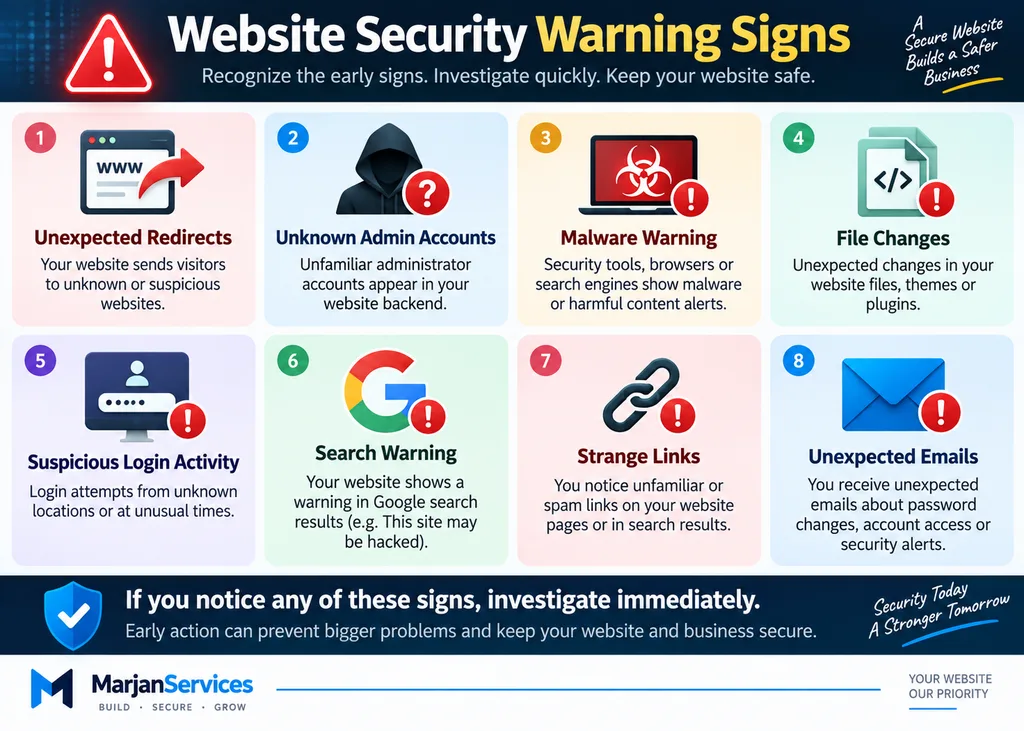
Possible website security warning signs include:
- Unexpected redirects.
- Pages you did not create.
- Unknown administrator accounts.
- Browser security warnings.
- Search engine security warnings.
- Unexpected file changes.
- Unexplained login activity.
- Strange links or advertisements.
- An email is being sent unexpectedly from the website.
- Important settings changing without authorization.
- Contact forms or checkout are behaving unusually.
- Sudden unexplained website problems.
These signs do not automatically prove that a website has been hacked.
Software conflicts, hosting problems, configuration errors, and legitimate changes can sometimes produce similar symptoms.
Investigate based on evidence rather than assumptions.
15. Prepare a Website Incident Response Plan
Security planning should include recovery.
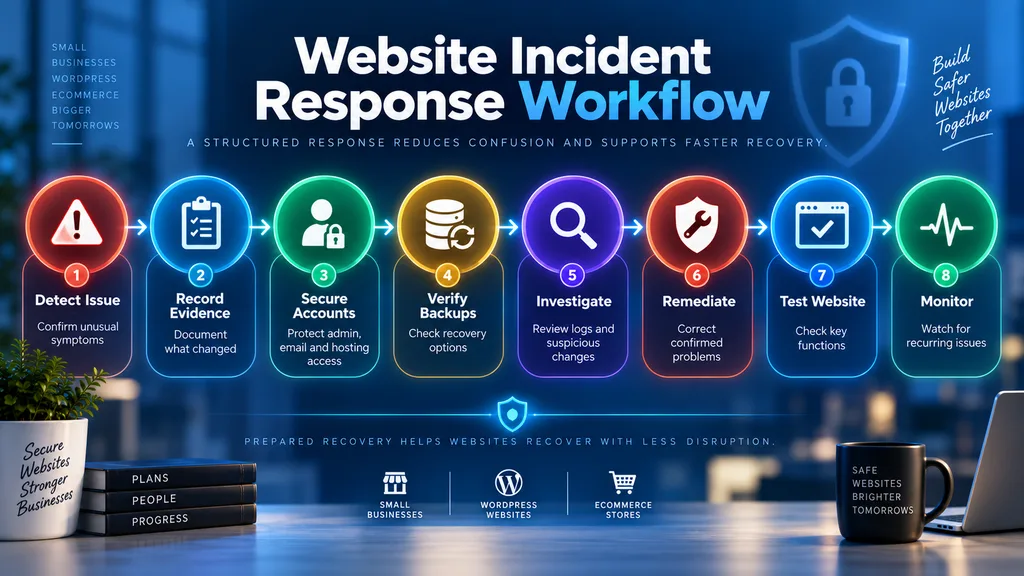
A simple website incident response plan should identify:
- Who manages the website?
- Who controls the domain?
- Who controls hosting?
- Who controls the business email?
- Where backups are stored.
- Who has administrator access?
- Which services are critical?
- How will evidence be preserved?
- How can accounts be secured?
- How can the website be restored?
If a serious issue occurs, avoid making uncontrolled changes immediately.
A structured response may involve:
- Confirming the symptoms.
- Recording what was observed.
- Protecting critical accounts.
- Preserving relevant information.
- Reviewing available logs.
- Verifying backups.
- Identifying unauthorized changes.
- Correcting confirmed problems.
- Updating affected software.
- Testing website functionality.
- Continuing monitoring after recovery.
Prepared recovery is more reliable than improvisation.
Reactive vs Preventive Website Security
Reactive security begins after a problem is discovered.
Preventive security attempts to reduce risk before an incident occurs.
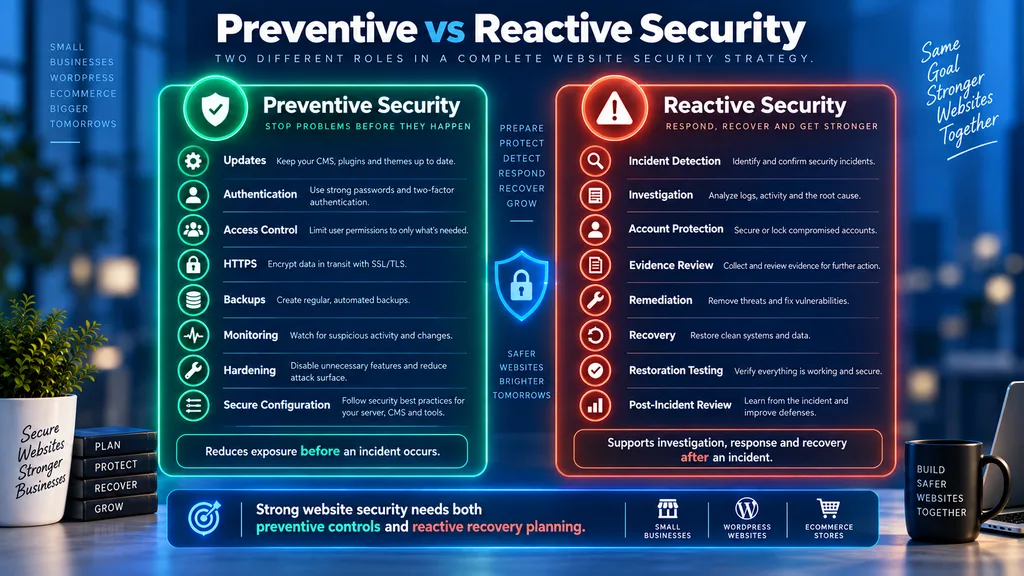
Preventive Controls
Updates.
Authentication.
Access control.
HTTPS.
Hardening.
Backups.
Monitoring.
Secure configuration.
Reactive Controls
Incident detection.
Account protection.
Investigation.
Remediation.
Recovery.
Restoration.
Post-incident review.
A mature website security approach needs both.
The objective is not to assume incidents are impossible.
The objective is to reduce likelihood, detect problems earlier, and recover more reliably.
Website Security for Small Businesses in Pakistan
The underlying principles of website security do not change by country.
A business website in Pakistan still needs:
- Secure administrator access.
- Controlled domain ownership.
- Secure hosting access.
- Strong business email protection.
- Updates.
- Backups.
- HTTPS.
- Monitoring.
- Recovery planning.
A particularly important operational issue arises whenever a business depends on outside developers, freelancers, agencies, or hosting providers.
The business itself should know who controls:
- Domain registration.
- Hosting.
- Website administration.
- Business email.
- Backup storage.
- Analytics.
- Search Console.
- Important payment or e-commerce accounts.
Temporary access can be legitimate.
Permanent uncertainty about account ownership is not good operational practice.
A Pakistani small business should therefore maintain a simple record of its critical website accounts, ownership, recovery methods, and authorized users.
The Marjan 20 Point Website Security Self-Audit
This scorecard is a practical self-review. It is not a vulnerability scan, penetration test, certification, or guarantee of security.
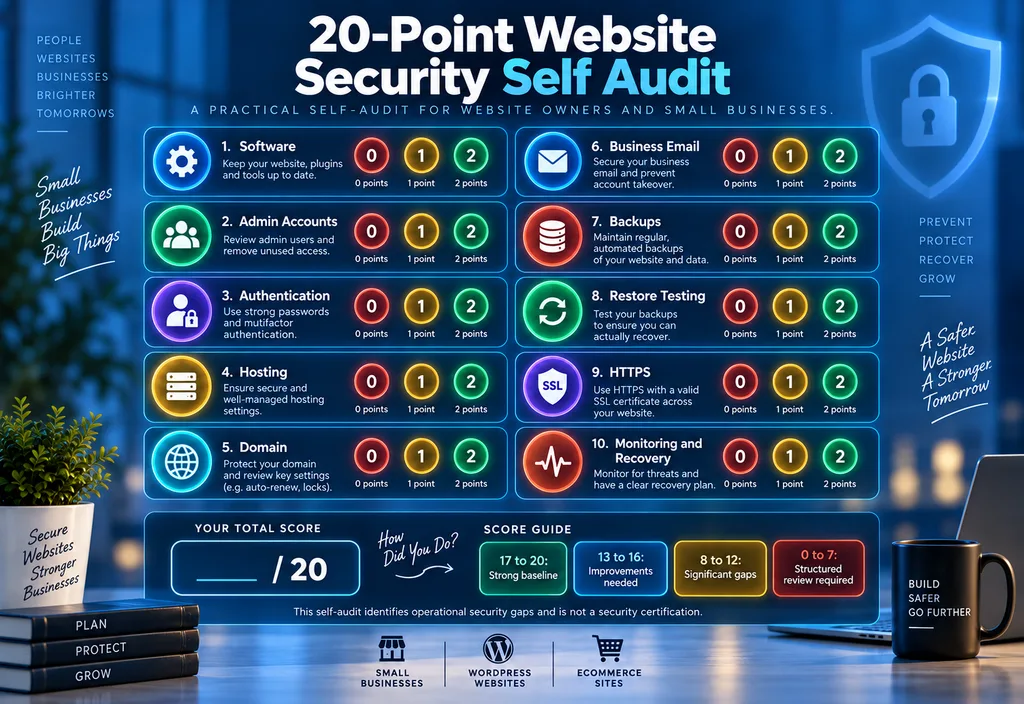
Score each category:
0 points: Unknown or not implemented.
1 point: Partially implemented or not regularly verified.
2 points: Confirmed, documented, and maintained.
1. Software
Are the website platform and active software current and supported?
2. Administrator Accounts
Are unnecessary high-privilege accounts removed?
3. Authentication
Are strong passwords and multifactor authentication used where practical?
4. Hosting Access
Does the business control and understand hosting access?
5. Domain Access
Are domain ownership and account recovery clear?
6. Business Email
Are important email accounts protected?
7. Backups
Do reliable recent backups exist?
8. Restore Testing
Has restoration been tested?
9. HTTPS
Does the website consistently use HTTPS correctly?
10. Monitoring and Recovery
Would the business notice important security changes, and would it know how to respond?
Score Interpretation
17 to 20 points: Strong basic security management. Continue routine review.
13 to 16 points: Reasonable foundation, but several gaps should be improved.
8 to 12 points: Significant weaknesses or unknowns need attention.
0 to 7 points: The website requires a structured security review.
A high score does not prove that a website has no vulnerabilities.
The score only measures whether important operational controls are understood and maintained.
How Often Should Website Security Be Reviewed?
There is no single schedule suitable for every website.
Review security when meaningful changes occur.
Examples include:
- Installing major plugins or integrations.
- Changing hosting.
- Adding e-commerce.
- Adding new administrators.
- Migrating the website.
- Changing payment systems.
- Launching customer accounts.
- Discovering a vulnerability.
- Recovering from an incident.
- Receiving a security warning.
Routine frequency should reflect the website’s complexity, rate of change, exposure, and business importance.
A frequently updated e-commerce website requires more active oversight than a small static information site.
Consistency matters more than pretending one fixed interval works for everyone.
Common Website Security Mistakes
Treating SSL as Complete Security
HTTPS is necessary, but it does not protect against every website security problem.
Giving Too Many Users Administrator Access
High privileges should be limited.
Keeping Unsupported Plugins
Old software should not remain simply because the website still appears to work.
Installing Too Many Security Plugins
More security plugins do not automatically mean more security.
Ignoring Old Staging Websites
Forgotten development environments can remain accessible long after a project ends.
Sharing Administrator Passwords
Individual accounts provide better accountability and control.
Never Testing Backups
A backup is useful only if restoration is possible.
Making Random Changes During an Incident
Uncontrolled changes can make investigation and recovery more difficult.
Assuming One Tool Provides Complete Protection
Website security depends on multiple layers.
Frequently Asked Questions About Website Security
What is a website security guide?
A website security guide explains the controls and practices used to reduce website security risks. It normally covers updates, authentication, administrator access, HTTPS, backups, monitoring, hardening, and recovery.
How do I secure a website?
Start with current software, strong authentication, limited administrator access, HTTPS, tested backups, monitoring, removal of unnecessary components, and a recovery plan.
Is an SSL certificate enough for website security?
No. SSL and HTTPS protect data in transit, but they do not replace updates, secure accounts, access control, backups, malware monitoring, or secure website configuration.
Are WordPress security plugins enough?
No. A security plugin can provide useful controls, but WordPress security also depends on updates, hosting, administrator accounts, backups, authentication, trusted extensions, and monitoring.
What is website security hardening?
Website security hardening is the process of reducing unnecessary exposure and strengthening important controls. It may include removing unused components, limiting privileges, improving authentication, reviewing configuration, and protecting critical accounts.
What is a website security audit?
A website security audit is a structured review of security controls, configuration, access, software, backups, integrations, and potential weaknesses. Its exact scope should always be clear.
What should I do if my website appears hacked?
Document what you observe, protect important accounts, preserve relevant information, verify backups, investigate the cause, correct confirmed problems, update affected software, test the website, and continue monitoring after recovery.
How can a small business improve website security?
Start by establishing clear ownership of the domain, hosting, website administrator, email, and backups. Then maintain updates, authentication, least privilege, monitoring, HTTPS, reliable backups, and recovery procedures.
Final Website Security Checklist
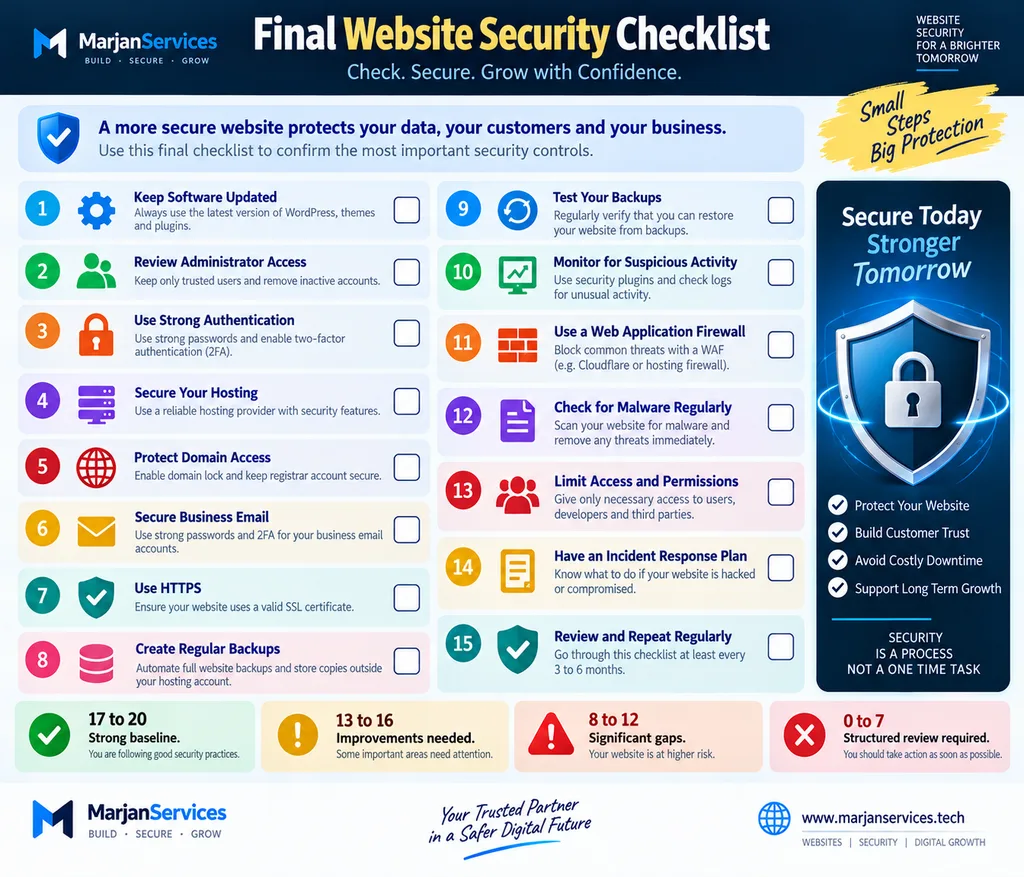
Before completing a routine review, confirm:
- Website software is current.
- Unsupported software is removed.
- Administrator accounts are limited.
- Important passwords are unique.
- Multifactor authentication is enabled where practical.
- Hosting access is controlled.
- Domain ownership is clear.
- HTTPS works correctly.
- Backups exist.
- Backup restoration has been tested.
- Important changes are monitored.
- Old accounts and integrations are reviewed.
- The business knows who controls critical accounts.
- A recovery process exists.
- Security is reviewed after important website changes.
If several answers are uncertain, start with the unknowns.
Installing another security plugin should not be the first response when the website owner does not yet understand the existing environment.
Conclusion
Effective website security is built in layers.
Software updates, authentication, controlled privileges, HTTPS, backups, monitoring, secure configuration, and recovery planning all serve different purposes.
For small businesses, one of the most valuable improvements is clear ownership. The business should understand who controls its domain, hosting, website administrator account, email, backups, analytics, and other critical services.
The next priority is consistency.
Keep software maintained.
Remove unnecessary access.
Protect critical accounts.
Test backups.
Monitor meaningful changes.
Document recovery.
Review security when the website changes.
No single plugin, firewall, certificate, or hosting feature can replace disciplined website management.
A practical website security guide should therefore help website owners understand their environment, prioritize important controls, detect problems sooner, and recover with less disruption.
Editorial Methodology
This guide was structured around practical website administration controls and internationally recognized website security concepts, including authentication, least privilege, secure configuration, software maintenance, HTTPS, backups, monitoring, incident response, and recovery.
The content is written for website owners and small businesses rather than penetration testers or offensive security professionals.
The Marjan Five Layer Website Security Framework and 20 Point Website Security Self Audit are organizational tools created for this guide. They are not security certifications, penetration tests, or guarantees that a website is free from vulnerabilities.
Technical recommendations should be reviewed according to the website’s actual platform, hosting environment, integrations, data sensitivity, and business requirements.
Author
Syed Abdul Quddus
Founder, Marjan Web Studio.
The author works with website administration, WordPress, SEO, website development, content architecture, and digital business systems. This guide has been prepared to help website owners understand practical security controls without presenting the material as a substitute for specialist security assessment where one is required.
Technical References
For technical verification and further reading, consult authoritative documentation from:
- WordPress Developer Resources. WordPress Security and Hardening guidance.
- OWASP Cheat Sheet Series. HTTP Security Response Headers.
- OWASP Cheat Sheet Series. Content Security Policy.
- OWASP Secure Coding Practices.
- CISA. Cybersecurity resources for small and medium-sized businesses.
- Google Search Console documentation for security issues affecting websites.
Related Website Guides
- SSL Certificate Guide
- Website Maintenance Guide
- Technical SEO Guide 2026
- Google Search Console Guide
- Website Planning Checklist
- Website Launch Checklist
Website Security Services
Recommended Internal Links
- SSL Certificate Guide
- Website Maintenance Guide
- Technical SEO Guide 2026
- Google Search Console Guide
- Website Planning Checklist
- Website Launch Checklist
- Website Features Checklist
- Website Security Services
3 Comments