Quick Answer
This SSL Certificate Guide explains that an SSL certificate is a digital certificate that verifies a website’s identity and encrypts communication between a visitor’s browser and a web server using HTTPS. It protects sensitive information, including passwords, payment details, contact form submissions, and personal data, while assuring visitors that the website is secure. Although modern certificates rely on Transport Layer Security (TLS) rather than the original Secure Sockets Layer (SSL) protocol, the term “SSL certificate” remains the widely recognized and industry standard name across the web hosting, cybersecurity, and website security industries.
Table of Contents
Key Takeaways
- SSL certificates encrypt data transmitted between browsers and servers.
- HTTPS has become the standard for secure websites.
- Modern SSL certificates use TLS encryption rather than the older SSL protocols.
- Every business website should implement HTTPS regardless of its size.
- Choosing the correct SSL certificate depends on your website type, business requirements, and the number of domains you need to secure.
- SSL is one part of a comprehensive website security strategy and should be combined with secure hosting, software updates, backups, and ongoing maintenance.
What Is an SSL Certificate?
An SSL certificate is a digital security certificate that authenticates the identity of a website and creates an encrypted connection between a visitor’s browser and the website’s server. This encrypted connection prevents unauthorized parties from reading or modifying information while it is transmitted across the internet.
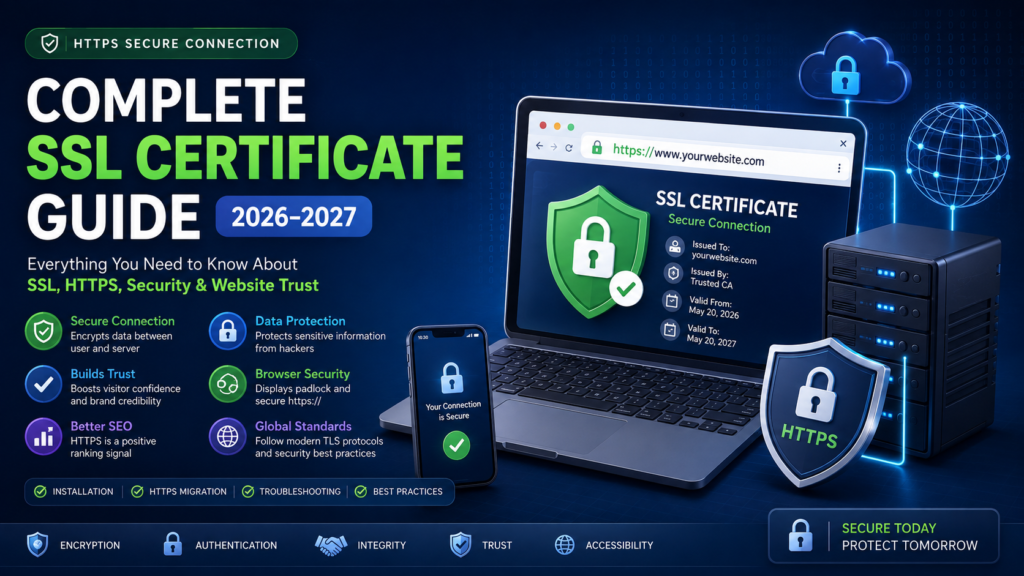
Although the name Secure Sockets Layer (SSL) is still widely used, modern certificates rely on Transport Layer Security (TLS), which replaced SSL with stronger encryption and improved security mechanisms. The industry, however, continues to use the familiar term “SSL certificate” because it is widely recognized by businesses, hosting providers, and website owners.
Every SSL certificate contains important information such as:
- The domain name it protects.
- The Certificate Authority (CA) that issued it.
- The certificate’s validity period.
- The website’s public encryption key.
- A digital signature confirming its authenticity.
When someone visits a secure website, the browser checks this certificate before establishing an encrypted HTTPS connection. If the certificate is valid and trusted, the connection proceeds securely. If there is a problem, such as an expired certificate or a domain mismatch, the browser displays a warning to help protect the visitor.
Why SSL Matters in 2026 and Beyond
Cybersecurity expectations have changed significantly over the past decade. Internet users now expect every legitimate website to provide a secure browsing experience, regardless of whether it sells products or simply publishes information.
Modern browsers clearly identify insecure websites, often displaying warnings that can discourage visitors from continuing. These warnings can reduce user confidence and negatively affect business credibility.
An SSL certificate helps address these concerns by:
- Encrypting information exchanged between users and the website.
- Verifying the website’s identity.
- Supporting secure authentication.
- Reducing browser security warnings.
- Strengthening visitor confidence.
- Providing a foundation for secure online services.
Today, HTTPS is no longer limited to banks or online stores. Educational institutions, healthcare providers, government agencies, professional service firms, blogs, nonprofit organizations, and personal portfolios all benefit from secure connections.
Why Do Websites Need SSL Certificates?
Every website exchanges data with visitors, even if no online payments are involved.
Examples include:
- Contact forms.
- Login pages.
- Newsletter subscriptions.
- Search functions.
- User accounts.
- File downloads.
- Appointment booking systems.
- Customer support portals.
Without encryption, this information may be exposed while traveling across networks.
SSL certificates help reduce this risk by encrypting transmitted data before it leaves the user’s browser and ensuring that only the intended web server can decrypt it.
How HTTPS Protects Website Visitors
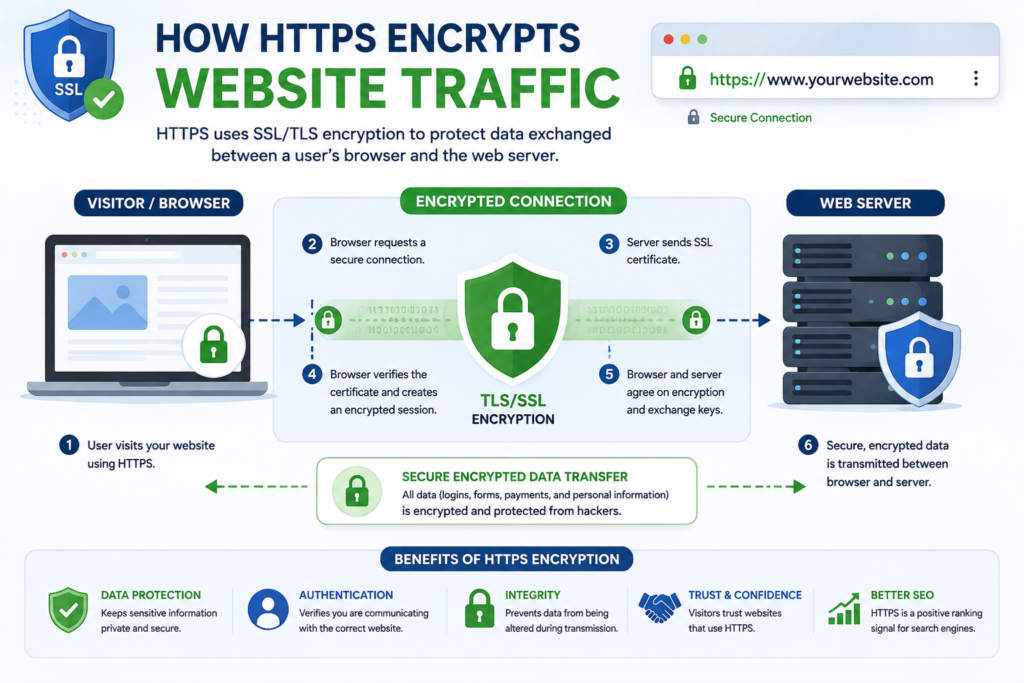
HTTPS stands for Hypertext Transfer Protocol Secure.
It combines the traditional HTTP protocol with encrypted TLS communication.
Instead of transmitting information in plain text, HTTPS encrypts every request and response exchanged between browsers and web servers.
For website visitors, this means greater protection when:
- Logging into an account.
- Completing online purchases.
- Entering payment details.
- Submitting contact forms.
- Uploading documents.
- Accessing private information.
Even if someone intercepts the transmitted data, the encrypted information is significantly more difficult to interpret without the appropriate cryptographic keys.
Common Security Risks Without SSL
Websites that rely solely on HTTP lack encrypted communication between visitors and servers.
Potential risks include:
Data Interception
Sensitive information transmitted over an unencrypted connection may be intercepted by unauthorized parties while traveling across networks.
Identity Spoofing
Visitors may have greater difficulty confirming that they are communicating with the intended website if no trusted certificate is present.
Browser Security Warnings
Modern browsers increasingly alert users when websites do not use HTTPS. These warnings can discourage visitors from interacting with the website.
Reduced Customer Confidence
When users encounter “Not Secure” warnings, they may hesitate to submit forms, create accounts, or complete purchases.
Increased Compliance Challenges
Many industries require secure communication as part of broader security and privacy obligations. While requirements vary by jurisdiction and sector, HTTPS is commonly regarded as a baseline security measure.
Benefits of Using an SSL Certificate
Installing an SSL certificate offers several advantages beyond encryption.
1. Protects Sensitive Information
SSL encrypts information such as:
- Passwords.
- Personal details.
- Contact information.
- Login credentials.
- Payment information.
- Customer records.
- Authentication tokens.
2. Verifies Website Identity
Certificates issued by trusted Certificate Authorities help browsers verify that visitors are communicating with the correct website.
3. Improves Visitor Trust
Security indicators such as HTTPS and the browser padlock reassure visitors that the connection is encrypted.
4. Supports Secure Online Transactions
Businesses that process online payments or customer accounts depend on secure communication to protect transmitted information.
5. Enables Modern Web Features
Many browser capabilities and web technologies require secure HTTPS connections to function correctly.
6. Supports Professional Business Reputation
A secure website demonstrates attention to security and professionalism, contributing to a more trustworthy online presence.
How SSL Builds Customer Trust
Trust is a critical factor in online decision-making.
Visitors often evaluate a website within seconds. A secure HTTPS connection contributes to a positive first impression by reducing security concerns.
For example, imagine two online stores offering the same product:
Store A
- Displays “Not Secure.”
- Uses HTTP.
- Shows browser warnings.
Store B
- Uses HTTPS.
- Displays a secure connection.
- Loads protected checkout pages.
Most visitors are naturally more comfortable interacting with the second website because it provides visible security indicators.
While SSL alone does not guarantee business legitimacy, it forms an essential part of a trustworthy user experience.
Industries That Benefit Most from SSL
Although every website should use HTTPS, some industries have particularly strong reasons to implement SSL.
E-commerce
Online stores process customer accounts, payment information, and order details, making secure communication essential.
Healthcare
Healthcare providers often handle sensitive patient information that should be transmitted securely.
Financial Services
Banks, insurance companies, investment firms, and payment providers rely on encrypted communication to protect customer data.
Education
Schools and universities use secure portals for student records, online learning platforms, and administrative systems.
Government
Government websites frequently provide online forms, applications, and citizen services that require secure connections.
Professional Services
Law firms, accounting firms, consultants, and agencies often receive confidential client information through their websites.
How to Check Whether Your Website Uses SSL
You can quickly determine whether a website uses SSL by checking the browser’s address bar.
Look for:
- https:// at the beginning of the website address.
- A padlock icon displayed by the browser.
- No security warnings.
You can also inspect the certificate details in most modern browsers to view information such as:
- Certificate issuer.
- Expiration date.
- Protected domain.
- Encryption details.
Regularly checking your certificate status helps ensure that it remains valid and properly configured.
Expert Tip
Installing an SSL certificate is only the beginning. A secure website also requires timely certificate renewal, software updates, secure hosting, proper access controls, and ongoing monitoring. Treat HTTPS as the foundation of your website security strategy, not the complete solution.
How SSL Works, TLS Handshake, Public Key Infrastructure (PKI), SSL vs TLS, and HTTP vs HTTPS
How Does an SSL Certificate Work?
Most website owners know that an SSL certificate secures a website, but far fewer understand how it actually works behind the scenes. Understanding this process helps you troubleshoot SSL issues, choose the right certificate, and appreciate why HTTPS has become the standard for secure web communication.
When a visitor enters a secure website address such as:
https://example.comthe browser and the web server perform a series of cryptographic checks before any webpage loads. This process usually takes only milliseconds, yet it establishes the trust and encryption required for secure communication.
The workflow can be summarized as follows:
Visitor Opens HTTPS Website
            │
            ▼
Browser Requests SSL Certificate
            │
            ▼
Server Sends Certificate
            │
            ▼
Browser Verifies Certificate
            │
            ▼
TLS Handshake Begins
            │
            ▼
Encryption Keys Created
            │
            ▼
Secure HTTPS Session Established
            │
            ▼
Encrypted Data Transmission
Once this secure session is established, all information exchanged between the browser and the server is encrypted until the session ends.
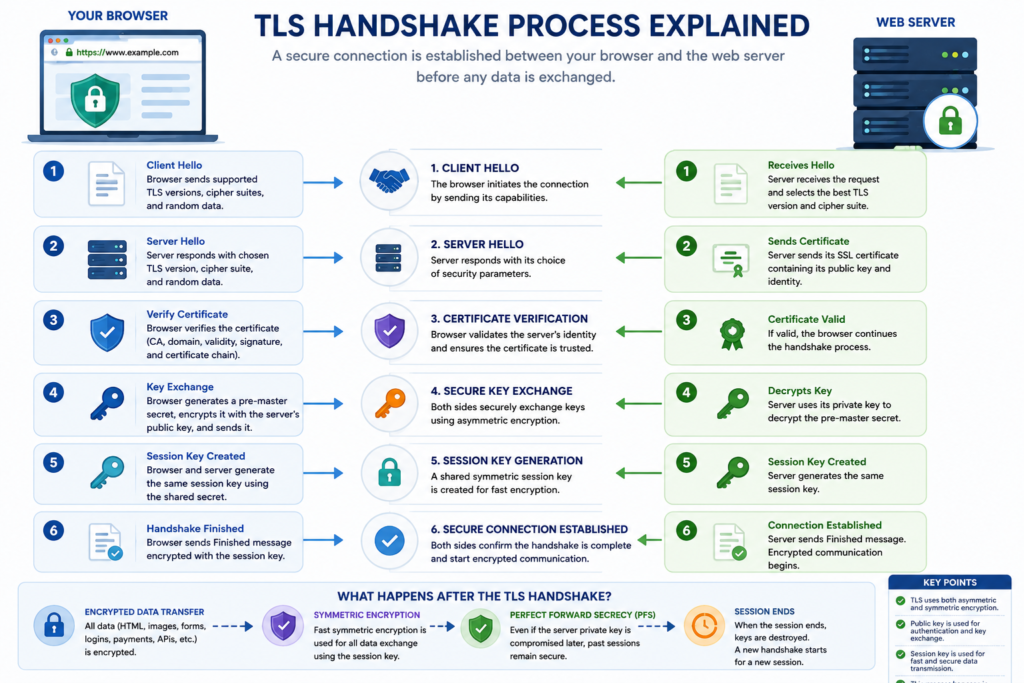
Step-by-Step SSL Authentication Process
Step 1. The Browser Requests a Secure Connection
When a user types an HTTPS URL into a browser, the browser first requests a secure connection instead of immediately loading the webpage.
Unlike an ordinary HTTP request, the browser indicates that it wants to establish an encrypted session.
Step 2. The Web Server Sends Its SSL Certificate
The web server responds by sending its SSL certificate.
This certificate contains important information including:
- Protected domain name.
- Certificate Authority (CA).
- Public encryption key.
- Certificate validity period.
- Digital signature.
- Certificate serial number.
The browser now has enough information to begin verifying whether the certificate should be trusted.
Step 3. Certificate Validation
Before encryption begins, the browser performs several security checks.
It verifies:
- ✓ Is the certificate expired?
- ✓ Does the domain name match?
- ✓ Was the certificate issued by a trusted Certificate Authority?
- ✓ Has the certificate been altered?
- ✓ Is the certificate chain complete?
If every check passes successfully, the browser proceeds to establish an encrypted session.
If any verification fails, the browser may display warnings such as:
- Your connection is not private.
- Certificate not trusted.
- SSL certificate expired.
- Certificate name mismatch.
- NET::ERR_CERT_COMMON_NAME_INVALID.
These warnings help protect users from potentially unsafe or misconfigured websites.
Public Key Infrastructure (PKI)
SSL certificates rely on a security framework known as Public Key Infrastructure (PKI).
PKI is the system that enables browsers to determine whether a website can be trusted.
It consists of several interconnected components:
- Certificate Authorities.
- Root certificates.
- Intermediate certificates.
- Public keys.
- Private keys.
- Digital signatures.
- Certificate Revocation Lists (CRLs).
- Online Certificate Status Protocol (OCSP).
Without PKI, browsers would have no standardized method to verify website identities.
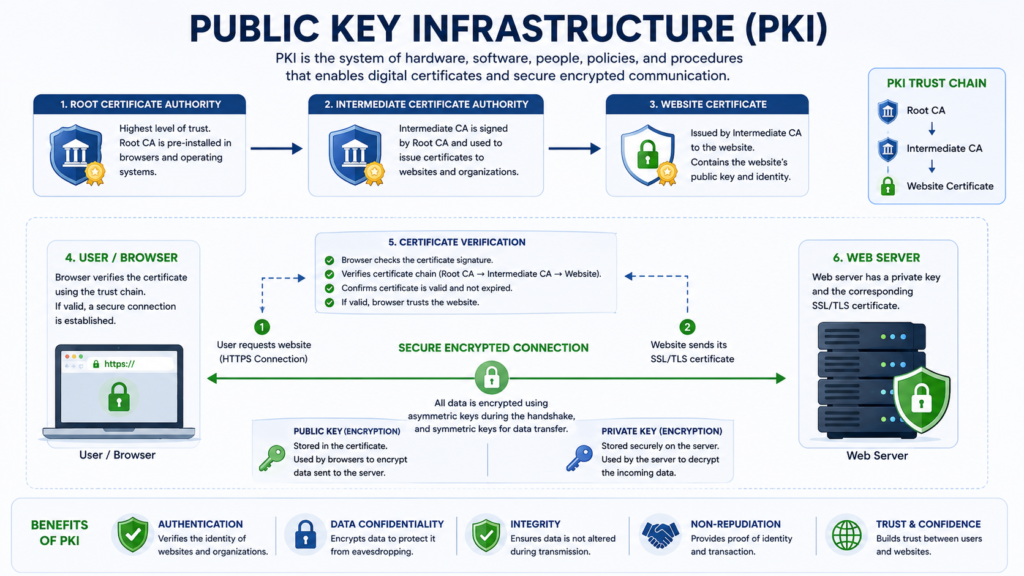
Understanding Public and Private Keys
SSL encryption uses asymmetric cryptography, which relies on two mathematically related keys.
Public Key
The public key:
- Is included inside the SSL certificate.
- Can be shared openly.
- Encrypts information.
- Cannot decrypt encrypted data by itself.
Anyone can use the public key to encrypt information intended for the website.
Private Key
The private key:
- Remains securely stored on the server.
- Must never be shared publicly.
- Decrypts information encrypted with the public key.
- Confirms the server’s identity.
If a private key is compromised, the associated certificate should be replaced immediately because the trust relationship can no longer be relied upon.
A Simple Analogy
Imagine sending a valuable package through the mail.
The website provides an open padlock that anyone can close, but only the website owner can unlock.
- The public key is like the open padlock.
- The private key is the only key that can unlock it.
Anyone can secure the package, but only the intended recipient can open it.
This is the foundation of asymmetric encryption.
The TLS Handshake Explained
After the certificate is trusted, the browser and the server perform the TLS Handshake.
The handshake establishes a secure communication session while ensuring that both parties agree on the encryption methods that will be used.
Although the actual protocol is highly technical, it can be understood through six simplified stages.
Stage 1. Client Hello
The browser begins by sending a Client Hello message.
This message contains:
- Supported TLS versions.
- Supported encryption algorithms (cipher suites).
- Random data used during key generation.
- Additional security extensions.
The browser is essentially asking:
“These are the encryption methods I support. Which one shall we use?”
Stage 2. Server Hello
The web server replies with a Server Hello.
It selects:
- The TLS version.
- The cipher suite.
- Random server data.
- The SSL certificate.
Both systems now know which security methods they will use for the connection.
Stage 3. Certificate Verification
Before trusting the server, the browser validates the certificate by checking:
- Domain ownership.
- Certificate Authority.
- Digital signature.
- Expiration date.
- Certificate chain.
Only after successful verification does the handshake continue.
Stage 4. Secure Key Exchange
Using asymmetric cryptography, the browser and the server securely establish shared encryption material.
Modern TLS implementations commonly use ephemeral key exchange, which supports Perfect Forward Secrecy (PFS). This means that even if a server’s long-term private key is compromised later, previously recorded encrypted sessions are generally not exposed.
Stage 5. Session Key Generation
Once the key exchange is complete, both systems generate identical session keys.
These keys are temporary.
They exist only for the current browsing session.
Stage 6. Encrypted Communication Begins
The secure session is now active.
Everything transmitted between the browser and server is encrypted.
Examples include:
- HTML pages.
- Images.
- CSS files.
- JavaScript.
- Login requests.
- Payment details.
- API requests.
- Contact forms.
- Downloads.
This encryption protects data while it is traveling across networks.
Symmetric vs Asymmetric Encryption
SSL/TLS uses both encryption methods because each serves a different purpose.
| Feature | Asymmetric Encryption | Symmetric Encryption |
|---|---|---|
| Keys Used | Public + Private | One Shared Session Key |
| Speed | Slower | Faster |
| Primary Use | Authentication and Key Exchange | Data Encryption |
| Efficiency | Lower | Higher |
Why Both Are Necessary
Asymmetric encryption establishes trust and securely exchanges keys.
Symmetric encryption handles the ongoing communication because it is much faster and more efficient for transferring data.
What Is a Digital Signature?
Every SSL certificate includes a digital signature created by the Certificate Authority.
This signature allows browsers to verify that:
- The certificate was issued by a trusted CA.
- The certificate has not been altered.
- The certificate belongs to the stated domain.
If someone attempts to modify the certificate, the digital signature becomes invalid, and the browser rejects the connection.
Certificate Authorities (CAs)
A Certificate Authority (CA) is an organization that verifies applicants and issues digital certificates.
Browsers maintain a list of trusted Certificate Authorities.
Some well-known CAs include:
- Let’s Encrypt.
- DigiCert.
- Sectigo.
- GlobalSign.
- Entrust.
If a certificate is issued by an untrusted or unknown CA, browsers typically warn users before allowing access.
Root Certificates and Intermediate Certificates
Certificate Authorities organize trust using a hierarchy.
Root Certificate
        │
        ▼
Intermediate Certificate
        │
        ▼
Website SSL Certificate
Root Certificate
The highest level of trust.
Root certificates are embedded in browsers and operating systems.
Intermediate Certificate
Issued by the root CA.
Most website certificates are signed by an intermediate certificate rather than directly by the root.
Website Certificate
The certificate installed on your web server.
Browsers validate the entire chain before establishing trust.
What Happens If the Certificate Chain Is Broken?
If the intermediate certificate is missing or incorrectly configured:
- Browsers may not trust the website.
- Visitors may receive security warnings.
- HTTPS may fail on some devices.
Correct installation of the complete certificate chain is therefore essential.
SSL vs TLS
Many people assume SSL and TLS are different technologies currently competing with one another.
In reality:
TLS is the modern successor to SSL.
Older SSL versions are obsolete because they contain known security weaknesses.
Today, virtually all secure websites use TLS, even though the certificates are still commonly marketed as “SSL certificates.”
| Feature | SSL | TLS |
|---|---|---|
| Current Use | Obsolete | Current Standard |
| Security | Deprecated | Modern |
| Performance | Older | Improved |
| Recommended | No | Yes |
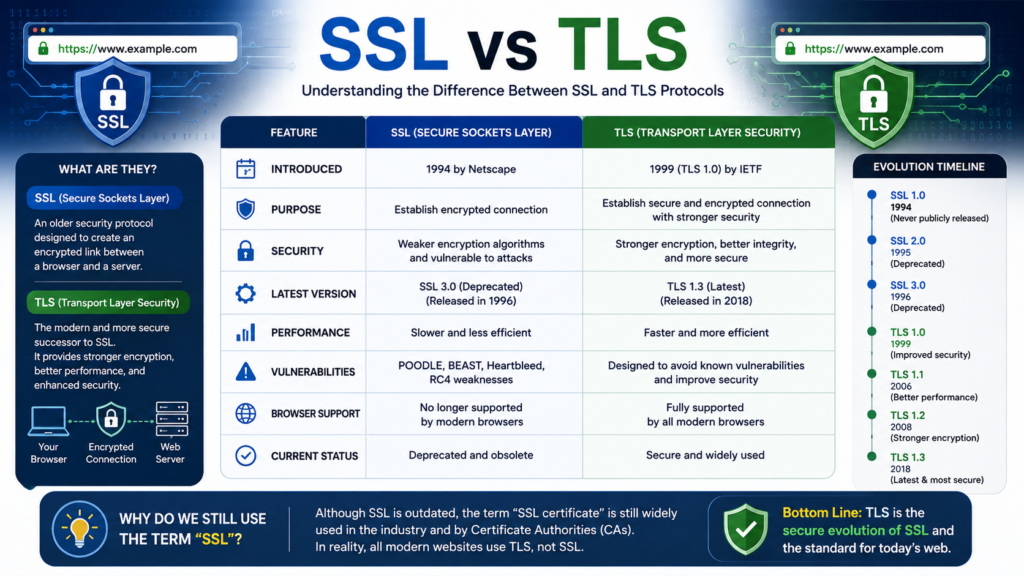
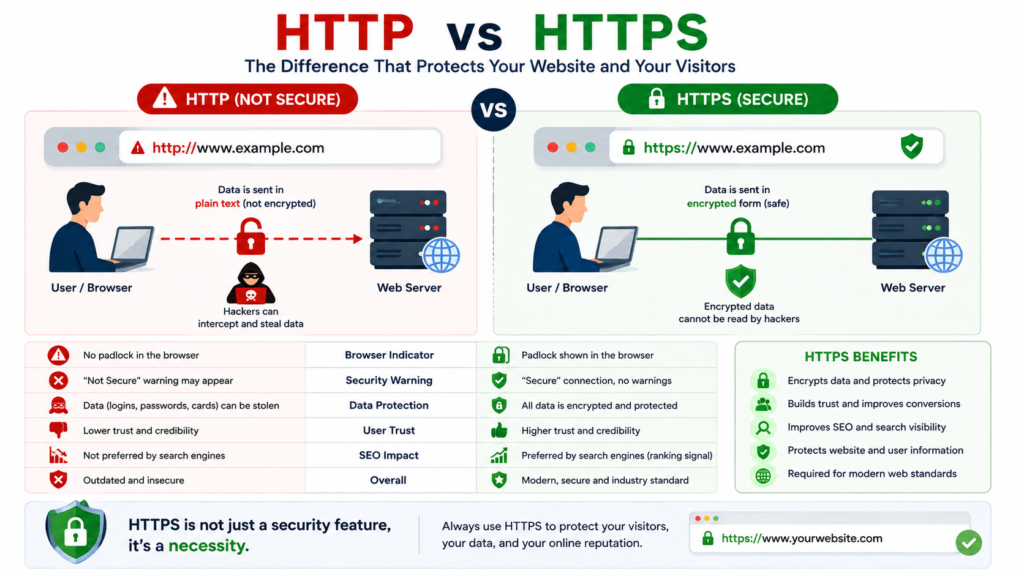
HTTP vs HTTPS
Another common question is how HTTP differs from HTTPS.
| Feature | HTTP | HTTPS |
|---|---|---|
| Encryption | No | Yes |
| SSL/TLS Required | No | Yes |
| Data Protection | Limited | Encrypted |
| Browser Security Indicators | No | Yes |
| Suitable for Sensitive Information | No | Yes |
HTTPS is simply HTTP operating over an encrypted TLS connection, providing confidentiality and authentication during data transmission.
Expert Tip
When evaluating an SSL certificate, don’t focus only on price. Consider the Certificate Authority’s reputation, the validation level, automation options, renewal process, and how well the certificate fits your infrastructure. A certificate that is easy to manage over time is often more valuable than one chosen solely because it costs less.
Types of SSL Certificates, Validation Levels, Certificate Authorities, and Choosing the Right SSL Certificate
Understanding SSL Certificate Types
One of the most common mistakes website owners make is purchasing an SSL certificate without understanding the different types available. Not every certificate provides the same level of protection, identity verification, or flexibility.
SSL certificates are generally classified in two ways:
- By domain coverage (what the certificate protects).
- By validation level (how the website owner is verified).
Understanding both categories helps you choose a certificate that fits your website’s technical requirements, business goals, and future growth.
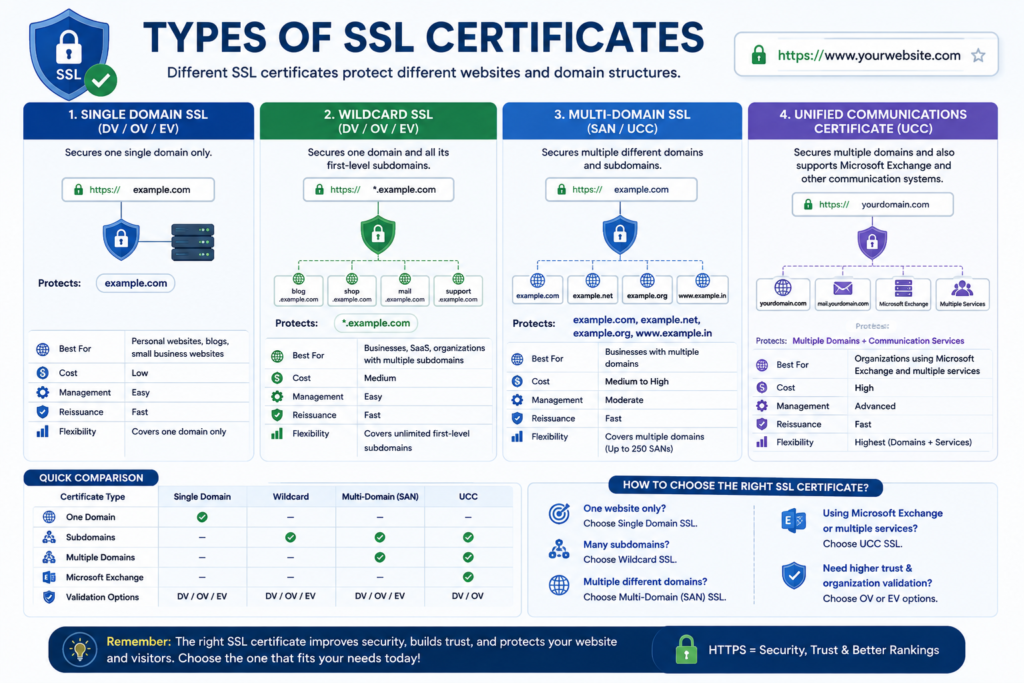
SSL Certificate Types by Domain Coverage
There are four primary certificate types based on the domains they protect:
- Single Domain SSL Certificate
- Wildcard SSL Certificate
- Multi-Domain (SAN) SSL Certificate
- Unified Communications Certificate (UCC)
Each serves a different purpose.
1. Single Domain SSL Certificate
A Single Domain SSL Certificate protects one Fully Qualified Domain Name (FQDN).
Example
If your certificate is issued for:
example.com
It protects:
- example.com
It does not automatically protect:
- www.example.com (unless included)
- blog.example.com
- shop.example.com
- support.example.com
Each additional hostname generally requires separate coverage unless specifically included.
Best For
A Single Domain SSL certificate is ideal for:
- Personal blogs
- Portfolio websites
- Small businesses
- Company landing pages
- Nonprofit organizations
- Local service websites
Advantages
- Easy to manage.
- Lower cost than enterprise certificates.
- Fast deployment.
- Suitable for most small websites.
Limitations
As your website grows, managing multiple certificates for different subdomains can become more time-consuming.
2. Wildcard SSL Certificate
A Wildcard SSL Certificate secures one primary domain and all of its first-level subdomains.
Example
example.com
Also protects:
- blog.example.com
- shop.example.com
- mail.example.com
- support.example.com
- help.example.com
A single certificate can therefore secure multiple services under the same root domain.
Best For
Wildcard certificates work well for:
- Growing businesses.
- SaaS platforms.
- Educational institutions.
- Hosting companies.
- Digital agencies.
- Organizations with multiple departments.
Advantages
- One certificate protects many subdomains.
- Simplified certificate management.
- Easier renewal process.
- Lower administrative effort.
Considerations
If the private key associated with a wildcard certificate is compromised, multiple subdomains may be affected. Strong key management practices are therefore essential.
3. Multi-Domain SSL Certificate (SAN Certificate)
A Multi-Domain SSL Certificate, also called a Subject Alternative Name (SAN) Certificate, secures multiple different domain names with a single certificate.
Example
One certificate may protect:
- example.com
- example.net
- company.org
- mybusiness.co
- store.com
These domains do not need to share the same root domain.
Best For
Multi-Domain certificates are particularly useful for:
- Enterprises.
- Corporate organizations.
- International brands.
- Franchise businesses.
- Digital agencies managing multiple client websites.
Benefits
- Centralized management.
- Fewer certificates to maintain.
- Simplified renewal.
- Reduced administrative complexity.
4. Unified Communications Certificate (UCC)
A Unified Communications Certificate is a specialized type of Multi-Domain certificate originally designed for Microsoft Exchange and enterprise communication systems.
It is commonly used for:
- Microsoft Exchange.
- Microsoft Teams infrastructure.
- Office communication platforms.
- Enterprise email systems.
Comparing Domain Coverage
| Certificate Type | Domains Protected | Best For |
|---|---|---|
| Single Domain | One domain | Blogs, portfolios, small businesses |
| Wildcard | One domain + unlimited first-level subdomains | Growing businesses, SaaS |
| Multi-Domain (SAN) | Multiple unrelated domains | Enterprises, agencies |
| UCC | Multiple domains for communication systems | Microsoft environments |
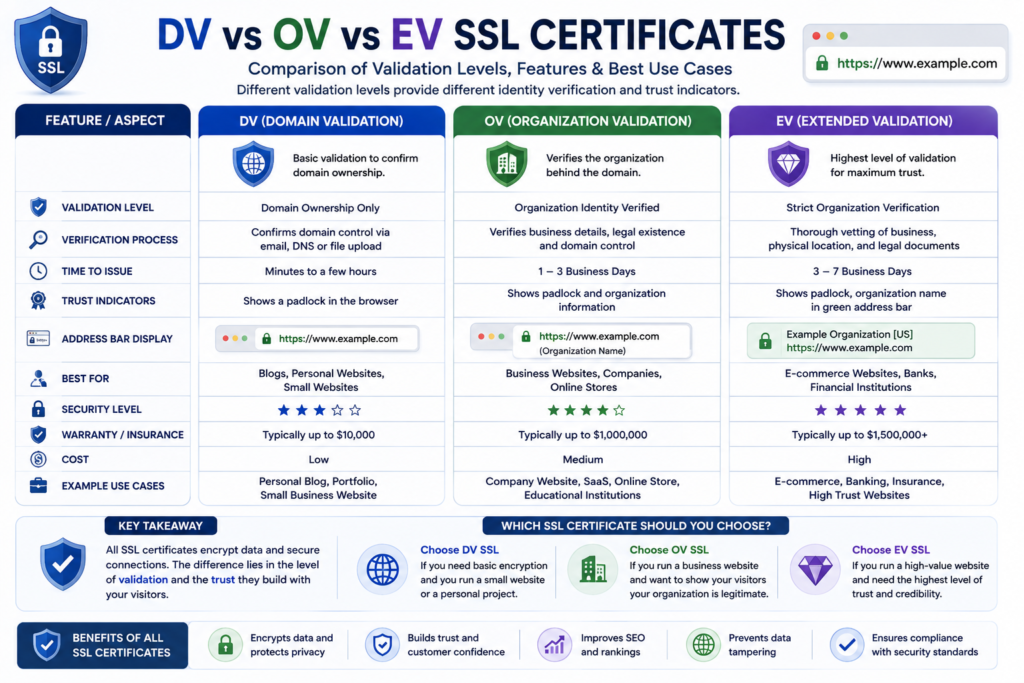
SSL Validation Levels
Domain coverage tells you what the certificate protects.
Validation level determines how thoroughly the Certificate Authority verifies the applicant before issuing the certificate.
There are three primary validation levels:
- Domain Validation (DV)
- Organization Validation (OV)
- Extended Validation (EV)
Domain Validation (DV)
A Domain Validation (DV) certificate is the simplest and fastest type of SSL certificate.
The Certificate Authority verifies only that the applicant controls the domain.
Common verification methods include:
- Email verification.
- DNS record validation.
- HTTP file verification.
No business documents are normally required.
Advantages
- Issued quickly.
- Easy to automate.
- Cost-effective.
- Suitable for most websites.
Best For
- Personal blogs.
- Freelancers.
- Small businesses.
- WordPress websites.
- Informational websites.
- Startups.
Organization Validation (OV)
An Organization Validation (OV) certificate includes verification of the organization requesting the certificate.
The Certificate Authority checks information such as:
- Legal business registration.
- Organization name.
- Physical existence.
- Domain ownership.
- Business identity.
Advantages
- Greater identity assurance.
- Increased business credibility.
- Appropriate for professional organizations.
Best For
- Medium-sized businesses.
- Healthcare organizations.
- Educational institutions.
- Government contractors.
- Professional firms.
Extended Validation (EV)
An Extended Validation (EV) certificate requires the most comprehensive verification process.
The Certificate Authority performs additional checks, including:
- Legal registration.
- Operational existence.
- Physical location.
- Domain ownership.
- Authorized representatives.
Although browser interfaces have changed over time, EV certificates remain valuable for organizations that require the highest level of verified identity.
Best For
- Banks.
- Insurance companies.
- Financial institutions.
- Enterprise organizations.
- High-value eCommerce businesses.
DV vs OV vs EV Comparison
| Feature | DV | OV | EV |
|---|---|---|---|
| Domain Ownership Verified | ✓ | ✓ | ✓ |
| Business Verification | ✗ | ✓ | ✓ |
| Extended Identity Verification | ✗ | ✗ | ✓ |
| Typical Issuance Time | Minutes | Days | Longer verification process |
| Suitable for Blogs | ✓ | Optional | No |
| Suitable for Business Websites | ✓ | ✓ | ✓ |
| Suitable for Large Enterprises | Limited | ✓ | ✓ |
Which SSL Certificate Should You Choose?
Choosing the right certificate depends on several factors rather than simply selecting the least expensive option.
Ask yourself:
How many domains need protection?
- One domain → Single Domain SSL.
- Multiple subdomains → Wildcard SSL.
- Multiple unrelated domains → SAN Certificate.
Do you need business identity verification?
If visitors need additional assurance about your organization, consider OV or EV certificates.
Will your infrastructure grow?
Growing businesses often benefit from solutions that simplify certificate management as additional services are added.
Decision Framework
| Website Type | Recommended Certificate |
|---|---|
| Personal Blog | DV Single Domain |
| Portfolio Website | DV Single Domain |
| Freelancer | DV Single Domain |
| Small Business | DV or OV |
| WordPress Website | DV |
| eCommerce Store | OV or EV |
| SaaS Platform | Wildcard SSL |
| Agency | Wildcard or SAN |
| Enterprise | SAN + OV/EV |
Understanding Certificate Authorities (CAs)
A Certificate Authority (CA) is a trusted organization responsible for issuing, validating, and managing SSL certificates.
Browsers trust certificates from recognized Certificate Authorities because they follow established security standards and verification procedures.
Some widely recognized CAs include:
- Let’s Encrypt.
- DigiCert.
- Sectigo.
- GlobalSign.
- Entrust.
- GeoTrust.
Each CA offers different certificate portfolios, management tools, and support options.
What Makes a Good Certificate Authority?
When comparing providers, consider:
- Industry reputation.
- Browser compatibility.
- Certificate management tools.
- Renewal process.
- Customer support.
- Automation capabilities.
- Documentation quality.
- Enterprise features.
The best Certificate Authority for one organization may not be the best choice for another.
Real-World Scenarios
Scenario 1: Personal Blog
Sarah runs a travel blog with one domain.
Recommended Certificate
- DV Single Domain SSL.
Reason:
Simple, cost-effective, and sufficient for protecting visitor communication.
Scenario 2: Growing Digital Agency
An agency operates:
- agency.com
- blog.agency.com
- support.agency.com
- portal.agency.com
Recommended Certificate
- Wildcard SSL.
Reason:
One certificate secures all first-level subdomains, simplifying administration.
Scenario 3: International Enterprise
A multinational company manages:
- company.com
- company.co.uk
- company.de
- company.au
Recommended Certificate
- Multi-Domain SAN Certificate with OV or EV validation.
Reason:
Supports centralized management across multiple country-specific domains while providing stronger organizational verification.
Expert Tip
Choose an SSL certificate based on your long-term requirements rather than your current website alone. If you anticipate adding subdomains, launching new services, or expanding internationally, selecting a certificate that accommodates future growth can reduce administrative overhead and simplify certificate management.
Best SSL Certificate Providers, Free vs Paid SSL, Pricing Factors, Certificate Lifecycle, Installation Planning, and HTTPS Migration
Choosing the Best SSL Certificate Provider
Selecting the right SSL certificate involves more than comparing prices. The provider you choose affects certificate management, technical support, automation options, validation methods, and long-term maintenance.
A suitable provider should offer:
- Certificates trusted by major browsers.
- Reliable certificate issuance.
- Clear documentation.
- Renewal options.
- Strong customer support.
- Compatibility with modern web servers.
- Automation capabilities where appropriate.
The ideal provider depends on your website type, technical expertise, and business requirements.
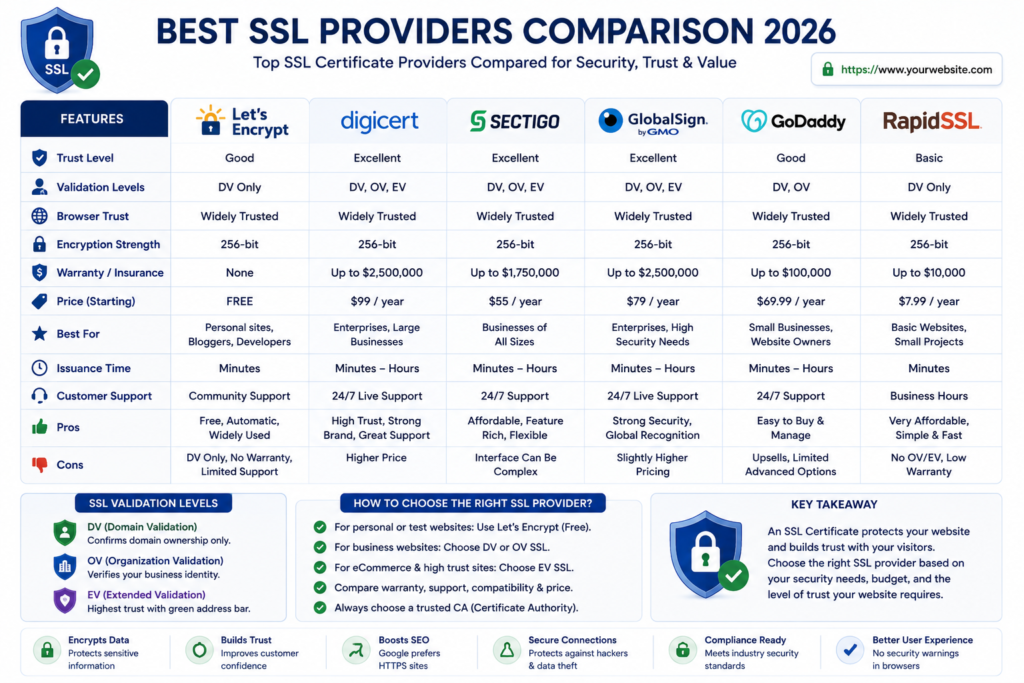
Leading SSL Certificate Providers
Several well-established Certificate Authorities (CAs) issue certificates trusted worldwide.
1. Let’s Encrypt
Let’s Encrypt is one of the most widely used Certificate Authorities because it provides free Domain Validation (DV) certificates.
Advantages
- Free certificates.
- Trusted by major browsers.
- Automated renewal support.
- Excellent for WordPress.
- Popular among hosting providers.
Best For
- Blogs.
- Personal websites.
- Small businesses.
- Portfolio websites.
- Development projects.
Limitations
- Domain Validation only.
- No Organization Validation or Extended Validation certificates.
2. DigiCert
DigiCert is recognized for enterprise-grade certificate management and extensive security services.
Advantages
- Broad certificate portfolio.
- Enterprise management tools.
- Comprehensive documentation.
- Business support.
Best For
- Enterprises.
- Financial institutions.
- Healthcare organizations.
- Large businesses.
3. Sectigo
Sectigo offers a wide range of SSL certificates suitable for businesses of different sizes.
Advantages
- DV, OV, and EV certificates.
- Enterprise solutions.
- Flexible certificate options.
Best For
- Small businesses.
- Medium-sized organizations.
- Agencies.
- Online stores.
4. GlobalSign
GlobalSign specializes in enterprise identity and certificate management.
Best For
- International organizations.
- Enterprise infrastructures.
- Large corporate environments.
5. Entrust
Entrust provides enterprise-focused security and identity solutions.
Common use cases include:
- Enterprise PKI.
- Government organizations.
- Financial institutions.
- Healthcare providers.
SSL Provider Comparison
| Provider | Certificate Types | Best For |
|---|---|---|
| Let’s Encrypt | DV | Blogs, Small Websites |
| DigiCert | DV, OV, EV | Enterprises |
| Sectigo | DV, OV, EV | Businesses |
| GlobalSign | DV, OV, EV | Large Organizations |
| Entrust | Enterprise Certificates | Regulated Industries |
Each provider updates its products, pricing, and services over time. Always review the latest documentation before making a purchasing decision.
Free SSL vs Paid SSL
One of the most common questions website owners ask is:
“Should I use a free SSL certificate or purchase a commercial certificate?”
The answer depends on your website’s purpose rather than assuming that one option is universally better.
Free SSL Certificates
Free SSL certificates are commonly issued through services such as Let’s Encrypt or included with managed hosting plans.
Benefits
- No certificate purchase cost.
- Trusted by modern browsers.
- Automated renewal available in many environments.
- Easy installation on many hosting platforms.
Suitable For
- Blogs.
- Portfolio websites.
- Freelancers.
- Informational websites.
- Small business websites.
- Startups.
Paid SSL Certificates
Commercial certificates typically provide additional validation options, enterprise management features, or professional support.
Potential advantages include:
- Organization Validation (OV).
- Extended Validation (EV).
- Enterprise certificate lifecycle management.
- Vendor support.
- Broader management tools.
Specific features vary by provider, so compare current offerings before purchasing.
Free vs Paid SSL Comparison
| Feature | Free SSL | Paid SSL |
|---|---|---|
| Domain Validation | ✔ | ✔ |
| Organization Validation | ✖ | ✔ |
| Extended Validation | ✖ | ✔ |
| Browser Trust | ✔ | ✔ |
| Automatic Renewal | Often Available | Provider Dependent |
| Enterprise Features | Limited | Extensive |
| Technical Support | Limited | Usually Available |
| Cost | Free | Varies |
Which One Should You Choose?
Choose Free SSL If
- You operate a personal website.
- You manage a blog.
- You own a portfolio.
- Your hosting provider offers automated certificates.
- You have limited technical requirements.
Consider Paid SSL If
- Your organization requires verified business identity.
- You operate a regulated business.
- You manage enterprise infrastructure.
- You need dedicated vendor support.
- Your organization has formal compliance requirements.
Factors That Influence SSL Pricing
The cost of an SSL solution depends on more than the certificate itself.
Typical cost factors include:
Validation Level
Higher validation generally involves additional verification processes.
Number of Domains
Protecting multiple domains may require more advanced certificate types.
Number of Subdomains
Organizations managing many subdomains often choose Wildcard certificates.
Certificate Management
Enterprise lifecycle management platforms may introduce additional operational costs.
Support Services
Some providers include technical support, onboarding assistance, or enterprise management tools.
Compliance Requirements
Industries with regulatory obligations may require additional validation or operational controls.
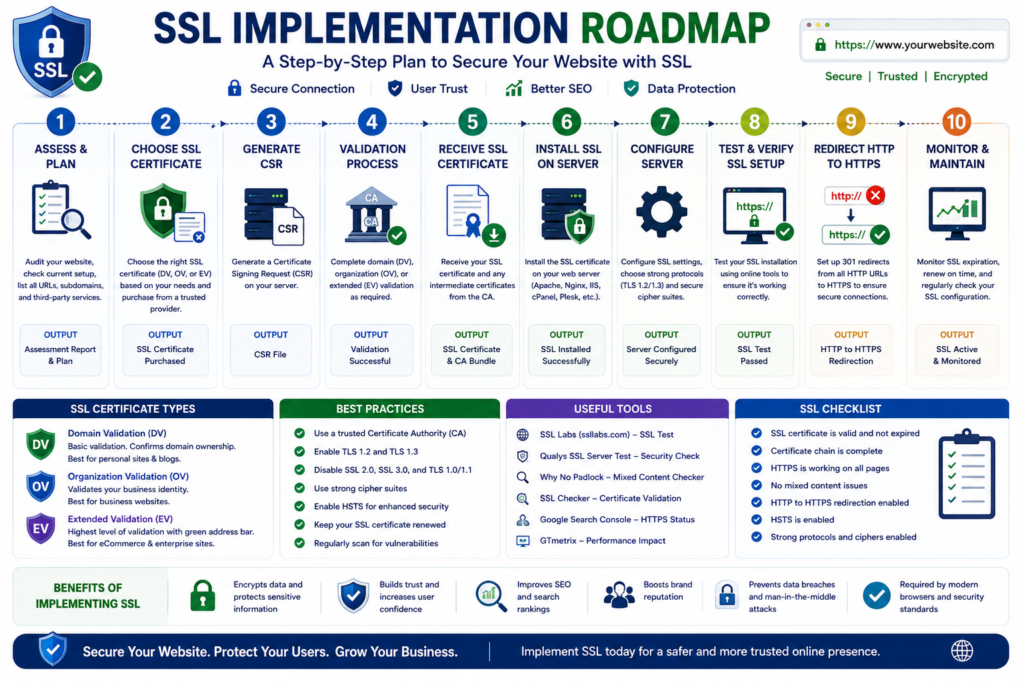
The SSL Certificate Lifecycle
Every SSL certificate follows a lifecycle from issuance to replacement.
Planning

↓

Certificate Request

↓

Validation

↓

Certificate Issued

↓

Installation

↓

HTTPS Configuration

↓

Testing

↓

Monitoring

↓

Renewal

↓

Replacement

↓

Retirement
Maintaining each stage reduces the likelihood of certificate-related service interruptions.
Planning Before Installation
Before deploying an SSL certificate, create a deployment plan.
Consider:
- Which domains require protection?
- Which subdomains exist?
- Which web servers require certificates?
- Who is responsible for renewal?
- How will certificates be monitored?
- Is automation available?
Planning reduces future maintenance challenges.
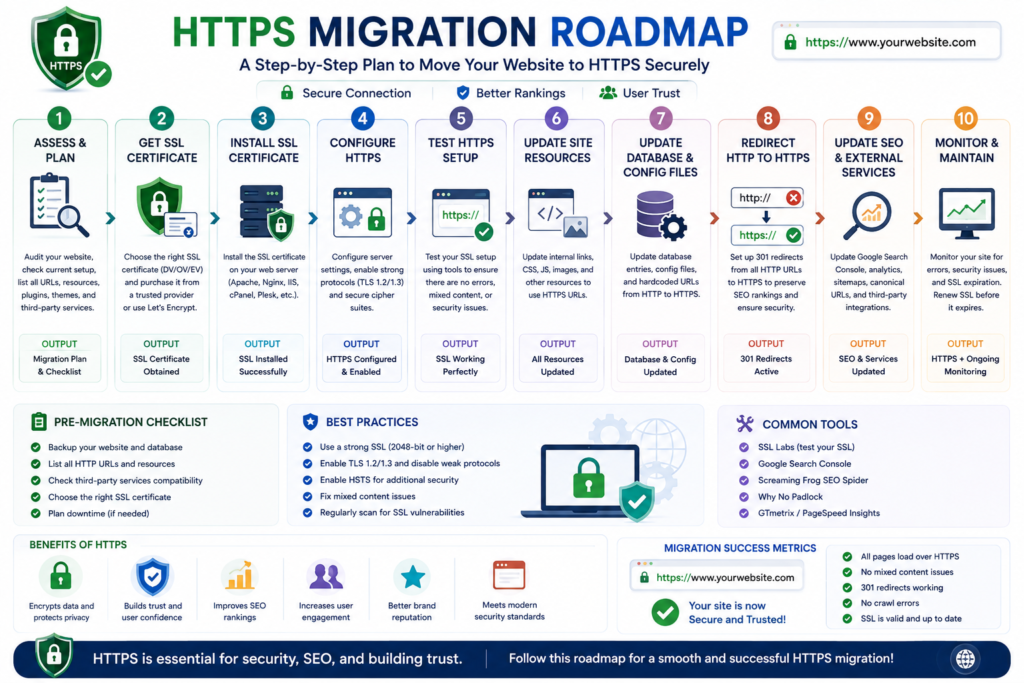
Preparing Your Website for HTTPS
Before enabling HTTPS:
- ✔ Create a complete website backup.
- ✔ Update server software.
- ✔ Review DNS records.
- ✔ Verify hosting compatibility.
- ✔ Confirm certificate requirements.
- ✔ Document current website configuration.
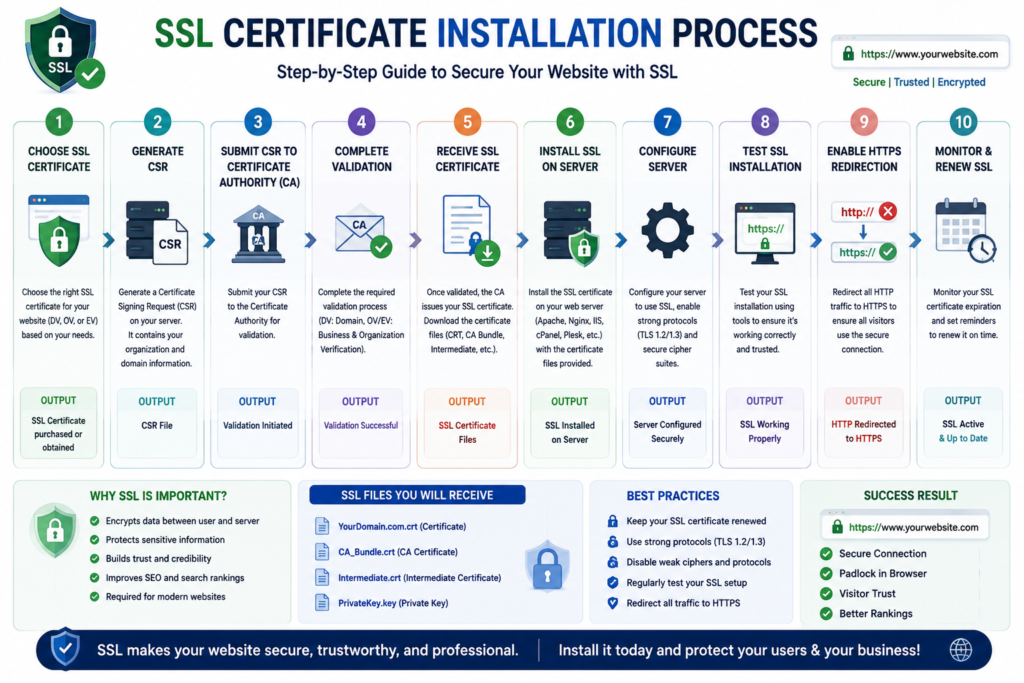
Installing the Certificate
The exact installation process depends on your hosting environment.
Typical deployment involves:
- Request the certificate.
- Complete validation.
- Receive the certificate.
- Install it on the server.
- Configure HTTPS.
- Restart or reload services if required.
- Test the installation.
Redirecting HTTP to HTTPS
After installation, visitors should automatically access the secure version of the website.
Example:
http://example.com

↓

301 Redirect

↓

https://example.com
Permanent redirects help browsers and search engines recognize HTTPS as the preferred version.
Updating Website Resources
After migration, update all internal references.
Review:
- Images.
- JavaScript.
- CSS.
- Fonts.
- API endpoints.
- Internal links.
- Canonical URLs.
- Structured data.
- XML sitemaps.
Leaving outdated HTTP references can create mixed content issues.
Mixed Content Explained
Mixed content occurs when a secure HTTPS page loads one or more resources over HTTP.
Examples include:
- Images.
- Scripts.
- Videos.
- Stylesheets.
- Fonts.
Browsers may warn users or block these insecure resources.
Fixing Mixed Content
A systematic review should include:
- Updating image URLs.
- Replacing HTTP scripts.
- Updating CSS references.
- Correcting API endpoints.
- Reviewing CDN configuration.
- Clearing website caches.
Testing after migration is essential to ensure every resource loads securely.
HTTPS Migration Checklist
Before launching HTTPS, confirm that:
- SSL certificate is installed.
- HTTPS loads successfully.
- HTTP redirects correctly.
- Internal links use HTTPS.
- Images load without warnings.
- CSS files load correctly.
- JavaScript loads correctly.
- XML sitemap uses HTTPS URLs.
- Canonical URLs reference HTTPS.
- Browser warnings are absent.
- Mobile devices display secure connections.
Hypothetical Business Example
A web design agency manages:
- Main website.
- Client portal.
- Knowledge base.
- Customer support system.
Instead of maintaining separate certificates for each subdomain, the agency implements a Wildcard SSL certificate, centralizes renewal management, enables automated monitoring, and documents certificate ownership. This reduces administrative complexity while supporting future expansion.
Expert Tips Before Buying an SSL Certificate
- Choose a certificate that matches your long-term growth plans.
- Verify browser compatibility.
- Compare automation capabilities.
- Review the provider’s support documentation.
- Consider certificate management features, not only purchase price.
- Document renewal responsibilities before deployment.
- Test HTTPS thoroughly after installation.
- Monitor certificate expiration continuously.
Contextual Call to Action
Selecting the right SSL certificate is a strategic decision rather than simply a technical purchase. Consider your website’s growth, operational requirements, and maintenance capabilities before deciding between free and commercial solutions. A well-planned SSL deployment can simplify future management while providing a secure experience for your visitors.
Common SSL Errors, Troubleshooting, SSL and SEO, Google Search Essentials, E.E.A.T., Website Performance, and Security Best Practices
Common SSL Certificate Errors
Even after successfully installing an SSL certificate, website owners may occasionally encounter browser warnings or configuration problems. These issues are usually caused by incorrect installation, expired certificates, incomplete certificate chains, or outdated website resources.
Understanding the cause of an SSL error is the first step toward resolving it efficiently.
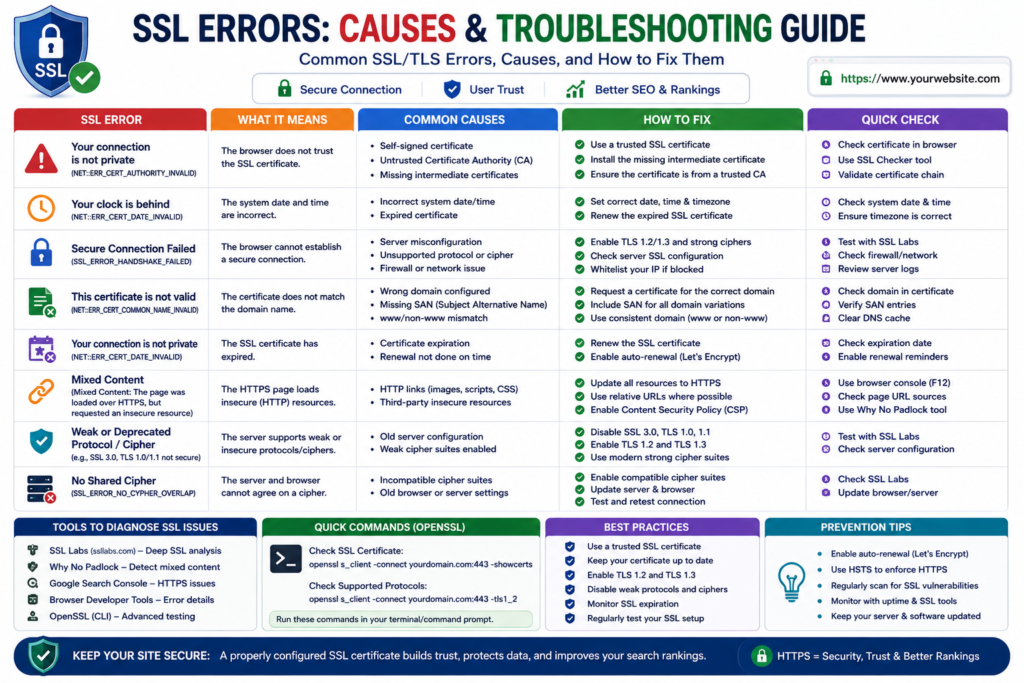
1. SSL Certificate Expired
An expired certificate is one of the most common SSL problems.
When a certificate reaches the end of its validity period, browsers can no longer trust it, resulting in security warnings for visitors.
Common Symptoms
- “Your connection is not private.”
- “SSL certificate has expired.”
- Browser security warning before loading the website.
- HTTPS padlock disappears.
Why It Happens
- Renewal reminders were missed.
- Automatic renewal failed.
- The certificate was renewed but not installed.
- Incorrect server configuration.
How to Fix It
- Renew the SSL certificate.
- Install the updated certificate.
- Restart or reload the web server if necessary.
- Verify that the new certificate is active.
- Test the website in multiple browsers.
2. Certificate Name Mismatch
A certificate name mismatch occurs when the certificate does not match the domain visitors are trying to access.
Example
Certificate issued for:
example.com
Visitor opens:
shop.example.com
If the certificate does not include the subdomain, browsers display a warning.
Solution
Use:
- Wildcard SSL
- Multi-Domain SSL
- Correct single-domain certificate
depending on your infrastructure.
3. Incomplete Certificate Chain
Browsers verify trust through a certificate chain.
Root CA

↓

Intermediate CA

↓

Website Certificate
If the intermediate certificate is missing, some browsers may reject the connection.
Solution
Install the complete certificate bundle provided by your Certificate Authority.
4. Mixed Content Errors
Mixed content occurs when an HTTPS webpage loads resources through HTTP.
Examples include:
- Images.
- CSS files.
- JavaScript.
- Fonts.
- Videos.
- API calls.
Why It Matters
Modern browsers may block insecure resources or display security warnings.
How to Fix It
- Replace HTTP URLs with HTTPS.
- Update image links.
- Update stylesheet references.
- Update JavaScript resources.
- Update CDN configuration.
- Clear all caches.
5. SSL Handshake Failed
An SSL handshake failure prevents the browser and server from establishing a secure connection.
Possible Causes
- Unsupported TLS versions.
- Cipher incompatibility.
- Firewall interference.
- Incorrect certificate installation.
- Expired certificates.
Troubleshooting Steps
- Verify TLS configuration.
- Review server logs.
- Confirm certificate validity.
- Check firewall settings.
- Test from different browsers and devices.
SSL Troubleshooting Checklist
| Problem | Likely Cause | Recommended Solution |
|---|---|---|
| Certificate expired | Missed renewal | Renew and reinstall |
| Browser warning | Invalid certificate | Verify installation |
| Mixed content | HTTP resources | Update URLs |
| Handshake failure | TLS configuration | Review server settings |
| Domain mismatch | Wrong certificate | Install correct certificate |
| Missing padlock | Mixed content or redirects | Audit page resources |
SSL and Search Engine Optimization (SEO)
A common question among website owners is:
“Does installing an SSL certificate improve SEO?”
The answer requires some nuance.
HTTPS is recognized as a positive technical signal, but it is not a substitute for high-quality content, user experience, or comprehensive SEO.
Search performance depends on many interconnected factors.
How HTTPS Supports Technical SEO
HTTPS contributes to a healthy technical foundation by helping:
- Protect visitors.
- Eliminate browser security warnings.
- Establish a preferred secure version of pages.
- Reduce duplicate HTTP/HTTPS indexing issues.
- Support modern browser features.
A technically sound HTTPS implementation complements broader SEO efforts.
SSL and Google Search Essentials
Google’s Search Essentials emphasize creating secure, helpful, and accessible websites.
Using HTTPS aligns with these recommendations because it provides encrypted communication between users and websites.
However, HTTPS alone does not guarantee improved rankings.
Content quality, search intent satisfaction, page experience, and technical health remain equally important.
SSL and E.E.A.T.
Google evaluates content using the principles of:
- Experience.
- Expertise.
- Authoritativeness.
- Trustworthiness.
SSL primarily supports the Trustworthiness component.
For example:
A healthcare website requesting patient information without HTTPS would likely reduce user confidence.
Likewise, a law firm, financial institution, or eCommerce business should provide encrypted communication whenever visitors submit personal information.
HTTPS helps demonstrate a commitment to protecting users.
SSL and Website Trust
Visitors often decide whether to trust a website within seconds.
Visual indicators influence those decisions.
A secure website displays:
- HTTPS.
- Browser padlock.
- Secure forms.
- Protected checkout pages.
Combined with clear policies, accurate content, and transparent business information, HTTPS contributes to a stronger overall trust signal.
SSL and Website Performance
Many people still believe SSL slows websites dramatically.
Modern servers and browsers have significantly reduced this overhead.
Performance now depends much more on:
- Hosting quality.
- Server configuration.
- Caching.
- CDN optimization.
- Image compression.
- Code quality.
Properly configured HTTPS generally has little measurable impact on modern websites.
SSL and Core Web Vitals
SSL does not directly improve Core Web Vitals.
It does not automatically increase:
- Largest Contentful Paint (LCP).
- Interaction to Next Paint (INP).
- Cumulative Layout Shift (CLS).
However, websites that invest in modern infrastructure often implement HTTPS alongside performance optimizations, resulting in an overall better user experience.
SSL for WordPress Websites
WordPress powers millions of websites worldwide, making SSL configuration particularly important.
After enabling HTTPS:
- Update the WordPress Address (URL).
- Update the Site Address (URL).
- Replace outdated HTTP links.
- Test plugins.
- Test themes.
- Clear caches.
- Verify media files.
- Confirm login functionality.
A properly configured WordPress site should load every page through HTTPS without browser warnings.
SSL for eCommerce
Online stores exchange sensitive information daily.
HTTPS protects:
- Customer accounts.
- Shipping information.
- Billing information.
- Payment details.
- Order history.
- Checkout sessions.
Most payment gateways also require secure HTTPS connections.
SSL for APIs
Modern websites increasingly communicate with:
- Mobile applications.
- CRM systems.
- Payment gateways.
- Marketing platforms.
- Cloud services.
API requests should use HTTPS to protect transmitted data and authentication tokens.
Website Security Beyond SSL
An SSL certificate protects data in transit, but it does not secure every aspect of a website.
A comprehensive security strategy should also include:
- Strong passwords.
- Multi-factor authentication.
- Software updates.
- Firewall protection.
- Malware scanning.
- Regular backups.
- Least-privilege access controls.
- Security monitoring.
- Vulnerability assessments.
Think of SSL as one important layer within a broader defense strategy.
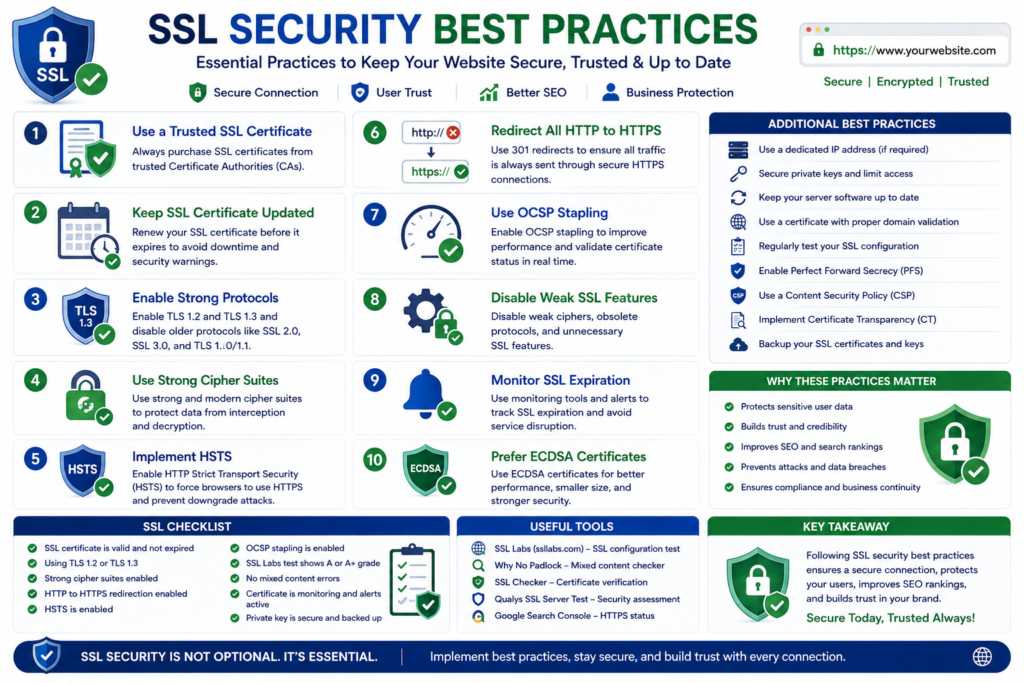
SSL Security Best Practices
Follow these recommendations to maintain a secure HTTPS environment.
Enable HTTPS Everywhere
Redirect all HTTP traffic to HTTPS.
Protect Private Keys
Store private keys securely and restrict access.
Monitor Certificate Expiration
Use automated reminders or monitoring tools to avoid unexpected expiration.
Keep Server Software Updated
Modern TLS implementations depend on current server software.
Disable Deprecated Protocols
Avoid outdated SSL versions and weak encryption settings.
Test After Every Renewal
Verify that:
- HTTPS loads correctly.
- Redirects work.
- The certificate chain is complete.
- No browser warnings appear.
Maintain Documentation
Document:
- Certificate owners.
- Renewal dates.
- Validation methods.
- Server locations.
- Emergency procedures.
Good documentation simplifies long-term management.
Implementation Checklist
Before considering your SSL deployment complete, verify the following:
| Task | Complete |
|---|---|
| SSL installed | □ |
| HTTPS enabled | □ |
| HTTP redirects configured | □ |
| Internal links updated | □ |
| Mixed content resolved | □ |
| Certificate chain verified | □ |
| TLS configuration reviewed | □ |
| Expiration monitoring enabled | □ |
| Website tested | □ |
| Documentation updated | □ |
Expert Recommendations
Whether you manage a single website or an enterprise infrastructure, establish a repeatable SSL management process.
Your process should include:
- Certificate inventory.
- Automated monitoring.
- Renewal procedures.
- Configuration testing.
- Security audits.
- Documentation updates.
A proactive approach significantly reduces the risk of certificate-related outages and security warnings.
Service Call to Action
If your website has not been reviewed recently, perform a complete HTTPS audit. Verify certificate validity, redirect behavior, mixed content, TLS configuration, and renewal settings. Addressing these areas proactively can help maintain a secure browsing experience and reduce avoidable technical issues.
Frequently Asked Questions
Frequently Asked Questions (FAQ)
1. What is an SSL certificate?
An SSL certificate is a digital certificate that verifies a website’s identity and encrypts communication between a visitor’s browser and a web server using HTTPS. It protects data such as passwords, payment information, contact forms, and login credentials while helping visitors identify that a website is using a secure connection.
2. Is SSL the same as TLS?
No. SSL (Secure Sockets Layer) is the older protocol that has been replaced by Transport Layer Security (TLS). Although modern certificates use TLS, the term SSL certificate remains the standard industry name.
3. Why is HTTPS important?
HTTPS encrypts data transmitted between browsers and web servers, helping protect sensitive information from interception during transmission and increasing visitor confidence.
4. Does every website need an SSL certificate?
Yes. Whether you operate a blog, portfolio, business website, nonprofit organization, or eCommerce store, HTTPS is considered a fundamental security best practice.
5. Does SSL improve SEO?
HTTPS contributes to a secure technical foundation and supports a positive user experience. However, search rankings also depend on content quality, search intent satisfaction, technical SEO, and other ranking factors.
6. What happens if my SSL certificate expires?
Visitors may encounter browser warnings indicating that the connection is no longer trusted. Renewing certificates before expiration helps avoid interruptions and maintains user confidence.
7. Can I use a free SSL certificate?
Yes. Free SSL certificates are suitable for many websites, including blogs, portfolios, informational websites, and numerous small business websites.
8. When should I buy a commercial SSL certificate?
Commercial certificates may be appropriate when you require Organization Validation (OV), Extended Validation (EV), enterprise management features, dedicated support, or specific compliance capabilities.
9. What is a Wildcard SSL certificate?
A Wildcard SSL certificate protects one primary domain together with all first-level subdomains.
Example:
- example.com
- blog.example.com
- shop.example.com
- support.example.com
10. What is a Multi-Domain SSL certificate?
A Multi-Domain (SAN) certificate secures multiple unrelated domain names using one certificate.
11. How do I know if my SSL certificate is working?
Check that:
- HTTPS loads successfully.
- The browser displays a secure connection.
- No certificate warnings appear.
- The certificate details show the correct domain and validity period.
12. Why does my browser display “Not Secure”?
Common causes include:
- No SSL certificate.
- Expired certificate.
- Mixed content.
- Domain mismatch.
- Incorrect certificate installation.
13. How often should SSL certificates be renewed?
Renewal schedules depend on current Certificate Authority policies and certificate validity periods. Always monitor expiration dates and renew certificates before they expire.
14. Does SSL protect my website from hackers?
SSL encrypts data during transmission but does not protect against all cyber threats. Website security also requires secure hosting, software updates, strong authentication, backups, and ongoing security monitoring.
15. Can one SSL certificate secure multiple websites?
Yes. Multi-Domain (SAN) certificates can secure multiple domain names, while Wildcard certificates protect a primary domain and its first-level subdomains.
16. Should WordPress websites always use HTTPS?
Yes. HTTPS helps protect administrator logins, customer accounts, contact forms, and other data exchanged through WordPress websites.
17. Does HTTPS affect website speed?
Modern TLS implementations introduce minimal overhead. Website performance is generally influenced more by hosting quality, caching, image optimization, and code efficiency.
18. What is HSTS?
HTTP Strict Transport Security (HSTS) instructs compatible browsers to connect only through HTTPS after a secure connection has been established.
19. How can I avoid SSL certificate expiration?
Maintain a certificate inventory, enable automated renewal where available, configure expiration alerts, and regularly review certificate status.
20. Which SSL certificate is best?
The best certificate depends on:
- Website type.
- Business requirements.
- Number of domains.
- Validation requirements.
- Long-term growth plans.
There is no single certificate that is best for every organization.
Final Conclusion
A secure website begins with a properly implemented SSL certificate. Whether you manage a personal blog, a growing business, an eCommerce platform, or an enterprise environment, HTTPS plays a critical role in protecting data exchanged between visitors and your website.
However, selecting the right certificate is only one part of the process. Proper installation, HTTPS migration, routine monitoring, timely renewal, and secure server configuration are equally important. Organizations should also combine SSL with broader security measures such as regular software updates, strong authentication, reliable backups, firewall protection, and continuous monitoring.
As your website evolves, periodically review your SSL strategy to ensure it continues to meet your technical, operational, and business requirements. By treating certificate management as an ongoing process rather than a one-time task, you can provide a safer, more trustworthy experience for your visitors.
Final Call to Action
If you are planning to launch a new website or improve an existing one, include SSL planning in your initial website strategy. Choosing the appropriate certificate, implementing HTTPS correctly, and maintaining it over time will help create a secure foundation that supports visitor trust and long-term website management.
Recommended Internal Links
- Complete Website Security Guide
- Website Development Services
- Complete Domain Name Guide
- Technical SEO Guide
- Google Search Console Guide
- Website Planning Checklist
- Common Website Mistakes to Avoid
- Why Is My Website Not Getting Customers?
2 Comments