Table of Contents
Introduction
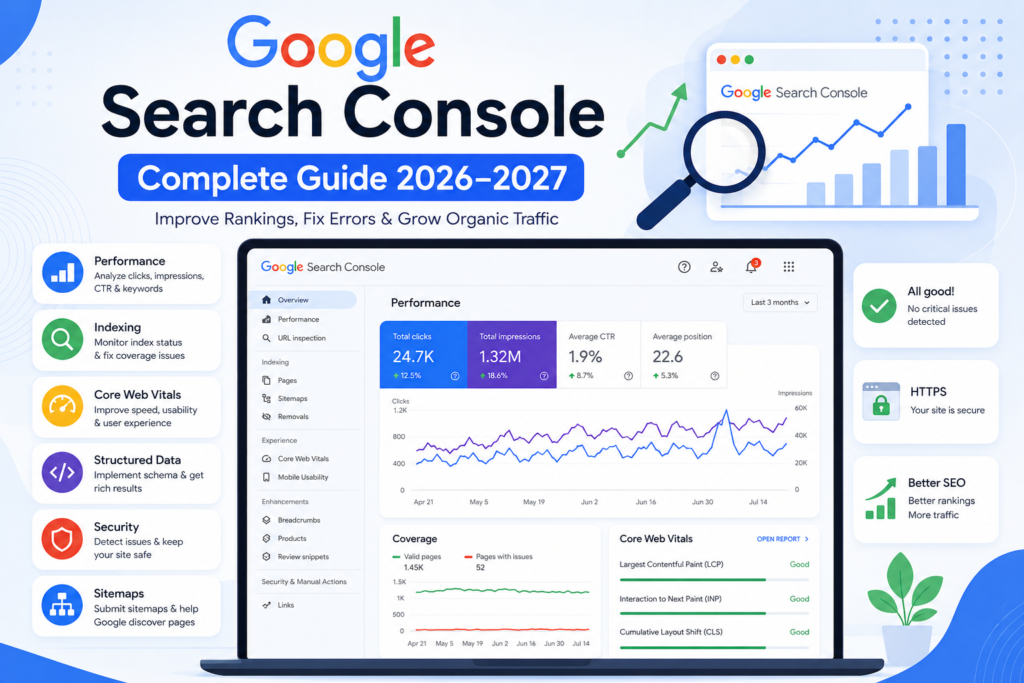
Google Search Console Guide is your complete resource for understanding how to monitor, optimize, and improve your website’s performance in Google Search. Whether you are a beginner, website owner, blogger, developer, or SEO professional, this comprehensive guide explains everything you need to know about Google Search Console in 2026–2027. From website verification and indexing to keyword research, Core Web Vitals, structured data, XML sitemaps, and technical SEO, you’ll learn how to use Google’s official platform to increase organic traffic, improve rankings, and maintain a healthy website.
Google Search Console is a free tool provided by Google that helps you monitor your website’s search performance, identify technical issues, understand user search behavior, and optimize your site for better visibility in Google Search.
Google Search Console Guide (2026–2027) is the ultimate step-by-step resource for learning how to use Google Search Console to improve indexing, keyword rankings, Core Web Vitals, technical SEO, structured data, XML sitemaps, and overall website performance. Whether you’re a beginner or an experienced SEO professional, this guide will help you maximize your organic search visibility using Google’s official tools and best practices.
By the end of this guide, you will know how to:
- Set up Google Search Console correctly.
- Verify ownership of your website.
- Submit XML sitemaps.
- Diagnose crawling and indexing issues.
- Discover valuable keyword opportunities.
- Improve click-through rates (CTR).
- Monitor Core Web Vitals and page experience.
- Interpret search performance reports.
- Resolve technical SEO issues.
- Optimize websites for Google Search and AI-powered search experiences.
Whether you manage a single website or an entire portfolio of digital properties, mastering Google Search Console will help you make more informed SEO decisions based on reliable first-party data.
What Is Google Search Console?
Google Search Console is a free website management and search performance platform developed by Google that helps website owners monitor, maintain, and improve their visibility in Google Search.
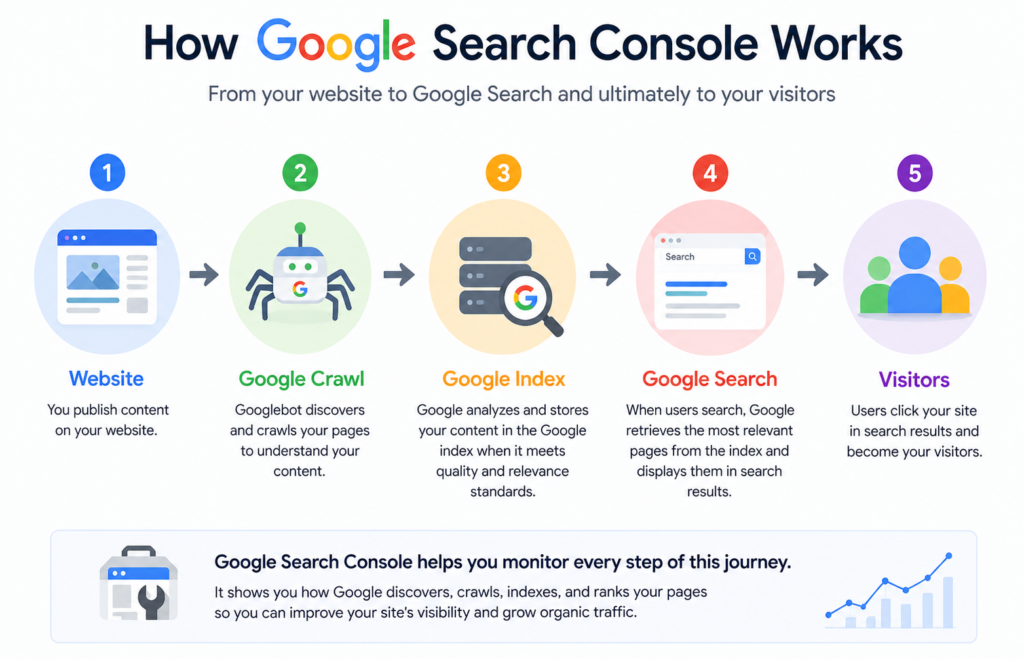
Rather than functioning as a traditional SEO tool, Search Console acts as Google’s official communication channel for website owners. It provides insights into how Google crawls, indexes, and evaluates your website while highlighting issues that may affect search performance.
The platform enables you to monitor search traffic, identify technical SEO problems, submit XML sitemaps, inspect URLs, review indexing status, analyze keyword performance, track Core Web Vitals, detect security issues, and validate structured data—all from a single dashboard.
One of the most significant advantages of Google Search Console is that the data comes directly from Google’s own search systems. This makes it one of the most reliable sources of information for understanding how your website performs in Google Search.
What Google Search Console Does
Google Search Console helps you:
- Monitor organic search performance.
- Identify the keywords that generate impressions and clicks.
- Check whether pages are indexed.
- Discover crawling and indexing errors.
- Submit XML sitemaps.
- Inspect individual URLs.
- Monitor Core Web Vitals.
- Review structured data enhancements.
- Detect security and manual action issues.
- Understand how Google views your website.
What Google Search Console Does Not Do
Although Search Console is an essential SEO platform, it has limitations.
It does not:
- Increase rankings automatically.
- Generate backlinks.
- Write or optimize content.
- Replace comprehensive SEO research platforms.
- Track paid advertising campaigns.
- Display every ranking factor Google uses.
Instead, it provides the information needed to identify opportunities and solve technical or performance issues that influence search visibility.
Why Google Search Console Matters in 2026–2027
Search has changed dramatically over the past few years. Google now relies on advanced machine learning, AI-assisted search features, and increasingly sophisticated quality systems to evaluate web content. As these systems evolve, website owners need reliable first-party data to understand how their content performs and where improvements are needed.
Google Search Console plays a central role in this process.
Instead of guessing why traffic increased or declined, you can use Search Console to identify measurable causes, such as changes in impressions, click-through rates, indexing status, page experience, or search queries.
The platform also helps you respond more effectively to algorithm changes. If a page suddenly loses visibility, Search Console can reveal whether the issue is related to indexing, technical problems, user experience, or shifting search demand. This makes troubleshooting more systematic and evidence-based.
For businesses, Search Console provides insights that support better marketing decisions. You can discover which products, services, or informational pages attract qualified visitors, identify new keyword opportunities, and prioritize improvements that are most likely to increase organic traffic.
For content creators, it highlights which articles resonate with users and where updates may be needed to maintain relevance. Developers can use it to detect crawl errors, rendering issues, and mobile usability problems, while SEO professionals can monitor the overall health of large websites and communicate progress with stakeholders using trustworthy data.
As Google’s search ecosystem continues to incorporate AI-generated summaries and richer search experiences, maintaining accurate technical foundations becomes even more important. Search Console helps ensure that your content is accessible, understandable, and eligible for these evolving search features.
Key Features at a Glance
Google Search Console includes several powerful reports, each serving a specific purpose:
| Feature | Purpose |
|---|---|
| Performance Report | Analyze clicks, impressions, CTR, and average position. |
| URL Inspection | Check crawling, indexing, canonicalization, and request indexing. |
| Page Indexing | Monitor indexed and excluded pages. |
| XML Sitemaps | Submit and validate sitemaps for improved discovery. |
| Core Web Vitals | Evaluate real-user page experience metrics. |
| Enhancements | Review structured data and rich result eligibility. |
| Links Report | Analyze internal and external linking signals. |
| Security Issues | Detect malware, hacked content, or security warnings. |
| Manual Actions | Review penalties or policy violations affecting visibility. |
Benefits of Google Search Console
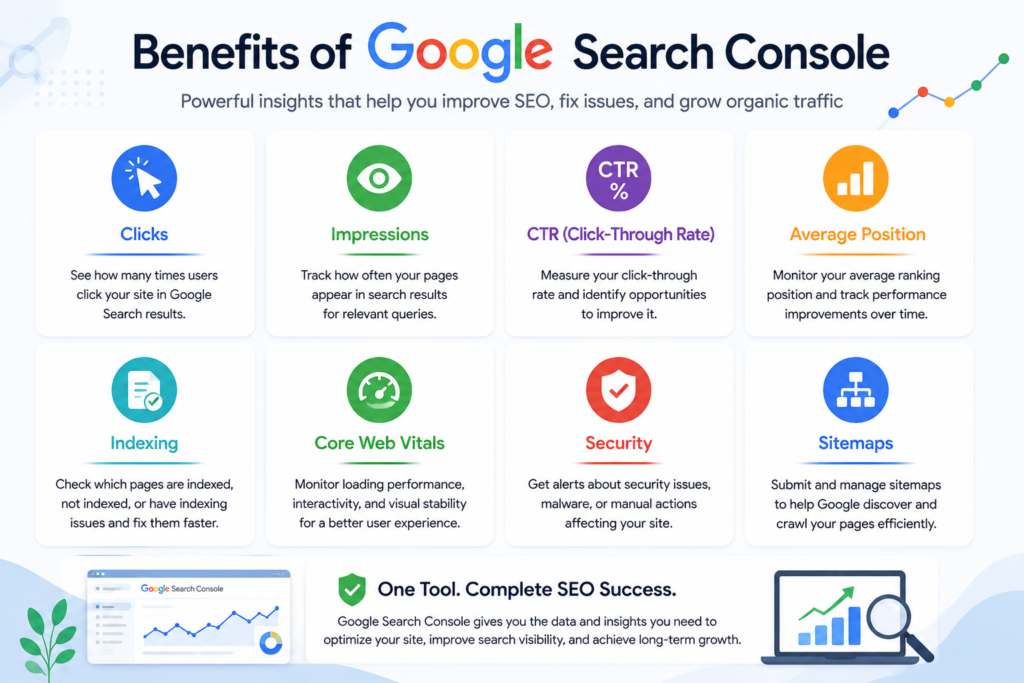
Google Search Console is much more than a reporting dashboard. It is a decision-making platform that helps website owners understand how Google interacts with their websites and where improvements can have the greatest impact. Because the data comes directly from Google, it provides reliable insights that support long-term SEO strategies rather than assumptions or estimates.
Whether you manage a personal blog, an online store, or a large enterprise website, Search Console helps you identify opportunities to increase visibility, improve user experience, and resolve technical issues before they affect your rankings.
1. Monitor Your Website’s Performance in Google Search
The Performance report shows how users discover your website through Google Search.
You can monitor:
- Total clicks
- Total impressions
- Average click-through rate (CTR)
- Average search position
Instead of guessing whether your SEO efforts are working, Search Console provides measurable data that helps you track progress over time.
Example:
If your article receives 30,000 impressions but only 600 clicks, your CTR may be lower than expected. This could indicate that your title or meta description needs improvement rather than suggesting a ranking problem.
2. Discover High-Value Keyword Opportunities
Many websites already rank for valuable keywords without realizing it.
Search Console helps you identify:
- Keywords generating impressions but few clicks.
- Keywords ranking on the second page of Google.
- Long-tail search queries.
- Emerging search trends.
- Pages with untapped ranking potential.
These insights allow you to prioritize updates that can improve traffic without creating entirely new content.
3. Improve Content Based on Real User Searches
Instead of relying solely on keyword research tools, Search Console reveals the actual search terms people use to find your website.
For example, if users frequently discover your article through a query you never intentionally targeted, you can expand that section, answer related questions, and improve relevance for similar searches.
This creates content that aligns more closely with user intent.
4. Identify Crawling and Indexing Problems
Publishing content does not guarantee that it will appear in Google Search.
Search Console helps you identify issues such as:
- Crawled but not indexed pages.
- Discovered but not currently indexed URLs.
- Duplicate pages.
- Redirect errors.
- Server issues.
- Blocked resources.
Resolving these problems increases the likelihood that important pages become eligible for search results.
5. Monitor Website Health
Search Console continuously reports technical issues that may affect visibility.
These include:
- Mobile usability problems.
- Core Web Vitals.
- Structured data errors.
- HTTPS issues.
- Manual actions.
- Security warnings.
Early detection allows you to address problems before they have a significant impact on organic traffic.
6. Improve Click-Through Rate (CTR)
Ranking on the first page of Google does not guarantee traffic.
Search Console shows whether users actually click your result.
A page may rank well but receive relatively few clicks because:
- The title lacks relevance.
- The meta description is unconvincing.
- Competitors provide stronger search snippets.
- The search intent is not fully satisfied.
Improving titles, descriptions, and overall relevance can increase traffic without changing rankings.
7. Measure the Impact of SEO Changes
Whenever you:
- Update an article,
- Improve page speed,
- Add structured data,
- Build internal links,
- Publish new content,
Search Console allows you to measure the results using objective performance data.
This helps distinguish successful improvements from changes that have little measurable effect.
8. Strengthen Technical SEO
Technical SEO often determines whether search engines can efficiently discover and understand your content.
Search Console supports technical optimization by helping you:
- Validate XML sitemaps.
- Inspect URLs.
- Review canonical pages.
- Identify indexing errors.
- Monitor mobile usability.
- Track Core Web Vitals.
- Validate structured data.
9. Support Better Business Decisions
Search Console is valuable beyond SEO.
Business owners can identify:
- Which services attract the most search demand.
- Which landing pages generate consistent traffic.
- Which products receive growing interest.
- Which geographic markets perform best.
This information supports content planning, marketing priorities, and business growth strategies.
10. Build Long-Term Organic Growth
Search Console encourages continuous improvement rather than one-time optimization.
Successful websites typically:
- Review performance regularly.
- Refresh outdated content.
- Resolve technical issues promptly.
- Improve user experience.
- Expand high-performing topics.
Over time, these incremental improvements contribute to sustainable organic growth.
Who Should Use Google Search Console?
One of the greatest strengths of Google Search Console is its flexibility. It is suitable for anyone responsible for a website, regardless of technical expertise or industry.
Website Owners
If you own a website, Search Console helps you understand:
- How customers find your business.
- Which pages generate traffic.
- Whether Google can index your content.
- Which improvements deserve priority.
Bloggers and Content Creators
Bloggers can use Search Console to:
- Discover new article ideas.
- Improve existing content.
- Monitor keyword performance.
- Increase organic traffic.
- Identify seasonal search trends.
SEO Professionals
SEO specialists rely on Search Console to:
- Audit websites.
- Track rankings.
- Diagnose technical issues.
- Validate optimizations.
- Report progress to clients.
Digital Marketing Agencies
Agencies managing multiple websites benefit from:
- Centralized monitoring.
- Technical diagnostics.
- Performance reporting.
- Client communication using Google’s own data.
Developers
Developers use Search Console to identify:
- Crawling issues.
- Rendering problems.
- Structured data errors.
- Mobile usability concerns.
- HTTPS configuration issues.
Ecommerce Businesses
Online stores can monitor:
- Product page visibility.
- Category page performance.
- Seasonal search demand.
- Indexing of new products.
- Technical issues affecting shopping pages.
Local Businesses
Businesses serving local customers can monitor:
- Local service pages.
- Brand searches.
- Location-specific queries.
- Mobile performance.
- Search visibility for nearby users.
Educational Institutions
Schools, colleges, and universities can use Search Console to:
- Improve discoverability of admissions information.
- Monitor program-related searches.
- Ensure important pages remain indexed.
- Identify opportunities for new educational content.
Real-World Examples
Understanding features is useful, but practical examples demonstrate how Search Console supports real business objectives.
Example 1: Local Plumbing Company
A plumbing company noticed a decline in phone calls despite maintaining its advertising budget.
Search Console revealed that several key service pages had become excluded from Google’s index after a technical update.
After correcting the issue and requesting re-indexing, the pages gradually returned to search results, restoring visibility for important local searches.
Example 2: Ecommerce Store
An online retailer discovered that many product pages generated impressions but few clicks.
Search Console showed that competing search results offered more compelling titles and descriptions.
After improving product titles and meta descriptions, the click-through rate increased without requiring major content changes.
Example 3: Professional Blog
A technology blog found that an older article continued receiving thousands of impressions for newly emerging search queries.
The author expanded the article to address those topics, updated screenshots, and added additional FAQs.
Within several weeks, the page attracted significantly more qualified traffic.
Example 4: Digital Marketing Agency
An agency managing dozens of client websites uses Search Console to:
- Monitor indexing.
- Track Core Web Vitals.
- Detect security issues.
- Review search performance.
- Identify technical errors before clients notice traffic losses.
This proactive approach reduces downtime and supports consistent SEO improvements.
Example 5: Educational Website
A university discovered that important admissions pages were not appearing consistently in search results.
Search Console identified crawl issues caused by incorrect canonical tags.
After correcting the technical implementation and validating the fixes, indexing improved, and prospective students were able to find the pages more easily.
Key Takeaway
Regardless of your industry or level of experience, Google Search Console provides actionable insights that help you understand how Google views your website. By regularly reviewing performance reports, resolving technical issues, and refining content based on real search data, you can make informed decisions that support sustainable organic growth.
What Google Search Console Can and Cannot Do
One of the biggest misconceptions about Google Search Console is that it is an SEO tool that automatically improves rankings. In reality, Search Console is a website monitoring and diagnostic platform. It provides accurate information about how Google discovers, crawls, indexes, and displays your website, but it does not optimize your website on your behalf.
Understanding its capabilities—and its limitations—helps you use it effectively alongside other SEO and analytics tools.
What Google Search Console Can Do
Google Search Console provides first-party data directly from Google Search, allowing website owners to make informed decisions based on real performance metrics.
It helps you:
Monitor Search Performance
You can track:
- Total clicks
- Total impressions
- Average CTR
- Average ranking position
This data helps you understand how your website performs in Google Search over time.
Identify Keyword Opportunities
Search Console shows the actual search queries that bring visitors to your website.
This helps you discover:
- New keyword opportunities.
- Low-hanging fruit keywords.
- Seasonal search trends.
- Long-tail search phrases.
- Pages with ranking potential.
Unlike traditional keyword tools, this information is based on your own website’s search performance.
Monitor Indexing Status
Search Console tells you whether Google has indexed your pages successfully.
You can identify:
- Indexed pages.
- Excluded pages.
- Crawled but not indexed URLs.
- Duplicate pages.
- Canonical issues.
- Soft 404 errors.
This helps ensure that your most important content is eligible to appear in Google Search.
Detect Technical SEO Problems
Search Console continuously checks your website for technical issues that may affect visibility.
Examples include:
- Crawl errors.
- Mobile usability issues.
- HTTPS problems.
- Structured data errors.
- Core Web Vitals.
- Manual actions.
- Security warnings.
Submit XML Sitemaps
Google Search Console allows you to submit XML sitemaps so Google can discover your content more efficiently.
This is especially useful when:
- Launching a new website.
- Publishing many new pages.
- Updating website architecture.
Inspect Individual URLs
The URL Inspection Tool lets you verify:
- Crawl status.
- Indexing status.
- Canonical URL.
- Mobile usability.
- Structured data detection.
- Last crawl date.
You can also request indexing after making significant improvements.
Validate Technical Fixes
After correcting problems such as:
- Structured data errors,
- Core Web Vitals issues,
- HTTPS problems,
Search Console allows you to validate your fixes so Google can review them again.
Improve Website Quality
Although Search Console doesn’t improve rankings directly, it highlights issues that may reduce visibility.
Examples include:
- Poor page experience.
- Missing structured data.
- Broken pages.
- Mobile issues.
- Security problems.
Fixing these problems supports long-term SEO improvements.
What Google Search Console Cannot Do
Understanding what Search Console cannot do is equally important.
It Cannot Improve Rankings Automatically
Installing Search Console does not increase rankings.
You still need:
- Helpful content.
- Strong technical SEO.
- Quality backlinks.
- Good user experience.
- Search intent optimization.
It Does Not Build Backlinks
Search Console reports links pointing to your website but does not create backlinks or help you acquire them.
It Does Not Replace Keyword Research
Although Search Console reveals keywords your website already ranks for, it does not provide:
- Competitor keyword research.
- Search volume estimates.
- Keyword difficulty.
- SERP analysis.
Dedicated SEO tools remain valuable for broader keyword research.
It Does Not Analyze Competitors
Search Console only reports data for verified properties.
It cannot show:
- Competitor rankings.
- Competitor backlinks.
- Competitor traffic.
- Competitor keywords.
It Does Not Replace Analytics Platforms
Search Console focuses on Google Search performance rather than user behavior.
It cannot accurately report:
- Session duration.
- Bounce rate.
- User engagement.
- Conversions.
- Revenue.
- Events.
Google Analytics 4 complements Search Console by measuring on-site behavior after visitors arrive.
It Does Not Fix Website Problems Automatically
Search Console identifies issues but does not resolve them.
For example:
If Google reports:
- Broken pages,
- Missing structured data,
- Slow pages,
you must manually correct these issues on your website.
Google Search Console vs Third-Party SEO Tools
Google Search Console is often compared with commercial SEO platforms such as:
- Semrush
- Ahrefs
- Moz
- Screaming Frog SEO Spider
- SE Ranking
- Mangools
While these platforms are powerful, they serve different purposes.
Comparison Table
| Feature | Google Search Console | Third-Party SEO Tools |
|---|---|---|
| Official Google Data | ✅ Yes | ❌ No (estimated) |
| Search Queries | ✅ Actual | ⚠ Estimated |
| Clicks & Impressions | ✅ Yes | ❌ No |
| Average Position | ✅ Yes | ⚠ Estimated |
| Index Coverage | ✅ Yes | ❌ No |
| URL Inspection | ✅ Yes | ❌ No |
| XML Sitemap Submission | ✅ Yes | ❌ No |
| Manual Actions | ✅ Yes | ❌ No |
| Security Reports | ✅ Yes | ❌ No |
| Competitor Research | ❌ No | ✅ Yes |
| Backlink Research | Limited | ✅ Extensive |
| Keyword Difficulty | ❌ No | ✅ Yes |
| Search Volume | ❌ No | ✅ Yes |
| Site Audits | Limited | ✅ Advanced |
| Rank Tracking | Limited | ✅ Advanced |
When Should You Use Google Search Console?
Use Search Console when you want to:
- Understand Google’s view of your website.
- Monitor indexing.
- Analyze real search queries.
- Diagnose crawl issues.
- Review Core Web Vitals.
- Monitor structured data.
- Request indexing.
When Should You Use Third-Party SEO Tools?
Use commercial SEO platforms when you need to:
- Research competitors.
- Discover new keyword opportunities.
- Analyze backlink profiles.
- Estimate keyword difficulty.
- Perform comprehensive site audits.
- Monitor rankings across multiple search engines.
Professional Recommendation
Professional SEO teams rarely rely on a single tool.
Instead, they combine:
- Google Search Console
- Google Analytics 4
- Google Tag Manager
- Looker Studio
- Semrush or Ahrefs
- Screaming Frog SEO Spider
Together, these tools provide a comprehensive understanding of website performance, technical health, user behavior, and competitive positioning.
Google Search Console vs Google Analytics 4
Although both products are developed by Google, they answer different questions.
Google Search Console answers:
How did users find my website in Google Search?
Google Analytics 4 answers:
What did users do after they arrived?
Search Console Focus
Search Console measures:
- Search visibility.
- Organic clicks.
- Search impressions.
- Average ranking.
- Crawl status.
- Indexing.
- Technical SEO.
Google Analytics 4 Focus
GA4 measures:
- Users.
- Sessions.
- Engagement.
- Conversions.
- Revenue.
- Events.
- Customer journeys.
Example
A page may receive:
- 20,000 impressions
- 900 clicks
Search Console reports these search metrics.
GA4 then shows:
- Time spent on the page.
- Scroll depth.
- Conversion events.
- Purchases.
- Form submissions.
Together, they provide a complete picture of performance.
How to Set Up Google Search Console
Setting up Google Search Console correctly is one of the first steps toward monitoring your website’s search performance.
Step 1: Sign In
Visit the official Google Search Console website and sign in using the Google account you want to associate with your website.
Step 2: Add a Property
You can choose between:
Domain Property
Covers:
- HTTP
- HTTPS
- www
- non-www
- All subdomains
Recommended for most websites because it provides complete coverage.
URL Prefix Property
Monitors only the exact URL you verify.
Example:
https://example.comIt does not automatically include:
- http://
- www.
- Subdomains
Step 3: Verify Ownership
Google must confirm that you own or manage the website.
Common verification methods include:
- DNS record
- HTML file upload
- HTML meta tag
- Google Analytics
- Google Tag Manager
We will examine each method in detail in the next section.
Common Setup Mistakes
Many websites experience indexing and reporting problems because Search Console was configured incorrectly.
Avoid these common mistakes:
- Verifying only the URL Prefix property when Domain Property is more appropriate.
- Forgetting to submit an XML sitemap.
- Blocking important pages in
robots.txt. - Using incorrect canonical tags.
- Not verifying HTTPS.
- Ignoring crawl errors after launch.
- Failing to monitor Search Console regularly.
- Removing verification records accidentally.
Correct setup from the beginning helps prevent unnecessary technical issues later.
Website Verification Methods
Before Google Search Console can provide data about your website, Google must verify that you own or manage the property. Verification protects website data from unauthorized access and ensures only approved users can view or manage Search Console reports.
Google offers several verification methods. While all of them confirm ownership, they differ in setup complexity, long-term reliability, and the level of access they provide.
1. DNS Record Verification (Recommended)
DNS verification is Google’s preferred method because it verifies ownership at the domain level.
Instead of verifying only a single version of your website, DNS verification confirms ownership of:
How It Works
Google provides a TXT record that you add to your domain’s DNS settings through your domain registrar or DNS provider.
After the record propagates, Google verifies ownership automatically.
Advantages
- ✔ Covers the entire domain.
- ✔ Works for all protocols.
- ✔ Includes subdomains.
- ✔ Most secure option.
- ✔ Does not depend on website files.
Disadvantages
- Requires access to DNS settings.
- DNS propagation may take several minutes or hours.
Recommended For
- Businesses
- Agencies
- Ecommerce websites
- Large organizations
- Professional SEO projects
2. HTML File Upload
This method requires uploading a verification file to your website’s root directory.
Steps
- Download Google’s verification file.
- Upload it to the root folder.
- Click Verify in Search Console.
Advantages
✔ Easy for developers.
✔ Fast verification.
Disadvantages
- The file must remain on the server.
- Deleting the file may affect verification.
Recommended For
Developers with FTP or hosting access.
3. HTML Meta Tag Verification
Google provides a small HTML meta tag that must be inserted into the <head> section of your homepage.
Example:
<meta name="google-site-verification" content="verification-code">Advantages
✔ Easy to implement.
✔ No FTP required.
Disadvantages
- Theme changes may remove the tag.
- Incorrect placement causes verification failure.
Recommended For
- WordPress websites.
- Small business websites.
- Beginners.
4. Google Analytics Verification
If Google Analytics 4 is already installed correctly and you have sufficient permissions, Search Console may verify ownership automatically.
Advantages
✔ No extra code required.
✔ Quick setup.
Disadvantages
- Depends on Analytics implementation.
- May stop working if Analytics is removed.
Recommended For
Existing GA4 users.
5. Google Tag Manager Verification
If Google Tag Manager is installed correctly, Google can use it for ownership verification.
Advantages
✔ No additional files.
✔ Simple setup.
Disadvantages
- Requires proper GTM permissions.
- Removing GTM may affect verification.
Which Verification Method Should You Choose?
Choosing the correct verification method depends on your website and plans.
| Website Type | Best Verification Method |
|---|---|
| Business Website | DNS Verification |
| Ecommerce Store | DNS Verification |
| Agency Website | DNS Verification |
| Personal Blog | HTML Meta Tag |
| WordPress Website | DNS or HTML Meta Tag |
| Shopify Store | DNS Verification |
| Large Enterprise Website | DNS Verification |
Professional Recommendation
For long-term stability and complete website coverage, use Domain Property with DNS Verification whenever possible.
Adding Users and Managing Permissions
Search Console allows multiple people to access the same property without sharing your Google account.
This is useful when working with:
- SEO consultants.
- Marketing agencies.
- Developers.
- Content writers.
- Technical support teams.
Permission Levels
Owner
Owners have full control.
They can:
- Add users.
- Remove users.
- Change settings.
- Verify ownership.
Full User
Full users can:
- View reports.
- Submit sitemaps.
- Inspect URLs.
- Request indexing.
They cannot remove owners.
Restricted User
Restricted users can:
- View reports only.
Ideal for clients or stakeholders who need read-only access.
Google Search Console Dashboard Overview
Once verification is complete, you’ll gain access to the Search Console dashboard. This dashboard serves as the central hub for monitoring your website’s health, performance, and visibility in Google Search.
The left-hand navigation menu provides access to all major reports, while the main panel displays performance summaries and important notifications.
Main Dashboard Sections
The dashboard includes several key reports:
- Overview
- Performance
- URL Inspection
- Page Indexing
- Sitemaps
- Core Web Vitals
- Enhancements
- Links
- Manual Actions
- Security Issues
- Settings
Each report focuses on a different aspect of your website’s relationship with Google.
Professional Daily Workflow
Professional SEO specialists rarely open Search Console without a plan. They follow a consistent workflow that helps identify issues quickly and prioritize the most important actions.
Step 1: Review Performance Trends
Check:
- Clicks.
- Impressions.
- CTR.
- Average Position.
Look for unusual increases or decreases compared with previous periods.
Step 2: Review Indexing
Open the Page Indexing report.
Confirm:
- Newly published pages are indexed.
- No unexpected exclusions have appeared.
Step 3: Review Security Notifications
Check:
- Manual Actions.
- Security Issues.
These reports should ideally show No Issues Detected.
Step 4: Review Core Web Vitals
Check whether any URLs have:
- Poor LCP.
- Poor INP.
- Poor CLS.
Address performance regressions promptly.
Step 5: Review Keyword Opportunities
Open the Performance report.
Filter queries with:
- High impressions.
- Average position between 8–20.
These pages often provide the quickest ranking improvement opportunities.
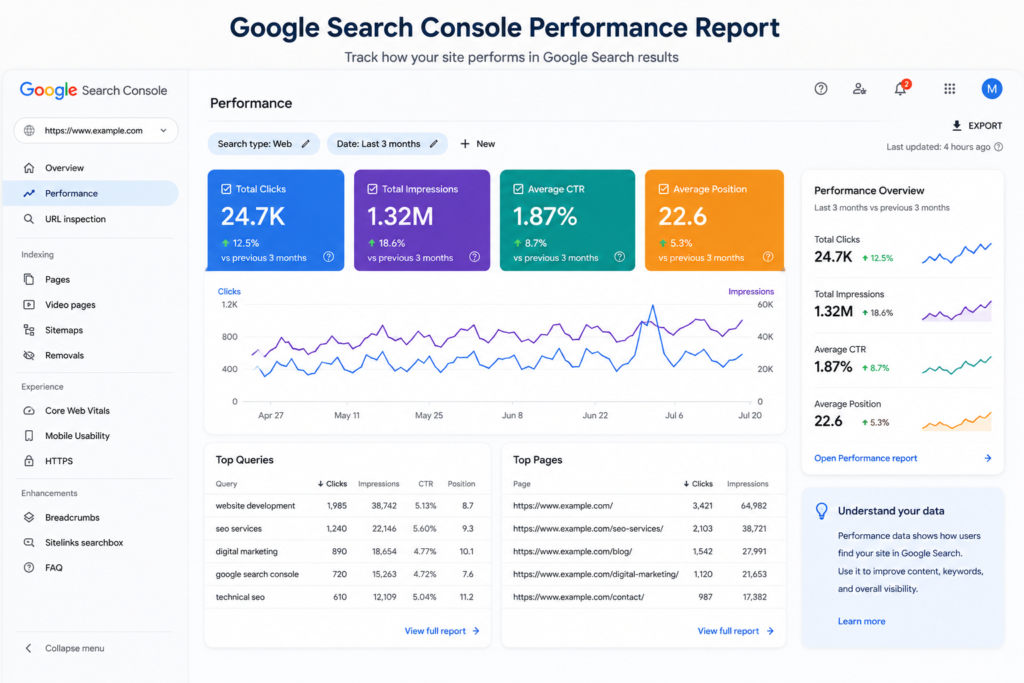
Understanding the Performance Report
The Performance report is one of the most valuable sections of Google Search Console. It shows how your website appears in Google Search and how users interact with your search listings.
Instead of estimating performance, the report uses data collected directly from Google Search.
Total Clicks
Clicks represent the number of times users selected your website from Google Search results.
A growing number of clicks generally indicates that your content is attracting more visitors through organic search.
Total Impressions
An impression is counted each time one of your pages appears in Google Search results, even if the user does not click it.
High impressions combined with low clicks often suggest an opportunity to improve titles and meta descriptions.
Average Click-Through Rate (CTR)
CTR measures the percentage of impressions that resulted in clicks.
Formula:
CTR = (Clicks ÷ Impressions) × 100
Example:
- Impressions: 20,000
- Clicks: 1,000
CTR:
5%
A higher CTR generally indicates that your search snippet is relevant and compelling.
Average Position
Average Position estimates where your page typically appears in search results for a query.
For example:
- Position 1 → Top organic result.
- Position 5 → Middle of page one.
- Position 11 → Top of page two.
Improving pages’ ranking between positions 8 and 20 often produces the fastest SEO gains.
Using Performance Filters
The Performance report includes powerful filters that allow you to analyze data from different perspectives.
You can filter by:
- Search queries.
- Pages.
- Countries.
- Devices.
- Search appearance.
- Date ranges.
Combining filters helps identify trends and opportunities that might otherwise remain hidden.
Example Analysis
Imagine a page with the following metrics:
- 35,000 impressions
- 700 clicks
- CTR: 2%
- Average Position: 9.4
This indicates that Google already considers the page relevant, but relatively few users are clicking it.
Possible improvements include:
- Writing a more compelling SEO title.
- Improving the meta description.
- Matching search intent more closely.
- Adding structured data where appropriate.
- Updating the content to better answer user questions.
These refinements can often increase traffic without requiring significant ranking changes.
Professional Keyword Research Using Google Search Console
Many beginners think Google Search Console is only useful for checking clicks and impressions. In reality, it is one of the most valuable tools for discovering keyword opportunities because it uses real search data from Google, not estimates.
Unlike commercial SEO tools that predict keyword performance, Google Search Console shows the exact queries that are already generating impressions and clicks for your website. This allows you to improve existing content instead of relying solely on speculative keyword research.
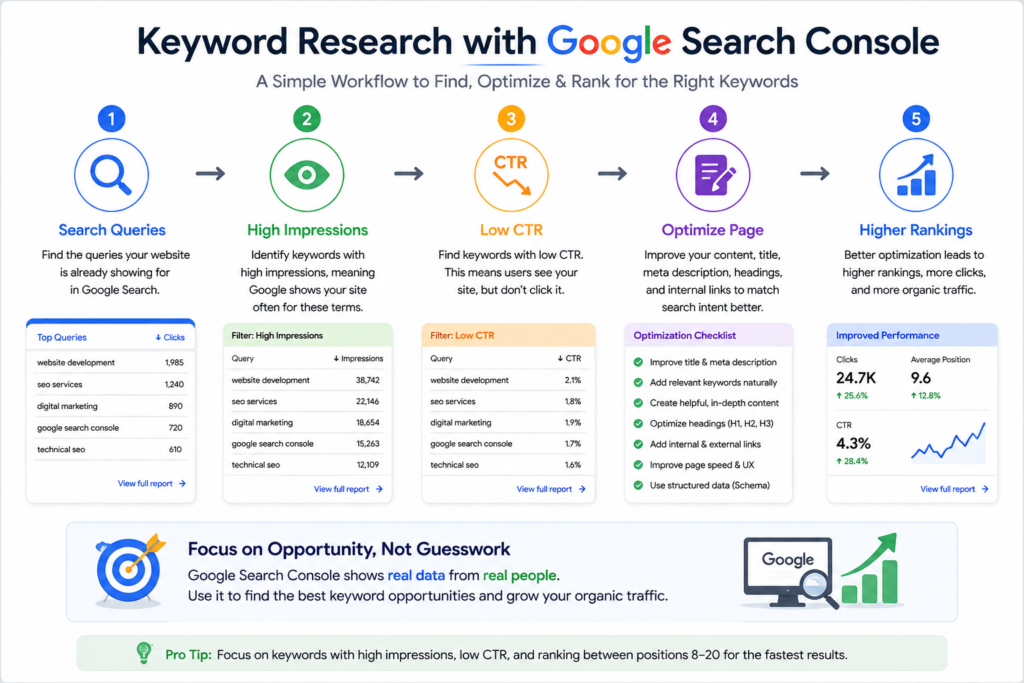
Professional SEO teams use Search Console every week to identify pages that can achieve better rankings with targeted improvements.
Step 1: Open the Performance Report
Navigate to:
Performance → Search Results
This report displays:
- Total Clicks
- Total Impressions
- Average CTR
- Average Position
Scroll down to the Queries section to view the search terms users entered before seeing your website in Google Search.
Step 2: Sort by Impressions
Sorting by impressions helps identify keywords that Google already considers relevant.
For example:
| Query | Impressions | Clicks | Position |
|---|---|---|---|
| Google Search Console Guide | 22,500 | 650 | 8.6 |
| Search Console Tutorial | 14,200 | 380 | 9.3 |
| Google Search Console Tips | 8,900 | 180 | 11.4 |
These queries indicate opportunities because Google is already displaying your page for them.
Step 3: Identify High-Impression, Low-CTR Pages
Sometimes a page appears thousands of times but receives relatively few clicks.
Example:
- Impressions: 50,000
- Clicks: 600
- CTR: 1.2%
Possible reasons include:
- Weak SEO title.
- Generic meta description.
- Search intent mismatch.
- Stronger competitor snippets.
- Missing rich results.
Improving titles and descriptions can often increase traffic without changing rankings.
Step 4: Identify Keywords Ranking Between Positions 8–20
These are often called low-hanging fruit keywords.
Example:
| Keyword | Position |
|---|---|
| Google Search Console Guide | 8.7 |
| Search Console Setup | 11.2 |
| URL Inspection Tool | 14.6 |
Pages in this range frequently require refinement rather than a complete rewrite.
Step 5: Analyze Search Intent
Every keyword reflects a specific user goal.
Professional SEO generally classifies search intent into four categories:
Informational
Users want to learn something.
Examples:
- What is Google Search Console?
- How does Google Search Console work?
Navigational
Users are looking for a particular website or page.
Examples:
- Google Search Console Login
- Google Search Console Help
Commercial Investigation
Users are comparing options before making a decision.
Examples:
- Best SEO tools
- Google Search Console vs Semrush
Transactional
Users are ready to take action.
Examples:
- SEO services
- Technical SEO audit
Understanding intent helps you create content that satisfies user expectations.
Step 6: Expand Existing Content
Rather than creating a new article for every keyword, strengthen existing pages by adding:
- Additional explanations.
- Frequently asked questions.
- Real examples.
- Comparison tables.
- Step-by-step tutorials.
- Visual guides.
This approach builds topical authority and keeps related information consolidated.
Finding Low-Hanging Fruit Keywords
Low-hanging fruit keywords are search terms for which your pages already rank reasonably well but have not yet reached their full potential.
These opportunities often deliver the fastest SEO improvements because Google has already recognized the page as relevant.
How to Find Them
Inside the Performance report:
- Open Queries.
- Filter Average Position.
- Select Greater than 7.
- Select Less than 20.
You will now see keywords that are close to the first page or already appearing near the bottom of page one.
Example
| Keyword | Position | Opportunity |
|---|---|---|
| Google Search Console Guide | 8.9 | Excellent |
| URL Inspection Tool | 11.4 | High |
| XML Sitemap Guide | 13.2 | High |
| Core Web Vitals | 17.8 | Moderate |
These pages often improve with targeted optimization rather than creating entirely new content.
How to Move Rankings from Position 8 to Position 3
Professional SEO teams focus heavily on pages ranking between positions 8 and 10 because relatively small improvements can produce significant gains in clicks.
Improve the SEO Title
Your title should:
- Include the primary keyword.
- Clearly communicate value.
- Match search intent.
- Encourage clicks without exaggeration.
Improve the Meta Description
Write a concise summary that explains what users will gain from visiting the page.
Avoid keyword stuffing and focus on relevance.
Expand the Content
Strengthen the page by adding:
- Updated information.
- Real-world examples.
- Comparison tables.
- Expert insights.
- Frequently asked questions.
- Step-by-step guidance.
Fresh, comprehensive content often performs better over time.
Improve Internal Linking
Link to the page from:
- High-authority articles.
- Related guides.
- Category pages.
- Resource hubs.
Descriptive anchor text helps Google understand the relationship between pages.
Enhance User Experience
Review:
- Mobile usability.
- Readability.
- Image optimization.
- Navigation.
- Page speed.
Positive user experience supports long-term search performance.
Strengthen E-E-A-T Signals
Include:
- Author information.
- Publication and update dates.
- References to reliable sources.
- Accurate, experience-based explanations.
These elements improve trust and credibility.
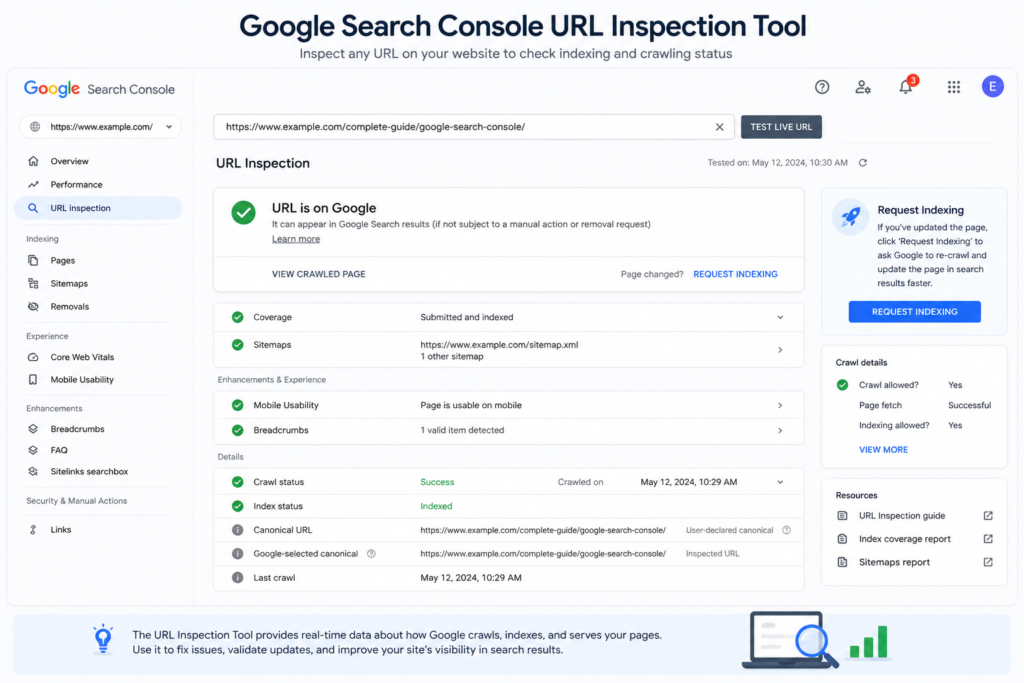
URL Inspection Tool
The URL Inspection Tool provides detailed information about how Google processes an individual page.
It helps answer questions such as:
- Has Google indexed this page?
- Can Google crawl it?
- Which canonical URL is selected?
- Is the page mobile-friendly?
- Can Google render the content correctly?
When Should You Use URL Inspection?
Use it whenever you:
- Publish a new page.
- Update important content.
- Fix technical SEO issues.
- Add structured data.
- Correct indexing problems.
- Improve internal linking.
Checking the page before requesting indexing helps verify that Google can access it correctly.
Understanding URL Inspection Results
The inspection report typically includes:
- Index status.
- Last crawl date.
- Canonical URL.
- Crawled as.
- Mobile usability.
- Structured data.
- HTTPS status.
- Referring sitemap.
Review these details carefully before deciding whether further action is needed.
Request Indexing Best Practices
The Request Indexing feature allows you to ask Google to revisit a page after meaningful improvements.
Appropriate situations include:
- Publishing a new article.
- Expanding outdated content.
- Fixing technical issues.
- Correcting canonical problems.
- Improving structured data.
- Resolving crawl errors.
Avoid requesting indexing for trivial edits such as correcting a typo or changing punctuation.
URL Inspection Workflow
Professional SEO teams often follow this process:
Publish or Update Content
          ↓
Inspect the URL
          ↓
Confirm Google Can Access the Page
          ↓
Check Canonical URL
          ↓
Review Structured Data
          ↓
Request Indexing (if appropriate)
          ↓
Monitor Page Indexing Report
          ↓
Track Performance in Search Results
Following a consistent workflow reduces indexing issues and improves quality control.
Common Indexing Problems
Even high-quality content may not be indexed immediately.
Common causes include:
- Poor internal linking.
- Duplicate content.
- Incorrect canonical tags.
- Soft 404 errors.
- Blocked resources.
- Noindex directives.
- Crawl budget limitations on very large websites.
- Low-value or thin content.
Search Console helps identify these issues so they can be addressed systematically.
Professional SEO Example
Imagine you publish a comprehensive guide on Technical SEO.
After one week:
- The page receives no impressions.
- Search Console reports Discovered – currently not indexed.
Instead of requesting indexing repeatedly, you:
- Add internal links from related articles.
- Include the page in your XML sitemap.
- Expand the content with practical examples.
- Improve page speed.
- Verify there are no
noindextags or robots.txt restrictions. - Inspect the URL.
- Request indexing once after the improvements.
This structured approach gives Google a stronger reason to crawl and evaluate the page.
Professional Tips
✔ Review the Performance report every week.
✔ Prioritize pages ranking between positions 8 and 20.
✔ Update older articles instead of creating duplicate content.
✔ Base content improvements on real search queries.
✔ Use URL Inspection before requesting indexing.
✔ Reserve indexing requests for meaningful updates.
✔ Monitor indexing and performance over time rather than expecting immediate ranking changes.
Understanding the Page Indexing Report
One of the most important reports in Google Search Console is the Page Indexing Report. This report tells you whether Google has successfully discovered, crawled, and indexed your website pages. If a page is not indexed, it cannot appear in Google Search regardless of how well it is written.
The Page Indexing Report helps website owners identify indexing problems before they negatively affect organic traffic.
What Is Page Indexing?
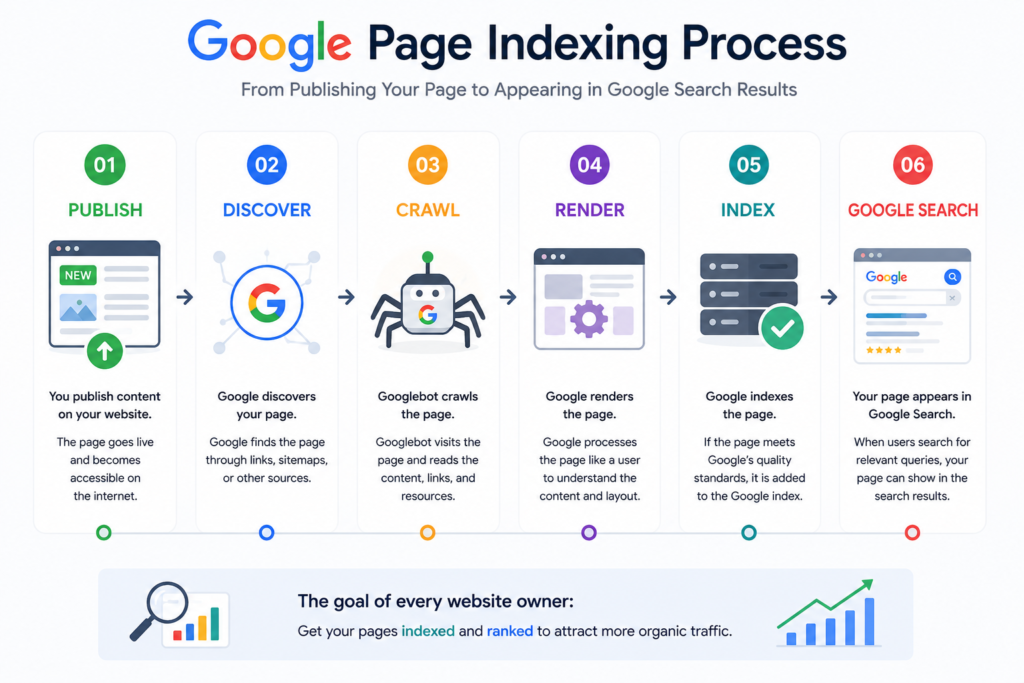
Page indexing is the process of adding a webpage to Google’s search index after it has been crawled and evaluated.
The process typically follows this sequence:
Page Published
        ↓
Google Discovers URL
        ↓
Google Crawls Page
        ↓
Google Renders Content
        ↓
Google Evaluates Quality
        ↓
Google Indexes Page
        ↓
Page Becomes Eligible to Rank
A page that has not been indexed cannot appear in Google’s organic search results.
Where to Find the Page Indexing Report
Inside Google Search Console, navigate to:
Indexing → Pages
This report provides an overview of:
- Indexed pages
- Non-indexed pages
- Reasons for exclusion
- Crawl statistics
- Validation status
It serves as the primary dashboard for monitoring indexing health.
Understanding the Indexing Summary
The report generally categorizes pages into two main groups:
Indexed Pages
These pages have been successfully added to Google’s search index and are eligible to appear in search results.
However, being indexed does not guarantee high rankings. Rankings depend on factors such as relevance, content quality, authority, and user experience.
Non-Indexed Pages
These pages have not been added to Google’s search index.
The report explains why each page is excluded, allowing you to determine whether action is required.
Why Pages Are Not Indexed
Not every excluded page represents a problem. Some exclusions are intentional, while others require immediate attention.
Below are the most common reasons.
Crawled – Currently Not Indexed
Google successfully crawled the page but decided not to include it in the index.
Possible Causes
- Thin content
- Duplicate information
- Low perceived value
- Weak internal linking
- Poor content quality
Recommended Actions
- Expand the content.
- Improve topical depth.
- Add unique insights.
- Strengthen internal links.
- Update the page with current information.
Discovered – Currently Not Indexed
Google knows the page exists but has not crawled it yet.
Possible Causes
- Large website
- Limited crawl resources
- Weak internal linking
- Recently published content
Recommended Actions
- Include the page in your XML sitemap.
- Add internal links.
- Avoid repeatedly requesting indexing.
- Wait for Google’s natural crawl schedule.
Duplicate Without User-Selected Canonical
Google detected duplicate content and selected another page as the canonical version.
Recommended Actions
- Specify the preferred canonical URL.
- Consolidate duplicate pages.
- Remove unnecessary duplicates.
Alternate Page with Proper Canonical Tag
This status usually indicates that Google understands your canonical configuration correctly.
No action is typically required.
Excluded by “Noindex” Tag
The page contains a noindex directive instructing Google not to include it in search results.
Recommended Actions
If indexing is intended:
- Remove the noindex tag.
- Verify changes.
- Request indexing if significant updates were made.
Blocked by Robots.txt
Google cannot crawl the page because access is restricted by the robots.txt file.
Recommended Actions
Review your robots.txt configuration and ensure important pages are not blocked unintentionally.
Soft 404
Google believes the page offers little useful content even though it returns a successful server response.
Common Causes
- Thin pages
- Empty product pages
- Placeholder content
- Automatically generated pages
Recommended Actions
- Improve content quality.
- Merge similar pages where appropriate.
- Return a proper 404 or 410 status if the page should no longer exist.
Indexing Troubleshooting Workflow
Professional SEO teams follow a structured process instead of guessing why a page is not indexed.
Step 1: Confirm Crawl Accessibility
Verify that:
- Robots.txt allows crawling.
- The page returns a 200 OK status.
- There are no redirect loops.
- HTTPS is functioning correctly.
Step 2: Inspect the URL
Use the URL Inspection Tool to determine:
- Crawl status
- Index status
- Canonical URL
- Last crawl date
- Mobile usability
- Structured data detection
Step 3: Evaluate Content Quality
Ask:
- Does the page solve a real user problem?
- Is the content original?
- Is it more comprehensive than competing pages?
- Does it satisfy search intent?
If the answer is “no,” improve the content before requesting indexing.
Step 4: Review Internal Links
Ensure the page receives links from:
- Related articles
- Category pages
- Navigation menus
- Pillar pages
Pages without internal links are often crawled less efficiently.
Step 5: Check the XML Sitemap
Confirm that the page appears in your XML sitemap and that the sitemap has been submitted successfully in Search Console.
Step 6: Request Indexing (When Appropriate)
Request indexing only after making meaningful improvements.
Avoid requesting indexing repeatedly without addressing underlying issues.
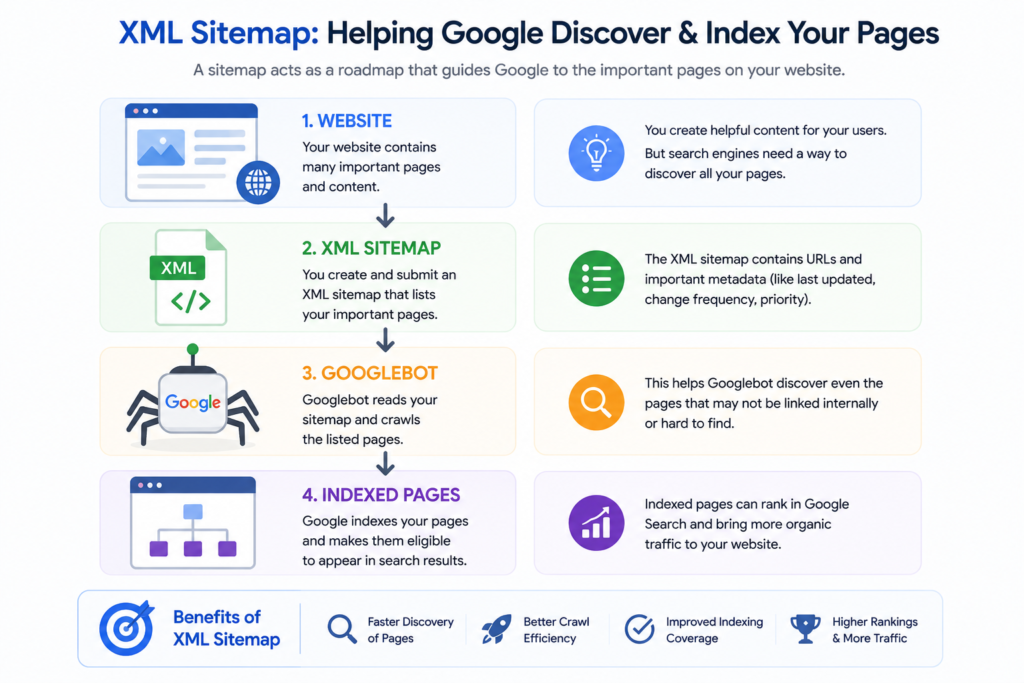
XML Sitemaps
An XML sitemap is a structured file that lists the important pages on your website, helping Google discover and prioritize content more efficiently.
While Google can often find pages through internal links, a sitemap improves crawl efficiency, especially for larger websites.
Why XML Sitemaps Matter
An optimized sitemap helps Google:
- Discover new pages.
- Crawl updated content.
- Understand website structure.
- Prioritize important URLs.
- Identify recently modified pages.
What Should Be Included?
Include:
- Blog posts
- Service pages
- Product pages
- Landing pages
- Category pages
Exclude:
- Redirected URLs
- Duplicate pages
- Noindex pages
- Search result pages
- Admin URLs
- Test environments
Sitemap Best Practices
Follow these recommendations:
- Submit only canonical URLs.
- Keep modification dates accurate.
- Remove deleted pages promptly.
- Update automatically whenever possible.
- Monitor sitemap status regularly.
Separate Sitemaps for Large Websites
Large websites benefit from multiple sitemap files.
Examples include:
- Posts Sitemap
- Pages Sitemap
- Products Sitemap
- Images Sitemap
- Videos Sitemap
- News Sitemap
A sitemap index file organizes these into a single submission.
Common Sitemap Errors
Common issues include:
Invalid URLs
Broken or malformed URLs reduce crawl efficiency.
Redirect URLs
Do not include redirected pages.
Noindex Pages
Avoid listing pages intentionally excluded from search results.
Incorrect Canonical URLs
Only canonical versions should appear in the sitemap.
Outdated URLs
Remove deleted or obsolete content promptly.
Core Web Vitals
Core Web Vitals are user experience metrics that measure how quickly, smoothly, and visually stable your pages perform for real visitors.
Google uses real-world usage data to evaluate these metrics.
Although Core Web Vitals are only one part of Google’s ranking systems, improving them enhances user satisfaction and often supports better business outcomes.
The Three Core Web Vitals
Largest Contentful Paint (LCP)
Measures loading performance.
Recommended Target:
Less than 2.5 seconds
Improve LCP by:
- Compressing images.
- Using modern formats such as WebP.
- Improving server response time.
- Reducing render-blocking resources.
- Implementing caching.
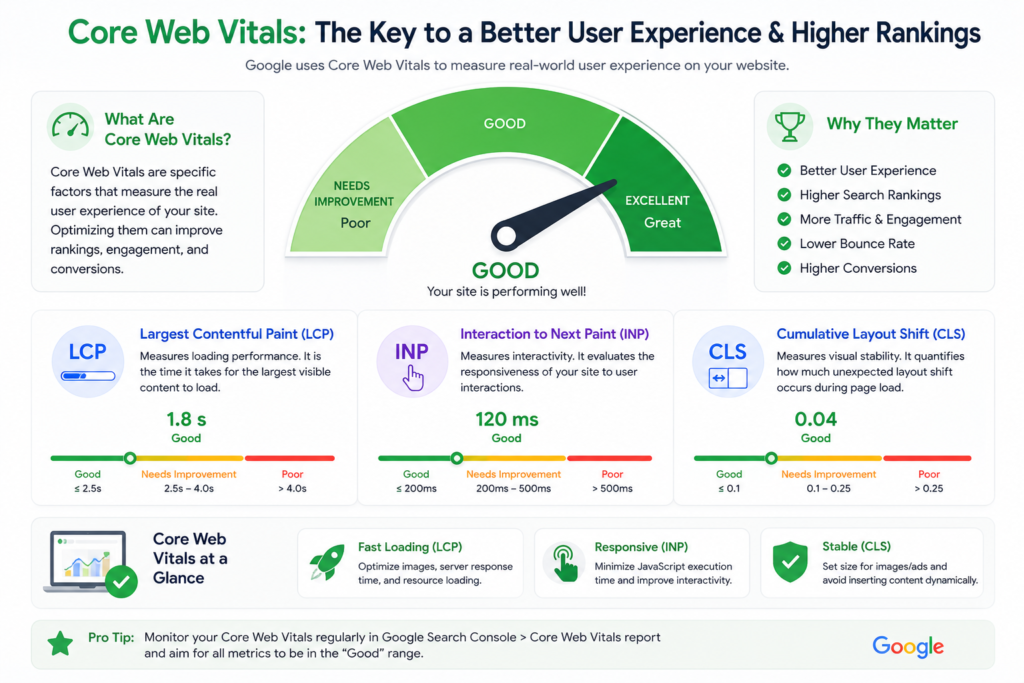
Interaction to Next Paint (INP)
Measures how quickly a page responds to user interactions.
Recommended Target:
Less than 200 milliseconds
Improve INP by:
- Reducing JavaScript execution.
- Optimizing event handlers.
- Removing unnecessary scripts.
- Deferring non-critical resources.
Cumulative Layout Shift (CLS)
Measures visual stability.
Recommended Target:
Less than 0.1
Improve CLS by:
- Setting image dimensions.
- Reserving space for ads.
- Avoiding unexpected layout changes.
- Loading fonts efficiently.
Core Web Vitals Optimization Checklist
Use the following checklist during every technical SEO audit.
Loading Performance
✔ Optimize images.
✔ Convert images to WebP.
✔ Enable browser caching.
✔ Use a Content Delivery Network (CDN).
✔ Compress CSS and JavaScript.
✔ Minify unnecessary code.
Responsiveness
✔ Reduce JavaScript.
✔ Remove unused plugins.
✔ Optimize third-party scripts.
✔ Improve server performance.
Visual Stability
✔ Set image dimensions.
✔ Reserve ad space.
✔ Avoid dynamic layout shifts.
✔ Preload important fonts.
Validating Fixes in Google Search Console
After correcting technical issues, Google allows you to validate your fixes directly within Search Console.
Common reports supporting validation include:
- Core Web Vitals
- HTTPS
- Structured Data
- Page Indexing
- Manual Actions (after reconsideration)
- Security Issues (after remediation)
Validation helps Google confirm that reported issues have been resolved.
Professional Technical SEO Workflow
Experienced SEO professionals follow a repeatable workflow rather than reacting only when problems occur.
Daily
- Review Performance Report.
- Monitor indexing changes.
- Check security alerts.
Weekly
- Analyze keyword opportunities.
- Review Core Web Vitals.
- Inspect newly published pages.
Monthly
- Audit XML sitemaps.
- Refresh high-performing content.
- Resolve crawl issues.
- Review internal linking.
Quarterly
- Conduct a full technical SEO audit.
- Review structured data.
- Evaluate site architecture.
- Update outdated content.
- Analyze long-term search trends.
Key Takeaways
- The Page Indexing Report helps identify pages that Google has or has not indexed.
- Not every exclusion requires action; understanding the reason is essential.
- XML sitemaps improve crawl efficiency and should include only canonical, indexable URLs.
- Core Web Vitals focus on loading speed, responsiveness, and visual stability.
- Validating fixes after making improvements helps Google reprocess affected pages.
- A consistent technical SEO workflow makes it easier to maintain long-term website health.
What Is Structured Data?
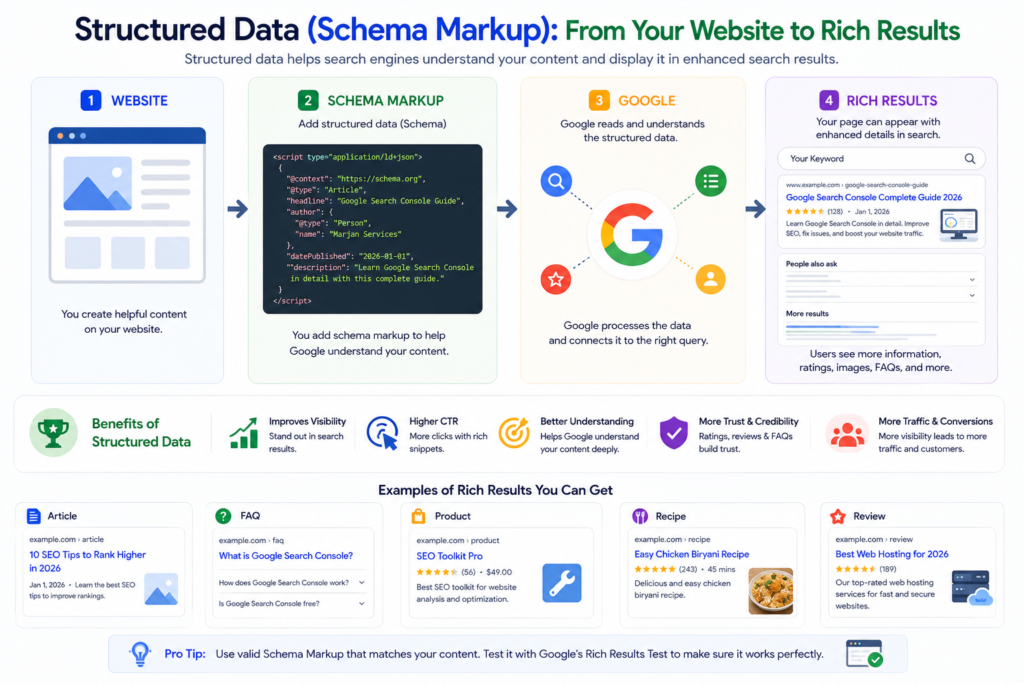
Structured data is a standardized format that helps search engines understand the meaning and context of your webpage. Instead of relying only on visible text, structured data provides machine-readable information about your content.
Think of structured data as a translator between your website and Google’s search systems. It explains what a page represents, who created it, when it was published, whether it describes a product, an organization, an event, a recipe, or another content type.
Google primarily recommends implementing structured data using JSON-LD, which is easier to maintain and less likely to introduce errors than inline markup.
How Structured Data Works
Without structured data, Google must infer meaning from headings, paragraphs, and links.
With structured data, your website explicitly tells Google:
- What the page is about.
- Who published it.
- When it was updated.
- Whether it contains FAQs.
- Whether it represents a product.
- Whether it describes a local business.
- Whether it includes reviews.
- Whether it contains a video.
This additional context improves Google’s understanding of your content.
Structured Data vs Schema Markup
These terms are often used interchangeably, but they are slightly different.
- Structured Data is the organized data format used by search engines.
- Schema Markup refers to the vocabulary developed through Schema.org that describes different content types.
In practice, implementing Schema.org vocabulary in JSON-LD format is what most people mean when they talk about adding structured data.
Why Structured Data Matters for SEO
Structured data is not a shortcut to higher rankings, but it plays an important role in helping Google interpret your content accurately.
It contributes to better search visibility by:
- Helping Google understand page meaning.
- Improving eligibility for rich search results.
- Supporting Knowledge Graph understanding.
- Enhancing AI-driven search experiences.
- Clarifying relationships between entities.
When implemented correctly, structured data can improve how your pages appear in search results, making them more informative and attractive to users.
Benefits of Structured Data
Improved Search Appearance
Structured data may enable enhanced search features such as:
- Rich snippets.
- FAQ enhancements (where supported).
- Product information.
- Review stars (when eligible).
- Breadcrumb navigation.
- Video enhancements.
These features can make your listings more informative.
Better Entity Recognition
Google increasingly relies on entities rather than isolated keywords.
Structured data helps Google understand:
- People.
- Organizations.
- Products.
- Locations.
- Services.
- Articles.
- Events.
This strengthens topical understanding.
Improved Content Classification
Google can more accurately classify whether a page is:
- A blog article.
- A service page.
- A product page.
- A business profile.
- A software application.
- A tutorial.
This supports more accurate indexing and presentation in search results.
Support for AI-Powered Search
Modern search systems use structured information to better understand relationships between concepts.
Clear structured data can help search engines interpret your content more effectively as AI-powered search experiences evolve.
How Google Search Console Uses Structured Data
Google Search Console includes an Enhancements section that reports on supported structured data implementations.
When eligible structured data is detected, Search Console may display:
- Valid items.
- Valid items with warnings.
- Invalid items.
- Validation status.
These reports help website owners identify and correct implementation issues.
Common Enhancement Reports
Depending on your website, Search Console may show reports for supported structured data such as:
- Breadcrumbs
- Products
- Videos
- Merchant listings
- Review snippets (where eligible)
The reports available depend on the types of structured data detected on your website and Google’s current support.
Organization Schema
Organization Schema identifies the company or organization behind your website.
This helps Google understand who owns and manages the website.
Information to Include
Organization Schema commonly includes:
- Business name.
- Official website.
- Logo.
- Contact information.
- Social profiles.
- Description.
Best Use Cases
Ideal for:
- Companies.
- Agencies.
- Educational institutions.
- Non-profit organizations.
- Government websites.
Benefits
Organization Schema helps establish a consistent identity for your website and supports Google’s understanding of your brand.
WebSite Schema
WebSite Schema provides information about your website as a whole.
Unlike Article Schema, which applies to individual pages, WebSite Schema describes the entire website.
Recommended Properties
Include:
- Website name.
- Homepage URL.
- Publisher.
- Search functionality (if applicable).
Why It Matters
It helps search engines better understand the structure and identity of your website.
Article Schema
Article Schema helps Google identify informational content such as:
- Blog posts.
- Tutorials.
- News articles.
- Educational resources.
- Long-form guides.
Recommended Properties
Include:
- Headline.
- Author.
- Publication date.
- Last updated date.
- Featured image.
- Publisher.
Best Practices
- Use descriptive headlines.
- Keep publication dates accurate.
- Update the modified date after meaningful revisions.
- Include author information.
Breadcrumb Schema
Breadcrumb Schema helps search engines understand your website hierarchy.
Example:
Home
   ↓
SEO
   ↓
Technical SEO
   ↓
Google Search Console Guide
Benefits
Breadcrumbs:
- Improve navigation.
- Clarify page relationships.
- Enhance crawl efficiency.
- Improve user experience.
FAQ Schema
FAQ Schema organizes genuine question-and-answer content.
Appropriate Uses
Suitable for:
- Product FAQs.
- Service FAQs.
- Educational guides.
- Support documentation.
Best Practices
Only include:
- Questions that appear on the page.
- Answers visible to users.
- Accurate, helpful information.
Avoid creating hidden or misleading FAQ content.
Product Schema
Product Schema helps search engines understand ecommerce pages.
Include
- Product name.
- Description.
- Images.
- Brand.
- Price.
- Currency.
- Availability.
Best For
- Ecommerce stores.
- Digital products.
- Software products.
- Physical goods.
Review Schema
Review Schema provides structured information about reviews when used in accordance with Google’s policies.
Include
- Rating value.
- Reviewer.
- Review date.
- Review content.
Best Practices
Only use authentic reviews and avoid misleading or fabricated ratings.
Video Schema
Video Schema helps search engines understand embedded video content.
Include
- Video title.
- Description.
- Thumbnail.
- Upload date.
- Duration.
Benefits
Well-implemented Video Schema can improve how video content is understood and surfaced in relevant search experiences.
LocalBusiness Schema
LocalBusiness Schema is important for organizations serving customers in a specific geographic area.
Include
- Business name.
- Address.
- Phone number.
- Opening hours.
- Website.
- Geographic coordinates.
- Service area.
Best For
- Restaurants.
- Medical clinics.
- Law firms.
- Digital agencies.
- Retail stores.
- Service providers.
SoftwareApplication Schema
SoftwareApplication Schema describes software products.
It is particularly useful for:
- SaaS platforms.
- WordPress plugins.
- Mobile apps.
- Desktop software.
Include
- Software name.
- Version.
- Operating system.
- Application category.
- Download URL.
- Publisher.
Schema Markup Best Practices
Follow these recommendations to improve implementation quality.
Use JSON-LD
Google recommends JSON-LD because it is easier to manage and less prone to implementation errors.
Match Visible Content
Structured data should accurately represent what users can see on the page.
Do not include information that is hidden or misleading.
Keep Information Updated
Review structured data whenever you update:
- Titles.
- Images.
- Authors.
- Prices.
- Business details.
Consistency between visible content and structured data is essential.
Validate Before Publishing
Test your structured data before making it live to identify syntax or eligibility issues.
Testing Structured Data
Before publishing, verify that your implementation is functioning correctly.
Recommended workflow:
- Add the structured data.
- Test the page using Google’s supported validation tools.
- Resolve any reported errors.
- Publish the page.
- Monitor the relevant Enhancement reports in Search Console.
Common Structured Data Mistakes
Avoid these common implementation errors:
- Missing required properties.
- Invalid JSON syntax.
- Incorrect data types.
- Outdated information.
- Using the wrong schema type.
- Marking up hidden content.
- Adding schema that does not match the page.
Correct implementation improves reliability and reduces validation issues.
H2: Professional Schema Strategy
Rather than adding every available schema type, implement the types that accurately describe your content.
A practical strategy is:
Every Website
- Organization Schema.
- WebSite Schema.
- Breadcrumb Schema.
Blog Articles
- Article Schema.
- Breadcrumb Schema.
Ecommerce Stores
- Product Schema.
- Review Schema (when eligible).
- Breadcrumb Schema.
Local Businesses
- LocalBusiness Schema.
- Organization Schema.
- Breadcrumb Schema.
Software Companies
- SoftwareApplication Schema.
- Organization Schema.
Choosing the appropriate schema for each page type helps search engines understand your content more accurately while keeping your implementation maintainable.
Key Takeaways
- Structured data helps search engines interpret your content more effectively.
- JSON-LD is the recommended implementation format.
- Search Console’s Enhancement reports help monitor supported structured data.
- Use schema types that accurately reflect your page content.
- Validate implementations before publishing and review reports regularly.
- Keep structured data synchronized with visible page content.
Understanding the Links Report
The Links Report is one of the most overlooked yet valuable sections of Google Search Console. It provides insights into how your website is connected internally and externally, helping you understand your site’s authority, content relationships, and backlink profile.
Unlike commercial backlink tools that estimate link data, Google Search Console reports links that Google has discovered for your verified property.
The Links Report is divided into two primary categories:
- Internal Links
- External Links
Together, these reports help you improve your website architecture and understand how Google navigates your content.
Internal Links Report
Internal links connect one page of your website to another.
Example:
Homepage
      ↓
SEO Services
      ↓
Technical SEO Guide
      ↓
Google Search Console Guide
These links help both users and search engines understand how your content is organized.
Why Internal Links Matter
Strong internal linking helps Google:
- Discover new pages.
- Understand topical relationships.
- Pass authority between pages.
- Improve crawl efficiency.
- Identify important content.
For users, internal links improve navigation and encourage them to explore additional relevant resources.
Benefits of Internal Linking
A well-planned internal linking strategy can:
- Increase page views.
- Reduce bounce rates.
- Improve user engagement.
- Strengthen topical authority.
- Help new pages get indexed faster.
- Distribute authority across important pages.
Professional Internal Linking Strategy
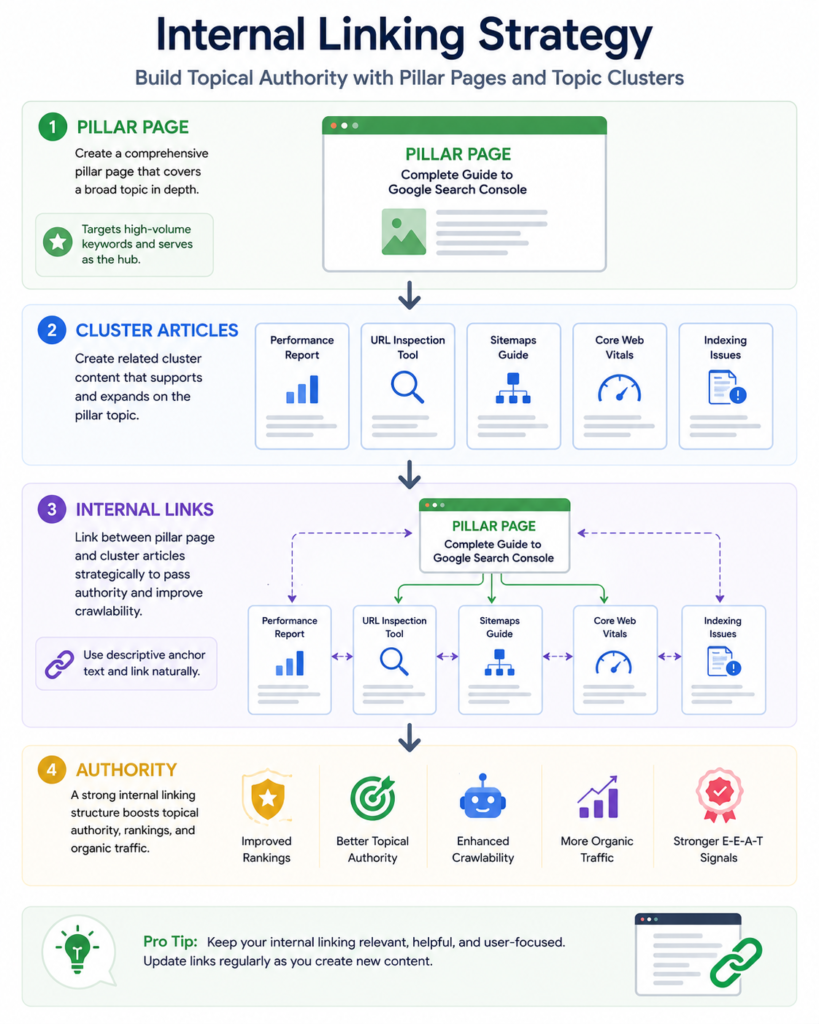
Professional SEO is not about publishing isolated articles. Instead, successful websites build content clusters around a central topic.
Pillar Page Strategy
A pillar page covers a broad topic comprehensively.
Example:
Google Search Console Guide
Supporting articles might include:
- URL Inspection Guide
- XML Sitemap Guide
- Core Web Vitals Guide
- Structured Data Guide
- Technical SEO Guide
Each supporting article links back to the pillar page, and the pillar page links back to each supporting article.
Topic Clusters
Example structure:
Technical SEO
        │
        ├── Google Search Console
        ├── XML Sitemap
        ├── Core Web Vitals
        ├── Structured Data
        ├── Robots.txt
        ├── Crawl Budget
        └── HTTPS
This structure helps Google understand that all these pages belong to the same subject area.
Contextual Links
The most valuable internal links are placed naturally within the content.
Instead of writing:
Click here
Use descriptive anchor text such as:
- Learn more about Core Web Vitals.
- Read our complete Technical SEO Guide.
- Explore our XML Sitemap Tutorial.
Descriptive anchor text helps both users and search engines understand the destination page.
Recommended Number of Internal Links
There is no fixed number, but quality is more important than quantity.
As a general guideline:
| Article Length | Suggested Internal Links |
|---|---|
| 1,000 words | 5–8 |
| 2,500 words | 10–15 |
| 5,000 words | 15–25 |
| 8,000+ words | 25–40 |
Every internal link should add value and fit naturally within the content.
External Links Report
The External Links Report shows which websites link to your content.
These backlinks remain one of the strongest signals that help Google understand your website’s reputation and authority.
What Is a Backlink?
A backlink is a hyperlink from another website pointing to your website.
Example:
example.com
        ↓
yourwebsite.com
Backlinks act as references that indicate other websites consider your content useful or noteworthy.
Information Available in the External Links Report
Google Search Console provides information about:
- Top linked pages.
- Top linking websites.
- Top linking text (anchor text).
This helps you identify which content attracts the most attention from other websites.
Understanding Anchor Text
Anchor text is the visible, clickable text used in a hyperlink.
Examples:
Good anchor text:
- Technical SEO Guide
- Google Search Console Tutorial
- Website Security Checklist
Poor anchor text:
- Click here
- Read more
- This page
Descriptive anchor text improves usability and provides better context about the linked page.
Backlink Quality vs Quantity
Not all backlinks have equal value.
A small number of links from reputable, relevant websites is generally more beneficial than a large number of low-quality or unrelated links.
When evaluating backlinks, consider:
- Relevance to your topic.
- Overall trustworthiness of the linking website.
- Editorial context.
- Natural placement within content.
Avoid focusing solely on backlink counts.
Link Building Best Practices
Sustainable link acquisition focuses on creating content that other websites genuinely want to reference.
Effective approaches include:
- Publishing comprehensive guides.
- Creating original research.
- Producing useful tools.
- Developing infographics.
- Sharing case studies.
- Building free educational resources.
These methods encourage natural editorial links over time.
Manual Actions
A Manual Action occurs when Google’s review team determines that a website violates Google’s spam policies.
Unlike algorithmic ranking changes, manual actions are applied after a human review.
If a manual action affects your site, Google Search Console will notify you with details about the issue.
Common Reasons for Manual Actions
Examples include:
- Unnatural inbound links.
- Thin or low-value content.
- Cloaking.
- Hidden text.
- Keyword stuffing.
- Automatically generated spam.
- User-generated spam.
- Structured data abuse.
- Sneaky redirects.
Following Google’s policies helps reduce the risk of manual actions.
How to Recover from a Manual Action
If your website receives a manual action, follow a structured recovery process.
Step 1: Read the Manual Action Report
Identify:
- The affected pages.
- The reported issue.
- Google’s explanation.
Understanding the cause is the first step toward resolution.
Step 2: Correct the Problem
Depending on the issue, you may need to:
- Remove spam content.
- Improve low-quality pages.
- Eliminate deceptive practices.
- Correct structured data misuse.
- Address unnatural linking practices.
Ensure the issue is fully resolved before requesting reconsideration.
Step 3: Review the Entire Website
Do not fix only the reported page.
Look for similar issues across the entire website and resolve them comprehensively.
Step 4: Submit a Reconsideration Request
After making the necessary corrections, submit a reconsideration request explaining:
- What caused the issue.
- What changes were made.
- How similar issues will be prevented in the future.
Be honest, specific, and concise.
Step 5: Continue Monitoring
After the review, continue monitoring Search Console for updates and maintain compliance with Google’s policies.
Security Issues Report
The Security Issues Report alerts website owners when Google detects security problems that could put users at risk.
Prompt action is essential because unresolved security issues can affect user trust and search visibility.
Common Security Problems
Examples include:
- Malware infections.
- Hacked content.
- Phishing pages.
- Harmful downloads.
- Deceptive content.
Regular monitoring helps identify problems early.
HTTPS Report
HTTPS encrypts communication between visitors and your website, improving security and protecting sensitive information.
Google Search Console includes an HTTPS report that highlights pages with secure connections and identifies pages that may require attention.
Benefits of HTTPS
HTTPS helps:
- Protect user data.
- Increase visitor confidence.
- Meet modern browser expectations.
- Support secure website practices.
Review HTTPS reports periodically to ensure all important pages remain accessible over secure connections.
Website Security Best Practices
Maintaining a secure website requires ongoing attention rather than a one-time setup.
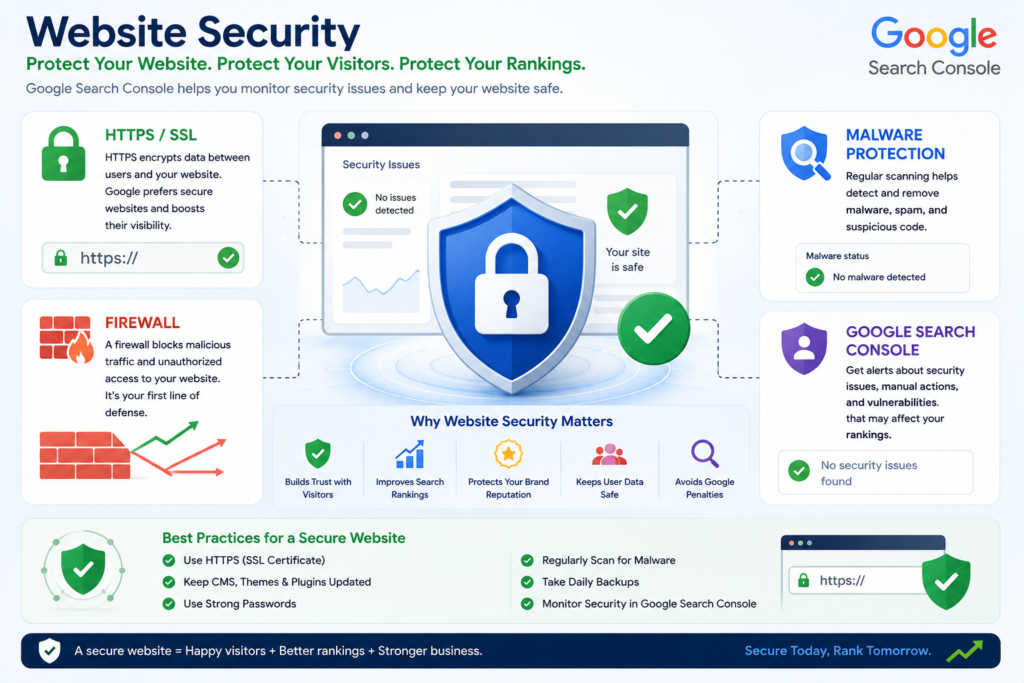
Keep Software Updated
Regularly update:
- WordPress core.
- Themes.
- Plugins.
- Server software.
Outdated software is a common source of vulnerabilities.
Use Strong Authentication
Protect administrator accounts by:
- Using strong, unique passwords.
- Enabling multi-factor authentication (MFA).
- Limiting unnecessary administrator accounts.
Perform Regular Backups
Maintain automated backups so your website can be restored if an unexpected issue occurs.
Store backups securely and test recovery procedures periodically.
Monitor Security Reports
Check Search Console regularly for:
- Security issues.
- Manual actions.
- Crawl anomalies.
Early detection makes remediation easier.
Professional Website Maintenance Workflow
Consistent maintenance helps preserve search performance and website reliability.
Daily Tasks
- Review Performance trends.
- Monitor security notifications.
- Check indexing status for important new pages.
Weekly Tasks
- Review internal linking opportunities.
- Inspect newly published URLs.
- Monitor Core Web Vitals.
- Review top-performing pages.
Monthly Tasks
- Audit XML sitemaps.
- Refresh important content.
- Review backlink growth.
- Identify crawl issues.
Quarterly Tasks
- Perform a comprehensive technical SEO audit.
- Review structured data implementation.
- Evaluate site architecture.
- Update evergreen content.
- Assess long-term search trends.
Key Takeaways
- Internal links help Google discover, understand, and prioritize your content.
- Contextual, descriptive anchor text improves both usability and crawlability.
- Focus on earning relevant, high-quality backlinks rather than accumulating large numbers of low-quality links.
- Manual actions require careful investigation, complete remediation, and, when appropriate, a reconsideration request.
- Regular monitoring of Search Console’s Security Issues and HTTPS reports supports a healthier, more secure website.
- A structured maintenance routine helps sustain long-term search performance and reduces the likelihood of technical problems.
What Is the Google Search Console API?
The Google Search Console API allows developers, SEO professionals, and businesses to access Search Console data programmatically instead of manually downloading reports.
Rather than logging into Google Search Console every day, the API enables applications to retrieve search performance data automatically and use it for dashboards, reports, monitoring systems, or custom SEO tools.
For agencies and enterprise websites managing dozens or hundreds of properties, API integration saves time and provides a scalable way to analyze search performance.
What Can the Search Console API Do?
The API allows you to retrieve information such as:
- Search queries.
- Clicks.
- Impressions.
- Average CTR.
- Average position.
- Landing pages.
- Countries.
- Devices.
- Search appearance.
- Date-based performance.
It can also support automation workflows that reduce manual reporting.
Common Use Cases
Professional SEO teams use the Search Console API to:
- Generate automated SEO reports.
- Build client dashboards.
- Monitor keyword performance.
- Detect traffic anomalies.
- Track indexing trends.
- Analyze search performance at scale.
- Integrate Search Console with internal business systems.
Google Search Console API Authentication
Before using the API, you must authenticate access through your Google Cloud project.
The general process involves:
- Creating a Google Cloud project.
- Enabling the Search Console API.
- Configuring OAuth credentials or a service account, depending on your use case.
- Granting appropriate permissions.
- Authenticating API requests.
Always follow Google’s official documentation for the latest authentication requirements.
Automating SEO Reports
One of the biggest advantages of the API is automated reporting.
Instead of manually exporting CSV files every week, businesses can schedule reports that update automatically.
Typical automated reports include:
- Weekly keyword growth.
- Monthly traffic summaries.
- Top-performing pages.
- Declining pages.
- New search queries.
- Country-based performance.
- Device comparisons.
Automation saves time and reduces reporting errors.
Google Looker Studio Integration
Looker Studio (formerly Google Data Studio) allows you to transform Search Console data into interactive dashboards.
Instead of reviewing multiple reports manually, you can visualize trends in a single interface.
Popular Dashboard Widgets
Many SEO dashboards include:
- Organic clicks.
- Organic impressions.
- Average CTR.
- Average position.
- Top landing pages.
- Top search queries.
- Country performance.
- Device performance.
- Monthly growth trends.
These dashboards make it easier to communicate performance to clients and stakeholders.
Benefits of Looker Studio
Looker Studio helps you:
- Share interactive reports.
- Monitor KPIs.
- Reduce manual reporting.
- Combine multiple Google data sources.
- Present SEO performance clearly.
Google Sheets Integration
Google Sheets is another popular reporting option.
Using the Search Console API, you can automatically populate spreadsheets with updated search performance data.
Example Reports
A Google Sheets dashboard may include:
- Top 100 keywords.
- Top landing pages.
- CTR trends.
- Weekly ranking changes.
- Click growth.
- Impression growth.
- Device performance.
- Country performance.
Because Sheets supports formulas, filters, and charts, it becomes a flexible reporting tool for individuals and small teams.
BigQuery Integration
Organizations with large datasets often combine Search Console data with BigQuery.
BigQuery supports:
- Long-term data storage.
- SQL-based analysis.
- Large-scale reporting.
- Custom dashboards.
- Machine learning workflows.
- Cross-platform data analysis.
Enterprise SEO teams use BigQuery to analyze millions of rows of historical search data efficiently.
Google Search Console for WordPress
WordPress powers a significant portion of the web, making Search Console integration particularly important.
A properly configured WordPress website allows Search Console to monitor search visibility while SEO plugins simplify technical implementation.
Connecting WordPress to Search Console
The typical process includes:
- Verify ownership of the website.
- Submit the XML sitemap.
- Confirm indexing.
- Monitor crawl reports.
- Resolve technical issues.
- Review Core Web Vitals.
This establishes a strong foundation for ongoing SEO.
Rank Math Integration
Rank Math integrates well with Search Console by helping you manage technical SEO tasks.
Key features include:
- XML sitemap generation.
- Robots meta controls.
- Canonical URL management.
- Schema markup support.
- Redirect management.
- Breadcrumb configuration.
These features complement the insights provided by Search Console.
Yoast SEO Integration
Yoast SEO offers similar functionality, including:
- XML sitemaps.
- Meta tag management.
- Canonical URLs.
- Breadcrumb support.
- Robots directives.
- Basic structured data.
Choose the plugin that best fits your workflow and ensure settings remain consistent.
WP Rocket and Caching
Caching plugins can improve loading performance.
Benefits include:
- Faster page loading.
- Reduced server load.
- Better user experience.
- Improved Core Web Vitals.
Always test your website after enabling caching to ensure pages render correctly.
Cloudflare Integration
Cloudflare can complement Search Console by improving:
- Global content delivery.
- HTTPS management.
- Security.
- Performance.
- Caching.
- DDoS protection.
These improvements contribute to a healthier website environment.
Google Search Console for Shopify
Shopify users should connect their stores to Search Console as soon as possible.
Search Console helps merchants monitor:
- Product indexing.
- Collection pages.
- Search performance.
- Mobile usability.
- Core Web Vitals.
- Technical SEO issues.
Shopify SEO Checklist
Ensure that you:
- Submit the XML sitemap.
- Verify domain ownership.
- Monitor product indexing.
- Optimize product titles.
- Improve meta descriptions.
- Fix crawl errors.
- Review structured data.
These actions improve the discoverability of your store.
WooCommerce Optimization
WooCommerce stores benefit from the same Search Console features while offering additional flexibility through WordPress.
Monitor:
- Product pages.
- Category pages.
- Tag pages.
- Checkout exclusions.
- Duplicate content.
- Structured data.
Maintaining a clean technical structure helps search engines understand your catalog.
Local Business SEO
Local businesses should use Search Console to understand how nearby customers discover their services.
Useful reports include:
- Location-based queries.
- Mobile performance.
- Service page visibility.
- Branded searches.
- Local landing page performance.
These insights support local SEO strategies alongside an optimized business profile.
Best Practices for Local Businesses
- Create dedicated location pages.
- Keep contact information consistent.
- Use LocalBusiness structured data.
- Maintain accurate business details.
- Monitor search performance regularly.
Agency Workflow Using Search Console
Digital marketing agencies often manage multiple websites simultaneously.
A structured workflow helps maintain consistency.
Daily Tasks
- Monitor traffic changes.
- Review indexing issues.
- Check manual actions.
- Investigate security alerts.
Weekly Tasks
- Analyze keyword opportunities.
- Review Core Web Vitals.
- Audit newly published content.
- Track important landing pages.
Monthly Tasks
- Prepare client reports.
- Review sitemap health.
- Refresh important content.
- Audit structured data.
- Evaluate internal linking.
AI-Assisted SEO Reporting
Modern SEO workflows increasingly use AI to interpret Search Console data.
AI can help:
- Identify trends.
- Summarize large datasets.
- Suggest optimization priorities.
- Detect unusual performance changes.
- Draft reporting summaries for stakeholders.
Human review remains essential to validate recommendations and apply business context.
Professional Best Practices
To get the most value from Google Search Console:
- Review reports consistently rather than only when traffic changes.
- Base decisions on trends over meaningful time periods.
- Combine Search Console with analytics and technical SEO tools.
- Prioritize user experience alongside technical optimization.
- Keep structured data, sitemaps, and internal links up to date.
- Use automation where it improves efficiency without sacrificing oversight.
Key Takeaways
- The Search Console API enables scalable reporting and automation.
- Looker Studio and Google Sheets simplify data visualization.
- BigQuery supports enterprise-scale analysis.
- WordPress, Shopify, and WooCommerce all benefit from proper Search Console integration.
- Local businesses can use Search Console to strengthen local search visibility.
- Agencies should adopt repeatable workflows for monitoring and reporting.
- AI can enhance reporting workflows, but strategic decisions should remain grounded in accurate data and human expertise.
Here is the final advanced section with proper H2 and H3 structure for direct insertion into your article.
Google Search Console Guide (2026–2027)
Part 10 — Advanced Tips, SEO Checklists, Common Mistakes, AI Search Readiness & Expert Recommendations
Advanced Google Search Console Tips
Once the basic reports are configured correctly, Google Search Console can become a powerful SEO decision-making platform rather than a simple traffic-monitoring tool.
Advanced users do not review reports individually. They combine queries, pages, devices, countries, dates, search appearance, indexing data, and technical reports to understand why performance is increasing or declining.
The following strategies can help website owners extract greater value from Search Console data.
Compare Different Date Ranges
Date comparison helps identify meaningful changes in performance.
Useful comparisons include:
- Last 28 days versus previous 28 days.
- Last three months versus previous three months.
- Current year versus previous year.
- Before and after a major content update.
- Before and after a website migration.
- Mobile traffic versus desktop traffic.
When reviewing changes, analyze clicks, impressions, CTR, average position, and the pages responsible for the difference.
Separate Brand and Non-Brand Queries
Branded searches include the name of your company, website, product, or author.
Non-branded searches describe a topic, service, problem, or product without mentioning your brand.
Examples of branded queries:
- Marjan Services.
- Marjan website development.
- Marjan SEO services.
Examples of non-branded queries:
- Website development services.
- Technical SEO consultant.
- Google Search Console guide.
Separating these queries provides a more accurate picture of genuine SEO growth. An increase in branded searches may indicate stronger brand awareness, while growth in non-branded searches usually reflects broader organic visibility.
Analyze Performance by Device
Search behavior may vary significantly between mobile, desktop, and tablet users.
Compare:
- Clicks.
- Impressions.
- CTR.
- Average position.
- Top-performing pages.
- Conversion behavior in your analytics platform.
A page may rank well on desktop but perform poorly on mobile because of slow loading, difficult navigation, intrusive elements, or an unclear layout.
Analyze Performance by Country
Country filters are especially useful for websites targeting multiple markets.
You can identify:
- Countries generating the most impressions.
- Regions with strong rankings but low CTR.
- Markets where localized content may be needed.
- Countries generating irrelevant traffic.
- Opportunities for location-specific landing pages.
For international SEO, compare performance before creating separate country or language versions of important pages.
Monitor Search Appearance
The Search Appearance report may show how pages perform through supported search features.
Depending on the website, available categories may include:
- Rich results.
- Product results.
- Video results.
- Merchant listings.
- Web results.
- Other supported search appearances.
Use this information to determine whether structured data and content enhancements are improving visibility.
Identify Content Decay
Content decay occurs when an established page gradually loses clicks, impressions, or rankings.
To find declining content:
- Compare the last three months with the previous three months.
- Open the Pages tab.
- Sort by the largest click decrease.
- Review the affected queries.
- Check whether search intent, competition, freshness, or content quality has changed.
Potential improvements include:
- Updating statistics.
- Improving examples.
- Expanding weak sections.
- Replacing outdated screenshots.
- Adding relevant FAQs.
- Improving internal links.
- Correcting broken external references.
- Updating the title and meta description.
Detect Keyword Cannibalization
Keyword cannibalization occurs when multiple pages compete for the same or closely related search intent.
To investigate:
- Open the Performance report.
- Select a query.
- Open the Pages tab.
- Review which URLs receive impressions for that query.
Multiple ranking pages do not always indicate a problem. However, action may be required when several similar pages alternate unpredictably, dilute authority, or fail to satisfy the search intent clearly.
Possible solutions include:
- Merging overlapping articles.
- Strengthening the primary page.
- Changing the intent of a secondary page.
- Improving internal anchor text.
- Applying an appropriate canonical tag.
- Redirecting obsolete pages.
Find Featured-Snippet Opportunities
Queries containing words such as “what,” “how,” “why,” “best,” “difference,” and “can” may present opportunities for concise answer formats.
Improve eligibility by adding:
- Direct definitions.
- Numbered steps.
- Comparison tables.
- Short explanatory paragraphs.
- Clear headings.
- Lists of requirements or benefits.
Answers should remain helpful and natural rather than being written only for search features.
Discover New Content Topics
Search Console often shows queries that are relevant to an existing page but not covered adequately.
When a query receives impressions but the current page only partially addresses it, decide whether to:
- Expand the existing page.
- Add a new subsection.
- Create a separate supporting article.
- Add a comparison table.
- Publish a dedicated service or location page.
The decision should be based on search intent, not only keyword variation.
Daily Google Search Console Checklist
A daily review does not need to be lengthy. Focus on changes that may require immediate attention.
Review Security Notifications
Check for:
- Malware warnings.
- Hacked content.
- Phishing detections.
- Harmful downloads.
- Other security alerts.
Security issues should be investigated promptly.
Review Manual Actions
Confirm that no new manual action has appeared.
A manual action can affect selected pages, sections, or the entire website.
Check Important New Pages
Review recently published or updated pages to confirm:
- Google can access them.
- The intended canonical URL is selected.
- They are included in the sitemap.
- No accidental
noindexdirective is present.
Look for Unusual Performance Changes
A sudden decline may result from:
- Tracking or reporting differences.
- Website downtime.
- Accidental redirects.
- Removed pages.
- Technical changes.
- Seasonal demand.
- Search ranking changes.
Do not make major decisions based on one day of data alone unless there is clear evidence of a technical failure.
Weekly Google Search Console Checklist
Review Search Performance
Compare recent performance with the preceding period.
Analyze:
- Click growth.
- Impression growth.
- CTR changes.
- Average-position changes.
- New queries.
- Declining pages.
Find Low-Hanging Fruit Keywords
Identify terms ranking approximately between positions 8 and 20.
Prioritize queries with:
- Strong impressions.
- Relevant intent.
- Commercial or strategic value.
- A page that can be improved meaningfully.
Inspect Recently Updated URLs
Confirm that major content updates are crawlable and technically correct.
Review Page Indexing Changes
Investigate unexpected increases in:
- Crawled but not indexed pages.
- Discovered but not indexed pages.
- Soft 404 pages.
- Duplicate pages.
- Redirect errors.
- Server errors.
Review Core Web Vitals
Look for new groups of poor or needs-improvement URLs.
Do not optimize only one page if the report identifies a template-level issue affecting many URLs.
Monthly Google Search Console Checklist
Audit XML Sitemaps
Confirm that:
- Sitemaps are accessible.
- Important canonical URLs are included.
- Deleted URLs have been removed.
- Redirected and noindex URLs are excluded.
- Submitted and indexed counts remain reasonable.
Review Internal Linking
Identify important pages receiving too few internal links.
Add contextual links from related, authoritative pages where appropriate.
Refresh Declining Content
Prioritize pages with:
- Meaningful click loss.
- Falling impressions.
- Reduced CTR.
- Decreasing rankings.
- Outdated information.
Review Backlink Data
Check:
- Top linked pages.
- New linking patterns.
- Important pages with limited external links.
- Unexpected or suspicious linking domains.
Review Structured Data Reports
Correct invalid items and investigate warning trends.
Warnings do not always prevent eligibility, but important missing fields should be reviewed.
Quarterly Google Search Console Checklist
Conduct a Full Technical SEO Audit
Review:
- Crawlability.
- Indexability.
- Canonical tags.
- Redirects.
- XML sitemaps.
- Robots.txt.
- HTTPS.
- Structured data.
- Core Web Vitals.
- Internal links.
Review Website Architecture
Ensure important pages are not buried too deeply within the site.
A clear structure should guide users and search engines from broad topics to detailed pages.
Evaluate Content Clusters
Check whether each major topic includes:
- A strong pillar page.
- Supporting articles.
- Logical internal links.
- Clear search-intent separation.
- Updated information.
Review International and Local Performance
For international websites, analyze country and language performance.
For local businesses, review service and location-based queries.
Audit Templates
Inspect templates used for:
- Blog posts.
- Product pages.
- Service pages.
- Categories.
- Author archives.
- Location pages.
Template-level problems can affect hundreds or thousands of URLs.
Yearly Google Search Console Checklist
Review Annual Growth
Compare the current year with the previous year.
Analyze:
- Total clicks.
- Total impressions.
- Average CTR.
- Average position.
- Top pages.
- Top queries.
- Country growth.
- Device growth.
Update the SEO Strategy
Use annual data to decide:
- Which topics deserve expansion.
- Which pages should be merged.
- Which markets should be targeted.
- Which services generate qualified demand.
- Which content formats perform best.
Remove or Consolidate Low-Value Content
Pages that remain thin, outdated, duplicative, or irrelevant may need to be:
- Improved.
- Merged.
- Redirected.
- Noindexed.
- Removed.
Every decision should consider user value, backlinks, traffic, and business importance.
Common Google Search Console Mistakes
Even experienced website owners can misinterpret Search Console data. Avoiding the following mistakes can prevent unnecessary work and harmful SEO decisions.
Expecting Immediate Results
Search Console data and indexing changes may not appear instantly.
SEO improvements require time for crawling, processing, evaluation, and ranking adjustments.
Requesting Indexing Repeatedly
Repeated requests do not force Google to rank or index a page.
Resolve quality, accessibility, duplication, or internal-linking problems first.
Treating Average Position as an Exact Ranking
Average position is calculated across queries, devices, countries, dates, and search-result formats.
It should be treated as a directional metric rather than a precise rank tracker.
Ignoring Search Intent
A page may rank poorly because it does not provide the content format users expect.
For example, a service page may not satisfy an informational query, while a general blog post may not satisfy a transactional query.
Focusing Only on Clicks
Clicks are important, but impressions, CTR, and query visibility provide additional context.
A page gaining impressions before clicks may be showing early signs of growth.
Ignoring Low-CTR Queries
Deep impressions with low CTR may indicate:
- An unattractive title.
- A weak meta description.
- Search-intent mismatch.
- Stronger competing results.
- Limited brand recognition.
Creating a New Page for Every Keyword
Closely related keywords often belong on one comprehensive page.
Creating many near-duplicate pages can weaken quality and create cannibalization.
Ignoring Mobile Performance
For many websites, most search impressions come from mobile devices.
Poor mobile usability can reduce engagement and conversions even when rankings remain stable.
Submitting Non-Canonical URLs in the Sitemap
Sitemaps should normally contain canonical, indexable URLs that return a successful status.
Including Noindex Pages in the Sitemap
A sitemap that includes noindex pages sends conflicting signals.
Blocking Pages in Robots.txt While Expecting Indexing
Blocking crawling can prevent Google from accessing important page content and directives.
Using Incorrect Canonical Tags
A canonical tag pointing to the wrong URL may cause the preferred page to be excluded.
Misunderstanding “Crawled — Currently Not Indexed”
This status does not always mean a technical error.
Google may have crawled the page but decided that indexing was not currently justified.
Ignoring Soft 404 Pages
A page can return a 200 status while still being treated as a soft 404 because it offers little meaningful content.
Publishing Thin Location Pages
Changing only a city name across numerous pages rarely creates strong local value.
Each location page should contain genuinely useful, location-specific information.
Overusing Exact-Match Anchor Text
Internal links should be descriptive but natural.
Repetitive, forced anchor text can reduce readability.
Ignoring Security Alerts
A hacked website can lose user trust, traffic, and search visibility.
Assuming Search Console Replaces Analytics
Search Console reports search performance before the click, while analytics platforms report behavior after the visitor arrives.
Both are necessary for complete analysis.
Depending Only on One SEO Tool
No single tool provides every required insight.
Combine Search Console with analytics, crawling software, server logs, and other appropriate tools.
Comparing Inappropriate Date Periods
Comparing a holiday period with a normal business period may produce misleading conclusions.
Account for seasonality and business cycles.
Making Changes Too Frequently
Constantly changing titles, headings, URLs, and content makes it difficult to identify which change produced an improvement or decline.
Changing URLs Without Redirects
When URLs must change, appropriate redirects should preserve access and consolidate signals.
Ignoring Image Search Performance
Image-heavy websites should review image visibility, filenames, alt text, page relevance, and loading performance.
Ignoring Video Search Opportunities
Pages containing important videos should include accessible video content, useful supporting text, appropriate thumbnails, and valid structured data where relevant.
Using Misleading Structured Data
Structured data must represent visible and accurate page content.
Manipulative markup can cause rich-result ineligibility or manual action.
Neglecting User Permissions
Former employees, developers, or agencies should not retain unnecessary access.
Review Search Console users periodically.
Failing to Document SEO Changes
Maintain a record of:
- Website migrations.
- Major content updates.
- Template changes.
- Plugin changes.
- Redirect implementations.
- Structured data changes.
- Server changes.
Documentation makes performance analysis more reliable.
Google Search Console Best Practices
Verify the Domain Property
Domain verification provides broader coverage across supported protocols and subdomains.
Submit Clean XML Sitemaps
Submit only valid, canonical, indexable URLs.
Check Reports Consistently
Regular monitoring helps detect problems before they cause substantial damage.
Prioritize Important Pages
Not every URL deserves equal attention.
Focus first on pages that support traffic, leads, sales, reputation, or strategic authority.
Use Meaningful Date Comparisons
Select timeframes that account for seasonality, campaigns, and publishing schedules.
Combine Performance and Indexing Data
A page with no impressions may have:
- An indexing problem.
- Weak query relevance.
- Limited demand.
- Poor internal links.
- Strong competition.
Review multiple reports before reaching a conclusion.
Improve Content Before Requesting Indexing
A technically accessible page may still lack sufficient value.
Maintain Accurate Structured Data
Update schema whenever visible content or business details change.
Protect Administrative Access
Grant only the permissions required for each user.
Keep a Regular SEO Maintenance Schedule
Search performance should be monitored continuously rather than only after a decline.
Expert Recommendations
Build Content Around Search Intent
Keywords should guide content planning, but user intent should determine page format, depth, examples, and calls to action.
Improve Existing Rankings Before Chasing New Topics
Pages already receiving impressions are often the fastest opportunities for growth.
Use Search Console as a Content Research Tool
Real queries reveal:
- User vocabulary.
- Emerging questions.
- Unmet content needs.
- Comparison opportunities.
- Location demand.
- Commercial intent.
Connect SEO Data to Business Results
Traffic growth alone is not the final objective.
Measure whether organic visitors:
- Submit enquiries.
- Purchase products.
- Contact the business.
- Download resources.
- Create accounts.
- Book appointments.
Maintain Technical Simplicity
Complex websites are not automatically better.
A clean architecture, stable URLs, strong internal links, fast templates, and accurate metadata often produce more reliable long-term results.
Focus on Sustainable Improvements
Avoid manipulative shortcuts such as:
- Keyword stuffing.
- Fabricated reviews.
- Hidden content.
- Artificially generated doorway pages.
- Irrelevant backlinks.
- Misleading structured data.
Preparing for AI Overviews and AI-Powered Search
AI-powered search systems increasingly summarize and organize information from multiple sources.
Website owners should focus on making content understandable, trustworthy, specific, and easy to extract accurately.
Provide Direct Answers
Important questions should receive clear answers near the relevant heading.
Avoid delaying the answer with unnecessary introductions.
Use Logical Heading Structures
A clear hierarchy helps users and search systems understand relationships between topics.
Use:
- One main page title.
- Descriptive H2 sections.
- Supporting H3 subsections.
- H4 headings only where necessary.
Strengthen Entity Clarity
Clearly identify:
- The organization.
- Authors.
- Products.
- Services.
- Locations.
- Topics.
- Relationships between pages.
Include Verifiable Information
Support significant factual claims with reliable references where appropriate.
Demonstrate Experience
Useful experience signals may include:
- Original screenshots.
- Tested workflows.
- Case studies.
- Real examples.
- Practical warnings.
- Measured results.
Keep Content Updated
Outdated dates, screenshots, prices, product details, and recommendations can reduce usefulness.
Create Self-Contained Sections
Each major subsection should explain its topic clearly enough to be understood independently.
Use Tables and Step-by-Step Processes
Structured formats make complex information easier to understand.
Avoid Writing Only for Search Engines
Content that repeats keywords without offering substance is unlikely to create sustainable value.
Future of Google Search Console
Google Search Console will likely continue developing as search becomes more visual, conversational, multimodal, and AI-assisted.
Website owners should expect increasing emphasis on:
- Content interpretation.
- User experience.
- structured data quality.
- Video and image visibility.
- merchant information.
- technical accessibility.
- entity understanding.
- search-feature reporting.
- Automation and data integration.
The most successful SEO strategies will combine technical accuracy, useful content, strong brand signals, and real user satisfaction.
Final Key Takeaways
Google Search Console is more than a reporting dashboard. It is a strategic platform for understanding how Google discovers, processes, indexes, and displays a website.
To use it effectively:
- Monitor search performance consistently.
- Analyze queries and pages together.
- Improve low-hanging fruit keywords.
- Resolve indexing issues systematically.
- Maintain accurate XML sitemaps.
- Monitor Core Web Vitals.
- Implement valid structured data.
- Build a logical internal-linking system.
- Review backlinks and security reports.
- Use APIs and dashboards where automation is useful.
- Connect SEO performance with meaningful business outcomes.
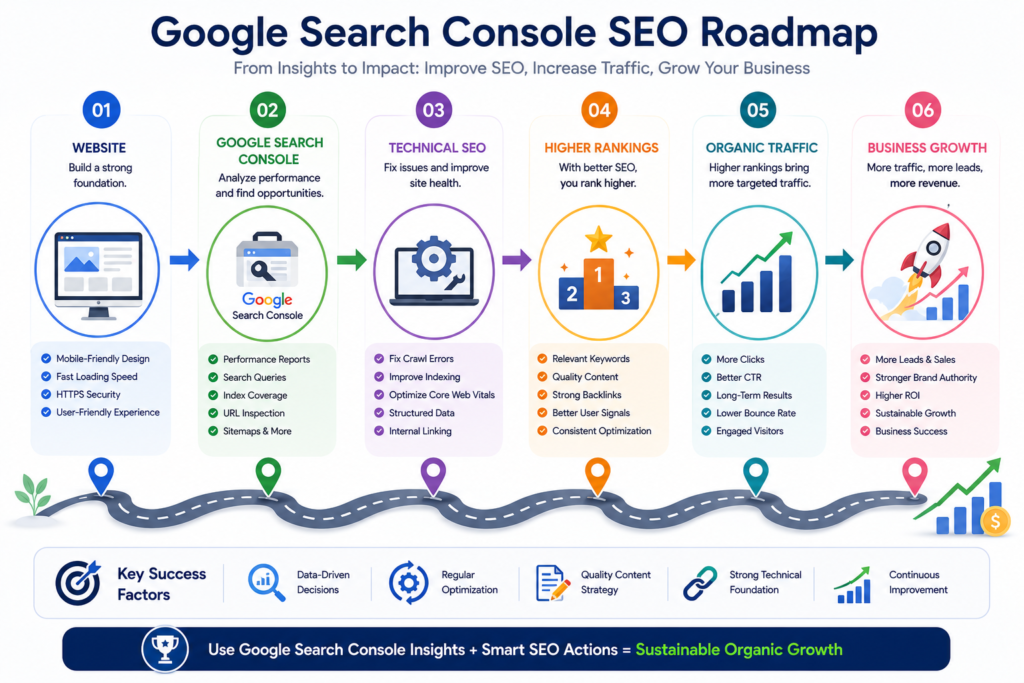
Final Conclusion
Google Search Console provides website owners with direct access to essential information about their visibility in Google Search.
It reveals which queries generate impressions, which pages attract clicks, how Google processes individual URLs, why certain pages are excluded from the index, and whether technical, security, or structured-data issues require attention.
However, Search Console does not replace a complete SEO strategy. It does not automatically improve rankings, create high-quality content, earn backlinks, or fix technical problems. Its value depends on how accurately the data is interpreted and how effectively the findings are converted into meaningful improvements.
A successful workflow combines Search Console with strong content, technical SEO, user-focused design, reliable analytics, transparent expertise, and continuous maintenance.
Website owners who review the platform consistently can identify opportunities earlier, resolve problems faster, improve content more intelligently, and build more sustainable organic visibility over time.
The objective should not be to chase every impression or ranking fluctuation. The objective should be to create a technically accessible, genuinely useful, trustworthy website that satisfies users and supports measurable business goals.
Frequently Asked Questions About Google Search Console
Is Google Search Console Free?
Yes. Google Search Console is available without a subscription fee for verified website owners and authorized users.
Does Google Search Console Improve Rankings Automatically?
No. It provides information and diagnostic reports, but website owners must implement the necessary improvements.
How Long Does Google Search Console Take to Show Data?
Some reports may take time to process. Recently verified properties may not display complete historical data immediately.
Why Is My New Page Not Indexed?
Possible reasons include weak internal linking, low content value, duplication, crawl restrictions, canonical issues, or limited crawl prioritization.
Should I Request Indexing After Every Edit?
No. Request indexing after publishing a new important page or making a meaningful update, not after every small correction.
How Often Should I Check Search Console?
Important websites should review critical notifications regularly, conduct weekly performance checks, and complete deeper monthly audits.
What Is the Difference Between Clicks and Impressions?
An impression occurs when a search result containing your page is displayed. A click occurs when a user selects that result.
What Is a Good CTR?
CTR varies by position, query type, device, brand strength, search feature, and user intent. Compare pages and queries within relevant contexts rather than relying on one universal percentage.
Is Average Position Accurate?
It is useful as a trend indicator, but it is not an exact daily ranking for every user or location.
Can Search Console Show All Backlinks?
It provides a sample of links known to Google and should not be treated as a complete backlink database.
Does Search Console Replace Google Analytics?
No. Search Console focuses on search visibility and activity before the click, while analytics tools measure user behavior after arrival.
What Does “Crawled — Currently Not Indexed” Mean?
Google accessed the page but did not currently include it in the index. The page may need stronger value, clearer uniqueness, or better internal support.
What Does “Discovered — Currently Not Indexed” Mean?
Google knows the URL exists but has not yet crawled it.
Should Noindex Pages Appear in an XML Sitemap?
Normally, no. Sitemaps should generally include canonical URLs that you want search engines to index.
Can I Submit Multiple Sitemaps?
Yes. Large or complex websites often use separate sitemaps for posts, pages, products, videos, images, or news content.
What Is URL Inspection Used For?
It helps review crawlability, index status, canonical selection, rendered content, and related technical information for an individual URL.
What Are Core Web Vitals?
They are user-experience metrics focusing on loading performance, interaction responsiveness, and visual stability.
Does Passing Core Web Vitals Guarantee Higher Rankings?
No. Core Web Vitals are one part of a broader search and user-experience system.
What Is a Manual Action?
It is an action applied after Google determines that a website or page violates relevant spam policies.
How Do I Recover from a Manual Action?
Identify the issue, correct it fully, review similar problems across the site, and submit a clear reconsideration request when applicable.
Can Search Console Detect Malware?
It can report certain security issues detected by Google, but it should not replace dedicated website security monitoring.
Which Verification Method Is Best?
Domain verification through DNS is generally the most comprehensive option because it covers supported protocols and subdomains.
Can I Add Multiple Users?
Yes. Property owners can grant appropriate access levels to team members, agencies, developers, and other authorized users.
Does Search Console Work with WordPress and Shopify?
Yes. It works with any website that can be verified and accessed by Google, including WordPress, Shopify, WooCommerce, and custom platforms.
Can Search Console Help with Keyword Research?
Yes. Its Performance report shows real queries that already generate impressions and clicks for your website.
How Can I Find Low-Hanging Fruit Keywords?
Filter queries with meaningful impressions and average positions near the bottom of the first page or on the second page, then improve the relevant landing pages.
Can Search Console Help Increase CTR?
Yes. It can identify queries and pages with high impressions but comparatively low clicks, allowing you to improve titles, descriptions, relevance, and search presentation.
Should I Remove Every Non-Indexed Page?
No. Some pages are intentionally excluded, duplicated, redirected, or canonicalized. Review the reason before taking action.
Can Search Console Be Used for Ecommerce SEO?
Yes. Ecommerce stores can monitor products, categories, merchant listings, structured data, Core Web Vitals, indexing, and search performance.
Is Google Search Console Suitable for Beginners?
Yes. Beginners can start with performance, indexing, sitemap, and URL Inspection reports, then gradually explore advanced features.
Official References and Further Reading
For the most current technical requirements, implementation rules, structured-data eligibility, API documentation, and policy information, consult Google’s official documentation and Search Console Help resources.
Because Google may update reports, terminology, eligibility requirements, and supported search features over time, website owners should verify important technical decisions against the latest official guidance before implementation.
Suggested Guides
- Website Planning Checklist
- Types of Websites Explained
- Website Development Cost in Pakistan 2027
- Complete Domain Name Guide 2026
- Hostinger Agency Hosting 2026
- Proven On-Page SEO Services 2026
- Why Is My Website Not Getting Customers?
- Website Mistakes to Avoid
- Shopify Guide for Beginners 2026
References & Further Reading
- Google Search Console Help Center
- Google Search Console Documentation
- Google Search Central
- Google Search Essentials
- Google SEO Starter Guide
- Google Search Console API Documentation
- Google Crawling and Indexing Documentation
- Google Core Web Vitals Documentation
- Schema.org Official Website
- Google Structured Data Documentation
- Google Rich Results Test
- Google PageSpeed Insights
- Google Lighthouse Documentation
- Google Mobile-First Indexing Guidance
- Google Safe Browsing Transparency Report
- Google Robots.txt Documentation
- Google XML Sitemap Documentation
- Google Canonicalization Documentation
- Google URL Inspection Tool Documentation
- Google Search Central Blog
7 Comments