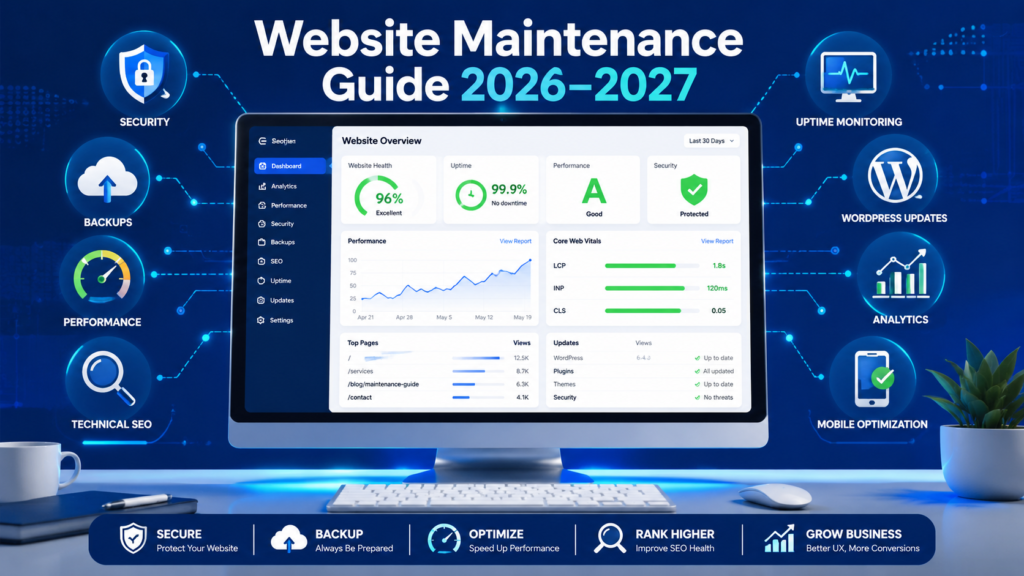
Table of Contents
Keeping a website online is not the same as keeping it healthy.
A website can appear normal to visitors while important problems develop behind the scenes. A contact form may stop delivering leads. A plugin may contain a security vulnerability. Backups may fail without anyone noticing. Pages may become slower. Important URLs may return errors. Analytics may stop recording conversions. Search engines may encounter crawling or indexing problems.
That is why website maintenance should be treated as an ongoing business process rather than an occasional technical task.
This guide explains how website maintenance works, what should be checked regularly, how often maintenance tasks should be performed, and how businesses can build a reliable maintenance process.
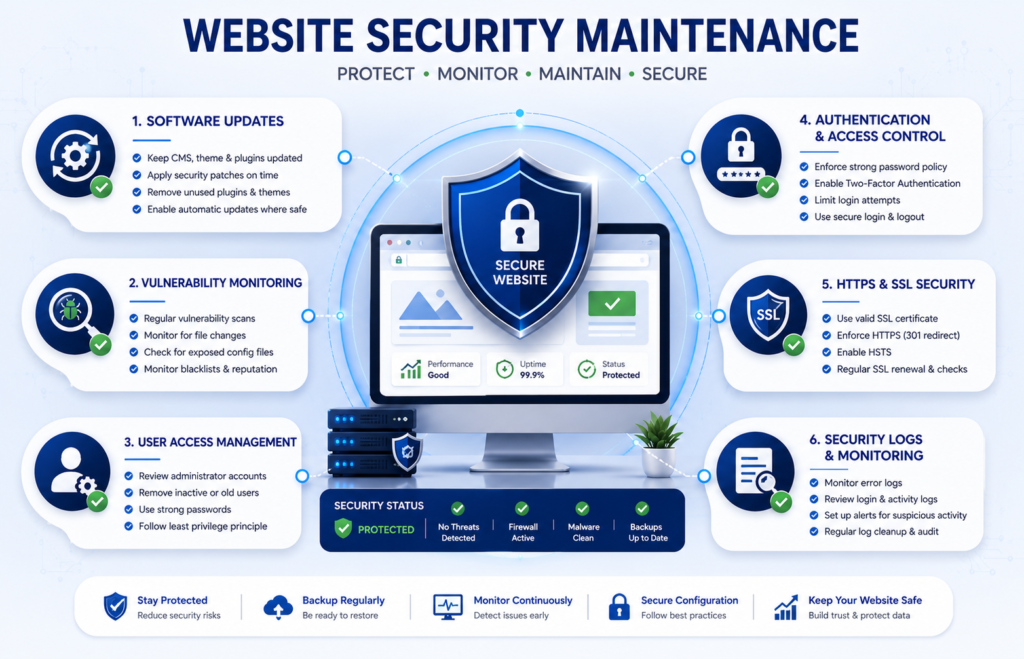
Whether you manage a small business website, WordPress site, ecommerce store, service website, blog, or growing online platform, this guide provides a practical framework for keeping it secure, fast, reliable, recoverable, and useful.
Quick Answer: What Is Website Maintenance?
Website maintenance is the ongoing process of monitoring, updating, securing, backing up, testing, repairing, and optimizing a website to keep it secure, available, recoverable, fast, functional, accurate, and search-friendly.
A complete website maintenance process may include:
- CMS, plugin, and theme updates.
- Website security monitoring.
- Vulnerability reviews.
- Website and database backups.
- Backup restoration testing.
- Uptime monitoring.
- Website performance optimization.
- Core Web Vitals monitoring.
- Technical SEO checks.
- Broken link monitoring.
- Content updates.
- Contact form testing.
- Checkout and payment testing.
- Analytics verification.
- Mobile usability checks.
- Accessibility reviews.
- Third-party integration monitoring.
The exact maintenance requirements depend on the website’s size, platform, complexity, traffic, business importance, transaction volume, and technical infrastructure.
Website Maintenance at a Glance
| Maintenance Area | What You Should Monitor | Typical Frequency |
|---|---|---|
| Security | Updates, vulnerabilities, access, suspicious activity | Continuous to weekly |
| Backups | Files, database, backup completion, recovery | Daily to weekly |
| Uptime | Availability and critical endpoints | Continuous |
| Performance | Speed, Core Web Vitals, scripts, images | Monthly |
| Technical SEO | Indexing, sitemap, redirects, canonicals, errors | Monthly |
| Content | Accuracy, outdated information, links | Monthly to quarterly |
| Forms | Submissions, email delivery, CRM integration | Weekly |
| Ecommerce | Cart, checkout, payments, transactional emails | Daily to weekly |
| Analytics | Tracking, conversions, e-commerce events | Monthly |
| Accessibility | Keyboard use, forms, headings, contrast | Quarterly |
| Strategic Audit | Hosting, technology, policies, architecture | Annually |
Why Website Maintenance Matters
A modern website is not a static collection of pages.
It may depend on:
- Hosting infrastructure.
- Domain and DNS configuration.
- Content management systems.
- Databases.
- Themes.
- Plugins.
- APIs.
- Payment gateways.
- Analytics platforms.
- Email services.
- Content delivery networks.
- Security systems.
- Third-party applications.
These components change over time.
Software receives updates. Security vulnerabilities are discovered. External services modify their APIs. Website databases grow. Content becomes outdated. Search engines recrawl pages. New scripts affect performance. Employees and contractors gain or lose access.
Without structured maintenance, small problems can gradually become serious operational issues.
1. Website Maintenance Helps Reduce Security Risk
Website security is not a one-time configuration.
New vulnerabilities can be discovered in:
- CMS software.
- Plugins.
- Themes.
- Frameworks.
- Libraries.
- Server software.
- Third-party integrations.
Regular website security maintenance helps website owners identify and respond to these risks.
Important activities include:
- Reviewing security updates.
- Applying appropriate patches.
- Monitoring vulnerabilities.
- Removing unused software.
- Reviewing administrator accounts.
- Removing unnecessary access.
- Monitoring suspicious activity.
- Maintaining HTTPS.
- Maintaining reliable backups.
- Preparing recovery procedures.
No maintenance strategy can guarantee that a website will never experience a security incident. However, disciplined preventive maintenance can reduce avoidable exposure and improve recovery readiness.
2. Website Maintenance Helps Prevent Extended Downtime
Downtime can affect:
- Leads.
- Sales.
- Customer support.
- Bookings.
- Applications.
- Membership access.
- Brand credibility.
Possible causes include:
- Hosting failures.
- Application errors.
- Failed software updates.
- Database problems.
- DNS issues.
- Resource limitations.
- Security incidents.
- Third-party service failures.
- Human error.
Automated website uptime monitoring can detect availability problems and notify the responsible person or team.
For business-critical websites, monitoring should extend beyond the homepage.
Important endpoints may include:
- Contact pages.
- Customer login.
- Checkout.
- Payment pages.
- Booking systems.
- APIs.
3. Website Maintenance Protects Website Performance
Website performance can gradually decline even when no single major problem occurs.
For example, a website may accumulate:
- Larger images.
- Additional plugins.
- Tracking scripts.
- Advertising tags.
- Chat widgets.
- Video embeds.
- Marketing pixels.
- Database records.
- Third-party JavaScript.
Each addition may appear harmless individually, but the combined effect can reduce website speed and responsiveness.
Regular website performance maintenance helps identify these regressions before they become permanent.
4. Website Maintenance Supports SEO
SEO does not end when a page is published or indexed.
Routine technical maintenance can identify problems such as:
- Broken internal links.
- Important 404 errors.
- Redirect chains.
- Redirect loops.
- XML sitemap problems.
- Robots.txt mistakes.
- Canonical URL issues.
- Crawl errors.
- Indexing problems.
- Slow pages.
- Structured data errors.
- Orphan pages.
Website maintenance cannot guarantee higher rankings. However, it can protect the technical foundation that allows search engines to crawl, understand, and index important website content.
5. Website Maintenance Protects Leads and Sales
A website can continue receiving traffic while silently losing conversions.
Consider a service business.
The contact page loads correctly, but the form no longer sends email notifications.
Visitors can still:
- Open the page.
- Complete the form.
- Click submit.
- See a confirmation message.
From the visitor’s perspective, everything appears successful.
But if the business never receives the enquiry, the website is failing at one of its most important functions.
A professional maintenance workflow should therefore test the entire conversion path:
Visitor → Form → Submission → Processing → Email → CRM → Analytics → Confirmation
For ecommerce websites, the equivalent workflow may be:
Product → Cart → Checkout → Payment → Order → Transactional Email → Analytics
6. Website Maintenance Keeps Information Accurate
Content can become outdated even when the technical website remains healthy.
Information that should be reviewed periodically includes:
- Prices.
- Services.
- Products.
- Contact details.
- Staff information.
- Opening hours.
- Policies.
- Statistics.
- Screenshots.
- External references.
- Internal links.
Content freshness does not mean changing a publication date without changing the content.
A meaningful update should improve accuracy, completeness, relevance, usefulness, or supporting evidence.
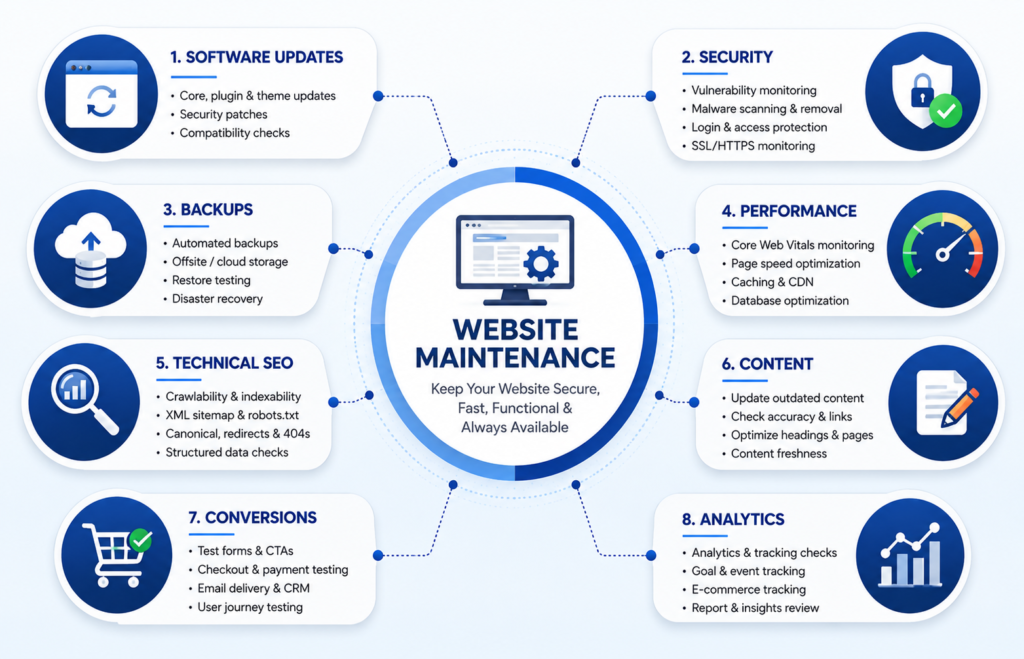
What Does Website Maintenance Include?
A professional website maintenance plan usually combines several technical and editorial disciplines.
Software Maintenance
Software maintenance may include:
- CMS updates.
- Plugin updates.
- Theme updates.
- Framework updates.
- Library updates.
- Runtime compatibility reviews.
- Compatibility testing.
Significant updates should not always be treated as simple one-click actions.
For an important website, a safer workflow is:
- Review the update.
- Confirm a recent backup.
- Assess compatibility.
- Test in staging when appropriate.
- Deploy the update.
- Test important functionality.
- Monitor the website.
- Roll back if a serious problem occurs.
Security Maintenance
Security maintenance can include:
- Vulnerability monitoring.
- Security patching.
- Malware monitoring.
- Login monitoring.
- Administrator access reviews.
- Permission reviews.
- HTTPS checks.
- Security logging.
- Firewall reviews where applicable.
Backup and Recovery Maintenance
Backup maintenance can include:
- Website file backups.
- Database backups.
- Media backups.
- Configuration backups.
- Offsite storage.
- Backup retention.
- Restore testing.
A backup strategy should answer four basic questions:
- What is being backed up?
- How frequently is it backed up?
- Where is the backup stored?
- Can the backup actually be restored?
Performance Maintenance
Performance maintenance can include:
- Core Web Vitals monitoring.
- Image optimization.
- Cache management.
- CDN reviews.
- Database optimization.
- JavaScript reviews.
- Third-party script audits.
- Server performance monitoring.
Technical SEO Maintenance
Technical SEO maintenance may include:
- Google Search Console monitoring.
- Crawlability checks.
- Indexability checks.
- XML sitemap maintenance.
- Robots.txt reviews.
- Canonical URL checks.
- Redirect audits.
- 404 monitoring.
- Internal link maintenance.
- Structured data validation.
- Core Web Vitals monitoring.
Content Maintenance
Content maintenance can include:
- Updating service information.
- Reviewing product information.
- Updating pricing where published.
- Correcting outdated facts.
- Replacing old screenshots.
- Reviewing statistics.
- Updating policies.
- Fixing broken references.
- Improving internal links.
Conversion Maintenance
Commercial websites should regularly test:
- Contact forms.
- Quote forms.
- Booking systems.
- Shopping carts.
- Checkout.
- Payment gateways.
- CRM integrations.
- Transactional emails.
- Conversion tracking.
Analytics Maintenance
Analytics maintenance can include:
- Verifying analytics installation.
- Testing conversion events.
- Reviewing ecommerce tracking.
- Checking important data anomalies.
- Confirming tracking after redesigns or migrations.
Accessibility and Mobile Maintenance
Accessibility and mobile maintenance may include:
- Alternative text reviews.
- Keyboard navigation.
- Form labels.
- Heading hierarchy.
- Color contrast.
- Focus states.
- Mobile navigation.
- Mobile forms.
- Mobile checkout.
Preventive vs Corrective Website Maintenance
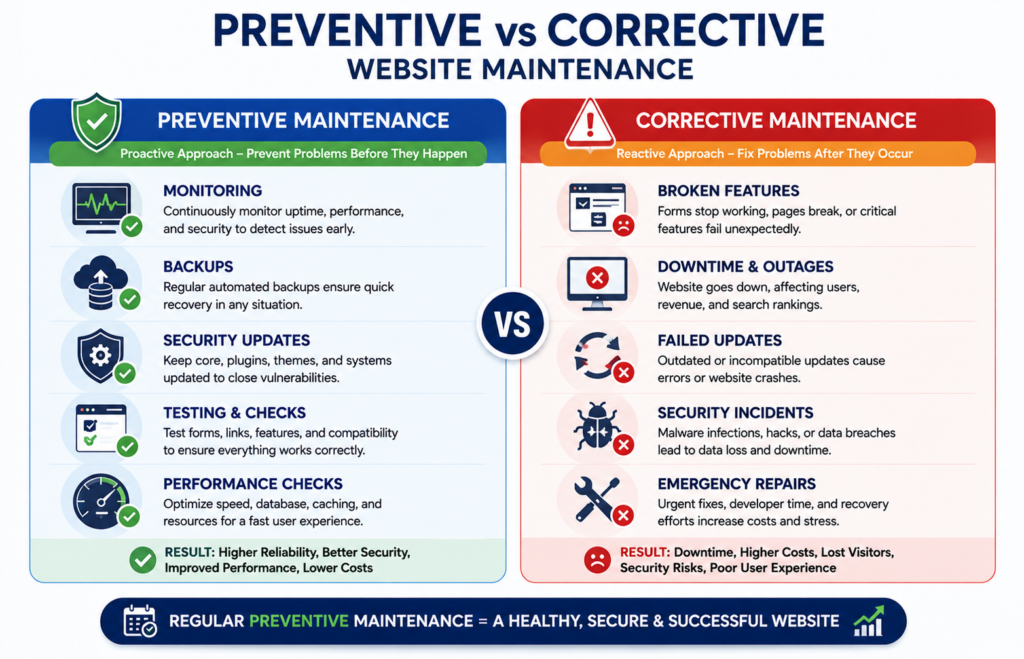
Website maintenance can broadly be divided into two categories.
Preventive Website Maintenance
Preventive maintenance takes place before a visible failure occurs.
Examples include:
- Creating backups.
- Installing security updates.
- Monitoring uptime.
- Testing forms.
- Reviewing website performance.
- Monitoring vulnerabilities.
- Checking Google Search Console.
- Reviewing administrator access.
The objective is to reduce the likelihood or impact of future problems.
Corrective Website Maintenance
Corrective maintenance occurs after a problem has already appeared.
Examples include:
- Fixing a broken form.
- Repairing a failed update.
- Resolving a server error.
- Restoring missing data.
- Repairing checkout functionality.
- Correcting broken redirects.
Preventive vs Corrective Website Maintenance
| Factor | Preventive Maintenance | Corrective Maintenance |
|---|---|---|
| Timing | Before a failure | After a failure |
| Main Goal | Reduce risk | Restore functionality |
| Nature | Planned | Often reactive |
| Example | Apply a security patch | Repair a compromised component |
| Downtime Risk | Usually lower | Potentially higher |
| Business Impact | Controlled where possible | Can be unpredictable |
A mature website maintenance strategy uses both, but it emphasizes preventive maintenance whenever practical.
Complete Website Maintenance Schedule
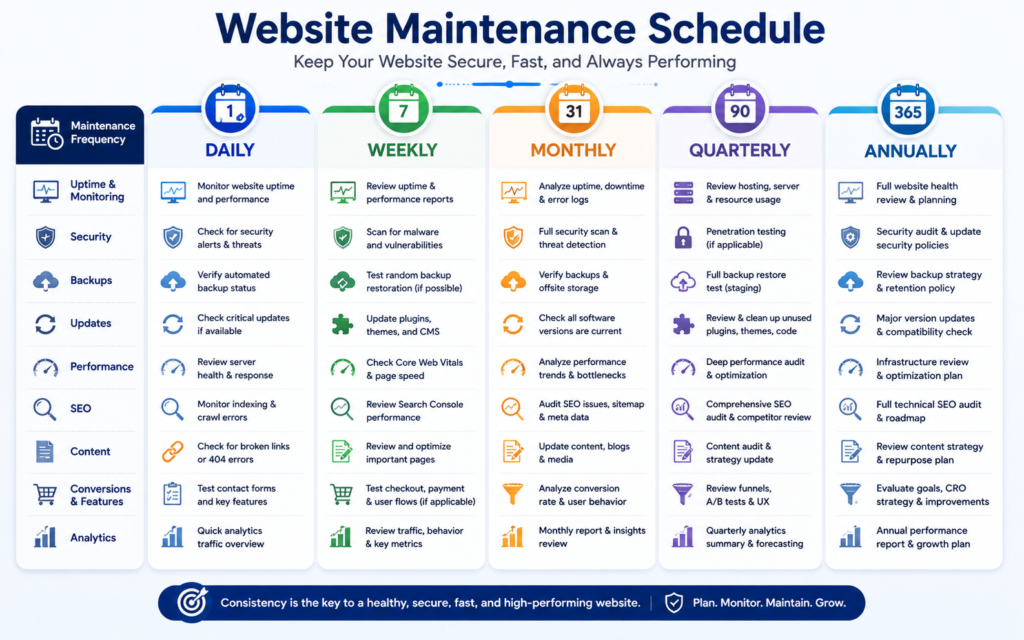
A structured website maintenance schedule makes ongoing maintenance easier to manage and measure.
A practical framework is:
Continuous Monitoring → Weekly Checks → Monthly Maintenance → Quarterly Audits → Annual Strategic Review
The exact frequency should reflect the website’s business risk.
A small informational website does not necessarily require the same maintenance frequency as an e-commerce store processing transactions throughout the day.
Daily Website Maintenance Tasks
Daily maintenance should focus on critical operational signals rather than manually reviewing every page.
Monitor Website Uptime
Automated monitoring can check:
- Homepage availability.
- Critical landing pages.
- Login systems.
- Checkout.
- APIs.
If an outage occurs:
- Confirm the outage.
- Determine its scope.
- Review hosting status.
- Check recent changes.
- Review relevant errors.
- Roll back a problematic change where appropriate.
- Restore from a verified backup if necessary.
- Test important functionality.
- Document the incident.
Review Critical Security Alerts
Monitor important alerts such as:
- Suspicious login activity.
- Unexpected file changes.
- Malware indicators.
- Critical vulnerabilities.
- Unauthorized administrator changes.
Confirm Critical Backup Jobs
For websites using daily backups, monitor:
- Backup completion.
- Database backup status.
- File backup status.
- Storage errors.
- Failed jobs.
Monitor Critical Ecommerce Functions
For ecommerce websites, monitor:
- Checkout availability.
- Payment failures.
- Order processing.
- Inventory synchronization.
- Transactional email problems.
Weekly Website Maintenance Checklist
Weekly maintenance should focus on operational reliability.
Software Updates
- [ ] Review CMS updates.
- [ ] Review plugin updates.
- [ ] Review theme updates.
- [ ] Review security patches.
- [ ] Test significant updates where appropriate.
Backups
- [ ] Confirm scheduled backups.
- [ ] Review failed backup jobs.
- [ ] Verify required data is included.
Security
- [ ] Review important security alerts.
- [ ] Check suspicious login activity.
- [ ] Review critical vulnerability notices.
Forms and Conversions
- [ ] Test contact forms.
- [ ] Test quote forms.
- [ ] Verify email notifications.
- [ ] Verify CRM delivery where applicable.
- [ ] Check important conversion events.
Important Pages
- [ ] Review the homepage.
- [ ] Check important service pages.
- [ ] Test key landing pages.
- [ ] Test login where applicable.
- [ ] Test checkout where applicable.
User Journeys
For a service website, test:
Landing Page → CTA → Form → Confirmation
For ecommerce, test:
Product → Cart → Checkout → Payment → Confirmation
Monthly Website Maintenance Checklist
Monthly website maintenance should provide a broader health review.
Security
- [ ] Review website security.
- [ ] Review administrator accounts.
- [ ] Remove unnecessary access.
- [ ] Review vulnerability findings.
- [ ] Verify HTTPS.
Backups and Recovery
- [ ] Verify backup retention.
- [ ] Review failed backups.
- [ ] Confirm offsite storage where appropriate.
- [ ] Perform restore testing according to risk.
Performance
- [ ] Review Core Web Vitals.
- [ ] Test important page templates.
- [ ] Review oversized images.
- [ ] Review caching.
- [ ] Review CDN performance.
- [ ] Audit unnecessary scripts.
- [ ] Review database growth.
Technical SEO
- [ ] Review Google Search Console.
- [ ] Check important indexing issues.
- [ ] Review XML sitemap.
- [ ] Check important 404 errors.
- [ ] Review redirects.
- [ ] Review internal links.
- [ ] Check canonical URLs.
Content
- [ ] Review important business information.
- [ ] Review service and product pages.
- [ ] Update materially outdated information.
- [ ] Review important external references.
Analytics
- [ ] Verify analytics.
- [ ] Check key conversion events.
- [ ] Verify form tracking.
- [ ] Verify ecommerce tracking where applicable.
- [ ] Investigate major unexplained data changes.
Quarterly Website Maintenance Checklist
Quarterly maintenance should include deeper technical and strategic checks.
- [ ] Conduct a technical SEO audit.
- [ ] Conduct a content audit.
- [ ] Test backup restoration.
- [ ] Review administrator permissions.
- [ ] Review website architecture.
- [ ] Audit third-party integrations.
- [ ] Review accessibility.
- [ ] Review mobile usability.
- [ ] Analyze performance trends.
- [ ] Review conversion journeys.
- [ ] Identify obsolete software.
- [ ] Review unresolved maintenance issues.
Annual Website Maintenance Checklist
The annual review should assess whether the entire website environment still supports the business effectively.
- [ ] Conduct a complete website audit.
- [ ] Review domain ownership.
- [ ] Review domain renewal.
- [ ] Review DNS.
- [ ] Review HTTPS configuration.
- [ ] Review hosting suitability.
- [ ] Review the technology stack.
- [ ] Identify unsupported software.
- [ ] Review backup strategy.
- [ ] Review disaster recovery.
- [ ] Review security architecture.
- [ ] Review website navigation.
- [ ] Review content strategy.
- [ ] Review policy pages.
- [ ] Review SEO performance.
- [ ] Review analytics configuration.
- [ ] Review maintenance documentation.
Website Security Maintenance
Website security maintenance is a continuous process of reducing preventable risks, maintaining appropriate access controls, responding to vulnerabilities, and ensuring that recovery options remain available if an incident occurs.
Security should not be treated as a one-time task completed when a website launches. Content management systems, plugins, themes, frameworks, hosting environments, and third-party integrations continue to change after deployment.
Keep Website Software Updated
Regularly review updates for:
- CMS core software.
- Plugins.
- Themes.
- Frameworks.
- Libraries.
- Server software.
- Supported runtime versions.
Security-related updates should generally receive greater priority than cosmetic or optional feature updates.
Before applying a significant update:
- Confirm that a recent backup exists.
- Review compatibility requirements.
- Test the update in staging where appropriate.
- Deploy the update.
- Test critical website functions.
- Monitor the website for unexpected behavior.
- Use a rollback procedure if a serious problem appears.
Remove Unused Software
Unused plugins, themes, applications, scripts, and integrations can increase maintenance complexity and potentially expand the website’s attack surface.
Periodically review installed components and remove those that are no longer required after confirming that the website does not depend on them.
Review Administrator Accounts
Administrator access should be reviewed regularly.
Check accounts belonging to:
- Current employees.
- Former employees.
- Developers.
- Agencies.
- Contractors.
- Temporary users.
- Test accounts.
Remove unnecessary access promptly.
Apply the Principle of Least Privilege
Users should receive only the permissions necessary to perform their responsibilities.
For example, a person responsible only for publishing content may not require unrestricted administrator access.
Role-based permissions can reduce the potential impact of account misuse or compromise.
Strengthen Authentication
For important accounts, consider:
- Strong and unique passwords.
- Multi-factor authentication.
- Individual user accounts.
- Secure password management.
- Login monitoring.
Avoid unnecessarily sharing administrator credentials among multiple users.
Monitor Website Vulnerabilities
Vulnerability monitoring can help identify security problems affecting website components.
Prioritize findings according to:
- Severity.
- Exploitability.
- Internet exposure.
- Importance of the affected component.
- Business impact.
- Availability of a security fix.
Not every vulnerability has the same operational risk.
Maintain HTTPS
Regularly verify that:
- The SSL or TLS certificate is valid.
- Automatic renewal is functioning.
- HTTP requests redirect appropriately to HTTPS.
- Important pages do not contain mixed content problems.
HTTPS protects data transmitted between visitors and the website and is a basic requirement for modern websites.
Maintain Security Logs
Where available, security and application logs can help investigate:
- Failed login attempts.
- Unexpected administrator activity.
- Application errors.
- Suspicious requests.
- Security incidents.
Log retention should reflect the website’s technical, operational, and compliance requirements.
Website Backup and Disaster Recovery
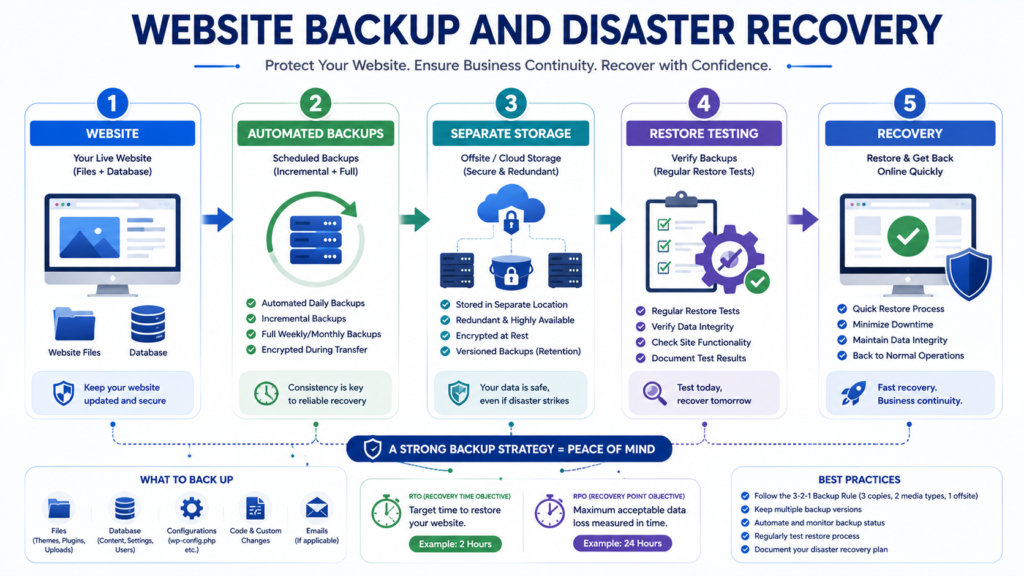
Website backups are among the most important components of a professional website maintenance plan.
A backup provides a recovery point if a website is damaged by:
- Failed updates.
- Human error.
- Database corruption.
- Hosting problems.
- Security incidents.
- Incorrect configuration.
- Accidental deletion.
However, creating backup files alone is not enough.
A reliable backup strategy must also consider storage, retention, restoration, and recovery procedures.
What Should a Website Backup Include?
Depending on the website platform, backups may need to include:
- Website files.
- Database.
- Media library.
- Themes.
- Plugins.
- Custom code.
- Configuration files.
- Important e-commerce data.
The backup scope should be documented so that the responsible person knows exactly what can and cannot be recovered.
How Often Should You Back Up a Website?
Backup frequency should reflect how frequently valuable website data changes.
A relatively static informational website may tolerate a longer interval between backups.
An ecommerce store processing orders throughout the day may require much more frequent database backups because losing several hours of data could mean losing:
- Orders.
- Customer records.
- Inventory changes.
- Transaction information.
Backup frequency should therefore be based on business risk rather than convenience.
Full vs Incremental Backups
A full backup creates a complete copy of the selected website data.
An incremental backup generally stores changes made since an earlier backup point.
The appropriate method depends on:
- Website size.
- Data change frequency.
- Storage capacity.
- Recovery requirements.
- Hosting architecture.
Some environments use a combination of both approaches.
Keep Appropriate Offsite Backups
Keeping the only backup on the same production environment as the live website can create unnecessary risk.
Where appropriate, maintain separate backup copies in an independent storage location.
A commonly used resilience principle is the 3 2 1 backup approach:
- Maintain three copies of important data.
- Use two different storage systems or media where practical.
- Keep one copy separate or offsite.
The exact implementation should reflect the website’s risk and infrastructure.
Establish a Backup Retention Policy
A retention policy determines how long backup versions remain available.
For example, a website may maintain a combination of:
- Recent daily backups.
- Weekly recovery points.
- Monthly archives.
There is no universal retention period suitable for every website.
The correct policy depends on:
- Business requirements.
- Storage capacity.
- Data sensitivity.
- Transaction frequency.
- Recovery objectives.
- Applicable legal or compliance requirements.
Test Website Restoration
A backup should not be considered fully reliable simply because an automated system reports that the backup completed successfully.
Periodic restoration testing can identify:
- Corrupted archives.
- Missing files.
- Incomplete databases.
- Missing media.
- Configuration problems.
- Incompatible recovery procedures.
A restore test should verify important functions after restoration, including:
- Homepage.
- Important pages.
- Administrator login.
- Forms.
- Media.
- Database content.
- Checkout where applicable.
- Critical integrations.
Create a Website Disaster Recovery Plan
Backups are an important part of disaster recovery, but they are not the complete recovery process.
A disaster recovery plan should document:
- Who is responsible for responding.
- How an incident is assessed.
- Where backups are stored.
- How restoration is performed.
- Which systems should be restored first.
- Which integrations require testing.
- How the recovered website is validated.
- How the incident is documented.
Understand RTO and RPO
Two useful recovery concepts are Recovery Time Objective and Recovery Point Objective.
Recovery Time Objective, or RTO, describes how quickly the website should be restored after a disruption.
Recovery Point Objective, or RPO, describes how much recent data loss the organization can tolerate.
For example, a high-transaction ecommerce store may require a shorter RPO than a website whose content changes only once a month.
RTO and RPO can help determine:
- Backup frequency.
- Recovery architecture.
- Hosting requirements.
- Support expectations.
Website Performance and Core Web Vitals Maintenance
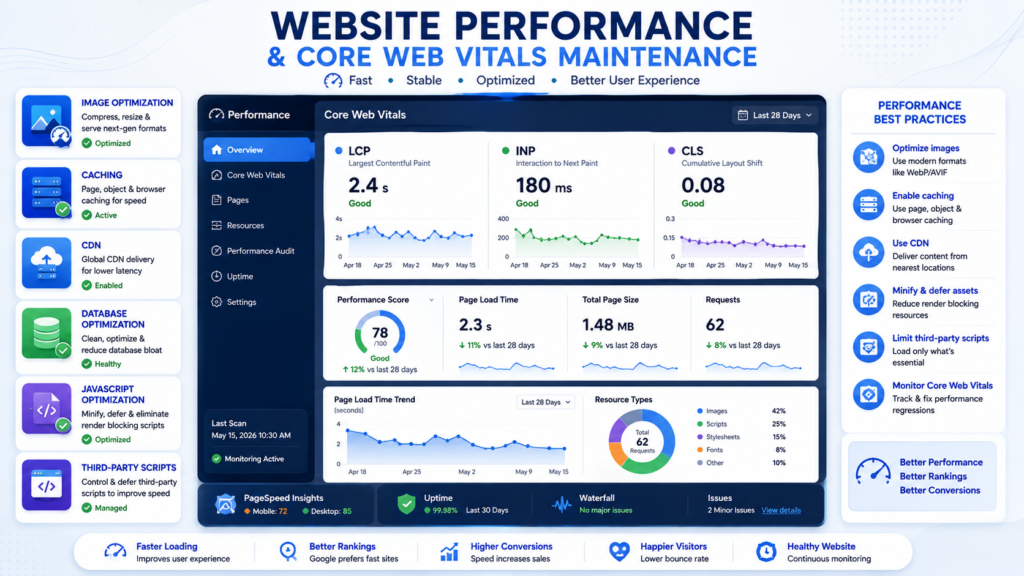
Website performance should be treated as an ongoing maintenance responsibility rather than a one-time optimization project.
A website may be fast at launch but gradually become slower as new:
- Images.
- Plugins.
- Applications.
- Tracking scripts.
- Marketing tools.
- Fonts.
- Videos.
- Third-party widgets.
are added.
Website Performance Maintenance Checklist
Regular performance maintenance can include:
- [ ] Test important page templates.
- [ ] Monitor Core Web Vitals.
- [ ] Review page weight.
- [ ] Optimize oversized images.
- [ ] Review JavaScript execution.
- [ ] Review third-party scripts.
- [ ] Check caching.
- [ ] Review CDN configuration.
- [ ] Review database performance.
- [ ] Monitor server response.
- [ ] Compare performance with previous baselines.
Test More Than the Homepage
Testing only the homepage can hide problems affecting commercially important pages.
Monitor representative templates such as:
- Homepage.
- Service pages.
- Product pages.
- Blog articles.
- Landing pages.
- Cart.
- Checkout.
- Login.
Optimize Website Images
Images are often among the largest resources on a webpage.
Review:
- Image dimensions.
- File size.
- Compression.
- Appropriate image formats.
- Responsive image delivery.
- Lazy loading where appropriate.
Do not upload unnecessarily large images and rely entirely on the browser to resize them visually.
Review Caching
Caching can reduce repeated processing and improve website delivery.
Depending on the architecture, review:
- Browser caching.
- Page caching.
- Object caching.
- Server caching.
- CDN caching.
After significant website changes, confirm that caching is not causing visitors to receive outdated or broken content.
Review CDN Performance
A Content Delivery Network can help deliver website resources efficiently to geographically distributed visitors.
Periodically verify:
- CDN availability.
- Cache behavior.
- SSL configuration.
- Asset delivery.
- Purging behavior after important updates.
Audit Third-Party Scripts
Third-party scripts can significantly affect website performance.
Examples include:
- Analytics.
- Advertising platforms.
- Marketing pixels.
- Chat widgets.
- Heatmaps.
- Social embeds.
- Video embeds.
Ask whether every script still provides sufficient business value to justify its performance and maintenance cost.
Monitor Core Web Vitals
Core Web Vitals provide useful signals for evaluating important aspects of real-world page experience.
The key metrics include:
- Largest Contentful Paint.
- Interaction to Next Paint.
- Cumulative Layout Shift.
Core Web Vitals should be monitored as trends rather than treated as a one-time score.
Largest Contentful Paint
Largest Contentful Paint, or LCP, relates to loading performance and measures when the largest visible content element is rendered.
Potential areas to investigate include:
- Large hero images.
- Slow server response.
- Render-blocking resources.
- Poor caching.
- Resource loading priorities.
Interaction to Next Paint
Interaction to Next Paint, or INP, relates to responsiveness to user interactions.
Poor responsiveness can be associated with:
- Heavy JavaScript.
- Long main thread tasks.
- Complex interactive components.
- Excessive third-party scripts.
Cumulative Layout Shift
Cumulative Layout Shift, or CLS, relates to unexpected visual movement while a page loads or changes.
Common areas to review include:
- Images without defined dimensions.
- Advertisements.
- Embedded content.
- Dynamic banners.
- Web fonts.
- Late-loading components.
Monitor Performance Trends
Instead of asking only:
“What is our speed score today?”
Also ask:
“Has performance improved or deteriorated over the last three months, and what changed?”
Trend-based monitoring can help identify regressions caused by:
- New plugins.
- New tracking scripts.
- Design changes.
- Hosting changes.
- Larger media files.
Website Uptime Monitoring
Website uptime monitoring automatically checks whether a website or critical service is available.
This can help identify failures before customers repeatedly report them.
What Should You Monitor?
Depending on the website, monitor:
- Homepage.
- Important landing pages.
- Login.
- Checkout.
- Customer portal.
- Important APIs.
Create Meaningful Alerts
Alerts should reach the person or team capable of responding.
Avoid creating so many low-value notifications that genuinely critical alerts become easy to ignore.
Maintain an Incident Record
For significant downtime, record:
- Date and time.
- Duration.
- Affected systems.
- Root cause where known.
- Corrective action.
- Recovery steps.
- Preventive recommendation.
This turns incidents into useful operational knowledge.
Technical SEO Website Maintenance
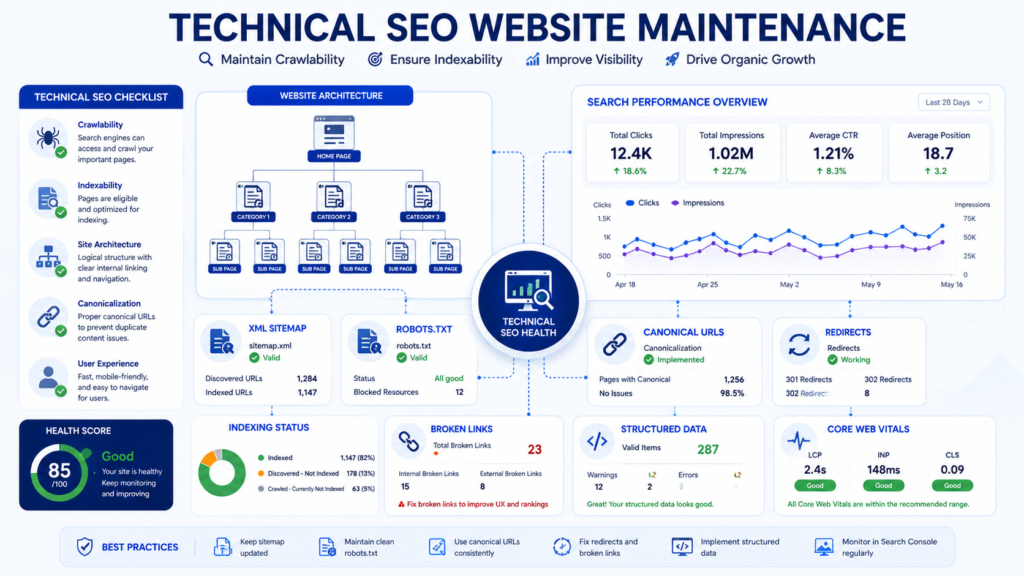
Technical SEO maintenance helps ensure that search engines can continue discovering, crawling, interpreting, and indexing important website content.
Normal website changes can accidentally create SEO problems, so technical SEO should be included in recurring website maintenance.
Monitor Google Search Console
Regularly review relevant Google Search Console reports for:
- Search performance.
- Indexing.
- Sitemaps.
- Core Web Vitals.
- Relevant structured data or enhancement reports.
Pay particular attention after:
- Website migrations.
- Major redesigns.
- URL changes.
- CMS changes.
- Large content updates.
Maintain XML Sitemaps
An XML sitemap can help search engines discover important canonical URLs.
Check that the sitemap:
- Is accessible.
- Contains appropriate indexable URLs.
- Does not unnecessarily include removed pages.
- Reflects meaningful website changes.
- Does not contain large numbers of broken URLs.
Review Robots.txt
Robots.txt mistakes can interfere with crawling.
Review the file particularly after:
- Website migrations.
- Staging deployments.
- Redesigns.
- Infrastructure changes.
A staging rule accidentally transferred to production can create serious search visibility problems.
Maintain Canonical URLs
Canonical URLs help communicate the preferred version of similar or duplicate pages.
Review canonical implementation after:
- URL structure changes.
- HTTPS migrations.
- Ecommerce filtering changes.
- Template changes.
- Content migrations.
Monitor 404 Errors
Not every 404 error requires a redirect.
Prioritize missing URLs that:
- Receive meaningful traffic.
- Have valuable backlinks.
- Are internally linked.
- Previously represented important content.
- Are being requested because of an incorrect internal URL.
Maintain Redirects
Regularly check for:
- Redirect chains.
- Redirect loops.
- Incorrect destinations.
- Obsolete temporary redirects.
- Redirects pointing to irrelevant pages.
When an old URL has a clear replacement, redirecting it directly to the most relevant destination is generally preferable to creating multiple hops.
Maintain Internal Links
Internal links help visitors and search engines understand relationships between pages.
Regularly:
- Fix broken internal links.
- Add relevant links to new content.
- Review important orphan pages.
- Reduce unnecessary redirect hops.
- Strengthen links to strategically important pages.
Internal linking should remain useful and contextual rather than being added solely to repeat keywords.
Review Structured Data
Where structured data is used:
- Confirm that the markup remains valid.
- Ensure it accurately represents visible page content.
- Remove obsolete or misleading markup.
- Review relevant Search Console reports.
Structured data should describe real page content rather than making claims that the page does not support.
Website Content Maintenance
Website maintenance is not limited to technical systems.
Content also requires ongoing review.
Website Content Maintenance Checklist
- [ ] Review high-traffic pages.
- [ ] Review high conversion pages.
- [ ] Update outdated facts.
- [ ] Remove expired promotions.
- [ ] Verify service descriptions.
- [ ] Check published pricing.
- [ ] Review screenshots.
- [ ] Update outdated statistics where necessary.
- [ ] Repair broken references.
- [ ] Review internal links.
- [ ] Review calls to action.
- [ ] Check important contact information.
Prioritize Important Pages
Do not treat every page as equally urgent.
Prioritize:
- Revenue-generating pages.
- High traffic pages.
- Lead generation pages.
- Product and service pages.
- Pages containing time-sensitive information.
- High visibility informational content.
Monitor Content Decay
Possible signs of content decay include:
- Declining organic traffic.
- Declining impressions.
- Lower engagement.
- Lower conversions.
- Outdated information.
- Broken citations.
- Old screenshots.
- Changed search intent.
A declining article does not automatically require a complete rewrite.
Sometimes the best solution is a focused update that improves accuracy and usefulness.
Do Not Fake Content Freshness
Changing only the publication date does not make content more useful.
A genuine content refresh should involve meaningful improvements such as:
- Correcting outdated information.
- Adding new evidence.
- Improving explanations.
- Updating screenshots.
- Repairing links.
- Removing obsolete advice.
Website Accessibility and Mobile Maintenance
Accessibility and mobile usability can regress when new templates, plugins, content, or interactive components are added.
Accessibility Maintenance
Periodically review:
- Alternative text.
- Heading hierarchy.
- Keyboard navigation.
- Form labels.
- Focus states.
- Color contrast.
- Link clarity.
- Interactive controls.
Automated accessibility tools can identify some problems, but they cannot replace all manual evaluation.
Mobile Website Maintenance
Test important functionality on relevant mobile devices or responsive environments.
Review:
- Navigation.
- Buttons.
- Forms.
- Tables.
- Images.
- Popups.
- Login.
- Cart.
- Checkout.
- Calls to action.
A website that works correctly on desktop can still provide a poor mobile experience.
Website Form and Conversion Testing
Forms are among the most business-critical components of service websites.
A maintenance check should test more than whether the form appears on the page.
Website Form Testing Checklist
- [ ] Form loads correctly.
- [ ] Required fields work.
- [ ] Validation works.
- [ ] Submission completes.
- [ ] Confirmation appears.
- [ ] Email notification arrives.
- [ ] CRM receives the lead where applicable.
- [ ] Conversion tracking records the action where configured.
Test the Complete Conversion Workflow
For a lead generation website:
Landing Page → CTA → Form → Submission → Email → CRM → Analytics
For an ecommerce website:
Product → Cart → Checkout → Payment → Order → Email → Analytics
Testing the complete workflow can identify failures that ordinary page checks miss.
Professional Website Maintenance Process
A structured website maintenance process helps ensure that important work is performed consistently.
1. Monitor
Monitor:
- Uptime.
- Security.
- Backups.
- Performance.
- Search health.
- Critical business functions.
2. Assess
When an issue or update appears, determine:
- Severity.
- Business impact.
- Urgency.
- Dependencies.
- Potential risk.
3. Back Up
Before significant changes, confirm that an appropriate recovery point exists.
4. Test
Use staging where appropriate to test:
- Updates.
- Compatibility.
- New functionality.
- Significant configuration changes.
5. Implement
Deploy approved changes carefully.
6. Validate
After deployment, test:
- Important pages.
- Forms.
- Login.
- Checkout.
- Analytics.
- Critical integrations.
7. Document
Record:
- What changed.
- When it changed.
- Who performed the work.
- What was tested.
- Whether problems occurred.
8. Improve
Use incidents, performance trends, and maintenance reports to improve future procedures.
A professional maintenance workflow therefore becomes a continuous cycle:
Monitor → Assess → Protect → Test → Implement → Validate → Document → Improve
WordPress Website Maintenance
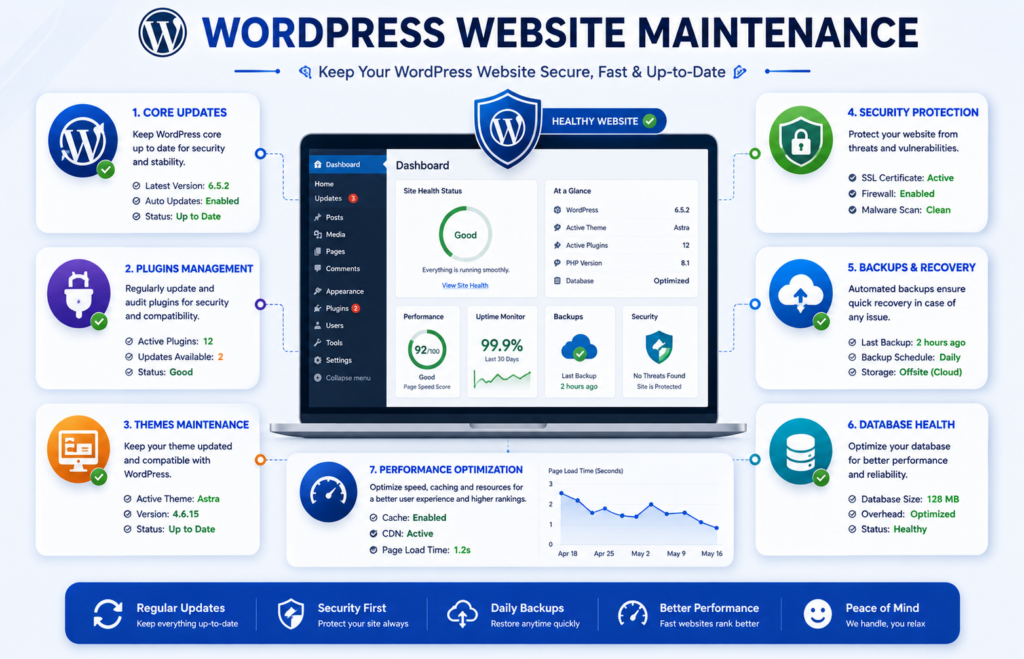
WordPress is flexible and widely used, but that flexibility also creates ongoing maintenance responsibilities.
A professional WordPress website maintenance process should cover WordPress core, plugins, themes, backups, security, performance, database health, forms, and compatibility testing.
WordPress Core Maintenance
Regularly review:
- WordPress core updates.
- PHP compatibility.
- Database requirements.
- Hosting compatibility.
Before major WordPress updates:
- Confirm a recent backup.
- Review compatibility.
- Test in staging where appropriate.
- Update WordPress.
- Test important website functions.
- Monitor the live website.
WordPress Plugin Maintenance
Plugins can affect:
- Security.
- Forms.
- SEO.
- Checkout.
- Analytics.
- Performance.
- Login.
- Page layouts.
A WordPress plugin maintenance process should include:
- [ ] Review plugin updates.
- [ ] Remove unused plugins.
- [ ] Identify abandoned plugins.
- [ ] Review compatibility.
- [ ] Test important functions after major updates.
Do not install plugins simply because they are available.
Every additional plugin creates another dependency that may require updates, monitoring, and troubleshooting.
WordPress Theme Maintenance
Themes should also be reviewed regularly.
Check:
- Active theme updates.
- Child theme compatibility.
- Page templates.
- Mobile layouts.
- Important visual components.
Unused themes can be removed where appropriate after confirming they are not required.
WordPress Security and Backups
Maintain:
- Regular backups.
- Restore testing.
- Administrator access.
- Strong authentication.
- Vulnerability monitoring.
- Security updates.
- Login monitoring.
WordPress Performance Maintenance
Review:
- Caching.
- Database growth.
- Image sizes.
- Third-party scripts.
- Plugin overhead.
- Core Web Vitals.
A slow WordPress website is not always caused by hosting. Plugins, database growth, scripts, and page design can also contribute.
Ecommerce Website Maintenance
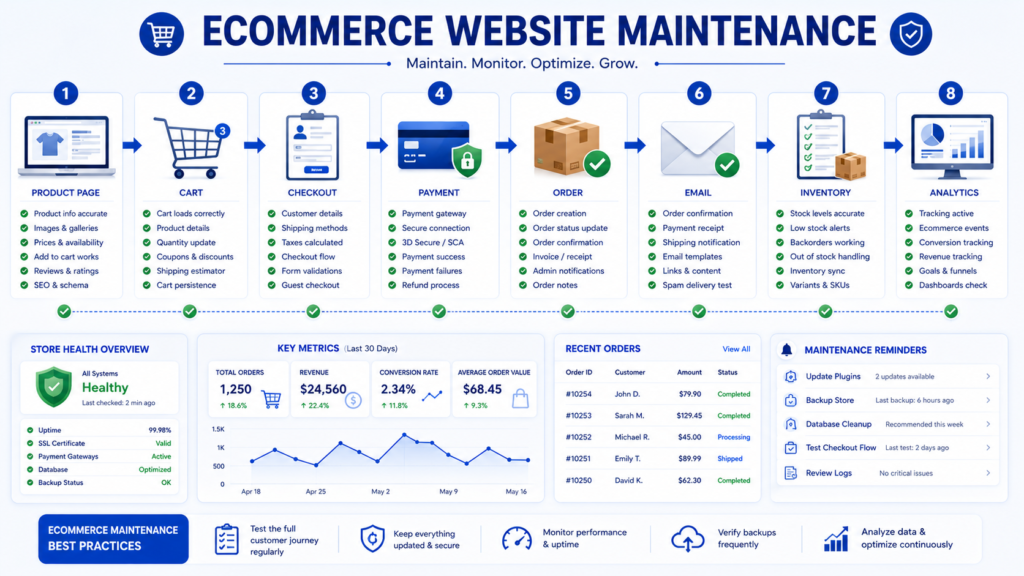
Ecommerce website maintenance requires greater attention because technical failures can directly affect transactions, customer experience, and revenue.
A healthy ecommerce website should maintain the entire purchase journey.
Ecommerce Website Maintenance Checklist
- [ ] Test product pages.
- [ ] Test search and filters.
- [ ] Test product variations.
- [ ] Test add to cart.
- [ ] Test cart updates.
- [ ] Test checkout.
- [ ] Test payment gateways.
- [ ] Test discount codes.
- [ ] Review shipping calculations.
- [ ] Review tax calculations where applicable.
- [ ] Test transactional emails.
- [ ] Review order processing.
- [ ] Review inventory synchronization.
- [ ] Test customer accounts.
- [ ] Verify analytics.
- [ ] Verify ecommerce conversion tracking.
- [ ] Confirm backups.
Test the Complete Ecommerce Journey
Do not only check whether the checkout page opens.
A complete test should follow:
Product Page → Cart → Checkout → Payment → Order Confirmation → Transactional Email → Inventory Update → Analytics
This process helps identify silent failures that may otherwise remain unnoticed.
WooCommerce Maintenance
WooCommerce maintenance should combine WordPress maintenance with e-commerce-specific testing.
Review:
- WordPress core.
- WooCommerce updates.
- Payment plugins.
- Shipping plugins.
- Theme compatibility.
- Checkout templates.
- Database health.
- Backups.
- Performance.
Major WooCommerce updates should be tested carefully because they can affect checkout, product templates, payment methods, and database structures.
Shopify Maintenance
Shopify manages much of the underlying infrastructure, but store owners still need to maintain:
- Apps.
- Themes.
- Products.
- Collections.
- Navigation.
- Discounts.
- Shipping settings.
- Payment settings.
- Analytics.
- Conversion tracking.
- Third-party integrations.
Periodically review installed apps and remove those that are no longer needed.
Each app may affect:
- Performance.
- Theme behavior.
- Tracking.
- Customer experience.
- Subscription cost.
Website Maintenance for Small Business
Website maintenance for small business should focus on the functions that directly protect leads, customer trust, search visibility, and business continuity.
A small business does not necessarily need an enterprise-level maintenance program.
It does need a reliable one.
Essential Small Business Website Maintenance
- [ ] Keep website software current.
- [ ] Maintain reliable backups.
- [ ] Monitor website uptime.
- [ ] Review security alerts.
- [ ] Test contact forms.
- [ ] Keep contact details accurate.
- [ ] Review service pages.
- [ ] Check mobile usability.
- [ ] Monitor performance.
- [ ] Review Google Search Console.
- [ ] Verify analytics.
- [ ] Test conversion tracking.
- [ ] Review important integrations.
Prioritize Business Critical Functions
Small businesses with limited maintenance resources should prioritize:
- Security.
- Backups.
- Website availability.
- Lead generation forms.
- Checkout or booking systems.
- Mobile usability.
- Important service pages.
- Analytics and conversion tracking.
Suggested Small Business Maintenance Schedule
Weekly
- Review critical updates.
- Confirm backups.
- Test important forms.
- Review uptime.
Monthly
- Review security.
- Check Search Console.
- Review analytics.
- Test conversions.
- Review performance.
Quarterly
- Conduct a deeper technical audit.
- Test restoration.
- Review user accounts.
- Review content.
- Check accessibility.
Annually
- Review domain.
- Review hosting.
- Review SSL or TLS.
- Conduct a complete website audit.
- Review the maintenance provider or internal process.
How to Create a Website Maintenance Plan
A website maintenance plan converts individual tasks into an organized and repeatable operational process.
A good plan answers:
- What should be maintained?
- How often should it be checked?
- Who is responsible?
- What happens if something fails?
- How is the work documented?
Step 1. Create a Website Inventory
Document major website systems:
- Domain.
- DNS.
- Hosting.
- CMS.
- Themes.
- Plugins.
- Database.
- CDN.
- Analytics.
- Forms.
- CRM.
- Payment gateways.
- Email systems.
- APIs.
- Backups.
- Security tools.
You cannot effectively maintain systems you have not identified.
Step 2. Identify Business Critical Functions
Determine which website functions directly affect the business.
Examples include:
- Contact forms.
- Checkout.
- Payments.
- Booking.
- Login.
- Customer portals.
- Transactional email.
- Lead delivery.
Step 3. Assign Risk Levels
Classify important systems as:
- Critical.
- High.
- Medium.
- Low.
For example:
A payment gateway may be critical.
A decorative animation may be low priority.
Step 4. Set Maintenance Frequencies
Assign recurring tasks to:
- Continuous monitoring.
- Weekly maintenance.
- Monthly maintenance.
- Quarterly audits.
- Annual reviews.
- Event-driven checks.
Step 5. Assign Responsibilities
Clearly identify who is responsible for:
- Updates.
- Backups.
- Security.
- Hosting.
- SEO.
- Content.
- Analytics.
- Ecommerce.
- Emergency response.
Avoid vague responsibilities such as:
“Someone handles the backups.”
A critical maintenance task should have a clearly identified owner.
Step 6. Define Recovery Procedures
Document:
- Backup locations.
- Restore instructions.
- Required access.
- Hosting contact information.
- Emergency contacts.
- Rollback procedures.
- Critical recovery priorities.
Step 7. Maintain a Website Change Log
A change log can record:
| Date | Change | Responsible Person | Backup Confirmed | Result |
|---|---|---|---|---|
| Example | Plugin security update | Developer | Yes | Successful |
| Example | Checkout integration update | Agency | Yes | Tested |
| Example | Service page content update | Marketing | Not required | Successful |
A change log can make troubleshooting easier by connecting new problems with recent changes.
Website Maintenance Cost
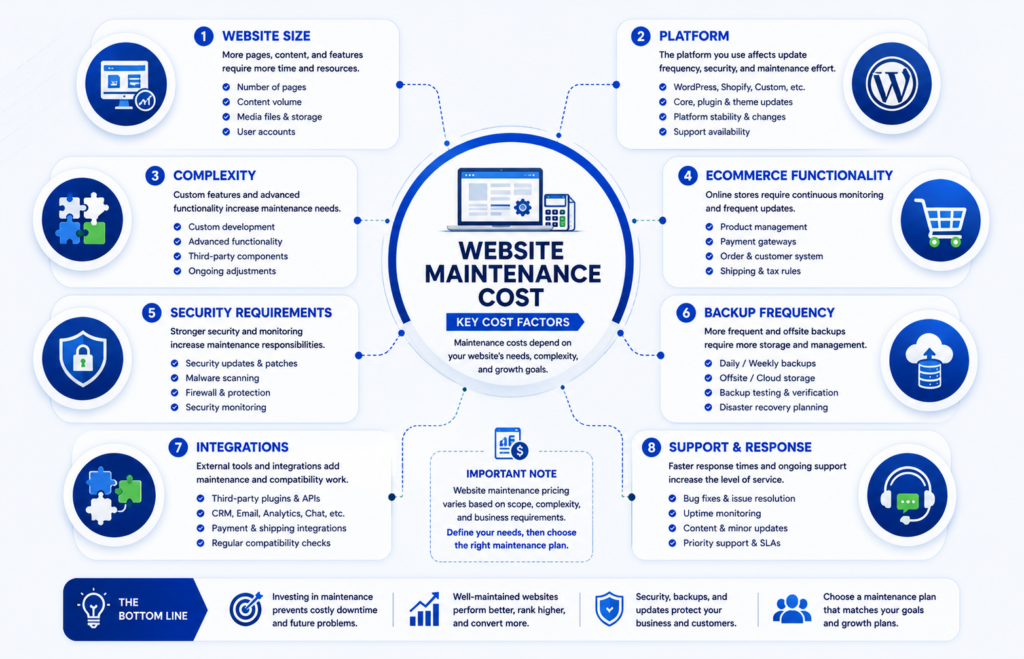
Website maintenance cost varies according to the actual scope and risk of the website.
There is no single maintenance price suitable for every website.
A simple informational website may require relatively limited maintenance, while an ecommerce store or business-critical application may require frequent monitoring, testing, backups, and specialist support.
What Affects Website Maintenance Cost?
Important pricing factors include:
- Website size.
- Website type.
- Platform.
- Technical complexity.
- Ecommerce functionality.
- Security requirements.
- Backup frequency.
- Number of integrations.
- Support expectations.
- Required response time.
- Custom development.
Website Size and Complexity
A five-page brochure website generally requires less maintenance than a website with:
- Hundreds of pages.
- Thousands of products.
- Membership systems.
- Multiple languages.
- Custom functionality.
- Complex integrations.
However, page count alone does not determine cost.
A small custom application can require more specialist maintenance than a large but simple content website.
Ecommerce Functionality
Ecommerce websites may require additional maintenance for:
- Payments.
- Checkout.
- Inventory.
- Shipping.
- Customer accounts.
- Transactional email.
- Product data.
- Analytics.
These systems increase both testing requirements and operational risk.
Security Requirements
Websites with higher security requirements may need:
- More frequent monitoring.
- Vulnerability reviews.
- Access control reviews.
- Advanced backups.
- Security incident support.
- More detailed reporting.
Common Website Maintenance Pricing Models
Maintenance providers may use:
- Monthly retainers.
- Fixed maintenance packages.
- Hourly support.
- Project-based maintenance.
- Custom managed service agreements.
Monthly Website Maintenance Retainer
A monthly retainer can provide predictable recurring maintenance.
It may include:
- Updates.
- Backups.
- Monitoring.
- Security checks.
- Form testing.
- Performance reviews.
- Technical support.
- Reporting.
Hourly Website Maintenance
Hourly support may suit websites requiring only occasional technical assistance.
Potential advantages include:
- Pay only when work is required.
- Flexibility for irregular tasks.
Potential limitations include:
- Unpredictable monthly cost.
- Little or no preventive monitoring.
- Maintenance may become reactive.
Fixed Maintenance Packages
A fixed package may combine a predefined scope such as:
- Updates.
- Backups.
- Uptime monitoring.
- Security checks.
- Performance reviews.
- Support.
Package names are not standardized.
Always compare what is actually included.
What Should Website Maintenance Pricing Include?
When comparing providers, check whether the price includes:
- CMS updates.
- Plugin and theme updates.
- Security monitoring.
- Backups.
- Restore testing.
- Uptime monitoring.
- Performance checks.
- Technical SEO checks.
- Form testing.
- Reporting.
- Technical support.
Do not compare prices without comparing scope.
What Do Website Maintenance Services Include?
Professional website maintenance services can combine preventive maintenance, monitoring, technical support, testing, and reporting.
Typical services may include:
- Website monitoring.
- CMS updates.
- Plugin and theme maintenance.
- Security monitoring.
- Website backups.
- Restore testing.
- Performance optimization.
- Core Web Vitals monitoring.
- Technical SEO maintenance.
- Form testing.
- Ecommerce testing.
- Analytics verification.
- Maintenance reporting.
- Technical support.
The exact scope should be clearly documented before a maintenance agreement begins.
Managed Website Maintenance
Managed website maintenance can be useful when:
- The website is important to revenue.
- Internal technical expertise is limited.
- Maintenance is frequently postponed.
- Multiple systems or integrations are involved.
- Rapid support is important.
DIY vs Professional Website Maintenance
Both DIY and professional maintenance can be appropriate depending on the website’s complexity, business importance, technical risk, and available skills.
DIY Website Maintenance May Be Suitable When
- The website is relatively simple.
- Business risk is low.
- You understand the platform.
- You can manage backups.
- You can troubleshoot common problems.
- You have enough time.
Potential Advantages of DIY Maintenance
- Direct control.
- Lower direct service cost.
- Immediate access to website settings.
Potential Limitations of DIY Maintenance
- Requires technical knowledge.
- Requires recurring time.
- Maintenance may be postponed.
- Recovery skills may be limited.
- Significant updates can create production risk.
Professional Website Maintenance May Be Suitable When
- The website generates significant revenue.
- Downtime is costly.
- Ecommerce is involved.
- Multiple integrations exist.
- Security requirements are higher.
- Internal technical expertise is limited.
- Fast incident response is important.
Website Maintenance Agency vs Freelancer
Businesses may choose between an individual freelancer and a website maintenance agency.
Neither option is automatically better.
Freelancer
Potential advantages:
- Direct communication.
- Flexible service arrangements.
- Specialist expertise.
- Potentially lower overhead.
Potential considerations:
- Availability may depend on one person.
- Backup coverage may be limited.
- Service continuity should be discussed.
Agency
Potential advantages:
- Multiple specialists.
- Broader technical coverage.
- Greater team availability.
- Formal processes.
- Potentially stronger continuity.
Potential considerations:
- Service costs may be higher.
- Communication may pass through account management.
The best choice depends on the website’s actual needs.
How to Choose a Website Maintenance Service Provider
Selecting a maintenance provider should involve more than comparing prices.
The provider may receive privileged access to an important business asset.
Ask About Relevant Experience
Determine whether the provider has experience with:
- Your CMS.
- Your ecommerce platform.
- Your hosting environment.
- Your technology stack.
- Similar website types.
Ask About Backups
Questions should include:
- How often are backups created?
- Where are they stored?
- How long are they retained?
- Are restore tests performed?
- Who can perform restoration?
Ask About Update Procedures
Determine whether the provider:
- Reviews updates.
- Confirms backups.
- Uses staging where appropriate.
- Tests after deployment.
- Maintains rollback procedures.
Ask About Security
Review:
- Access management.
- Credential handling.
- Security monitoring.
- Vulnerability response.
- Incident procedures.
Ask About Reporting
A professional provider should be able to explain what work was completed.
Reports may include:
- Updates.
- Backup status.
- Security findings.
- Uptime.
- Performance.
- Technical SEO findings.
- Incidents.
- Recommendations.
Ask About Support Availability
Clarify:
- Support hours.
- Support channels.
- Emergency support.
- Response expectations.
- Additional charges.
Confirm Website Ownership and Access
The business should understand who controls:
- Domain.
- Hosting.
- CMS.
- Analytics.
- Search Console.
- Backups.
- Third-party systems.
Avoid unnecessary dependency on accounts that only the maintenance provider controls.
Website Maintenance vs Support, Development, and Hosting
These services are related but not identical.
| Service | Main Purpose |
|---|---|
| Website Maintenance | Ongoing website health, monitoring, updates, testing, and prevention |
| Website Support | Request-based troubleshooting or changes |
| Web Development | Building new functionality or major features |
| Web Hosting | Providing server and infrastructure resources |
| Website Management | Broader operational oversight that may include maintenance and content |
A maintenance agreement should clearly explain which of these responsibilities are included.
Website Maintenance SLA
A Service Level Agreement, or SLA, can define measurable expectations for maintenance support.
An SLA may include:
- Support hours.
- Incident severity levels.
- Response targets.
- Escalation procedures.
- Communication expectations.
- Emergency support.
- Exclusions.
Example Incident Priority Structure
| Priority | Example |
|---|---|
| Critical | Entire website unavailable or checkout completely failing |
| High | Major business function unavailable |
| Medium | Significant issue with a workaround |
| Low | Minor visual or nonurgent issue |
Response Time vs Resolution Time
These terms are different.
Response time refers to how quickly the provider acknowledges or begins investigating a problem.
Resolution time refers to how quickly the problem is fully resolved.
A complex issue can receive a rapid response but still require additional time for safe diagnosis and repair.
Website Maintenance Reporting and KPIs
Website maintenance should produce evidence of completed work and help identify recurring risks.
What Should a Website Maintenance Report Include?
A useful maintenance report may include:
- Maintenance date.
- Software updates.
- Security findings.
- Backup status.
- Restore test results.
- Uptime.
- Performance observations.
- Core Web Vitals.
- Technical SEO issues.
- Form testing.
- Checkout testing.
- Incidents.
- Outstanding problems.
- Recommendations.
Useful Website Maintenance KPIs
Possible KPIs include:
| KPI | What It Measures |
|---|---|
| Website uptime | Availability |
| Backup success rate | Backup reliability |
| Restore test success | Recoverability |
| Critical incidents | Operational reliability |
| Form test success | Lead generation reliability |
| Checkout test success | Ecommerce reliability |
| Core Web Vitals trends | User experience performance |
| Mean Time to Detect | Speed of issue detection |
| Mean Time to Resolve | Speed of recovery |
The best KPIs are those that help make operational decisions.
Website Maintenance Best Practices
A strong maintenance process should be preventive, documented, testable, and risk-based.
Use Preventive Maintenance
Do not rely entirely on emergency fixes.
Use:
- Monitoring.
- Updates.
- Backups.
- Testing.
- Security reviews.
- Technical SEO checks.
Prioritize by Business Impact
A failed checkout deserves higher priority than a minor formatting issue on an old article.
Prioritize according to:
- Security risk.
- Revenue impact.
- User impact.
- Data loss risk.
- Search visibility impact.
Back Up Before Significant Changes
Before a major update, confirm that an appropriate recovery point exists.
Use Staging Where Appropriate
Staging can be useful for:
- Major updates.
- Ecommerce changes.
- Theme changes.
- Complex plugins.
- Custom functionality.
Maintain a Rollback Plan
Before changing an important production system, know how to restore the previous working state.
Test Complete Workflows
Do not test only individual pages.
Test full workflows such as:
Page → User Action → Processing → Integration → Confirmation → Measurement
Monitor Trends
Compare:
- Uptime.
- Performance.
- Core Web Vitals.
- Conversions.
- Security alerts.
- Errors.
Trend analysis can reveal gradual deterioration that isolated checks may miss.
Remove Unnecessary Dependencies
Every unnecessary:
- Plugin.
- Script.
- App.
- API.
- Integration.
adds maintenance complexity.
Periodically ask whether each dependency is still necessary.
Website Maintenance Tools
A professional website maintenance toolkit may include several categories of tools.
No single tool needs to perform every task.
Uptime Monitoring Tools
Useful for:
- Availability checks.
- Downtime alerts.
- Response monitoring.
- Historical uptime reporting.
Backup Tools
Useful features may include:
- Automated scheduling.
- Database backups.
- File backups.
- Offsite storage.
- Retention.
- Restoration.
Security Tools
Security tools may help with:
- Vulnerability monitoring.
- Malware detection.
- Login monitoring.
- Firewall protection.
- Security logging.
Performance Tools
Performance tools can help analyze:
- Core Web Vitals.
- Page loading.
- JavaScript.
- Network requests.
- Rendering.
Google Search Console
Google Search Console can support recurring SEO maintenance by providing information about:
- Search performance.
- Indexing.
- Sitemaps.
- Core Web Vitals.
- Relevant search enhancements.
Analytics Tools
Analytics can help identify:
- Traffic changes.
- Conversion problems.
- E-commerce tracking issues.
- Unexpected changes in user behavior.
Website Crawling Tools
Website crawlers can help identify:
- Broken links.
- Redirects.
- HTTP status codes.
- Canonical problems.
- Internal linking issues.
Tool selection should be based on website requirements rather than popularity alone.
Website Maintenance for SEO, AI Overviews, and AI Search
Modern website maintenance should also protect the technical and content foundations that support visibility in search engines and AI-driven search experiences.
The most important principle is simple:
Do not create a separate artificial optimization system for AI search. Maintain a technically healthy, useful, accurate, and well-structured website.
Standard SEO fundamentals remain relevant to generative search. Focus on crawlability, useful content, clear structure, accurate information, strong internal linking, and structured data where it genuinely applies.
Maintain Crawlability
Important website content should remain accessible to search engines.
Review:
- Robots.txt.
- Internal links.
- XML sitemaps.
- HTTP status codes.
- Server availability.
- Canonical URLs.
A technical change can accidentally make important content harder to crawl.
Maintain Indexability
Review whether important pages can still be considered for indexing.
Check:
- Noindex directives.
- Canonical URLs.
- Redirect behavior.
- Duplicate content.
- Search Console indexing reports.
Keep Content Accurate
AI-generated search experiences may summarize or reference website content.
That makes content accuracy increasingly important.
Regularly review:
- Prices.
- Services.
- Product information.
- Dates.
- Technical guidance.
- Business information.
- Author information.
Use Clear Content Structure
Make information easy to understand.
Use:
- Descriptive headings.
- Short definitions.
- Tables.
- Checklists.
- Step-by-step processes.
- Concise summaries.
- FAQs.
This improves readability for users and can also make sections easier to interpret in search results.
Maintain Entity Consistency
Keep important information consistent across the website.
Examples include:
- Organization name.
- Services.
- Author names.
- Contact information.
- Locations where applicable.
- Product information.
Maintain Images and Multimedia
Review:
- Broken images.
- Missing alternative text.
- Outdated screenshots.
- Incorrect captions.
- Broken video embeds.
- Relevant structured metadata.
Avoid Artificial AI SEO Shortcuts
Do not add unsupported or invented elements such as:
- AI Overview schema.
- ChatGPT schema.
- LLM schema.
Unless they are part of a legitimate, documented web standard or platform requirement.
Complete Website Maintenance Audit Checklist
A website maintenance audit provides a baseline of the website’s current technical and operational condition.
It is particularly useful:
- Before starting a new maintenance agreement.
- After changing developers or agencies.
- Before a redesign.
- After a migration.
- After a major technical incident.
- When performance or search visibility declines.
Infrastructure Audit
- [ ] Confirm domain ownership.
- [ ] Review DNS.
- [ ] Review hosting.
- [ ] Verify HTTPS.
- [ ] Review CDN where applicable.
- [ ] Check server resources.
Software Audit
- [ ] Review CMS version.
- [ ] Review plugins.
- [ ] Review themes.
- [ ] Review custom code dependencies.
- [ ] Identify unsupported software.
- [ ] Identify abandoned components.
Security Audit
- [ ] Review administrator accounts.
- [ ] Review user permissions.
- [ ] Review vulnerability findings.
- [ ] Review security alerts.
- [ ] Review login security.
- [ ] Check unused accounts.
Backup and Recovery Audit
- [ ] Verify backup frequency.
- [ ] Review retention.
- [ ] Confirm database backups.
- [ ] Confirm file backups.
- [ ] Review offsite storage.
- [ ] Test restoration.
- [ ] Review recovery procedures.
Performance Audit
- [ ] Review Core Web Vitals.
- [ ] Test important templates.
- [ ] Review image sizes.
- [ ] Review caching.
- [ ] Review CDN behavior.
- [ ] Audit third-party scripts.
- [ ] Review database performance.
Technical SEO Audit
- [ ] Review crawlability.
- [ ] Review indexability.
- [ ] Check XML sitemap.
- [ ] Review robots.txt.
- [ ] Check canonical URLs.
- [ ] Review redirects.
- [ ] Identify important 404 errors.
- [ ] Review internal links.
- [ ] Review structured data.
- [ ] Review Search Console.
Content Audit
- [ ] Review outdated content.
- [ ] Check service pages.
- [ ] Review product information.
- [ ] Check published pricing.
- [ ] Review contact details.
- [ ] Check external references.
- [ ] Review internal links.
- [ ] Identify duplicate or overlapping content.
Conversion Audit
- [ ] Test contact forms.
- [ ] Test quote forms.
- [ ] Test booking systems.
- [ ] Test checkout.
- [ ] Test payments.
- [ ] Verify transactional emails.
- [ ] Verify CRM integration.
- [ ] Verify conversion tracking.
Analytics Audit
- [ ] Verify analytics installation.
- [ ] Check important events.
- [ ] Verify ecommerce tracking.
- [ ] Check form tracking.
- [ ] Review unexpected data changes.
Prioritize Audit Findings
Classify issues by business impact.
| Priority | Meaning |
|---|---|
| Critical | Immediate security, availability, or revenue risk |
| High | Significant issue requiring prompt action |
| Medium | Important improvement |
| Low | Noncritical optimization |
This prevents minor cosmetic issues from receiving the same priority as checkout failures, backup problems, or security incidents.
30 Day Website Maintenance Action Plan
If your website currently has no formal maintenance system, use the following 30-day implementation plan.
Days 1 to 5. Document the Website
Create an inventory of:
- Domain.
- DNS.
- Hosting.
- CMS.
- Plugins.
- Themes.
- Analytics.
- Search Console.
- Backups.
- Security tools.
- Forms.
- Payment systems.
- Third-party integrations.
Also document who has administrator access.
Days 6 to 10. Secure and Protect
Review:
- Critical software updates.
- Administrator accounts.
- Unused accounts.
- HTTPS.
- Backup configuration.
- Security alerts.
Confirm that a current recovery point exists before significant changes.
Days 11 to 15. Test Business Functions
Test:
- Contact forms.
- Quote forms.
- Booking.
- Login.
- Checkout.
- Payments.
- Transactional email.
- CRM integration.
Document failures and assign priorities.
Days 16 to 20. Review Performance and Technical SEO
Check:
- Core Web Vitals.
- Important page speed.
- Search Console.
- Indexing.
- XML sitemap.
- Robots.txt.
- Redirects.
- 404 errors.
- Internal links.
- Canonical URLs.
Days 21 to 25. Review Content and Analytics
Review:
- Important service pages.
- Product information.
- Pricing.
- Contact details.
- Outdated content.
- Analytics.
- Conversion tracking.
- Ecommerce tracking.
Days 26 to 30. Build the Maintenance System
Create:
- Weekly checklist.
- Monthly checklist.
- Quarterly audit.
- Annual review.
- Responsibility matrix.
- Change log.
- Emergency contacts.
- Recovery procedures.
- Maintenance report template.
At the end of the 30 days, the website should have a documented baseline and repeatable maintenance process.
Common Website Maintenance Mistakes
Even businesses that perform regular maintenance can make mistakes that increase risk.
Waiting Until Something Breaks
Reactive maintenance alone can leave problems unnoticed until they affect customers or revenue.
Use monitoring and scheduled preventive maintenance instead.
Updating Without a Backup
Before major updates, confirm that recovery is possible.
Never Testing Backups
A backup job can report success while the backup is incomplete or unusable.
Periodic restoration testing is essential.
Updating Too Many Critical Systems at Once
Changing several major components simultaneously can make troubleshooting difficult.
When practical, use a controlled sequence.
Keeping Unused Plugins and Applications
Unused components still require monitoring and can increase maintenance complexity.
Remove them when they are no longer needed.
Ignoring Forms
A form can fail while the page itself appears perfectly normal.
Test the entire submission and delivery workflow.
Ignoring Mobile Users
A website may work on desktop while important mobile functionality is broken.
Test critical mobile journeys.
Ignoring Performance Regressions
New scripts, plugins, widgets, and design changes can gradually make a website slower.
Compare performance over time.
Treating SEO as a One-Time Project
Website changes can create technical SEO problems long after launch.
Maintain:
- Indexing.
- Redirects.
- Canonicals.
- Sitemaps.
- Internal links.
- Core Web Vitals.
Publishing Outdated Information
Incorrect:
- Prices.
- Services.
- Contact details.
- Policies.
- Product information.
Can reduce trust and create customer confusion.
Having No Recovery Plan
A backup is much more valuable when the responsible team knows how to restore it.
Website Maintenance Before and After Major Changes
Some maintenance tasks should occur when specific events happen rather than waiting for the next scheduled review.
Before a Major Update
- Confirm backup status.
- Review compatibility.
- Use staging where appropriate.
- Prepare a rollback plan.
- Document the change.
After a Major Update
- Test important pages.
- Test forms.
- Test login.
- Test checkout.
- Verify analytics.
- Review performance.
- Review errors.
After a Website Migration
Check:
- DNS.
- HTTPS.
- Redirects.
- Canonicals.
- XML sitemap.
- Robots.txt.
- Analytics.
- Search Console.
- Forms.
- Internal links.
- Performance.
Before a Major Marketing Campaign
Test:
- Landing pages.
- Forms.
- Checkout.
- Payments.
- Analytics.
- Conversion tracking.
- Mobile usability.
- Website speed.
- Uptime monitoring.
Frequently Asked Questions About Website Maintenance
What Is Website Maintenance?
Website maintenance is the ongoing process of monitoring, updating, securing, backing up, testing, and optimizing a website so that it remains reliable, functional, accurate, and technically healthy.
Why Is Website Maintenance Important?
Website maintenance helps reduce preventable security problems, downtime, data loss, performance issues, broken functionality, outdated information, and technical SEO problems.
How Often Should a Website Be Maintained?
A practical schedule includes:
- Continuous monitoring for critical systems.
- Weekly operational checks.
- Monthly maintenance.
- Quarterly audits.
- Annual strategic reviews.
The exact frequency depends on business risk and website complexity.
What Should Be Checked Weekly?
Weekly maintenance may include:
- Software updates.
- Backup status.
- Security alerts.
- Contact forms.
- Important pages.
- Uptime.
- Critical user journeys.
What Should Be Checked Monthly?
Monthly website maintenance may include:
- Security.
- Backups.
- Core Web Vitals.
- Technical SEO.
- Search Console.
- Analytics.
- Content.
- Forms.
- Integrations.
- Conversion tracking.
Does WordPress Need Regular Maintenance?
Yes.
WordPress website maintenance can include:
- Core updates.
- Plugin updates.
- Theme maintenance.
- Backups.
- Security.
- Performance.
- Database reviews.
- Functional testing.
How Often Should Website Backups Be Created?
Backup frequency should reflect how frequently valuable data changes.
A frequently updated ecommerce store may require more frequent backups than a static informational website.
Should Website Backups Be Tested?
Yes.
Periodic restoration testing helps verify that backups can actually support website recovery.
Can Website Maintenance Help SEO?
Yes, maintenance can support SEO by protecting:
- Crawlability.
- Indexing.
- Website performance.
- Redirects.
- Canonical URLs.
- Internal links.
- Content accuracy.
However, maintenance cannot guarantee rankings.
Does Website Maintenance Include SEO?
Technical SEO monitoring can be included in website maintenance.
A broader SEO strategy may include additional work such as content planning, keyword research, authority building, and optimization.
How Much Does Website Maintenance Cost?
Website maintenance cost depends on:
- Website size.
- Platform.
- Complexity.
- Security requirements.
- Backup frequency.
- Ecommerce functionality.
- Integrations.
- Support expectations.
- Business risk.
There is no universal price appropriate for every website.
For current Marjan Web Studio pricing, see our Website Maintenance Services page or Pricing page.
Is Website Maintenance Necessary for Small Businesses?
Yes.
Small business websites can still experience:
- Broken forms.
- Security problems.
- Downtime.
- Backup failures.
- Tracking problems.
- Outdated content.
The maintenance program may simply be less complex.
Can I Maintain My Website Myself?
Yes, particularly if the website is simple and you have enough technical knowledge and time.
Professional maintenance may be more suitable for ecommerce, complex, high-traffic, or business-critical websites.
What Is a Website Maintenance Plan?
A website maintenance plan documents recurring tasks, maintenance frequency, responsibilities, monitoring, backups, recovery procedures, support, and reporting.
What Is Preventive Website Maintenance?
Preventive maintenance includes work performed before failure, such as:
- Updates.
- Backups.
- Monitoring.
- Testing.
- Security reviews.
What Is Corrective Website Maintenance?
Corrective maintenance addresses an existing problem such as:
- Broken forms.
- Failed updates.
- Server errors.
- Checkout failures.
- Damaged website functionality.
Complete Website Maintenance Checklist
Use this condensed checklist as the final operational reference.
Security
- [ ] Review software updates.
- [ ] Monitor vulnerabilities.
- [ ] Review administrator access.
- [ ] Remove unnecessary accounts.
- [ ] Maintain HTTPS.
- [ ] Monitor security alerts.
Backups and Recovery
- [ ] Schedule backups.
- [ ] Back up files and databases.
- [ ] Maintain appropriate retention.
- [ ] Maintain separate copies where appropriate.
- [ ] Test restoration.
- [ ] Document recovery procedures.
Availability
- [ ] Monitor uptime.
- [ ] Review major errors.
- [ ] Monitor critical endpoints.
- [ ] Maintain incident contacts.
Performance
- [ ] Review Core Web Vitals.
- [ ] Optimize oversized images.
- [ ] Review caching.
- [ ] Review CDN configuration.
- [ ] Audit third-party scripts.
- [ ] Monitor database health.
Technical SEO
- [ ] Review Google Search Console.
- [ ] Monitor indexing.
- [ ] Check XML sitemap.
- [ ] Review robots.txt.
- [ ] Check canonical URLs.
- [ ] Review redirects.
- [ ] Fix important broken links.
- [ ] Review structured data.
Content
- [ ] Keep service information accurate.
- [ ] Keep product information accurate.
- [ ] Review published pricing.
- [ ] Review contact information.
- [ ] Update outdated content.
- [ ] Review internal and external references.
Conversions
- [ ] Test contact forms.
- [ ] Test booking systems.
- [ ] Test checkout.
- [ ] Test payments.
- [ ] Verify CRM delivery.
- [ ] Verify transactional emails.
Analytics
- [ ] Verify analytics.
- [ ] Verify conversion tracking.
- [ ] Verify ecommerce tracking where applicable.
- [ ] Investigate unusual data changes.
User Experience
- [ ] Review mobile usability.
- [ ] Review accessibility.
- [ ] Test important browsers.
- [ ] Review critical user journeys.
Governance
- [ ] Maintain documentation.
- [ ] Maintain a change log.
- [ ] Assign responsibilities.
- [ ] Maintain emergency procedures.
- [ ] Review maintenance reports.
- [ ] Review renewals.
Final Website Maintenance Framework
A complete website maintenance strategy can be summarized through eight operational pillars.
1. Protect
Maintain:
- Security.
- Access control.
- Software updates.
- HTTPS.
2. Preserve
Maintain:
- Backups.
- Retention.
- Restore testing.
- Disaster recovery.
3. Monitor
Track:
- Uptime.
- Security alerts.
- Errors.
- Performance.
- Critical transactions.
4. Validate
Test:
- Forms.
- Checkout.
- Payments.
- Login.
- Integrations.
5. Optimize
Maintain:
- Performance.
- Core Web Vitals.
- Technical SEO.
- Mobile usability.
6. Update
Keep current:
- Content.
- Services.
- Products.
- Pricing.
- Business information.
7. Measure
Verify:
- Analytics.
- Conversions.
- Search performance.
- Ecommerce tracking.
8. Document
Record:
- Updates.
- Incidents.
- Tests.
- Changes.
- Recommendations.
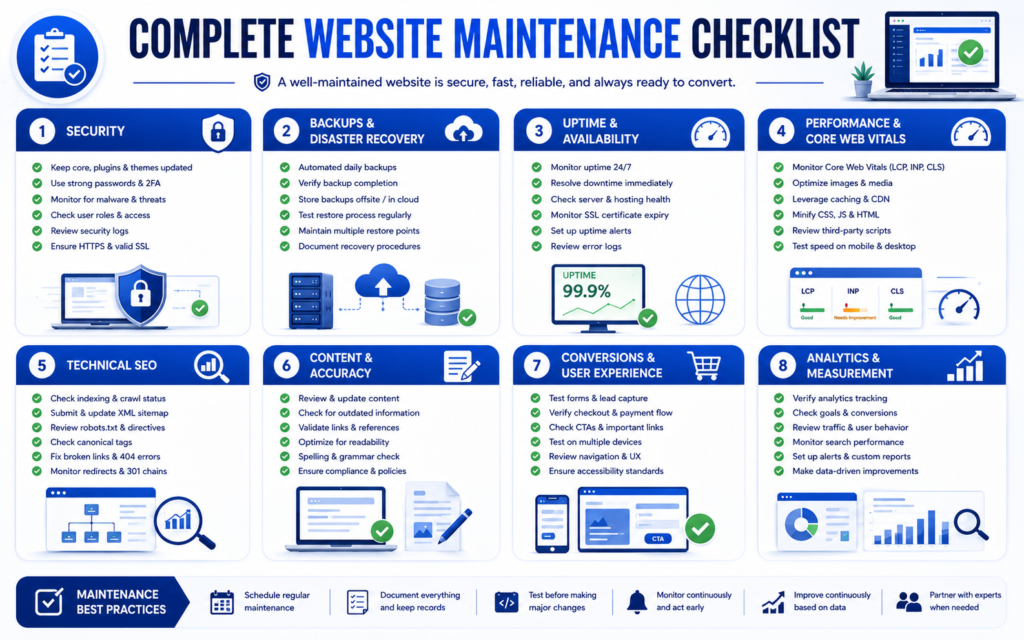
Conclusion
Website maintenance is not simply the process of installing software updates.
It is an ongoing operational discipline that protects a website’s:
- Security.
- Availability.
- Recoverability.
- Performance.
- Technical SEO health.
- Content accuracy.
- User experience.
- Conversion reliability.
- Business continuity.
A practical website maintenance strategy follows a clear cycle:
Continuous Monitoring → Weekly Checks → Monthly Maintenance → Quarterly Audits → Annual Strategic Review
The correct maintenance frequency depends on the website’s:
- Complexity.
- Traffic.
- Business importance.
- Transaction volume.
- Security exposure.
- Rate of change.
- Third-party integrations.
- Recovery requirements.
A small informational website may require a relatively lightweight process.
An ecommerce store, membership website, SaaS application, or business-critical platform may require more frequent monitoring, backups, testing, and incident response.
The key question should not simply be:
“Is the website online?”
A better question is:
“Is the website secure, available, recoverable, fast, functional, searchable, accurate, measurable, and reliably supporting the people and business processes that depend on it?”
That is the real purpose of professional website maintenance.
When Should You Hire a Website Maintenance Professional?
Managing website updates, security, backups, performance, technical SEO, forms, analytics, e-commerce functionality, and third-party integrations can become increasingly complex as a website grows.
Professional website maintenance can provide structured support for:
- Website monitoring.
- CMS updates.
- Plugin and theme maintenance.
- Website security.
- Backup management.
- Restore testing.
- Performance optimization.
- Core Web Vitals monitoring.
- Technical SEO maintenance.
- Form testing.
- Ecommerce testing.
- Analytics verification.
- Maintenance reporting.
- Technical support.
Choose a maintenance provider according to the complexity, operational risk, and business importance of your website rather than price alone.
If you prefer ongoing technical support rather than managing these tasks internally, explore Marjan Web Studio’s dedicated website maintenance service for updates, backups, monitoring, and ongoing website care.
A well-maintained website is not simply a website that works today. It is a website with the monitoring, protection, recovery, testing, and documentation required to remain dependable tomorrow.
Author: Syed Abdul Quddus
Expertise: Website Development, Website Maintenance, Technical SEO, WordPress, Website Performance
Author Bio:
Syed Abdul Quddus creates and maintains professional websites with a focus on technical reliability, website performance, search visibility, usability, and business functionality. The author’s work includes website development, ongoing maintenance, technical SEO, WordPress management, and digital website optimization.
Only publish information that is accurate and verifiable.
Recommended Internal References
- Technical SEO Guide (2026): Complete Enterprise SEO Handbook
https://marjanservices.tech/technical-seo-guide-2026/ - Complete Google Search Console Guide (2026–2027): Powerful SEO Tips for Higher Rankings
https://marjanservices.tech/google-search-console-guide/ - How to Build a Website in 2027: Proven Steps to Online Success
https://marjanservices.tech/how-to-build-a-website-2027/ - What Is Website Development?
https://marjanservices.tech/what-is-website-development/ - Website Planning Checklist
https://marjanservices.tech/website-planning-checklist/ - Types of Websites Explained
https://marjanservices.tech/18-best-types-of-websites-explained/ - Professional Website Development & SEO Services
https://marjanservices.tech/
Recommended External References
- Google Search Central. SEO Guide for Web Developers
https://developers.google.com/search/docs/fundamentals/get-started-developers - Google Search Central. Understanding Core Web Vitals and Google Search Results
https://developers.google.com/search/docs/appearance/core-web-vitals - Google Search Central. Crawling and Indexing Documentation
https://developers.google.com/search/docs/crawling-indexing - Google Search Central. Learn About Sitemaps
https://developers.google.com/search/docs/crawling-indexing/sitemaps/overview - Google Search Central. Introduction to Robots.txt
https://developers.google.com/search/docs/crawling-indexing/robots/intro - WordPress.org. Updating WordPress Documentation
https://wordpress.org/documentation/article/updating-wordpress/
5 Comments