Table of Contents
A website can have excellent content, attractive design, and useful services but still frustrate visitors if people cannot understand where information belongs or how to find it.
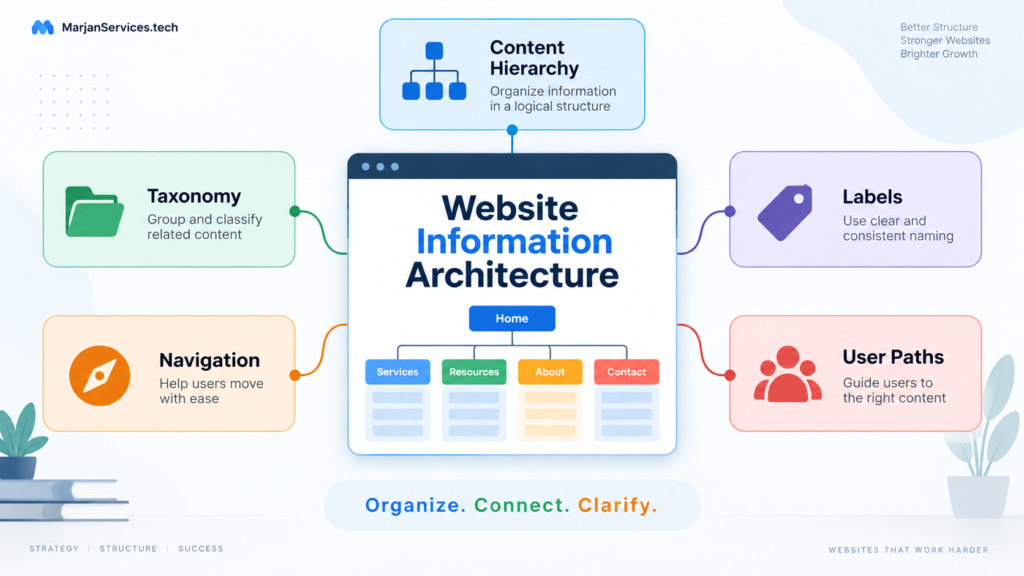
Website information architecture, commonly shortened to IA, is the deliberate organization, classification, labeling, and connection of website information so people can understand what a website contains and move through it logically.
Good information architecture answers practical questions such as:
- Where should a page belong?
- Which pages should be grouped?
- What should a category be called?
- Should a topic have its own page?
- Which content belongs inside an existing page?
- How should visitors move between related information?
- How can a growing website remain organized?
This guide focuses specifically on content organization, hierarchy, taxonomy, labels, navigation, card sorting, tree testing, and IA governance.
It does not attempt to replace broader website planning or technical SEO. Those are separate disciplines with different purposes.
What Is Website Information Architecture?
Website information architecture is the system used to decide how information is grouped, named, prioritized, and connected across a website.
It provides the underlying logic behind:
- Website hierarchy.
- Categories.
- Navigation.
- Labels.
- Content relationships.
- Contextual links.
- Search systems.
- Filters.
- Page ownership.
- Content governance.
A well-designed architecture gives every important page a defined role.
For example, a website development business may contain:
- Website development services.
- WordPress guides.
- Shopify guides.
- SEO resources.
- Hosting reviews.
- Pricing information.
- Company information.
- Contact pages.
Without clear information architecture, these pages may simply accumulate over time.
With a structured IA, the website can separate them into meaningful groups such as:
- Services.
- Educational resources.
- Reviews.
- Company information.
- Support.
- Conversion pages.
This makes the website easier to understand, manage, and expand.
Quick Answer
Website information architecture determines:
- What information belongs on the website.
- Which pages belong together.
- Which pages should be parents or children.
- How content should be classified.
- What categories should be called.
- How visitors move between related content.
- How the structure should be tested.
- How the structure should remain organized as the website grows.
A sitemap may show part of the final hierarchy, but information architecture is the reasoning behind that hierarchy.
Why Website Information Architecture Matters
Visitors usually do not understand a website before they arrive.
They build that understanding through:
- Menu labels.
- Page titles.
- Categories.
- Headings.
- Internal links.
- Search.
- Breadcrumbs.
- Related resources.
If these signals are inconsistent, users have to guess where information is located.
Good information architecture can help:
- Make content easier to find.
- Reduce confusion.
- Clarify the purpose of pages.
- Prevent unnecessary duplicate content.
- Improve navigation.
- Create logical content relationships.
- Support future content growth.
- Improve editorial consistency.
- Make website maintenance easier.
The goal is not simply to create more pages.
The goal is to ensure that every useful page has a clear place and purpose.
Website Information Architecture vs Sitemap vs Navigation
Information architecture, sitemaps, taxonomy, and navigation are related, but they are not the same thing.
| Concept | Main Purpose | Example |
|---|---|---|
| Information architecture | Defines how information is organized and related | Deciding that development tutorials belong under Website Development |
| Sitemap | Represents the page hierarchy | Home → Resources → Website Development |
| Taxonomy | Classifies related content | WordPress, Shopify, SEO, Hosting |
| Navigation | Helps users move through the site | Header, footer, categories, contextual links |
| Labels | Describe sections and destinations | Services, Pricing, Resources, Contact |
| Internal relationships | Connect useful related content | A general guide linking to a specialist guide |
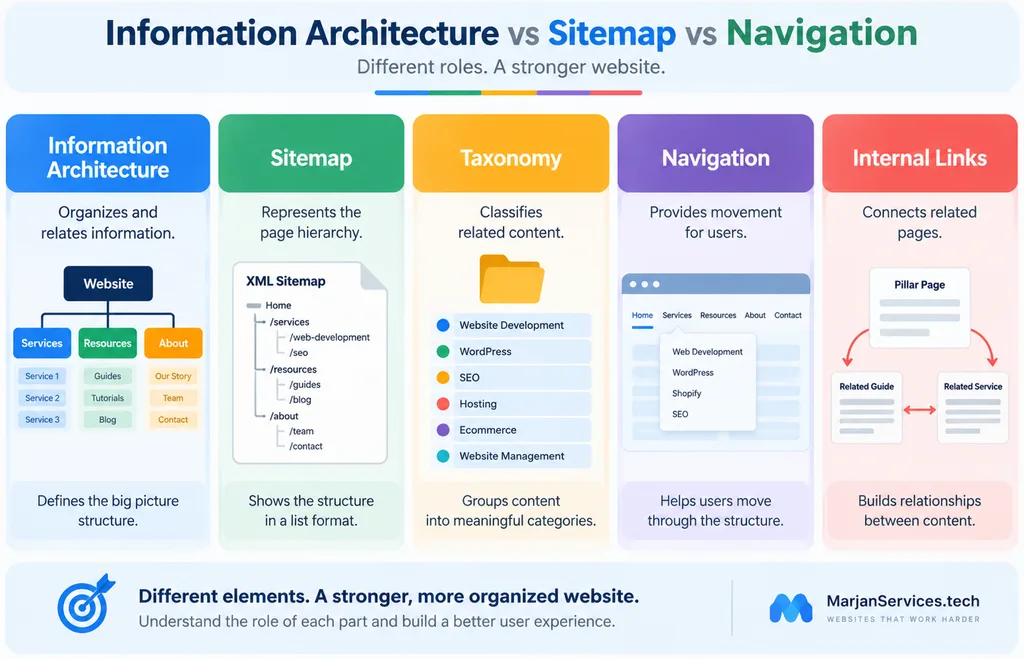
A sitemap can show the structure.
It does not explain why that structure is correct.
Similarly, a navigation menu exposes part of the architecture, but navigation itself is not the complete information architecture.
Information Architecture vs Technical Website Architecture
Information architecture and technical website architecture overlap in some areas, but they answer different questions.
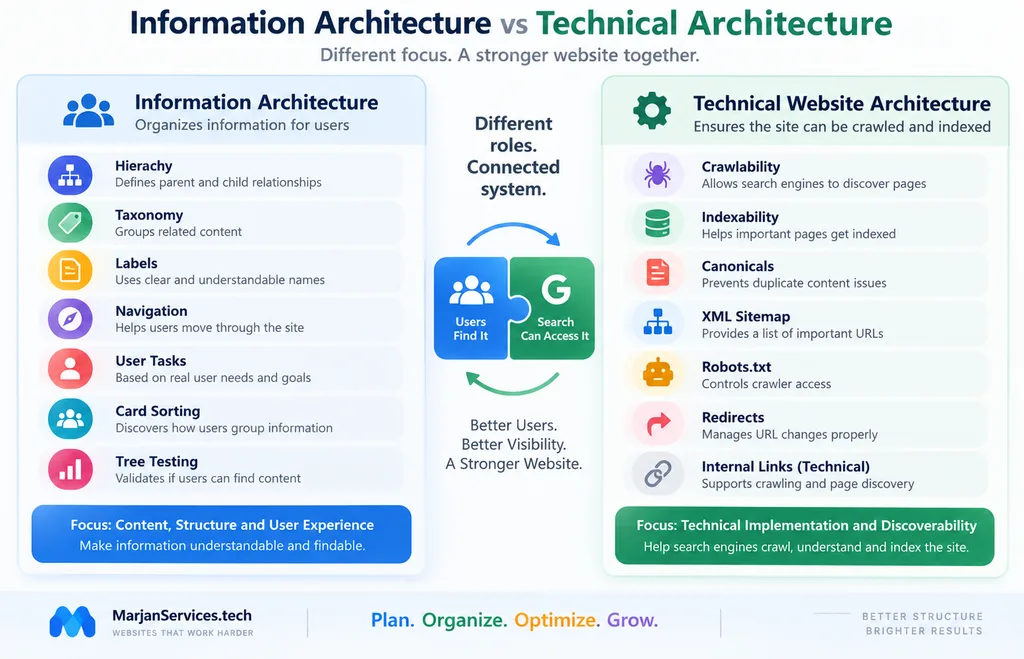
Information Architecture Focuses On
- Content grouping.
- User mental models.
- Page hierarchy.
- Categories.
- Taxonomy.
- Labels.
- Navigation concepts.
- Content relationships.
- Card sorting.
- Tree testing.
- IA governance.
Technical Website Architecture Focuses On
- Crawlability.
- Indexability.
- Canonicalization.
- XML sitemaps.
- Robots.txt.
- URL implementation.
- Redirects.
- Crawl depth.
- Technical internal links.
- Orphan pages.
- Search engine discovery.
A useful distinction is:
Information architecture decides what belongs together.
Technical architecture determines how that structure is technically implemented and discovered.
Both matter, but they should not be treated as the same discipline.
The Core Principle of Good Information Architecture
Every important page should answer one question:
Why does this page deserve to exist separately?
A separate page may be justified when it:
- Solves a distinct user problem.
- Answers a meaningfully different question.
- Supports a separate decision.
- Requires specialist depth.
- Serves a different user journey.
- Provides a dedicated service.
- Provides a useful tool or resource.
A trivial keyword variation is not enough.
For example, the following phrases may represent the same underlying subject:
- Website IA.
- Website information architecture.
- Information architecture for websites.
- Website information structure.
- Website information hierarchy.
Creating a different page for every variation would usually create unnecessary duplication.
A stronger approach is to build one comprehensive page that satisfies the full intent.
The Seven Layers of Practical Website Information Architecture
A useful website IA can be understood through seven connected layers.
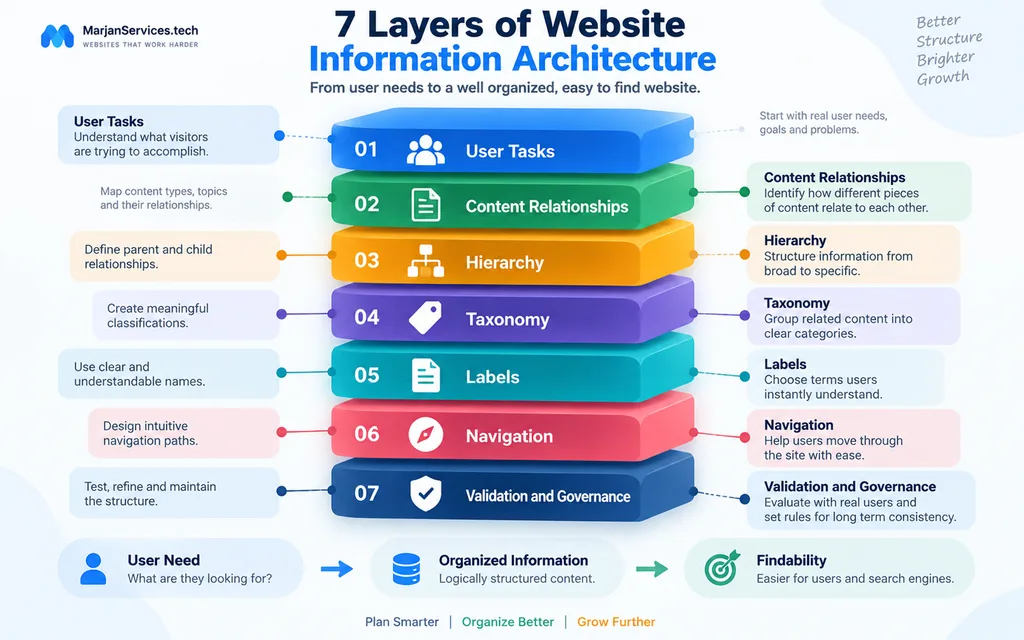
1. User Tasks
Start with what visitors are trying to accomplish.
Common user tasks may include:
- Understanding a service.
- Finding pricing.
- Learning about a topic.
- Comparing options.
- Solving a problem.
- Contacting a business.
- Finding support.
- Reading documentation.
Do not automatically organize everything according to the internal departments of a company.
Visitors often think in terms of tasks and problems, not organizational structure.
2. Content Relationships
Identify how different pieces of information relate to each other.
A page may function as:
- A pillar page.
- A supporting guide.
- A service page.
- A comparison page.
- A troubleshooting guide.
- A trust page.
- A conversion page.
- A resource.
This step helps determine whether a page should be independent or connected to a broader subject.
3. Website Hierarchy
Hierarchy defines parent and child relationships.
A simple service structure might look like this:
Home
→ Services
→ Website Development
→ WordPress Development
A content structure might look like:
Home
→ Resources
→ Website Development Guides
→ Website Information Architecture
Broad concepts generally sit higher in the structure.
More specialized subjects sit deeper.
However, the structure should not become unnecessarily complicated.
4. Website Taxonomy
Taxonomy is the classification system used to organize related information.
A website development publication might use categories such as:
- Website Development.
- SEO.
- Hosting.
- Ecommerce.
- Website Management.
The taxonomy should reflect real content and real user needs.
Avoid creating a new category every time a new article is published.
A useful category should normally support multiple meaningful resources and have a continuing purpose.
5. Labels
Labels are the words users see.
Examples include:
- Services.
- Pricing.
- Portfolio.
- Resources.
- About.
- Contact.
Labels should reduce uncertainty.
For example:
Website Development Services
is usually clearer than:
Solutions
when website development is the actual subject.
Labels should help users predict what they will find after clicking.
6. Navigation
Navigation exposes the information architecture.
Different navigation systems may serve different purposes.
Primary Navigation
Provides access to the most important website sections.
Footer Navigation
Provides access to secondary pages, policies, support, and additional resources.
Category Navigation
Helps users browse related content.
Contextual Navigation
Uses internal links inside articles and pages to connect related information.
Website Search
Helps users find specific content when browsing is inefficient.
The main menu does not need to contain every page on the website.
A strong architecture uses multiple navigation methods together.
7. Validation and Governance
A structure should be tested instead of accepted simply because the website owner understands it.
Useful testing methods include:
- Card sorting.
- Tree testing.
- Navigation testing.
- Task-based usability testing.
Governance becomes important after launch.
Without governance:
- Categories multiply.
- Similar pages appear.
- Navigation becomes cluttered.
- Page purposes overlap.
- Editors create inconsistent labels.
Information architecture should therefore be treated as an ongoing system, not a one-time exercise.
How to Create Website Information Architecture Step by Step
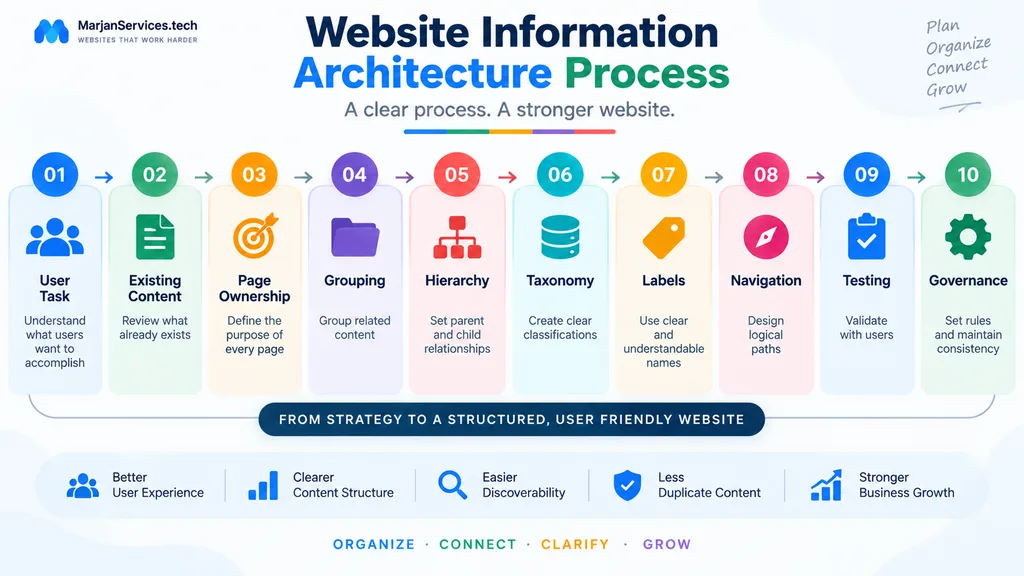
Step 1. Identify the User Task
Ask:
What is the visitor trying to accomplish?
Examples include:
- Find a service.
- Understand a topic.
- Compare options.
- Reach support.
- Request a quotation.
- Find pricing.
The user’s task should guide the structure.
Step 2. Identify Relevant Content
List the pages or content that support each task.
For an existing website, review what already exists before creating more pages.
Ask:
- Does the information already exist?
- Is another page already serving this purpose?
- Should the content be expanded instead?
- Does it deserve its own URL?
Step 3. Define Page Ownership
Every important page should have a clear primary purpose.
For example:
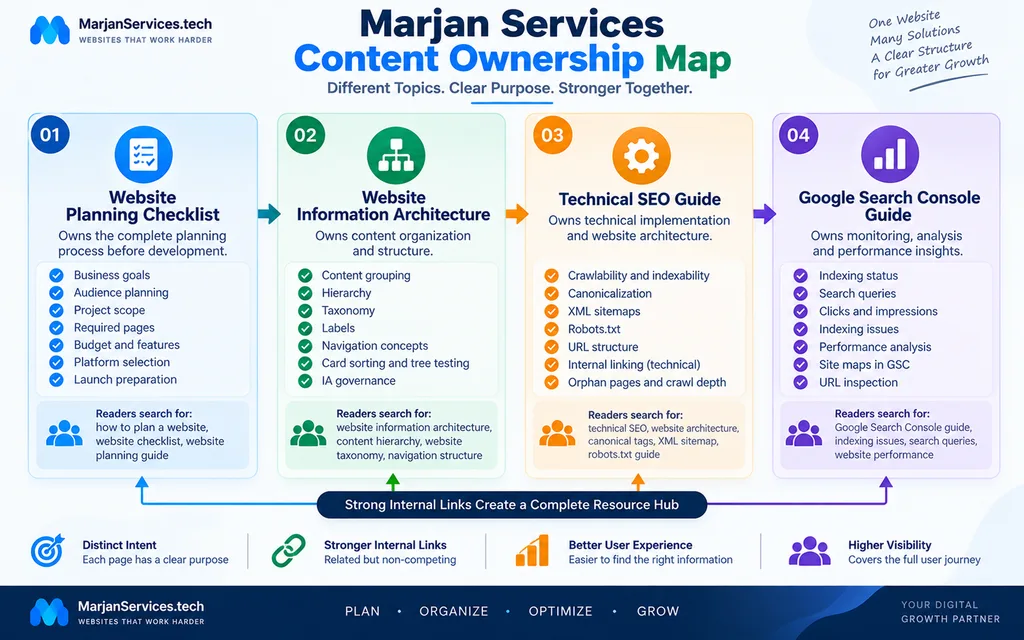
Website Planning Content Should Own
- Business goals.
- Audience planning.
- Budget.
- Platform decisions.
- Required pages.
- Features.
- Project scope.
- Launch planning.
Website Information Architecture Should Own
- Content organization.
- Hierarchy.
- Taxonomy.
- Labels.
- Navigation concepts.
- Card sorting.
- Tree testing.
- IA governance.
Technical SEO Content Should Own
- Crawlability.
- Indexability.
- Canonicals.
- Robots.txt.
- XML sitemaps.
- Technical URL structure.
- Orphan pages.
- Crawl depth.
Clear ownership reduces unnecessary overlap.
Step 4. Group Related Content
Group information based on meaning and user expectations.
Ask:
- Which pages solve related problems?
- Which pages belong under one broader topic?
- Which topics deserve a category?
- Which pages are related but should remain siblings?
- Which pages are duplicates?
Do not group pages simply because they contain similar keywords.
Step 5. Build the Hierarchy
Define:
- Main sections.
- Parent pages.
- Child pages.
- Supporting pages.
- Sibling resources.
The hierarchy should remain understandable as the website grows.
Avoid excessive nesting unless the amount of content genuinely requires it.
Step 6. Create the Taxonomy
A strong taxonomy should answer:
- What belongs in this category?
- What does not belong here?
- Is the category name clear?
- Can multiple meaningful pages fit inside it?
- Does another category mean almost the same thing?
Avoid categories created only to capture keyword variations.
Step 7. Write Clear Labels
Review each category and navigation label.
Ask:
- Would a new visitor understand it?
- Could the label mean several different things?
- Is there a simpler alternative?
- Does the label accurately describe the destination?
Clear language usually performs better for users than clever but vague wording.
Step 8. Design Navigation Paths
Decide how people should move between related information.
Possible relationships include:
- Pillar → Supporting guide.
- Guide → Comparison.
- Service → Educational resource.
- Educational resource → Related service.
- Article → Troubleshooting guide.
Internal links should help readers continue their task.
Do not add links simply because a keyword appears in the text.
Step 9. Test the Architecture
Test uncertain categories and navigation structures.
Ask users to complete tasks such as:
- Find website maintenance information.
- Locate pricing.
- Find a WordPress service.
- Find a website security guide.
Observe whether users choose the expected route.
If people repeatedly select the wrong category, the problem may be:
- The label.
- The grouping.
- The hierarchy.
- The navigation design.
Step 10. Establish Governance
Create clear rules for future publishing.
Decide:
- Who can create categories?
- When does a new topic deserve a page?
- When should two pages be merged?
- Who approves navigation changes?
- How often is taxonomy reviewed?
- What happens to outdated pages?
Governance helps prevent long-term structural disorder.
A Focused Website Information Architecture Content Inventory
An IA inventory should focus on structural decisions.
| Page Situation | IA Decision |
|---|---|
| Strong useful pillar | Keep |
| Two pages serving the same purpose | Merge or differentiate |
| Broad subject | Parent |
| Specialist subject | Child or supporting page |
| Repeated content grouping | Category candidate |
| Independent user intent | Standalone page |
| Outdated page with no useful role | Archive or remove after proper review |
This approach helps editors understand where content belongs without turning IA into a complete project management system.
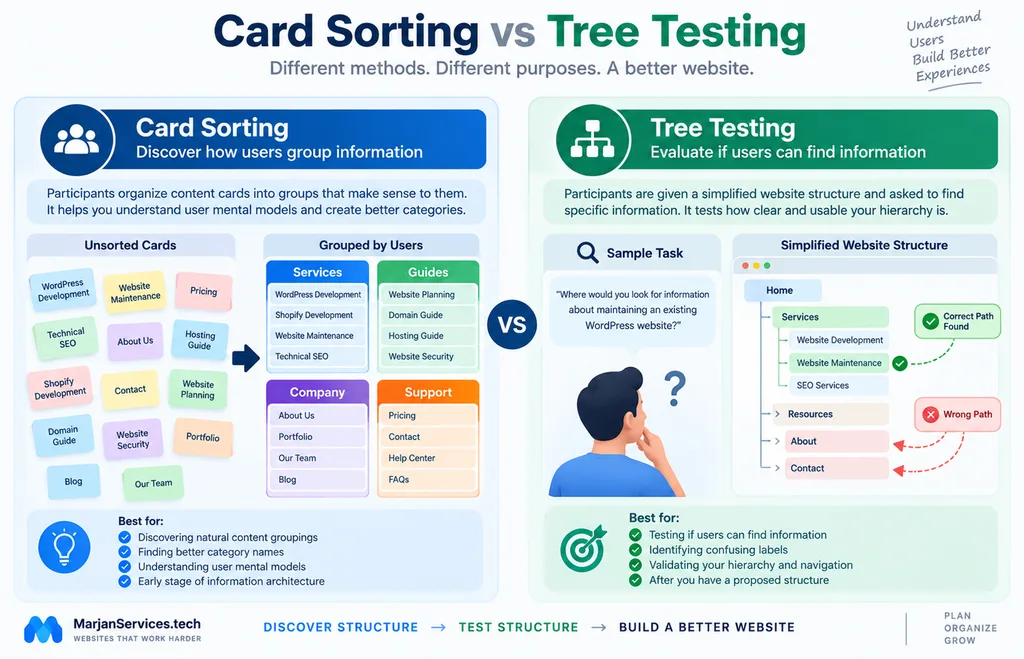
What Is Card Sorting?
Card sorting is a research method used to understand how users naturally group information.
Participants receive cards representing:
- Pages.
- Topics.
- Features.
- Services.
- Content types.
They then organize those cards into groups that make sense to them.
Card sorting can reveal:
- Unexpected content relationships.
- Confusing labels.
- Different user mental models.
- Topics that users consistently group.
Hypothetical Card Sorting Example
The following example is illustrative only.
Imagine cards containing:
- WordPress Development.
- Shopify Development.
- Website Maintenance.
- Technical SEO.
- Website Planning.
- Domain Name Guide.
- Hosting Guide.
- Website Security.
- Portfolio.
- Pricing.
- Contact.
- About.
A participant might create these groups:
Services
- WordPress Development.
- Shopify Development.
- Website Maintenance.
- Technical SEO.
Guides
- Website Planning.
- Domain Name Guide.
- Hosting Guide.
- Website Security.
Company
- About.
- Portfolio.
Contact and Conversion
- Pricing.
- Contact.
This does not automatically prove that the structure is correct.
It simply provides evidence about how users may conceptualize the information.
What Is Tree Testing?
Tree testing evaluates a proposed hierarchy.
Users are shown a simplified text-based structure and asked to locate specific information.
For example:
Where would you look for information about maintaining an existing WordPress website?
The user then navigates through the hierarchy.
If many users repeatedly choose the wrong path, the structure or labels may need improvement.
Card Sorting vs Tree Testing
| Method | Main Purpose | Best Stage |
|---|---|---|
| Card sorting | Discover how users group information | Early IA planning |
| Tree testing | Test whether users can find information | After a hierarchy is proposed |
| Usability testing | Test the actual interface and tasks | Prototype or live website |
A simple distinction is:
Card sorting helps discover possible structures.
Tree testing helps evaluate a proposed structure.
Neither method guarantees a perfect architecture.
They provide evidence that can improve decisions.
Example Information Architecture for a Small Service Website
A small service business may use:
Home
→ Services
→ Individual Service
→ Related Guide
→ Contact
The main priority is usually simplicity.
The website may not need a complicated taxonomy.
Example Information Architecture for a Blog
A content-heavy website may use:
Home
→ Main Topic
→ Pillar Guide
→ Supporting Guide
→ Specialist Article
This structure helps users move from broad concepts toward more specific information.
Example Information Architecture for Ecommerce
An ecommerce website may use:
Home
→ Product Category
→ Subcategory
→ Product
Filters may provide additional ways to browse products by:
- Brand.
- Price.
- Size.
- Features.
- Availability.
Product architecture should reflect meaningful customer choices rather than keyword variations.
Example Information Architecture for SaaS
A SaaS website might organize information as:
Home
→ Product
→ Features
→ Use Cases
→ Resources
→ Documentation
→ Support
The challenge is usually keeping marketing, education, product information, and customer support clearly separated while still connected.
How Information Architecture Supports Findability
The main purpose of information architecture is to make information easier for users to understand and locate.
Clear page relationships can also support search discovery because important pages are connected through navigation and contextual links.
The correct relationship is:
Information architecture decides which information belongs together.
Navigation and internal links expose those relationships.
Technical SEO ensures the implementation can be properly discovered and processed by search systems.
Detailed technical issues such as:
- Canonical tags.
- Robots.txt.
- XML sitemap configuration.
- Crawl budget.
- Redirect chains.
- Indexation problems.
should be handled separately as technical SEO topics.
Website Information Architecture, AEO and Generative Search
AEO and GEO are useful industry concepts when they encourage:
- Clear answers.
- Logical structure.
- Strong entity relationships.
- Useful internal links.
- Original content.
- Direct explanations.
However, they should not be treated as separate official Google ranking systems.
For information architecture, the useful principles remain straightforward:
- Give each page a clear purpose.
- Use descriptive headings.
- Explain relationships directly.
- Avoid duplicate intent pages.
- Connect related resources.
- Keep important information accessible.
- Provide useful original value.
- Write primarily for real users.
There is no need to create artificial AI-focused pages or repeat every long-tail keyword variation.
Common Website Information Architecture Mistakes
1. Organizing Everything Around Internal Departments
Visitors may not understand the internal structure of a business.
Where practical, organize major information according to user needs.
2. Treating Navigation as the Entire Architecture
Navigation is only one expression of IA.
Taxonomy, hierarchy, labels, relationships, and governance matter too.
3. Creating Too Many Categories
A category should serve a continuing organizational purpose.
Do not create one for every new article.
4. Creating Nearly Identical Categories
For example:
- Website Development.
- Web Development.
- Website Building.
- Website Creation.
These may represent the same conceptual group.
Duplicating categories adds confusion.
5. Using Vague Labels
Avoid labels that force users to guess what a section contains.
Clarity should come before creativity.
6. Creating a Page for Every Keyword Variation
Keyword variations do not automatically represent different search intent.
One strong page may satisfy many closely related phrases.
7. Allowing Pages to Lose Their Purpose
A page may begin with a clear subject but gradually expand into unrelated areas.
Periodically confirm what each major page is supposed to own.
8. Copying Competitor Architecture
A competitor’s architecture reflects:
- Its own customers.
- Its own services.
- Its own content.
- Its own business model.
Research competitors for ideas, but do not copy their architecture blindly.
9. Skipping User Validation
Website owners understand their own terminology.
New visitors may not.
Testing can reveal misunderstandings that internal teams miss.
10. Ignoring Governance
Without governance:
- Similar pages appear.
- Categories multiply.
- Labels become inconsistent.
- Navigation becomes cluttered.
Long-term IA requires editorial control.
Website Information Architecture Checklist
Use this checklist before approving a website structure.
Page Ownership
- Does every important page have a clear purpose?
- Have overlapping pages been reviewed?
- Are pillar and supporting pages differentiated?
- Does every standalone page solve a distinct need?
Hierarchy
- Do major subjects have clear parents?
- Do supporting pages have logical relationships?
- Is the hierarchy understandable?
- Is unnecessary nesting avoided?
Taxonomy
- Are categories meaningfully different?
- Do categories have continuing value?
- Have duplicate categories been avoided?
- Can users understand what belongs in each category?
Labels
- Are labels clear?
- Is internal jargon minimized?
- Can users predict the destination?
- Are menu terms consistent?
Navigation
- Can users reach important destinations logically?
- Is the main menu manageable?
- Are useful contextual links present?
- Are related resources easy to discover?
Validation
- Have uncertain groupings been tested?
- Have important tasks been evaluated?
- Does mobile navigation preserve critical paths?
- Have confusing labels been reviewed?
Governance
- Are there rules for creating categories?
- Are there rules for new pages?
- Are duplicate topics reviewed before publishing?
- Are navigation changes controlled?
When Should Website Information Architecture Be Redesigned?
A complete IA redesign should be based on a genuine structural need.
Possible triggers include:
- Major content growth.
- New services.
- New product lines.
- Repeated navigation problems.
- Many overlapping categories.
- A major website redesign.
- A substantial change in audience needs.
- Large-scale content consolidation.
Do not rebuild the structure simply because another URL format appears cleaner.
Structural changes should solve an actual user or content problem.
How Often Should Website Information Architecture Be Reviewed?
There is no universal review schedule.
A small service website may remain stable for years.
A large content website may require more frequent reviews.
Useful review triggers include:
- New content clusters.
- New services.
- Navigation expansion.
- Duplicate topics.
- Website redesign.
- User feedback.
- Usability test results.
- Significant content growth.
The goal is not constant restructuring.
The goal is to prevent gradual disorder.
Frequently Asked Questions
What is website information architecture?
Website information architecture is the system used to organize, classify, label, and connect website information so users can understand the site’s structure and find relevant content.
Is information architecture the same as a sitemap?
No. A sitemap represents pages and hierarchy. Information architecture also includes taxonomy, labels, relationships, navigation, user needs, and content ownership.
Is information architecture the same as navigation?
No. Information architecture defines how information is organized. Navigation provides interfaces that allow users to move through that organization.
What is website taxonomy?
Website taxonomy is the classification system used to group related content into meaningful categories or other structures.
What is card sorting?
Card sorting is a user research method in which participants organize content or topic cards into groups that make sense to them.
What is tree testing?
Tree testing evaluates whether users can locate information within a proposed website hierarchy without relying on the full visual design.
What is the difference between card sorting and tree testing?
Card sorting helps generate possible content structures. Tree testing evaluates whether a proposed hierarchy helps users find information.
How many levels should a website hierarchy have?
There is no universal number. The hierarchy should remain understandable while providing enough detail for the amount and complexity of the website’s content.
Should every service have its own page?
Only when the service has enough unique purpose, content, and user need to justify a standalone page.
Does information architecture improve SEO?
Information architecture can support findability and create clearer page relationships, but it does not guarantee rankings. Technical SEO, content quality, relevance, and other factors still matter.
Do I need special AEO or GEO schema?
No special AEO or GEO schema is required. Structured data should describe the actual visible content and use supported schema types where appropriate.
Final Conclusion
Strong website information architecture gives every important piece of information a predictable place.
The objective is not to create the largest possible sitemap or the maximum number of pages.
The objective is to create a website where:
- Users understand the major sections.
- Related content is grouped logically.
- Categories have clear purposes.
- Labels communicate accurately.
- Navigation reflects user expectations.
- Pages have defined ownership.
- New content can be added without unnecessary duplication.
- The structure remains manageable as the website grows.
Before creating another page, ask:
What user need does this information serve?
Then ask:
Where does it naturally belong?
Finally ask:
Does it genuinely deserve its own page?
When those decisions are made consistently, a website becomes easier to navigate, easier to maintain, and easier to expand without creating unnecessary internal competition.
Related Guides
- Website Planning Checklist
https://marjanservices.tech/website-planning-checklist/ - Technical SEO Guide 2026
https://marjanservices.tech/technical-seo-guide-2026/ - Website Mistakes to Avoid
https://marjanservices.tech/website-mistakes-to-avoid/ - Website Maintenance Guide
https://marjanservices.tech/website-maintenance-guide/ - Google Search Console Guide
https://marjanservices.tech/google-search-console-guide/
External Resources
- Google Search Central. Link Best Practices
https://developers.google.com/search/docs/crawling-indexing/links-crawlable - Google Search Central. AI Features and Your Website
https://developers.google.com/search/docs/appearance/ai-features - Digital.gov. Information Architecture
https://digital.gov/topics/information-architecture - Google Search Central. URL Structure Best Practices
https://developers.google.com/search/docs/crawling-indexing/url-structure - Google Search Central. How Google Search Works
https://developers.google.com/search/docs/fundamentals/how-search-works