Updated: August 12, 2026
Product Information Verified: August 12, 2026
Author: Syed Abdul Quddus
Hostinger has become one of the most recognizable hosting providers for WordPress users, small businesses, ecommerce websites, freelancers, and agencies. But choosing between Hostinger’s lower-cost web hosting plans and its more capable business-level hosting can be confusing, especially because plan names, resource allocations, promotional prices, and renewal costs can change over time.
This Hostinger Business Hosting Review 2026 examines the service from a practical purchasing perspective. Instead of focusing only on promotional claims, the review considers WordPress suitability, WooCommerce support, backups, storage, CDN functionality, website performance, pricing, renewal costs, scalability, limitations, and the important Hostinger Premium vs Business decision.
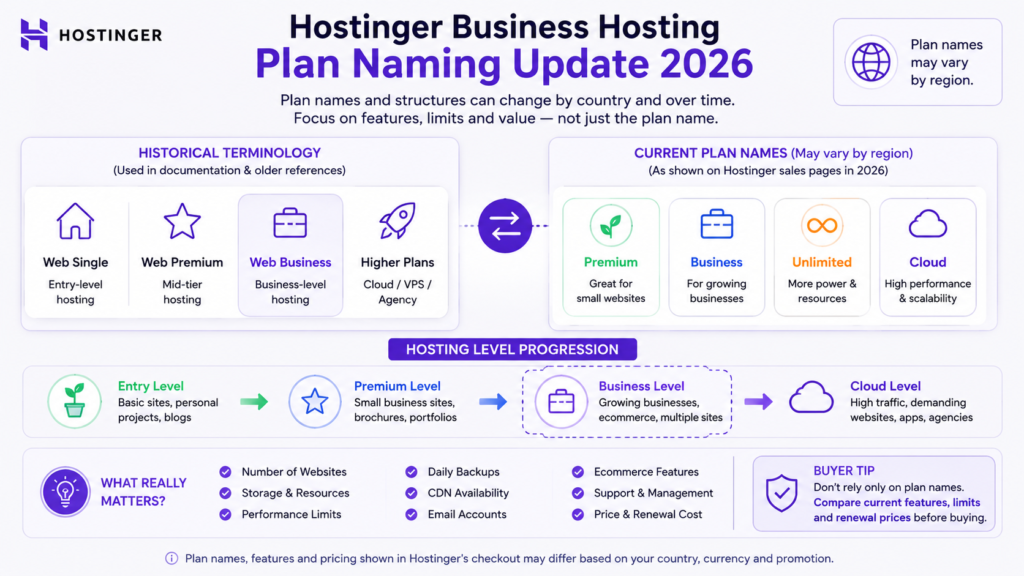
There is also an important 2026 naming issue to understand. Hostinger’s current regional sales pages may not always display a plan literally named “Business.” Hostinger’s support documentation, however, continues to use terms such as Web Business and Business Web Hosting when explaining features, limits, backups, and CDN eligibility.
This review therefore uses Hostinger Business Hosting as the established product and search term while clearly distinguishing it from the plan names currently displayed in different markets.
Table of Contents
Hostinger Business Hosting Review: Quick Verdict
Hostinger Business-level hosting is a strong option for growing WordPress websites, commercial websites, smaller ecommerce stores, freelancers, and businesses that need more capability than entry-level hosting without immediately moving to cloud or VPS infrastructure.
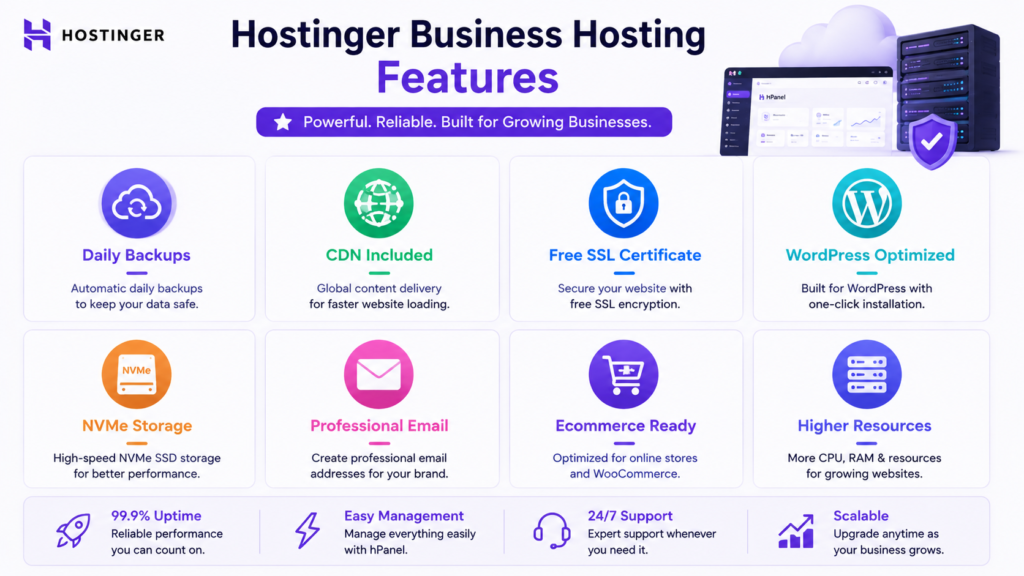
Its biggest practical strengths include managed website administration, WordPress functionality, daily backups on eligible Business-level hosting, CDN access, modern storage allocations on applicable plans, ecommerce support, and a relatively straightforward upgrade path.
Hostinger’s current documentation states that Business-level and higher hosting receives daily backups, while all web and cloud hosting plans receive automated weekly backups.
Hostinger also states that its CDN is available with Premium Web, Business Web, Cloud, and Agency hosting plans.
The plan category is therefore particularly attractive when your website is commercially important and requires stronger backup protection or additional hosting capacity.
It is not necessarily the best value for every website.
A small personal website, portfolio, or lightweight blog may be adequately served by Premium or another lower-cost tier. A demanding WooCommerce store, resource-heavy membership website, agency environment, or rapidly growing commercial project may be better suited to Cloud Startup or another more powerful hosting architecture.
Overall verdict: Hostinger Business-level hosting offers strong value when its additional resources and features solve real website requirements. The decision should be based on workload, renewal pricing, backup requirements, and expected growth rather than the plan name alone.
Important 2026 Hostinger Business Hosting Plan Naming Update
One of the biggest problems with older Hostinger reviews is that they sometimes treat product names and plan specifications as permanent.
They are not.
Hostinger changes its product lineup, limits, promotions, and regional offers.
Current Hostinger support documentation still refers to:
Web Single.
Web Premium.
Web Business.
and higher hosting categories when describing hosting limits.
At the same time, regional sales pages can display somewhat different public-facing plan names and configurations.
This means a user searching:
Hostinger Business Hosting Review
may arrive at a Hostinger sales page where the closest current commercial tier has another name.
That does not make the keyword obsolete. It means the review must explain the distinction.
What Should Buyers Do?
Do not purchase hosting based solely on an older article’s plan name.
Before checkout, verify:
- Current plan name.
- Number of websites allowed.
- Storage allocation.
- Backup frequency.
- CDN eligibility.
- Email allowance.
- WordPress features.
- Ecommerce functionality.
- Introductory cost.
- Renewal price.
- Subscription length.
This review focuses on the Business-level hosting proposition rather than pretending that a particular public-facing plan name will remain unchanged worldwide.
Review Methodology
This review evaluates Hostinger Business-level hosting using documented product information, practical website requirements, and editorial analysis.
It deliberately separates provider specifications from independent testing.
Verified Product Information
Time-sensitive Hostinger-specific information has been checked against Hostinger’s current official product pages and Help Center documentation.
Important product claims include:
- Backup frequency.
- Manual backup availability.
- Backup downloads.
- CDN availability.
- Hosting limits.
- WordPress-related functionality.
- Current regional product positioning.
Technical Analysis
Recommendations concerning WordPress, WooCommerce, ecommerce hosting, website performance, backups, website migration, and scalability are based on established website development and hosting principles.
Editorial Assessment
Descriptions such as strong fit, good value, or better suited to growing websites are editorial assessments.
They are not presented as laboratory measurements.
Testing Transparency
This review does not claim independent performance benchmarks where corresponding test evidence is unavailable.
It therefore does not invent:
- Uptime measurements.
- Time to First Byte results.
- Server response times.
- Core Web Vitals results.
- Stress-test capacity.
- Maximum visitor numbers.
- Support response times.
- Conversion-rate improvements.
Google’s reviews system is designed to reward reviews offering insightful analysis and original research rather than thin summaries. Google also recommends evidence that helps readers understand the reviewer’s experience where such evidence exists.
For that reason, provider documentation and editorial conclusions are clearly separated from independently measured results.
What Is Hostinger Business Hosting?
Hostinger Business Hosting generally refers to Hostinger’s more capable managed web hosting tier designed for users who need greater resources and functionality than basic hosting provides.
The category sits between entry-level web hosting and more powerful cloud or VPS solutions.
It can be relevant to:
- Business websites.
- WordPress websites.
- Growing blogs.
- WooCommerce stores.
- Freelancers.
- Marketing agencies.
- Website development agencies.
- Affiliate websites.
- Content websites.
- Professional portfolios.
- Owners managing multiple websites.
Hostinger describes its web hosting services as shared-resource hosting suitable for websites including personal sites, blogs, small businesses, and other web projects.
The principal benefit is managed infrastructure.
Instead of manually configuring and maintaining a server, website owners receive a hosting environment where many routine tasks can be handled through Hostinger’s control panel and associated tools.
Hostinger Business Hosting Features
The value of a hosting plan should not be measured by how many marketing features appear on the pricing page.
A better question is:
Which features will actually protect, improve, simplify, or scale your website?
Hosting Resources
Hostinger’s current hosting limits documentation distinguishes Web Business from lower tiers and gives it higher resource allocations in several categories.
For example, the current limits documentation lists Web Business with higher CPU, RAM, disk space, inode, I/O, database, and website allocations than Web Premium.
This matters because more demanding commercial websites can require greater server resources than small personal sites.
However, higher limits do not automatically mean that every website needs the Business tier.
NVMe and Modern Storage
Current higher Hostinger configurations may use NVMe storage.
NVMe is a modern interface for solid-state storage designed for high throughput and low latency.
For hosting, this can provide a stronger foundation for file access and database operations.
But storage technology is only one performance component.
Real WordPress speed depends on:
- Server resources.
- Database efficiency.
- PHP processing.
- Theme architecture.
- Plugin quality.
- Caching.
- Images.
- JavaScript.
- External scripts.
- CDN configuration.
- Visitor location.
Therefore:
NVMe can improve the technical foundation, but it cannot guarantee a specific page-loading time.
Daily Backups
Backups are one of the strongest practical reasons to consider Business-level hosting.
Hostinger currently states that all web and cloud hosting plans receive automated weekly backups and that Business or greater hosting plans have daily backups enabled.
Daily backups are particularly useful for websites that change frequently.
Examples include:
- WooCommerce stores.
- Membership websites.
- News websites.
- Frequently updated blogs.
- Lead-generation websites.
- Business websites.
- Active development environments.
Why Daily Backups Matter
Imagine a WooCommerce website receiving orders every day.
If a plugin update breaks the website, the age of the most recent usable backup can make a substantial difference to recovery.
The same principle applies to websites receiving:
- Customer registrations.
- Form submissions.
- Content changes.
- Database changes.
- Ecommerce orders.
- Account activity.
A more recent backup can reduce the amount of activity potentially lost during recovery.
Manual Backups
Business-level hosting can also provide manual backup options.
Hostinger’s official backup documentation explains that Business or greater plans can create backups through the hosting backup tool.
Manual backups are especially useful before:
- Updating WordPress.
- Updating critical plugins.
- Changing themes.
- Modifying important code.
- Performing database maintenance.
- Migrating a website.
- Starting a major redesign.
This provides an additional restore point before potentially disruptive work.
Downloadable Backups
Hostinger also documents the ability to download backups to a local device for eligible web and cloud hosting accounts.
Its backup documentation explains that users can download website files or database backups through the backup management interface.
This is useful for business-critical websites because a provider-side backup does not necessarily have to be your only recovery copy.
Hostinger CDN
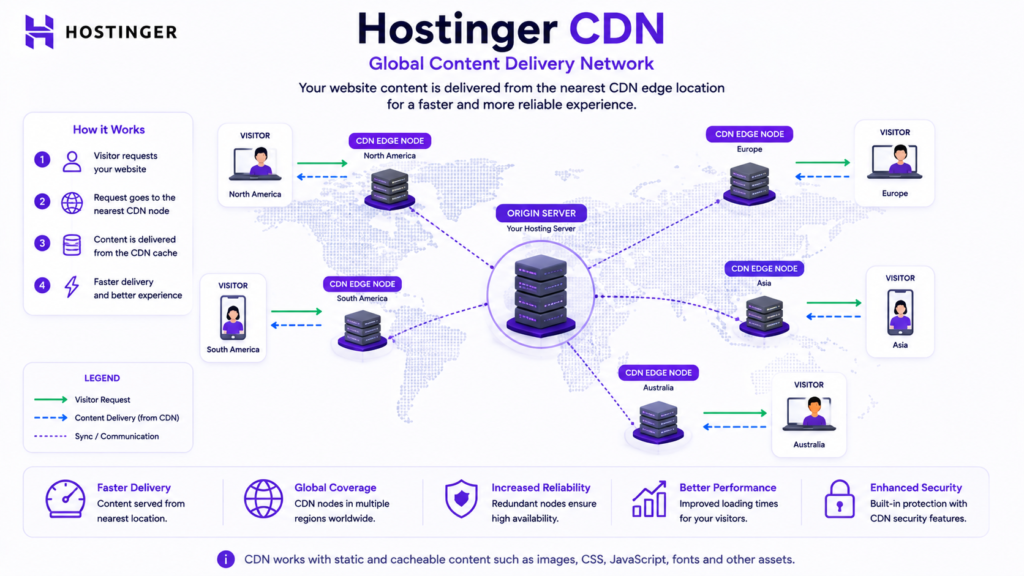
Hostinger’s CDN is available on Premium Web, Business Web, Cloud, and Agency hosting according to its current support documentation.
A content delivery network distributes cacheable resources through geographically distributed infrastructure.
This can reduce unnecessary distance between users and website content.
A CDN becomes especially relevant when a website receives visitors from several geographic markets.
For example:
- USA.
- UK.
- Canada.
- Australia.
- Europe.
- Pakistan.
Does CDN Automatically Make a Website Fast?
No.
A CDN cannot compensate for every performance problem.
A website may still perform poorly because of:
- Oversized images.
- Excessive JavaScript.
- Poor theme architecture.
- Inefficient plugins.
- Database problems.
- Large third-party scripts.
- Dynamic processing.
- Incorrect caching.
CDN should therefore be treated as one component of a broader performance strategy.
Hostinger CDN Security Features
Hostinger also provides CDN-related security controls on qualifying higher tiers.
Its current documentation says advanced CDN security levels are available on Web Hosting Business or higher plans.
These controls can help filter suspicious traffic.
However, CDN protection should not replace WordPress-level security practices.
SSL
HTTPS is fundamental to modern websites.
SSL and TLS encryption help protect information being transmitted between users and a website.
This matters particularly for:
- Login pages.
- Contact forms.
- Ecommerce.
- Customer accounts.
- Membership sites.
- Business websites.
Hostinger’s current web-hosting sales pages advertise SSL as part of its hosting offer.
Domain Registration
Some qualifying Hostinger hosting terms include domain registration for an introductory period.
This can simplify the initial setup because the domain and hosting can be managed within the same ecosystem.
However:
A domain included for the first year should not be interpreted as permanently free.
Check the future renewal price separately.
Email Hosting
Professional email can improve business presentation.
An address such as:
contact@yourbusiness.com
is usually more suitable for professional communication than a generic personal account.
Hostinger currently provides Business Email trial functionality with web, cloud, and agency hosting, although exact email entitlements can vary according to the offer and product.
Always check the current checkout details rather than relying on an older review.
Hostinger Business Hosting for WordPress
Is Hostinger Business Hosting Good for WordPress?
Yes. Hostinger Business-level hosting can be a strong choice for small and medium WordPress websites that want managed website tools without server administration.
Its main appeal is that common WordPress tasks can be managed inside the hosting ecosystem rather than requiring users to operate their own infrastructure.
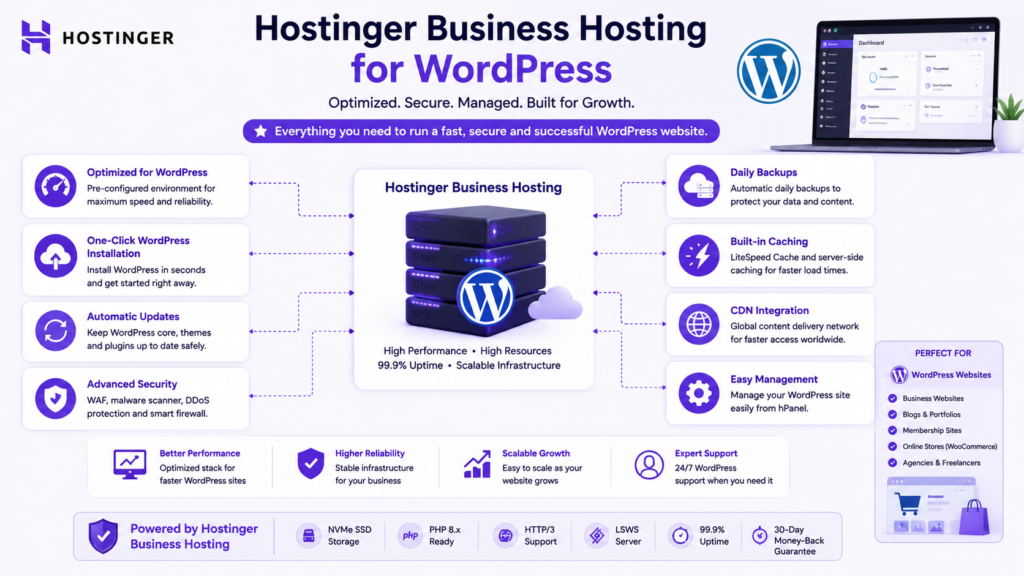
Potential use cases include:
- Business websites.
- Service websites.
- Professional blogs.
- Affiliate sites.
- Content websites.
- Lead-generation sites.
- Portfolio websites.
- Smaller WooCommerce stores.
Why Managed WordPress Matters
Managing WordPress involves more than installing the CMS.
A functioning professional WordPress website also requires attention to:
- Updates.
- Backups.
- Security.
- PHP compatibility.
- Caching.
- Plugins.
- Themes.
- Database health.
- Performance.
- Staging.
- Migration.
A managed environment reduces the number of infrastructure tasks a website owner must handle manually.
Example WordPress Use Case
Consider a website development business operating:
- Its primary business site.
- A blog.
- Several landing pages.
- Demonstration websites.
- Development projects.
An entry-level plan may be perfectly adequate initially.
As the number and complexity of sites increase, however, additional resources and backup functionality can become more valuable.
This is where the higher Business-level tier begins to make more practical sense.
When WordPress Users Should Consider Cloud Hosting
Web hosting is not the final destination for every project.
Consider stronger infrastructure when:
- Resource use becomes consistently high.
- Traffic grows significantly.
- Databases become larger.
- Plugins become resource-intensive.
- Ecommerce activity increases.
- Membership functionality becomes complex.
- Numerous active websites share the account.
- Downtime has substantial business consequences.
The correct upgrade point should be determined by actual workload rather than an arbitrary visitor number.
Hostinger Business Hosting for WooCommerce
WooCommerce creates a more demanding workload than a simple brochure site because many user actions involve dynamic processing.
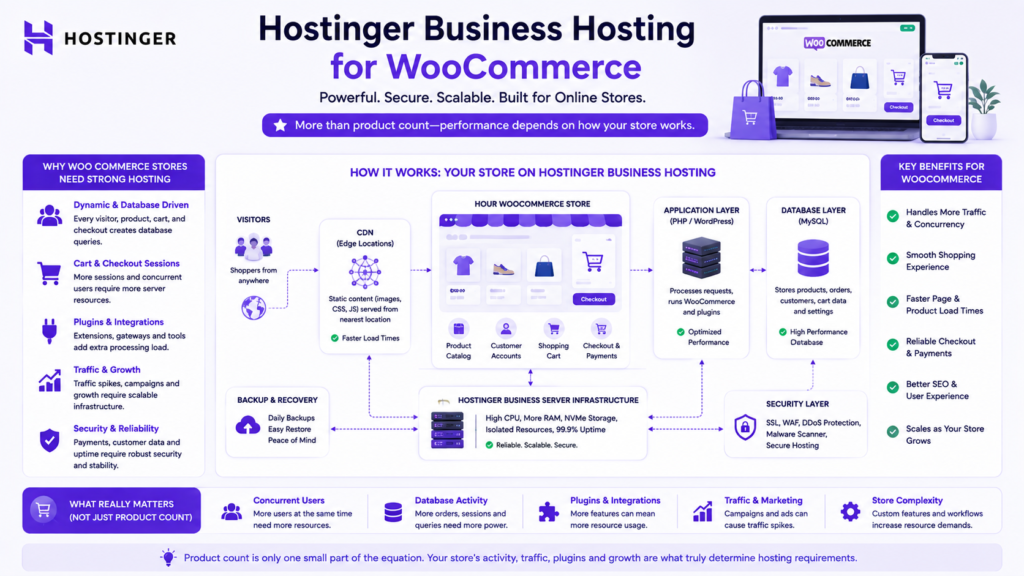
Customers may:
- Search products.
- Filter catalogs.
- Log into accounts.
- Add items to carts.
- Update carts.
- Apply coupons.
- Check out.
- View orders.
- Trigger transactional emails.
Many of these operations involve database activity.
Is Hostinger Business Hosting Good for WooCommerce?
It can be a good starting point for small and moderately demanding WooCommerce stores whose resource requirements fit comfortably within the hosting plan.
Relevant advantages include:
- Managed WordPress hosting.
- Daily backup availability.
- CDN access.
- SSL.
- Higher resources than basic tiers.
- Simplified hosting management.
However, the word “ecommerce” alone should not determine which hosting plan you purchase.
Product Count Is Not Enough
A store containing 500 simple products and receiving light traffic can use fewer resources than a smaller store running:
- Advanced filtering.
- Subscription plugins.
- Membership systems.
- Dynamic pricing.
- External APIs.
- Inventory integrations.
- Several payment gateways.
- Complex shipping calculations.
Hosting should therefore be chosen according to workload.
Hostinger Business Hosting for Ecommerce
For a smaller ecommerce business, Hostinger’s main advantage is operational simplicity.
A store owner may not want to manage:
- Linux administration.
- Server patches.
- Web-server configuration.
- Database-server configuration.
- Operating-system updates.
- Caching infrastructure.
Managed hosting reduces the need for this low-level administration.
When Business-Level Hosting Makes Sense
It is worth considering when you need a balance of:
- Managed administration.
- WordPress support.
- Daily backups.
- CDN.
- SSL.
- Ecommerce compatibility.
- Reasonable cost.
- Upgrade potential.
When It May Not Be Enough
More powerful infrastructure deserves consideration when:
- Store revenue becomes substantial.
- Concurrent user activity increases.
- Database processing becomes demanding.
- Resource use repeatedly approaches plan limits.
- Dynamic operations become complex.
- Site performance has significant commercial consequences.
Hostinger Business Hosting for Small Business
Small businesses represent one of the strongest use cases for higher managed web hosting.
A typical business site may contain:
- Home.
- About.
- Services.
- Pricing.
- Portfolio.
- Blog.
- Contact forms.
- Booking.
- Ecommerce.
Many small organizations do not employ dedicated server administrators.
That means ease of management has genuine value.
Why Small Businesses May Prefer Hostinger
A single hosting ecosystem can centralize several website functions:
- Hosting.
- Domain.
- SSL.
- Email.
- WordPress.
- Backups.
- CDN.
- Migration.
- Support.
For an organization without dedicated IT staff, reducing infrastructure complexity can be more important than having advanced low-level server control.
Hostinger Business Hosting Performance
Performance is one of the most commercially important parts of any hosting review.
It is also one of the easiest areas to exaggerate.
No trustworthy review should claim that every website on a particular plan will load within an exact number of milliseconds without controlled testing and appropriate qualifications.
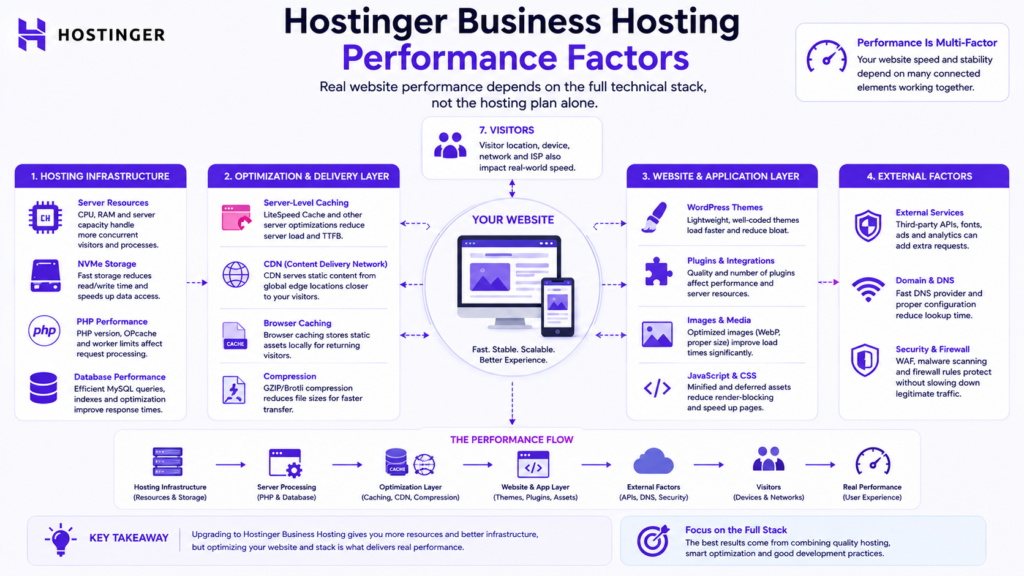
What Determines Website Performance?
Website performance depends on several layers:
- CPU resources.
- Available memory.
- Storage.
- PHP processing.
- Database efficiency.
- Caching.
- CDN.
- Theme architecture.
- Plugins.
- Images.
- Fonts.
- JavaScript.
- External scripts.
- User geography.
- Concurrent activity.
What Can Be Evaluated Without Inventing Benchmarks?
Infrastructure characteristics can be evaluated.
Hostinger’s documentation currently distinguishes Business-level hosting from lower tiers by providing higher resource limits in categories including CPU, RAM, disk space, I/O, website counts, and databases.
These specifications provide a stronger technical foundation for more demanding workloads.
They do not guarantee a particular loading time.
What This Review Does Not Claim
Without independent controlled testing, this review does not claim:
- Guaranteed loading time.
- Independently measured uptime.
- Guaranteed TTFB.
- Fixed traffic capacity.
- Guaranteed Core Web Vitals.
- That Hostinger is faster than every competitor.
These claims require real evidence.
Hostinger Business Hosting and Core Web Vitals
Hosting can influence website responsiveness, but frontend implementation remains critical.
Important Core Web Vitals metrics include:
- Largest Contentful Paint.
- Interaction to Next Paint.
- Cumulative Layout Shift.
A strong server cannot completely compensate for an inefficient website.
Website owners should also optimize:
- Images.
- CSS.
- JavaScript.
- Fonts.
- Themes.
- Plugins.
- Databases.
- Caching.
- CDN configuration.
Hostinger Business Hosting Price
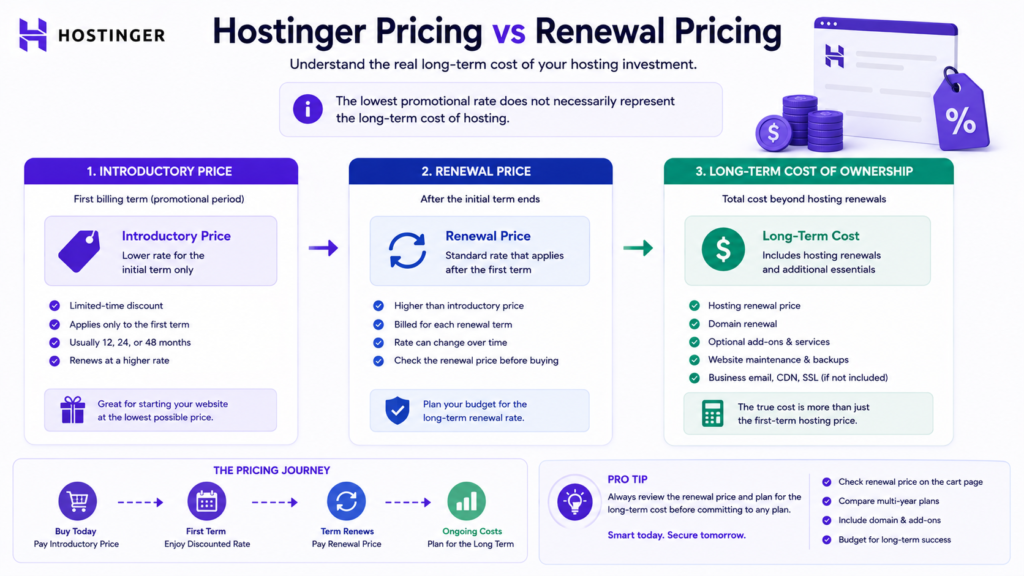
Hostinger pricing requires careful interpretation because promotional and renewal prices are different.
Prices can also change according to:
- Country.
- Currency.
- Subscription length.
- Promotional campaign.
- Taxes.
- Product configuration.
For example, Hostinger’s current Pakistan web-hosting page displays locally priced hosting offers and explicitly shows both promotional and renewal pricing.
Because this review targets a worldwide audience, one regional price should not be presented as the permanent worldwide Hostinger Business hosting price.
Promotional Price vs Actual Billing Commitment
A hosting provider may advertise a low monthly equivalent calculated from a long prepaid subscription.
Therefore:
A displayed monthly equivalent does not necessarily mean the service can be purchased month by month at that price.
Before paying, confirm:
- Upfront total.
- Contract duration.
- Renewal rate.
- Domain renewal.
- Optional services.
- Taxes.
Hostinger Business Hosting Renewal Price
For a long-term website, renewal pricing can be more important than the introductory discount.
Calculate:
Total cost of ownership = initial hosting payment + future hosting renewals + domain renewals + required optional services.
This gives a more realistic financial picture.
Why Renewal Price Changes the Comparison
Imagine two plans.
| Plan | Introductory Pricing | Renewal Pricing | Long-Term Assessment |
|---|---|---|---|
| Plan A | Very low | Significantly higher | Requires long-term calculation |
| Plan B | Moderate | Moderate | Could cost less over time |
The cheapest advertisement is not necessarily the cheapest long-term hosting solution.
For a business website expected to remain online for years, renewal cost should be considered before checkout.
Hostinger Premium vs Business
The Hostinger Premium vs Business comparison is one of the most important decisions for potential buyers.
Hostinger’s own hosting limits documentation currently assigns different resources to Web Premium and Web Business, including differences in CPU, RAM, storage, I/O, website capacity, and database allowances.
The better plan therefore depends on workload rather than branding.
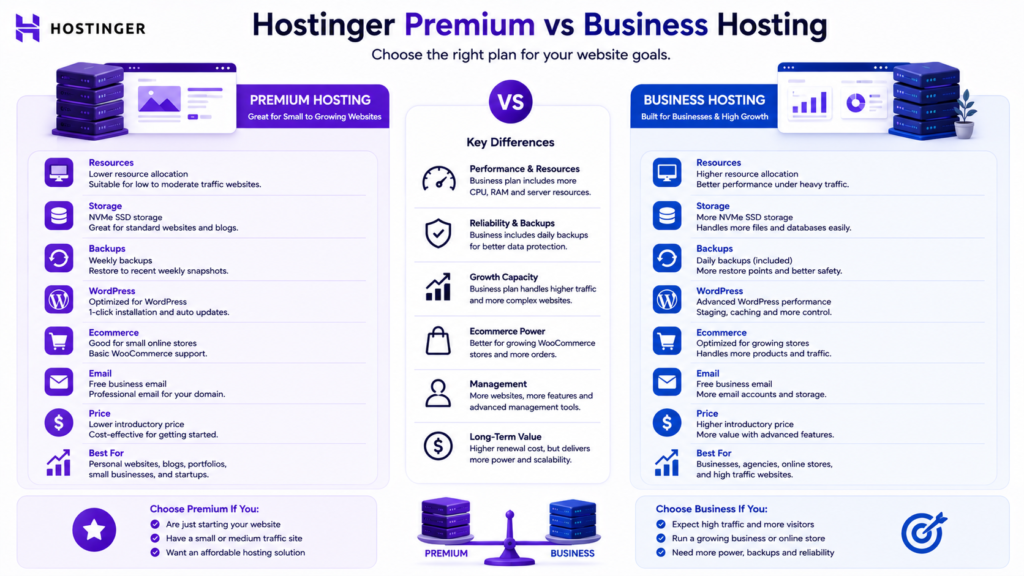
Hostinger Premium vs Business Comparison
| Requirement | Hostinger Premium | Business-Level Hosting |
|---|---|---|
| Small personal website | Strong fit | May be unnecessary |
| Growing business website | Suitable | Stronger fit |
| WordPress | Suitable | Suitable |
| Backup needs | Lower-tier policy | Daily backups on eligible Business-level plans |
| Resource allocation | Lower | Higher |
| Ecommerce | Possible | Better positioned for greater workloads |
| Growth headroom | Moderate | Higher |
| Cost | Lower | Higher |
| Ideal user | Smaller project | Growing commercial project |
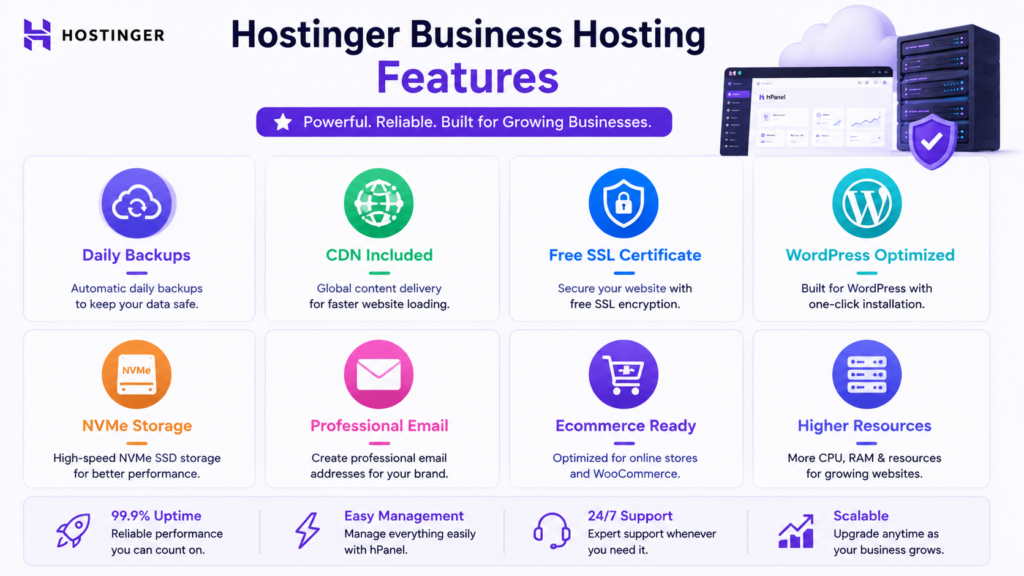
Choose Hostinger Premium If
Premium may offer better value when:
- You have a small website.
- Traffic is modest.
- Resource requirements are low.
- You want to minimize cost.
- Premium’s backup policy is sufficient.
- You are building your first website.
Choose Business-Level Hosting If
The higher tier becomes more compelling when:
- Your website generates revenue.
- You need daily backups.
- Your website is growing.
- Resource use is increasing.
- You operate multiple projects.
- You run ecommerce.
- You need greater hosting headroom.
Premium vs Business: Which Is Better?
Neither is universally better.
Premium can be the better purchase for a lightweight website.
Business-level hosting can be the better purchase for a commercial site that genuinely benefits from additional resources and backup protection.
The best value is the lowest plan that comfortably meets the website’s present requirements while providing reasonable room for growth.
Hostinger Business vs Cloud Startup
Business-level web hosting and Cloud Startup address different workloads.
Web hosting prioritizes affordability and ease of management.
Cloud hosting provides more resource headroom for demanding projects.
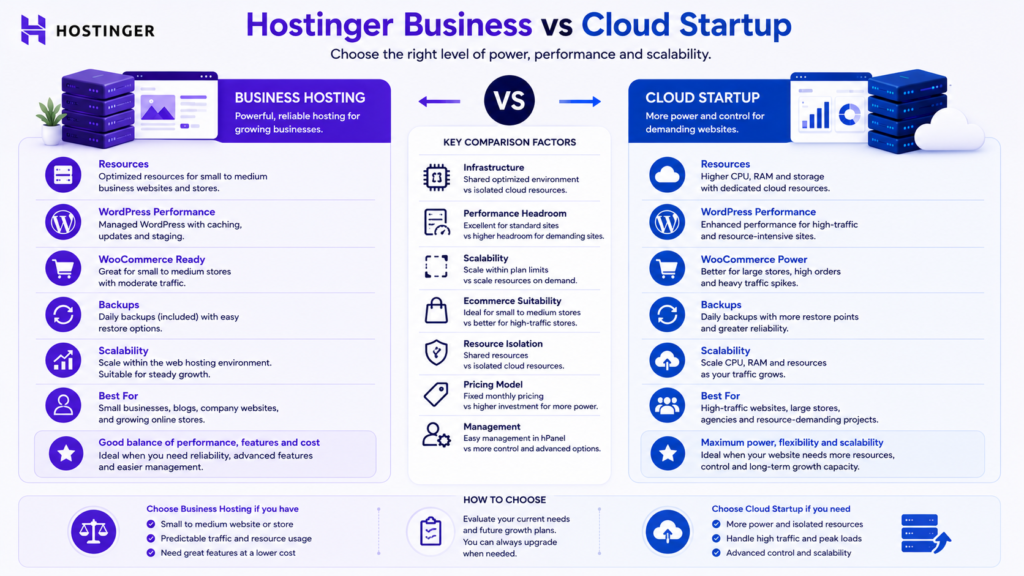
Hostinger Business vs Cloud Startup Comparison
| Category | Business-Level Web Hosting | Cloud Startup |
|---|---|---|
| Best for | Growing websites | More demanding commercial sites |
| Administration | Managed | Managed |
| WordPress | Suitable | Suitable |
| WooCommerce | Suitable for appropriate workloads | Better positioned for demanding stores |
| Backup protection | Daily on eligible Business-level hosting | Daily backup functionality |
| Resource capacity | Lower | Higher |
| Price | Lower | Higher |
| Scalability | Good | Stronger |
| Typical user | Small business or growing website | Agency, ecommerce, or heavier website |
When Should You Consider Cloud?
Cloud becomes increasingly relevant when:
- Resource consumption is consistently high.
- Ecommerce transactions increase substantially.
- Numerous commercial websites share infrastructure.
- Dynamic processing becomes heavier.
- Databases grow.
- Performance becomes directly tied to substantial revenue.
Cloud should therefore be treated as an upgrade decision rather than a status symbol.
Hostinger Business Hosting Pros and Cons
Advantages
Stronger Resource Allocation
Hostinger’s current limits documentation provides Web Business with higher allocations than Premium across several technical resources.
Daily Backups
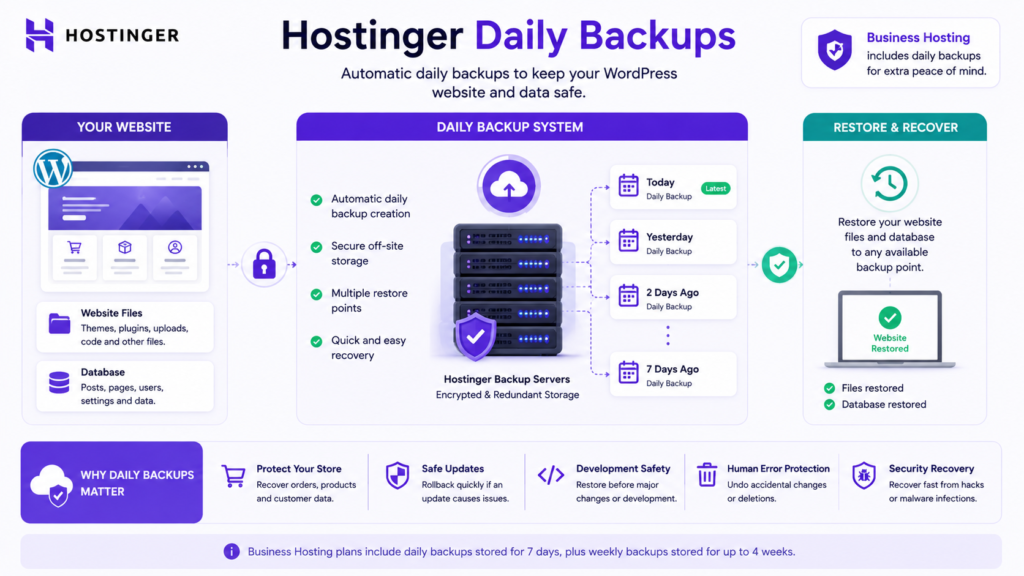
Daily backups are an important advantage for frequently changing or commercial websites.
Manual Backup Functionality
Business-level users can create additional restore points before major website changes.
Backup Downloads
Eligible backup files and databases can be downloaded to local storage.
CDN Availability
Hostinger CDN is available on Premium Web, Business Web, Cloud, and Agency hosting.
Managed Website Administration
A managed environment is easier for users who do not want to administer servers manually.
Ecommerce Compatibility
The hosting ecosystem supports commercial website use cases and ecommerce projects.
Upgrade Path
Growing websites can compare Cloud or other higher-capacity services when they outgrow ordinary hosting.
Disadvantages
Higher Renewal Cost
Promotional pricing should not be confused with the long-term renewal rate.
Lowest Prices Can Require Long Commitments
The most attractive advertised monthly equivalents frequently correspond to longer prepaid terms.
Shared Hosting Has Limits
Business-level web hosting remains different from dedicated or fully isolated infrastructure.
hPanel Is Not cPanel
Users familiar with cPanel need to adapt to Hostinger’s proprietary management environment.
Product Names and Limits Can Change
Older reviews can become inaccurate as Hostinger updates product structures.
Resource-Intensive Projects May Outgrow It
Large ecommerce stores, complex membership sites, and demanding applications may eventually need cloud or VPS infrastructure.
Is Hostinger Business Hosting Worth It?
Yes, Hostinger Business-level hosting can be worth it for growing websites that genuinely require its additional resources, daily backups, managed administration, and stronger hosting capabilities.
Its best position is between entry-level hosting and more expensive cloud infrastructure.
It can provide particularly good value for:
- Growing business websites.
- WordPress sites.
- Smaller ecommerce stores.
- Agencies managing moderate workloads.
- Multi-site website owners.
- Professional content websites.
But paying for additional resources you do not use is not good value.
Should I Buy Hostinger Business Hosting?
The higher tier deserves serious consideration when:
- Your website generates business leads or sales.
- Losing recent data would be costly.
- Daily backups matter.
- Your current hosting resources are restrictive.
- You manage several sites.
- You use WordPress or WooCommerce.
- You want managed infrastructure.
- You understand the renewal cost.
Premium may remain better when your website is small and resource requirements are modest.
Cloud deserves comparison when workload or commercial importance becomes substantially higher.
Hostinger Business Hosting Security
Website security is a shared responsibility.
A hosting provider can secure infrastructure and provide protective tools, but the website owner remains responsible for application-level security.
Important website-owner practices include:
- Strong passwords.
- Multi-factor authentication where available.
- WordPress updates.
- Plugin updates.
- Theme updates.
- Removing unused plugins.
- Avoiding untrusted themes.
- Limiting administrator accounts.
- Maintaining backups.
- Monitoring suspicious activity.
Hostinger’s CDN documentation also describes advanced security levels for Business hosting or higher.
These controls can contribute another security layer, but they do not replace responsible WordPress management.
Recommended Backup Strategy
A professional business website should not rely blindly on one recovery mechanism.
Layer 1. Host Backups
Use the automatic backups provided with the hosting plan.
Layer 2. Manual Restore Point
Create an additional manual backup before significant changes when the plan supports it.
Layer 3. Independent Copy
For business-critical projects, consider maintaining an independent backup copy outside the primary hosting account.
This reduces dependence on one recovery environment.
How to Migrate to Hostinger Safely
Step 1. Create a Complete Backup
Do not begin migration without recoverable website files and databases.
Step 2. Verify Compatibility
Check:
- PHP.
- WordPress version.
- Themes.
- Plugins.
- Database.
- Custom scripts.
Step 3. Record DNS Settings
Maintain a copy before changing nameservers or DNS records.
Step 4. Migrate the Website
Use an appropriate migration method or the migration functionality available through the hosting provider.
Step 5. Test the Website
Verify:
- Important pages.
- Forms.
- Login.
- Website search.
- Images.
- Internal links.
- WooCommerce cart.
- Checkout.
- Customer accounts.
- HTTPS.
Step 6. Preserve SEO Elements
Where possible, keep:
- Existing URLs.
- HTTPS.
- Canonical URLs.
- Redirects.
- Internal links.
- Sitemap URLs.
Step 7. Monitor After Migration
Check:
- Analytics.
- Google Search Console.
- Crawling.
- Indexing.
- Forms.
- Ecommerce transactions.
- Website availability.
A hosting migration should not unnecessarily change the site’s URL structure.
Hostinger Business Hosting and SEO
Hosting is infrastructure.
It cannot make poor content rank first on Google.
Google Search Essentials emphasizes helpful, reliable, people-first content, descriptive wording, crawlable links, and fundamental technical accessibility rather than a particular hosting provider.
Hosting can support SEO indirectly through:
- Availability.
- HTTPS.
- Performance infrastructure.
- Reliable content delivery.
- Crawl accessibility.
Organic rankings still depend on a broader combination of factors including:
- Search intent.
- Content usefulness.
- Original information.
- Technical SEO.
- Internal linking.
- Website architecture.
- Backlinks.
- User experience.
- Competition.
- Authority.
- Topical relevance.
Therefore:
Buy hosting as infrastructure, not as an SEO shortcut.
Hostinger Business Hosting and Google AI Overviews
There is no separate secret hosting or schema setting that guarantees inclusion in Google AI Overviews.
Google’s current guidance for generative AI search continues to emphasize strong SEO fundamentals and unique, expert-led, people-first information.
This is why this review prioritizes:
- Direct answers.
- Clear comparisons.
- Practical explanations.
- Accurate terminology.
- Transparent methodology.
- Tables.
- FAQs.
- Buying criteria.
- Primary-source verification.
These structures make the content easier for readers to understand while also making important concepts easier for search systems to interpret.
Hostinger Business Hosting Cost: Calculate the Real Value
The correct hosting decision should consider total ownership rather than the introductory rate.
Use:
Total hosting cost = initial payment + hosting renewals + domain renewals + required optional services.
Then compare that figure with the value of included capabilities.
A higher plan might reduce the need for separate paid backup or infrastructure services.
But if you do not need those features, paying extra creates no meaningful value.
Who Should Choose Hostinger Business Hosting?
Small Businesses
A strong potential fit when easy administration, WordPress, backups, and scalable hosting are priorities.
WordPress Website Owners
Useful for sites that have outgrown entry-level hosting or require stronger backup protection.
Bloggers and Publishers
Relevant when traffic, content volume, or website complexity has increased.
Freelancers
Potentially valuable when managing multiple projects in one environment.
Website Development Agencies
Useful for suitable agency workloads, though agencies managing many demanding commercial sites should compare stronger infrastructure.
WooCommerce Stores
Appropriate for smaller and moderate workloads when the hosting resource limits match the store’s actual needs.
Who Should Avoid Hostinger Business Hosting?
It may not be the best option for:
- Very small sites that can use cheaper hosting.
- Extremely resource-intensive web applications.
- Very large ecommerce operations.
- Developers requiring root-level server control.
- Projects requiring dedicated infrastructure.
- Users who prefer cPanel specifically.
- Buyers who have not evaluated the renewal price.
Hostinger Business Hosting Alternatives
Alternatives deserve consideration when your project specifically requires something that Hostinger’s managed web hosting does not provide.
Examples include:
- Full root access.
- Dedicated resources.
- Traditional cPanel workflows.
- Enterprise service agreements.
- Specialized managed WooCommerce infrastructure.
- Specific data-center requirements.
- Different billing models.
A hosting alternative should solve a defined requirement rather than simply score higher in one isolated benchmark.
Hostinger Business Hosting Buying Checklist
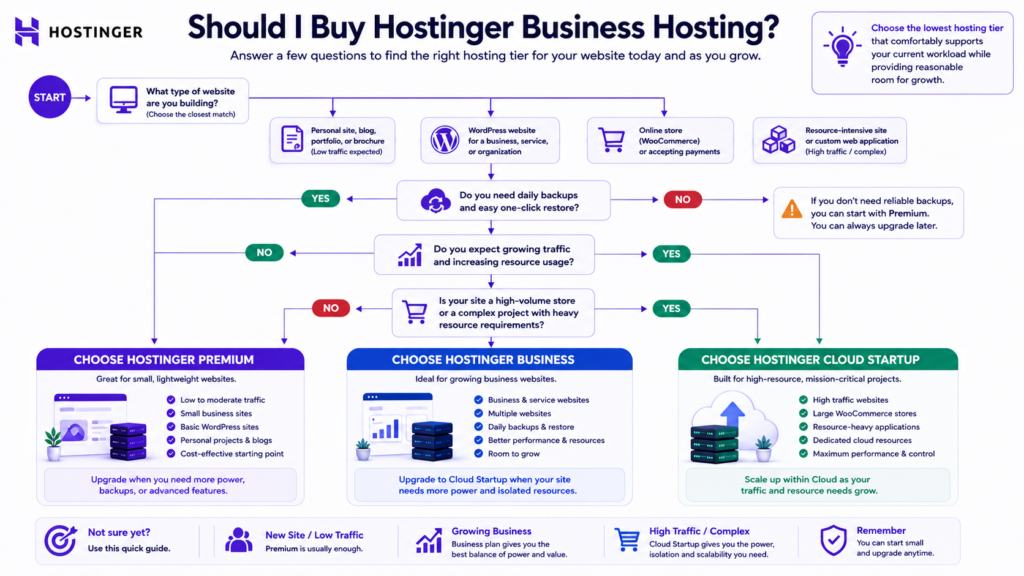
Before purchasing, answer these questions:
- How many websites will I host?
- Will I use WordPress?
- Will I use WooCommerce?
- How frequently does my website change?
- Do I need daily backups?
- What storage and resource limits do I need?
- Does the website generate business revenue?
- What would website downtime cost?
- What is the renewal price?
- How much growth do I expect?
- Can I upgrade easily?
- Do I need root-level server control?
If you can answer these questions, choosing between Premium, Business-level web hosting, and Cloud becomes considerably easier.
Final Editorial Assessment
This review does not use a fabricated five-star rating.
Instead, it assesses documented capabilities and practical suitability.
| Area | Assessment | Reason |
|---|---|---|
| Ease of management | Strong | Managed hosting reduces routine administration |
| WordPress suitability | Strong | Designed for common WordPress workloads |
| Backup protection | Strong | Daily backups on eligible Business-level hosting |
| Resource allocation | Strong | Higher documented limits than lower tiers |
| CDN availability | Strong | Hostinger CDN supports eligible web-hosting plans |
| Ecommerce suitability | Good | Appropriate for suitable WooCommerce workloads |
| Introductory value | Potentially strong | Promotions can reduce initial cost |
| Long-term pricing | Requires evaluation | Renewal pricing must be checked separately |
| Scalability | Good | Cloud provides a logical upgrade route |
| Developer control | Moderate | Managed web hosting provides less control than VPS |
| Overall value | Strong for the right user | Additional resources matter when genuinely required |
Frequently Asked Questions
Is Hostinger Business Hosting worth it in 2026?
Yes, it can be worth it for growing business websites, WordPress users, and smaller ecommerce projects that need stronger resources, managed hosting, and daily backup functionality. The exact current plan and renewal price should be verified before purchase.
Is Hostinger Business Hosting good for WordPress?
Yes. Hostinger’s managed hosting environment is designed for WordPress use cases and can suit small and medium WordPress websites that do not require full server administration.
Is Hostinger Business Hosting good for WooCommerce?
It can be suitable for small and moderately demanding WooCommerce stores. More resource-intensive ecommerce websites should compare Cloud or stronger hosting.
Does Hostinger Business Hosting include daily backups?
Hostinger currently states that Business or greater hosting plans have daily backups enabled.
Can Hostinger backups be downloaded?
Yes. Hostinger’s current documentation allows eligible web and cloud hosting users to download website files and database backups.
Does Hostinger Business Hosting include a CDN?
Hostinger currently states that its CDN is available for Premium Web, Business Web, Cloud, and Agency hosting plans.
Does Hostinger Business Hosting have higher resources than Premium?
Hostinger’s current hosting limits documentation lists higher allocations for Web Business than Web Premium across several resources, including CPU, RAM, storage, I/O, websites, and databases.
What is the Hostinger Business Hosting price?
There is no permanent worldwide price. Pricing varies by region, currency, promotion, term, and current product configuration.
What is the Hostinger Business Hosting renewal price?
Renewal pricing varies by market and subscription. Buyers should check the renewal amount displayed by Hostinger before purchasing rather than assuming the introductory rate will continue.
Hostinger Premium vs Business: Which is better?
Premium can provide better value for smaller websites. Business-level hosting becomes more attractive when additional resources, daily backups, or greater commercial capacity are needed.
Is Hostinger Business Hosting good for small businesses?
Yes. Small businesses can benefit from managed hosting, backups, WordPress support, CDN functionality, and centralized website administration.
Can Hostinger Business Hosting handle high traffic?
There is no responsible universal visitor number. Capacity depends on concurrent traffic, caching, database queries, plugins, dynamic operations, and resource consumption.
Is Hostinger Business Hosting faster than Premium?
Business-level hosting can provide stronger resource allocations, but a specific performance advantage should not be claimed without controlled side-by-side testing.
Is Hostinger good for beginners?
Hostinger’s managed approach can be easier for users who do not want to administer their own servers.
Should I choose Business or Cloud Startup?
Choose according to resource requirements. Business-level web hosting can suit moderate workloads, while Cloud becomes more relevant as processing, traffic, ecommerce activity, or commercial importance increases.
Should I buy Hostinger Business Hosting?
Consider it if your website has outgrown entry-level hosting but does not yet require more advanced cloud or VPS infrastructure. Check current specifications and long-term costs before purchasing.
Key Takeaways
Hostinger Business-level hosting is best viewed as a middle ground between basic shared hosting and stronger cloud infrastructure.
Its most compelling strengths are higher resources, daily backup functionality on eligible Business-level plans, CDN availability, managed administration, WordPress suitability, and a practical growth path.
The Hostinger Premium vs Business decision should be based on workload. A smaller website may save money with Premium, while a revenue-generating website with greater resource or backup requirements may benefit from Business-level hosting.
WooCommerce users should avoid choosing a hosting plan solely by product count. Database activity, plugins, concurrent users, dynamic operations, and integrations can matter more.
Promotional hosting prices should always be compared against renewal rates.
Most importantly, this review does not invent performance benchmarks or customer experiences that have not been independently documented.
About the Author
Syed Abdul Quddus writes about website development, WordPress, hosting, SEO, and digital infrastructure, focusing on practical guidance for website owners and businesses.
This review separates Hostinger’s documented product information from editorial analysis and does not present independent benchmark results where supporting testing evidence is unavailable.
Editorial and Verification Policy
Hostinger-specific product information in this article was reviewed against current official Hostinger documentation on August 12, 2026.
Because hosting products change regularly, pricing, renewal rates, resource allocations, plan names, email allowances, backup policies, CDN availability, and other time-sensitive features should be rechecked whenever this article receives a substantive update.
Editorial recommendations are based on the suitability of documented hosting capabilities for different workloads.
Material factual errors should be corrected when identified.
The visible updated date should change only when meaningful factual or editorial changes have been made.
Google encourages clear information about who created content, how it was produced, and why it exists as part of evaluating helpful, trustworthy, people-first content.
Final Verdict
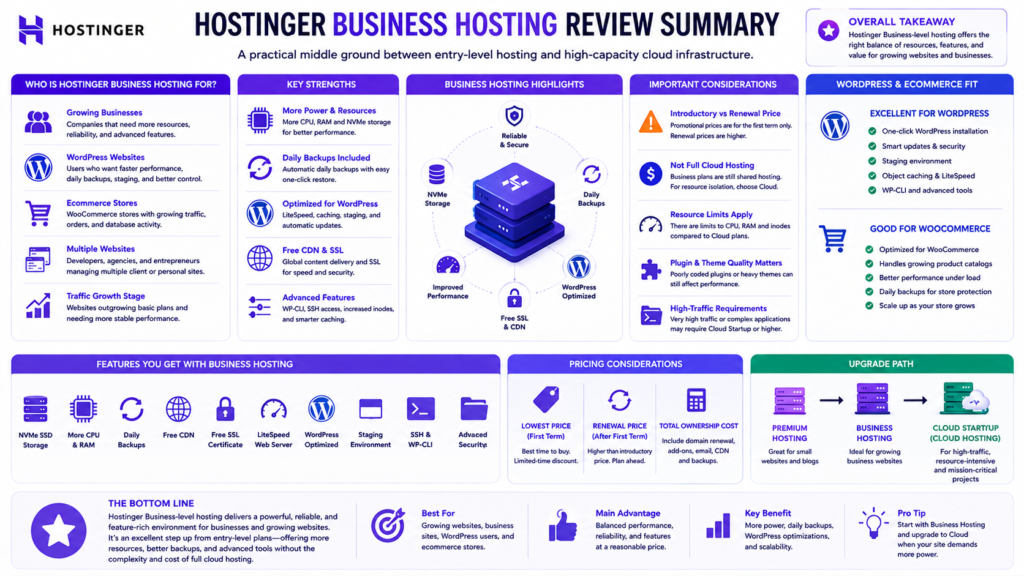
This Hostinger Business Hosting Review 2026 finds that Hostinger’s Business-level web hosting remains a compelling option for website owners who need more capability than entry-level hosting but are not yet ready for stronger cloud or VPS infrastructure.
Its most meaningful advantages include:
Daily backups on eligible Business-level hosting.
Higher documented resource limits than lower web-hosting tiers.
CDN availability.
Managed website administration.
WordPress and ecommerce suitability.
A clear upgrade path as requirements grow.
For a growing WordPress website, small business, freelancer, professional content website, agency project, or appropriately sized WooCommerce store, these capabilities can justify the additional cost.
However, a small lightweight website may not need the extra resources.
Similarly, a demanding ecommerce operation or resource-intensive commercial website should compare Cloud or other stronger infrastructure.
Renewal pricing should also influence the purchasing decision. Do not judge long-term hosting value from the introductory promotional rate alone.
Most importantly, no hosting provider should be selected because a review promises guaranteed rankings, guaranteed Core Web Vitals, or unrealistic traffic capacity.
The evidence-based conclusion is simpler:
Hostinger Business-level hosting is a strong option when your website genuinely needs its additional resources, backup protection, managed WordPress environment, and growth capacity. Verify the exact current regional plan, resource limits, and renewal pricing before purchasing.
Need Professional Help With Your Website?
Choosing hosting is only one part of building a reliable and competitive website.
A professional website also requires proper planning, development, security, performance optimization, technical SEO, content architecture, and ongoing maintenance.
If your business needs professional support with website development, WordPress setup, website migration, ecommerce development, technical SEO, hosting configuration, or performance optimization, explore the relevant website development services and choose a solution based on your actual requirements.
The objective is not to buy the most expensive hosting plan. The objective is to choose infrastructure that supports your website reliably today and gives it enough room to grow.
Internal Links
- Hostinger Review 2026: Honest Review for Beginners
- Hostinger Agency Hosting 2026: Comprehensive Review, Plans & Pricing
- Complete Domain Name Guide 2026
- Technical SEO Guide 2026
- Complete Google Search Console Guide 2026–2027
- Website Mistakes to Avoid: 25 Costly Problems