Table of Contents
Hostinger is a compelling managed WordPress hosting option for beginners, bloggers, small businesses, developers, and many growing websites. Its strongest advantages are straightforward WordPress management, competitive introductory pricing, migration tools, caching, backups, security features, and an upgrade path from standard hosting to more powerful cloud infrastructure.
The main limitation is equally important. The lowest advertised price does not tell you the long-term cost. Renewal pricing can be considerably higher, while features such as staging, object caching, backup frequency, and available resources depend on the plan.
This Hostinger WordPress Hosting Review examines the service from a buyer’s perspective, including current pricing, managed WordPress features, performance evidence, speed, renewal costs, WooCommerce suitability, support, security, scalability, pros and cons, and the circumstances in which another hosting solution may make more sense.
Research methodology: This is a research based review, not a claimed hands on benchmark test. Current Hostinger product pages and support documentation, WordPress requirements, and independent hosting evaluations were reviewed. Third party test results are attributed to the organizations that performed them. Hostinger’s plans, prices, promotions, and specifications can change and may vary by country. Commercial information was rechecked on August 13, 2026.
Hostinger WordPress Hosting Review: Quick Verdict
Hostinger is good for WordPress when you want managed hosting that reduces server administration without immediately moving into premium managed hosting or VPS infrastructure.
It is particularly suitable for new WordPress websites, blogs, portfolios, small businesses, and many moderate commercial sites. Hostinger provides WordPress management features including staging, object caching, backups, WooCommerce optimization, and other WordPress tools depending on the selected plan.
It becomes less compelling when you need deep server-level control, specialized infrastructure, highly isolated resources, or capabilities beyond the selected plan.
Key Findings
| Question | Verdict |
|---|---|
| Is Hostinger good for WordPress? | Yes, for many beginner to growing WordPress projects |
| Best for | Beginners, blogs, portfolios, small businesses, and moderate commercial sites |
| Main strength | Managed WordPress convenience and competitive entry pricing |
| Main limitation | Renewal costs and plan-dependent advanced features |
| WordPress migration | Available |
| Backups | Available, frequency depends on plan |
| Staging | Available on eligible plans |
| Object caching | Available on eligible higher tier plans |
| WooCommerce | Supported |
| Beginner friendly | Yes |
| High traffic projects | Evaluate higher tier or cloud resources |
| Full server control | VPS is more appropriate |
| Testing status | Research-based review, not original MarjanServices.tech benchmark testing |
How We Evaluated Hostinger WordPress Hosting
A professional hosting review should explain how its conclusions were reached.
Google’s review guidance recommends evaluating products from a user’s perspective, demonstrating knowledge, discussing advantages and disadvantages, explaining important decision factors, comparing alternatives where useful, and providing evidence or measurements when available.
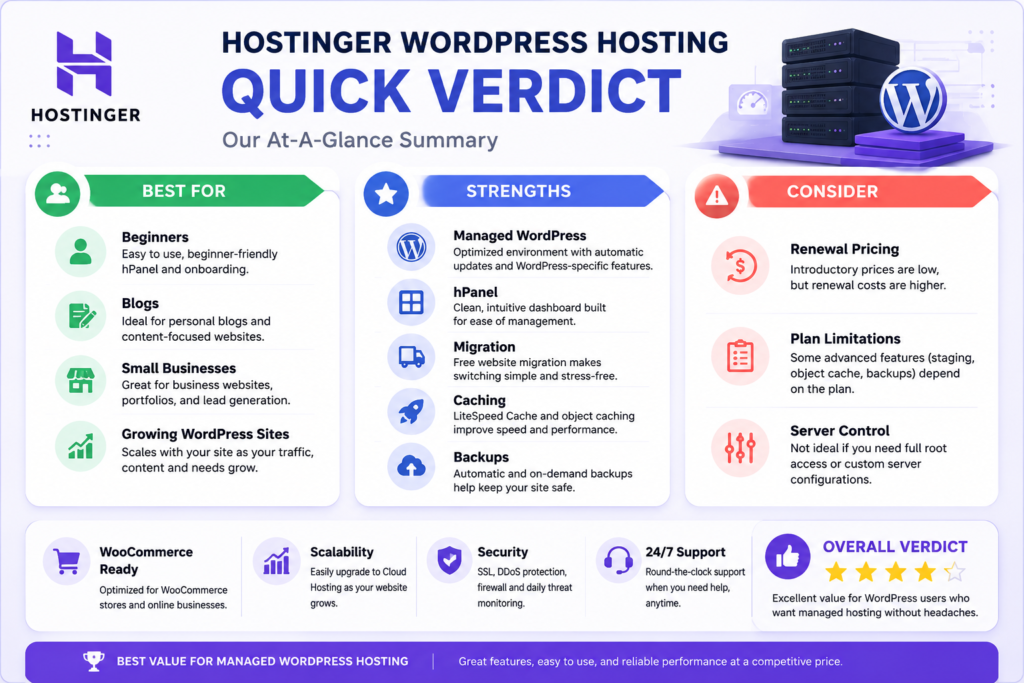
This review therefore evaluates Hostinger across the following areas.
| Evaluation Factor | What We Examined |
|---|---|
| Pricing | Introductory cost and contract structure |
| Renewal pricing | Long-term affordability beyond the promotional period |
| WordPress management | Installation, updates, migration, caching, staging, and related tools |
| Performance | Infrastructure features and independent performance evidence |
| Ease of use | hPanel and routine WordPress administration |
| Backups | Availability, frequency, and recovery implications |
| Security | SSL and documented hosting and WordPress protections |
| Support | Availability and practical limitations |
| Scalability | Upgrade options for growing websites |
| Value | Features and resources relative to long-term cost |
| Limitations | Situations where another hosting model may be more appropriate |
Evidence Used in This Review
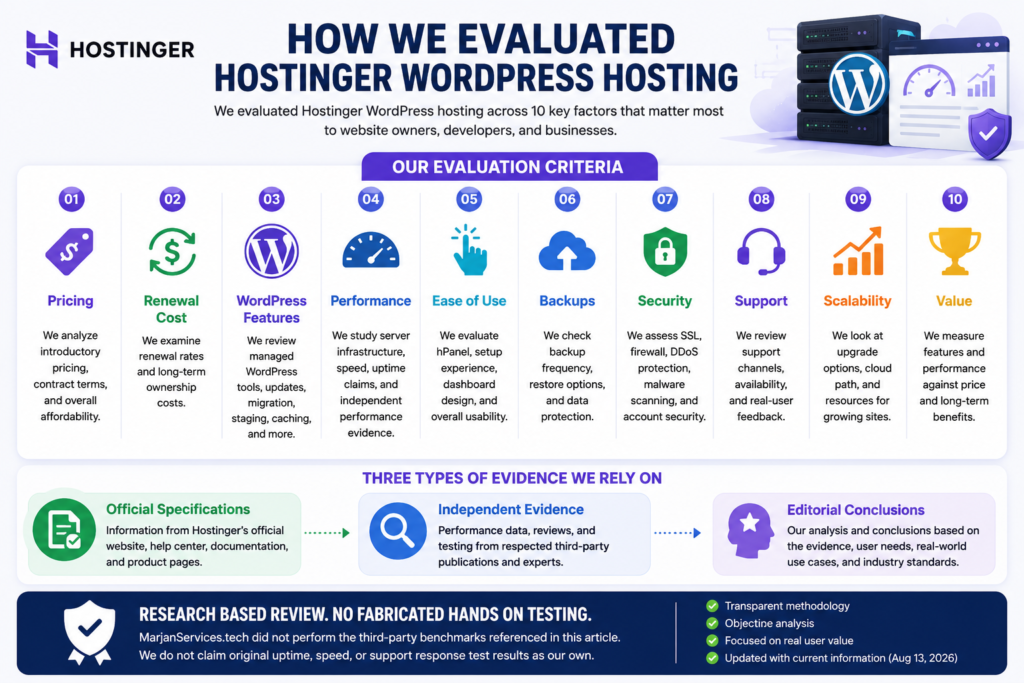
Three evidence categories are kept separate.
Official specifications come primarily from Hostinger’s current product pages and support documentation.
Independent evidence comes from third parties that conduct their own hosting evaluations.
Editorial conclusions are interpretations based on the available evidence and the needs of different WordPress users.
This distinction matters.
A feature listed by Hostinger establishes that the company offers or advertises that feature. It does not independently establish that Hostinger is superior to every competitor.
Similarly, one independent speed test cannot guarantee identical results for another WordPress website.
What We Did Not Test
MarjanServices.tech did not perform the third-party benchmarks referenced in this article.
Accordingly, this article does not claim:
- original uptime measurements.
- original load testing.
- personally measured server response times.
- original support response testing.
- personal experience with every current Hostinger plan.
This limitation is intentional. A research-based review should not be converted into a fictional hands-on review.
What Is Hostinger Managed WordPress Hosting?
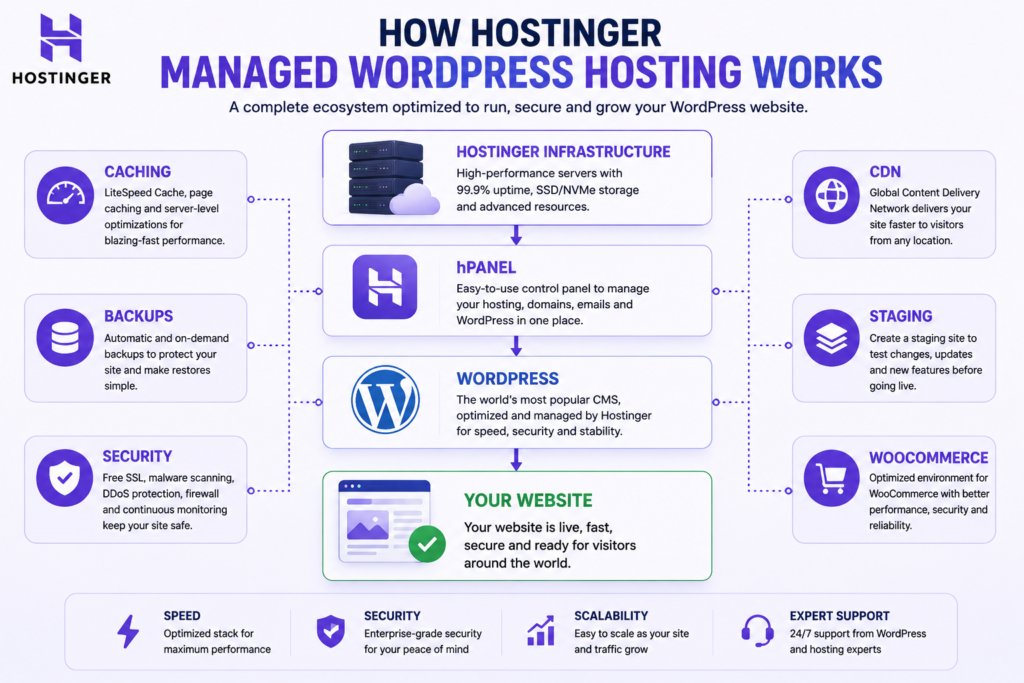
Hostinger managed WordPress hosting combines web hosting infrastructure with tools designed specifically for running and administering WordPress.
The relationship is straightforward.
Hostinger provides the hosting infrastructure.
WordPress is the content management system running on that infrastructure.
hPanel is Hostinger’s hosting management interface.
LiteSpeed and caching technologies help reduce repeated processing and improve content delivery.
Staging provides a separate environment where eligible users can test WordPress changes before deploying them to the live website.
WooCommerce adds e-commerce functionality to WordPress and can create substantially heavier workloads than a basic content site.
Hostinger’s current managed WordPress documentation lists capabilities including object cache, on-demand backups, staging, multisite functionality, and advanced WooCommerce optimization.
What Does Managed WordPress Actually Mean?
Managed WordPress hosting reduces infrastructure administration.
Depending on the plan and current product configuration, the hosting environment can assist with areas such as:
- WordPress setup.
- updates.
- migration.
- caching.
- backups.
- staging.
- security.
- WooCommerce optimization.
- WordPress management.
It does not mean the hosting provider manages every part of your website.
You remain responsible for areas such as:
- website design.
- content.
- plugin selection.
- theme selection.
- user permissions.
- SEO.
- ecommerce configuration.
- third-party integrations.
- business operations.
- application-level maintenance.
Managed hosting simplifies infrastructure. It does not replace professional website management.
Is Hostinger Good for WordPress?
Yes. Hostinger is suitable for many WordPress websites, particularly when ease of management, affordability, and built-in WordPress tools matter more than unrestricted server control.
WordPress currently recommends a modern PHP environment, MariaDB or MySQL, HTTPS support, and a suitable web server. The current WordPress requirements page recommends PHP 8.3 or greater, MariaDB 10.6 or greater or MySQL 8.0 or greater, plus HTTPS.
Hostinger goes beyond simply providing an environment capable of running WordPress by offering WordPress-specific management functionality.
The important qualification is workload.
A five-page company website and a busy WooCommerce store may both use WordPress, but they do not necessarily need the same hosting resources.
The better question is therefore:
Which Hostinger hosting tier provides enough resources and functionality for this particular WordPress website?
Hostinger WordPress Hosting Plans and Pricing
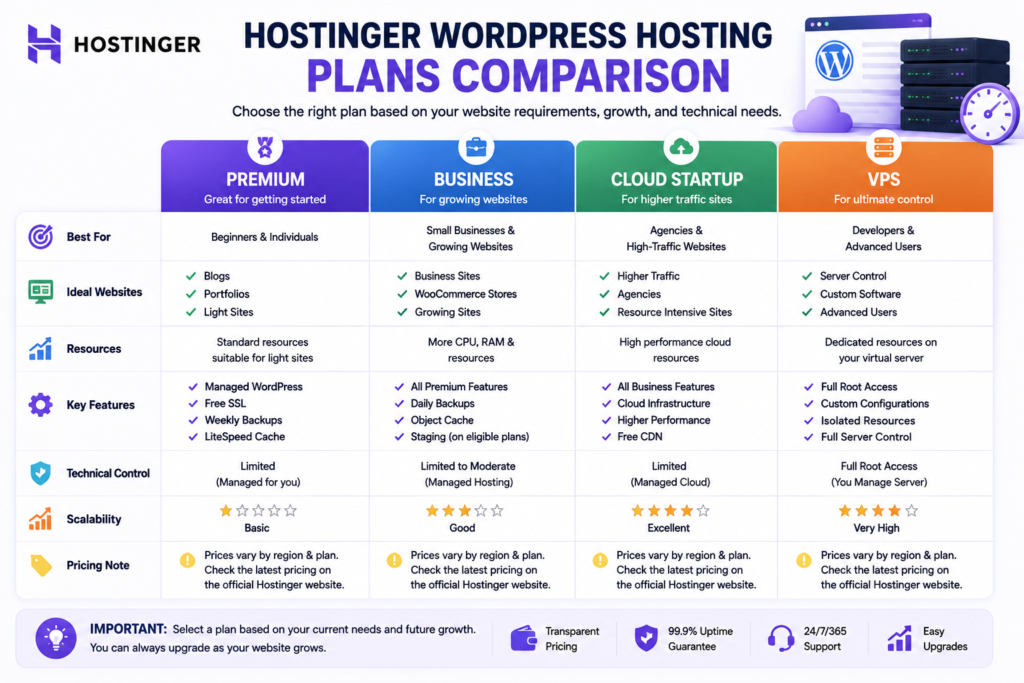
Hostinger’s plan structure requires careful explanation because names, promotions, included resources, and prices can vary by country and product page.
The global WordPress hosting page currently advertises WordPress hosting from $2.99 per month, while Hostinger’s Pakistan-facing pages display localized pricing in Pakistani rupees.
For this reason, a worldwide Hostinger WordPress pricing comparison should not present one country’s price as a permanent global figure.
Pricing note: Hostinger pricing is highly volatile. Always verify the introductory price, total amount due, renewal rate, plan limits, and local taxes on Hostinger’s official page immediately before purchasing.
Current Plan Direction
Depending on the market and product page, users may encounter options positioned around standard Premium or Business hosting and higher-capacity Cloud Startup infrastructure.
A practical way to interpret the hierarchy is:
| Hosting Direction | Typical Use Case |
|---|---|
| Entry or Premium level | Blogs, portfolios, and lighter WordPress projects |
| Business level | Growing business sites, more demanding WordPress projects, and advanced workflows |
| Cloud Startup | Agencies, ecommerce, higher traffic, or more resource-intensive projects |
| VPS | Projects requiring greater server-level control |
These are workload-based directions rather than universal resource requirements.
Introductory Pricing
Hostinger uses promotional pricing extensively.
For example, Hostinger’s current Pakistan comparison page displays Premium at Rs.599 per month on a 48-month term and states that it renews at Rs.1,699 per month. That same listing currently includes three websites, 20 GB SSD storage, weekly backups, CDN, and other features.
Cloud Startup is currently displayed on Hostinger Pakistan at Rs.2,099 per month for a 48-month term, with the page listing higher cloud tiers separately.
These examples demonstrate why the promotional monthly figure should never be evaluated alone.
Renewal Pricing
Renewal price is one of the most important factors in determining whether Hostinger represents good long-term value.
The promotional price can be substantially below the regular renewal rate.
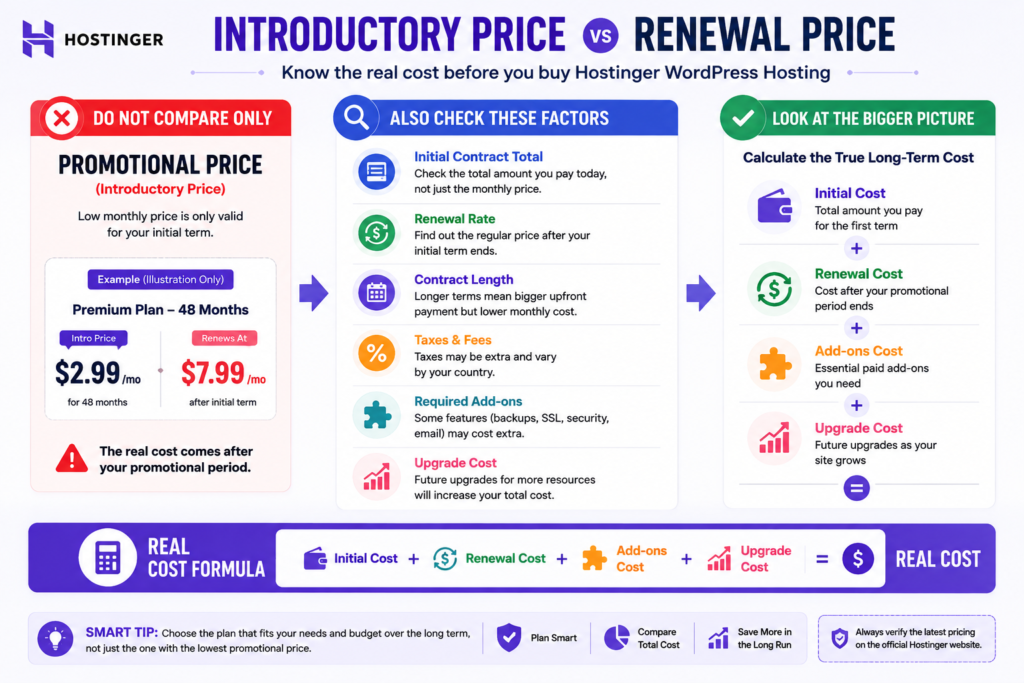
Before purchasing, check:
- The advertised monthly equivalent.
- The required subscription length.
- The total amount payable today.
- The stated renewal rate.
- Whether taxes are additional.
- Whether important features require a higher plan.
- The expected cost over the number of years you intend to keep the website.
A hosting plan that is cheapest during year one or the initial contract is not necessarily the cheapest long-term option.
How to Calculate the Real Long-Term Cost
Use this framework:
Long-Term Hosting Cost = Initial Contract Cost + Expected Renewal Cost + Required Paid Add-Ons + Expected Upgrade Costs
For multiple websites, you can also calculate:
Effective Hosting Cost Per Website = Total Hosting Cost ÷ Number of Active Websites
This provides more useful information than comparing promotional monthly rates alone.
When Is a Higher Plan Worth Paying For?
Upgrade because you need a capability, not because a higher plan sounds more professional.
A higher tier becomes more reasonable when you genuinely require:
- stronger resource allocation.
- more frequent backups.
- staging.
- object caching.
- greater storage.
- more websites.
- ecommerce capacity.
- greater traffic headroom.
- development workflow features.
- cloud infrastructure.
The most economical plan is generally the lowest tier that reliably meets the project’s actual requirements with reasonable room for growth.
WordPress Features That Matter Most
Hosting companies advertise long feature lists. Not every feature has equal practical value.
For WordPress users, the following areas matter most.
WordPress Installation and Migration
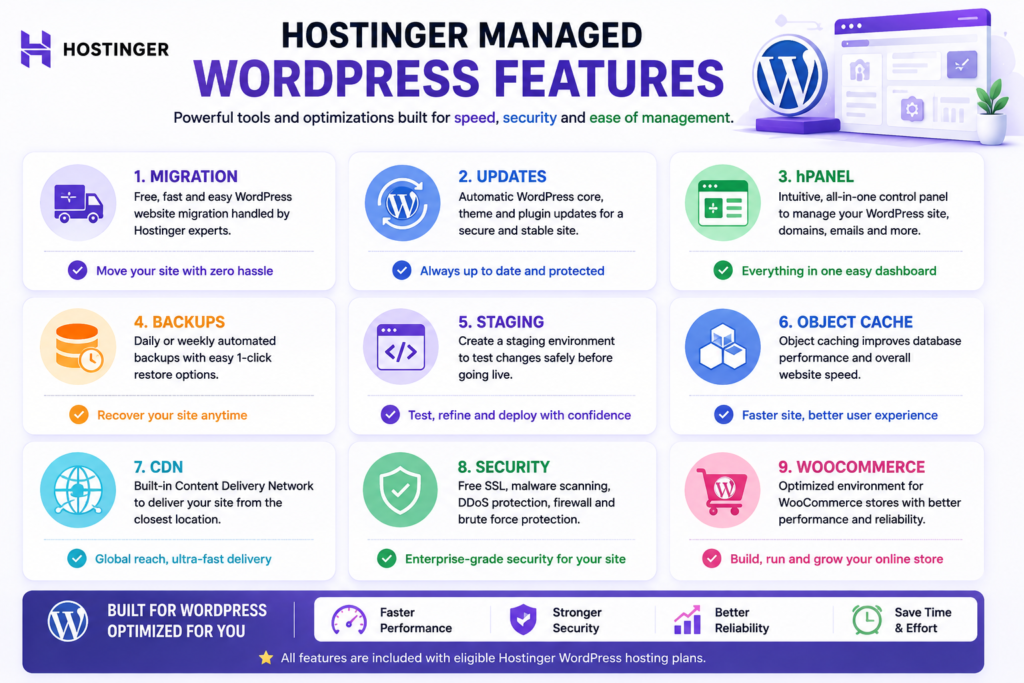
Hostinger provides tools for deploying WordPress and moving existing websites.
Migration can reduce the technical work involved in changing providers, but the transferred website should still be checked carefully afterward.
Validate:
- pages.
- images.
- forms.
- SSL.
- redirects.
- analytics.
- caching.
- email-related functionality.
- e-commerce checkout where applicable.
- search engine directives.
A completed migration does not automatically prove that every website function works correctly.
Automatic WordPress Updates
Updates are important for functionality, compatibility, and security.
Hostinger’s WordPress Overview allows users to manage WordPress update settings.
Automation reduces routine work but does not eliminate the need for oversight.
Important updates should still be monitored for plugin, theme, or custom code compatibility.
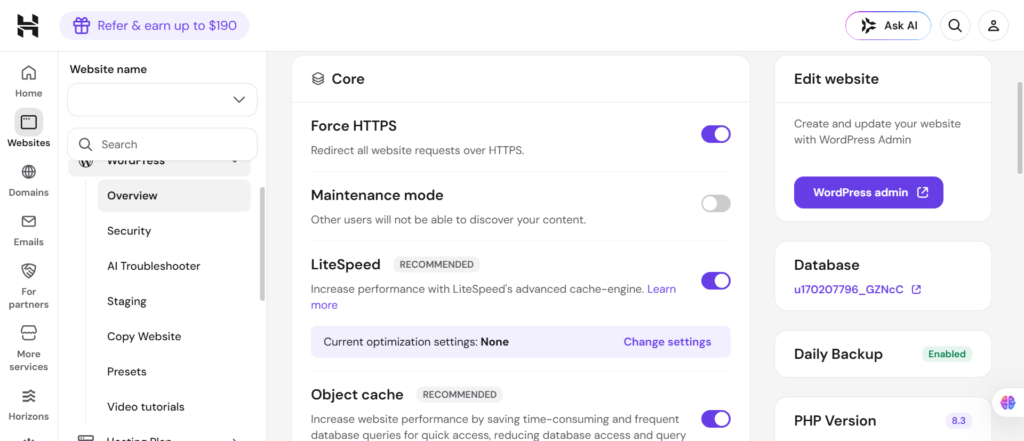
hPanel WordPress Management
Hostinger uses its own hPanel interface.
WordPress management functions can be accessed from the hosting dashboard, including caching and update controls. Hostinger’s current documentation also exposes staging and object cache controls for eligible plans.
For beginners, a centralized interface can reduce the learning curve.
Experienced users accustomed to cPanel may need time to adjust to Hostinger’s workflow.
Backups and Restore Options
Backup requirements depend on how frequently a website changes.
A static portfolio updated twice a year has very different recovery requirements from an ecommerce store processing orders every day.
Hostinger’s managed WordPress documentation lists backup functionality, including on-demand backup capability within eligible offerings.
The important question is not merely:
Does the plan include backups?
Ask:
How much website activity could I afford to lose if I had to restore the latest available backup?
For an important commercial website, maintaining an additional independent offsite backup can reduce dependence on a single recovery system.
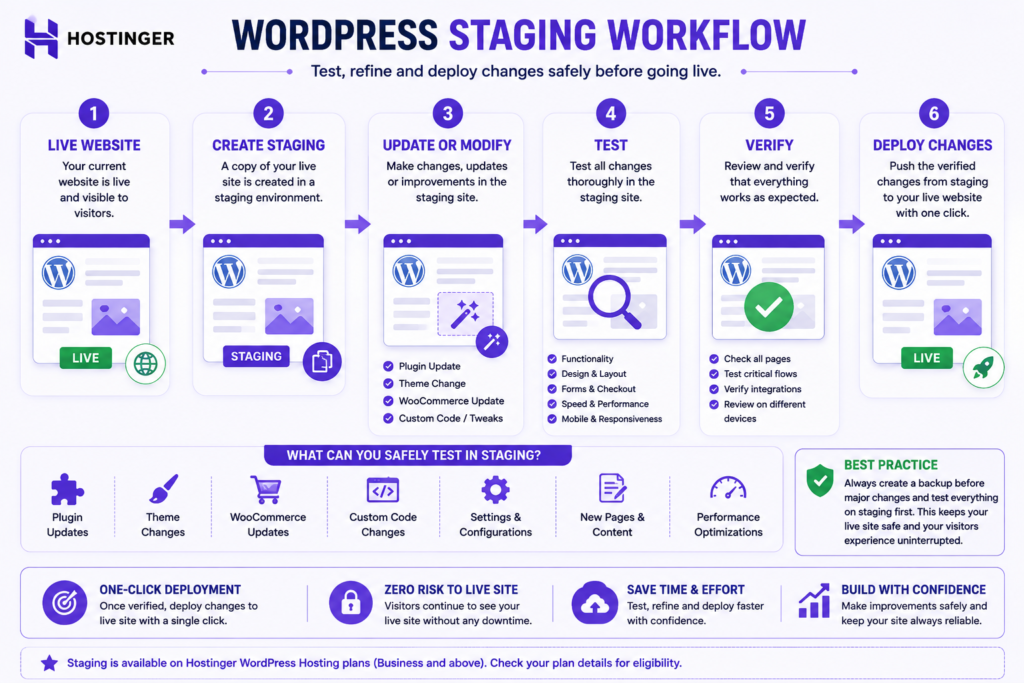
Staging
A staging environment creates a separate copy or environment where changes can be tested before they reach visitors.
This is valuable for:
- plugin updates.
- WordPress updates.
- theme changes.
- custom code.
- PHP changes.
- WooCommerce updates.
- major redesigns.
Hostinger’s WordPress Overview documentation currently includes staging functionality and indicates that eligibility depends on the hosting plan.
If staging is important to your workflow, verify eligibility on the exact plan before buying.
Object Caching and LiteSpeed
Hostinger’s WordPress management documentation currently includes LiteSpeed cache controls and object caching for eligible plans. Its support documentation states that object cache can be enabled on Web Business or greater.
Object caching can be particularly useful for dynamic websites because frequently requested information can be retrieved without repeating every database operation.
The practical benefit varies by workload.
A small brochure site may benefit less than a dynamic WooCommerce or membership website.
CDN and Performance Tools
A content delivery network can serve cacheable assets closer to visitors geographically.
This can improve delivery efficiency, particularly for geographically distributed audiences.
A CDN should still be viewed as one component of performance.
It cannot completely compensate for:
- inefficient themes.
- excessive plugins.
- oversized images.
- poorly optimized JavaScript.
- slow database queries.
- unnecessary third-party scripts.
Security Features
Managed hosting provides an infrastructure security layer, but WordPress security remains a shared responsibility.
Website owners should still:
- use strong credentials.
- secure administrator accounts.
- keep software updated.
- remove unused plugins.
- use reputable themes and plugins.
- maintain backups.
- control user permissions.
- secure external integrations.
No legitimate hosting platform can make a badly maintained WordPress installation automatically immune to security problems.
Performance and Speed
Hostinger provides a performance-oriented environment for WordPress, but no responsible review can promise a universal page loading time.
Independent 2026 WordPress hosting coverage continues to identify Hostinger as a strong value option. TechRadar currently lists Hostinger as its best value WordPress hosting choice and highlights its ease of use for beginners.
That does not mean every Hostinger website will produce identical performance.
What Hostinger Provides for Performance
Depending on the plan, the environment can include technologies and resources related to:
- LiteSpeed caching.
- Object caching.
- CDN.
- SSD or NVMe storage.
- Higher resource tiers.
- Cloud infrastructure.
- WordPress optimization.
These create a performance foundation.
They are not a universal speed guarantee.
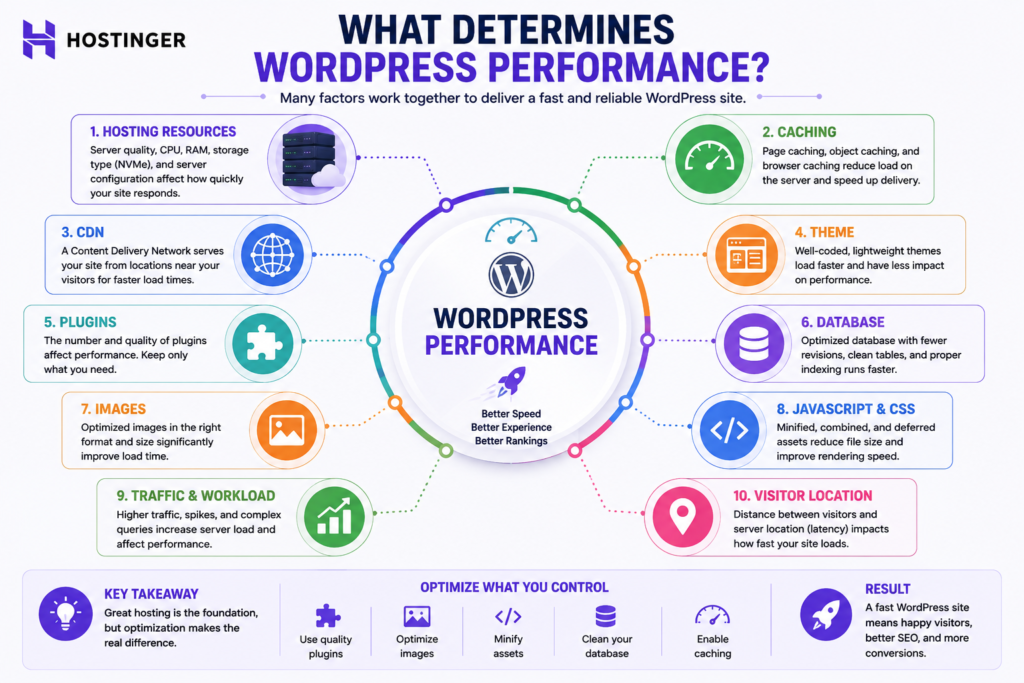
Why Performance Results Vary
Real WordPress performance depends on the complete application.
Important variables include:
Theme architecture. Heavy themes can add unnecessary CSS, JavaScript, and processing.
Plugins. Inefficient or overlapping plugins can increase database and PHP workload.
Images. Large unoptimized media can dominate page weight.
Caching. Correct caching can dramatically reduce repeated processing.
Database workload. Dynamic websites depend heavily on efficient database operations.
Third-party scripts. Advertising, analytics, chat widgets, external fonts, and embeds can affect page experience.
Traffic. Concurrent requests can expose resource limitations that are invisible on an idle website.
Visitor location. Geographic distance can influence network latency.
What Independent Reviews Can and Cannot Tell You
Independent benchmarks are valuable because they provide evidence beyond the hosting company’s marketing.
However, results from different reviewers should not be averaged blindly.
Differences in:
- hosting plan.
- data center.
- WordPress configuration.
- theme.
- plugins.
- caching.
- test location.
- test tool.
- page complexity.
- traffic simulation.
can produce different outcomes.
Therefore, independent tests should be treated as contextual evidence rather than a guarantee.
How to Test Your Own WordPress Site
After launch, evaluate your actual website.
Useful measurements include:
- Largest Contentful Paint.
- Interaction to Next Paint.
- Cumulative Layout Shift.
- Server response behavior.
- Cache effectiveness.
- Page weight.
- Database behavior.
- Performance during realistic traffic.
Real production measurements ultimately matter more than a generic hosting benchmark.
Ease of Use and WordPress Management
Hostinger is relatively beginner-friendly because hPanel centralizes many common hosting and WordPress tasks.
That reduces the need to administer a server directly.
Is hPanel Beginner Friendly?
For many first-time website owners, yes.
The interface organizes common tasks through a visual dashboard rather than requiring command-line server administration.
This makes Hostinger particularly relevant to users who want to focus on WordPress rather than infrastructure.
hPanel vs cPanel
Neither interface is universally superior.
hPanel is designed around Hostinger’s ecosystem.
cPanel is a widely used third-party hosting control panel familiar to many experienced hosting users.
Choose based on the controls you actually require rather than brand familiarity alone.
What Beginners Still Need to Learn
Managed hosting does not remove the need to understand:
- WordPress themes.
- plugins.
- backups.
- security.
- SEO.
- user management.
- updates.
- website performance.
- content management.
Hostinger simplifies the hosting layer. It does not eliminate the responsibilities of owning a website.
Customer Support and Reliability
Support matters because hosting problems often occur when website owners cannot diagnose the issue themselves.
Hostinger advertises support as part of its current hosting offerings.
This review has not conducted an original controlled support response test, so it would be inappropriate to claim that every support interaction is excellent or poor.
What Hosting Support Can Help With
The exact scope depends on the provider and issue, but hosting support is generally most relevant to the hosting environment and provider-controlled functionality.
What Hosting Support Does Not Replace
Hosting support should not automatically be treated as a substitute for:
- a WordPress developer.
- SEO consulting.
- custom programming.
- plugin developer support.
- website design.
- business IT management.
Understanding the support boundary is particularly important for commercial websites.
Uptime and Reliability Considerations
Reliability requires observations over time.
A single speed test cannot establish long-term uptime.
This research-based review therefore does not invent an original uptime percentage.
For a business-critical website, evaluate Hostinger’s current service commitments and use independent monitoring after deployment if uptime is commercially important.
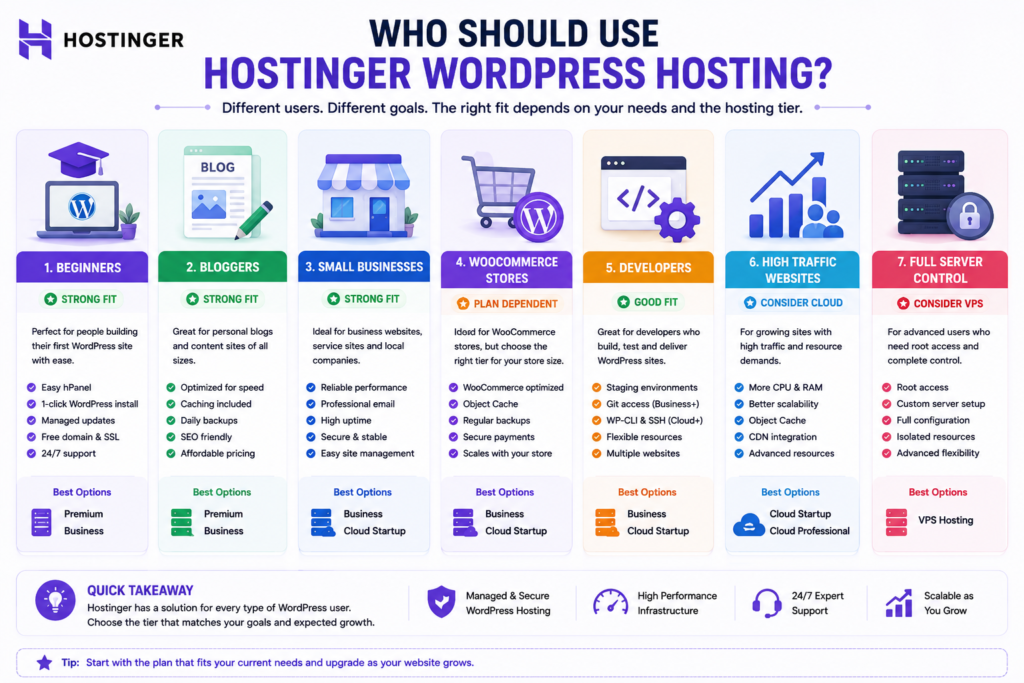
Who Is Hostinger Best For?
Hostinger’s strongest audience is users who want WordPress convenience without unnecessary server administration.
Beginners and Bloggers
Hostinger is a strong candidate for beginners because WordPress management, migration, caching, backups, and other hosting functions are integrated into a relatively accessible environment.
TechRadar’s current 2026 WordPress hosting assessment similarly highlights Hostinger’s value and beginner-friendliness.
Small Business Websites
A small business should evaluate hosting according to business consequences rather than simply traffic.
Important considerations include:
- lead generation.
- backups.
- restoration.
- security.
- staging.
- website speed.
- support.
- renewal cost.
A slightly higher hosting cost can be reasonable if the additional features materially reduce business risk.
WooCommerce Stores
Hostinger supports WooCommerce-related functionality, and its managed WordPress documentation currently lists advanced WooCommerce optimization.
WooCommerce nevertheless creates more dynamic workloads than a simple blog.
Stores can involve:
- shopping carts.
- customer sessions.
- checkout.
- inventory.
- product filtering.
- payment integrations.
- scheduled actions.
- transactional email.
- database-intensive plugins.
A small store may work comfortably on mainstream managed hosting.
As revenue, traffic, product count, or dynamic activity increases, stronger resources become more important.
Developers and Agencies
Developers can benefit from:
- staging.
- Caching controls.
- WordPress management.
- migration.
- Multiple website management.
- Cloud upgrade options.
Projects requiring deep operating system control or unusual server software may be better suited to VPS infrastructure.
Growing and Higher Traffic Websites
A growing website should upgrade based on evidence.
Possible signals include:
- repeated resource limits.
- slower dynamic processing under load.
- growing ecommerce activity.
- increased concurrency.
- greater storage requirements.
- more demanding development workflows.
Hostinger positions Cloud Startup for agencies and higher traffic projects on its current Pakistan-facing hosting page.
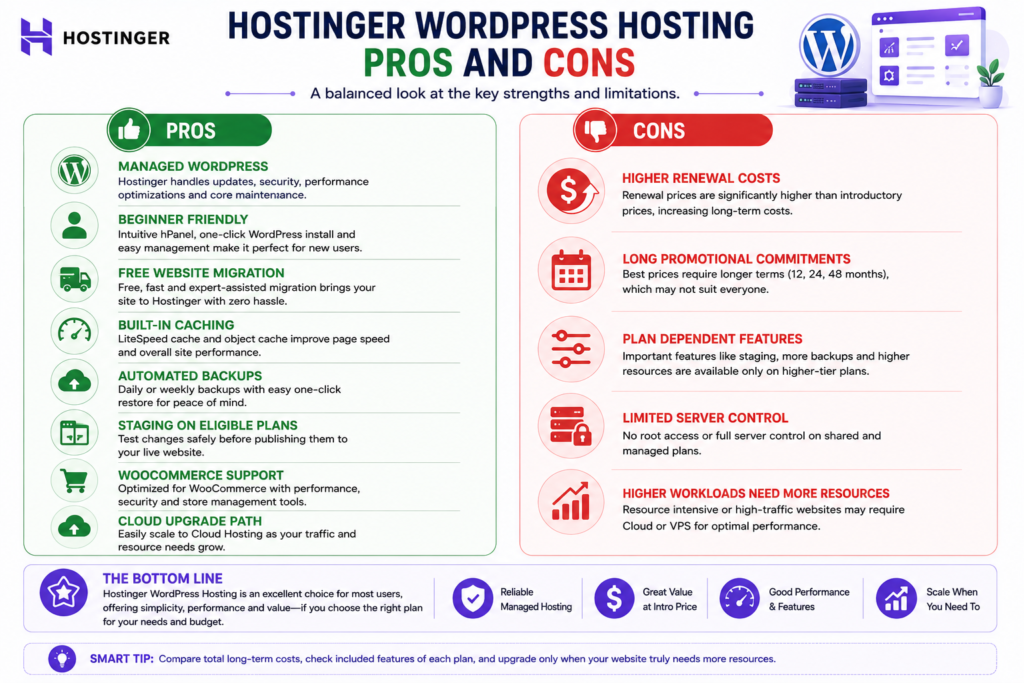
Hostinger WordPress Hosting Pros and Cons
| Pros | Cons and Limitations |
|---|---|
| Managed WordPress functionality | Promotional pricing can be much lower than renewal pricing |
| Beginner-friendly hPanel | Lowest rates may require long commitments |
| Migration functionality | Advanced features can depend on plan |
| WordPress caching tools | Performance still depends heavily on website quality |
| Object caching on eligible plans | Not available on every tier |
| Staging on eligible plans | Eligibility needs verification |
| Backup functionality | Required backup frequency varies by project |
| WooCommerce support | Ecommerce can require stronger resources |
| Upgrade path to cloud | Higher resources increase long-term cost |
| Suitable for many small business sites | Deep server control requires another hosting model |
| Competitive entry pricing | Regional pricing and plan structure can vary |
When Hostinger May Not Be the Right Choice
Hostinger is not automatically the best choice when you need:
- complete operating system control.
- unusual server software.
- highly specialized infrastructure.
- complex enterprise architecture.
- custom networking.
- very high resource isolation.
- specialized enterprise managed WordPress workflows.
It may also be unsuitable if the renewal cost exceeds your realistic long-term budget.
A good review should identify users who should not buy the product, not only those who should.
Hostinger vs Other Hosting Options
Hostinger should be evaluated against the type of infrastructure your website actually needs.
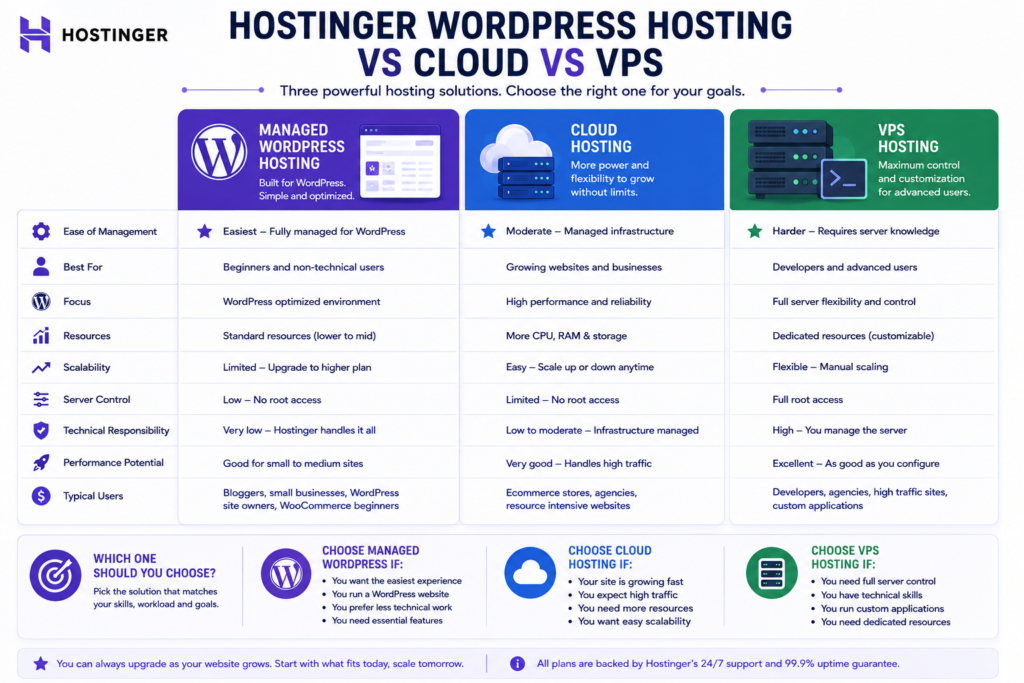
Hostinger WordPress Hosting vs Cloud Hosting
Managed WordPress hosting prioritizes convenience and cost efficiency for ordinary WordPress workloads.
Cloud hosting becomes more relevant as resource requirements increase.
Hostinger’s current cloud offering includes Cloud Startup, Cloud Professional, and Cloud Enterprise, with localized pricing and resources depending on the market.
Consider cloud when your website genuinely needs more resource headroom rather than simply because cloud hosting sounds more advanced.
Hostinger WordPress Hosting vs VPS
VPS hosting solves a different problem.
Managed WordPress hosting emphasizes convenience.
VPS emphasizes server-level control.
Consider VPS when you require:
- operating system access.
- custom server software.
- specialized applications.
- advanced server configuration.
- infrastructure control.
More control also means greater responsibility.
For an ordinary WordPress beginner, VPS can introduce unnecessary complexity.
Alternatives Worth Comparing
Different providers may suit different priorities.
Current independent WordPress hosting coverage identifies Hostinger as a strong value choice, while other providers can make sense depending on requirements such as premium managed WordPress workflows, support preferences, or specialized infrastructure.
The correct comparison is therefore not:
Which hosting company is universally best?
It is:
Which hosting environment best matches my workload, budget, technical skill, and business risk?
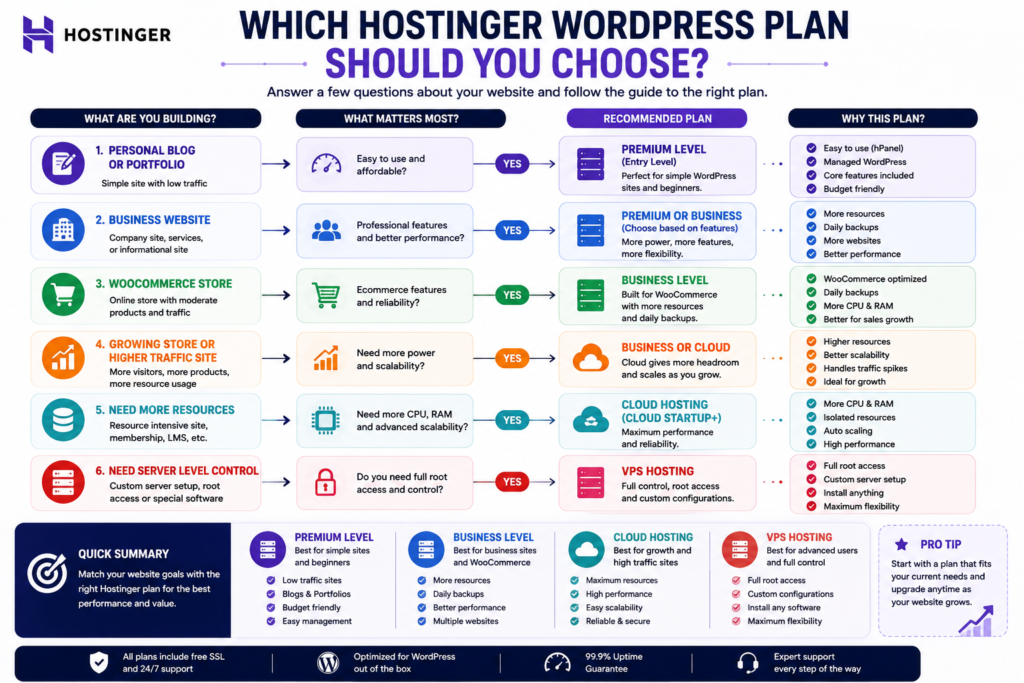
Which Hostinger Plan Should You Choose?
Use workload rather than marketing labels.
| Website Type | Hosting Direction to Evaluate |
|---|---|
| Personal blog | Entry or Premium level |
| Portfolio | Entry or Premium level |
| Small business brochure site | Premium or Business level |
| Important lead generation website | Business level |
| Growing content site | Business or stronger tier |
| Developer workflow | Business or higher |
| Small WooCommerce store | Business level |
| Growing ecommerce store | Business or Cloud |
| Higher traffic commercial project | Cloud |
| Server-level custom application | VPS or alternative infrastructure |
These are editorial starting points, not universal specifications.
15 Point Buying Checklist
Before purchasing, ask:
- How many websites do I genuinely need to host?
- How much storage do they require?
- How frequently does the website change?
- How much data could I afford to lose between backups?
- Do I need staging?
- Do I need object caching?
- Will I use WooCommerce?
- How important is the website to revenue?
- What traffic do I realistically expect?
- Are my plugins resource-intensive?
- Do I require server-level control?
- What is the total initial payment?
- What is the stated renewal rate?
- What will hosting cost over several years?
- Can I upgrade or migrate without major disruption?
This checklist is more useful than selecting whichever plan displays the largest discount.
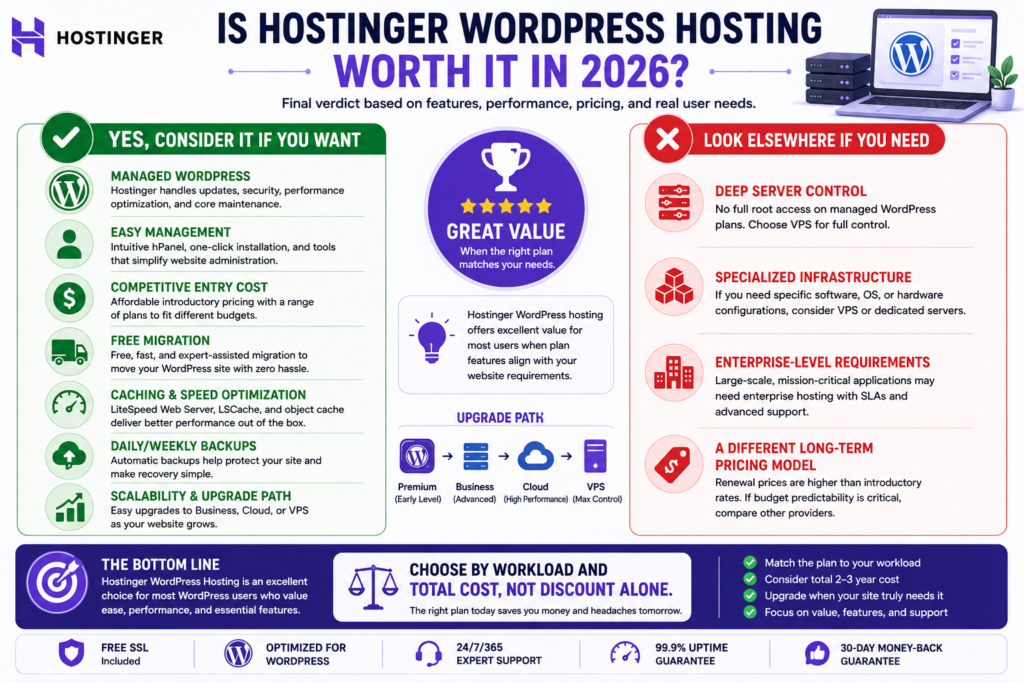
Is Hostinger WordPress Hosting Worth It in 2026?
Yes, for many beginners, bloggers, freelancers, small businesses, and ordinary WordPress projects, Hostinger can offer strong value when the selected plan matches the site’s workload.
Its strongest advantages are:
- managed WordPress functionality.
- relatively accessible entry pricing.
- hPanel.
- migration tools.
- caching.
- backups.
- staging on eligible plans.
- WooCommerce functionality.
- scalability toward cloud hosting.
The strongest reasons to be cautious are:
- renewal pricing.
- long commitments associated with some promotional rates.
- feature differences between plans.
- resource requirements for demanding sites.
- less server control than VPS infrastructure.
The word value is important.
Hostinger does not need to be the most powerful hosting platform to represent good value for a particular website.
It needs to provide the functionality and resources that the website requires at a sustainable total cost.
Final Verdict
Hostinger WordPress hosting is a strong research-based recommendation for users who want an accessible managed WordPress environment without taking on server administration.
It is particularly attractive for beginners, blogs, portfolios, small businesses, and many growing WordPress websites.
The decision becomes more nuanced for ecommerce and higher traffic projects, where backup frequency, caching, database activity, resource allocation, staging, and scalability become more important.
The biggest buying mistake would be choosing Hostinger solely because of the promotional monthly price.
Instead, compare:
the initial contract cost.
the renewal rate.
the features included in the exact plan.
the website’s workload.
the cost of future upgrades.
the operational consequences if the website fails.
For a relatively light WordPress project, an entry or Premium level offering may be enough.
For a serious business site, Business level functionality deserves closer evaluation.
For substantially greater resource requirements, Cloud becomes more relevant.
For projects requiring deep server control, VPS or another infrastructure model may be the better fit.
The best Hostinger plan is not automatically the cheapest or most expensive one. It is the lowest cost plan that reliably provides the resources and functionality your WordPress website actually needs, with enough headroom for realistic growth.
Frequently Asked Questions
Is Hostinger good for WordPress?
Yes. Hostinger is suitable for many WordPress beginners, bloggers, small businesses, and growing websites. It provides managed WordPress functionality and additional tools depending on the selected plan.
Is Hostinger WordPress hosting worth it?
It can be. Hostinger is most attractive when you value managed WordPress convenience, competitive introductory pricing, migration, caching, backups, and an upgrade path. Renewal pricing should be evaluated before buying.
Which Hostinger plan is best for WordPress?
There is no universal best plan. A lighter WordPress website may need only an entry or Premium tier, while business, ecommerce, developer, or higher traffic projects may justify Business or Cloud resources.
Is Hostinger suitable for WooCommerce?
Yes, but the plan should match the store’s workload. Hostinger’s managed WordPress documentation includes WooCommerce optimization, while larger stores should evaluate database activity, traffic, backups, caching, and resource requirements carefully.
What should I check before Hostinger renews?
Check the renewal rate, subscription duration, required features, current resource usage, website growth, and comparable alternatives. Do not assume the introductory promotional price will continue at renewal.
Does Hostinger WordPress hosting include staging?
Staging is available on eligible Hostinger plans. Hostinger’s current WordPress management documentation includes staging functionality, but eligibility should be confirmed for the exact plan before purchasing.
Can I migrate an existing WordPress site to Hostinger?
Hostinger provides WordPress migration functionality. After migration, verify pages, forms, redirects, SSL, analytics, caching, email functionality, and e-commerce transactions where relevant.
SEO Title: Hostinger WordPress Hosting Review 2026: Is It Worth It?
Meta Description: Is Hostinger good for WordPress in 2026? Compare managed WordPress features, plans, renewal pricing, speed, backups, pros and cons, and who it suits best.
Recommended Slug: /hostinger-wordpress-hosting-review/
Primary Keyword: Hostinger WordPress Hosting Review
Recommended Schema: Article or BlogPosting plus BreadcrumbList. Do not invent review ratings, AggregateRating values, or review counts. Google says its review system favors insightful analysis and original research, while its current AI Search guidance says the same foundational SEO practices apply to AI features.
Publication note: Keep the SEO title, meta description, slug, primary keyword, schema recommendation, and this publication note in your WordPress SEO/editorial fields rather than displaying them as part of the reader-facing article. Before publishing, recheck all Hostinger pricing and plan details because these are volatile. Also add genuine screenshots or original testing later if available. That is the main remaining path from a highly optimized research-based review toward a genuinely firsthand review under Google’s review guidance.
Internal References for Hostinger WordPress Hosting Review 2026
- Hostinger Review 2026: Is It Worth Buying?
https://marjanservices.tech/honest-hostinger-review-2026/ - Hostinger Agency Hosting 2026: Comprehensive Review, Plans & Pricing
https://marjanservices.tech/hostinger-agency-hosting-review-plans-pricing/ - Complete Domain Name Guide 2026
https://marjanservices.tech/domain-name-guide/ - Technical SEO Guide 2026: Complete Enterprise SEO Handbook
https://marjanservices.tech/technical-seo-guide-2026/ - Complete Google Search Console Guide 2026–2027
https://marjanservices.tech/google-search-console-guide/ - Website Mistakes to Avoid: 25 Costly Problems
https://marjanservices.tech/website-mistakes-to-avoid/ - Proven On-Page SEO Services 2026
https://marjanservices.tech/on-page-seo-services-2026/ - Why Is My Website Not Getting Customers?
https://marjanservices.tech/why-is-my-website-not-getting-customers/ - Shopify Guide for Beginners 2026
https://marjanservices.tech/shopify-guide-for-beginners-2026/
External References for Hostinger WordPress Hosting Review 2026
- Hostinger WordPress Hosting. Official Product Information
Hostinger WordPress Hosting - Hostinger Managed WordPress Hosting. Official Documentation
Hostinger Managed WordPress Documentation - WordPress Hosting Requirements. Official WordPress Documentation
WordPress Requirements - Google Search Central. How to Write High-Quality Reviews
Google High-Quality Reviews Guidelines - Google Search Central. Reviews System Guidance
Google Reviews System - Google Search Central. Helpful, Reliable, People First Content
Google People First Content Guidelines - Google Search Central. Search Essentials
Google Search Essentials - Google Search Central. SEO Starter Guide
Google SEO Starter Guide - Google Search Central. Generative AI Search Optimization Guidance
Google Generative AI Optimization Guide - Google Search Central. Structured Data Supported by Google Search
Google Structured Data Documentation