Table of Contents
Static vs Dynamic Website
- Published: August 2026
- Last Updated: August 2026
- Reviewed By: Editorial Team
- Category: Website Development
- Reading Time: Approximately 45 Minutes
About the Author
- Author: Syed Abdul Quddus
- Designation: Website Development & Technical SEO Specialist
- Experience: 2+ Years in Website Development, WordPress, Technical SEO, Performance Optimization, and Digital Strategy
Areas of Expertise
- Website Development
- WordPress Development
- Business Website Architecture
- Technical SEO
- Google Search Essentials
- Semantic SEO
- Core Web Vitals
- Website Security
- Performance Optimization
Fact-Checking Statement
Every recommendation in this guide is based on established web development principles, current search engine guidance, and practical industry experience. Technology evolves continuously, so readers should verify platform-specific features before implementation.
Editorial Policy
This article is written to educate businesses, entrepreneurs, developers, and website owners. It focuses on practical decision-making rather than promoting a single technology stack.
Quick Answer
Static vs Dynamic Website
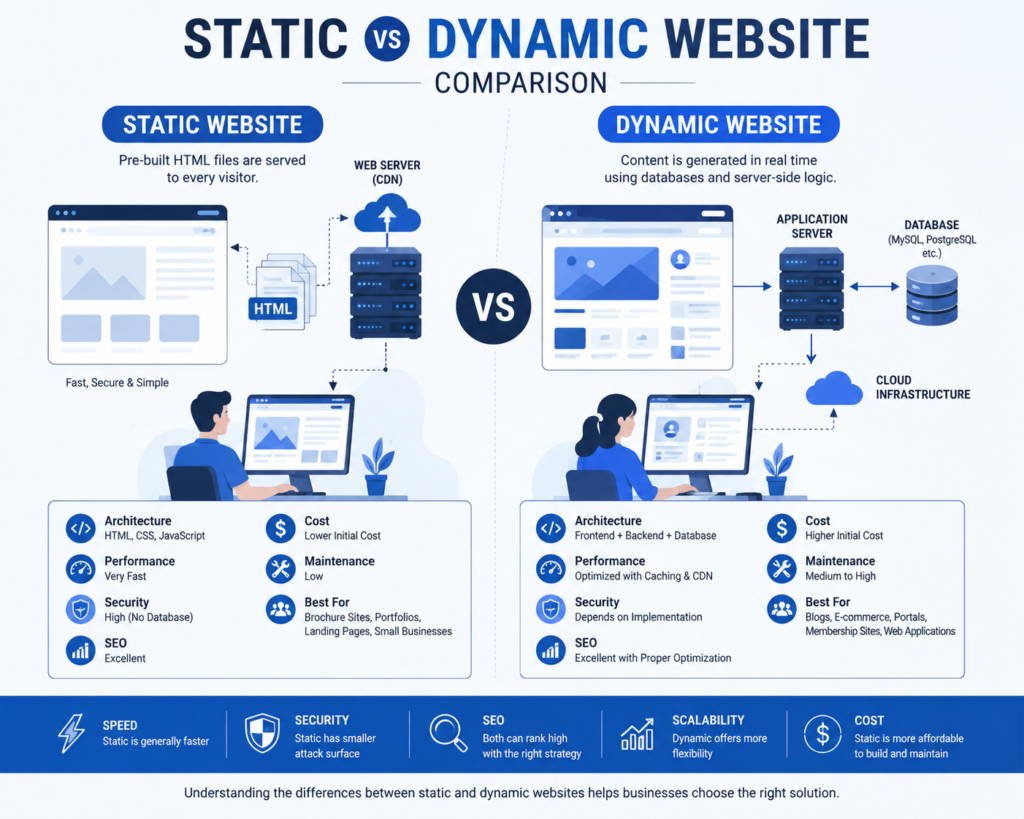
A static website delivers the same pre-built page to every visitor, making it fast, secure, and cost-effective. A dynamic website generates content in real time using databases and server-side logic, allowing personalized experiences, user accounts, e-commerce, bookings, dashboards, and content management.
For most businesses, the best choice depends on business goals rather than technology trends.
Introduction
Choosing between a static vs. dynamic website is one of the most important decisions when planning a professional online presence. Whether you are launching a business website, portfolio, ecommerce store, corporate platform, or startup, the website architecture you choose directly affects performance, scalability, security, maintenance, search visibility, and long-term costs.
Many business owners mistakenly assume that a dynamic website is always better because it offers more functionality. Others believe that static websites are outdated because they do not rely on databases or complex server-side programming. In reality, both approaches remain highly relevant in modern web development, and each excels in different situations.
Today’s websites are also expected to satisfy more than traditional SEO requirements. They must provide excellent user experiences, fast loading times, clear information architecture, accessibility, strong security, and structured content that can be understood by both search engines and AI-powered answer systems. Businesses that align their websites with these principles are better positioned to improve visibility across Google Search, AI-generated summaries, and other modern discovery platforms.
In this comprehensive guide, you will learn:
- What static websites are.
- What dynamic websites are.
- How each technology works.
- Their advantages and disadvantages.
- Which option offers better SEO.
- Which solution provides stronger security.
- Which is more cost-effective.
- Which architecture is best for your business.
By the end of this guide, you will have a practical framework for selecting the website type that best supports your current needs while allowing room for future growth.
What Is a Static Website?
A static website is a website whose pages are delivered to visitors exactly as they are stored on the web server. Every visitor receives the same HTML, CSS, images, and other assets unless separate pages have been manually created.
Unlike database-driven systems, a static website does not generate pages dynamically when a visitor requests them. Instead, the web server simply sends pre-built files directly to the user’s browser.
Because no database queries or complex application logic are required for most requests, static websites are known for their exceptional speed, reliability, and simplicity.
How a Static Website Works
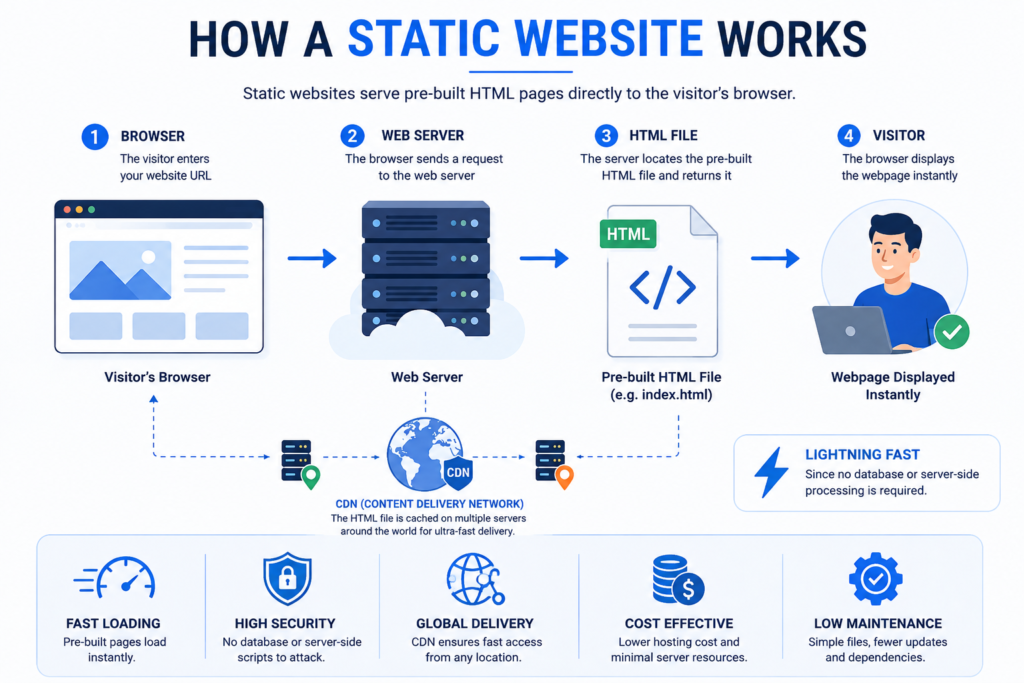
The workflow of a static website is straightforward:
- A visitor enters a website URL.
- The browser sends a request to the web server.
- The server immediately returns the pre-built HTML page.
- The browser renders the page.
Since no database processing occurs during page delivery, response times are often extremely fast.
Main Characteristics of Static Websites
A static website typically includes:
- HTML pages
- CSS stylesheets
- JavaScript files
- Images
- Videos
- Fonts
- Downloadable documents
Content usually changes only when the developer edits the source files and republishes the website.
Advantages of Static Websites
Extremely Fast Loading Speed
Static websites can load very quickly because they serve ready-made files without performing database operations.
Better Security
Without databases, login systems, or server-side processing, the attack surface is significantly smaller.
Lower Hosting Costs
Most static websites require fewer server resources, making them less expensive to host.
High Reliability
Static pages are less likely to fail due to server-side errors or database issues.
Excellent Scalability
When combined with Content Delivery Networks (CDNs), static websites can efficiently handle large amounts of traffic.
Easier Caching
Browsers and CDNs can cache static files effectively, reducing load times for returning visitors.
Limitations of Static Websites
Static websites are not suitable for every project.
Common limitations include:
- Manual content updates.
- Limited personalization.
- No built-in user accounts.
- No native database integration.
- Limited interactive functionality.
- More developer involvement for frequent updates.
Best Use Cases for Static Websites
Static websites are an excellent choice for:
- Business brochure websites
- Portfolio websites
- Landing pages
- Product showcases
- Company profile websites
- Event websites
- Documentation websites
- Personal websites
- Resume websites
- Marketing campaign pages
For organizations that primarily publish informational content with infrequent updates, a static architecture often delivers outstanding performance while minimizing maintenance costs.
What Is a Dynamic Website?
A dynamic website creates web pages in real time based on user requests, database content, and application logic. Instead of serving identical files to every visitor, it generates personalized or frequently updated content whenever someone accesses the site.
Dynamic websites rely on technologies such as server-side programming languages, databases, APIs, and content management systems to assemble pages before they are displayed in the browser.
This architecture enables businesses to deliver interactive experiences, manage large volumes of content efficiently, and support features such as e-commerce, customer accounts, bookings, dashboards, and search functionality.
How a Dynamic Website Works
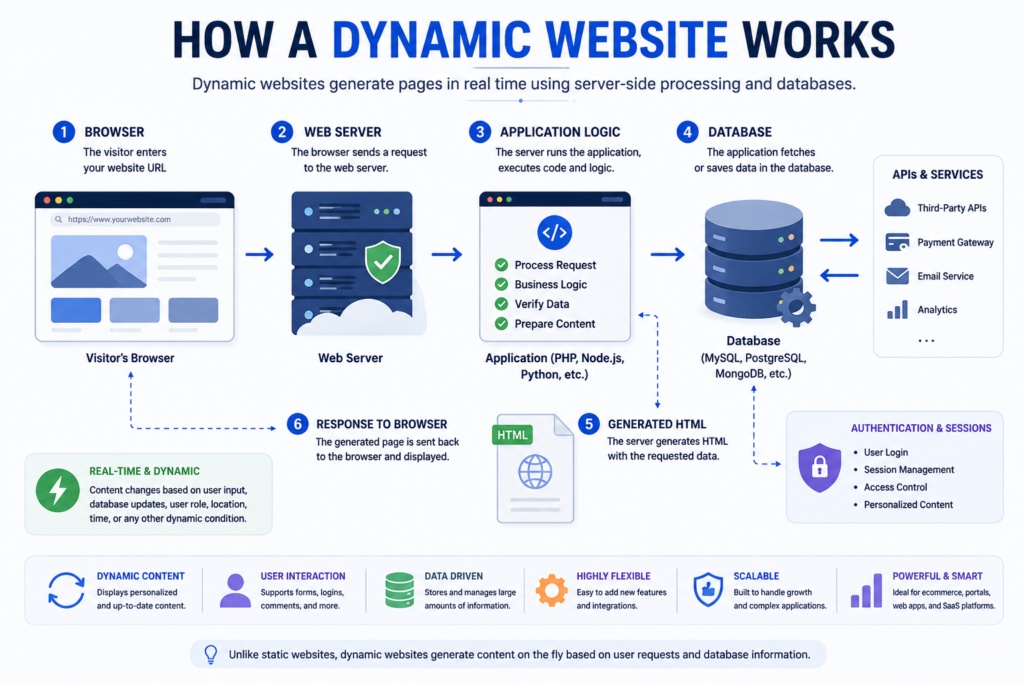
A typical dynamic website follows these steps:
- A visitor requests a page.
- The web server receives the request.
- Server-side code processes the request.
- Relevant data is retrieved from a database or external service.
- The page is generated dynamically.
- The completed page is sent to the visitor’s browser.
This process allows the same page template to display different content depending on the user, location, preferences, permissions, or stored data.
Common Technologies Used in Dynamic Websites
Dynamic websites often incorporate:
- Content Management Systems (CMS)
- Relational and NoSQL databases
- Server-side programming languages
- APIs
- Authentication systems
- Shopping cart functionality
- Payment gateways
- User dashboards
- Search features
- Content personalization
These technologies make dynamic websites ideal for businesses that require frequent content updates or advanced functionality.
Static vs Dynamic Website Comparison
Choosing between a static and dynamic website is one of the most important decisions during website planning. The right choice affects your website’s speed, search engine visibility, user experience, security, scalability, maintenance costs, and future business growth.
Many people assume that dynamic websites are always better because they offer more features. Others believe static websites are outdated because they do not rely on databases or content management systems. In reality, both architectures are highly effective when used for the right purpose.
The best website is not the one with the most features. It is the one that solves your business problems efficiently while delivering an excellent experience to your visitors.
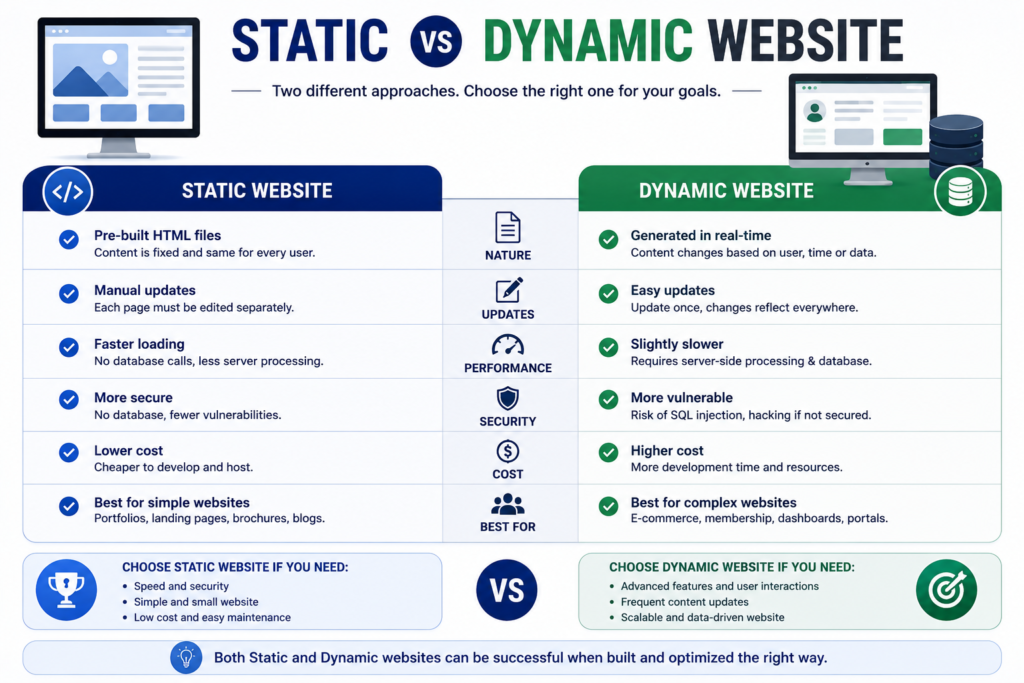
Quick Comparison Table
| Feature | Static Website | Dynamic Website |
|---|---|---|
| Content Delivery | Pre-built HTML pages | Generated in real time |
| Database | Usually Not Required | Required |
| Speed | Excellent | Very Good |
| SEO | Excellent | Excellent |
| Security | Excellent | Excellent with proper management |
| Maintenance | Low | Medium to High |
| Development Cost | Lower | Higher |
| Hosting Cost | Lower | Higher |
| Content Updates | Manual | Easy through CMS |
| User Login | Limited | Fully Supported |
| Ecommerce | Limited | Fully Supported |
| Membership System | Limited | Fully Supported |
| Booking System | Limited | Fully Supported |
| Scalability | Excellent | Excellent |
| Personalization | Limited | Excellent |
| Best For | Business websites, landing pages, portfolios | Ecommerce, SaaS, blogs, portals, marketplaces |
What Is the Main Difference Between a Static and Dynamic Website?
The biggest difference is how web pages are created and delivered.
A static website serves pre-built HTML pages directly from the server. Every visitor usually sees the same content because the pages already exist before anyone visits the website.
A dynamic website creates web pages when someone visits the website. The server processes requests, retrieves data from a database, and generates the page before sending it to the user’s browser.
Think of it like this:
A static website is similar to reading a printed brochure.
A dynamic website is similar to using an online banking application where every customer sees different information.
How a Static Website Works
A static website follows a simple process.
Step 1
The visitor enters the website URL.
↓
Step 2
The browser sends a request to the server.
↓
Step 3
The server immediately returns the stored HTML page.
↓
Step 4
The browser displays the webpage.
Since there are no database queries or complex server-side calculations, page loading is extremely fast.
How a Dynamic Website Works
Dynamic websites use a more advanced workflow.
Step 1
The visitor requests a webpage.
↓
Step 2
The server receives the request.
↓
Step 3
Application code executes.
↓
Step 4
The database is queried.
↓
Step 5
Required information is collected.
↓
Step 6
The webpage is generated dynamically.
↓
Step 7
The browser displays the completed page.
This process enables websites to show personalized content, shopping carts, customer dashboards, booking systems, user accounts, and much more.
Static Website Advantages
Static websites remain one of the best solutions for businesses that prioritize speed, simplicity, security, and low maintenance.
Lightning-Fast Loading Speed
Because pages are already built before visitors arrive, the server simply delivers HTML files.
Benefits include:
- Faster page loading
- Better user experience
- Lower bounce rates
- Improved Core Web Vitals
- Better SEO performance
Better Security
Static websites have a significantly smaller attack surface.
Since there are usually no databases, login systems, or server-side scripts, attackers have fewer opportunities to exploit vulnerabilities.
Security benefits include:
- Lower malware risk
- Reduced SQL injection risk
- Fewer plugin vulnerabilities
- Better resistance against many common attacks
Lower Development Cost
Simple informational websites can often be developed more quickly because they require fewer technologies.
Examples include:
- Company websites
- Personal portfolios
- Landing pages
- Event websites
- Product showcase websites
Lower Hosting Cost
Static websites require minimal server resources.
Many static websites can even be hosted on highly affordable cloud hosting platforms while still delivering excellent performance worldwide.
Outstanding Performance
Static websites work exceptionally well with:
- Browser caching
- CDN caching
- Edge delivery
- Image optimization
- Performance optimization
As a result, visitors enjoy consistently fast browsing experiences.
Static Website Disadvantages
Although static websites offer many benefits, they are not suitable for every project.
Manual Content Updates
Updating content usually requires editing website files or rebuilding the website before publishing changes.
This makes static websites less suitable for organizations publishing content every day.
Limited Interactive Features
Static websites are not designed for complex functionality such as:
- Customer dashboards
- User registration
- Membership systems
- Online learning
- Forums
- Booking engines
- E-commerce platforms
These features usually require additional services or dynamic functionality.
Difficult to Manage Large Websites
Managing hundreds or thousands of pages manually becomes increasingly difficult as a website grows.
For websites containing large amounts of regularly changing information, dynamic content management becomes much more practical.
Dynamic Website Advantages
Dynamic websites power most modern online businesses because they offer flexibility and automation.
Easy Content Management
Using a Content Management System (CMS), businesses can update content without editing code.
Popular CMS platforms include:
- WordPress
- Drupal
- Joomla
- Contentful
- Strapi
This allows marketing teams to publish articles quickly without depending on developers.
Personalized User Experience
Dynamic websites can display different content based on:
- User accounts
- Geographic location
- Purchase history
- Language
- Preferences
- Device type
This personalization improves engagement and customer satisfaction.
Advanced Functionality
Dynamic websites support powerful business features such as:
- Ecommerce
- Booking systems
- Customer portals
- Membership websites
- Learning management systems
- Online marketplaces
- Payment gateways
- Product filtering
- Inventory management
Business Automation
Dynamic websites can automate many repetitive tasks.
Examples include:
- Order processing
- Email notifications
- Customer registration
- Appointment scheduling
- CRM integration
- Inventory updates
- Marketing automation
Automation reduces manual work while improving operational efficiency.
Excellent Scalability
Dynamic websites can manage:
- Millions of users
- Thousands of products
- Multiple authors
- Multiple languages
- Large content libraries
This makes them suitable for growing businesses and enterprise organizations.
Dynamic Website Disadvantages
Dynamic websites also introduce additional complexity.
Higher Development Cost
Building a dynamic website usually requires:
- Backend development
- Database integration
- API development
- Authentication systems
- Security implementation
As a result, development costs are generally higher.
Higher Maintenance Requirements
Dynamic websites require ongoing maintenance, including:
- CMS updates
- Plugin updates
- Database optimization
- Security monitoring
- Performance optimization
Ignoring maintenance can create security and performance issues.
Greater Security Responsibility
Dynamic websites contain more components.
Each component—including plugins, themes, databases, APIs, and user accounts—must be properly maintained and secured.
When managed professionally, dynamic websites can still achieve excellent security.
Higher Hosting Requirements
Dynamic websites consume more server resources because pages are generated in real time.
Websites receiving large amounts of traffic often require more powerful hosting environments.
Advantages Comparison
| Category | Static Website | Dynamic Website |
|---|---|---|
| Loading Speed | ⭐⭐⭐⭐⭐ | ⭐⭐⭐⭐☆ |
| Security | ⭐⭐⭐⭐⭐ | ⭐⭐⭐⭐☆ |
| Hosting Cost | ⭐⭐⭐⭐⭐ | ⭐⭐⭐☆☆ |
| Maintenance | ⭐⭐⭐⭐⭐ | ⭐⭐⭐☆☆ |
| Ease of Updates | ⭐⭐☆☆☆ | ⭐⭐⭐⭐⭐ |
| Personalization | ⭐☆☆☆☆ | ⭐⭐⭐⭐⭐ |
| Ecommerce | ⭐☆☆☆☆ | ⭐⭐⭐⭐⭐ |
| Scalability | ⭐⭐⭐⭐⭐ | ⭐⭐⭐⭐⭐ |
| Automation | ⭐☆☆☆☆ | ⭐⭐⭐⭐⭐ |
| Business Flexibility | ⭐⭐⭐☆☆ | ⭐⭐⭐⭐⭐ |
Real-World Examples of Static Websites
Static websites are commonly used for:
- Company profile websites
- Small business websites
- Agency websites
- Personal portfolios
- Landing pages
- Resume websites
- Product launch pages
- Documentation websites
- Marketing campaigns
These websites prioritize speed, reliability, and simplicity.
Real-World Examples of Dynamic Websites
Dynamic websites are commonly used for:
- Ecommerce stores
- Online marketplaces
- News websites
- Educational platforms
- Hotel booking websites
- Hospital management systems
- Banking portals
- SaaS platforms
- Social media platforms
- Real estate portals
These websites require real-time content, user interaction, and advanced business functionality.
Expert Recommendation
There is no universal winner in the static vs dynamic website debate.
A static website is the ideal solution for businesses that need outstanding speed, strong security, lower costs, and relatively stable content.
A dynamic website is the better choice for organizations that require user interaction, e-commerce functionality, customer accounts, bookings, personalized experiences, or frequent content updates.
Many modern websites now adopt a hybrid architecture, combining the performance benefits of static websites with the flexibility of dynamic functionality. This approach allows businesses to achieve faster loading times while still supporting advanced features where they are needed.
Ultimately, your decision should be based on your business goals, target audience, content strategy, scalability requirements, and long-term growth plans rather than choosing one technology simply because it is more popular.
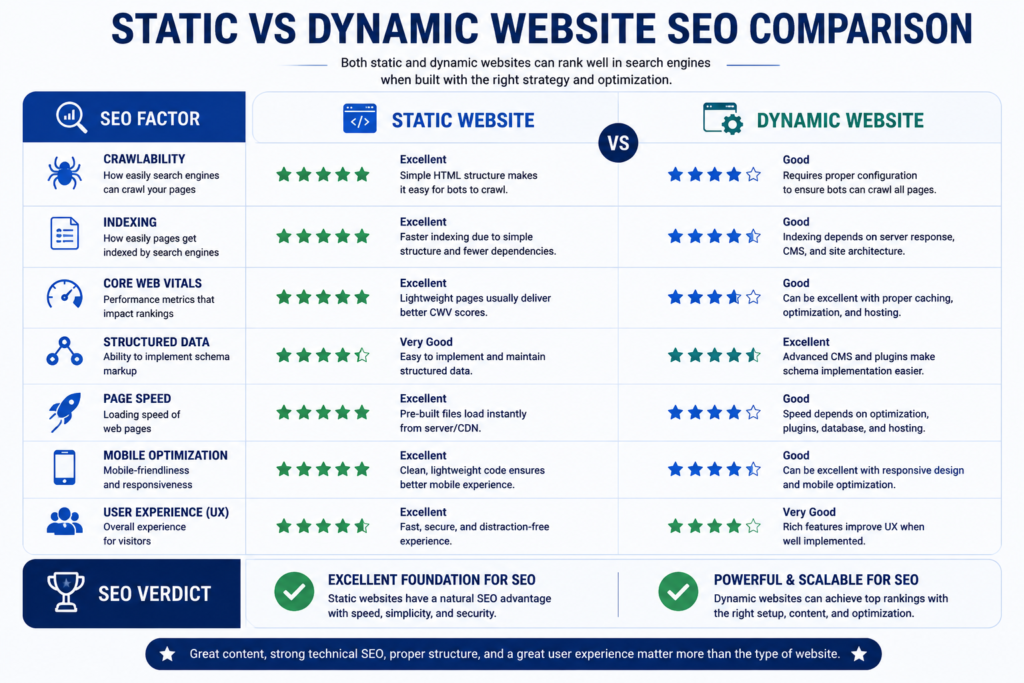
Static vs Dynamic Website SEO Comparison
One of the most common questions business owners ask is:
Which is better for SEO: a static website or a dynamic website?
The answer is surprisingly simple.
Neither website architecture automatically ranks higher on Google.
Google does not rank a website based on whether it is static or dynamic. Instead, Google’s ranking systems evaluate factors such as content quality, search intent satisfaction, user experience, page speed, crawlability, structured data, internal linking, and overall website quality.
In other words, both static and dynamic websites can achieve excellent rankings when they are properly optimized.
Does Google Prefer Static or Dynamic Websites?
No.
Google has never stated that static websites receive ranking advantages simply because they are static.
Likewise, dynamic websites are not penalized because they use databases or server-side technologies.
Instead, Google focuses on whether a webpage provides valuable, original, helpful, and trustworthy content while offering a good user experience.
This means your SEO success depends far more on optimization than on website architecture.
SEO Comparison Table
| SEO Factor | Static Website | Dynamic Website |
|---|---|---|
| Crawlability | Excellent | Excellent |
| Indexability | Excellent | Excellent |
| Core Web Vitals | Excellent | Very Good |
| Page Speed | Excellent | Good to Excellent |
| Structured Data | Fully Supported | Fully Supported |
| XML Sitemap | Supported | Supported |
| Robots.txt | Supported | Supported |
| Canonical URLs | Supported | Supported |
| Internal Linking | Excellent | Excellent |
| Mobile Optimization | Excellent | Excellent |
| Image SEO | Excellent | Excellent |
| Content Scalability | Limited | Excellent |
| Blog Management | Limited | Excellent |
| Ecommerce SEO | Limited | Excellent |
| Local SEO | Excellent | Excellent |
Static Website SEO Advantages
Static websites naturally provide several technical SEO benefits.
Faster Page Speed
Static pages are served immediately without waiting for database queries.
Benefits include:
- Better user experience
- Faster Largest Contentful Paint (LCP)
- Lower server response times
- Improved crawl efficiency
- Better Core Web Vitals
Google considers page experience an important aspect of overall website quality, making speed a competitive advantage.
Cleaner Website Structure
Static websites often have:
- Cleaner URLs
- Simpler navigation
- Fewer duplicate pages
- Easier crawl paths
This helps search engines discover and understand content more efficiently.
Better Crawl Efficiency
Search engine crawlers spend less time processing complex server-side requests.
As a result:
- More pages can be crawled.
- Crawl budget is used efficiently.
- Indexing may become faster.
Lower Technical Complexity
Static websites usually contain fewer technical issues such as:
- Broken database queries
- Slow server responses
- Dynamic parameter URLs
- Plugin conflicts
- Server-side rendering errors
Less complexity generally means fewer SEO problems.
Dynamic Website SEO Advantages
Dynamic websites also provide powerful SEO opportunities.
Easier Content Publishing
Content Management Systems allow businesses to publish:
- Blog posts
- News articles
- Landing pages
- Case studies
- Service pages
- Product pages
This supports topical authority and long-term organic growth.
Better Internal Linking
Dynamic CMS platforms automatically manage:
- Categories
- Tags
- Related posts
- Breadcrumbs
- Pagination
- Archive pages
These features strengthen website architecture.
Better Topical Authority
Businesses can continuously publish new content around a topic.
For example:
Pillar Article
↓
Supporting Articles
↓
Case Studies
↓
FAQs
↓
Industry Guides
↓
Service Pages
This content ecosystem helps establish expertise.
Easier Schema Implementation
Modern CMS platforms simplify adding:
- Article Schema
- FAQ Schema
- Organization Schema
- Breadcrumb Schema
- Service Schema
- Product Schema
- Review Schema
Structured data improves eligibility for rich search results.
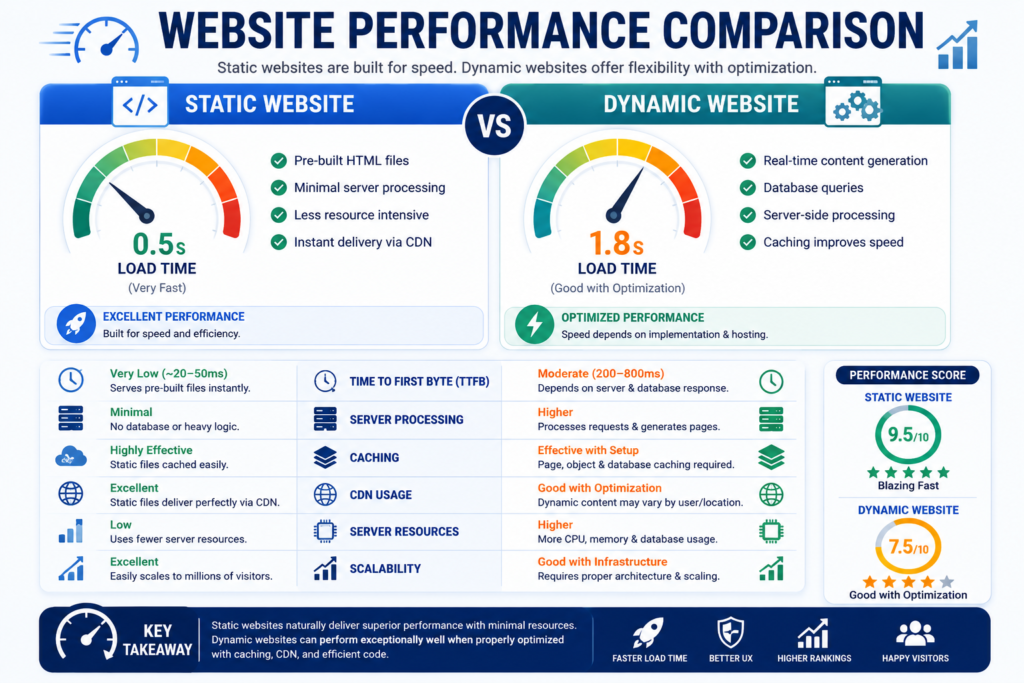
Which Website Loads Faster?
In most situations:
Static Website Wins.
Since static pages already exist before visitors arrive, the server only needs to deliver files.
Dynamic websites perform additional work such as:
- Executing server-side code
- Reading databases
- Running plugins
- Processing APIs
- Generating HTML
These extra processes can increase loading time if not optimized.
Website Speed Comparison
| Performance Metric | Static Website | Dynamic Website |
|---|---|---|
| Initial Load | Excellent | Very Good |
| Time to First Byte | Excellent | Good |
| Largest Contentful Paint | Excellent | Good |
| Interaction to Next Paint | Excellent | Good |
| Cumulative Layout Shift | Excellent | Excellent |
| CDN Performance | Excellent | Excellent |
| Browser Caching | Excellent | Excellent |
Core Web Vitals Comparison
Core Web Vitals directly influence user experience.
Static Websites
Usually achieve excellent scores because:
- Smaller page size
- Less JavaScript
- Faster rendering
- Fewer server requests
Dynamic Websites
Can also achieve outstanding Core Web Vitals through:
- Image optimization
- Object caching
- Page caching
- CDN integration
- Code optimization
- Database optimization
Proper optimization is far more important than architecture alone.
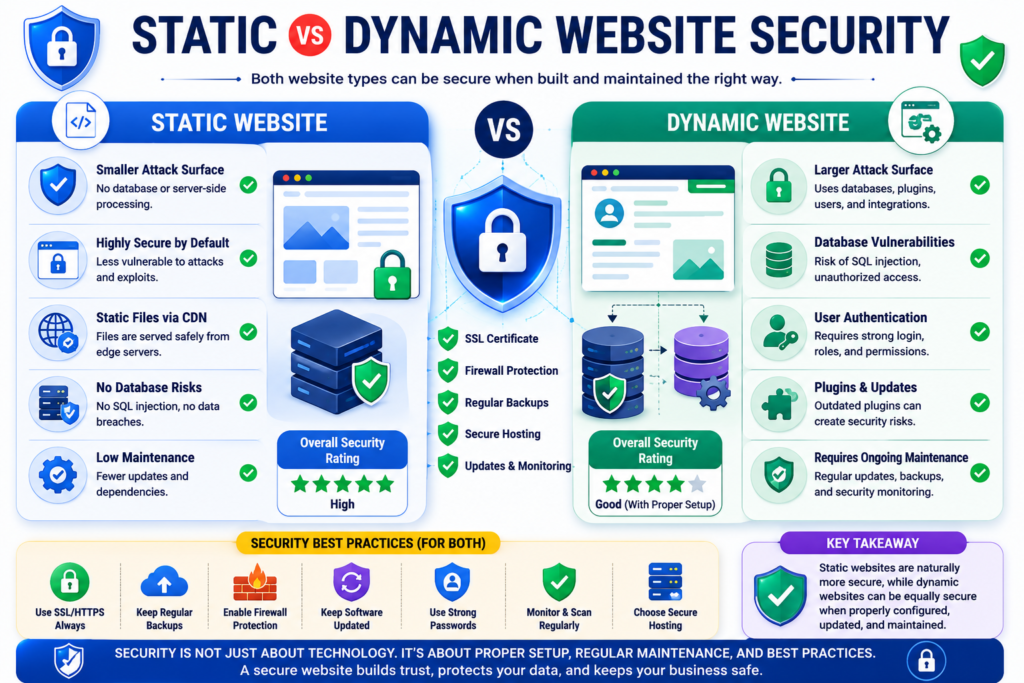
Website Security Comparison
Security should be considered from both a technical and business perspective.
Static Website Security
Advantages include:
- No database exposure
- Fewer attack vectors
- Reduced malware risk
- No plugin dependency
- Smaller software footprint
This makes static websites naturally resilient against many common attacks.
Dynamic Website Security
Dynamic websites require additional protection because they often include:
- User accounts
- Databases
- Login systems
- APIs
- Plugins
- Payment gateways
However, when properly maintained with updates, strong authentication, secure coding, backups, and monitoring, dynamic websites can also achieve a high level of security.
Security Comparison Table
| Security Area | Static Website | Dynamic Website |
|---|---|---|
| Attack Surface | Very Small | Larger |
| SQL Injection Risk | Very Low | Higher if poorly secured |
| Plugin Vulnerabilities | Minimal | Depends on maintenance |
| Malware Risk | Lower | Moderate |
| Authentication Security | Limited | Advanced |
| Data Protection | Excellent | Excellent with best practices |
Website Performance Comparison
Performance is more than page speed.
It also includes:
- Stability
- Reliability
- Scalability
- Resource consumption
- Server efficiency
Static websites generally require fewer resources and perform consistently under heavy traffic.
Dynamic websites provide greater flexibility but demand better infrastructure and optimization to maintain peak performance.
Which Website Performs Better Under Heavy Traffic?
For websites expecting sudden traffic spikes:
Static websites usually perform exceptionally well because cached files can be distributed globally through Content Delivery Networks.
Dynamic websites can also scale effectively using:
- Load balancing
- Cloud hosting
- Database replication
- Object caching
- Edge caching
Although dynamic websites require more infrastructure planning, they can support millions of users when properly architected.
Expert SEO Recommendation
From an SEO perspective, website quality matters far more than website type.
Choose a static website if your primary goals are:
- Maximum speed
- Simplicity
- Security
- Low maintenance
- Informational content
Choose a dynamic website if your business requires:
- Frequent publishing
- Ecommerce
- Customer accounts
- Advanced functionality
- Personalized experiences
- Large-scale content management
The strongest long-term strategy for many businesses is a hybrid approach, combining static performance with dynamic functionality where necessary. This delivers excellent user experience while supporting modern business requirements and scalable SEO growth.
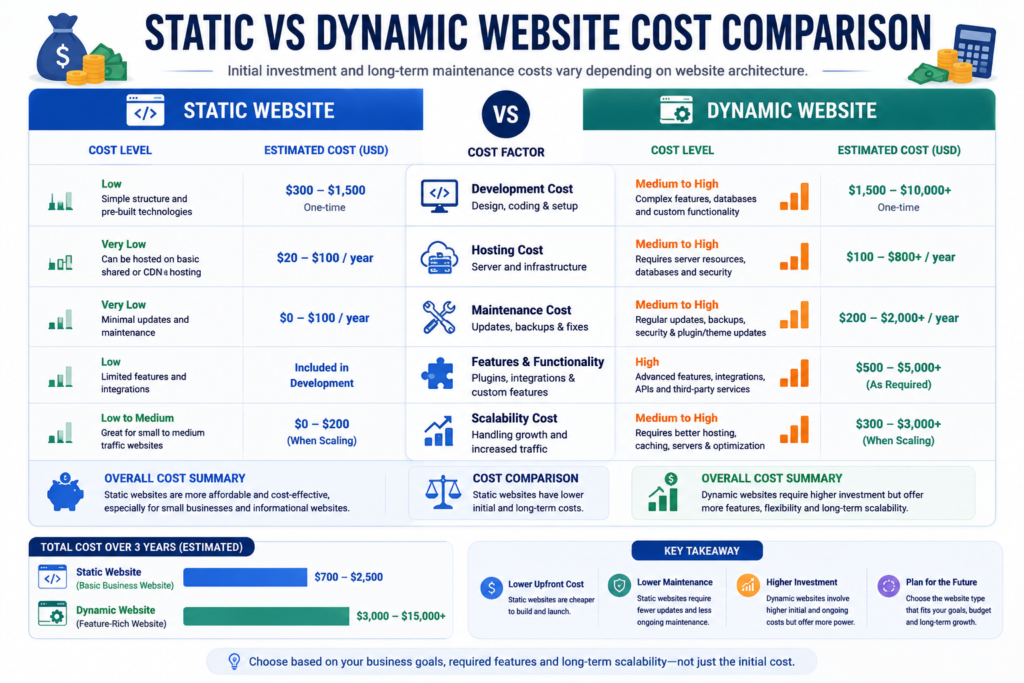
Static vs Dynamic Website Cost Comparison
When planning a new website, cost is one of the biggest factors influencing the final decision. However, many business owners only compare the initial development price and overlook ongoing expenses such as hosting, maintenance, security, upgrades, and scalability.
A website should be viewed as a long-term business investment rather than a one-time purchase.
Although static websites generally cost less to build and maintain, dynamic websites provide greater functionality that can generate higher returns for businesses requiring customer interaction, e-commerce, bookings, or automation.
Initial Development Cost
Static websites usually require fewer technologies, making them faster and less expensive to develop.
A basic static website typically includes:
- HTML
- CSS
- JavaScript
- Images
- Contact information
- Basic forms
Because there is no database or complex backend development, project timelines are shorter.
Dynamic websites require additional development such as:
- Database architecture
- Backend programming
- CMS configuration
- User authentication
- APIs
- Admin dashboard
- Payment integration
- Security implementation
As a result, development requires more time and specialized expertise.
Website Development Cost Comparison
| Cost Factor | Static Website | Dynamic Website |
|---|---|---|
| Design Cost | Lower | Higher |
| Development Time | Shorter | Longer |
| Backend Development | Not Required | Required |
| Database Setup | Not Required | Required |
| CMS Configuration | Optional | Commonly Required |
| API Integration | Rare | Common |
| Ecommerce Setup | Limited | Fully Supported |
| Overall Initial Investment | Lower | Higher |
Hosting Cost Comparison
Hosting costs vary depending on website size, traffic, and functionality.
Static websites generally require fewer server resources because they serve pre-built files directly to visitors.
Dynamic websites consume more resources due to:
- Database queries
- PHP or Node.js processing
- User sessions
- API requests
- Background tasks
Businesses expecting high traffic should budget for scalable hosting regardless of website type.
Hosting Comparison Table
| Hosting Feature | Static Website | Dynamic Website |
|---|---|---|
| Shared Hosting | Excellent | Good |
| VPS Hosting | Excellent | Excellent |
| Cloud Hosting | Excellent | Excellent |
| Resource Usage | Low | Medium to High |
| Bandwidth Efficiency | Excellent | Very Good |
| CDN Compatibility | Excellent | Excellent |
| Server Requirements | Minimal | Higher |
Maintenance Cost Comparison
A website is never truly finished.
Regular maintenance ensures that it remains secure, fast, compatible, and optimized for search engines.
Static Website Maintenance
Maintenance usually includes:
- Updating content
- Replacing images
- Performance monitoring
- Backup verification
- SSL certificate renewal
- Domain renewal
Because there are fewer moving parts, maintenance is generally straightforward.
Dynamic Website Maintenance
Dynamic websites require ongoing attention.
Typical maintenance includes:
- CMS updates
- Plugin updates
- Theme updates
- Database optimization
- Security patches
- Malware scanning
- Backup management
- Performance optimization
- Broken link monitoring
- Compatibility testing
Regular maintenance protects both business operations and customer data.
Maintenance Comparison
| Maintenance Task | Static Website | Dynamic Website |
|---|---|---|
| Content Updates | Manual | Easy through CMS |
| Software Updates | Minimal | Frequent |
| Database Maintenance | Not Required | Required |
| Plugin Updates | Rare | Common |
| Backup Complexity | Low | Medium |
| Security Monitoring | Simple | Continuous |
| Technical Support | Low | Medium to High |
Scalability Comparison
Scalability determines how well your website can grow as your business expands.
A website that performs well today should also support future traffic, content, users, and functionality.
Static Website Scalability
Static websites scale extremely well when serving identical content to large audiences.
Advantages include:
- CDN-friendly
- Extremely fast caching
- Low server load
- Excellent traffic handling
- Global content delivery
This makes static websites ideal for marketing websites, product pages, and documentation.
Dynamic Website Scalability
Dynamic websites are designed to grow alongside businesses.
They support:
- Thousands of products
- Customer accounts
- Employee dashboards
- Membership platforms
- Online courses
- Marketplaces
- Multi-vendor systems
- Enterprise applications
With cloud infrastructure and proper optimization, dynamic websites can scale to millions of users.
Flexibility Comparison
Business requirements often evolve.
A website should be flexible enough to support future growth.
Static Website Flexibility
Static websites work well for content that changes infrequently.
Examples include:
- Company information
- Portfolio projects
- Landing pages
- Product showcases
- Event announcements
Adding advanced features later may require rebuilding portions of the website.
Dynamic Website Flexibility
Dynamic websites easily accommodate new features.
Businesses can add:
- Ecommerce
- Customer portals
- Membership systems
- Booking engines
- Blogs
- Multi-language support
- Online payments
- Marketing automation
without rebuilding the entire website.
Business Growth Comparison
| Business Requirement | Static Website | Dynamic Website |
|---|---|---|
| Business Profile | Excellent | Excellent |
| Portfolio | Excellent | Excellent |
| Startup | Excellent | Excellent |
| Local Business | Excellent | Excellent |
| Blog | Good | Excellent |
| Ecommerce | Limited | Excellent |
| Marketplace | Not Recommended | Excellent |
| Membership Website | Limited | Excellent |
| Booking Website | Limited | Excellent |
| SaaS Platform | Not Suitable | Excellent |
Which Website Is More Cost-Effective?
The answer depends entirely on your business goals.
A static website is usually more cost-effective if you need:
- A professional online presence
- Company information
- Portfolio
- Landing pages
- Lead generation
- Minimal maintenance
A dynamic website becomes more cost-effective when your business requires:
- Customer accounts
- Online payments
- Frequent content updates
- Ecommerce
- Appointment booking
- Memberships
- Automation
Although the initial investment is higher, the additional functionality often produces greater long-term business value.
Common Cost Mistakes Businesses Make
Many organizations overspend because they purchase features they never use.
Avoid these common mistakes:
- Buying enterprise functionality for a small business website.
- Choosing expensive hosting before traffic justifies it.
- Ignoring long-term maintenance costs.
- Forgetting security and backup expenses.
- Building a dynamic website when a static solution is sufficient.
- Selecting technology based on trends instead of business objectives.
The most successful websites are built around actual business needs rather than unnecessary complexity.
Expert Recommendation
If your primary objective is to establish a professional online presence, generate leads, and showcase your services, a static website often delivers the best return on investment due to its lower development and maintenance costs.
If your business depends on continuous content publishing, customer interaction, online sales, booking systems, or personalized experiences, investing in a dynamic website provides significantly greater long-term value despite the higher initial cost.
The ideal choice is the one that aligns with your business strategy, expected growth, available budget, and operational requirements—not simply the cheapest or the most feature-rich option.
Static vs Dynamic Website Use Cases
Understanding where each website type performs best is just as important as understanding how it works. While both static and dynamic websites can deliver excellent user experiences, they are designed to solve different business challenges.
Selecting the right architecture ensures better performance, lower costs, easier maintenance, and a stronger return on investment.
Instead of asking, “Which website is better?”, ask:
“Which website is better for my business?”
That question leads to the right decision.
Best Use Cases for Static Websites
Static websites are ideal for businesses and organizations whose content changes infrequently and whose primary goal is to provide information quickly and efficiently.
They offer exceptional loading speed, lower maintenance requirements, and outstanding reliability.
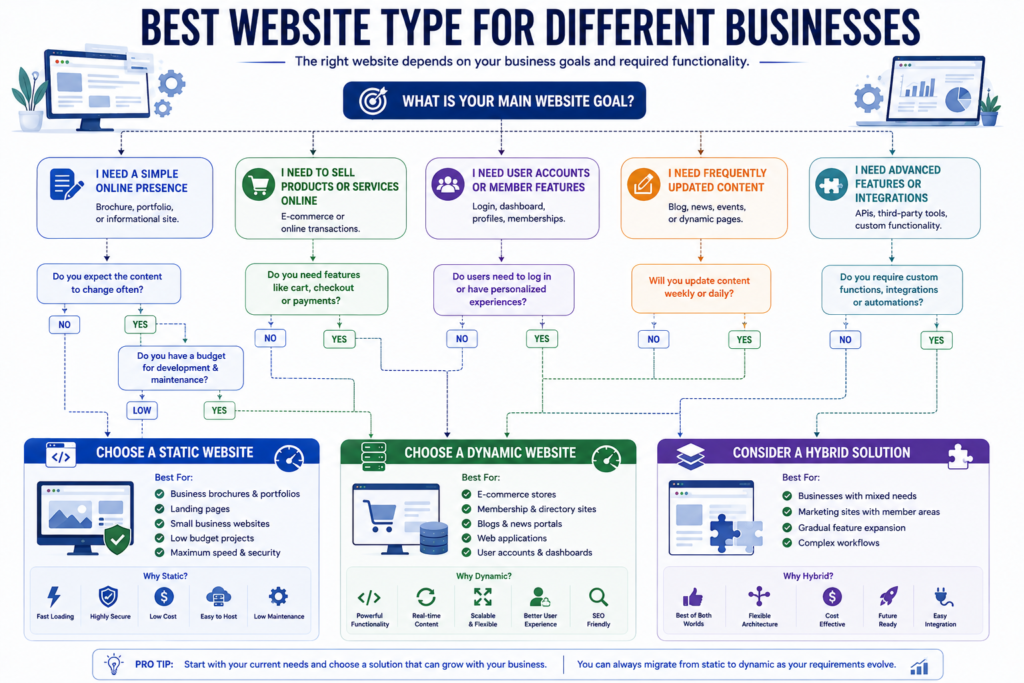
Company Profile Websites
Businesses that simply want to showcase their:
- Company overview
- Services
- Team members
- Contact information
- Office locations
- Business hours
can benefit significantly from a static website.
These websites rarely require daily updates, making static architecture a practical and cost-effective choice.
Portfolio Websites
Creative professionals such as:
- Web designers
- Developers
- Graphic designers
- Architects
- Photographers
- Freelancers
often prefer static portfolio websites because they load quickly and beautifully showcase visual work.
Landing Pages
Marketing campaigns require fast-loading landing pages that maximize conversions.
Static landing pages are excellent for:
- Google Ads
- Facebook Ads
- Product launches
- Webinar registrations
- Lead generation
- Event promotions
Their simplicity contributes to better performance and user experience.
Business Brochure Websites
Businesses that primarily provide information rather than interactive services are excellent candidates for static websites.
Examples include:
- Law firms
- Accounting firms
- Medical clinics
- Construction companies
- Manufacturing businesses
- Consulting firms
Documentation Websites
Technical documentation often remains relatively stable.
Static websites are commonly used for:
- API documentation
- User manuals
- Knowledge bases
- Product documentation
- Developer guides
Personal Websites
Individuals who need a simple online presence can benefit from static websites.
Examples include:
- Personal portfolios
- Online resumes
- Professional profiles
- Speaker websites
- Author websites
Best Use Cases for Dynamic Websites
Dynamic websites are designed for organizations that require frequent updates, user interaction, personalized experiences, or advanced business functionality.
Ecommerce Stores
Online stores require dynamic functionality because products, pricing, inventory, customer accounts, and payments constantly change.
Essential features include:
- Shopping cart
- Product search
- Inventory management
- Customer accounts
- Checkout
- Payment processing
- Order tracking
These features rely heavily on databases and server-side processing.
Business Websites with Blogs
Businesses investing in content marketing usually benefit from dynamic websites.
Publishing regular blog posts helps improve:
- Organic traffic
- Keyword rankings
- Topical authority
- Lead generation
- Brand awareness
A CMS allows marketing teams to publish content without relying on developers.
Membership Websites
Membership platforms require:
- User registration
- Login systems
- Subscription management
- Access control
- Personalized dashboards
Dynamic architecture makes these features possible.
Booking Websites
Businesses offering appointments or reservations require dynamic functionality.
Examples include:
- Hospitals
- Clinics
- Hotels
- Restaurants
- Salons
- Travel agencies
- Event management companies
Customers expect real-time availability and instant confirmations.
Educational Platforms
Learning management systems require advanced functionality such as:
- Student accounts
- Course progress
- Video lessons
- Quizzes
- Certificates
- Instructor dashboards
These features depend on dynamic technologies.
Online Marketplaces
Marketplaces involve multiple users interacting simultaneously.
Common examples include:
- Multi-vendor stores
- Property portals
- Job portals
- Freelance marketplaces
- Service directories
- Vehicle marketplaces
Dynamic architecture is essential for handling these complex interactions.
Industry-Based Recommendations
Small Businesses
Recommended Website:
✅ Static Website
Ideal when the goal is:
- Build credibility
- Generate leads
- Display services
- Publish contact information
If the business plans to expand into e-commerce later, a hybrid or dynamic solution may be more suitable.
Startups
Recommended Website:
✅ Dynamic Website
Startups often evolve rapidly.
They may eventually require:
- Customer accounts
- Product management
- SaaS functionality
- Payment systems
- Marketing automation
Building with future scalability in mind reduces redevelopment costs.
Large Enterprises
Recommended Website:
✅ Dynamic Website
Large organizations require:
- Multiple departments
- Employee portals
- Customer portals
- CRM integration
- ERP integration
- Advanced security
- Workflow automation
Dynamic systems provide the necessary flexibility.
Digital Agencies
Recommended Website:
✅ Hybrid Approach
Agency websites usually benefit from:
Static pages for:
- Service pages
- Landing pages
- Portfolio
- About page
Dynamic sections for:
- Blog
- Case studies
- Client portal
- Resource center
This combination delivers speed while supporting content marketing.
Ecommerce Businesses
Recommended Website:
✅ Dynamic Website
Reasons include:
- Product management
- Inventory updates
- Customer reviews
- Payments
- Order tracking
- Shipping integration
- Promotions
Portfolio Professionals
Recommended Website:
✅ Static Website
Perfect for:
- Designers
- Developers
- Writers
- Artists
- Architects
- Consultants
Fast loading times and visual presentation are usually more important than advanced functionality.
Decision Matrix
| Business Type | Recommended Website |
|---|---|
| Personal Portfolio | Static |
| Freelancer | Static |
| Local Business | Static |
| Corporate Website | Static or Hybrid |
| Startup | Dynamic |
| Blog | Dynamic |
| News Website | Dynamic |
| Ecommerce Store | Dynamic |
| Booking Platform | Dynamic |
| Membership Website | Dynamic |
| Educational Platform | Dynamic |
| SaaS Product | Dynamic |
| Online Marketplace | Dynamic |
| Government Portal | Dynamic |
| Healthcare Portal | Dynamic |
When Should You Choose a Static Website?
Choose a static website if:
✓ Your content changes only occasionally.
✓ Speed is your highest priority.
✓ You have a limited budget.
✓ You do not require user accounts.
✓ You do not need online payments.
✓ You want lower maintenance costs.
✓ You primarily generate leads instead of selling products online.
✓ Your website consists of informational pages.
When Should You Choose a Dynamic Website?
Choose a dynamic website if:
✓ You publish content regularly.
✓ You need a blog.
✓ You require e-commerce functionality.
✓ Customers need accounts.
✓ You accept online payments.
✓ You require booking or scheduling.
✓ You need user dashboards.
✓ Your business expects significant future growth.
✓ Automation is important to your operations.
Common Mistakes When Choosing a Website Type
Many businesses make decisions based on trends rather than actual requirements.
Avoid these common mistakes:
- Choosing a dynamic website simply because competitors use one.
- Building a static website for a rapidly growing ecommerce business.
- Ignoring future scalability.
- Focusing only on initial development costs.
- Overlooking maintenance expenses.
- Selecting technology before defining business objectives.
- Neglecting SEO and user experience during planning.
The best website is not necessarily the most advanced—it is the one that aligns with your business goals and delivers value to your users.
Expert Recommendation
If your goal is to establish a professional online presence, showcase your services, and generate leads with minimal maintenance, a static website is often the smartest choice.
If your business depends on customer interaction, content publishing, ecommerce, bookings, memberships, or personalized experiences, a dynamic website offers the flexibility and scalability required for long-term success.
For many modern organizations, a hybrid architecture provides the best of both worlds by combining the speed and security of static pages with the functionality of dynamic components. This approach supports excellent user experience, strong SEO performance, and sustainable business growth.
Static vs Dynamic Website Technologies and Platforms
The technology stack behind your website plays a crucial role in determining its performance, scalability, security, maintenance requirements, and long-term flexibility. While visitors only see the front-end interface, a combination of programming languages, databases, frameworks, hosting environments, and content management systems work together behind the scenes to deliver a seamless experience.
Understanding these technologies helps businesses choose a solution that aligns with their goals, budget, and future growth.
Technologies Used in Static Websites
Static websites are built using front-end technologies that generate pre-rendered pages served directly to users.
Core Technologies
The foundation of every static website typically includes:
- HTML5
- CSS3
- JavaScript
- Images
- Fonts
- SVG Graphics
- PDF Files
These technologies are sufficient for creating fast, secure, and visually appealing websites.
Modern Static Website Frameworks
Today’s static websites are far more advanced than traditional HTML pages.
Popular frameworks include:
- Astro
- Gatsby
- Hugo
- Jekyll
- Eleventy
- Next.js (Static Export)
- Nuxt (Static Generation)
These frameworks improve development speed while maintaining excellent performance.
Static Site Generators
Static Site Generators (SSGs) automatically create HTML pages during the build process.
Advantages include:
- Faster deployment
- Better SEO
- Improved page speed
- Easier content management
- Automatic optimization
Static Site Generators are increasingly popular for business websites because they combine developer productivity with exceptional performance.
Technologies Used in Dynamic Websites
Dynamic websites rely on both front-end and back-end technologies.
The front-end displays information while the back-end processes requests and communicates with databases.
Front-End Technologies
Common front-end technologies include:
- HTML5
- CSS3
- JavaScript
- React
- Vue.js
- Angular
- Svelte
These frameworks create responsive and interactive user interfaces.
Back-End Technologies
Dynamic websites commonly use:
- PHP
- Node.js
- Python
- Java
- C#
- Ruby
These programming languages handle business logic, authentication, and database communication.
Database Technologies
Dynamic websites usually store information inside databases such as:
- MySQL
- PostgreSQL
- MongoDB
- MariaDB
- SQLite
- Redis
Databases allow websites to manage users, products, orders, blog posts, and customer information efficiently.
Static Website vs Dynamic Website Technology Comparison
| Technology Area | Static Website | Dynamic Website |
|---|---|---|
| HTML | Yes | Yes |
| CSS | Yes | Yes |
| JavaScript | Yes | Yes |
| Database | Usually No | Yes |
| Server-Side Programming | Limited | Required |
| API Integration | Optional | Common |
| CMS | Optional | Common |
| Authentication | Limited | Fully Supported |
| Ecommerce | Limited | Fully Supported |
Static Website vs WordPress
One of the most common questions businesses ask is:
Is WordPress a static or dynamic website?
The answer is:
WordPress is primarily a dynamic Content Management System (CMS).
Whenever a visitor opens a WordPress page, the server retrieves information from a database before generating the webpage.
However, modern optimization techniques allow WordPress websites to generate static cached pages, improving loading speed while retaining dynamic functionality.
Static Website vs WordPress Comparison
| Feature | Static Website | WordPress |
|---|---|---|
| Speed | Excellent | Excellent with optimization |
| Content Management | Manual | Easy |
| Plugins | No | Thousands Available |
| Database | Usually No | Yes |
| Blog Management | Limited | Excellent |
| Ecommerce | Limited | Excellent |
| SEO | Excellent | Excellent |
| Maintenance | Low | Medium |
Static Website vs CMS
A Content Management System (CMS) enables users to update website content without editing source code.
Popular CMS platforms include:
- WordPress
- Drupal
- Joomla
- Contentful
- Strapi
- Sanity
- HubSpot CMS
Static websites generally require manual updates unless integrated with a Headless CMS.
Static Website vs Web Application
Many people confuse websites with web applications.
There is a significant difference.
Static Website
Purpose:
Provide information.
Examples:
- Company websites
- Portfolios
- Landing pages
Web Application
Purpose:
Allow users to perform tasks.
Examples:
- Gmail
- Online Banking
- Project Management Software
- CRM Systems
Web applications almost always require dynamic architecture.
Hybrid Websites
Modern businesses increasingly choose hybrid websites.
A hybrid website combines static and dynamic technologies.
For example:
Static Pages
- Home
- About
- Services
- Portfolio
Dynamic Components
- Blog
- Search
- Contact Forms
- Ecommerce
- Customer Portal
This approach provides the speed of static websites while maintaining the flexibility of dynamic functionality.
What Is JAMstack?
JAMstack stands for:
JavaScript
APIs
Markup
Instead of generating pages every time someone visits, websites are pre-built and enhanced using APIs.
Benefits include:
- Faster loading
- Better security
- Lower hosting costs
- Excellent scalability
- Outstanding SEO performance
Many modern agency websites now use JAMstack architecture.
What Is a Headless CMS?
A Headless CMS separates content management from website presentation.
Instead of controlling both content and design together, the CMS only stores and manages content.
The website retrieves that content through APIs.
Popular Headless CMS platforms include:
- Contentful
- Strapi
- Sanity
- Directus
- Hygraph
Benefits include:
- Greater flexibility
- Multi-platform publishing
- Faster websites
- Better scalability
- Improved developer experience
Hosting Requirements Comparison
| Requirement | Static Website | Dynamic Website |
|---|---|---|
| Shared Hosting | Excellent | Good |
| VPS | Excellent | Excellent |
| Cloud Hosting | Excellent | Excellent |
| CDN | Excellent | Excellent |
| Database Server | Not Required | Required |
| Object Caching | Optional | Recommended |
| Load Balancer | Optional | Recommended for High Traffic |
Can Static Websites Be Interactive?
Yes.
Modern static websites can include interactive elements through JavaScript and third-party APIs.
Examples include:
- Contact forms
- Live chat
- Maps
- Search
- Newsletter subscriptions
- Analytics
- Appointment requests
- Payment buttons
These features make static websites much more powerful than many people realize.
Can Dynamic Websites Be Fast?
Absolutely.
A well-optimized dynamic website can achieve outstanding performance.
Optimization techniques include:
- Page caching
- Object caching
- CDN integration
- Image optimization
- Lazy loading
- Database optimization
- Code minification
- HTTP compression
- Browser caching
Performance depends more on optimization than on architecture alone.
Future of Website Development
Website development continues to evolve toward hybrid architectures.
Modern technologies increasingly combine:
- Static Site Generation (SSG)
- Server-Side Rendering (SSR)
- Incremental Static Regeneration (ISR)
- Edge Computing
- Headless CMS
- API-driven development
This allows businesses to enjoy both exceptional performance and advanced functionality.
As AI-powered search, voice search, and personalized user experiences become more common, websites built with flexible and scalable architectures will be better positioned to adapt to future technological changes.
Expert Recommendation
For most professional businesses in 2026 and beyond, the decision is no longer limited to choosing between a purely static or purely dynamic website.
A thoughtfully designed hybrid architecture often provides the best balance of speed, security, scalability, SEO performance, and business functionality.
Whether you choose a static, dynamic, or hybrid solution, focus on selecting technologies that align with your business objectives, technical resources, and long-term digital strategy rather than simply following industry trends.
How to Choose Between a Static and Dynamic Website
Choosing between a static and dynamic website is not about selecting the newest technology. It is about selecting the solution that best supports your business goals, target audience, content strategy, and future growth.
Before making a decision, evaluate your current requirements as well as your long-term business plans.
The following decision framework will help you identify which website architecture best suits your needs.
Step 1. Define Your Business Goals
Start by asking yourself the following questions:
- What is the primary purpose of my website?
- Do I want to generate leads or sell products?
- Will customers interact with my website?
- Do I need online payments?
- Will my website publish new content regularly?
- Will customers create accounts?
- Do I need appointment booking?
- Will my business expand in the future?
Your answers will narrow down the most suitable website type.
Decision Table
| Business Goal | Recommended Website |
|---|---|
| Online Presence | Static Website |
| Company Profile | Static Website |
| Portfolio | Static Website |
| Lead Generation | Static Website |
| Blogging | Dynamic Website |
| Ecommerce | Dynamic Website |
| Customer Dashboard | Dynamic Website |
| Booking System | Dynamic Website |
| Membership Website | Dynamic Website |
| SaaS Platform | Dynamic Website |
Step 2. Consider Your Budget
Budget is often one of the deciding factors.
Choose a Static Website if:
- You have a limited budget.
- You need a professional website quickly.
- You do not require advanced functionality.
- Your website content rarely changes.
Choose a Dynamic Website if:
- You are investing in long-term business growth.
- You require automation.
- You plan to expand your website.
- Customer interaction is essential.
- You need online sales or bookings.
Remember that a dynamic website costs more initially but may reduce manual work over time through automation.
Step 3. Consider Content Updates
Ask yourself:
How often will I update my website?
Rare Updates
Examples:
- Company information
- About Us
- Contact page
- Portfolio
A static website is usually sufficient.
Frequent Updates
Examples:
- Daily blog posts
- News articles
- Product listings
- Event schedules
- Customer resources
A dynamic website provides much better content management.
Step 4. Think About Future Growth
Many businesses choose a website based only on today’s needs.
Instead, think about where your business will be in three to five years.
Questions to consider:
- Will you sell products later?
- Will you launch a blog?
- Will customers need accounts?
- Will you offer online bookings?
- Will your website support multiple languages?
- Will your team publish content regularly?
Planning can prevent expensive website rebuilds.
Step 5. Evaluate User Experience
User experience is one of the strongest indicators of website success.
Visitors expect websites to be:
- Fast
- Mobile-friendly
- Easy to navigate
- Secure
- Accessible
- Visually attractive
Both static and dynamic websites can provide excellent user experiences when properly designed.
Website Selection Checklist
Use the following checklist before choosing your website architecture.
Static Website Checklist
Choose a static website if most of these statements are true.
✓ I mainly need an online presence.
✓ My pages rarely change.
✓ I want maximum speed.
✓ Security is a top priority.
✓ My budget is limited.
✓ I do not require user accounts.
✓ I do not need online payments.
✓ My website has fewer than 50 pages.
✓ I want low maintenance.
Dynamic Website Checklist
Choose a dynamic website if most of these statements are true.
✓ I publish content frequently.
✓ I need a blog.
✓ I need e-commerce functionality.
✓ Customers will create accounts.
✓ I require online booking.
✓ I need customer dashboards.
✓ I want automation.
✓ I expect rapid business growth.
✓ My website will contain hundreds or thousands of pages.
Common Mistakes to Avoid
Many businesses make expensive mistakes when selecting a website architecture.
Avoid these common errors.
Choosing Technology Before Defining Business Goals
Technology should support your business—not the other way around.
Start with your objectives, then choose the appropriate technology.
Ignoring Future Scalability
Your website should continue supporting your business as it grows.
Building a website that cannot scale often leads to complete redevelopment.
Prioritizing Price Over Value
The cheapest website is not always the most economical.
Likewise, the most expensive website is not always the best investment.
Focus on business value rather than development cost alone.
Neglecting SEO During Planning
SEO should be considered from the beginning.
Important planning areas include:
- Website architecture
- URL structure
- Navigation
- Internal linking
- Schema markup
- Mobile optimization
- Core Web Vitals
Building these elements correctly from the start is far easier than fixing them later.
Overcomplicating Simple Projects
A common mistake is building a highly complex dynamic website for a business that only needs five informational pages.
This increases:
- Development costs
- Maintenance costs
- Security risks
- Technical complexity
without delivering meaningful business benefits.
AI Search Considerations
Modern search experiences are evolving beyond traditional search engines.
AI-powered systems increasingly summarize information before users visit websites.
To improve visibility across AI-powered search experiences, your website should include:
- Clear headings
- Direct answers
- Well-structured paragraphs
- Comparison tables
- Frequently Asked Questions
- Definitions
- Checklists
- Step-by-step guidance
- Consistent terminology
- Strong topical authority
Whether your website is static or dynamic, structured content significantly improves its ability to be understood and referenced by AI systems.
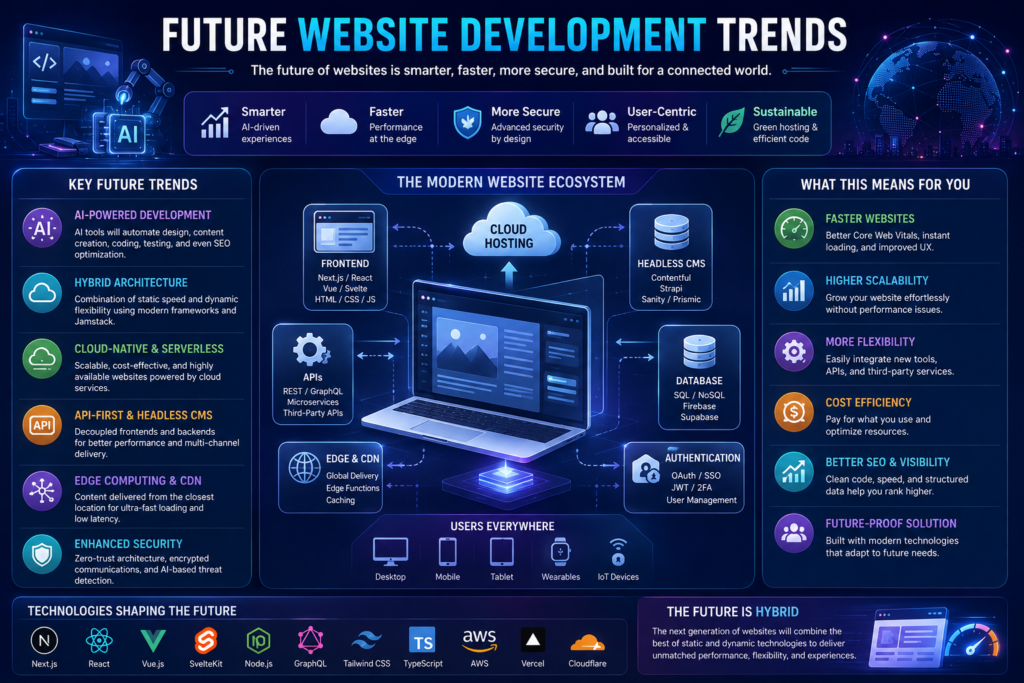
Future Trends (2026–2027)
Website development continues to evolve rapidly.
Key trends include:
- Hybrid website architecture
- AI-assisted development
- Headless CMS adoption
- Server-side rendering (SSR)
- Static Site Generation (SSG)
- Incremental Static Regeneration (ISR)
- Edge computing
- API-first development
- Personalized user experiences
- AI-powered search optimization
Businesses that build flexible, scalable websites today will be better prepared to adapt to these future developments.
Final Decision Framework
Use this simple decision guide.
| If You Need… | Choose… |
|---|---|
| Maximum Speed | Static Website |
| Lowest Maintenance | Static Website |
| Highest Security | Static Website |
| Lowest Initial Cost | Static Website |
| Blog Publishing | Dynamic Website |
| Ecommerce | Dynamic Website |
| Membership System | Dynamic Website |
| Customer Portal | Dynamic Website |
| Booking System | Dynamic Website |
| Long-Term Scalability | Dynamic Website |
| Best Overall Balance | Hybrid Website |
Expert Recommendation
There is no single website architecture that is perfect for every business.
A static website is an excellent choice for organizations focused on speed, simplicity, security, and cost efficiency.
A dynamic website is ideal for businesses that require frequent content updates, customer interaction, e-commerce, bookings, memberships, or advanced workflows.
For many modern businesses, especially those planning long-term growth, a hybrid website architecture offers the best balance by combining the performance advantages of static pages with the flexibility of dynamic functionality.
The most successful websites are not defined by the technology they use, but by how effectively they solve user problems, support business objectives, and deliver a fast, secure, and engaging online experience.
Frequently Asked Questions (FAQs)
The following frequently asked questions are based on common search queries, People Also Ask (PAA) results, voice search patterns, and the information needs of businesses evaluating static and dynamic websites.
1. What is the difference between a static and dynamic website?
A static website displays the same pre-built content to every visitor, while a dynamic website generates content in real time using databases, server-side programming, or content management systems.
Static websites are generally faster and simpler, whereas dynamic websites provide advanced features such as user accounts, e-commerce, booking systems, personalized content, and interactive functionality.
2. Which is better: a static website or a dynamic website?
Neither option is universally better.
A static website is ideal for businesses that prioritize speed, security, affordability, and minimal maintenance.
A dynamic website is better for organizations that require frequent content updates, e-commerce, user interaction, automation, or customer portals.
The best choice depends entirely on your business requirements.
3. Is a static website better for SEO?
A static website can perform exceptionally well in search engines because it typically offers:
- Faster loading speeds
- Cleaner website architecture
- Better Core Web Vitals
- Simpler crawling
However, SEO success depends primarily on high-quality content, search intent, technical optimization, and user experience rather than website type.
4. Can a dynamic website rank higher on Google?
Yes.
Dynamic websites can rank extremely well when they are properly optimized.
Platforms such as WordPress, Shopify, and many enterprise content management systems successfully power millions of high-ranking websites worldwide.
5. Which website loads faster?
Generally, static websites load faster because they serve pre-built HTML pages directly to visitors.
Dynamic websites perform additional processing before generating pages, but modern optimization techniques such as caching, CDN integration, image optimization, and efficient coding can significantly improve their performance.
6. Are static websites more secure?
In many situations, yes.
Static websites have a smaller attack surface because they usually do not rely on databases, plugins, or server-side applications.
However, a properly maintained dynamic website can also provide an excellent level of security.
7. Which website costs less to build?
Static websites generally cost less because they require fewer technologies and less development time.
Dynamic websites involve additional components such as databases, backend development, content management systems, APIs, and security implementation, increasing the overall development cost.
8. Which website is easier to maintain?
Static websites usually require less technical maintenance because they contain fewer software components.
Dynamic websites require regular updates, plugin maintenance, database optimization, backups, and security monitoring.
9. Is WordPress a static or dynamic website?
WordPress is primarily a dynamic Content Management System (CMS).
It stores content in a database and generates pages dynamically whenever visitors request them.
However, WordPress can also generate static cached pages to improve performance.
10. Can a static website include contact forms?
Yes.
Modern static websites can integrate contact forms using third-party form services, APIs, or serverless functions.
This allows businesses to collect customer inquiries without converting the website into a fully dynamic application.
11. Can static websites support ecommerce?
Yes, but with limitations.
Small catalogs can integrate hosted checkout solutions and payment gateways.
However, businesses with extensive product catalogs, customer accounts, inventory management, and order tracking generally benefit from dynamic ecommerce platforms.
12. Which website is better for small businesses?
For businesses that primarily need an online presence, service pages, contact information, and lead generation, a static website is often the most practical and cost-effective choice.
Businesses planning to sell products online or publish content frequently may benefit more from a dynamic website.
13. Which website is better for blogging?
Dynamic websites are generally better suited for blogging because they provide content management systems, category organization, tagging, search functionality, author management, and easier publishing workflows.
14. Which website is better for ecommerce?
Dynamic websites are the preferred choice for ecommerce because they support:
- Shopping carts
- Customer accounts
- Inventory management
- Payment gateways
- Product search
- Order management
- Shipping integrations
15. Can I convert a static website into a dynamic website later?
Yes.
Many businesses begin with a static website and later migrate to a dynamic solution as their requirements evolve.
Planning your website architecture carefully from the beginning can simplify future upgrades.
16. What is a hybrid website?
A hybrid website combines static and dynamic technologies.
For example, informational pages may be generated statically for maximum speed, while features such as blogs, ecommerce, customer portals, or search functions operate dynamically.
This approach provides an excellent balance between performance and functionality.
17. Which website is best for long-term business growth?
Businesses expecting rapid expansion, content publishing, customer interaction, ecommerce, or automation generally benefit from dynamic or hybrid website architectures.
Organizations with stable informational content may continue using static websites successfully for many years.
18. Do search engines prefer static or dynamic websites?
No.
Modern search engines evaluate website quality rather than website architecture.
Factors such as helpful content, technical SEO, mobile usability, structured data, page speed, internal linking, and user experience have a much greater influence on rankings than whether a website is static or dynamic.
19. Which website is easier to scale?
Static websites scale exceptionally well for delivering identical content to large audiences because they work efficiently with Content Delivery Networks (CDNs).
Dynamic websites also scale effectively when built using modern cloud infrastructure, caching systems, load balancing, and optimized databases.
The appropriate solution depends on the type of growth your business expects.
20. What should I consider before choosing between a static and dynamic website?
Before making your decision, evaluate:
- Your business goals.
- Your available budget.
- The frequency of content updates.
- Required website functionality.
- Expected traffic growth.
- Future scalability.
- Maintenance resources.
- Long-term digital strategy.
Selecting the website architecture that aligns with these factors will provide the strongest foundation for sustainable business success.
Final Thoughts
Choosing between a static vs. dynamic website is not about selecting the most advanced technology—it is about selecting the architecture that best supports your business objectives.
A static website delivers exceptional speed, strong security, lower maintenance, and cost efficiency, making it an excellent choice for portfolios, business websites, landing pages, and informational websites.
A dynamic website provides greater flexibility, automation, personalization, and scalability, making it the preferred solution for ecommerce stores, membership platforms, booking systems, SaaS applications, blogs, and enterprise websites.
For many modern organizations, a hybrid approach offers the ideal balance by combining the performance advantages of static pages with the powerful functionality of dynamic systems.
As technology continues to evolve, businesses should prioritize user experience, accessibility, security, technical SEO, and helpful content rather than focusing solely on the underlying website architecture.
A well-planned website—whether static, dynamic, or hybrid—can become a valuable long-term asset that supports brand credibility, lead generation, customer engagement, and sustainable online growth.
Ready to Build the Right Website?
Whether you need a lightning-fast static website, a feature-rich dynamic platform, or a modern hybrid solution, choosing the right architecture from the beginning can save time, reduce costs, and support long-term business success.
Our experienced website development team can help you:
- Select the most suitable website architecture.
- Design a responsive, user-friendly interface.
- Build a secure and scalable website.
- Optimize your website for SEO, AI search, and performance.
- Improve Core Web Vitals and user experience.
- Implement structured data and technical SEO best practices.
- Support your website with ongoing maintenance and optimization.
Contact us today to discuss your project and discover the best website solution for your business goals. Together, we can build a website that not only looks professional but also performs exceptionally well in search engines and delivers measurable business results.
Related Website Development Guides
- How to Build a Website in 2027
- Complete Domain Name Guide 2026
- Technical SEO Guide 2026
- Complete Google Search Console Guide 2026–2027
- Website Mistakes to Avoid
- Professional Website Security Services
- Shopify Guide for Beginners 2026
- SEO Content Writing Services
- Professional Website Development & SEO Services